


Top 9 Network Traffic Analysis Software

We evaluated 20 network traffic analysis solutions across production environments, testing the performance of NetFlow, sFlow, and IPFIX protocols, as well as real-time monitoring accuracy and threat detection capabilities under enterprise-scale loads.
Explore specific vendor comparisons, flow protocol optimization recommendations, and pricing insights based on actual deployment costs.
Top 9 Software for Network Traffic Analysis
* Vendors are sorted in ascending order with respect to their average ratings.
Review of Top 9 Network Traffic Analysis Software
Paessler PRTG Network Monitor
Paessler PRTG delivers network monitoring through a sensor-based architecture that combines traffic analysis with infrastructure monitoring, providing unified visibility across diverse IT environments.
Capabilities:
- Sensor-based monitoring architecture with 250+ native sensor types
- Automatic network discovery with immediate device recognition
- Customizable dashboards with real-time traffic visualization
- Multi-protocol support including SNMP, WMI, NetFlow, and packet sniffing
- Integrated alerting system with SMS, email, and push notifications
Pricing:
- Freeware edition: Free for up to 100 sensors
- PRTG 500: $1,600 annually for 500 sensors
- PRTG 1000: $3,200 annually for 1,000 sensors
- PRTG 2500: $6,900 annually for 2,500 sensors
- PRTG 5000: $11,500 annually for 5,000 sensors
Auvik Network Traffic Analysis
Auvik provides cloud-native network traffic analysis with automated device discovery and configuration management, eliminating traditional on-premises infrastructure requirements.
Capabilities:
- Fully automated network discovery and traffic flow mapping
- Cloud-based deployment with zero on-site hardware requirements
- Automated network documentation with real-time updates
- MSP-focused multi-tenant architecture with client separation
Datadog
Datadog uniquely correlates network traffic analysis with application performance monitoring and infrastructure metrics, providing full-stack visibility.
Capabilities:
- Full-stack correlation between network flows and application performance
- Advanced machine learning-based alerting with reduced false positives
- Cloud-native architecture with automatic service discovery
- Extensive third-party integrations with 750+ platform connectors
Pricing:
- Network Monitoring: $5 per host per month
- Pro plan: $15 per host per month with enhanced features
- Enterprise plan: $23 per host per month with advanced analytics
ExtraHop
ExtraHop Reveal(x) distinguishes itself through real-time wire data analysis using machine learning algorithms for advanced threat detection and performance optimization.
Capabilities:
- Stream processing of wire data for sub-second threat detection
- Advanced behavioral analytics using unsupervised machine learning
- Encrypted traffic analysis without decryption through metadata inspection
- Dynamic application dependency mapping with security context
Pricing:
- Cloud-based SaaS model with consumption-based pricing
- On-premises appliances starting at $25,000 annually
- Custom enterprise pricing based on data volume and features
Solarwinds NetFlow Traffic Analyzer
SolarWinds NTA stands out with its deep integration with Cisco’s Network-Based Application Recognition 2 (NBAR2) technology, enabling enhanced traffic categorization and application identification on Cisco devices.
Capabilities:
- Advanced application signature recognition through NBAR2 protocol classification
- Flow data collection supporting NetFlow, J-Flow, sFlow, IPFIX, and NetStream
- Intelligent traffic shaping recommendations based on QoS analysis
- Multi-vendor device support with vendor-specific optimization
Pricing:
- Starting at $1,168 for up to 2 interfaces
- Standard edition: $2,336 for up to 10 interfaces
- Enterprise pricing available for larger deployments
Site24x7 Network Traffic Monitoring
Site24x7 leverages artificial intelligence for proactive anomaly detection while providing global monitoring capabilities through 130+ worldwide monitoring locations.
Capabilities:
- AI-driven performance anomaly detection with predictive insights
- Global network monitoring from 130+ geographic locations
- Integrated synthetic transaction monitoring with traffic analysis
- Cloud-native architecture with automatic scaling capabilities
Pricing:
- Professional plan: $9 per monitor per month
- Enterprise plan: $20 per monitor per month
- Custom pricing for high-volume deployments
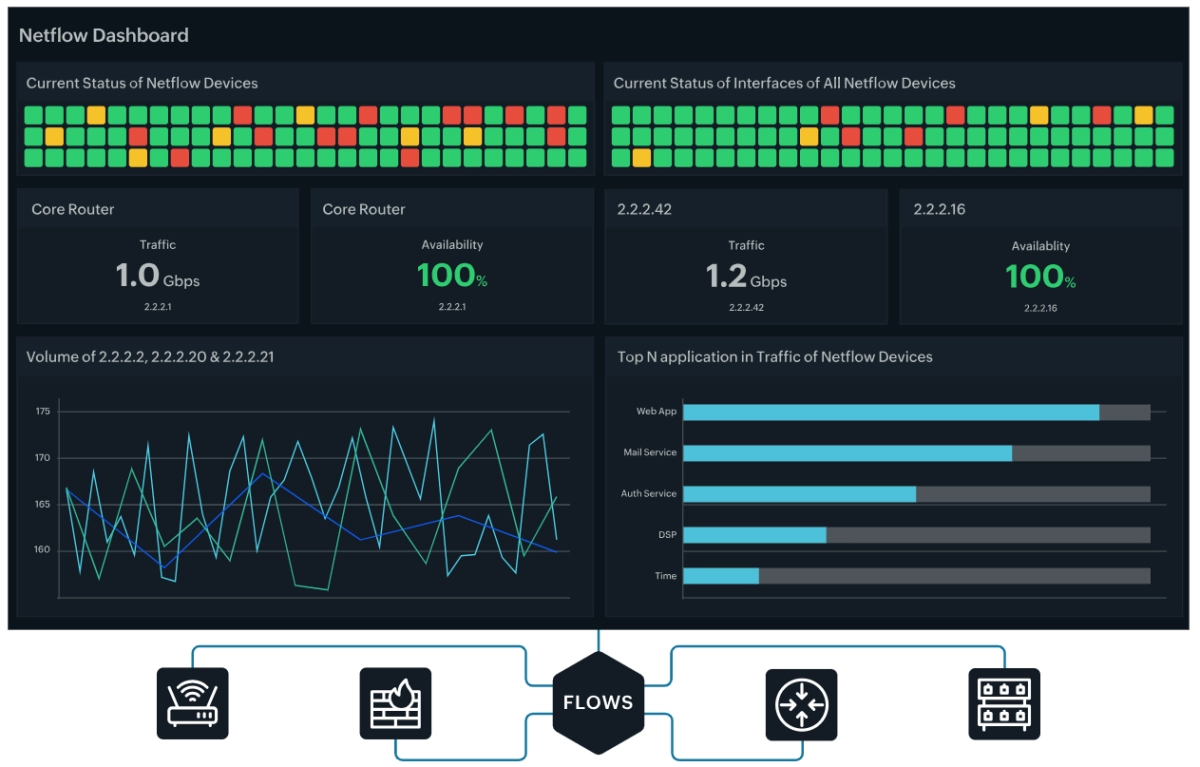
ManageEngine NetFlow Analyzer
NetFlow Analyzer excels in providing detailed bandwidth analysis with sophisticated Quality of Service (QoS) monitoring capabilities, enabling precise traffic prioritization and capacity planning.
Capabilities:
- QoS policy effectiveness analysis and optimization recommendations
- Advanced capacity planning with predictive analytics
- Granular user and application bandwidth allocation tracking
- Integrated network device configuration backup and monitoring
Pricing:
- Professional edition: $595 for 5 interfaces
- Enterprise edition: $4,595 for 100 interfaces
- Distributed edition available for multi-site deployments
Cisco Stealthwatch (Secure Network Analytics)
Cisco Stealthwatch offers AI-powered network behavior analysis with advanced threat detection capabilities, utilizing machine learning to identify security anomalies across an enterprise’s network infrastructure.
Capabilities:
- AI-driven behavioral analytics with unsupervised machine learning
- Encrypted traffic analysis through metadata inspection
- Integration with Cisco security ecosystem and threat intelligence
- Advanced persistent threat detection with kill-chain analysis
- Network segmentation insights and policy recommendations
Pricing:
- Subscription-based licensing with annual commitments
- Pricing varies by network size and data volume
- Enterprise deployments typically start at $50,000+ annually
- Custom pricing based on flow volume and advanced features
Shared Core Features Across Network Traffic Analysis Software
All leading network traffic analysis solutions provide these fundamental capabilities that form the foundation of effective network monitoring and security operations:
Flow Protocol Support
Modern NTA tools support multiple flow protocols to accommodate diverse network infrastructures:
- NetFlow (v5, v9, v10/IPFIX): Detailed per-flow analysis with metadata collection
- sFlow: Packet sampling for high-volume networks with reduced device overhead
- IPFIX: Standards-based protocol offering vendor neutrality and enhanced flexibility
- J-Flow, NetStream, rFlow: Vendor-specific implementations for multi-vendor environments
Real-Time Traffic Monitoring
- Live Traffic Visualization: Continuous monitoring of network flows with sub-second granularity
- Bandwidth Utilization Tracking: Real-time measurement of interface capacity and throughput
- Application-Layer Analysis: Protocol identification and application categorization
- Performance Metrics Collection: Latency, packet loss, and jitter measurement across network paths
Security and Anomaly Detection
- Behavioral Baselining: Establishment of normal traffic patterns for anomaly detection
- Threat Intelligence Integration: Correlation with external threat feeds and reputation databases
- DDoS Detection: Identification of volumetric and application-layer attacks
- Data Exfiltration Monitoring: Detection of unusual outbound traffic patterns
Data Collection and Storage
- Flow Data Aggregation: Efficient storage and retrieval of historical traffic metadata
- Retention Management: Configurable data retention policies balancing storage costs and forensic needs
- Multi-Site Consolidation: Centralized collection from distributed network infrastructure
- Export Capabilities: Integration with SIEM platforms and external analytics tools
Alerting and Reporting
- Escalation Workflows: Integration with ticketing systems and incident response platforms
- Threshold-Based Alerts: Configurable notifications for capacity, performance, and security events
- Customizable Dashboards: Role-based views for NOC, security, and management teams
- Automated Reporting: Scheduled generation of traffic summaries and compliance reports
Assessing Your Network Requirements
After pinpointing the prominent features of premier network traffic analysis tools, it’s crucial to assess your own network requirements. Regular updates to security and monitoring systems are essential to ensure the ongoing effectiveness of these tools in dealing with emerging threats and vulnerabilities while maintaining optimal network performance and security.
This evaluation is not a one-off task but a continuous process that should keep pace with the evolving network landscape. Your network is a dynamic entity, constantly changing with the addition of:
- New devices
- Users
- Applications
- Security threats
Consistently revisiting and revising your network requirements ensures that your network traffic analysis tools remain effective in meeting your network’s unique needs. This proactive approach helps prevent potential issues before they become significant problems, keeping your network secure and performing at its best.
Vendor Selection Criteria
We narrowed down our network traffic monitoring tools comparison focusing on three main factors:
- Number of employees: We looked at vendors with 15+ employees on LinkedIn.
- Number of user reviews: We included solutions with at least one user review from the popular B2B review websites (such as G2 and Capterra), as it indicates a level of market presence and user experience.
- Average review ratings: We selected the vendors with at least 4.4 points on average.
 Add as preferred source
FAQs
Network traffic refers to the movement of data packets between devices over a network, encompassing activities such as emails, web browsing, and file transfers. It is essentially the amount of data moving across a network at any given time.
Network traffic analysis functions akin to a high-tech traffic cop, constantly monitoring incoming and outgoing data packets to gain insights into network performance, security, and bandwidth utilization. At the heart of this process is flow data, which encompasses information about the IP traffic flow through a network, serving as a cornerstone in network traffic analysis.
These tools help analyze network traffic patterns by identifying usage trends, discovering peak usage times, and finding potential bottlenecks in the network infrastructure. Such thorough observation of network traffic patterns establishes a baseline against which expected traffic patterns can be mapped for anomaly detection. And it doesn’t stop there.
Historical traffic analysis data serves as a predictive tool, contributing to forecasting future network demands and ensuring network scalability to meet evolving business needs.
The effectiveness of network traffic monitoring tools is displayed in their ability to:
Identify security threats by tracking and analyzing the patterns of traffic and communications within networks
Provide enhanced visibility into network operations
Identify security threats in areas often unequipped with sufficient monitoring, such as IoT networks.
Network traffic analysis tools, also known as network traffic analysis NTA, offer a range of benefits, including the ability to analyze network traffic for:
Detection of typical security threats
Identification of sophisticated anomalies
Monitoring data traffic and patterns to identify potential vulnerabilities or ongoing cyberattacks
Detection of unauthorized activities
Swift identification of security breaches
Mitigation of DDoS attacks
These tools provide real-world applications that help enhance network security and protect against various threat vectors. Passive network traffic analysis tools act to safeguard your network, allowing you to focus on business priorities.
In addition to enhancing security, network traffic analysis contributes a pivotal role in enhancing network performance. It does this by:
Providing real-time dashboards to track user activity
Identifying causes of bandwidth peaks
Addressing growing network visibility challenges
Optimizing network speed
Handling bandwidth usage effectively
Insights gleaned from traffic data are instrumental in assisting with network capacity planning and managing network bandwidth bottlenecks. Moreover, identifying trends over time helps predict future needs and avoid performance issues. These tools deliver a significant return on investment by enhancing network performance, enabling effective security measures, and optimizing bandwidth through informed network management decisions.
An added advantage of continuous network monitoring is the ability to collect and integrate data with external tools, such as Elastic Stack’s flexible approach. This helps in:
Continuous data collection
Performance enhancement
Maintaining a high level of network health and uptime
Ensuring smooth and efficient business operations.
Cite this research
Pick the format that matches where you're publishing. Pasting the link version into your CMS preserves the backlink.
@misc{dilmegani2026,
  author = {Dilmegani, Cem},
  title  = {{Top 9 Network Traffic Analysis Software}},
  year   = {2026},
  month  = may,
  howpublished    = {\url{https://aimultiple.com/network-traffic-analysis-software}},
  note   = {AIMultiple. Retrieved May 18, 2026}
}Results and timestamps of 9 data points. Download the summary data shown in this article's charts and tables as a ZIP file containing one CSV file.
Want the granular data behind it? Join Premium
Changelog
3 updatesRemoved AKIPS Network Monitor from the article.
Added Paessler PRTG Network Monitor, Cisco Stealthwatch, and AKIPS Network Monitor to the Review of Top 9 Network Traffic Analysis Software.
Added Auvik Network Traffic Analysis to the product list.
Cem's work at AIMultiple has been cited by leading global publications including Business Insider, Forbes, Morning Brew, and Washington Post, global firms like Deloitte and HPE, NGOs like World Economic Forum, and supranational organizations like European Commission. [1], [2], [3], [4], [5]
Throughout his career, Cem served as a tech consultant, tech buyer and tech entrepreneur. He advised enterprises on their technology decisions at McKinsey & Company and Altman Solon for more than a decade. He also published a McKinsey report on digitalization.
He led technology strategy and procurement of a telco while reporting to the CEO. He has also led commercial growth of deep tech company Hypatos that reached a 7 digit annual recurring revenue and a 9 digit valuation from 0 within 2 years. Cem's work in Hypatos was covered by leading technology publications like TechCrunch and Business Insider.
Cem regularly speaks at international technology conferences. He graduated from Bogazici University as a computer engineer and holds an MBA from Columbia Business School.
Next to Read
Compare Top 10 All-in-One IT Management Platforms


GPU Marketplace: Vast.ai vs Shadeform vs Prime Intellect
Best Database Performance Monitoring Tools: Top 5 Platforms Compared






Be the first to comment
Your email address will not be published. All fields are required. Comments are left in their original language.