


10 SOAR Use Cases with Real-World Workflow Examples

Generic SOAR use cases rarely hold up in practice; the right automation depends entirely on your environment, alert volumes, and how your SOC is structured. The use cases below are tailored to specific scenarios and include step-by-step workflow breakdowns.
The workflows below reflect the traditional SOAR model; agentic platforms run many of these same cases without predefined steps.
1. Phishing detection and response
Analysts face bottlenecks handling phishing alerts manually, driven by high false-positive volumes and repetitive triage actions. The scale of the problem has grown substantially. AI-generated phishing content now appears in 82.6% of detected phishing emails a 53.5% year-on-year increase. 1
AI-generated phishing emails achieve a 60% higher click rate than traditionally crafted phishing emails, and the time to create a convincing campaign has dropped from 16 hours to roughly five minutes.1 At this volume and sophistication level, automated triage is no longer a productivity improvement it is a prerequisite.
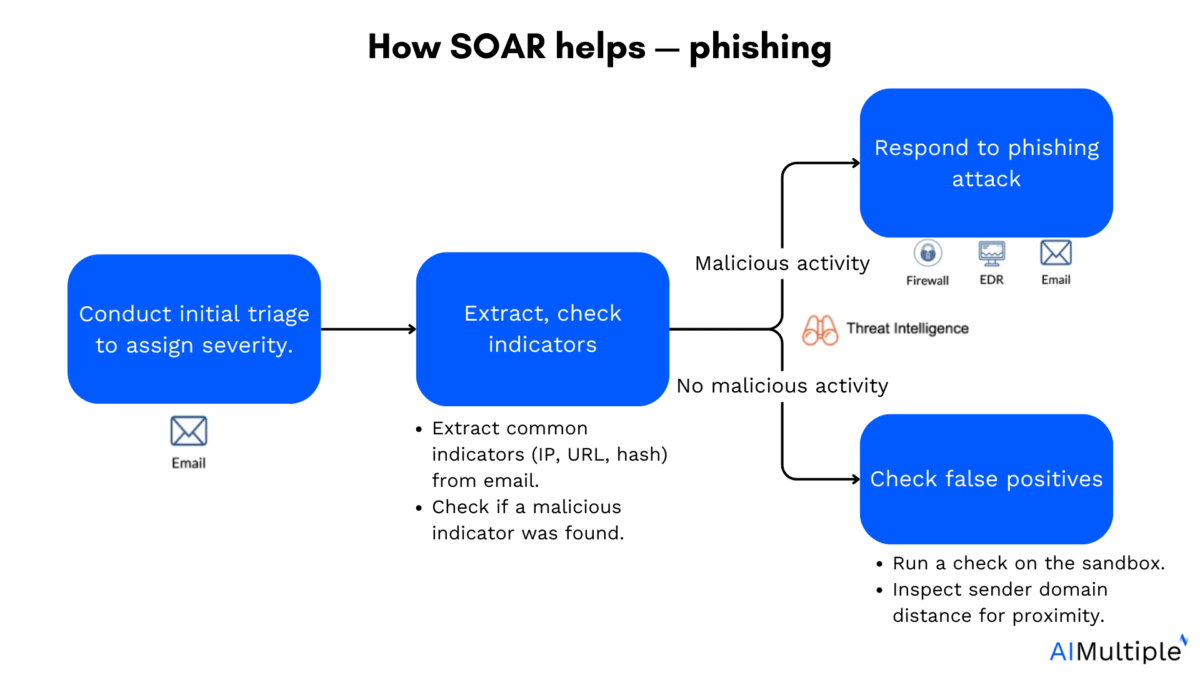
How SOAR helps:
- Triage phase: SOAR receives phishing alerts and automatically sorts them by severity, source, and risk level.
- Indicator extraction and validation: Key indicators (URLs, IP addresses, file hashes) are extracted from the phishing artifact.
- Malicious or not: If malicious activity is detected, the playbook triggers a response: blocking the sender, isolating endpoints, or deleting the malicious email. If no clear indicators are found, the system validates the alert further to rule out false positives.
- False-positive analysis: The suspicious file runs in a sandbox to analyze behavior. The sender’s domain is checked for similarity to trusted domains (homoglyph detection).
Real-world example: CrowdStrike’s Charlotte Agentic SOAR now handles phishing investigation in real time without pre-written playbooks, claiming 98% decision accuracy on investigated alerts.2 Zensar’s Cybersecurity Team uses SOAR for phishing triage and incident response via codeless playbooks with 200+ integrations and email threat intelligence.
The agentic difference here: Traditional SOAR matches phishing indicators against pre-written rules. Agentic platforms reason through the email’s context, sender history, and behavioral signals which matters particularly for AI-generated phishing that has no prior indicators to match against.
SOAR tools rely on accurate endpoint data and actionable device control. Learn how endpoint management software strengthens automated security response.
2. Endpoint detection and response (EDR)
EDR tools detect suspicious endpoint activity but generate high alert volumes, many of which are false positives. Manually triaging EDR alerts at scale consumes analyst time that should go toward investigating confirmed threats.
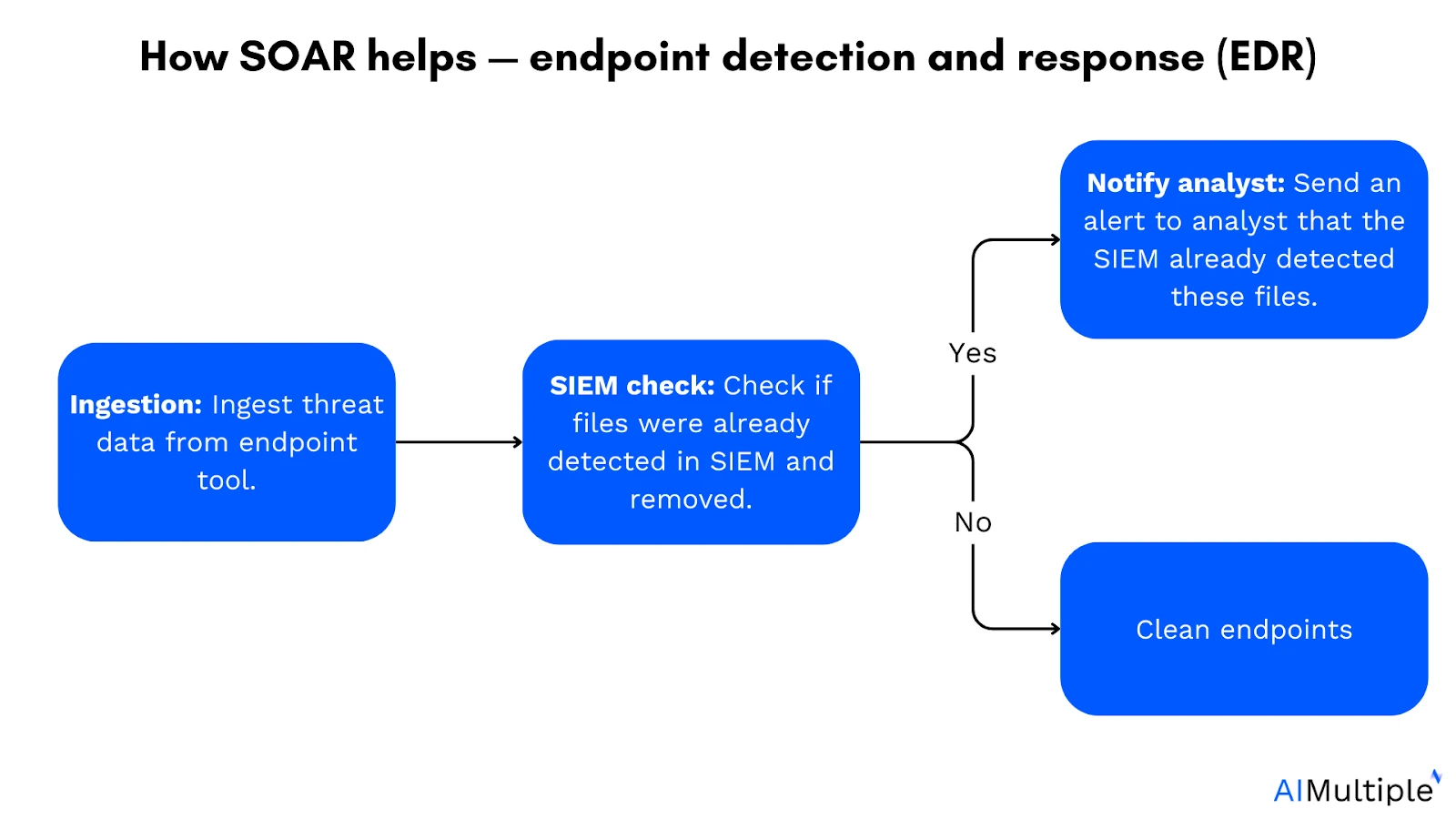
How SOAR helps:
- Ingestion of endpoint data: SOAR pulls real-time data from EDR tools (antivirus agents, EDR platforms) to monitor endpoint activity.
- SIEM check: Cross-references whether files or hashes have been previously identified in SIEM.
- Notification to analysts: If a potential threat is detected, SOAR alerts analysts with full context and severity score.
- Automated response and endpoint cleaning: If confirmed as a false positive, SOAR closes the incident automatically. If confirmed as a threat, SOAR isolates the endpoint and removes suspicious files.
The workflow typically completes in minutes rather than the hours required for manual triage. For organizations running thousands of endpoints, the operational difference is significant: manual EDR triage at scale requires analyst headcount that most SOCs cannot sustain.
Where this breaks down: Static SOAR playbooks handle known EDR alert patterns well. Novel malware or lateral movement techniques that don’t match existing rules require either an analyst review or an agentic platform that can reason through unfamiliar behavior.
3. Detecting suspicious user login from IP address locations
Suspicious logins are hard to catch at scale because user behavior is variable, organizations span multiple cloud environments, and manual monitoring is too slow to act before access is established.
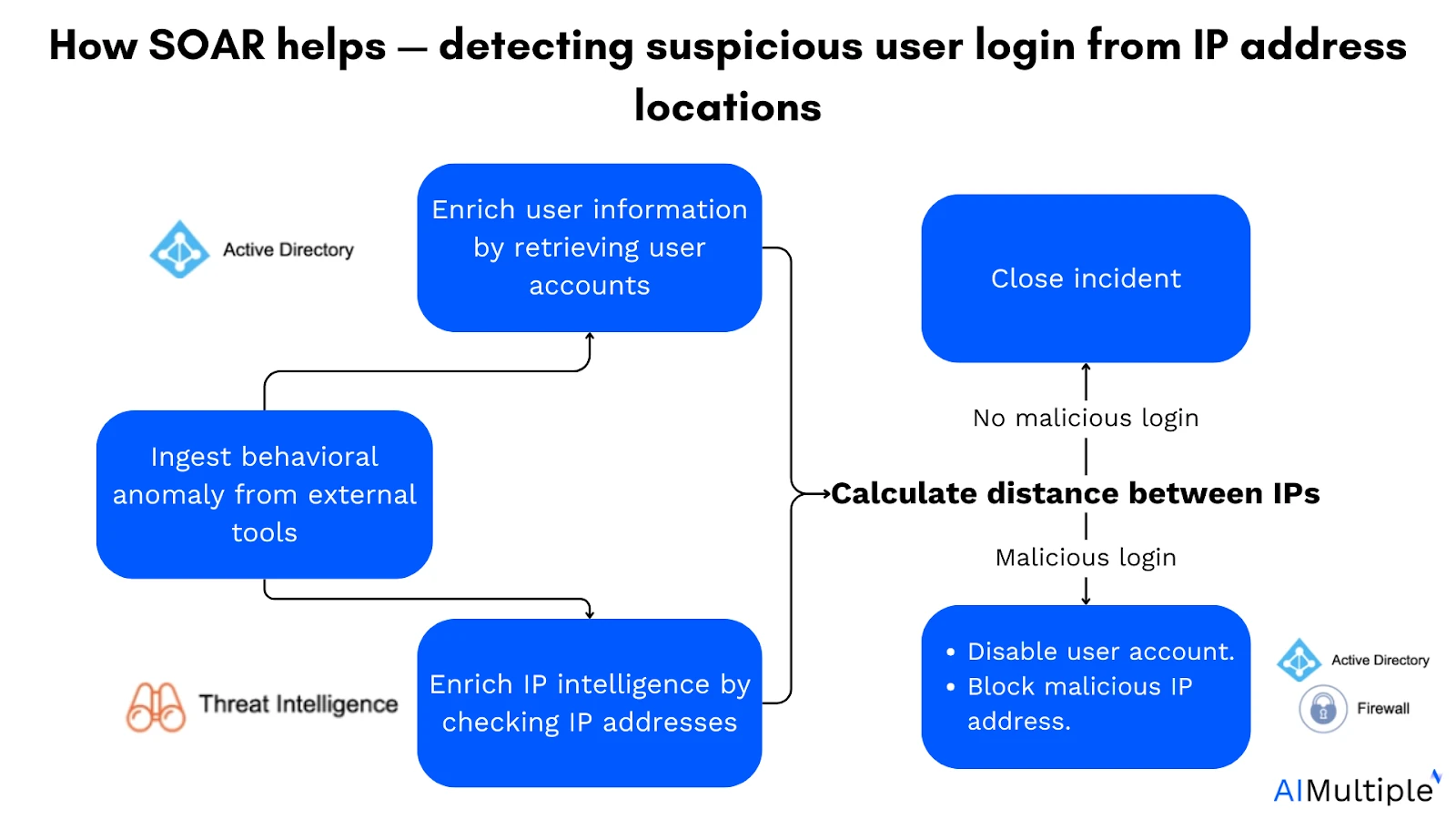
How SOAR helps:
- Ingest behavioral anomaly: SOAR collects login data from SIEMs or authentication systems and flags unusual activity (impossible travel, atypical access times, new devices).
- Enrich user information: SOAR retrieves past login history, role, and permissions to assess whether the behavior is consistent with the user’s normal pattern.
- Enrich IP intelligence: SOAR cross-references IP addresses against threat intelligence databases to identify known malicious sources, Tor exit nodes, or VPN endpoints.
- Determine threat status: Based on user behavior context and IP data, SOAR decides whether the login is likely malicious.
Automated response:
- No threat: SOAR closes the incident automatically
- Detected threat: SOAR blocks the IP and locks the account, triggering an MFA challenge or forced password reset
The enrichment step is where SOAR adds the most value. Without it, an analyst evaluating a login from an unfamiliar IP has no fast way to know whether the IP is flagged, whether the user traveled recently, or what the user’s access permissions would allow if compromised. SOAR surfaces all of that context in seconds.
Video: IP address investigation with SOAR
Source: Palo Alto Networks3
4. Zero-day threat response
Zero-day attacks exploit previously unknown security flaws before a patch is available. Antivirus tools don’t detect them because signatures don’t exist. This is also where static SOAR playbooks hit their hardest limit: no pre-written rule can anticipate an unknown exploit. AI-powered reconnaissance now allows attackers to identify unpatched vulnerabilities in hours rather than weeks,4 which compresses the window between exploit availability and active attacks.
How SOAR helps:
Collect IOCs and files: Pull file hashes, malicious URLs, and IP addresses from the alert.
Extract and check for indicators:
- Search endpoint logs for malicious hashes: Analyze EDR logs for evidence of identified hashes being executed or downloaded.
- Query firewall logs for compromised hosts: Look for traffic to or from known malicious IPs or suspicious lateral movement.
- Link to previous incidents: Cross-reference existing records to identify similar TTPs from past events.
- Block infected endpoints: Deploy blocking rules across firewalls, web gateways, and email filters.
- Close playbook: Send updated rules or IOCs back to the EDR platform.
Agentic AI addresses the zero-day gap directly. Rather than matching indicators against pre-written rules, it reasons through novel behavior, making it better suited for threat types that have never appeared in the environment before.5
5. Vulnerability management
Manual vulnerability testing is time-consuming, produces false positives, and often lacks visibility into unmanaged assets. Security teams struggle to prioritize the right vulnerabilities when CVE feeds arrive with hundreds of entries that all claim high severity.
How SOAR helps vulnerability management:
- Collection of vulnerability data: SOAR pulls vulnerability data from external tools and CVE databases.
- Enrich: SOAR adds details on affected endpoints, asset criticality, and affected business units.
- Add vulnerability context: SOAR adds exploitation history and known active threat context to the incident data.
- Calculate risks: SOAR combines CVE severity with system context to calculate the overall risk for each vulnerability.
Remediation:
- High-risk items: analyst review and manual patching coordination
- Known, low-risk findings: automated remediation where available (patch deployment via endpoint management, configuration change via API)
The enrichment step is what separates useful vulnerability management from noise. A CVSS 9.8 vulnerability on an isolated development server is less urgent than a CVSS 7.0 on an internet-facing authentication system. SOAR can surface that distinction automatically rather than leaving it to analyst judgment on each entry.
6. Automating the provisioning of new accounts
Manual user provisioning is error-prone. Mistakes in access assignments lead to over-provisioning (violating least privilege) or under-provisioning (blocking the new hire from working).
How SOAR helps:
- Get ticket details: Retrieves the provisioning request from the ITSM platform.
- Create a user in the directory service: Connects to Active Directory or equivalent.
- Add user to required tools by role: Assigns access to email, HR platforms, and other role-specific tools. Send onboarding email: Sends login credentials and setup instructions.
- Deploy required software to the endpoint: Initiates software deployment via endpoint management tools.
- Notify stakeholders: Alerts HR, IT, and managers when onboarding is complete.
7. Incident lifecycle case management
Problem: Continuity breaks down across the incident lifecycle because security products are siloed, processes aren’t standardized, and handoffs between teams slow mean time to response.
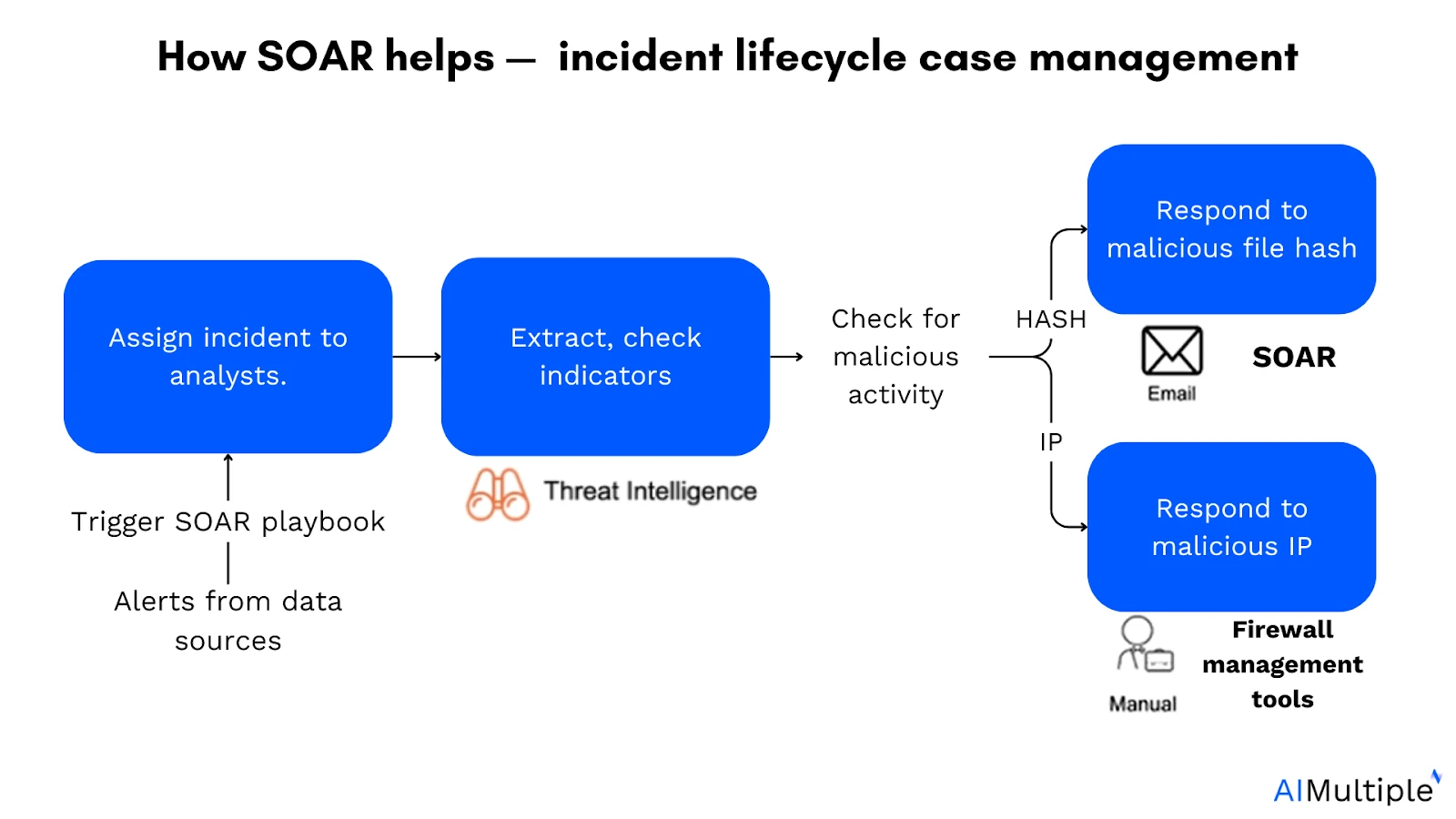
How SOAR helps:
- Retrieve alerts from data sources: SOAR continuously pulls alerts from SIEMs, firewalls, and other sources.
- Trigger playbook: Upon receiving an alert, SOAR triggers the appropriate playbook for that incident type.
- Assign incidents to analysts: SOAR routes enriched incidents with attached context.
- Extract and check IOCs with threat intelligence: File hashes, IP addresses, and domains are checked automatically.
- Check for malicious activity: SOAR determines if the activity is malicious and takes action blocking the IP or isolating the file.
LLM integration update: One MSSP documented a 60% increase in automated resolution of low-severity incidents after integrating large language models into their SOAR workflows. Analysts queried the platform in natural language for threat summaries and adjusted playbooks in real time without coding.6
8. Automating firewall policy change requests
Problem: Managing firewall change requests manually is slow, inconsistent, and hard to audit. Teams handle large volumes of requests each week, overlapping rules, and limited visibility into approvals.
How SOAR helps automate firewall policy change requests:
SOAR streamlines the firewall change process by automating approvals, validations, and policy deployments through integrated playbooks.
- A firewall policy change request: Initiated from an ITSM platform, e.g., ServiceNow
- Trigger SOAR playbook
- Do endpoints’ roles and addresses exist?
- YES: Add IP address to the existing endpoint group
- ELSE: Call “new policy” playbook: SOAR runs a separate playbook to create a custom rule.
- Apply the configuration using the firewall management system
- Close the ITSM ticket.
 Add as preferred source
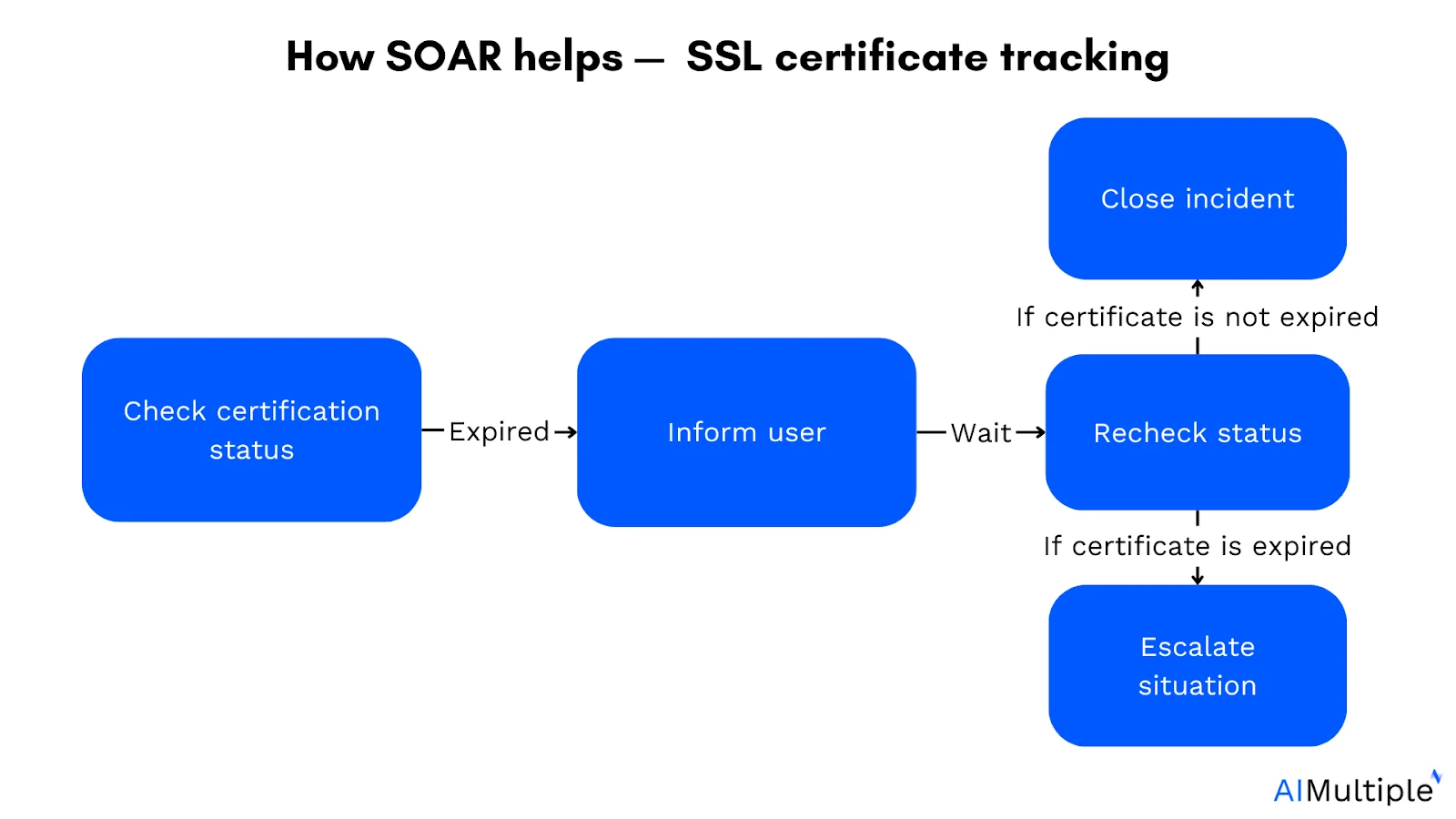
9. SSL certificate expiration tracking
Problem: Expired certificates trigger browser security warnings, reduce visitor trust, and can lead to traffic loss. Manual certificate tracking across large environments is unreliable.
How SOAR helps:
- Check certificate status: SOAR monitors SSL certificates across all domains and flags those nearing expiration.
- Alert and escalate: SOAR notifies the responsible team with enough lead time to act.
- Automate renewal where possible: For platforms with API access, SOAR can trigger the renewal workflow directly.
- Log and close: SOAR records the action taken and closes the ticket.
10. Threat Intelligence Management
Problem: Threat intelligence data arrives from multiple feeds in different formats. Manual ingestion, deduplication, and cross-referencing with active incidents is time-consuming and inconsistent.
How SOAR helps:
- Ingest threat intelligence feeds: SOAR automatically pulls indicators (IPs, domains, file hashes, CVEs) from multiple sources.
- Deduplicate and normalize: SOAR strips duplicates and converts data into a consistent format.
- Correlate with active incidents: SOAR checks incoming intelligence against open cases and live alerts.
- Enrich incidents: Relevant indicators are automatically added to open tickets and analyst queues.
- Distribute to blocking tools: High-confidence IOCs are pushed to firewalls, EDRs, and email filters.
Industry context: the shift from SOAR to agentic SOC
The 10 use cases above describe what traditional SOAR does. The direction of the market in 2026 is worth understanding, because new deployments are increasingly not traditional SOAR.
What is changing
Traditional SOAR requires engineers to write playbooks for every scenario the system will handle. Static playbooks cover approximately 30-40% of alert types in a typical enterprise deployment. Novel attack techniques, multi-stage campaigns, and alerts that don’t match existing patterns still require human analysts.7
Agentic SOAR platforms replace the static playbook model with AI agents that reason through alerts. Instead of “if this condition, then these steps,” an agentic system asks “given what I’ve found, what should I look at next?” the same logic an experienced analyst uses. This means alert types without existing playbooks can still be investigated automatically.8
Key platform moves in 2025-2026
- Palo Alto Cortex AgentiX: Announced in October 2025 as the direct successor to Cortex XSOAR. Trained on 1.2 billion real-world playbook executions. Claims up to 98% reduction in MTTR and 75% less manual work. Features 1,000+ prebuilt integrations and native MCP support. Professional services SKUs for XSOAR entered end-of-sale on February 1, 2026.9
- CrowdStrike Charlotte Agentic SOAR: Built on Falcon Fusion SOAR and Charlotte AI. Introduces AgentWorks the first no-code security agent development platform enabling security teams to build custom AI agents without writing code. Analysts set intent and guardrails while agents collaborate, reason, and act in real time.10
- Google Security Operations Agentic Automation: Embeds AI agents (powered by Gemini) directly into playbooks. Combines deterministic automation steps with AI agents that handle unplanned variables. Available for Google Security Operations instances migrated to Google Cloud infrastructure.11
- Trend Micro Vision One Agentic SOAR: Moves organizations from static playbooks to a dynamic, autonomous system that makes decisions in real time based on contextual understanding and continuous learning from events.12
The practical implication for teams evaluating SOAR today: if you are building a new SOC automation stack, the playbook-authoring model is where the market is departing from, not where it’s heading. That doesn’t mean traditional SOAR has no value mature playbooks for well-understood use cases like the 10 above remain effective but new deployments that require ongoing engineering headcount to maintain playbooks are a harder case to make.
FAQs
Security orchestration, automation, and response (SOAR) technology helps coordinate, execute, and automate tasks between various people and tools.
Orchestration:
Playbooks, workflows
Logically organized plan of action
Controlling and activating the security product stack from a central location.
Security automation:
Automated scripts
Extensible product integrations
Machine execution of playbook tasks.
Response:
Case management
Analysis and reporting collaboration
Breaking down silos: SOAR increases team collaboration and enables security analysts to automate actions across tools throughout their security stack.
Centralization: Providing security teams with a centralized console for managing and coordinating all company security areas.
Improved SOC decision-making: SOAR dashboards can help security operations teams make better decisions by providing visibility into threats.
Handling more notifications in less time: SOARs can help manage alerts by centralizing security data, enhancing events, and automating replies. As a result, SOCs can handle more alerts.
SIEM: SIEM tools gather and aggregate data from internal security tools, centralizing logs and flagging anomalies.
SOAR: SOAR systems emerged to enhance SIEMs by adding orchestration, automation, and incident response capabilities that standard SIEMs often lack. They focus on automating repetitive tasks, improving incident management, and coordinating security tools.
XDR (extended detection and response): a newer, more powerful solution for end-to-end security event management. It is mainly used for addressing issues at internal endpoints. When preparing for an automatic response, XDR uses data captured by SIEM.
Large organizations often use all three tools, but vendors increasingly combine their features.
Some SIEMs now include response capabilities.
XDRs are incorporating SIEM-like data logging.
Vendors such as Microsoft Sentinel and ManageEngine Log360 offer SIEM and SOAR capabilities.
Cite this research
Pick the format that matches where you're publishing. Pasting the link version into your CMS preserves the backlink.
@misc{hafa2026,
  author = {Hafa, Adil and Sezer, Sena},
  title  = {{10 SOAR Use Cases with Real-World Workflow Examples}},
  year   = {2026},
  month  = jun,
  howpublished    = {\url{https://aimultiple.com/soar-use-cases}},
  note   = {AIMultiple. Retrieved June 24, 2026}
}
Changelog
5 updatesAdded an agentic SOC industry context section covering Palo Alto, CrowdStrike, Google, and Trend Micro platforms.
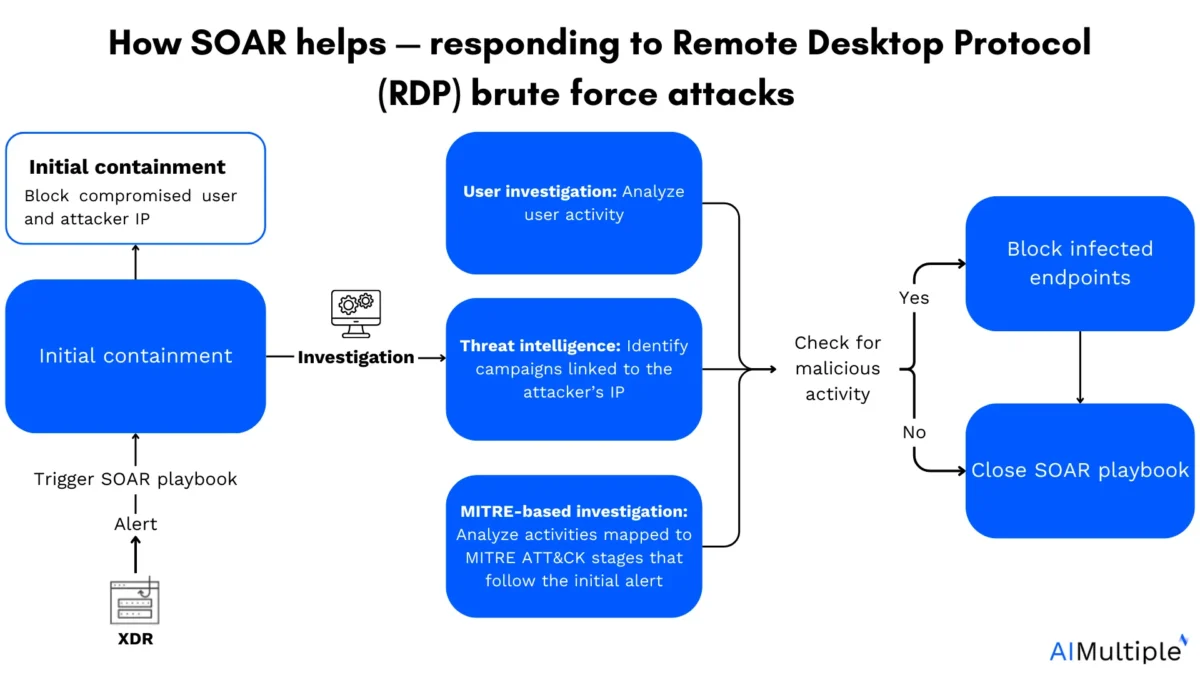
Replaced the "Responding to Remote Desktop Protocol (RDP) brute force attacks" use case with "Threat Intelligence Management" in the SOAR use cases section.
Reference Links






Be the first to comment
Your email address will not be published. All fields are required. Comments are left in their original language.