


Top 8 Open Source RBAC Tools

Based on GitHub activity, update frequency, and deployment model, I listed the top 8 open-source RBAC tools that help organizations restrict system access by granting users permissions and privileges.
This list covers 8 open-source RBAC tools across three categories: general-purpose authorization libraries and identity platforms with RBAC support, and Kubernetes-specific permission tools.
Open source RBAC tools based on GitHub stars
Tool selection & sorting:
- Number of reviews: 300+ GitHub stars.
- Update release: At least one update was released last week.
- Sorting: Vendors are sorted by GitHub stars in descending order.
Casdoor
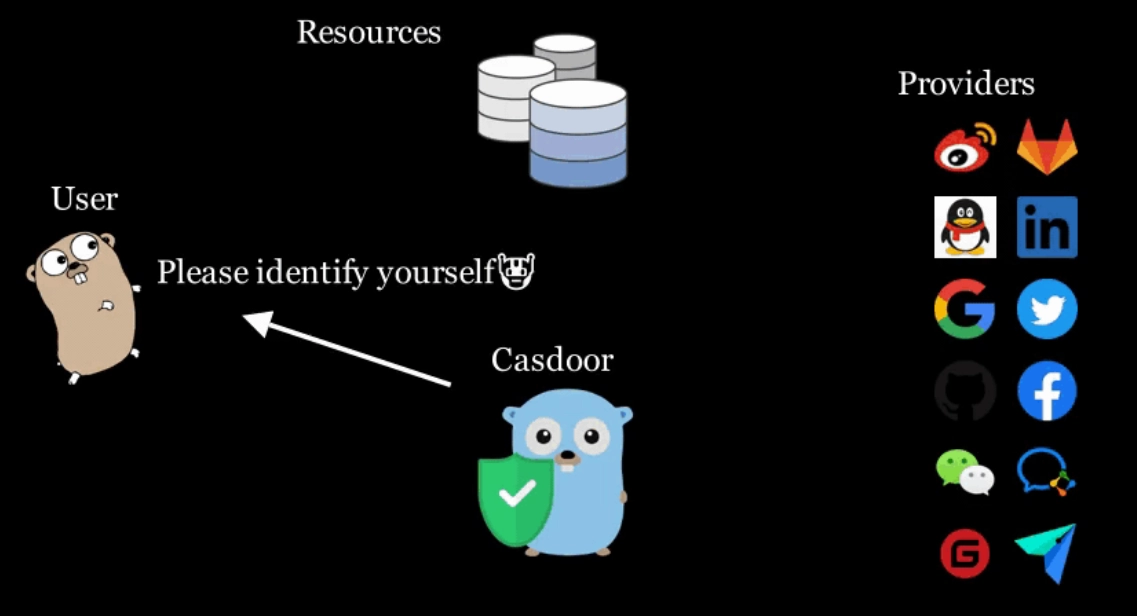
Casdoor is an Identity Access Management (IAM) platform that manages authentication and RBAC through a web interface, supporting OAuth 2.0, Google Workspace, Active Directory, and Kerberos.
Figure 1: Illustration of authentication through communication
Roles and permissions are assigned to built-in objects, such as applications, or to custom access behaviors; administrators structure groups and virtual groups to reflect the organization’s authority hierarchy.
The practical distinction from other tools on this list is multi-protocol support in a single deployment: Casdoor can bridge legacy Active Directory environments with modern OAuth 2.0 applications without an additional adapter layer. Configuration is UI-driven rather than file-based, which limits GitOps integration compared to tools like Cerbos or Casbin. Teams that need programmatic policy management via version control will find Casdoor’s web-first approach a constraint.
Zitadel
ZITADEL is an open-source identity infrastructure platform focused on B2B multi-tenancy: each customer organization manages its own user pool, roles, and permission set independently.
Supported protocols:
- OpenID Connect
- OAuth 2.x
- SAML 2
Video 1: Zitadel administrator console
Source: Zitadel1
Implementation Approach
Administrators integrate RBAC package and assign authorization roles from ZITADEL Console. Permissions assigned through APIs.
Role types:
- Application-specific positions (admin, accountant, employee, human resources)
- ZITADEL-specific manager roles (ORG_OWNER, IAM_OWNER)
Example: HR manager David Wallace’s credentials showing management grants search.
Who uses this: Organizations managing B2B customer portals requiring multi-tenancy with secure login and self-service.
Advantage: Combines identity management with RBAC in single platform. Reduces tool sprawl.
Cerbos
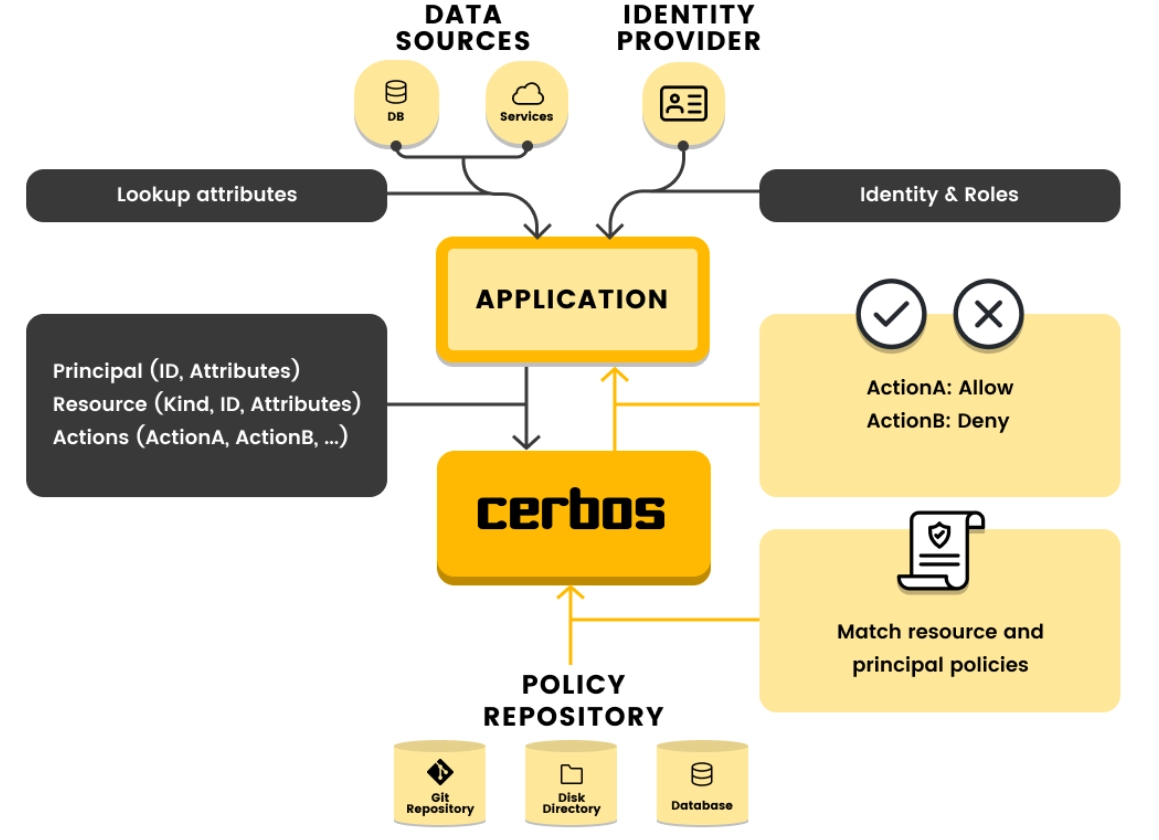
Cerbos is an authentication layer that allows users to define access control rules for application resources.
Capabilities:
- Collaborate with teammates to create and share policies in private environments
- Deliver network security policy updates to entire packet data protocol (PDP) fleet
- Create custom policy bundles for client-side or in-browser authorization
Figure 2: How Cerbos integrates with your application
Source: Cerbos2
Permit – Opal
OPAL (Open Policy Administration Layer) is an administrative layer for Open Policy Agent (OPA) that detects policy and data changes in real time and pushes live updates to deployed OPA instances without requiring a restart. Administrators update user role attributes; those attributes are transferred to the backend database and made available to OPA’s decision engine. The permit.check() function evaluates a user’s access level against the current policy.
Video: User permission checks in the UI with Opal
Source: Permit.io3
Technical requirement: Requires OPA deployment. OPAL is an administrative layer, not a standalone solution.
Fairwinds – RBAC Manager
Fairwinds RBAC Manager automates role binding across Kubernetes namespaces. Rather than creating individual RoleBindings in each namespace for a user who needs cross-namespace access, RBAC Manager manages those bindings from a single declarative configuration.
Basic Example
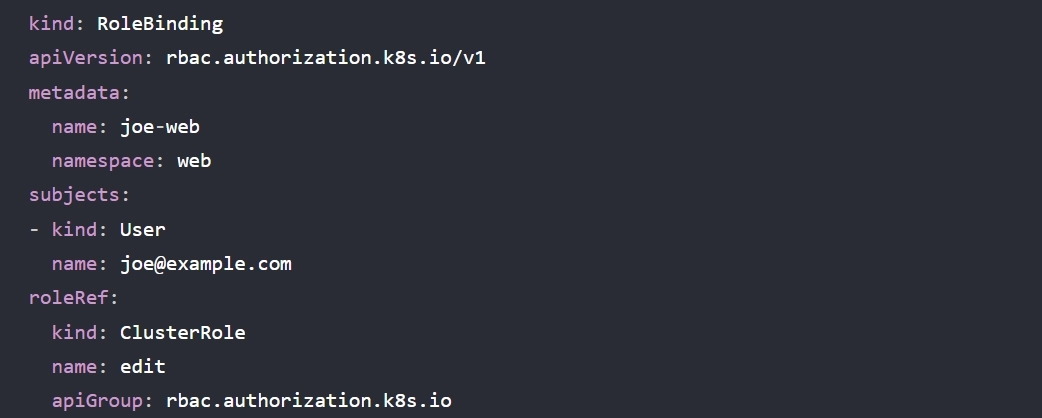
Single user, Joe, requires “edit” access to the “web” namespace. RBAC Manager creates role bindings allowing edit access to the web namespace.
Figure 3: Role binding with Fairwinds – RBAC Manager
Source: Fairwinds4
The tool operates at the Kubernetes cluster layer and has no effect on application-level authorization decisions. Its value is in reducing configuration drift in environments where hundreds of namespace-user combinations would otherwise be tracked manually.
OpenFGA
OpenFGA is an open-source authorization engine based on Relationship-Based Access Control (ReBAC), inspired by Google’s internal Zanzibar authorization system. Rather than assigning permissions directly to roles, OpenFGA models access through relationships between users and objects.
With OpenFGA, administrators can:
- Write an authorization model
- Write relationship tuples
- Perform authorization checks
- Add authentication to their OpenFGA server
For example, to check whether user “user:anne” of type user has a “reader” relationship with object “document:2021-budget”, administrators can write tuples to test the APIs.
Thus, the query in the figure will always return { “allowed”: true }if the user sets “document:2021-budget#reader” has the “reader” relation with “document:2021-budget.”
Figure 4: Querying with contextual tuples
Casbin Net
Casbin is an authorization library available in Go, Java, Node.js, Python, .NET, Rust, PHP, and Elixir. It supports ACL, RBAC, and ABAC through a configuration-file-based model definition: the access control model is expressed in a CONF file using the PERM metamodel (Policy, Effect, Request, Matchers), and switching models requires only a configuration change rather than application code modifications.
For RBAC, Casbin stores user-role mappings and supports role hierarchy with configurable depth (default maximum: 10 levels). The RBAC API provides a higher-level interface for common operations; for attribute-based rules, conditions can be evaluated against resource or user properties directly in the matcher expression.
Figure 5: Creating a role-based access control list (ACL) with Casbin
Which means:
- alice can read data1
- bob can write data2
 Add as preferred source
Why should your organization use RBAC tools?
Network security statistics show that 6+ million data records were exposed globally due to data breaches in the first quarter of 2023. Delivering role-based, conventional logic is an effective method for governing unauthorized user access to vital company resources; however, manually handling hundreds of conditional statements can be time-consuming.
Security teams can enhance their protection strategies by integrating centralized open-source Role-Based Access Control (RBAC) tools with Identity and Access Management (IAM) systems. This ensures that only authorized users can access sensitive resources, improving access governance.
Additionally, by implementing microsegmentation, security policies can be applied across isolated network zones, further restricting access and minimizing the attack surface. This layered approach strengthens security by combining granular user permissions with tightly controlled network boundaries.
Benefits of open source RBAC tools
Open source RBAC tools allow users to:
- Interact with fellow developers to report and track bugs and feature requests with transparency.
- Follow the latest development version and view how development is proceeding.
- Fix bugs and implement features if you know how to code.
- Avoid initial price payments, subscription fees, and vendor lock-in.
How to select open source RBAC tools
Here are a few recommendations to consider while selecting an open source RBAC tool:
- Check the tool’s popularity: The number of GitHub contributors and community members responding to user inquiries reflects the popularity of open-source technologies. The larger the community, the more support your organization can get.
- Check the tool’s features: Most open-source RBAC tools provide role customization, permission registration, and login methods. However, if your organization expects to use the RBAC tool for diverse purposes you should look for a more complete product. For example, an organization seeking automated access management might consider a solution with identity and access management (IAM) features.
- Compare closed-source solutions: Open-source solutions often include only limited or add-on features. Implementing a more tailored solution that offers a higher level of features (e.g., cloud segmentation) can be more efficient for your organization. Here is a list of closed-source micro segmentation tools with RBAC features.
Further reading
Cite this research
Pick the format that matches where you're publishing. Pasting the link version into your CMS preserves the backlink.
@misc{dilmegani2026,
  author = {Dilmegani, Cem and Arslan, Ezgi},
  title  = {{Top 8 Open Source RBAC Tools}},
  year   = {2026},
  month  = may,
  howpublished    = {\url{https://aimultiple.com/open-source-rbac}},
  note   = {AIMultiple. Retrieved May 19, 2026}
}Results and timestamps of 8 data points. Download the summary data shown in this article's charts and tables as a ZIP file containing one CSV file.
Want the granular data behind it? Join Premium
Changelog
5 updatesReduced the tool list from ten to eight open-source RBAC tools, removing several source citations and figures.
Expanded the introduction to the list of tools with two categories of open-source RBAC tools.
Removed "80+ Network Security Statistics" from Further reading.
Reference Links
Cem's work at AIMultiple has been cited by leading global publications including Business Insider, Forbes, Morning Brew, and Washington Post, global firms like Deloitte and HPE, NGOs like World Economic Forum, and supranational organizations like European Commission. [1], [2], [3], [4], [5]
Throughout his career, Cem served as a tech consultant, tech buyer and tech entrepreneur. He advised enterprises on their technology decisions at McKinsey & Company and Altman Solon for more than a decade. He also published a McKinsey report on digitalization.
He led technology strategy and procurement of a telco while reporting to the CEO. He has also led commercial growth of deep tech company Hypatos that reached a 7 digit annual recurring revenue and a 9 digit valuation from 0 within 2 years. Cem's work in Hypatos was covered by leading technology publications like TechCrunch and Business Insider.
Cem regularly speaks at international technology conferences. He graduated from Bogazici University as a computer engineer and holds an MBA from Columbia Business School.










Be the first to comment
Your email address will not be published. All fields are required. Comments are left in their original language.