


Top 12 Alternatives to Windows Task Scheduler

Windows Task Scheduler, like open-source job schedulers, has no license costs. However, our review found that Task Scheduler’s Windows focus and limited scheduling capabilities may be not sufficient for complex IT scenarios and hybrid cloud requirements of enterprises. Users seeking alternatives to Task Scheduler typically fall into three categories. Select your category for relevant solutions:
- Users considering Task Scheduler: Explore alternatives with similar capabilities.
- Current users frustrated by its limitations: Upgrade to scalable, enterprise-focused solutions with advanced job scheduling.
Follow the links below to see these task schedulers’ benefits and case studies:
Here are alternatives to Windows Task Scheduler with workload automation and enterprise job scheduling capabilities:
Lightweight alternatives to Windows Task Scheduler
Enterprise-focused alternatives to Task Scheduler
Organizations considering enterprise-focused scheduling software should consider the substantial financial investment required. The entry-level pricing for these tools often begins in the tens of thousands of dollars.
*Ratings are based on B2B user review data. Vendors who received the higher rating are ranked first, except the subscribers of the article, which include links to their websites in the table.
If you have workload automation tools in mind, or if you want to see the alternatives, you can read the following articles:
Windows Task Scheduler review
Windows Task Scheduler is a built-in tool in the Windows operating system that allows users to schedule and automate the launch of scripts and programs at pre-defined times or after specified intervals. Like any tool, Windows Task Scheduler has its pros and cons.
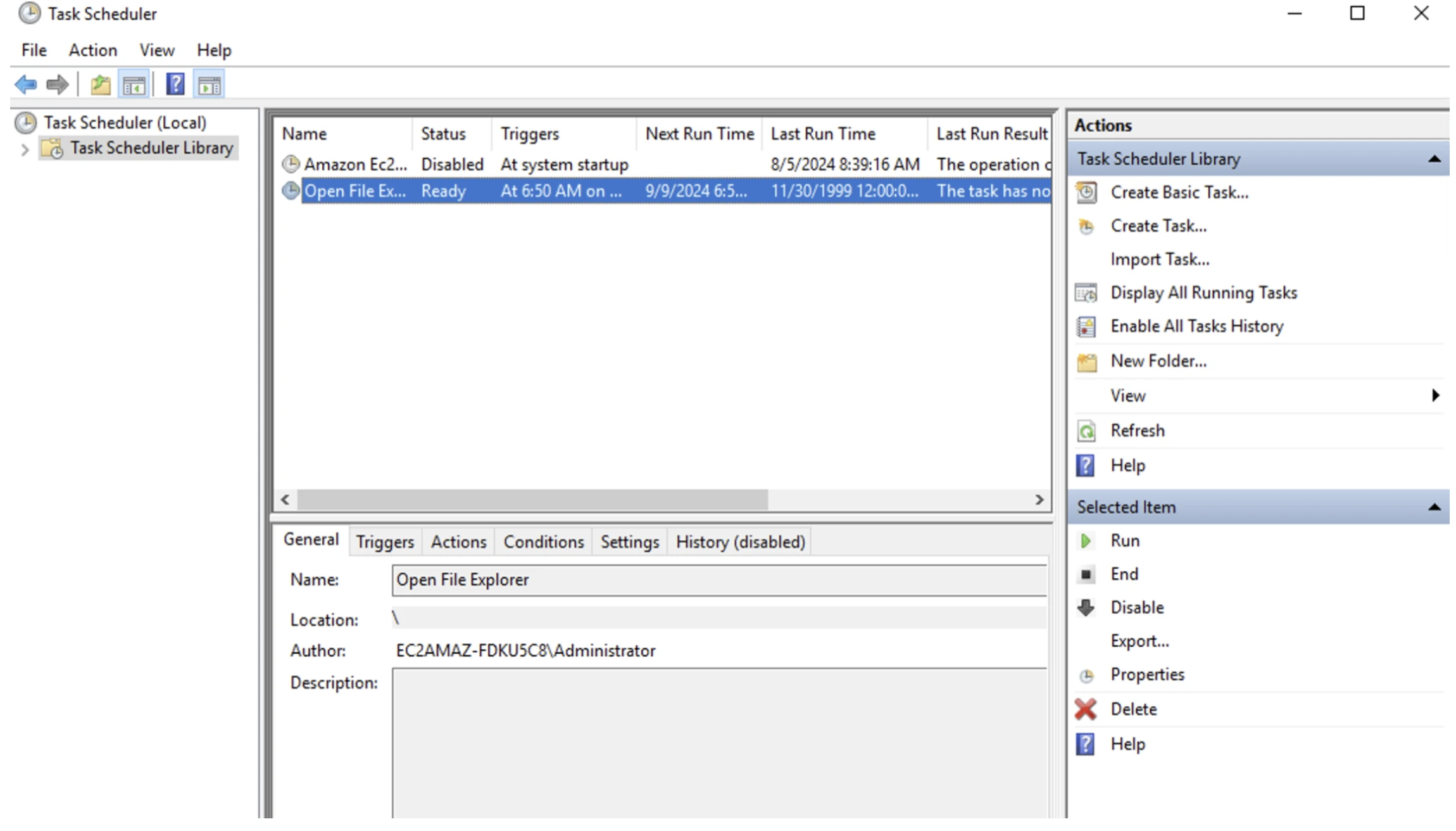
Windows Task Scheduler
Pros:
- Integrated into Windows: Windows task scheduler comes with Windows, so there is no need for third-party software if basic scheduling is all you need.
- Trigger Options: Tasks can be set to run at specific times, upon boot or user login, or after specific events.
- Runs Tasks in the Background: Once a task is scheduled, it will run silently in the background, even if a user isn’t logged on, provided that the right settings are chosen.
- Action Types: Task Scheduler can run a program or script but its built-in “send an email” and “display a message” actions were removed in Windows 8 and Windows Server 2012. To send an email, run a PowerShell script from the task instead.1
- Error Handling: Windows Task Scheduler can attempt to rerun tasks if they fail, and it logs task outcomes, which can help diagnose problems.
Cons:
- Lack of Centralized Management: Task Scheduler manages one computer at a time. The schtasks command can target a remote machine, but only one per command, so changes across many machines need scripts or other tools.2
- No Native Cross-Platform Support: The Task Scheduler is a Windows-centric tool. If you’re in a mixed OS environment (e.g., Linux, macOS, and Windows), you won’t be able to use it as a unified scheduling solution across all platforms.
- Legacy interfaces: Microsoft has deprecated the Task Scheduler 1.0 interfaces. Scripts and tools built on them should move to the 2.0 API, available since Windows Vista.3
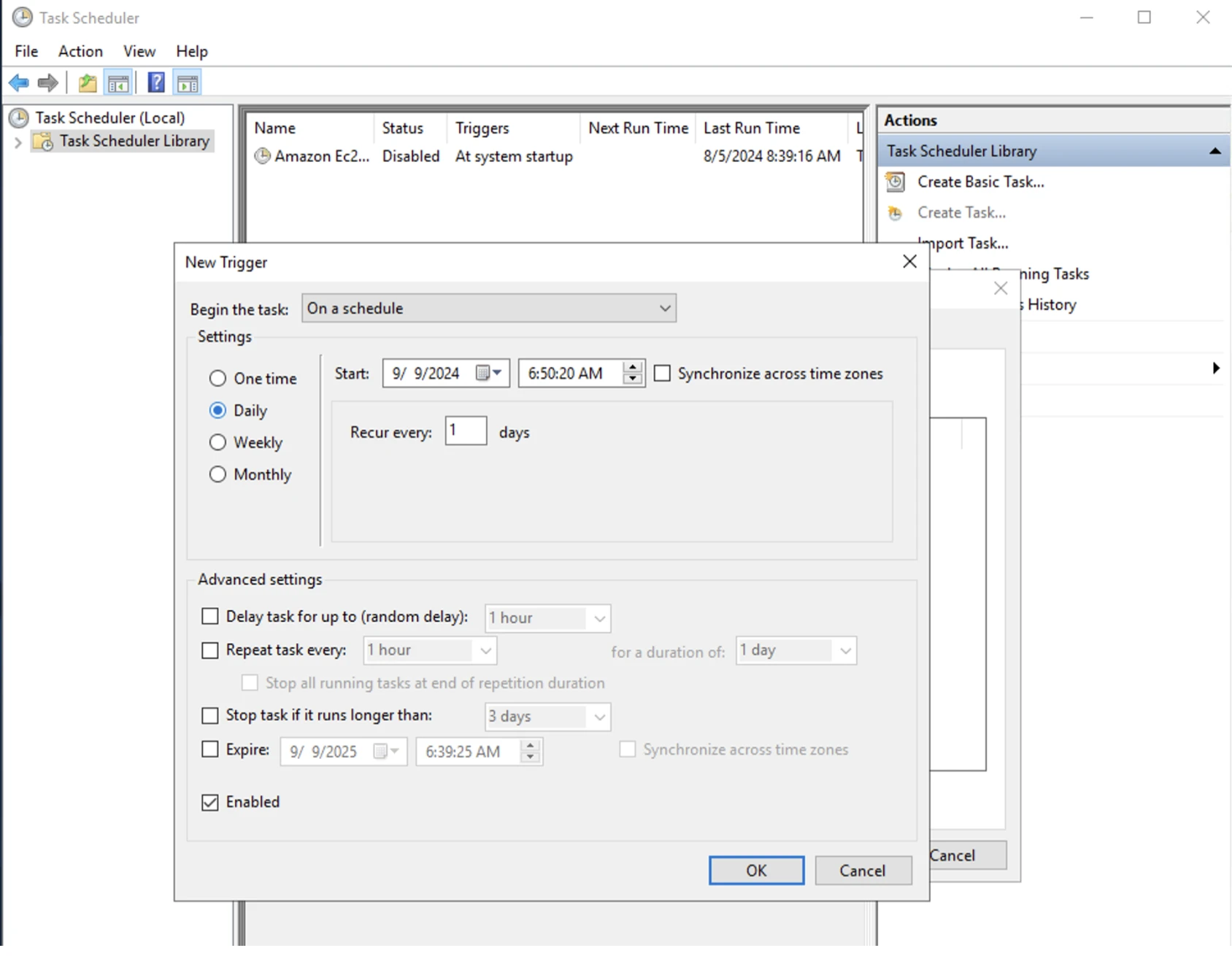
- Limited Advanced Features: More robust third-party tools offer greater functionality for complex scheduling and automation. Certain third-party tools, for example, support a wide range of event-driven triggers, such as file events, email triggers, and database modifications, beyond the basic time-based scheduling in Windows Task Scheduler. (See Figure 2)
- User Interface: While subjective, for certain users, the interface can be non-intuitive for more advanced configurations (Figure 1). For example, most configurations in the task scheduler are text-based or require navigating through multiple tabs and checkboxes, which may not be as intuitive as drag-and-drop interfaces or visual flowcharts.
Our experience with task scheduler
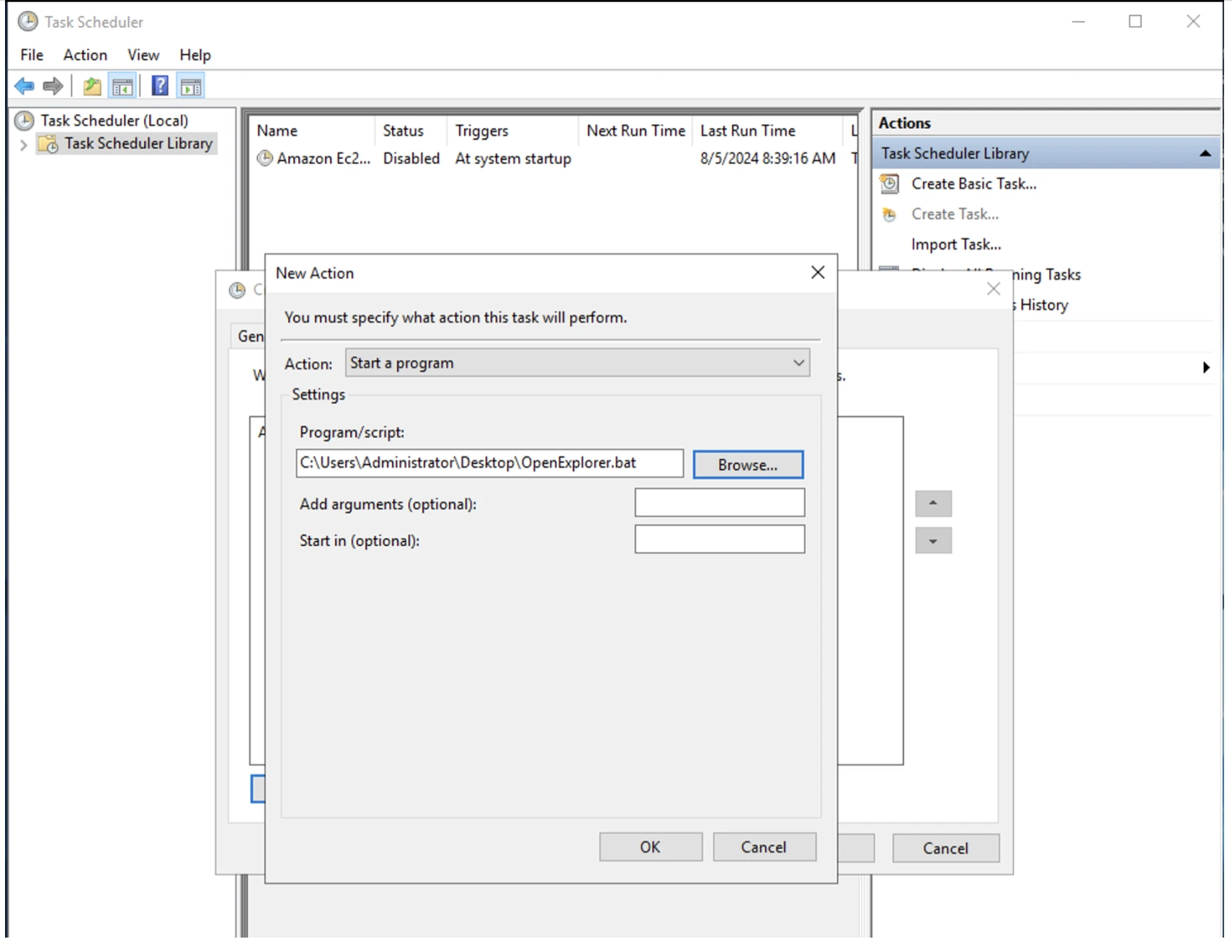
In our benchmark, we evaluated the performance of Windows Task Scheduler 1.o in September 2024 by automating the execution of a batch file. A .bat file named “OpenExplorer” was created to launch File Explorer, and defined as an action. (See Figure 3)
The Task Scheduler was configured with a time-based trigger, allowing the task to be set to run at predefined intervals, such as daily, weekly, one-time, or monthly. (See Figure 2) Scheduling worked as expected.
Windows task scheduler may be a good fit for those who aim to schedule Windows workloads to run on specific times. However, larger enterprises or those with specific, advanced needs might look into dedicated solutions or third-party software that provides a more robust and feature-rich environment. Below are our picks for alternatives to Windows Task Scheduler:
Enterprise-focused alternatives to Windows Task Scheduler
Stonebranch
Stonebranch UAC manages jobs from a central controller rather than on each machine. Existing Task Scheduler tasks can be moved with Stonebranch’s Xpress Conversion Tool (XCT). XCT finds task definitions across servers, converts them and loads them into UAC. Customers can run the conversion themselves.4 After conversion, scripts are kept in a shared library and tasks can be chained into cross-server workflows.5
Unlike Task Scheduler, Stonebranch is not limited to Windows. Its Universal Agent runs on Windows, Linux, AIX, IBM i and z/OS, so Windows jobs can depend on jobs on other platforms.6 Jobs can be triggered by events such as file changes, task status changes or webhook calls.7 UAC also provides SLA tracking, real-time monitoring and integration templates through the Stonebranch Integration Hub.
JAMS Scheduler
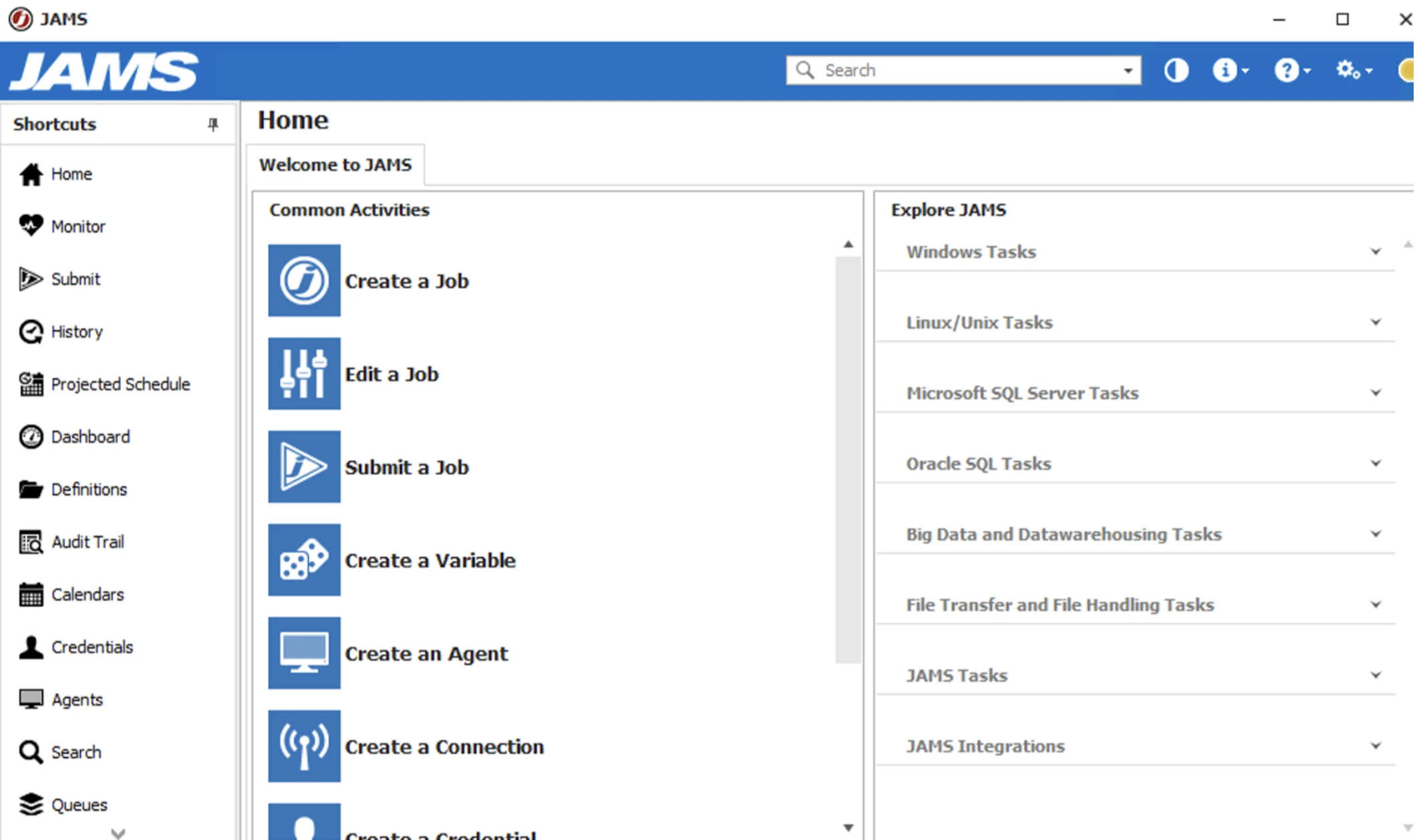
JAMS offers centralized, cross-platform job scheduling, addressing the limitations of Windows Task Scheduler’s single-system scope. Unlike Task Scheduler, JAMS includes enhanced error handling, detailed logging, and PowerShell support, making it better suited for managing complex, script-driven workflows at scale.
RunMyJobs by Redwood
RunMyJobs by Redwood offers a cloud-based, enterprise-grade SaaS job scheduling solution that addresses limitations of traditional tools like Windows Task Scheduler. Unlike Task Scheduler, which is typically limited to a single server and lacks centralized management for complex environments, RunMyJobs supports centralized orchestration across hybrid and multi-cloud systems.
As the single SAP Endorsed App included on the SAP Enterprise Cloud Services (ECS) list, RunMyJobs provides bidirectional integration for managed SAP landscapes and SAP Joule conversational control to automate S/4HANA and BTP workflows without custom code.
RunMyJobs utilizes historical data and dependency analysis for predictive SLA monitoring, triggering proactive alerts and dashboard updates before deadline breaches to ensure operational reliability.
The video below shows an overview of Redwood RunMyJobs:
ActiveBatch
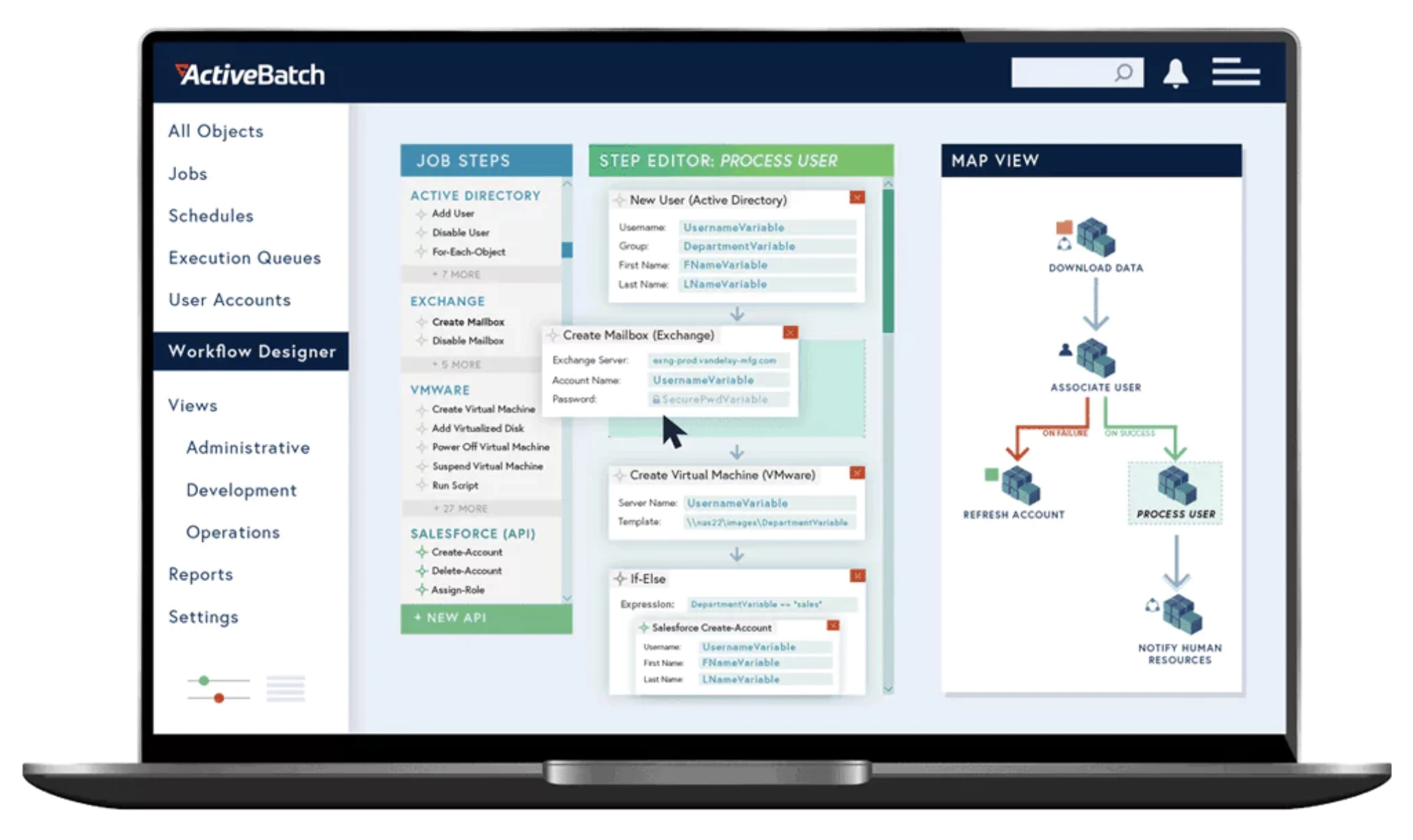
As an alternative to Task Scheduler, ActiveBatch integrates with utilities like Windows Task Scheduler, SQL Server Scheduling, and Microsoft System Center, promoting integration or merging of current automation systems.
ActiveBatch is compatible with various operating systems such as Windows, Mac OS, Linux, UNIX, OpenVMS, and Solaris; it may be a good alternative to Windows Task Scheduler because it allows flexibility on different platforms.
ActiveBatch provides a low-code solution that can be easier to use than Windows Task Scheduler. Drag and drop approach can also be an attractive alternative to Windows Task Scheduler’s command-line interface; see Figures 2, 3 & 4 for comparison.
CA 7 Workload Automation
Broadcom’s CA 7 is a solution tailored for enterprise workload automation. It allows businesses to efficiently manage, schedule, and oversee critical workloads spanning a range of platforms and applications, from a mainframe scheduler that reaches distributed platforms through agents.
VisualCron
VisualCron is a task automation and job scheduling tool designed specifically for Windows. Boasting an easy-to-use interface, it provides sophisticated scheduling capabilities and an array of in-built tasks like file transfers, email alerts, and script runs.
It’s compatible with multiple scripting languages and connects with many external applications. See the alternatives to VisualCron, which includes an in-depth review of VisualCron itself.
 Add as preferred source
FAQs
Yes, there are free alternatives like Z-Cron Scheduler, low-cost alternatives like VisualCron and paid alternatives like ActiveBatch.
Efficient IT infrastructure management relies on robust workload automation and there are tens of workload automation products that can serve as task scheduler alternatives.
Businesses may want to schedule tasks at specific times by specific triggers (e.g. completion of specific jobs, messages etc.).
Business may also want a solution for orchestrating jobs across different operating systems and cloud environments.
For such businesses, Task Scheduler wouldn’t be sufficient. They need to search for other workload automation tools catering to their specific requirements including certain features, ease of use or scalability.
Cite this research
Pick the format that matches where you're publishing. Pasting the link version into your CMS preserves the backlink.
@misc{dilmegani2026,
  author = {Dilmegani, Cem and Şimşek, Hazal},
  title  = {{Top 12 Alternatives to Windows Task Scheduler}},
  year   = {2026},
  month  = aug,
  howpublished    = {\url{https://aimultiple.com/alternative-to-task-scheduler}},
  note   = {AIMultiple. Retrieved August 4, 2026}
}Results and timestamps of 12 data points. Download the summary data shown in this article's charts and tables as a ZIP file containing 2 CSV files.
Want the granular data behind it? Join Premium
Changelog
11 updatesReplaced JAMS Scheduler with Fortra's JAMS in the Enterprise-focused alternatives to Windows Task Scheduler section.
Reference Links
Cem's work at AIMultiple has been cited by leading global publications including Business Insider, Forbes, Morning Brew, and Washington Post, global firms like Deloitte and HPE, NGOs like World Economic Forum, and supranational organizations like European Commission. [1], [2], [3], [4], [5]
Throughout his career, Cem served as a tech consultant, tech buyer and tech entrepreneur. He advised enterprises on their technology decisions at McKinsey & Company and Altman Solon for more than a decade. He also published a McKinsey report on digitalization.
He led technology strategy and procurement of a telco while reporting to the CEO. He has also led commercial growth of deep tech company Hypatos that reached a 7 digit annual recurring revenue and a 9 digit valuation from 0 within 2 years. Cem's work in Hypatos was covered by leading technology publications like TechCrunch and Business Insider.
Cem regularly speaks at international technology conferences. He graduated from Bogazici University as a computer engineer and holds an MBA from Columbia Business School.







Be the first to comment
Your email address will not be published. All fields are required. Comments are left in their original language.