


Top 5 Open Source SOAR Tools

I’ve spent nearly two decades as a CISO in heavily regulated industries long enough to have tested, deployed, and ripped out more SOAR tools than I’d like to admit. Most open-source options look promising on documentation, but fall apart when you actually run them in production.
Features of SOAR tools
SOAR tools rely on accurate endpoint data and actionable device control. Learn how endpoint management software strengthens automated security response.
GitHub stars of the best open-source SOAR tools
The chart tracks GitHub stars for the top open-source SOAR tools over the past 2 years. n8n dominates, with a higher star count of approximately 160k. This is largely because n8n has a much broader focus as a general workflow automation platform, attracting users beyond the security operations space.
The other tools, StackStorm, Shuffle, TheHive Project, and Tracecat, remain clustered in the lower range (under 20k stars), reflecting their more specialized focus on security-specific SOAR use cases.
Analysis of the top tools
n8n
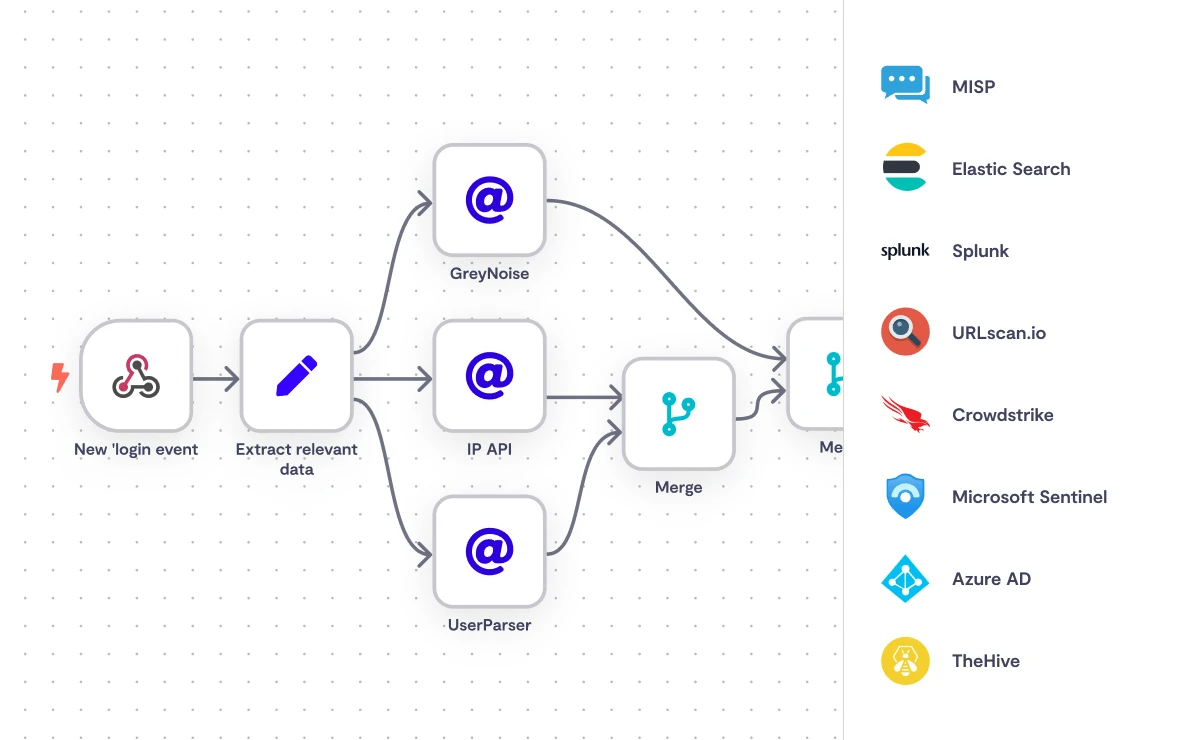
n8n is a self-hosted workflow automation platform with a visual, low-code interface. Security teams use it in SecOps contexts to automate detection, response, and enrichment tasks across SIEMs and threat intelligence platforms.
Licensing model: Source-available, not fully open-source. n8n’s free Community Edition ships with source code, but its Sustainable Use License places it outside the Open Source Initiative’s definition of open source.1
What the n8n Community Edition includes:
The free tier covers the core workflow engine: debug-in-editor with execution data pinning, 24 hours of workflow history, and custom execution metadata (save, search, comment).
What requires a paid plan:
Workflow sharing is restricted to the instance owner and creator; broader team access requires a Pro or Enterprise plan.
SOAR use cases with n8n:
Source: n8n2
MCP instance-level connections
n8n added instance-level MCP (Model Context Protocol) support, allowing MCP-compatible AI platforms to access opted-in workflows through a single OAuth-secured endpoint. Newly added workflows become available through the same connection without additional configuration.3
Security advisory
Two additional flaws patched in version 2.4.0 target deployments used for AI orchestration, exposing stored credentials for services including OpenAI, Anthropic, Azure OpenAI, and vector databases such as Pinecone and Weaviate.4
The CVE cluster kept growing through the first half of 2026. CVE-2026-25049 (CVSS 9.4) turned out to be a bypass of the earlier CVE-2025-68613 sandbox fix, letting an attacker trigger remote code execution through an unauthenticated public webhook using JavaScript destructuring syntax.5
CISA added the earlier CVE-2025-68613 to its Known Exploited Vulnerabilities catalog on March 11, 2026, after confirming active exploitation and required U.S. federal agencies to remediate by March 25.6
For a SecOps tool that stores credentials by design, this pattern of high-severity vulnerabilities is a material operational risk. Shadowserver Foundation scans found more than 24,700 unpatched, internet-exposed n8n instances in early February 2026, over 7,800 of them in Europe.7 Any self-hosted instance should be on the latest patched release, and teams should track n8n’s security advisories on an ongoing basis rather than treating any single patch as final.
SOAR use cases with n8n:
Source: N8n2
Pros
- JavaScript and Python are both supported for custom workflow logic, and self-hosted instances can pull in external npm libraries via the Code Node.
- The API integration layer handles cURL imports cleanly, speeding up connections to non-standard internal tools.
- Docker deployment is well documented and scales without significant friction.
- Cloud pricing is workflow-count-based rather than complexity-based, which avoids the cost unpredictability common in competing platforms.
Cons
- n8n is not a SOAR in the traditional sense; it lacks native case management, built-in alert correlation, and entity behavior profiling.
- OAuth configuration for third-party services like Google Workspace is noticeably more involved than comparable SaaS automation tools.
- The cloud version also lacks some capabilities available in self-hosted deployments, including access to npm packages. And as the 2026 CVE cluster makes clear, the self-hosted model places the patching burden squarely on the operator.
- With tens of thousands of unpatched instances still exposed publicly as of this year, that burden is not theoretical.
StackStorm – st2
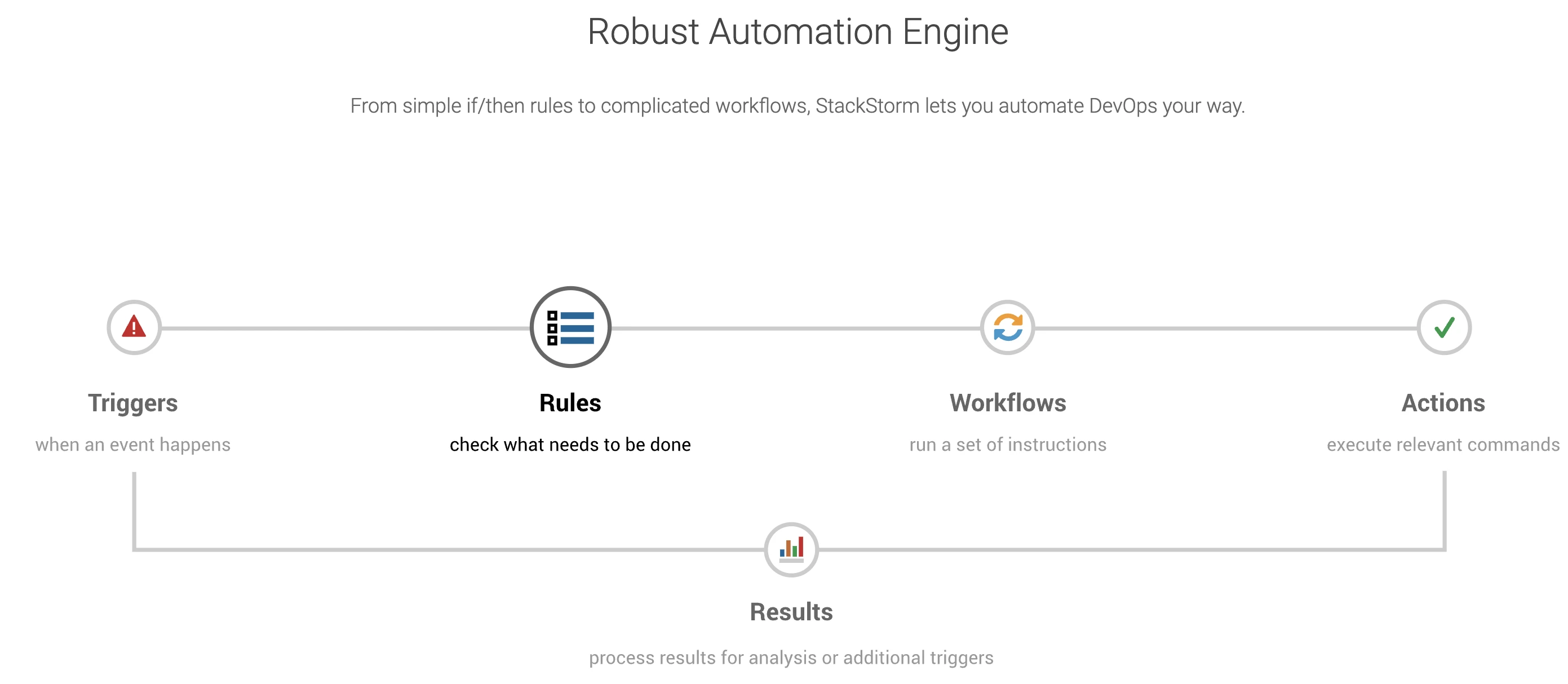
Source: StockStorm8
StackStorm automates remediation, incident response, troubleshooting, and deployments. It offers a rule-based automation engine, workflow management, and around 160 integration packs. Enterprises including Cisco, Target, and Netflix have deployed it in production; Netflix used it to host and execute operational runbooks.9
The open-source version includes Slack integration. AWS integration, a workflow designer, professional support, and network automation suites are available only in the enterprise tier.
Third-party infrastructure costs for a self-hosted deployment run roughly $28 per month, covering AWS, PackageCloud, forum hosting, domain certificates, and an OpenVPN license.10
Pros
- Custom workflows: The platform accepts custom scripts within workflows, allowing teams to wrap existing automation without rewriting it.
- Plugin ecosystem: Integration packs cover tools including NetBox, Splunk, and AWS, with additional packs available through the StackStorm Exchange.
Cons
- Kubernetes support: No native Kubernetes support is available.
- Learning curve: Building and managing workflows requires working knowledge of Python and YAML, which adds onboarding time for teams without that background.
- Maintenance cadence: Release frequency has declined in recent years. Teams evaluating it should weigh the breadth of the integration against the operational overhead of a project with slowing community activity.
Shuffle
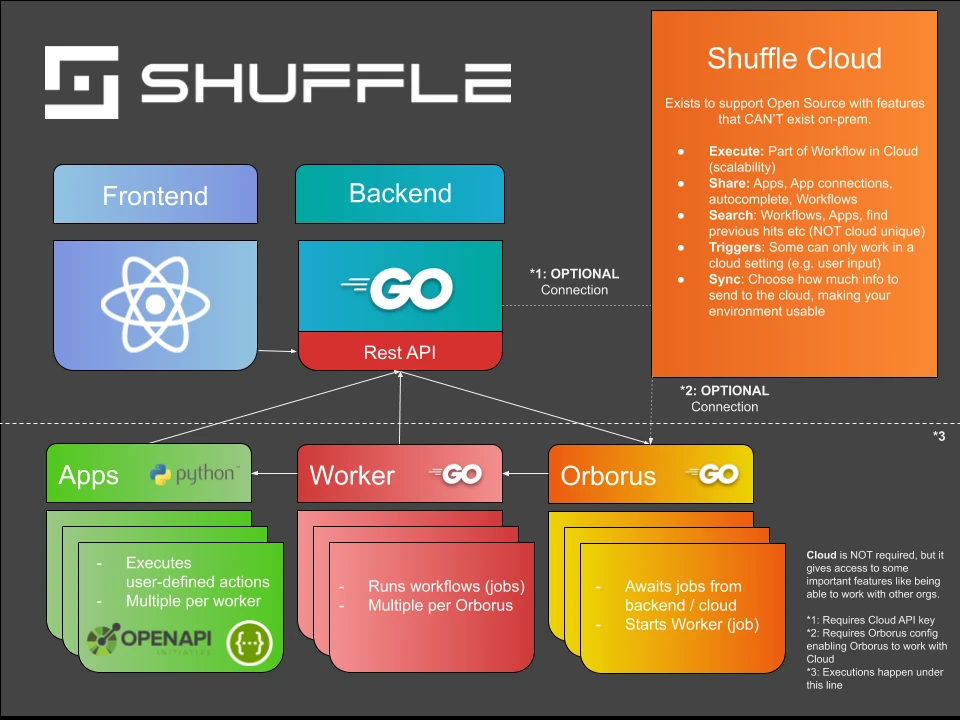
Source: Architecture11
Shuffle is an open-source SOAR platform built around OpenAPI, giving it access to over 11,000 endpoints across 200+ pre-built app integrations.
Its core automation model covers two patterns common in SOC environments: forwarding SIEM alerts to a case management system and bidirectional ticket synchronization across platforms with per-stakeholder access controls.12
Shuffle’s pricing is based on app-run volume rather than CPU cores. The free Starter tier covers 2,000 app-runs per month and includes all 2,500+ apps. The Scale tier starts at $29 per month for 10,000 app runs and increases limits to 15 users, 25 workflows, and 3 tenants. Enterprise pricing is custom and includes unlimited users, workflows, tenants, and environments, along with dedicated onboarding, on-call support, and a key management system.13
Limitations
Deployment via Docker is straightforward, and connecting tools such as Wazuh and Jira requires minimal configuration. On the other hand, managing backend procedures within a Docker environment adds complexity; integrations within containerized setups have reported reliability issues; and workflow execution speed is bounded by the host server’s capacity rather than by Shuffle’s own scheduler. Teams running resource-constrained infrastructure should account for this before committing to it at scale.14
TheHive Project – Cortex
Source: GitHub15
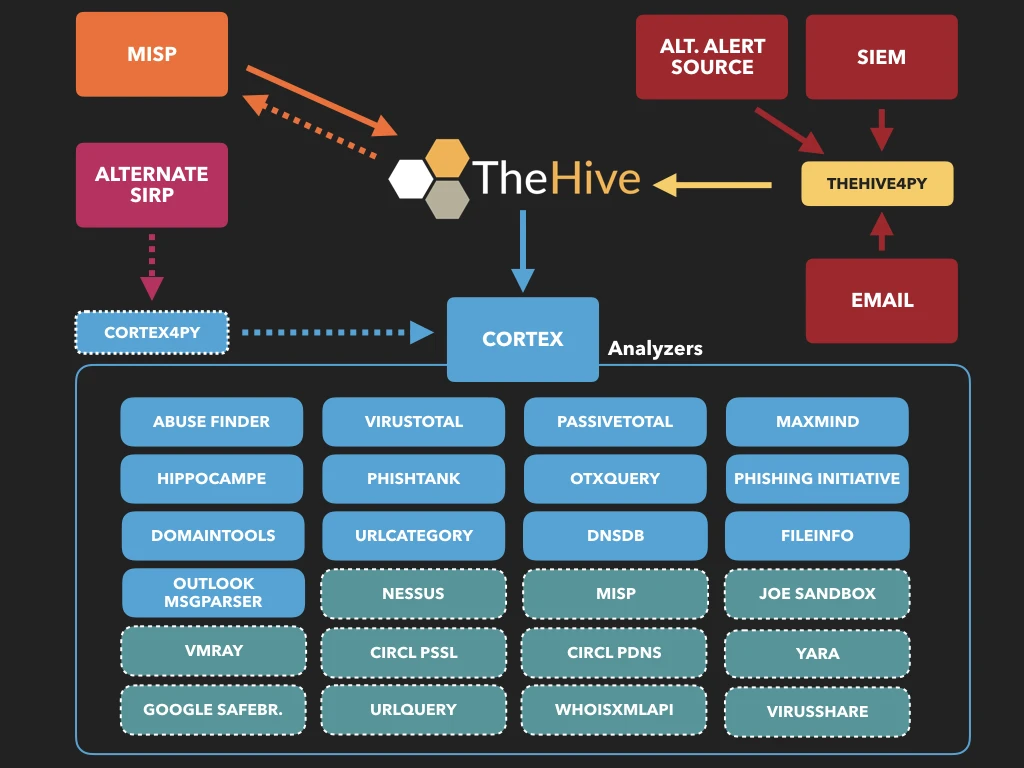
Cortex analyzes observables such as IP addresses, domains, and file hashes, individually or in bulk, via a RESTful API and a web interface.
Cortex remains fully open-source under the AGPL license. TheHive itself, however, moved to a commercial model with version 5. After a 14-day trial, new installations require a valid StrangeBee license; without one, the platform enters read-only mode. A free Community license is available on request.16
Free edition vs paid edition:
Pros
- Observable analysis at scale: Cortex supports bulk analysis of observables via a single interface, eliminating the need to query multiple tools separately.
- MISP integration: Cortex connects to MISP (Malware Information Sharing Platform) to enable threat intelligence sharing across platforms.
Cons
- TheHive licensing shift: TheHive 5 is no longer open source. Teams that relied on self-hosted TheHive 3 or 4 have no maintained upgrade path without accepting commercial terms.17
- Configuration complexity: Initial setup requires coordinating Cortex, Elasticsearch, and TheHive, which adds operational overhead for smaller teams.
- Community support limits: Cortex issues outside of enterprise contracts are handled through community channels, with no guaranteed response times.
 Add as preferred source
Tracecat
Source: 18
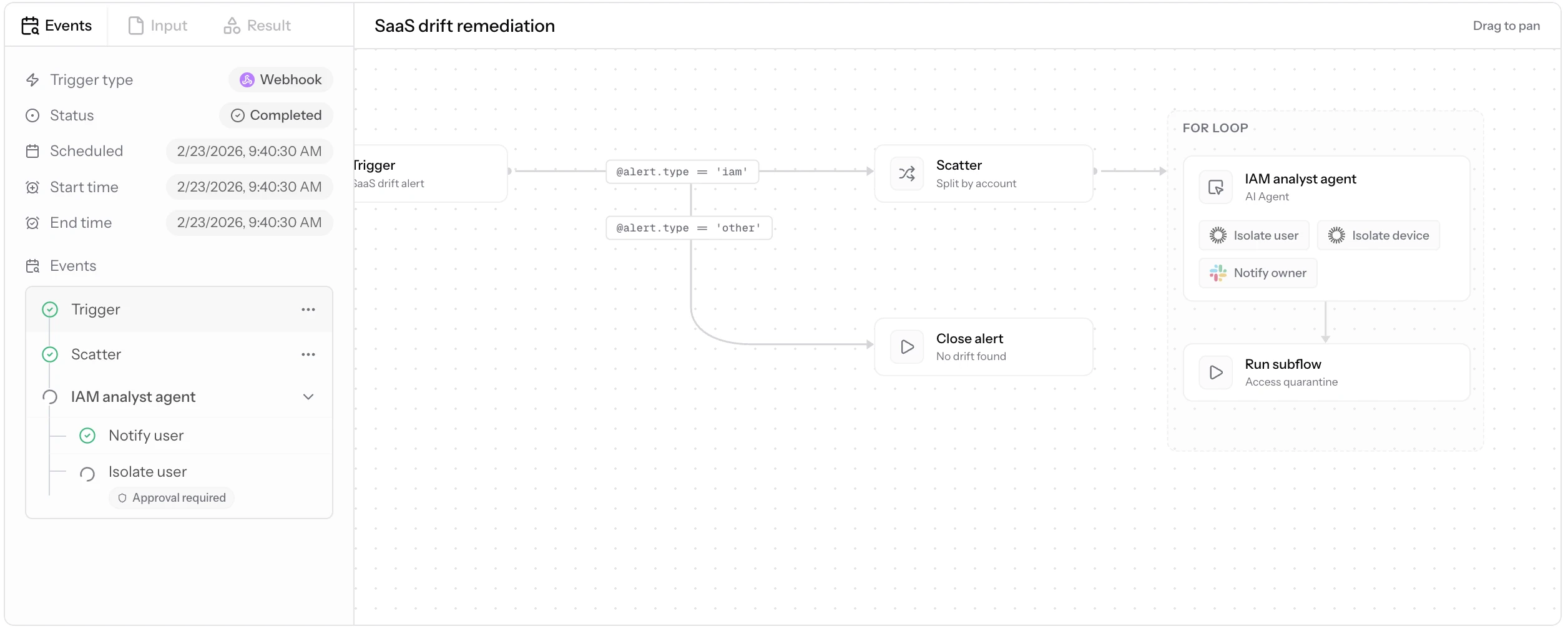
Tracecat is an open-source automation platform for security and IT engineers, positioned as a self-hosted alternative to Tines and Splunk SOAR.
Workflows can be built using a no-code drag-and-drop UI or YAML-based configuration-as-code, and the two stay in sync automatically. The workflow engine runs on Temporal, the same durable execution framework used by major cloud infrastructure teams.19
Open-source (self-hosted) features:
Unlimited workflows, case management, built-in lookup tables, 100+ integrations, custom Python/YAML integrations with git sync, SAML SSO, audit logs, and Docker or AWS Fargate deployment.
Professional and Enterprise features:
Includes all open-source features, plus fully managed cloud hosting, Kubernetes deployment via Helm, bring-your-own Temporal cluster, self-hosted LLMs, enterprise AI chatbots in Microsoft Teams, STIG compliance for federal use cases, and 24/7 tiered SLA support. Pricing requires contacting Tracecat directly.20
Pros
- Licensing model: SSO, audit logs, and infrastructure-as-code deployments remain free in the open-source tier, unlike most commercial SOAR platforms that gate these features.
- Dual authoring: No-code and YAML workflows stay synchronized, so analysts and engineers can work on the same workflow without conflict.
- Deployment flexibility: Docker Compose, AWS Fargate via Terraform, and Kubernetes via Helm are all supported.
Cons
- Active development pace: The project is under active development, and the team advises reviewing the changelog before each update, as breaking changes occur between releases.
- Self-hosting requirements: Running a production Tracecat stack with Temporal, PostgreSQL, and optional LLMs requires infrastructure capacity that can be a constraint for smaller teams.
- Relatively new: Tracecat has a smaller community and fewer third-party integrations compared to older platforms like StackStorm or TheHive.
FAQs
Security orchestration, automation, and response (SOAR) tools coordinate and automate tasks between people and software on a single platform. Security engineers use them to build automation with open-source connectors and configuration-as-code, while SOC teams use the resulting workflows to triage alerts, track incidents, and respond to threats.
Response speed directly affects breach costs. According to IBM’s 2025 Cost of a Data Breach Report, the global average cost of a data breach fell to $4.44M a 9% decline from the prior year, attributed in part to AI-assisted detection. The U.S. average, however, rose to $10.22M, an all-time high.21
GitHub activity is a practical starting point: star counts and contributor numbers reflect how actively a project is maintained and how much community support exists for troubleshooting and integration work.
Beyond community health, evaluate whether the platform’s native integrations cover the tools already in use. Most open-source SOAR platforms include incident response, threat hunting, and threat intelligence capabilities, but the depth varies. Organizations that also need SIEM functionality should verify whether that is built in or requires a separate integration.
Open-source solutions generally involve trade-offs: fewer out-of-the-box integrations, no guaranteed support SLAs, and maintenance responsibility on the deploying team. Paid alternatives typically offer more comprehensive documentation, dedicated support, and features such as microsegmentation and cloud security posture management.
Further reading
- 6 Real-life RBAC Examples
- 10 SOAR Use Cases with Real-World Workflow Examples
- Top 10 Microsegmentation Tools
- Top 15+ Open Source Incident Response
Cite this research
Pick the format that matches where you're publishing. Pasting the link version into your CMS preserves the backlink.
@misc{hafa2026,
  author = {Hafa, Adil},
  title  = {{Top 5 Open Source SOAR Tools}},
  year   = {2026},
  month  = jul,
  howpublished    = {\url{https://aimultiple.com/open-source-soar}},
  note   = {AIMultiple. Retrieved July 27, 2026}
}Results and timestamps of 91 data points. Download the summary data shown in this article's charts and tables as a ZIP file containing 5 CSV files.
Want the granular data behind it? Join Premium
Changelog
9 updatesExpanded the n8n security advisory with new CVE-2026-25049 and exposure data.
Updated the introduction to the article.
Added a chart to the n8n section.
Reference Links







Be the first to comment
Your email address will not be published. All fields are required. Comments are left in their original language.