


Compare TOP 5 SAP Job Scheduling Software

SAP job scheduling software integrates with SAP systems to schedule and monitor SAP jobs. 42% of business leaders reported more interest for SAP automation tools.1
Follow the links below to see top SAP batch scheduling tools’ their benefits and case studies:
SAP job scheduling tools
Modern SAP schedulers, known as Service Orchestration and Automation Platforms (SOAPs), do more than run batch jobs., they coordinate SAP jobs with cloud services and non-SAP apps.
Sorting: The tools are sorted by their number of reviews except for the subscribers that are listed at the top with a link to their website.
1- RunMyJobs by Redwood
RunMyJobs by Redwood is a SaaS full-stack enterprise job scheduler that offers
- SAP Cloud Connector to enable communication between on-premise systems and SAP cloud services (including SAP BTP).
- SAP Analytics Cloud (SAC) Connector and a Datasphere connector for large data transfers.
- Native connectors for SAP, Azure, AWS, Databricks, Oracle Fusion, ServiceNow, PowerBI, and more.
- Custom connector support using SOAP, REST APIs, JDBC, and other protocols.
- SAP Premium Certification and the single SAP Endorsed App status in the SAP ECS list.
- Confirmed its adherence to SAP’s stringent criteria for integration, security, and performance.
- Bidirectional SAP Cloud Connector to link on-premise systems to SAP BTP/Cloud, allowing SAP to trigger and control workflows directly.
- SAP Joule integration to enable AI-driven interaction and management of RunMyJobs via SAP’s virtual assistant.
SAP users, especially those migrating from SAP ECC to S/4HANA Cloud or in the RISE with SAP program, can leverage RunMyJobs for SAP batch scheduling and workload automation.
Learn more about RunMyJobs: Redwood SAP partnership.
Learn more about RunMyJobs:
Pros
- Scalable SaaS platform: Built to scale without agents and infrastructure. Agentless connectors for most applications enable 1 click, 5-minute updates.
- Native SAP integrations: Connectivity and support for SAP-specific job types and metrics with native integrations for SAP ECC, SAP S/4HANA and BTP. RunMyJobs offers the highest number of integrations to SAP modules, allowing users to maintain a clean SAP core.
- SAP-certifications: RunMyJobs holds five SAP certifications including “works with RISE,” “certified for S/4HANA,” “job scheduling,” and “utilities cloud.”
- SAP ECS Support: SAP ECS has designated RunMyJobs as the standalone non-SAP WLA application they officially support.
- Easy-to-Use interface: User-friendly interface with intuitive navigation and configuration options.
Cons
- Technical limitations: Some users report time-consuming tasks related to SQL scripts and CAR file imports.
2. Stonebranch UAC
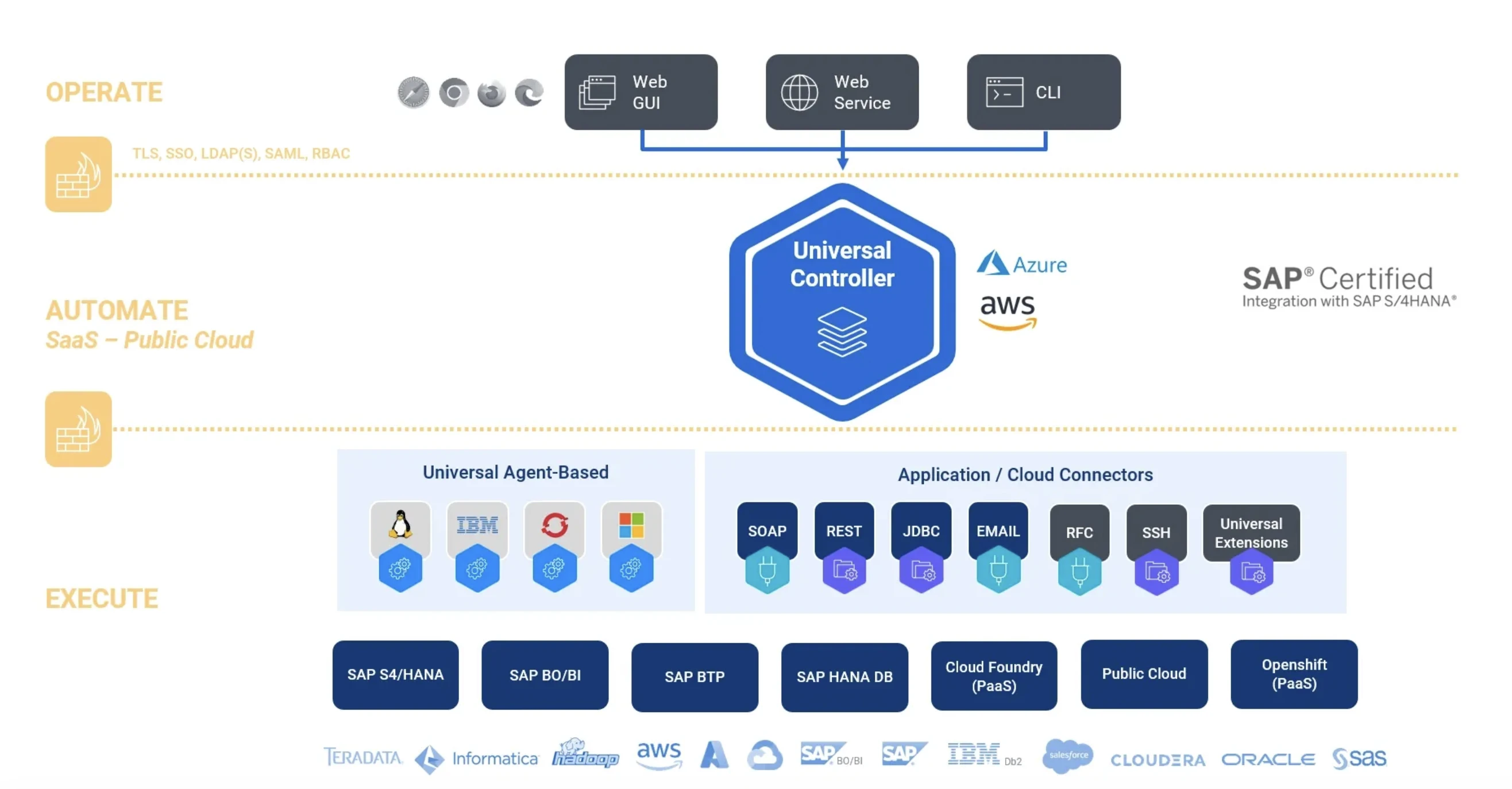
Stonebranch Universal Automation Center (UAC) is an enterprise-grade workload automation and job scheduling solution for hybrid IT environments. Stonebranch UAC provides SAP-certified integration with SAP S/4HANA and RISE with SAP S/4HANA Cloud.
Stonebranch UAC provides SAP-certified integration with SAP S/4HANA and RISE with SAP S/4HANA Cloud, supporting native integration and functioning as a reliable option for SAP batch scheduling.
Pros
- SAP job types and parameters: Supports SAP-specific job types and parameters for scheduling and execution within automation workflows.
Cons
- Learning curve: Extensive capabilities may require time and training to use fully.
Learn more on Stonebranch alternatives for a better comparison.
3-ActiveBatch
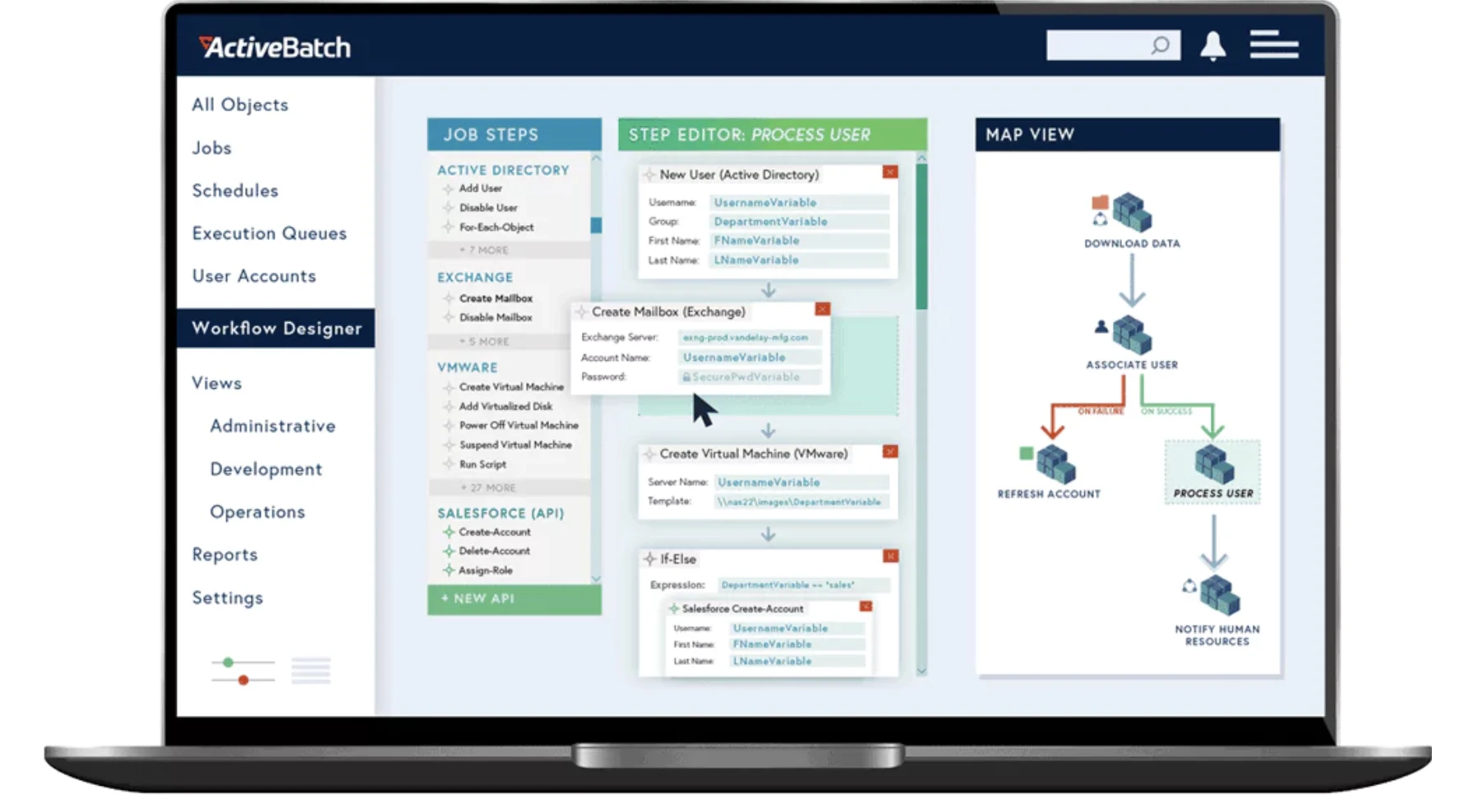
ActiveBatch is a workload automation and job scheduling platform that can interact with SAP modules, schedule SAP jobs, and execute SAP-specific tasks by:
- An extensive built-in integrations library.
- Connectors, pre-built actions, and lifecycle management for scripts.
Pros
- Flow Control Job Steps: Includes ForEachRow and If‐Branch to manage jobs within workflows with drag and drop capability. Unlike other WLA tools that support If-Else statements, ActiveBatch leverages conditions and dependencies to control execution flow.
- Super REST API adapter: Automated response parsing and authentication wizard for API connections.
- Extensibility: Wide range of built-in integrations and script support (VBS, PS1, BAT, CMD).
- Low-code Interface: Features a user-friendly drag-and-drop interface, making creating and managing workflows easier.
Cons
- Maintenance: Implementation and maintenance can require technical expertise.
4- JAMS Scheduler
JAMS Scheduler is a job scheduling and workload automation software. JAMS offers native integration with SAP systems, allowing direct communication and interaction with SAP modules. It can connect to SAP applications and databases to schedule and execute SAP-specific jobs. It also supports sap batch scheduling for time-sensitive and event-driven processes.
Pros
- SAP-specific Functionality: JAMS provides features and capabilities specifically designed for SAP environments. It supports SAP-specific job types, dependencies, and parameters, allowing for precise scheduling and efficient execution of SAP tasks.
- Advanced Scheduling Options: JAMS offers advanced scheduling options, such as time-based triggers, event-driven triggers, and dependencies. This flexibility enables users to create complex SAP job schedules based on specific criteria, ensuring optimal job execution.
- Cross-Platform compatibility: Supports a wide range of platforms and operating systems, making it versatile for diverse IT environments.
Cons
- Complexity: The extensive feature set may require a learning curve and additional effort for initial setup and configuration. Besides, documentation or project templates were insufficient to help clients familiarize themselves with the tool better.
Discover JAMS alternatives to compare and assess JAMS Scheduler accurately.
5. Tidal Software
Tidal by Redwood is a job scheduling and workload automation platform that can be used as an SAP job scheduler. It provides native integrations to interact with SAP applications, databases, and processes.
Pros
- Advanced scheduling capabilities: Support complex job dependencies and automation workflows.
Cons
- User interface: Users suggest improvements to the graphical interface for better UX.
- Limitations in cloud features: Some users report limited cloud connector features, slow web GUI, and slow file transfers.
 Add as preferred source
What is SAP job scheduling software?
SAP job scheduling software automates SAP background jobs, the work otherwise defined in SM36 and monitored in SM37, and coordinates them with processes in other systems. Options fall into three groups:
- SAP-native tools: SM36/SM37, Application Jobs in S/4HANA (Fiori), and BW process chains. They are included with SAP but limited to scheduling within a single system.
- SAP BTP job scheduling service: REST API-based scheduling for applications running on BTP Cloud Foundry. It suits extensions and cloud-native apps, not orchestration of ABAP jobs across a landscape.
- Third-party workload automation tools: These connect to SAP through the XBP interface and orchestrate jobs across multiple SAP systems and non-SAP applications.
SAP Job scheduling features to evaluate
- SAP integration: Check out
- Certified XBP support, and which version
- Coverage of ECC and S/4HANA, both on-premise and RISE
- Control of BW process chains
- Intercepting jobs that users start directly in SAP
- Managing variants
- Retrieving spool output and job logs into the scheduler
- Cross-system dependencies:
- Can an SAP job wait for a file transfer, a database load, or a job in another SID?
- Can SAP background events (SM62) trigger downstream jobs?
- Load distribution: Look for
- Assigning jobs to specific application servers or server groups
- Limiting concurrent jobs per system
- Keeping heavy jobs out of business-hour peaks
- Calendars: Look for factory calendar synchronization with SAP, time zone handling, and holiday exceptions.
- Monitoring and recovery: Look for
- A single view across all SIDs
- Alerts for failed or long-running jobs
- SLA forecasting
- Restarting a chain from the failed step rather than from the beginning
- Audit trail: Look for stored logs, spool output, and change history to support SOX and internal audits.
Further reading
Learn more on workload automation, IT automation and job scheduling tools:
Cite this research
Pick the format that matches where you're publishing. Pasting the link version into your CMS preserves the backlink.
@misc{simsek2026,
  author = {Şimşek, Hazal},
  title  = {{Compare TOP 5 SAP Job Scheduling Software}},
  year   = {2026},
  month  = oct,
  howpublished    = {\url{https://aimultiple.com/sap-job-scheduling-software}},
  note   = {AIMultiple. Retrieved October 2, 2026}
}Results and timestamps of 5 data points. Download the summary data shown in this article's charts and tables as a ZIP file containing one CSV file.
Want the granular data behind it? Join Premium
Changelog
9 updatesAdded Stonebranch Universal Automation Center to the list of SAP job scheduling software.
Removed the "WLA Tools vs. Job Schedulers: Top 6 Differences" section.
Reference Links




Be the first to comment
Your email address will not be published. All fields are required. Comments are left in their original language.