


Compare Top 5 Stonebranch Alternatives

Stonebranch is a SaaS workload automation solution with a wide range of community-driven pre-packaged integrations. However, Stonebranch alternatives may suit specific users. Follow the links below to see these Stonebranch alternatives’ benefits and case studies:
~30 WLA tools exist in the workload automation software landscape. We analyze each competitor’s features, user reviews and market presence signals to identify its strengths and advantages, allowing businesses to narrow down their shortlist.
Comparison of Stonebranch UAC and Top 5 Alternatives
*Ratings are based on B2B user reviews. The ranking is first based on subscription level, then the average rating.
Stonebranch UAC Review
Stonebranch Universal Automation Center (UAC) is a workload automation and orchestration platform. It can be deployed on-premises, in the public cloud or as SaaS. UAC has two main components:
- Universal Controller: the web-based server that manages workflows, triggers and monitoring.
- Universal Agent: software on target systems that runs the tasks.1
Users can connect UAC to other platforms and applications through pre-packaged integrations, custom-built solutions or community blueprints in the open-source Stonebranch Integration Hub. The Hub lists two types of integrations:
- Stonebranch Certified: these meet Stonebranch’s functional and security testing requirements. They are supported under Stonebranch’s Global Support Policy.
- Community Created: these are developed by UAC users and receive a limited review before publication. They are supported on a best-effort basis, outside the Global Support Policy.
The platform also provides visual dashboards and drill-down reports for real-time monitoring and SLA tracking. It can integrate with services such as SAP S/4HANA.
Check the video below to see their services:
Key Stonebranch UAC features
1. Robi AI
Robi AI is an AI assistant built into the Universal Controller. It uses an AI service connected to an MCP server. A vector database supplies documentation context through retrieval-augmented generation (RAG). Stonebranch states that each customer has its own Robi AI instance and that customer data is not used for training.2
Robi AI has four components:
- Robi AI Assistant: answers user questions based on UAC documentation and system data.
- Analyze Now: reviews logs, job metadata and execution history of failed tasks. It suggests a root cause and corrective steps.
- AI tasks: adds generative AI steps from ChatGPT, Gemini, Claude, Copilot or SAP Joule to workflows.
- MCP client/server: lets users work with UAC from LLM platforms through the Model Context Protocol.
2. Integrations and APIs
The Integration Hub includes integrations for AI platforms such as Azure OpenAI, Amazon Bedrock and Google Vertex AI. It also covers Guidewire, SAP iFlow, SAP Kyma, Microsoft Fabric and Batchman. Outbound email supports Microsoft Graph.
The Web Service API covers tasks, triggers, reports, z/OS job steps and promotion scheduling. Read APIs return audit fields showing who created or updated a record and when.3
3. Governance and approvals
- Version comparison: users can compare two versions of a task, workflow or trigger. Changed fields are highlighted.
- Approval tasks: Approved and Approval Required conditions control which workflow steps run next. Approvers can add a memo explaining their decision.
- Choice fields: administrators can add a custom dropdown field to any task type.
4. Event-driven automation
- Universal Events: task status and SLA events include agent, time zone and workflow details.
- Webhooks: URL actions can use event attributes, system variables and global variables.
5. Platform support
- OMS high availability: OMS servers can replicate their message database through the Raft protocol, without a shared network file system.
- z/OS: supports TLS 1.3 and is certified for z/OS 3.2.
- IBM i: supports scripted Virtual Terminal sessions and job log retrieval. Job logs can be attached to email notifications as PDF files.
- Security: agents use OpenSSL 3.5.5. An OMS option restricts agent registration by business service.4
Pros:
- Stonebranch UAC has real-time visibility into IT processes. This feature helps users monitor and manage their IT operations on time.
- Many users have reported that Stonebranch UAC provides a user-friendly interface and intuitive controls.
- The platform offers robust API support, making integrating with other systems and applications possible.
Cons:
- Some users have reported that the initial setup of Stonebranch UAC can be complex and time-consuming. This could be a drawback for businesses that aim to get up to speed quickly.
Latest Stonebranch advancements
Stonebranch also announced the Hybrid Orchestration Control Plane. The control plane runs traditional automation, AI tasks, autonomous agents and human approvals within a single workflow. Stonebranch positions it as a layer that connects agent actions to the wider enterprise process, rather than coordinating agents only inside their own runtime. The announcement lists these capabilities:
- Governed agent access: agents trigger approved UAC workflows through tool calls instead of reaching enterprise systems directly. By default, credentials stay in UAC and are not shared with the agent.
- Workflow controls: workflows apply permissions, business rules, approvals and service levels. They also manage dependencies and recovery.
- Vendor-neutral connections: third-party agents, models, AI gateways and automation tools connect through open APIs, MCP and reusable integrations.
- Shared monitoring and audit: monitoring, retries, exception handling and audit trails apply to every execution type. Each run keeps a record from request to outcome.
- AI Workflow Builder: built on Robi AI, it creates a workflow from a natural-language description. The workflow can combine deterministic tasks, AI tasks, agent actions, events and approvals. Users can refine it visually before moving it to production.
- Existing automation: established automation and externally built agents can be placed under the same governance without replacing current tools.
Top Alternatives to Stonebranch
1-RunMyJobs by Redwood
RunMyJobs, a software as a service (SaaS) platform, is devised to automate workloads, allowing users to integrate different systems and data, irrespective of the size or complexity of their IT landscape. RunMyJobs enables a connection between on-premise and private cloud SaaS solutions. A free trial is available on-demand for those keen on trying out the job scheduling solution.
RunMyJobs has direct, ready-to-use integrations that allow it to manage tasks on S/4HANA or BTP. As a result, users can automate tasks without the need for specific software installations. It also boasts SAP-approved connections with RISE and SAP S/4HANA Cloud. RunMyJobs embeds RangerAI, an agentic AI layer across the automation lifecycle, providing assistants such as an AI automation co-pilot for generating workflows and scripts, and conversational tools for product support and documentation.
Pros
- RunMyJobs allows for the creation of adaptable workflows and the efficient setup of robust parallel and dependent processes.
- It can effortlessly connect with various external or legacy systems, ensuring no delays once a job is scheduled and no work interruption.
- It has advanced functionalities like dashboards, logging, and load balancing.
- It’s compatible with all internet browsers and hybrid environments.
Cons
- The generation of metrics and statistics has room for improvement.
- Alert services and reporting capabilities could be improved.
Choose RunMyJobs for industry-leading SAP integrations delivered as SaaS
2-ActiveBatch
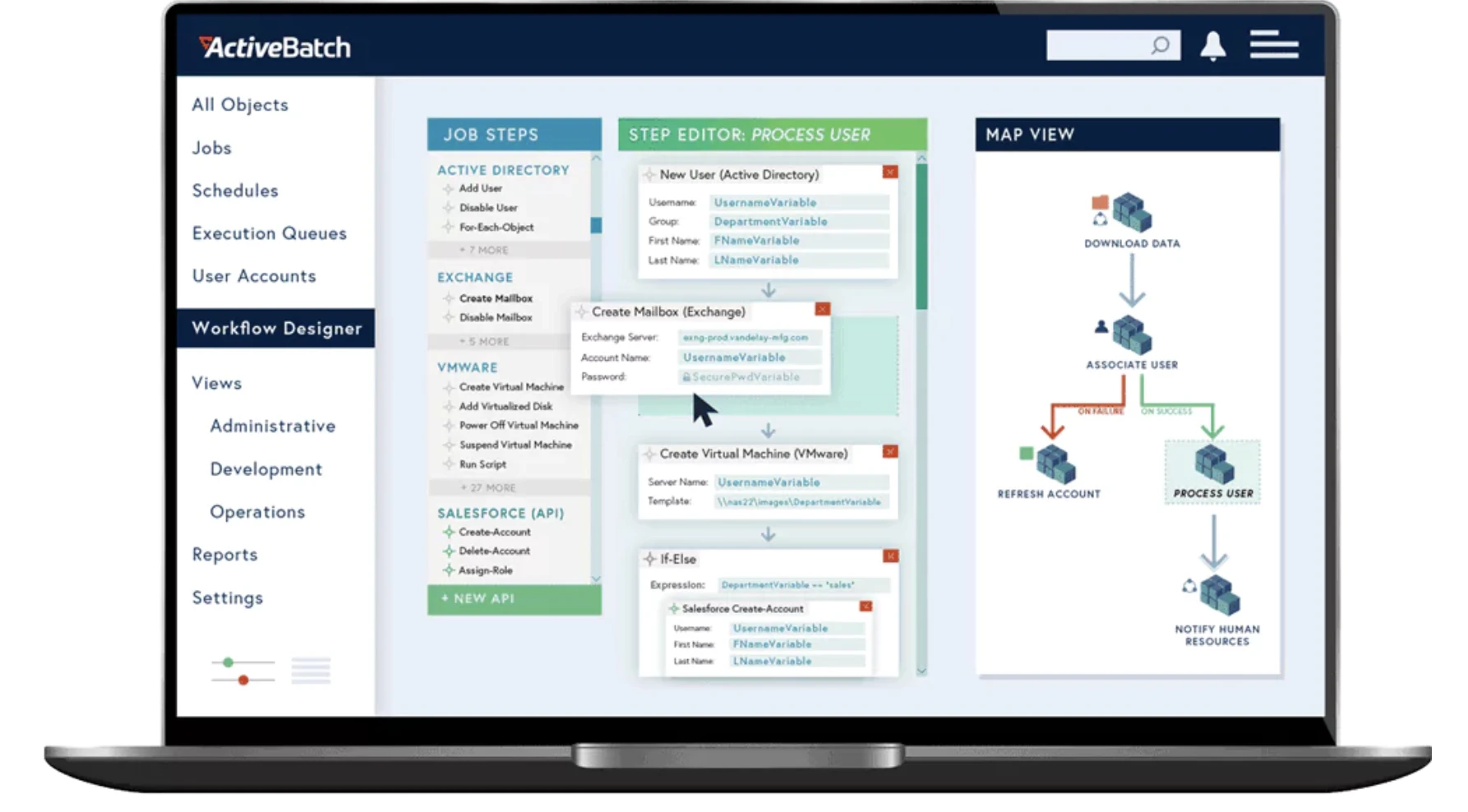
ActiveBatch offers an easy-to-use workload orchestration platform for enterprises with a wide range of integrations
Pros
- Flexibility: Its Flow Control Job Steps feature allows users to control script execution in a flexible manner (e.g. with operators like ForEachRow and If-Branch) based on specific conditions or dependencies.
- Ease of use: ActiveBatch has an intuitive low-code interface that offers drag-and-drop features and doesn’t require high technical skills. It supports various enterprise applications and can perform command-line operations while remaining user-friendly. Existing open-source job scheduling solutions can be incorporated or simplified within the ActiveBatch framework.
- API integrations: Its Super REST API adapter allows users to make AWS API calls using the AWS signature.
- Ease of migration: ActiveBatch supports command-line operations, enabling the integration of existing automation from open-source job schedulers into the ActiveBatch platform.
- Wide-OS support: ActiveBatch supports various platforms, including Windows, Unix, Linux, UNIX, Mac OS, and IBM iSeries AS/400. This makes it a versatile tool for heterogeneous IT environments.
Cons
- Although ActiveBatch supports integration with external tools and systems, this process could be further refined.
3-BMC Control-M
Control-M is versatile, deployable on any cloud, and available as a SaaS offering. It provides native integration with major cloud providers like AWS, Azure, and Google. Additionally, it connects seamlessly with data platforms such as Airflow, Snowflake, and Azure Data Factory, among others. A free trial is available upon request.
Compare top Control-M alternatives
Pros:
- Control-M provides central monitoring, is easy to use, and can integrate with multiple ITIL management tools.
- The file transfer component is valuable
Cons:
- A senior DevOps manager pointed out that the tool has limited API capabilities and integration options with other applications.
- Stability issues are present at times.
4-JAMS Scheduler
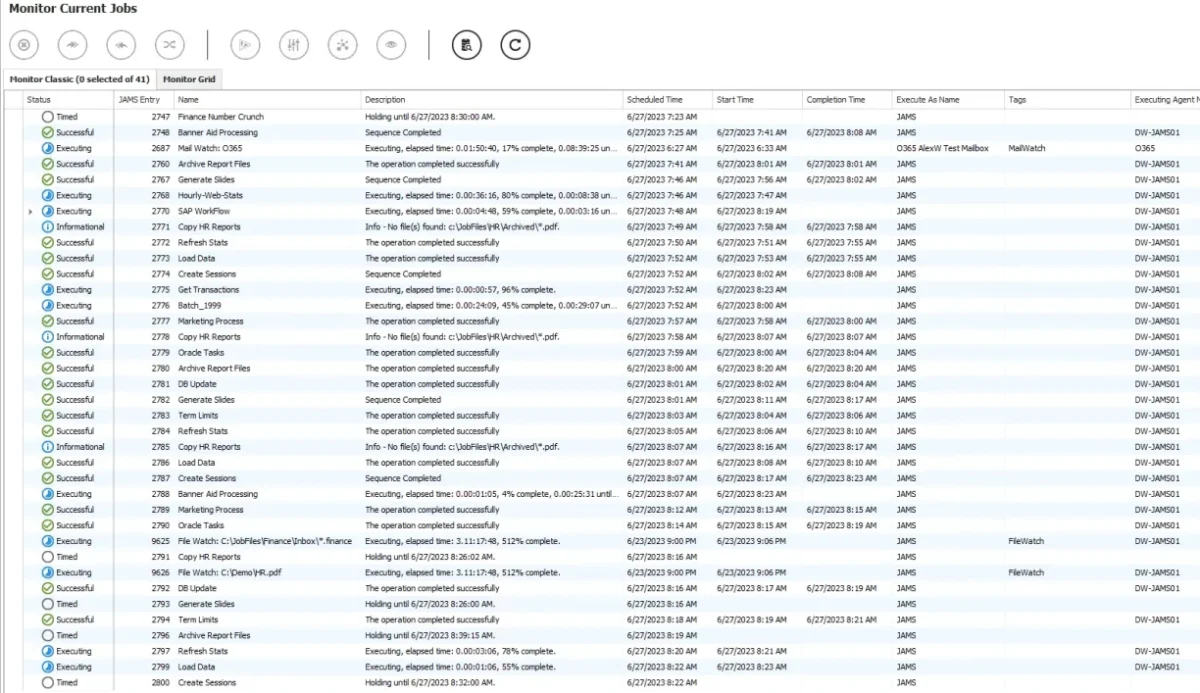
JAMS Scheduler’s functionality extends to the creation, execution, and supervision of job sequences and workflows. It is compatible with multiple platforms, such as Windows, UNIX, Linux, and IBM, as well as SQL Server, Oracle, and SAP applications. .
JAMS Scheduler leverages PowerShell by being constructed on the .NET framework, similar to PowerShell. The JAMS module offers over 50 cmdlets, enabling users to manage, maintain, and administer JAMS directly via PowerShell.
Pros:
- An IT director mentioned that JAMS integrates seamlessly with OpenVMS through a native agent, making it one of the few solutions available that offer this capability.
- The menu is customizable and intuitive.
Cons:
- An analyst at a healthcare organization noted that the intricate configurations of JAMS Scheduler can be difficult for new users to master quickly. This can lead to slower organizational adoption and require additional training and resources.
- Error messages are generic and could be improved.
Compare JAMS Scheduler alternatives based on features, pros and cons.
5-IBM Workload Automation
IBM Workload Automation is an enterprise job scheduling software crafted by IBM. Its purpose is to aid enterprises in managing and automating their intricate workload ecosystems spanning various systems, platforms, and applications.
This software is a unified, scalable answer for scheduling and executing various jobs, tasks, and procedures in distributed settings. It possesses multiple features and functionalities to enhance workload execution, boost efficiency, and help complete vital business operations punctually.
Pros:
- Users report that the tool offers a REST API interface, conveniently front-ended with Swagger, which simplifies development and testing processes. Additionally, the product performs effectively in both data center and cloud environments, including Kubernetes.
- Easy-to-use, simple yet effective user interface.
Cons:
- An assistant system manager observes that IBM Workload Automation lacks integration with third-party tools and has inadequate documentation, limiting the use of its features. They also recommend launching a mobile app for easier and quicker access.
- Working with REST API and getting responses still requires some manual activities, and optimization is required.
More alternatives
Stonebranch is a workload automation tool with functionality that can be categorized under the categories below. You can learn about more alternatives in the pages that explain a few top vendors in detail:
 Add as preferred source
Cite this research
Pick the format that matches where you're publishing. Pasting the link version into your CMS preserves the backlink.
@misc{dilmegani2026,
  author = {Dilmegani, Cem and Şimşek, Hazal},
  title  = {{Compare Top 5 Stonebranch Alternatives}},
  year   = {2026},
  month  = nov,
  howpublished    = {\url{https://aimultiple.com/stonebranch-alternatives}},
  note   = {AIMultiple. Retrieved November 13, 2026}
}Results and timestamps of 6 data points. Download the summary data shown in this article's charts and tables as a ZIP file containing one CSV file.
Want the granular data behind it? Join Premium
Changelog
7 updatesExpanded the description of RunMyJobs by Redwood.
Removed ActiveBatch from the list of Stonebranch alternatives.
Reference Links
Cem's work at AIMultiple has been cited by leading global publications including Business Insider, Forbes, Morning Brew, and Washington Post, global firms like Deloitte and HPE, NGOs like World Economic Forum, and supranational organizations like European Commission. [1], [2], [3], [4], [5]
Throughout his career, Cem served as a tech consultant, tech buyer and tech entrepreneur. He advised enterprises on their technology decisions at McKinsey & Company and Altman Solon for more than a decade. He also published a McKinsey report on digitalization.
He led technology strategy and procurement of a telco while reporting to the CEO. He has also led commercial growth of deep tech company Hypatos that reached a 7 digit annual recurring revenue and a 9 digit valuation from 0 within 2 years. Cem's work in Hypatos was covered by leading technology publications like TechCrunch and Business Insider.
Cem regularly speaks at international technology conferences. He graduated from Bogazici University as a computer engineer and holds an MBA from Columbia Business School.








Be the first to comment
Your email address will not be published. All fields are required. Comments are left in their original language.