


Top 7 Windows Job Scheduling Software

At AIMultiple, we benchmark and constantly use job scheduling tools. For example, we use crontab to orchestrate ~20 cron jobs that run every minute and ~30 less frequent jobs.
Based on our experience, we picked the top Windows job scheduling software based on their features, pricing, and market presence. Follow the links below to see our rationale.
Businesses choosing a job scheduling tool for Windows should consider:
- Compatibility with the Windows environment, including the version and architecture.
- The tools’ capability to integrate with existing systems, applications, and Windows services, such as Powershell, and Windows event log.
- Licensing fees, support costs, and any additional hardware or software requirements to ensure that the tool fits within their budget.
- Security features such as encryption, user authentication, and role-based access.
Comparison of Windows job scheduling software
*Ratings are based on B2B user reviews. Subscribers are listed at the top with their links. Then, number of reviews are used to rank software in the table above.
To understand each column and identify further criteria you can use in your evaluation, please see Windows job scheduling software features.
Selection criteria for top products
- The vendors we analyze should have at least one Fortune 500 reference.
- We focus on companies with 100+ employees.
Analysis of top Windows job schedulers
Stonebranch provides an Xpress Conversion Tool (XCT) that automatically converts and optimizes Windows Task Scheduler tasks for centralized, enterprise-wide management and automation.
Stonebranch integrates with platforms like Informatica Power Scheduler and provides ready-to-use integrations, custom development options, and integration templates via the Stonebranch Integration Hub. The platform also includes visual dashboards and reporting tools for monitoring and managing service level agreements (SLAs).
Check their offerings below:
RunMyJobs is a SaaS-deployed, full-stack automation platform that allows users to connect to diverse environments and enterprise applications, such as SAP and Oracle.
RunMyJobs provides SaaS encryption and security policies certified for with stringent security standards like ISO 27001 and SOC 2. It supports more than 25 scripting languages and offers customizable workflows. It also supports built-in authentication and third-party SSO/SAML integrations, such as Microsoft Azure AD.
Check the video below for their offerings:
ActiveBatch supports PowerShell scripts within workflows, enabling parameter passing and direct capture of script output for downstream tasks.
Integrations withWindows Task Scheduler, SQL Server Scheduling, Microsoft System Center, and more are offered by ActiveBatch.It can automate the management of Windows Services, including starting, stopping, and monitoring services as part of automated workflows.
The solution supports running workloads on Windows, Mac OS, Linux, UNIX, OpenVMS, and Solaris. It also offers REST API and web service capabilities, making connecting with and orchestrating third-party applications and services accessible. The API supports AWS signature authentication, enabling AWS API calls with AWS signatures, and allows JSON responses to be matched and returned as variables.
Read for an in-depth review of ActiveBatch.
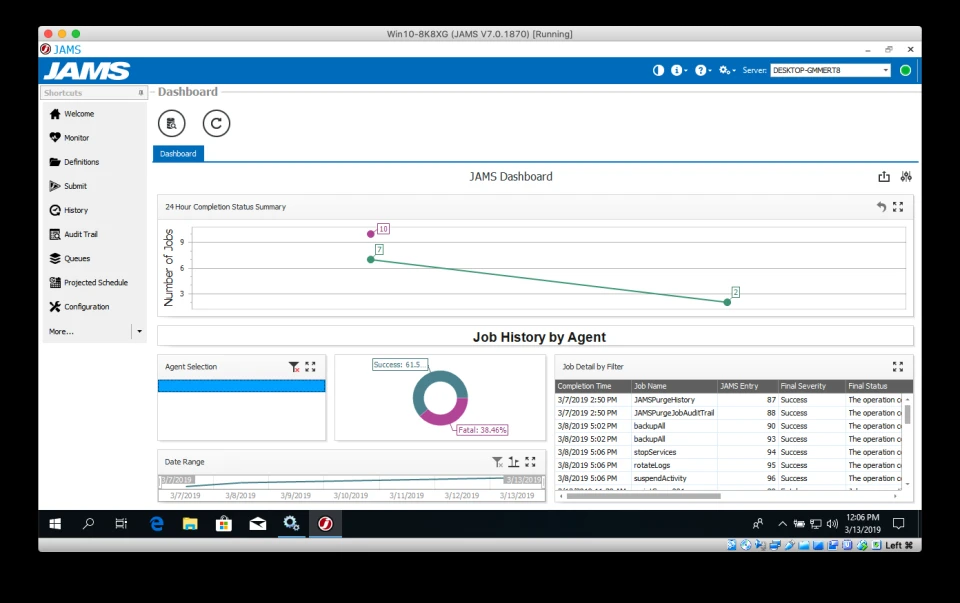
JAMS Scheduler is a .NET-based automation platform that includes 50+ PowerShell cmdlets for managing jobs, schedules, and workflows.
JAMS serves as a centralized solution for job scheduling and workflow management, allowing users to oversee, control, and audit processes across multiple systems. It ensures high availability, load balancing, and detailed logging to facilitate efficient troubleshooting, making it well-suited for complex IT environments.
CA Workload Automation, developed by Broadcom, is an enterprise-grade platform for scheduling and automating business processes and IT workloads.
AutoSys supports event-driven job scheduling, allowing jobs to be triggered based on various events such as the status of Windows services, specific text strings in files, or database events.
VisualCron is a task automation and job scheduler for Windows. . It supports:
- PowerShell automation: Execute and manage PowerShell scripts directly within VisualCron.
- Batch file execution: Automate the running of batch files to streamline repetitive tasks
VisualCron runs as a Windows service, ensuring tasks execute even when no user is logged on. This integration allows for operation and management within a Windows environment. See our experience with Visualcron to get a better idea of its user interface and capabilities.
Windows Task Scheduler
The built-in Windows Task Scheduler allows users to automate tasks, run programs or scripts, and send notifications at specific times or under certain conditions.
While Windows Task Scheduler offers robust scheduling and automation features, some users may find itsinterface and options complex. It is a free tool without any licensing fee on this list.
In the video below, you can see a demonstration of using the Windows Task Scheduler.
Windows job scheduling software features
When evaluating Windows job scheduling software, prioritize features that reduce manual work, improve reliability, and streamline task workflows.
Moreover, while WLA and job scheduling tools can also be utilized to orchestrate complex file transfers involving multiple stakeholders, businesses may better useMFT solutions if they aim to orchestrate file transfers.
Users should look for features that improve productivity, such as advanced scheduling options, cross-platform workflows, integration with PowerShell scripts, and the ability to manage critical jobs. Additionally, features like SLA monitoring, real-time alerts, and automation of processes are critical for ensuring seamless workflow management and minimizing downtime.
Public product features
1- Platform compatibility
Support for operating systems (Windows, macOS, Linux, and other Oses) affects whether a tool can be deployed in your environment.
Organizations should ensure that the workload automation tool they choose supports the operating system(s) used in their infrastructure to ensure seamless integration and functionality.
2- Deployment
Workload automation tools can be deployed:
- On-premise: It involves hosting the software within the organization’s infrastructure.
- Cloud: It utilizes cloud service providers for hosting and management.
- Hybrid-cloud: It combines both on-premise and cloud deployment models. The choice depends on factors such as security, infrastructure, scalability, and budget.
Choose based on security, infrastructure, scalability, and budget considerations.
3- Low-code interface
A simple, intuitive low-code interface lowers the technical barrier to setting up, managing, and monitoring scheduled tasks.
Features that are not publicly shared by vendors
Vendors often claim functionality beyond marketing descriptions. For example, there could be tens of different integrations that enable flexible scheduling. Buyers should evaluate whether software fulfills their specific requirements in practice.
4-Flexible scheduling options
The software should allow you to schedule tasks with various triggers, such as specific times, dates, intervals, or event-based triggers (e.g., file modifications and system events).
5-Scalability
As organizations grow, the job scheduling software should be able to scale with their needs, handling increased workloads without sacrificing performance.
6-Workflow management
The software should support creating and managing complex workflows involving multiple tasks, dependencies, and conditions.
7-Comprehensive reporting and analytics
Detailed reporting and analytics features can help businesses monitor scheduled task performance, identify bottlenecks, and optimize workflows. The software should have a built-in notification and alert system to keep users informed about the status of scheduled tasks, including any errors or warnings.
8-Access control and security
The software should include robust access control and security features to ensure authorized users can manage and modify scheduled tasks.
9-API and scripting support
The software should offer API and scripting capabilities, enabling users to create custom integrations and extend the functionality of the scheduler to suit their specific requirements
Frequently Asked Questions (FAQ) on Windows Job Scheduling Software
FAQs
A multi-functional task scheduler offers more flexibility and capabilities than a basic task scheduler. It can manage complex workflows, execute batch files, integrate with various operating systems, and provide scalability as your business needs grow. Tools like Stonebranch and JAMS offer robust integration capabilities and are highly scalable for enterprise use.
While Windows Task Scheduler is a free, built-in tool for automating tasks on Windows, third-party job scheduling software provides enhanced features like better scheduling options, automation of batch processes, load balancing, and integration with other remote systems. These tools are often designed for enterprise job scheduling and can handle larger workloads and more complex automation journeys.
Scheduling batch jobs involves automating tasks that need to run in sequence or in parallel, such as processing large sets of data or managing repetitive jobs. Job scheduling software like ActiveBatch or VisualCron can help you create scheduled tasks for these batch files, offering support for triggers, dependencies, and file transfers between multiple platforms.
Automation software simplifies business processes by streamlining tasks like data transfers, backups, and report generation. It ensures that key jobs and automated processes are executed on time, without human intervention, improving operational efficiency. Whether through batch processes or file transfers, automation reduces manual errors and enhances overall productivity.
Many job schedulers, like JAMS and ActiveBatch, offer robust PowerShell script support, enabling users to automate a wide variety of tasks using scripts. PowerShell scripts can be integrated into job schedules, allowing for greater flexibility in executing commands, managing systems, and automating critical jobs.
Scheduling software allows organizations to streamline and optimize their task management by automating the execution of repetitive tasks. It helps manage dependencies, prioritize tasks, and ensures that no job is missed, improving efficiency and reducing the chances of human error.
Yes, many modern job scheduling solutions, such as ActiveBatch and Stonebranch, support cross-platform workflows, enabling the automation of tasks across various operating systems like Windows, Linux, and macOS. This ensures seamless operations and reduces manual intervention when working in a multi-OS environment.
 Add as preferred source
Further reading
If you have some workload automation tools in your mind or if you want to see the alternatives, you can read our articles:
You can review other tools that can be applicable for windows job scheduling by skimming out these data-driven benchmarks and lists:
Cite this research
Pick the format that matches where you're publishing. Pasting the link version into your CMS preserves the backlink.
@misc{dilmegani2026,
  author = {Dilmegani, Cem and Şimşek, Hazal},
  title  = {{Top 7 Windows Job Scheduling Software}},
  year   = {2026},
  month  = jun,
  howpublished    = {\url{https://aimultiple.com/windows-job-scheduling-software}},
  note   = {AIMultiple. Retrieved June 25, 2026}
}Results and timestamps of 7 data points. Download the summary data shown in this article's charts and tables as a ZIP file containing one CSV file.
Want the granular data behind it? Join Premium
Changelog
10 updatesReplaced ActiveBatch's description with Stonebranch's description in the Analysis of top Windows job schedulers section.
Cem's work at AIMultiple has been cited by leading global publications including Business Insider, Forbes, Morning Brew, and Washington Post, global firms like Deloitte and HPE, NGOs like World Economic Forum, and supranational organizations like European Commission. [1], [2], [3], [4], [5]
Throughout his career, Cem served as a tech consultant, tech buyer and tech entrepreneur. He advised enterprises on their technology decisions at McKinsey & Company and Altman Solon for more than a decade. He also published a McKinsey report on digitalization.
He led technology strategy and procurement of a telco while reporting to the CEO. He has also led commercial growth of deep tech company Hypatos that reached a 7 digit annual recurring revenue and a 9 digit valuation from 0 within 2 years. Cem's work in Hypatos was covered by leading technology publications like TechCrunch and Business Insider.
Cem regularly speaks at international technology conferences. He graduated from Bogazici University as a computer engineer and holds an MBA from Columbia Business School.















Be the first to comment
Your email address will not be published. All fields are required. Comments are left in their original language.