


Top 10 ZTNA Solutions: Ratings, Size & Pricing

With around 22 million U.S. adults (~14% of the total employed population) working from home full-time,1 secure remote access is critical. Zero-trust network access (ZTNA) solutions address this need by ensuring that only authenticated, authorized users have access to sensitive resources. The ZTNA market is now valued at ~$30B in 2026 and is projected to reach ~$80B by 2035.2
See top 10 ZTNA solutions with their features and use cases:
Comparison of top 10 ZTNA solutions
Tools | User Rating* | Employee Size** | Free Version | Pricing*** | Category |
|---|---|---|---|---|---|
 Palo Alto Networks Prisma Access | 4.3 based on 73 reviews | 16,348 | ✕ | N/A | specialized product |
 Fortinet FortiClient | 4.3 based on 492 reviews | 15,989 | ✕ | N/A | unified platform |
 Zscaler Private Access | 4.5 based on 120 reviews | 8,942 | ✕ | N/A | unified platform |
 Cloudflare SASE Platform | 4.6 based on 1,081 reviews | 4,773 | ✓ | $7 | unified platform |
 Forcepoint One | 4.4 based on 41 reviews | 1,939 | ✕ | N/A | unified platform |
 Absolute Secure Access | 4.6 based on 334 reviews | 1,050 | ✕ | N/A | unified platform |
 Twingate | 4.8 based on 81 reviews | 78 | ✓ | $5 | specialized product |
 Ivanti Neurons | 4.5 based on38 reviews | 8 | ✕ | N/A | specialized product |
 Nord Layer ZTNA | 4.3 based on 126 reviews | 4 | ✕ | $8 | unified platform |
 Google Chrome Enterprise Premium | 4.3 based on 2 reviews | Not publicly available | ✕ | $6 | specialized product |
*Based on data from B2B review leading platforms
**Based on data from LinkedIn
***Proof of Concept (POC) option may be available for each product upon request by contacting the vendor. Price of the basic option per user per month.
Ranking: Products are ranked based on their total number of employees except for AIMultiple’s benchmarking services subscribers ranked at the top.
Inclusion: Cybersecurity products uses zero trust network access principles are included in the list. The products with zero user review in B2B review platforms are excluded.
1. Palo Alto Networks Prisma Access
Resource: Palo Alto Networks3
Palo Alto Networks offers a cloud-delivered ZTNA solution through its Prisma Access platform. Key features include:
- Secure web gateway (SWG): Provides secure access to the web by filtering and monitoring web traffic for potential threats such as malware, phishing attacks, and inappropriate content.
- Cloud access security broker (CASB): Provides visibility into cloud usage, enforces security policies, detects and responds to cloud-related threats, and ensures data protection and compliance across cloud environments.
- Firewall as a service (FWaaS): Applies Advanced Threat Prevention, URL Filtering, DNS Security, and sandboxing to traffic from remote locations.
- ZTNA-C Multi-interface support for distributed applications (as of February 2026): Enable NGFW-based ZTNA connectors to discover/enable access across multiple interfaces/VLANs/virtual routers, with dynamic path monitoring and routing/NAT automation.4
Differentiating feature(s):
- ZTNA 2.0: Palo Alto’s own label. It contrasts Prisma Access with older ZTNA tools that identify apps by IP address and port and stop checking traffic after granting access.
- Autonomous digital experience management (ADEM): Monitors network traffic paths and offers automated remediation, including end-user self-service.
Check before buying: Prisma Access sells three base editions (Secure Web Gateway, ZTNA, and Enterprise), and ZTNA Connector is a separate add-on license.5
2. Fortinet FortiClient
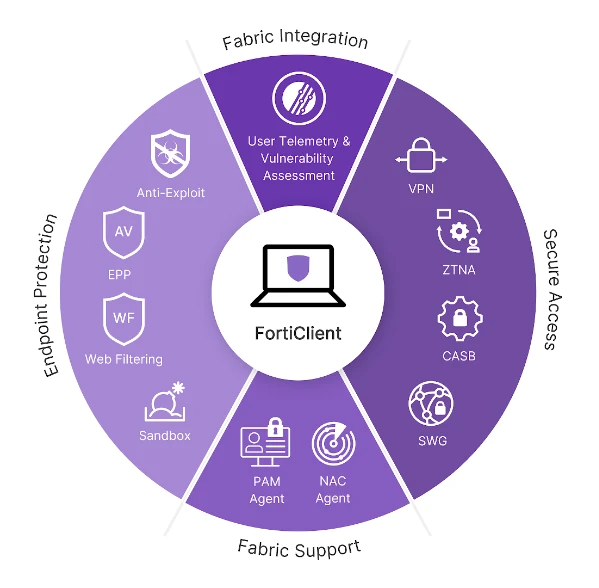
Source: Fortinet6
FortiClient is the endpoint agent in Fortinet’s ZTNA setup. FortiClient EMS issues each device a certificate, and a FortiGate or FortiSASE acts as the gateway, so the product suits companies that already run Fortinet firewalls. The product features include:
- Zero trust agent with MFA: It supports ZTNA tunnels, single sign-on (SSO), device posture checks, and multi-factor authentication (MFA).
- Central management via EMS or FortiClient Cloud: Admins deploy and upgrade endpoint software remotely and see each endpoint’s status.
- Central logging and reporting: Centralized logging through FortiSIEM or other SIEM products simplifies compliance reporting and security analysis.
- Split-tunneling: Works on ZTNA and VPN tunnels, so only selected traffic goes through the tunnel.
- Web Filtering: Blocks or allows web traffic by category.
Check before buying: ZTNA requires FortiClient EMS as the certificate authority.7 Fortinet’s FortiSASE ZTNA design does not support an existing on-premises EMS or FortiClient Cloud instance.8
3. Zscaler Private Access
Source: Zscaler9
Zscaler Private Access (ZPA) connects users to private apps through Zscaler’s cloud, with no inbound ports open on the app network. The product offers features such as:
- Least-privileged access: ZPA connects authorized users only to approved resources and keeps apps hidden from the internet.
- Global edge presence: Brokers access through more than 160 points of presence, so the app network needs no inbound gateway appliance.9
- Workload and device access: Connects workloads and OT/IT devices to private apps, in addition to users.
Differentiating feature(s):
- Full inline inspection: App Connector inspects private app traffic inline for web attacks, and integrated DLP covers private apps.
- Clientless access: Contractors and BYOD users reach apps from a web browser without Zscaler Client Connector.
Check before buying: App Connectors need only outbound TCP 443, but that traffic must not pass through TLS inspection.10 The on-premises Private Service Edge option needs inbound TCP 443.11
4. Cloudflare SASE Platform
Source: Cloudflare12
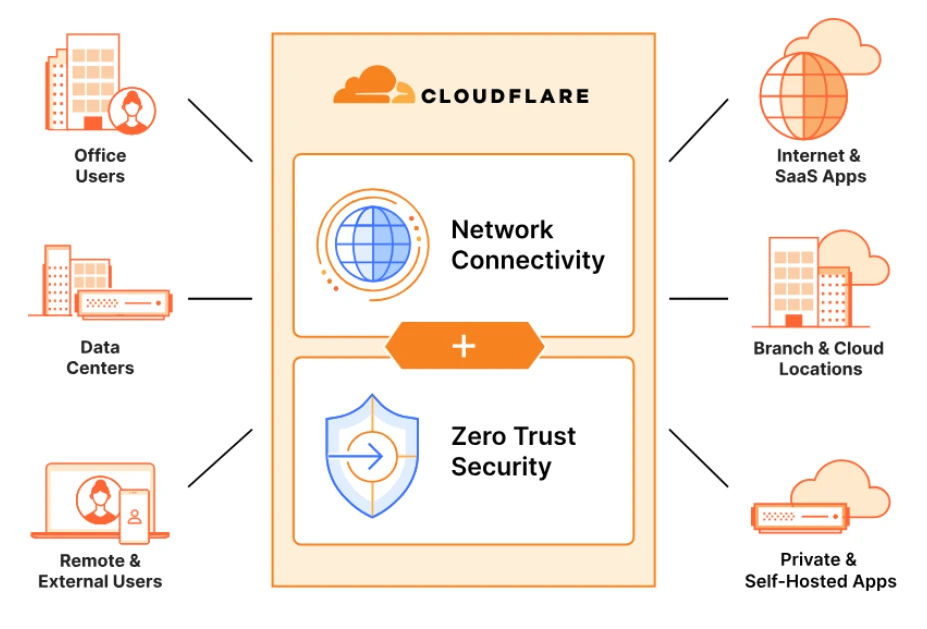
Cloudflare Access is the ZTNA product in Cloudflare One, the company’s SASE platform. Cloudflare Tunnel connects private apps through outbound-only connections, and web apps plus browser-based SSH and VNC work without a client. The platform also includes:
- AI-SPM: provides AI usage in traffic monitoring while protecting against Shadow AI.13
- Secure web gateway (SWG): Secures and inspects corporate internet traffic, protecting against phishing, ransomware, and other online threats.
- Magic WAN: Connects and secures branch offices, headquarters, data centers, cloud VPCs, and SD-WANs using Cloudflare’s network.
- Magic Firewall: Enforces consistent security policies across the WAN, without the need for backhauling traffic or creating choke points.
- Protection against email attacks: Cloudflare’s products include features to protect against email attacks such as phishing, business email compromise (BEC), and email supply chain attacks.
- Data loss prevention (DLP): Inspect HTTP/S traffic for sensitive data and prevent exfiltration with allow or block policies.
Differentiating feature(s):
- Remote browser isolation (RBI): Runs web code away from the endpoint. RBI is an add-on paid plans and is not listed on the Free plan.
Check before buying: The Free plan covers up to 50 users and keeps logs up to 24 hours. Pay-as-you-go costs $7 per user per month and keeps logs up to 30 days, but limits DLP to predefined profiles. Full DLP is an add-on contract plans.14
5. Forcepoint One
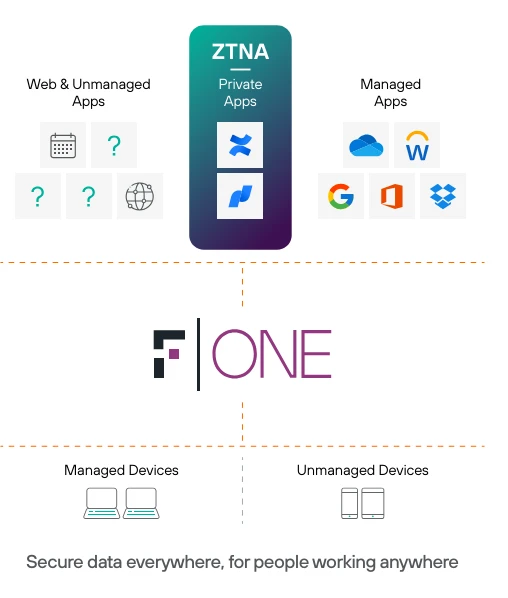
Source: Forcepoint15
Forcepoint Data Security Cloud SSE combines ZTNA, CASB, and SWG, and a connector inside your network links internal apps to Forcepoint’s cloud. Key features include:
- Data loss prevention: Applies inline DLP controls to the traffic it proxies to internal apps.
Check before buying: Agentless ZTNA covers only HTTP and HTTPS apps. SSH, RDP, SMB, and SFTP access needs SmartEdge Agent 1.6.1 or later on the user’s device.16
6. Absolute Secure Access
Absolute Secure Access is built for mobile and hybrid workers on unstable networks. Its client enforces policy on the endpoint and runs on Windows, macOS, iOS, and Android. Features of Absolute Secure Access include:
- Resilient connectivity: Keeps VPN and ZTNA sessions running when a device moves between Wi-Fi and cellular networks, and reaches apps in public cloud, private data centers, and on-premises environments.
- Dynamic policy enforcement: Applies the same rules on any network because the client enforces them.
- Diagnostics: Shows network and device health in real time for troubleshooting.
- Single platform: Combines VPN, ZTNA, secure web gateway (SWG), and digital experience monitoring (DEM).
Differentiating feature(s):
- UEBA: Alerts on suspicious behavior and anomalies using more than 50 detectors.
Check before buying: ZTNA comes with the Absolute Edge package, where the Secure Web Gateway is optional. Confirm which package a quote covers.17
7. Twingate
Twingate replaces VPNs with four components: Controller, Client, Connector, and Relay. Connectors sit behind the firewall and keep outbound connections to a Relay. Key features of Twingate’s solution include:
- Separation of Concerns: Twingate’s architecture ensures that no single component can independently authorize access. Multiple components verify each access request, adding layers of security.
- Four-Component Architecture:
- Controller: Central coordination hub, handling configuration, user authentication delegation, and issuing access control lists (ACLs).
- Client: Installed on user devices, it acts as a proxy for authentication and authorization, managing network requests and secure connections.
- Connector: Registers with the Controller, forwards authorized traffic, and ensures only authenticated users can access designated resources.
- Relay: Facilitates secure data flow between Clients and Connectors.
- Secure Traffic Encryption: Uses certificate-pinned TLS tunnels within the internal network to ensure all data transmissions are encrypted and secure, preventing unauthorized interception.
Check before buying: Starter is free for up to 5 users and 50 resources. Teams costs $5 per user per month for up to 100 users, and Business costs $10 for up to 500. Larger deployments need a custom Enterprise contract.18
8. Ivanti Neurons
Resource: Ivanti19
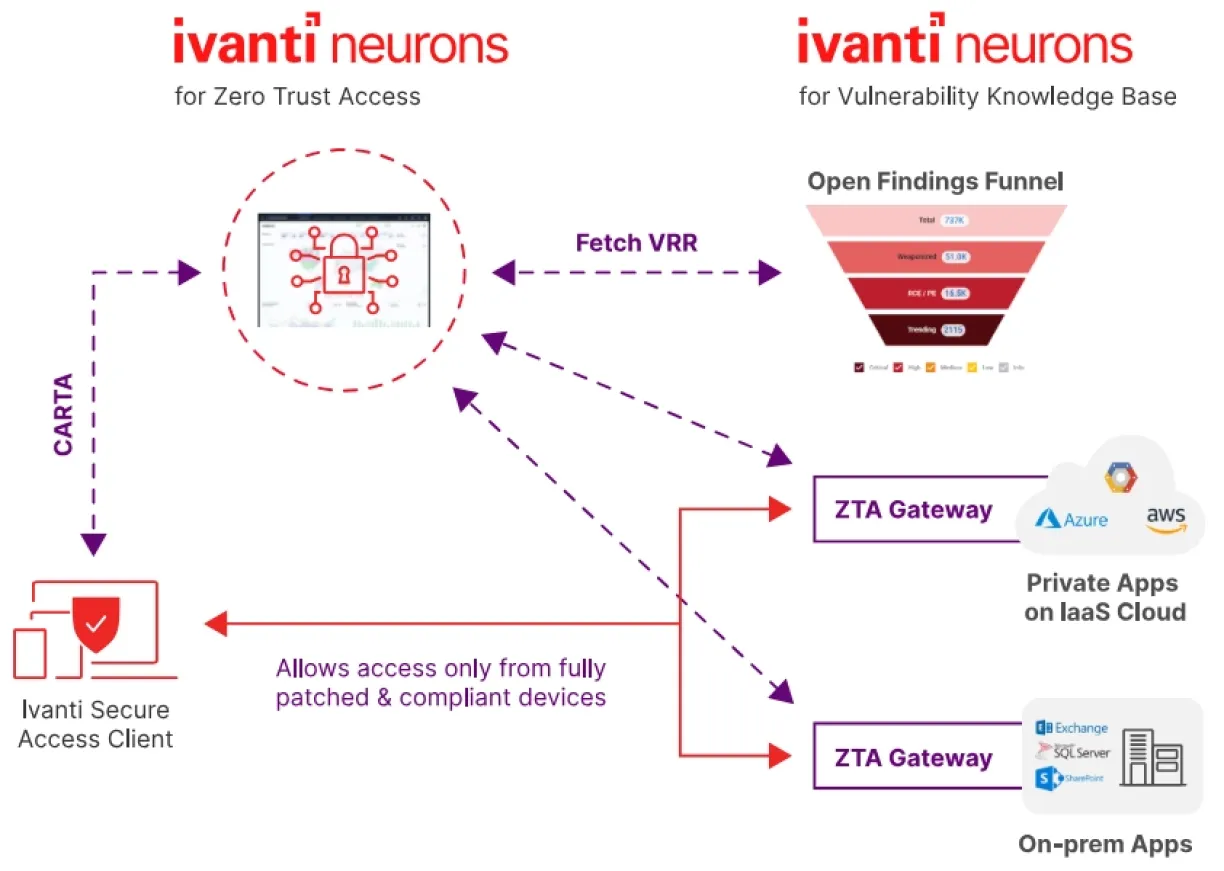
Ivanti Neurons for Zero Trust Access is a cloud-hosted controller paired with gateways you deploy as virtual machines on Azure, AWS, or VMware vSphere. Users connect through Ivanti Secure Access Client. Key features of the product include:
- End-to-end access policy: Applies the same access policy to remote and on-premises users.
- Single-pane-of-glass visibility: Reports on users, managed and unmanaged devices, applications, and infrastructure from one console.
- Adaptive SSO: Integrates with SAML 2.0 for single sign-on (SSO) to supported applications.
- Intelligent traffic steering: Routes each user to the geographically closest gateway in a group.
- Endpoint compliance: Authenticates users and devices against policies to minimize malware risks and ensure security.
- Application discovery: Shows application usage so admins can write access policies from it.
- User behavior analytics: Uses analytics to detect anomalies in user behavior.
- DLP and AV: Prevents data loss and exfiltration by monitoring data communications and safeguarding end-user devices.
Check before buying: Users enroll devices through Ivanti Secure Access Client, so confirm how contractors without your client would connect.20
 Add as preferred source
9. Nord Layer ZTNA
NordLayer sells ZTNA through Virtual Private Gateways, which admins configure from its Control Panel across 40+ service locations. Key features of Nord Layer ZTNA solution include:
- Identity and context-based access: Supports SSO, 2FA, and biometric authentication, and detects jailbroken devices.
- Network segmentation: Enforces segmentation up to Layer 7, at the app level.
Check before buying: The $8 Lite plan excludes device posture checks and the cloud firewall. Premium, at $14 per user per month, includes both. Every plan requires at least 5 users, and Core and Premium add a dedicated-IP server at $40 per month.21
10. Google Chrome Enterprise Premium (formerly BeyondCorp Enterprise)
Source: Google Cloud22
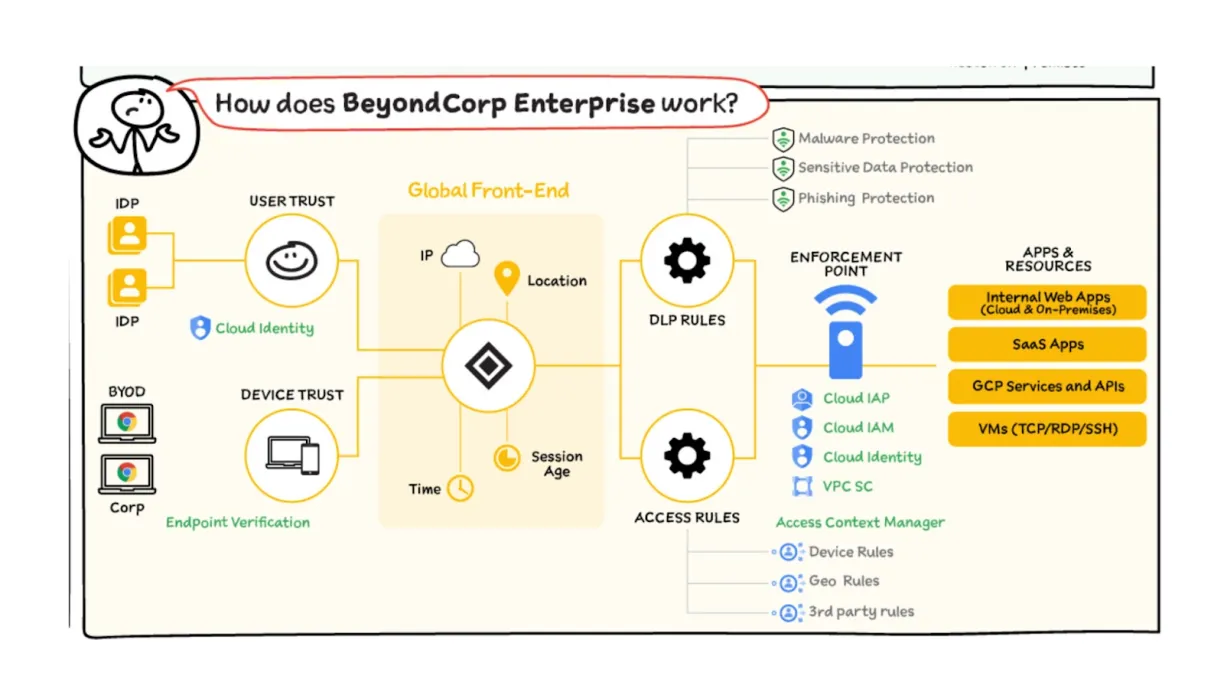
Google now sells BeyondCorp Enterprise as Chrome Enterprise Premium, which builds on Chrome Enterprise Core. It enforces access based on user identity, device security posture, and location. Its features include:
- Network-agnostic access: Access to services is not determined by the user’s network location. Whether an employee is on a corporate network, a home network, or a public network, access controls are consistently applied.
- Context-aware access: Access decisions are based on a combination of user identity and the security posture of their device, taking into account factors such as device health, user role, and location.
- Data loss prevention: Adds DLP controls on top of Chrome Enterprise Core.
Check before buying: Google lists $6 per user per month after a 60-day trial for up to 5,000 users.23 Its context-aware access covers SaaS, Google Cloud, and private web apps via Chrome, so confirm coverage for thick-client apps.24
Zero Trust policy governance alongside ZTNA
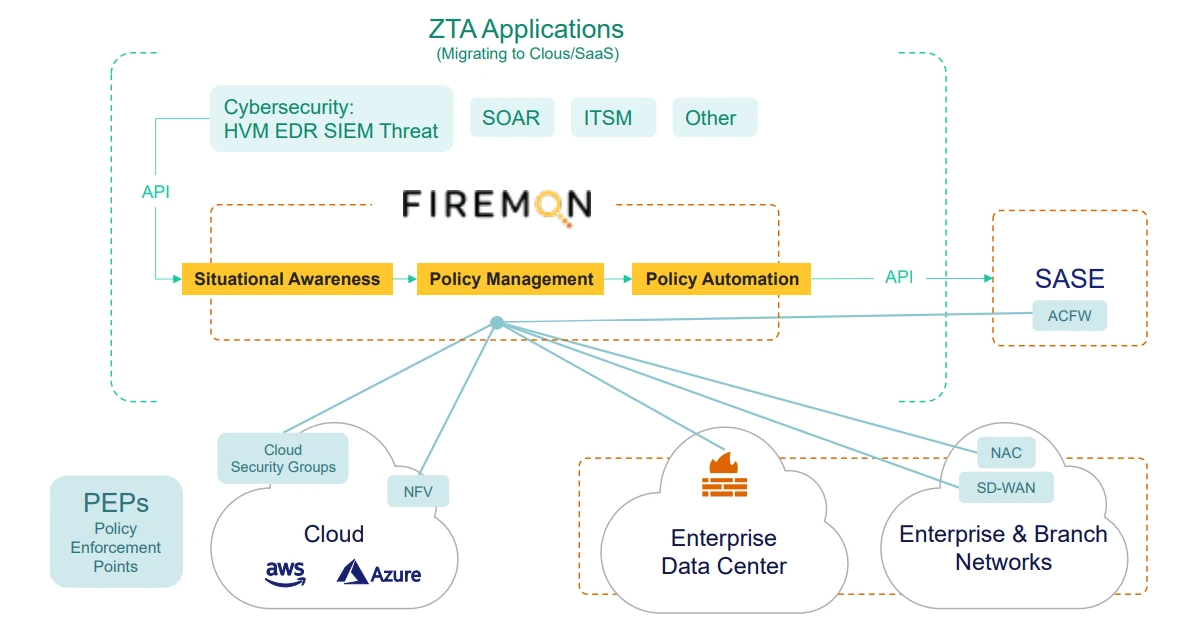
ZTNA controls which users reach which applications. Firewalls, cloud security groups, and segmentation platforms keep their own rules, and those rules also decide which systems can reach each other. Network security policy management (NSPM) platforms govern these rules across vendors.
FireMon is an NSPM platform and does not provide ZTNA enforcement, so we list it here and leave it out of the ranking above. FireMon Security Manager puts firewall, cloud, SASE, and segmentation policy into one model and works with the enforcement tools already in place. Its supported devices include Zscaler Internet Access and single-tenant Palo Alto Prisma Access.25
Key features:
- Automation and Visibility: Detects rule changes in real time. The Policy Planner and Policy Optimizer add-ons automate rule changes and reviews.
- Scalable Multi-Vendor Support: Normalizes policy from 120+ firewall and cloud platforms. FireMon says the platform is certified for over 15,000 devices and 25 million rules.
- Continuous Compliance: Checks proposed changes against compliance requirements before deployment.
- Risk analysis: The Risk Analyzer add-on combines Qualys, Rapid7, and Tenable scan data with network policy, runs attack simulations, and shows which vulnerabilities are reachable.
Choose FireMon Security Manager for zero trust policy governance
Visit WebsiteKey use cases across ZTNA platforms
Hybrid workforce security
Absolute Secure Access keeps VPN and ZTNA sessions running when a device moves between Wi-Fi and cellular networks. Teams with FortiGate firewalls can use them as ZTNA gateways with FortiClient.
Tools/platforms: Absolute Secure Access, Fortinet FortiClient.
Third-party & contractor access
Contractors often cannot install your agent. Zscaler and Cloudflare offer clientless browser access, and Cloudflare adds browser-based SSH and VNC. Forcepoint’s agentless mode covers HTTP and HTTPS apps only.
Tools/platforms: Zscaler Private Access, Cloudflare SASE Platform, Forcepoint One.
Endpoint compliance & posture management
NordLayer’s $8 Lite plan has no device posture checks. FortiClient reports posture through ZTNA tags, and Google’s access policies use device posture and signals from CrowdStrike and Tanium.
Tools/platforms: NordLayer, Fortinet FortiClient, Google Chrome Enterprise Premium.
Regulatory compliance & audit readiness
Log retention limits what an auditor can see. Cloudflare keeps logs up to 24 hours on Free, 30 days on pay-as-you-go, and 6 months on contract. Ask other vendors for the same number before buying.
Tools/platforms: Cloudflare SASE Platform.
Data loss prevention (DLP) & threat mitigation
Zscaler integrates DLP for private apps, and Forcepoint applies inline DLP to proxied ZTNA traffic. Cloudflare limits DLP to predefined profiles below its contract tier, where full DLP is an add-on.
Tools/platforms: Zscaler Private Access, Forcepoint One, Cloudflare SASE Platform.
Modern browser & SaaS security
Google builds access controls into Chrome, and Palo Alto offers Prisma Browser. Cloudflare and Zscaler offer remote browser isolation, which Cloudflare sells as an add-on.
Tools/platforms: Google Chrome Enterprise Premium, Palo Alto Prisma Access, Cloudflare SASE Platform, Zscaler Private Access.
FAQs
ZTNA helps companies support flexible work without opening up their whole network. It connects each user only to what they need, no matter where they are. This makes it easier to manage access and reduce risk in a remote work setup.
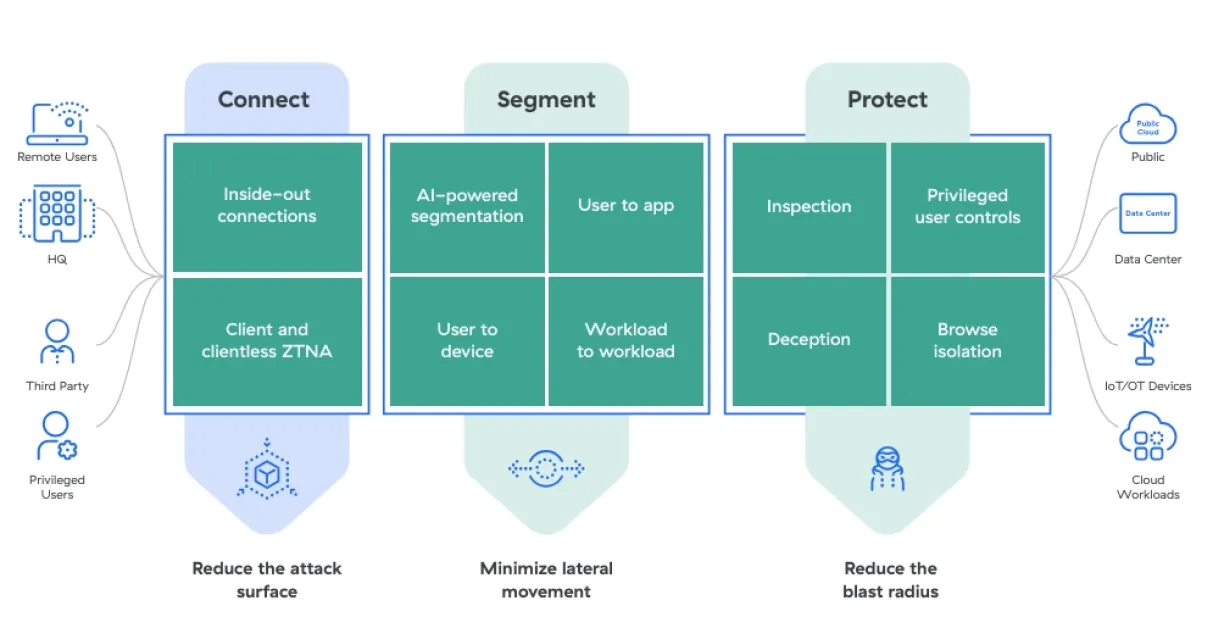
With ZTNA, access is established after the user has been authenticated to the ZTNA service. The ZTNA service then provisions access to the application on the user’s behalf through a secure, encrypted tunnel. ZTNA solutions create individual user identity- and context-based boundaries around network assets or groups of assets.
ZTNA is essential for businesses with distributed workplaces and complex supply chains. It provides protection for various attack surfaces, including personal and corporate devices, on-premises and public cloud applications, and remote and on-site employees. ZTNA ensures that only authorized users and devices gain access to specific resources, reducing the risk of unauthorized access and data breaches.
It also enables productivity through remote and hybrid work models while ensuring secure connections and granular access controls based on identity and context. Additionally, ZTNA verifies the identities of third parties and their devices, preventing unauthorized access and mitigating risks associated with compromised devices and unauthorized users.
SDP (software-defined perimeter) and ZTNA are security frameworks designed to provide secure access to network resources. While they share similarities, there are key differences.
SDP focuses on creating secure perimeters around individual resources, using authentication, encryption, and dynamic access policies to ensure only authorized users are granted access. ZTNA, however, treats all users requesting access as potentially malicious, requiring rigorous authentication and authorization checks before granting access.
SDP typically secures individual resources like applications or servers, while ZTNA secures an entire network, including all resources, devices, and users. Implementing SDP is more complex and resource-intensive, requiring management of individual perimeters. In contrast, ZTNA is more streamlined, allowing zero trust policies across the entire network via a single platform.
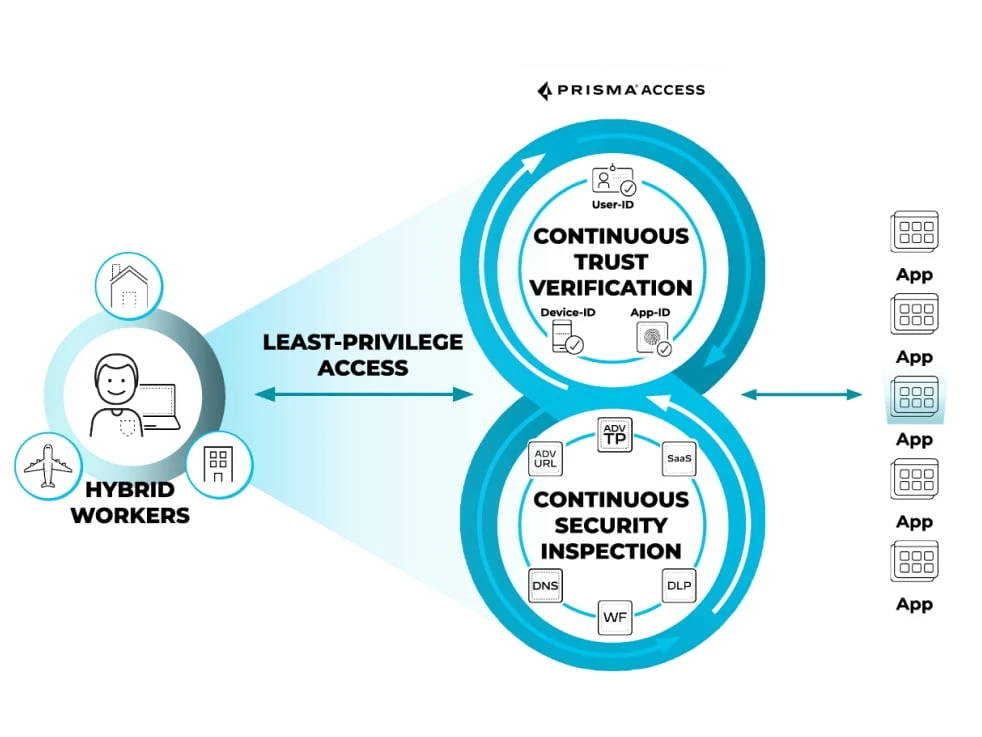
ZTNA 2.0 improves on ZTNA 1.0 by offering continuous security inspection and trust verification, instead of one-time checks. It enables real least-privileged access at the app and sub-app level, secures all data and apps (including SaaS and legacy apps), and is designed for today’s remote and hybrid work environments. Unlike ZTNA 1.0, it adapts to changing risks and ensures ongoing protection.
Further Reading
Cite this research
Pick the format that matches where you're publishing. Pasting the link version into your CMS preserves the backlink.
@misc{hafa2026,
  author = {Hafa, Adil and Arslan, Ezgi},
  title  = {{Top 10 ZTNA Solutions: Ratings, Size & Pricing}},
  year   = {2026},
  month  = nov,
  howpublished    = {\url{https://aimultiple.com/ztna-solutions}},
  note   = {AIMultiple. Retrieved November 4, 2026}
}Results and timestamps of 10 data points. Download the summary data shown in this article's charts and tables as a ZIP file containing one CSV file.
Want the granular data behind it? Join Premium
Changelog
5 updatesAdded ZTNA market size data (~$30B in 2026, ~$80B by 2035) to the introduction.
Reference Links




Be the first to comment
Your email address will not be published. All fields are required. Comments are left in their original language.