


Top 10+ PAM Solutions with Free Alternatives

We spent three days testing and reviewing popular Privileged Access Management (PAM) solutions. We used the free trials and admin consoles of BeyondTrust, and Keeper PAM. For solutions that required registration, we relied on official product documentation.
Based on our hands-on experience and information from vendor websites, we list the top 11 PAM solutions along with key features and pricing details.
Top 11 commercial PAM vendors
Vendor | Best for | Starting price | Contract term |
|---|---|---|---|
Organizations needing full PAM stack | No public information | – | |
Teams starting with free credential vaulting and scaling to full PAM on the same platform. | No public information | 12 months | |
Mid-market teams needing agentless PAM with NHI and AI agent coverage | No public information | 30-day free trial | |
Approval-based vendor and admin remote access | $98,690 | 36 months | |
Large self-hosted or SaaS PAM deployments under the Idira platform | $44,712 | 12 months | |
Small to medium businesses looking for a cost-effective PAM | $7,995 / year + maintenance | Annual license | |
DevOps and cloud-native teams needing fast, dynamic access | $840–1,200 / user per year | 12 months | |
Managing remote access | No public information | 12 months | |
Cloud-first organizations using Okta for identity | Small orgs: $2–15 / user / month Large orgs: $72,000 / year (+ $8,000 for MFA/API, $2,000 for PAM add-on) | – | |
SMBs and distributed teams needing a simple cloud PAM | $490 / year (~$2–85 / user / month) | Annual |
Pricing insights come from AWS Marketplace and official vendor websites.1
PAM maturity comparison
All reviewed PAM solutions include a common set of core features, explained below. Where they begin to diverge is in the depth of automation, context-aware access control, and full-stack integration capabilities that enable:
- Just-in-Time (JIT) access, which grants temporary, time-bound privileged access only when needed and automatically revokes it afterward.
- Dynamic access, which extends JIT principles by enabling adaptive, context-driven access across users, machines, APIs, and applications.
DevOps and infrastructure integrations
* Supports secrets management usable with Kubernetes (no explicit full orchestration support.
**Supports secrets management usable with Kubernetes (no explicit full orchestration support).
Free PAM solutions
A few vendors offer free PAM-capable solutions that are well-suited to small-scale deployments. Some, such as Devolutions Password Hub, also offer paid business plans that include enterprise features like approval workflows and compliance reporting.
We reviewed these tools based on their level of PAM functionality. Below, we present some key solutions. For more details, see our article on free PAM Solutions.
PAM for secure credential storage (vault-based tools):
- Devolutions Password Hub Free: For leveraging a cloud vault with access tracking, but no session control.
- KeePassXC (with KeeAgent): For managing local-only passwords and SSH keys.
PAM for dynamic secrets management tools:
- Vault by HashiCorp (Community Edition): For DevOps teams managing machine-to-machine secrets, dynamic credentials, and automation workflows. Free to self-host, but source-available under the Business Source License, not open source.2
One Identity
One Identity sells its PAM products under the Safeguard name. Safeguard for Privileged Passwords (SPP) vaults and rotates credentials and handles access requests. Safeguard for Privileged Sessions (SPS) proxies, records, and indexes privileged sessions. Safeguard for Privileged Analytics flags unusual user behavior.
Safeguard runs on premises as a hardware or virtual appliance. Safeguard On Demand is the SaaS version, with single-tenant and multi-tenant options.
What the platform covers
SPP and SPS run as separate appliances that are linked. An SPP LTS major version works only with the same LTS major version of SPS.3
SPS indexes session recordings, including on-screen text captured through OCR, so recordings can be searched for commands or displayed content.
In session requests, SPS injects the credential into the connection, and the user does not see the password. In password release requests, the approved user sees the password.
Version 9.0 changes the appliance base:
- SPP runs on Windows 11 LTSC and SPS on Ubuntu 24.04 LTS.
- Licensing is embedded in the appliance. In earlier versions, the SPP virtual appliance needed a separate Microsoft Windows license (MAK or KMS).
- Account discovery covers VMware ESXi hosts.
For Active Directory environments, One Identity’s AD bridge tools extend AD authentication to Unix, Linux, and macOS.
Limitations
- DevOps coverage is documented through Secrets Broker for DevOps; Kubernetes cluster access management is not documented.
- SPP and SPS must run the same LTS major version, so both appliances are upgraded together.
Securden
Securden sells its password vault and Unified PAM as separate products. Both run self-hosted or cloud-hosted. Unified PAM is licensed per user, with no add-on modules and no limit on the number of managed identities.4
What the platform covers
The password vault stores, shares, and rotates credentials. Unified PAM adds session launch and recording, JIT access, application password management, and endpoint privilege management.
By default, every remote session passes through the Securden server, so users never connect directly to target systems. An optional gateway, which runs the Securden Session Manager component, can route these connections instead. Sessions open in the browser over HTTPS or through native RDP and SSH clients, and the user does not see the underlying password or key.
Organizations with distributed networks can deploy multiple application servers and manage them from a central installation.
At RSA Conference 2026, Securden announced a platform that adds IGA, CIEM, non-human identity management, and AI agent security to its PAM and endpoint privilege management products.5
Strengths
- The free Starter tier includes granular access controls, 2FA, and scheduled backups.
- Licensing is per user for both the password vault and the PAM platform.
- Securden positions the product as self-installable, without mandatory professional services.
Weaknesses
- Pricing is quote-based above the free Starter tier, with no published per-user rates for the Teams, Enterprise, or PAM editions.
miniOrange
miniOrange PAM covers human administrators, service accounts, API keys, and AI agents. It discovers service accounts and machine identities and manages ephemeral secrets for automated workflows
A 30-day trial includes all features; pricing above that is quote-based.
What the platform covers
The core product handles credential vaulting with AES-256 encryption and automated rotation for SSH, RDP, VNC, Active Directory, and database accounts. 6 Session monitoring records live sessions with full playback; admins can terminate sessions in real time. JIT access provisioning grants time-limited elevation on request and revokes it automatically on completion, with no standing privileges. 7
The non-human identity and AI agent management layer is the more differentiated part of the offering. miniOrange provides discovery of service accounts, API keys, and machine identities alongside ephemeral secret management for automated workflows. 6
For web applications, miniOrange ships a PAM browser extension that detects login fields automatically and injects credentials without exposing them to users, including multi-step logins, domain fields, and custom authentication flows. 8
Compliance reporting covers PCI DSS, HIPAA, GDPR, ISO 27001, SOX, and SOC 2 out of the box. 6
Strengths
- No endpoint agents required; works across cloud, on-premises, and hybrid infrastructure without per-device installation. 6
- Discovery and management of service accounts, API keys, and machine-to-machine credentials alongside human privileged accounts.
- miniOrange’s Kubernetes page describes JIT access for Kubernetes administrators. 9
Weaknesses
- Smaller ecosystem than CyberArk or BeyondTrust. Third-party integrations and pre-built connectors are fewer, which matters in large enterprises with niche or legacy systems.
- Pricing above the trial tier is not published. Teams evaluating total cost of ownership cannot model it without a vendor conversation.
BeyondTrust
We used the BeyondTrust admin console10 to test how access approvals and session requests work in practice.
Password Safe manages credentials for service accounts, local application logins, and admin passwords, and launches privileged sessions with injected credentials. Privileged Remote Access, a separate BeyondTrust product, gives external vendors approval-based access with session recording and playback. REST API and GitHub Action support connect Password Safe to DevOps pipelines.
Below, we will highlight our experience:
System & interface overview:
You can initiate a session to these target systems using your existing tools via Direct Connect, or directly from the Password Safe Web Console.
- Users can launch sessions directly from the vault, with credentials automatically injected.
- It supports cross-platform access (Windows via RDP, Linux via SSH) from a unified interface.
- These sessions can be recorded, monitored, and terminated in accordance with policy.
Based on our experience, two use cases stood out for BeyondTrust: remote access and credential storage & management.
Remote access (privileged remote access):
BeyondTrust’s privileged remote access is built for giving admins and vendors controlled access to restricted parts of your network. Think of it as a secure remote jumpbox where you can grant access on demand or require approval first, convenient for external contractors. It also includes session recording and playback tools for audit and compliance.
Requesting access to the WS20 system:
When requesting access to the WS20 system, the console allows setting the start date, access window, and duration, as well as choosing whether to retrieve a password or launch an RDP session directly. This flexibility is part of BeyondTrust’s granular access control, which lets you define who gets access, when, and for how long.
In this case, the system required manual approval before initiating the RDP session. Earlier sessions on other systems were auto-approved because the user was marked as trusted. This demonstrates BeyondTrust’s ability to enforce dynamic access policies based on system type, trust level, or risk conditions.
You can also link access requests to a ticketing system (like ServiceNow) and specify a ticket number for tracking. The console allows you to set just-in-time (JIT) access durations, such as 2 hours, ensuring privileged credentials aren’t left active longer than necessary. Once approved, the session can be launched immediately, along with all related actions.11
Overall, the admin console provides clear visibility and strong policy enforcement, though initial configuration can be complex. Once set up, however, the workflow provides a controlled, auditable process for managing privileged sessions and credential retrieval.
Credential storage & management (Password Safe):
BeyondTrust’s Password Safe manages credentials for service accounts, local application logins, and admin passwords. The Team Passwords option helps when you need to share credentials without full automation.
Integration and onboarding:
You can integrate BeyondTrust with ticketing and ITSM systems like ServiceNow, but most teams start off doing things manually before automating approvals. The integration is powerful but takes effort to get right. BeyondTrust relies on vendor assistance for setup and expansion.
Automation and password rotation challenges:
BeyondTrust’s password automation is powerful but requires caution early on. Services can get locked out if cached credentials aren’t updated before rotation. Start by onboarding built-in admin accounts and rolling out automation slowly. Also, if your Active Directory has special password age or complexity rules, make sure BeyondTrust’s policies match to avoid rotation failures.
Strengths
- Detailed approval workflows for internal admins and third parties.
- Reliable session recording, monitoring, and playback.
- Deep integration with ServiceNow and other ticketing systems enables access requests to be made directly from incident or change tickets.
- Streamlines password checkouts and session launches without repeating full approval workflows.
- Allows simultaneous session launches and post-login commands across linked systems.
- REST API and GitHub Action support extend PAM capabilities into DevOps pipelines.
Weaknesses
- Session startup and authentication added noticeable delay before a session became usable.
- Default timeouts triggered frequent reauthentication.
- The automation-first design made manual asset and account setup cumbersome.
- Configuring ServiceNow and similar integrations required vendor guidance.
- Services can be locked out if cached credentials are not updated before rotation, and Active Directory password age or complexity rules must be mirrored in the BeyondTrust policy to avoid rotation failures.
CyberArk
CyberArk is part of Palo Alto Networks and is moving to the Idira brand.12
It targets large enterprises with hybrid environments, in-house technical staff, and full lifecycle compliance requirements. For smaller or less-regulated teams, it is heavier than lightweight PAM or secrets management tools.
Strengths
- Self-hosted and SaaS deployment options for the same PAM capability set.
- The self-hosted architecture separates the Vault, Central Policy Manager (CPM), Privileged Session Manager (PSM), and web access (PVWA), so each component can be placed and scaled on its own.
Weaknesses
- Each self-hosted component (Vault, CPM, PSM, PVWA) is sized and hardened separately, which requires dedicated expertise for a full rollout.13
- Smaller organizations may find the platform too heavy and costly for their scale.
ManageEngine PAM360
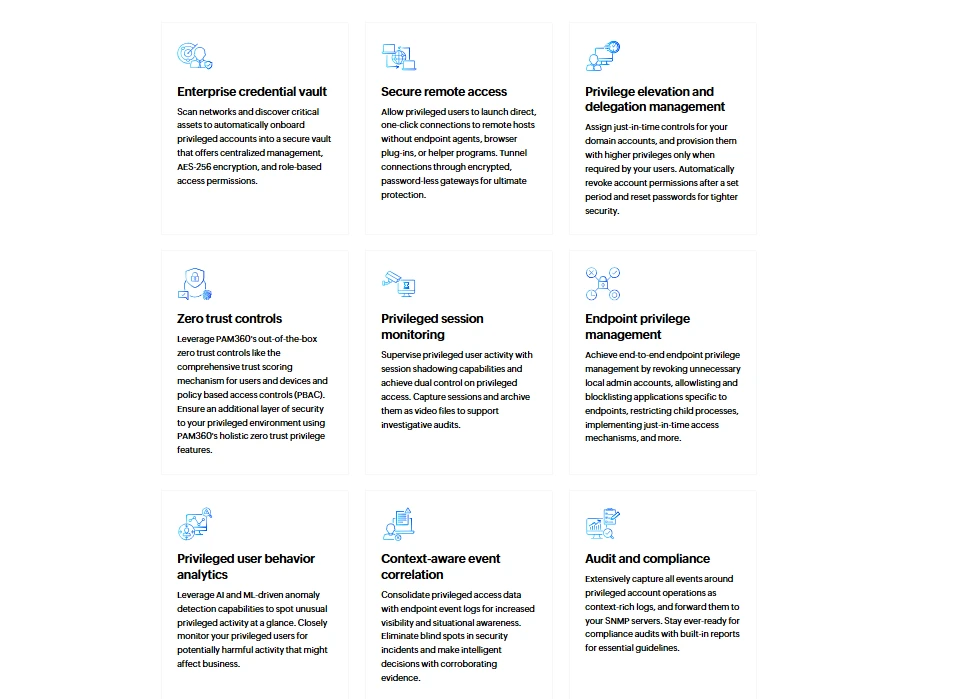
ManageEngine PAM360 is self-hosted software. The server installs on Windows Server or Linux (Ubuntu, CentOS, Red Hat Enterprise Linux, AlmaLinux), and ManageEngine also documents deployment as an AWS instance.14
Licensing counts administrators and SSH keys; the number of end users and managed resources is not limited.
Basic features included:
- Password vaulting & rotation: Secures passwords and integrates with Active Directory and LDAP for credential management.
- Session monitoring & recording: Live session shadowing with dual control, session recording with video playback, and keystroke and command capture.
- Approval workflows: Use ticketing and approval systems to control access to privileged accounts.
- Automated compliance reporting: Provides pre-built reports to assist with regulatory compliance (e.g., PCI DSS, HIPAA).
- Integration with ITSM/DevOps: Works with ServiceNow, Ansible, and Jenkins. The Kubernetes integration fetches secrets from clusters, stores them in PAM360, and rotates them.15
Strengths
- Provides essential PAM features at a lower cost than high-end competitors.
- Includes credential vaulting, session recording, and approval workflows.
- Integrates well with Active Directory and LDAP for seamless account management.
- Works with Ansible, Jenkins, and ServiceNow for integration into automation and incident management workflows.
- Licensing counts administrators and SSH keys, not end users or managed resources.
Weaknesses
- Licensing meters administrator count and SSH key count separately, so cost can rise on either axis independently of infrastructure size.
- Auto-discovery of privileged accounts, ticketing and SIEM integration, jump server configuration, and application-to-application password management are all excluded from the free tier.16
- PAM360 grants time-bound access through ticketing and approval workflows. It does not provision ephemeral accounts or issue short-lived credentials, which is how the zero-standing-privilege products in this comparison implement JIT.
StrongDM
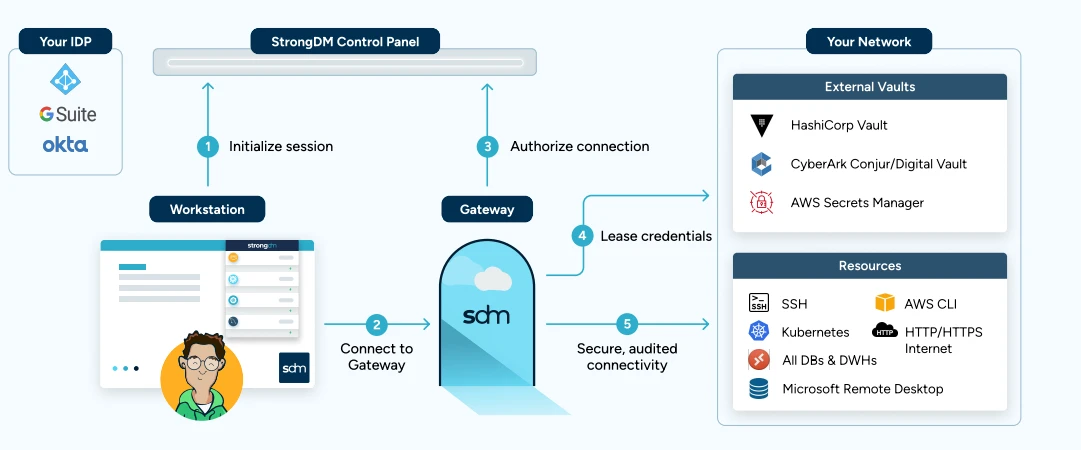
Strong DM Architecture17
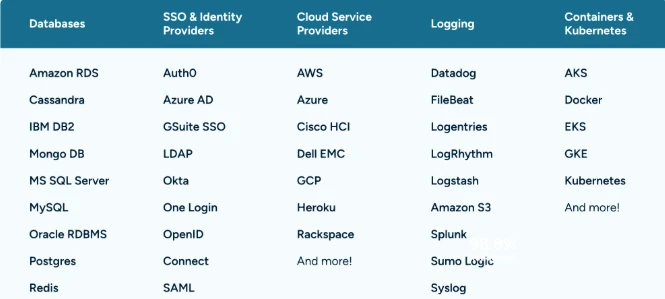
The platform provides ephemeral credentials and just-in-time access across databases, servers, clusters, web applications, and cloud services without metering or data limits by protocol or resource type.18 StrongDM offers zero trust access management for regulated workloads running in AWS GovCloud.
Below are some highlighted technologies that StrongDM supports:
Source: StongDM17
Strengths
- StrongDM uses a proxy model: users connect through their existing tools (CLI, RDP, SSH) without agents on target systems, and every session is logged.
- APIs, CLI tools, and SDKs allow access policies to be managed from CI/CD pipelines.
Weaknesses
- Gateways and relays run in customer infrastructure, and continuous connectivity to the StrongDM API is required to reach managed resources. Restricted or air-gapped environments are not supported.
 Add as preferred source
WALLIX
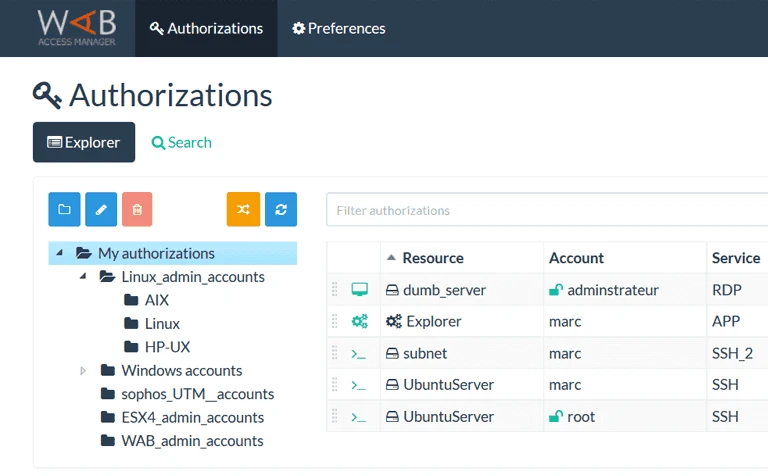
WALLIX Bastion is built from five modules that can be licensed separately: Session Manager, Password Manager, Access Manager, Privilege Elevation and Delegation Manager, and Application to Application Password Manager. Session recordings include video, a text transcript, and metadata.
WALLIX Bastion can be deployed on-premises or in the cloud (AWS, Azure, GCP), but lacks native support for container orchestration platforms like Kubernetes or modern secrets management pipelines.
Strengths
- WALLIX uses an agentless approach, reducing deployment complexity and minimizing maintenance overhead compared to agent-based PAM systems.
- Provides session recording, live monitoring, and playback capabilities. Admins can supervise or terminate sessions in real time to ensure policy compliance.
- Designed with compliance standards in mind, including GDPR, ISO 27001, and NIS2.
Weaknesses
- Container orchestration platforms such as Kubernetes are not covered in WALLIX documentation.
Okta Privileged Access
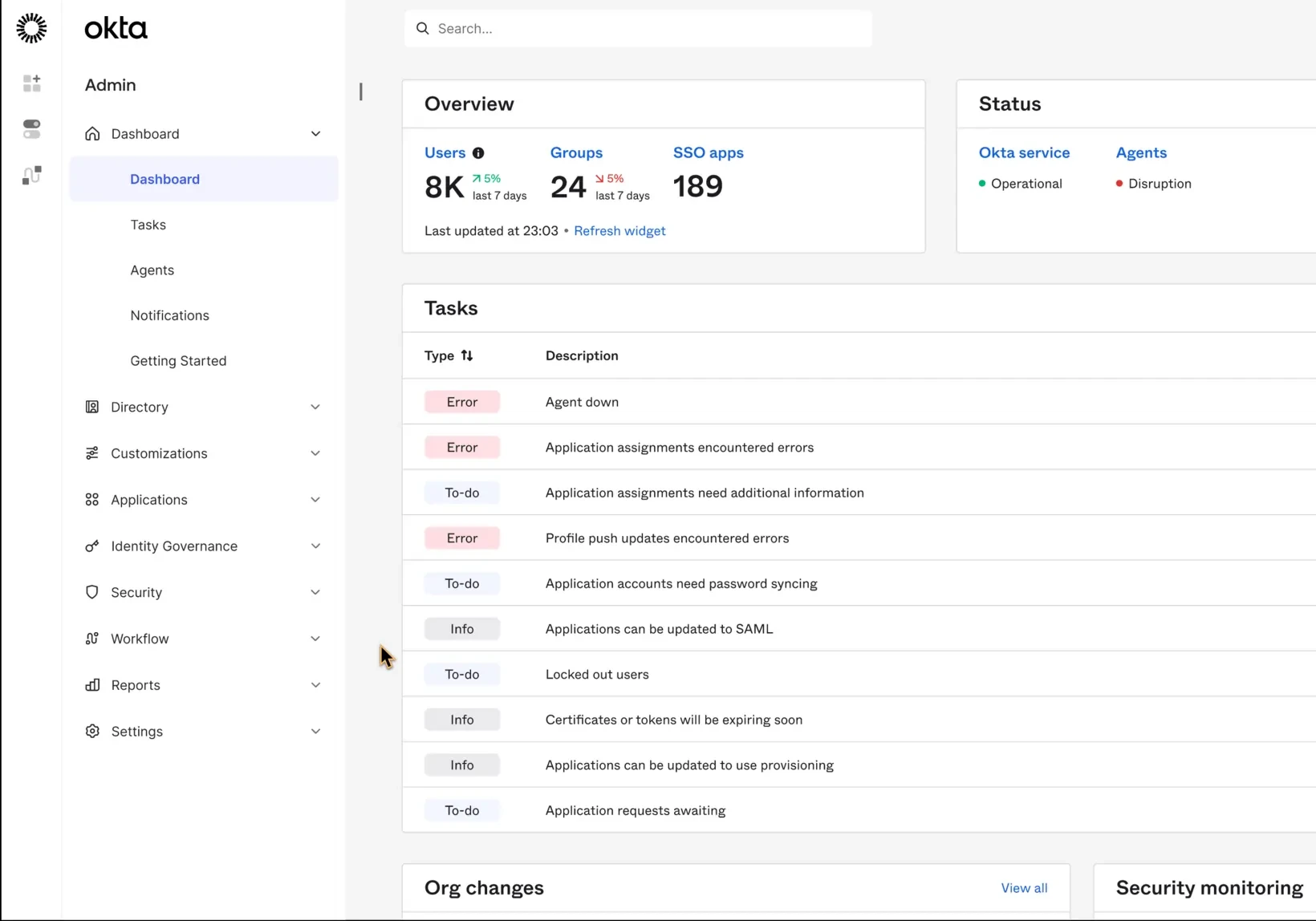
Okta Privileged Access integrates with Okta’s identity platform. Its documentation covers SSH and RDP server access, a secrets vault organized in folders, Active Directory, SaaS app, Okta service, and database accounts, and Kubernetes access management.19 Okta stopped selling and renewing Advanced Server Access (ASA), the earlier product, on May 1, 2026; ASA customers must move to Okta Privileged Access within one year of their next renewal date.
Strengths
- Best for multi-cloud and hybrid infrastructure, supporting AWS, Azure, GCP, and on-premises environments without requiring agents or complex network tunnels.
- Natively integrates with Okta Identity Cloud, inheriting its MFA, SSO, and policies.
Weaknesses
- Okta Privileged Access does not store or encrypt session recordings. Recordings stay on the gateway or go to a customer bucket such as AWS S3 or Google Cloud Storage, so encryption depends on that bucket’s configuration.
Keeper PAM (Keeper Security)
KeeperPAM uses a zero-knowledge encryption architecture: Keeper cannot read customer-stored secrets. Plans include up to 24 annual active non-human identities and 5,000 monthly endpoint workloads at no extra cost.20 The product holds FIPS 140-3 validation, FedRAMP Authorization, and GovRAMP Authorization.21 FedRAMP High covers Keeper Security Government Cloud, the AWS GovCloud instance, not the commercial platform.
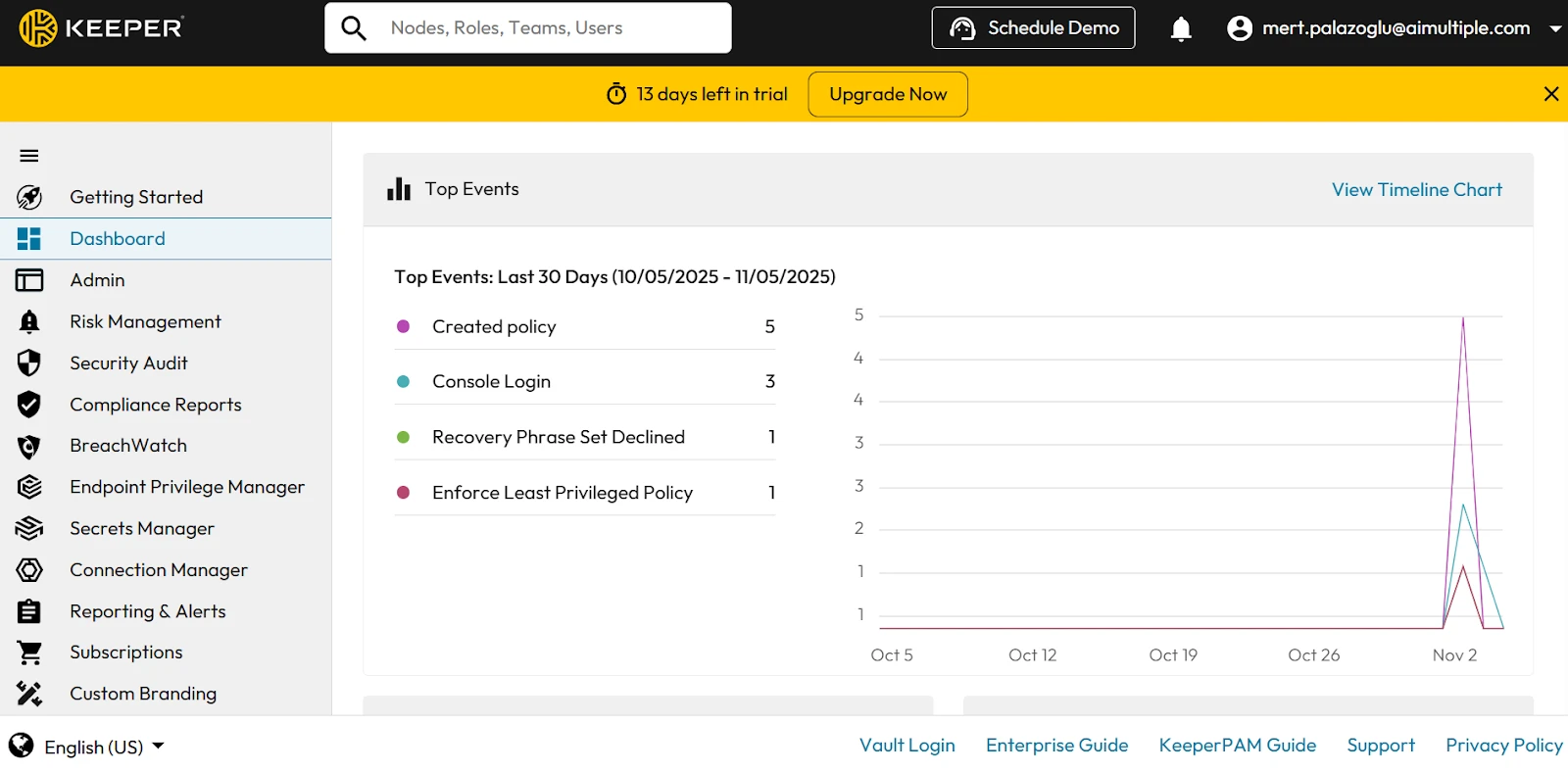
We tested KeeperPAM’s admin console, role policies, and team sharing controls.
Admin console overview:
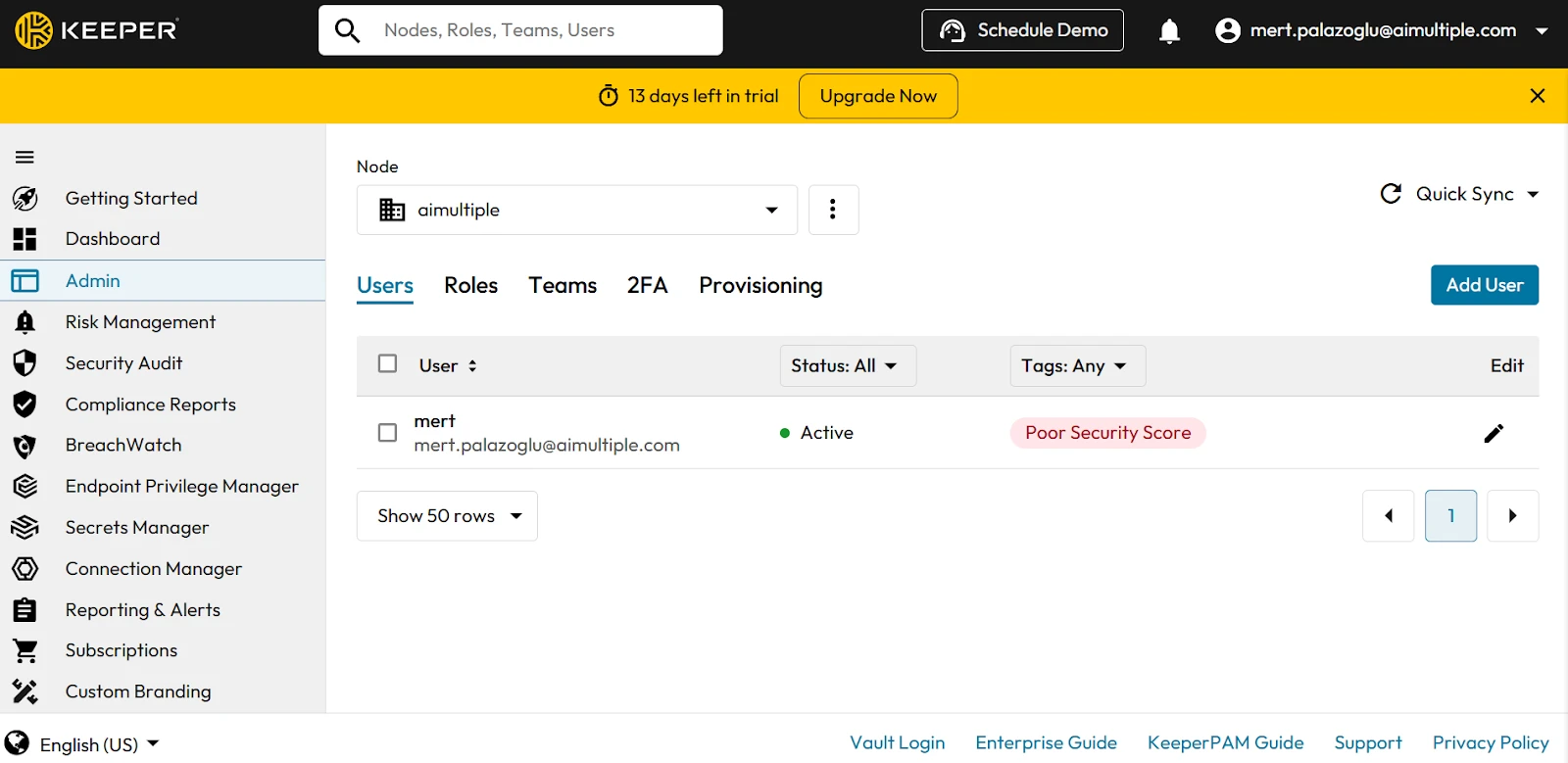
The dashboard combines top events, the Security Audit score, the BreachWatch score, and user status in one view.
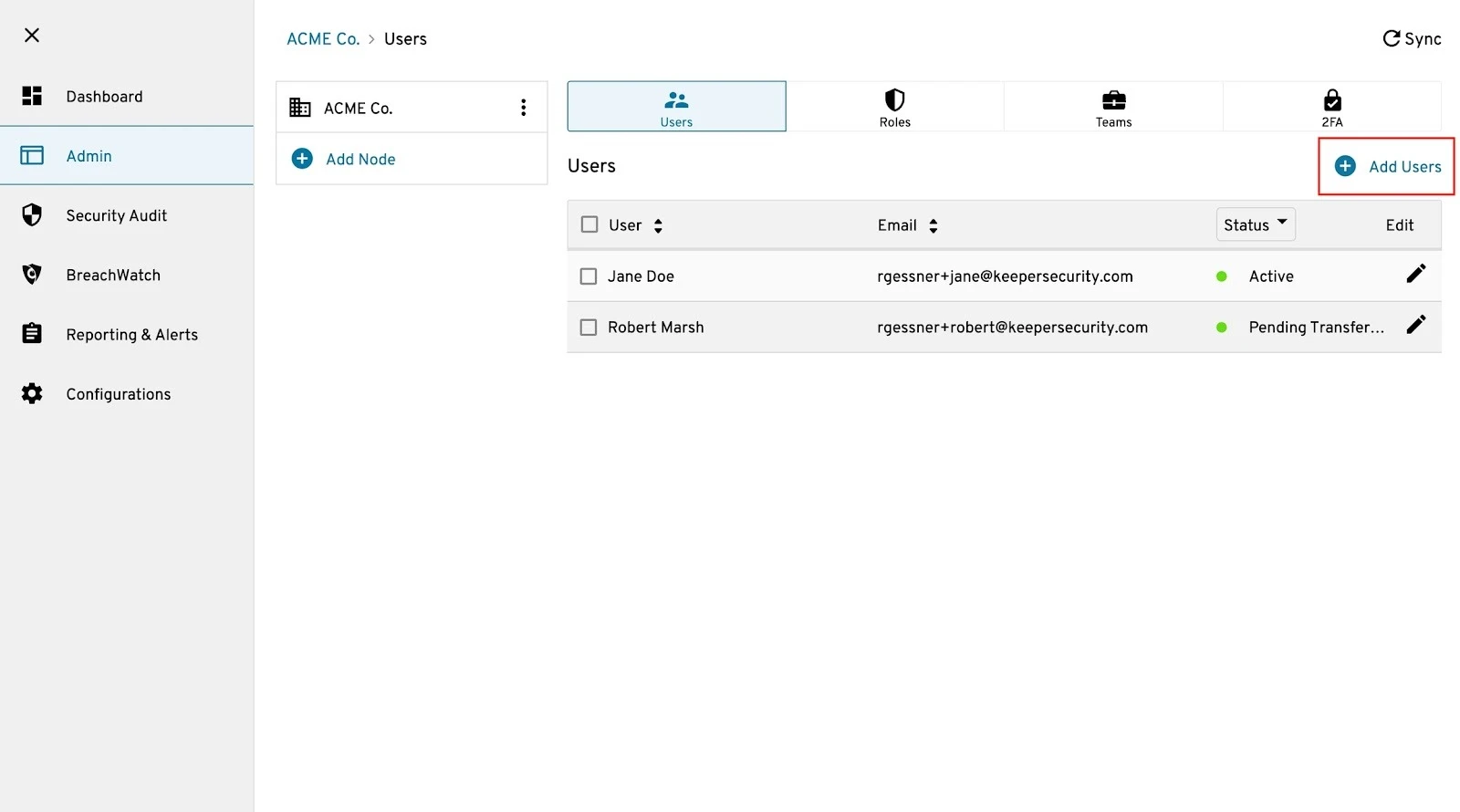
Nodes, users, roles, teams, and 2FA settings are managed from the Admin tab.
Role-based access controls:
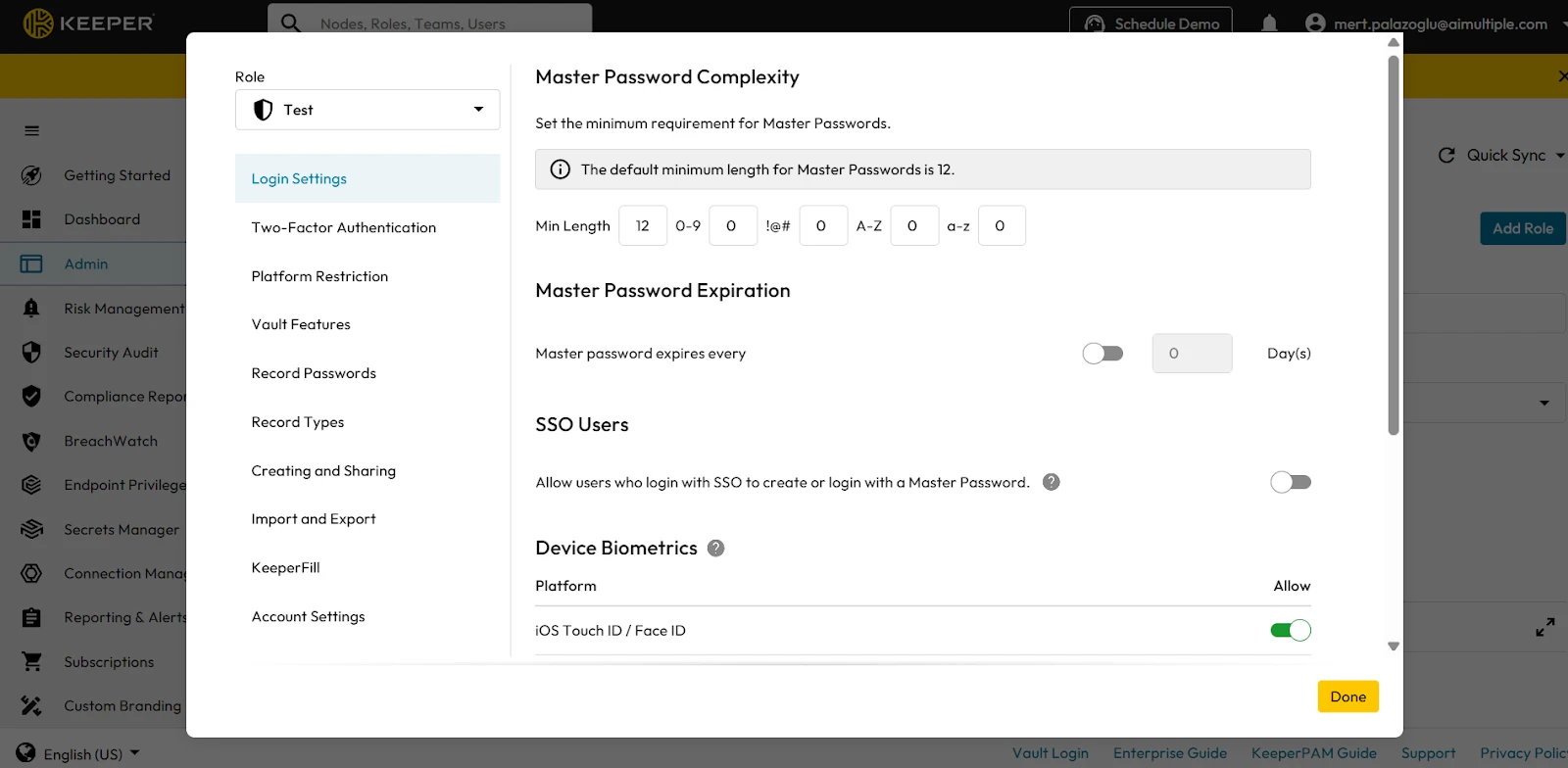
Enforcement policies are set per role and cover more than login and 2FA rules; they also control KeeperFill, Keeper Secrets Manager, record types, sharing, IP allowlists, and account transfer. When a user belongs to several roles or teams, Keeper applies the most restrictive combination of their policies.
Configuring enforcement policies for roles:
To configure enforcement policies, navigate to Admin, Roles, select a role, and click Enforcement Policies. A configuration dialog will appear, allowing specific rules to be applied. Once policies are defined, click Done to finalize and enforce them across all users assigned to that role.:
User onboarding:
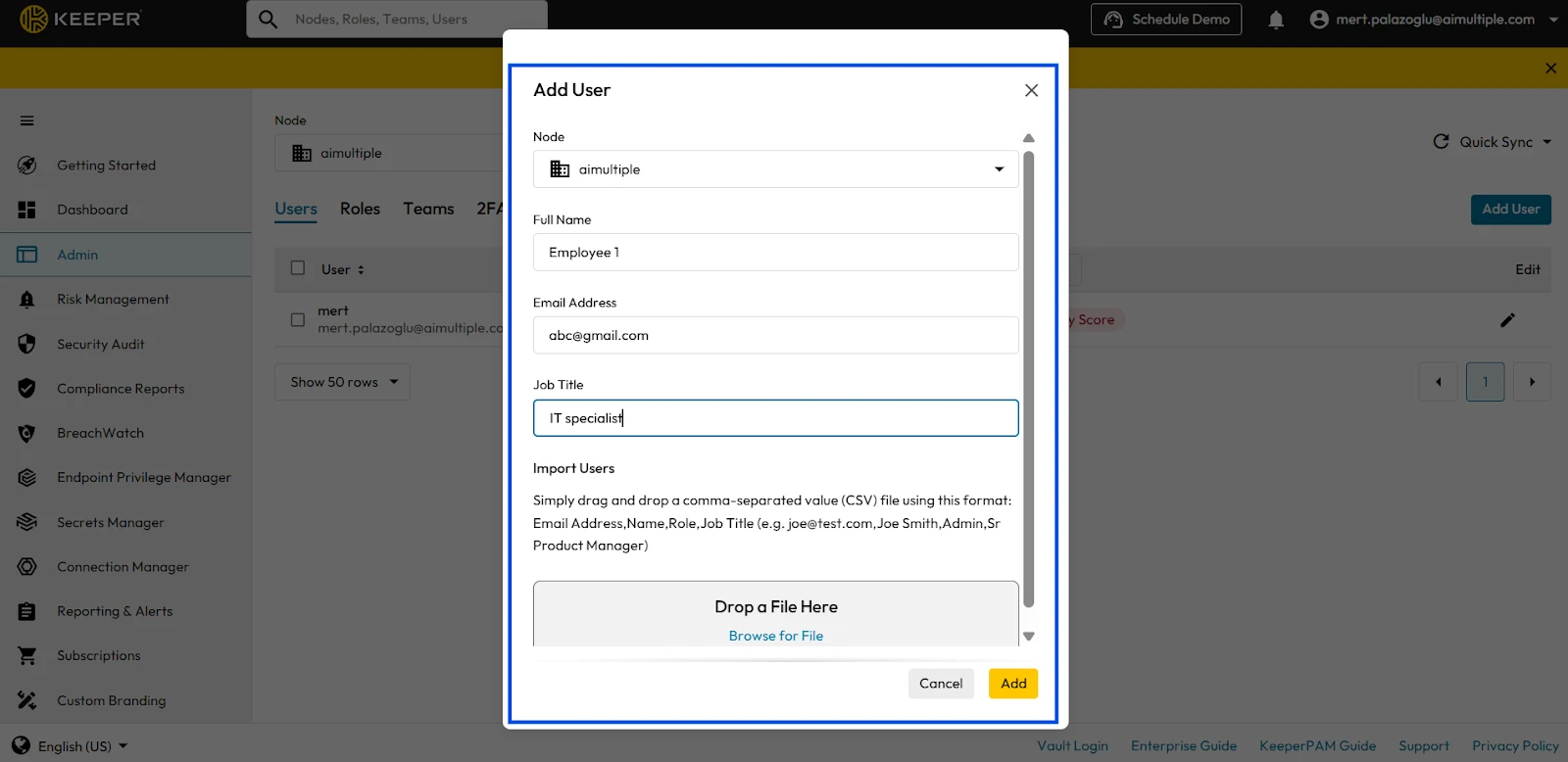
Users can be added by individual invitation, CSV import, or directory provisioning; each user receives an email invitation to set up their vault.
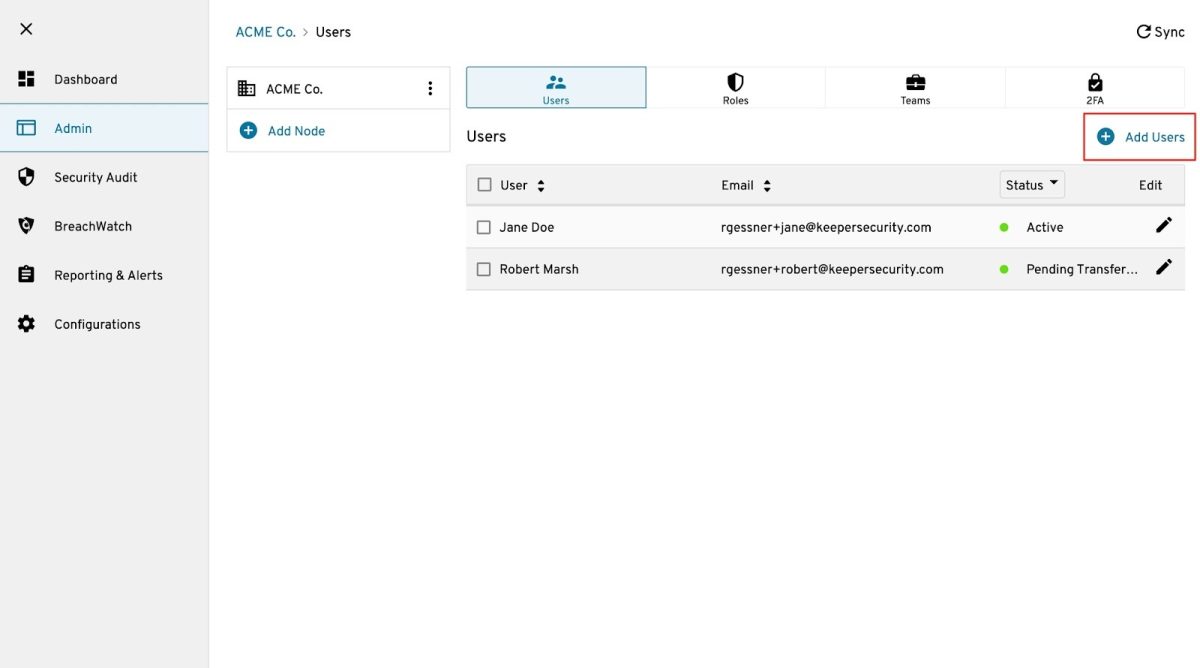
For manual user provisioning, you can invite users individually by navigating to Add Users, selecting the desired node, and entering the user’s full name and email address.
Also, for bulk user import: In larger deployments, admins can import users from a CSV file, automatically sending setup invitations to each user. Once users are added, Keeper automatically sends an email invitation prompting them to set up their account and complete onboarding.
Keeper Teams plan
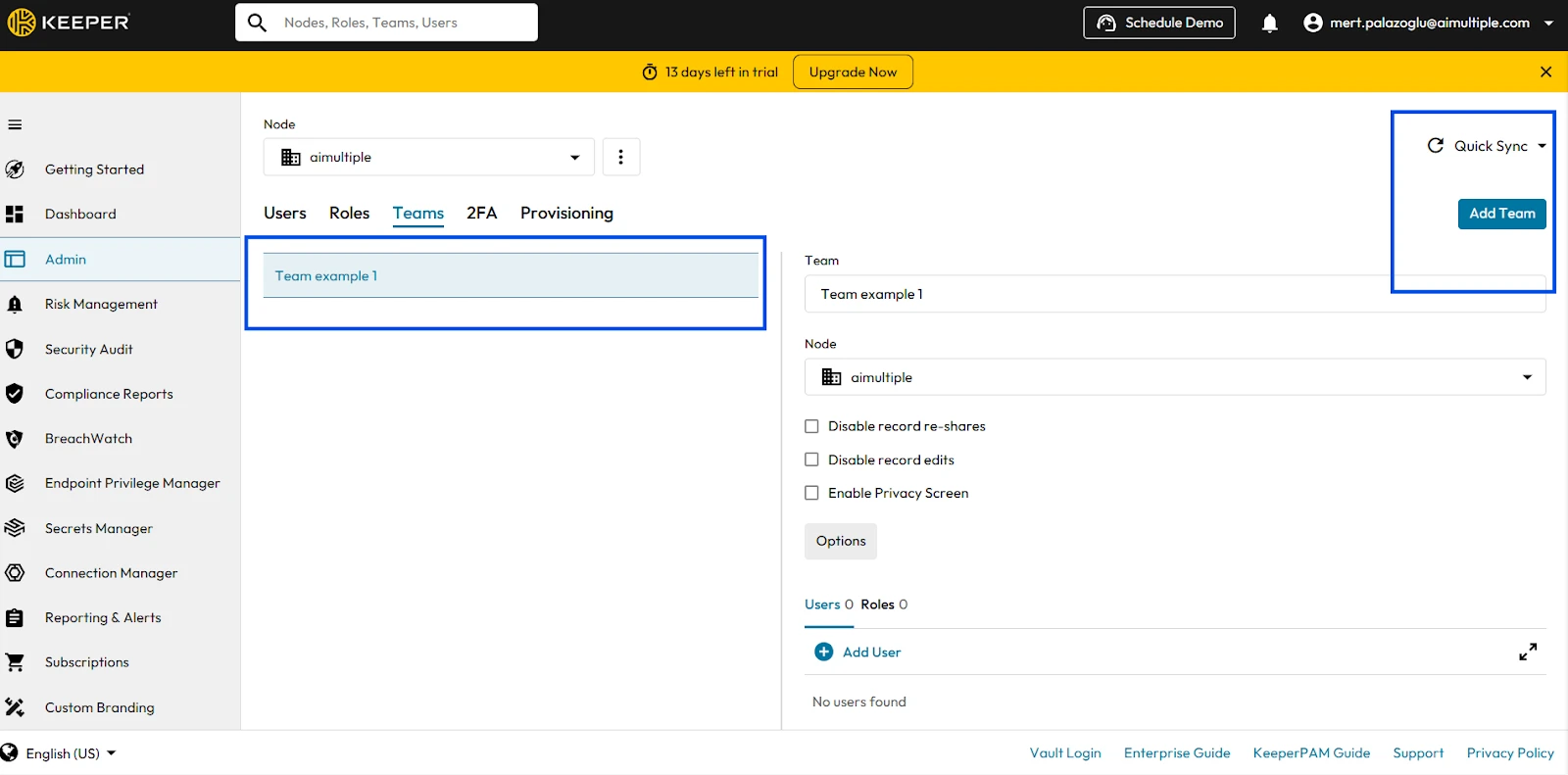
For teams, it offers a Team module that lets users share records and folders within their vaults with logical groupings of individuals. To do that, you need to set Team Restrictions (edit/viewing/sharing of passwords) and add individual users to the team:
To create a team, select the node you want to associate it with, enter the team name, and click Add Team:
Once created, you can configure team-level restrictions, such as:
- Disabling record re-shares
- Preventing record edits
- Applying a privacy screen for sensitive data
It’s important to note that Keeper implements Least-Privilege policies, so when a user is a member of multiple roles or teams, their net policy is the most restrictive or least privileged.
Keeper Enterprise
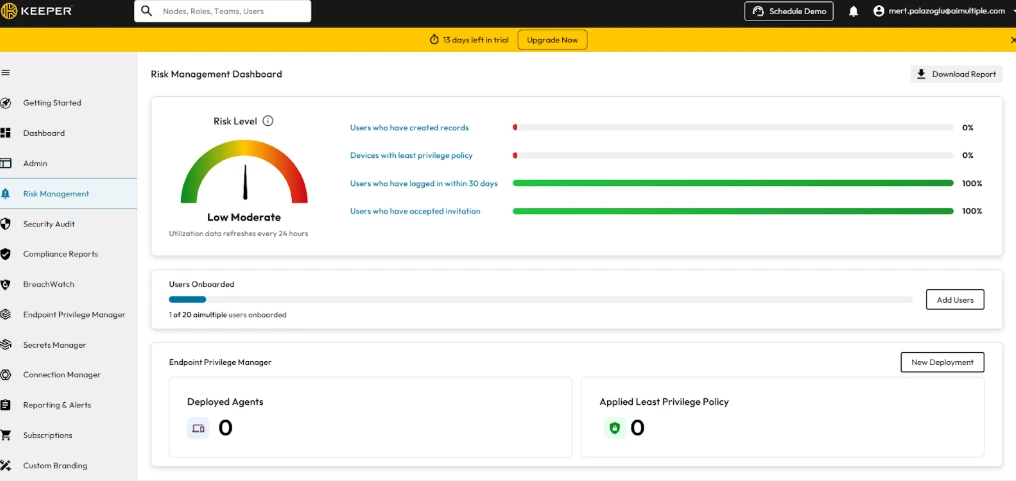
While our testing focused on Keeper for smaller teams, the Keeper Enterprise edition builds on these capabilities with additional compliance and multi-platform support.
It provides enterprise-grade risk analytics:
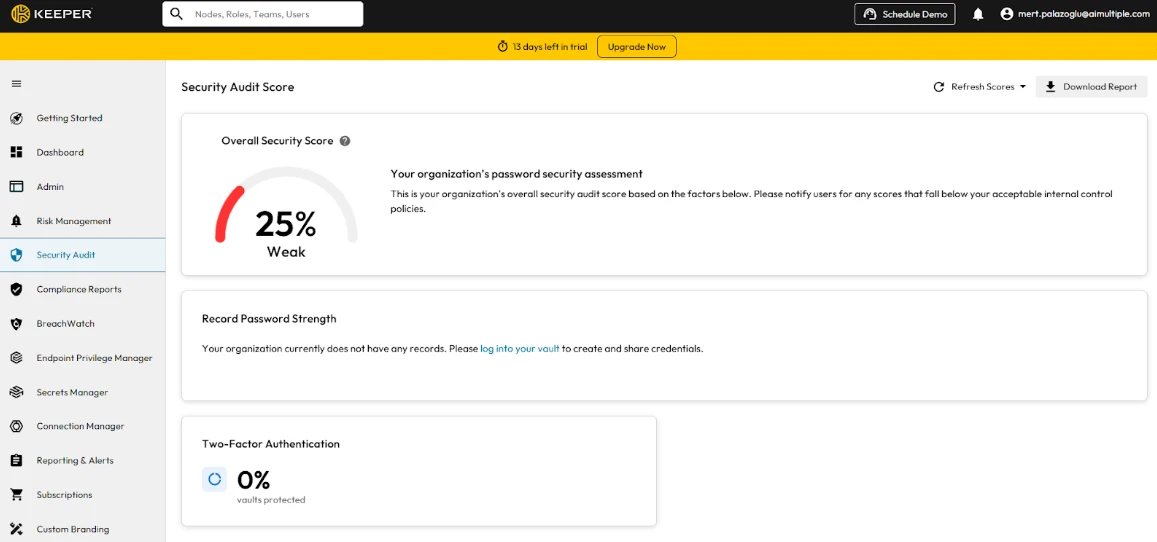
Keeper Security Government Cloud, the AWS GovCloud instance of KeeperPAM, holds FedRAMP High authorization. The authorization covers the government cloud instance rather than the commercial platform. See its security audit score dashboard:
Keeper Enterprise also provides multi-platform access, offering full functionality across Windows, Mac, Linux, iOS, Android, and all major web browsers (Chrome, Edge, Firefox, Safari). You can enforce platform restrictions, for example, limiting access to specific OS environments or disabling browser-based logins for high-security users.
Strengths
- KeeperPAM runs as a cloud service; it delivers vault and client updates automatically.
- Keeper provides plugins and APIs that enable integration with CI/CD tools, DevOps pipelines, and identity platforms.
Weaknesses
- The KeeperPAM control plane runs in Keeper Cloud and requires an outbound connection to it. Keeper Connection Manager is self-hostable and covers session brokering inside isolated networks, but it does not deliver the full platform on its own.22
- Coverage includes 24 annual active NHIs and 5,000 monthly endpoint workloads; beyond that, volume-based pricing applies.20
SailPoint (PAM Module)
SailPoint’s Privileged Account Management Module does not vault credentials or record sessions. It imports privileged account data from PAM products such as CyberArk into IdentityIQ, where privileged access goes through the same access reviews and compliance reports as other access.
Strengths
- Natively connects PAM data to identity governance, enabling full visibility of privileged accounts across systems.
- Automates access reviews and compliance reporting for privileged accounts.
Weaknesses
- Requires a separate PAM product for vaulting, session recording, and JIT access.
Core capabilities of PAM vendors
All vendors in this list except SailPoint vault credentials, record sessions, and route access through approval workflows. SailPoint’s module governs privileged accounts that a separate PAM product manages. They differ in how they grant temporary access:
- Just-in-time (JIT) access: grants time-bound privileged access on request and revokes it automatically when the window ends.
- Dynamic access: adjusts access decisions to context, such as user, device, resource, and risk level, across users, machines, APIs, and applications.
Key market updates
Two ownership changes reshaped this vendor set in the first half of 2026.
- Palo Alto Networks completed its $25 billion acquisition of CyberArk on 11 February 2026.23 On 12 May 2026 it introduced Idira, an identity security platform built on CyberArk’s PAM technology and extended to machine and AI agent identities. Idira is positioned as an upgrade path for existing CyberArk customers rather than a replacement, and CyberArk-branded products remain available.12
- Delinea completed its acquisition of StrongDM on 5 March 2026, combining Delinea’s enterprise PAM with StrongDM’s runtime authorization. The two products are still sold separately, so organizations evaluating a unified access strategy currently navigate two product lines.24
Free-tier terms also changed.
- HashiCorp Vault, listed in our free PAM section, is source-available under the Business Source License 1.1, not open source: the licence permits internal and commercial use but bars organizations that provide a competing offering.2
- Teleport Community Edition, another common free option, is limited to companies with fewer than 100 employees and annual revenue under $10 million.25
FAQs
Password managers store and manage individual users’ passwords, while PAM solutions provide enterprise-level control over privileged accounts, including session monitoring, access approvals, automated credential rotation, and compliance reporting. PAM tools manage not just passwords but also service accounts, API keys, SSH keys, and machine identities across your entire infrastructure.
Yes, they serve different purposes. End users can continue using password managers for personal work credentials, while PAM solutions manage privileged accounts used by administrators, service accounts, and automated processes. Many organizations run both simultaneously, PAM for infrastructure access, and password managers for day-to-day application credentials.
Timelines depend on the number of systems, accounts, and integrations in scope. Cloud-delivered products with vault-first deployments can start with a small set of accounts, while self-hosted platforms with multiple components require infrastructure sizing, policy configuration, and system onboarding before full rollout.
StrongDM and Okta Privileged Access issue ephemeral, per-session credentials. ManageEngine PAM360 grants time-bound access through approval workflows but does not issue short-lived credentials.
StrongDM requires continuous connectivity to its API and does not support air-gapped environments. The KeeperPAM control plane runs in Keeper Cloud; Keeper Connection Manager can be self-hosted for session brokering but does not deliver the full platform. One Identity Safeguard and WALLIX Bastion can run on premises.
Securden offers a free Starter tier for its password vault, and miniOrange offers a 30-day trial with full features. ManageEngine PAM360’s free tier excludes auto-discovery, ticketing and SIEM integration, jump server configuration, and application-to-application password management. We tested BeyondTrust, Keeper PAM, and ManageEngine PAM360 through their free trials. For free self-hosted tools, see our free PAM solutions article.
Cite this research
Pick the format that matches where you're publishing. Pasting the link version into your CMS preserves the backlink.
@misc{dilmegani2026,
  author = {Dilmegani, Cem and Arslan, Ezgi},
  title  = {{Top 10+ PAM Solutions with Free Alternatives}},
  year   = {2026},
  month  = sep,
  howpublished    = {\url{https://aimultiple.com/pam-solutions}},
  note   = {AIMultiple. Retrieved September 29, 2026}
}Results and timestamps of 33 data points. Download the summary data shown in this article's charts and tables as a ZIP file containing 3 CSV files.
Want the granular data behind it? Join Premium
Changelog
6 updatesUpdated CyberArk and StrongDM acquisition details, including Palo Alto's new Idira platform.
Added miniOrange as a new PAM vendor profile
Added Securden as a tenth commercial PAM vendor, with platform coverage, strengths, and weaknesses.
Removed the "Recommendations to buyers" section covering PAM pricing, licensing models, and maintenance costs.
Added One Identity to the list of commercial PAM vendors.
Removed the 'Access and automation capabilities' section.
Reference Links
Cem's work at AIMultiple has been cited by leading global publications including Business Insider, Forbes, Morning Brew, and Washington Post, global firms like Deloitte and HPE, NGOs like World Economic Forum, and supranational organizations like European Commission. [1], [2], [3], [4], [5]
Throughout his career, Cem served as a tech consultant, tech buyer and tech entrepreneur. He advised enterprises on their technology decisions at McKinsey & Company and Altman Solon for more than a decade. He also published a McKinsey report on digitalization.
He led technology strategy and procurement of a telco while reporting to the CEO. He has also led commercial growth of deep tech company Hypatos that reached a 7 digit annual recurring revenue and a 9 digit valuation from 0 within 2 years. Cem's work in Hypatos was covered by leading technology publications like TechCrunch and Business Insider.
Cem regularly speaks at international technology conferences. He graduated from Bogazici University as a computer engineer and holds an MBA from Columbia Business School.




Be the first to comment
Your email address will not be published. All fields are required. Comments are left in their original language.