


Top 7 WAN Monitoring Software

We selected WAN monitoring software that offers bandwidth monitoring and traffic analysis, along with real-time tracking of network devices, servers, applications, and infrastructure across wide-area networks.
See a comparison of popular WAN monitoring software:
Vendors | # of employees | # of B2B reviews | Average rating |
|---|---|---|---|
Paessler PRTG | 364 | 279 | 4.6 |
Domotz | 70 | 87 | 4.8 |
Obkio | 20 | 10 | 4.7 |
ManageEngine Site24x7 | 302 | 449 | 4.6 |
Cisco ThousandEyes | 883 | 81 | 4.5 |
Nagios XI | 300 | 56 | 4.5 |
Zabbix | 150 | 206 | 4.4 |
Selection criteria
We selected WAN monitoring tools meeting these criteria:
- Number of employees: We looked at vendors with 10+ employees on LinkedIn.
- Average review ratings: We selected vendors with an average rating of at least 4 points.
Top 7 WAN Monitoring Tools
1. Paessler PRTG
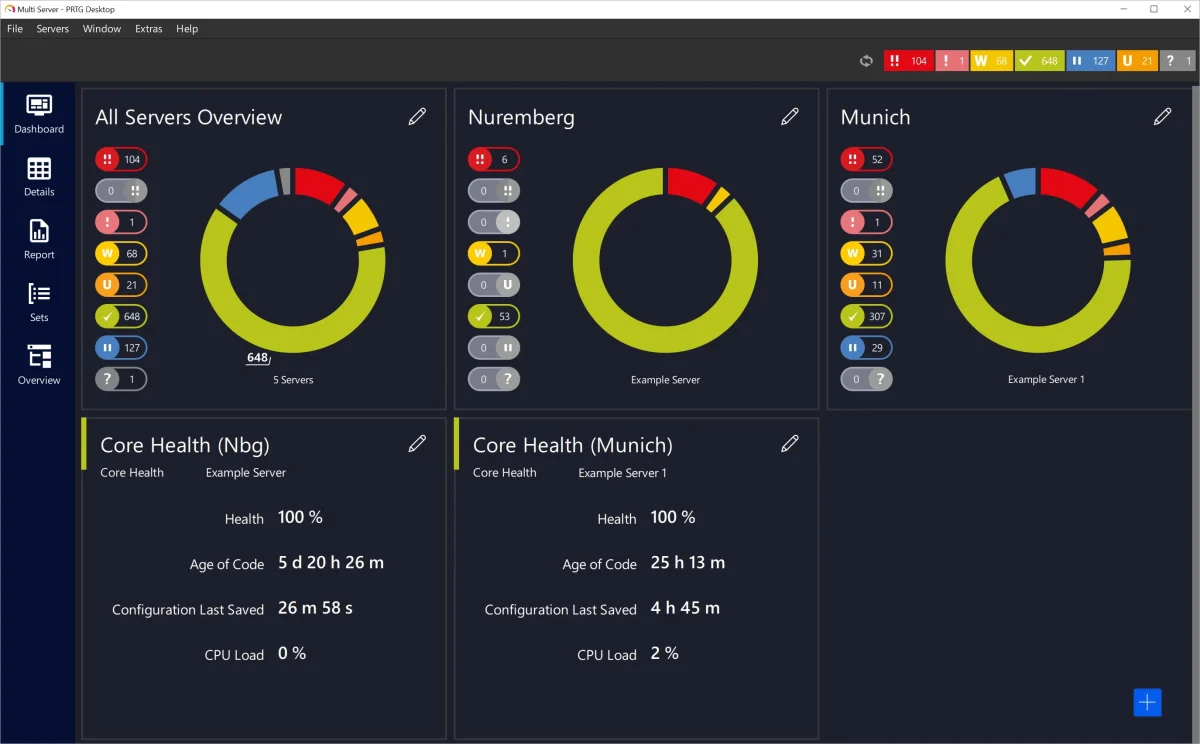
Unlike most monitoring tools, which charge per device, PRTG Network Monitor uses a sensor-based model. You pay for the metrics you actually track, making it easier to control costs as your network grows.
Key capabilities
- Sensor-Based Licensing: Licensing based on number of monitored metrics rather than devices. You control your monitoring scope and costs precisely.
- NetFlow/sFlow Analysis: Detailed traffic analysis for bandwidth and application monitoring.
- Wireless Network Monitoring: Monitors wireless access points, client connections, and RF performance beyond standard wired network monitoring.
2- Domotz
Domotz is a cloud-managed network monitoring platform built specifically for IT teams and managed service providers (MSPs) who need WAN performance visibility across multiple client sites without the deployment complexity of enterprise platforms.
Key capabilities
- Lightweight Agent Deployment: Domotz deploys via a lightweight hardware probe or software agent that automatically connects to the cloud management platform. Unlike enterprise tools that require on-premise collectors and extended configuration, Domotz is designed to reach operational status within minutes at a new site.
- iPerf3 WAN Testing: Domotz integrates with iPerf3 to run active measurements of throughput, jitter, and packet loss between sites or endpoints, providing validated WAN performance data rather than relying solely on passive SNMP polling.
- Multi-Site Management for MSPs: A single cloud console manages all monitored sites, making it well-suited for MSPs managing dozens or hundreds of client networks through a single interface. Per-agent pricing scales predictably as new sites are onboarded.
- Automated Speed Tests: In addition to inter-site testing, Domotz runs automated speed tests to measure internet connection performance at each site, providing MSPs with a baseline to compare against ISP SLA commitments.
3- Obkio
Obkio is a network performance monitoring tool built specifically for WAN visibility, with a strong focus on ease of deployment and SMB accessibility. Where enterprise platforms require extended configuration, Obkio is designed to deploy in minutes using a lightweight agent-based architecture.
Key capabilities
- Agent-Based WAN Testing: Monitoring agents are deployed at any two points in the network and continuously run synthetic performance tests between them. This gives end-to-end visibility from the user’s location to the application, covering both LAN and WAN segments.
- Ultra-Fast SNMP Polling: Obkio polls network devices every 30 seconds rather than the standard 5-minute interval used by most legacy tools, providing ten times the measurement precision for detecting intermittent WAN issues.
- Chord Diagram Overview: The main dashboard displays a Chord Diagram that shows the performance status of every monitored network path in real time, with minute-by-minute updates.
- Live Mode: During active network maintenance or troubleshooting, it provides real-time visibility into network performance, so teams can immediately see the effects of changes.
4- ManageEngine Site 24×7
Site24x7’s management console is fully cloud-hosted, eliminating the need for a central monitoring server. However, WAN and on-premises infrastructure monitoring require deploying lightweight polling agents within each network segment. One dashboard shows your websites, apps, servers, and WAN links.
Key capabilities
- Cisco IP SLA Integration: If you use Cisco routers, Site24x7 taps into IP SLA operations to measure actual performance between your sites, including latency, jitter, and packet loss.
- NetFlow/sFlow Analysis: See traffic patterns to plan capacity upgrades and identify bandwidth hogs.
- Configuration Management: Automatically backs up network device configs. When something breaks, you can compare current settings to what worked yesterday.
- Linux Deployment: Runs on Linux without needing Windows Server licenses.
In 2026, ManageEngine added causal intelligence and autonomous AI to Site24x7. The update introduces domain-aware causal correlation, which groups related anomaly signals across applications, infrastructure, and networks into a single problem view so teams know exactly where to start investigating. Customizable AI agents enable teams to set approved guardrails using solution documents and to assign tasks, from analysis to guided remediation. An MCP-based governance layer standardizes how agents access observability data and maintains audit records. Integration with Zoho’s Qntrl platform enables structured remediation runbooks with approvals and traceability. Early customer Synechron reported filtering out nearly 90% of alert noise using the new feature set. These AIOps capabilities are available on Professional and Enterprise plans.1
5- Cisco ThousandEyes
ThousandEyes focuses on problems outside your control, such as internet routing, ISP performance, and cloud provider connectivity. The platform runs from Cisco’s cloud, so there’s no hardware to deploy.
Key capabilities
- Cloud-Native SaaS: No servers to maintain. Cisco handles infrastructure and updates.
- Active Synthetic Monitoring: Agents deployed across your network continuously test your network and apps, catching issues before users report them.
- Internet Path Visualization: When your site is slow, you can see exactly where on the internet the delay occurs: your ISP, a peering point, or the destination network.
- BGP Monitoring: Tracks changes in internet routing. If your traffic suddenly routes through a different country, you’ll know why performance dropped.
- WAN Insights for SD-WAN: Applies statistical models to Cisco SD-WAN telemetry to produce routing recommendations and forecast performance gains for application groups, enabling teams to tune SD-WAN policies per site before performance degrades.
An AI Assistant for Connected Devices acts as a virtual field technician, analyzing diagnostic data and presenting plain-language root-cause explanations to reduce customer care handling time. MCP Server support reached General Availability at Cisco Live EMEA 2026 in Amsterdam, enabling IT teams and ISPs to build custom AI agents that query ThousandEyes telemetry through a governed interface. 2 They introduced AI Canvas, a cross-domain investigative workspace combining context from Meraki, ThousandEyes, and Splunk to accelerate root-cause analysis, along with Intelligent Testing, an adaptive, AI-powered synthetic test configuration that refines recommendations based on observed network patterns. 3
6- Nagios XI
Nagios XI runs on Linux and monitors through plugins. The core software is simple, but thousands of plugins allow users to monitor virtually anything, from standard network gear to custom applications.
Key capabilities
- Plugin Architecture: The community has built plugins for most scenarios. If you need something specific, you can write your own in any language (Python, Bash, Perl).
- Smart Dashboards: The 2026 release introduces a next-generation dashboarding framework with interactive dashlets, gauges, bar charts, Treemaps, and Alert Heatmaps. Dashboards can be shared globally across teams, and a Host Treemap on the home screen gives a color-coded, at-a-glance view of all hosts and services for instant problem identification.
- Distributed Monitoring via Mod Gearman: Nagios XI 2026 officially integrates Mod Gearman, which until now required manual community setup. It offloads check processing from the central server to distributed worker nodes, making large-scale or multi-site WAN deployments significantly more scalable. A setup wizard and pre-built configuration templates are included.
- Meraki Switch Wizard: Simplifies Cisco Meraki switch monitoring without complex SNMP configuration. A Red Hat OpenShift wizard was added in the February 2026 patch release.
- Improved Onboarding: The home screen now features Getting Started, Admin, and Popular Wizards tabs. A preconfigured Google.com host gives immediate monitoring feedback after installation. 4
7- Zabbix
Zabbix is a fully open-source monitoring platform widely used by organizations that need complete control over their monitoring stack without vendor licensing costs. It is the leading free option for teams with in-house Linux and DevOps expertise.
Key capabilities
- Zero Licensing Cost (Self-Hosted): The full Zabbix platform is free to download, install, and use, with no feature restrictions. Organizations manage their own infrastructure, eliminating recurring licensing fees but requiring internal operational expertise.
- Protocol Coverage: Supports SNMP, IPMI, JMX, SSH, Telnet, and HTTP/HTTPS checks out of the box, covering the full range of WAN-connected device types without requiring third-party plugins for standard protocols.
- Distributed Monitoring with Proxies: Zabbix Proxies can be deployed at remote sites to collect data locally and forward it to the central server, reducing WAN bandwidth consumption for monitoring traffic itself.
- Custom Templates and Community: A large community has produced thousands of ready-made monitoring templates for network gear, servers, applications, and cloud services. These can be imported and adapted without writing custom code.
What is WAN monitoring?
WAN monitoring tracks network performance across locations between offices, data centers, and cloud services. It measures bandwidth usage, latency, packet loss, and jitter to ensure applications work smoothly across distances.
Key aspects of WAN monitoring include:
Performance Monitoring: Tracking various metrics such as bandwidth usage, latency (delay in data transmission), packet loss (data that never reaches its destination), and jitter (variance in time it takes for packets to travel). These metrics help in understanding the quality of the network connection.
Fault Management: Detecting and diagnosing network issues to minimize downtime. This involves identifying failed devices or links, troubleshooting problems, and implementing solutions to restore connectivity.
Configuration Management: Keeping track of network device configurations and ensuring they are optimized for performance. This can also involve updating configurations to adapt to network changes or to enhance security.
Security Monitoring: Protecting the network from external threats such as hacking, phishing, and malware attacks. This involves monitoring for suspicious activity and ensuring that firewalls and other security measures are up to date and effective.
Traffic Analysis: Analyzing the types of traffic flowing over the network to identify usage patterns, bandwidth hogs, and potential security threats. This can help in capacity planning and ensuring that critical applications have the necessary resources.
SD-WAN Monitoring: As enterprises shift from legacy MPLS circuits to software-defined WAN architectures, monitoring SD-WAN overlays has become a core function of WAN monitoring. Tools must track tunnel health, jitter, latency, and packet loss across dynamic SD-WAN paths and, ideally, support multiple vendors (Cisco Viptela, Meraki, Fortinet, Palo Alto Prisma, and others) without requiring separate vendor-specific dashboards.
FAQs
WAN monitoring is crucial for maintaining the performance and reliability of a network that spans multiple locations. It helps identify bottlenecks, ensures that business-critical applications are available, and provides insights that can lead to cost savings through optimized bandwidth usage and better resource allocation.
Some essential features to consider include real-time performance monitoring, automated alerts, detailed reporting, network topology mapping, and support for various network protocols. Additionally, the ability to monitor different types of WAN connections (like MPLS, VPNs, and SD-WAN) is important for comprehensive oversight.
WAN Monitoring focuses on the broader, long-distance connections between various locations or branches of an organization, often involving external networks or service providers. In contrast, LAN (Local Area Network) Monitoring deals with the internal network within a single location, such as an office or data center. WAN monitoring tends to be more complex due to the greater distances and multiple service providers involved.
Cloud-based WAN Monitoring software offer several advantages, including easier scalability, faster deployment, and the ability to monitor networks across multiple locations without needing extensive on-premises infrastructure. They also provide real-time access to data and insights from anywhere, which is particularly beneficial for distributed teams.
Yes, many WAN Monitoring software offer integrations with other IT management systems, such as network monitoring, IT ticketing, and performance management tools. These integrations help provide a more comprehensive view of your network and streamline troubleshooting and management tasks.
Choosing the appropriate WAN monitoring software parallels selecting the right pair of shoes. Factors such as size (your network’s scale), style (your business’s specific needs), and comfort (the tool’s usability) must be considered.
While choosing the right solution, you should consider:
Your Network Needs and Scale: Whether you’re a small business or a large enterprise, the scale of your network and the size of your business play a crucial role in the selection process. Small businesses need user-friendly, immediate alert systems, while enterprises require comprehensive, scalable solutions.
Feature Sets and Usability: Contrasting feature sets and usability of various WAN monitoring tools is akin to trying on diverse pairs of shoes to discover the optimal fit. Above we explained the key features to look for. However, you should check the solutions in detail to assess whether they accommodate your specific needs.
Support and Community Feedback: Reliable technical support from the provider is essential for addressing complex network issues and minimizing downtime. The vendor’s reputation for customer service significantly affects overall satisfaction with the product and support during critical situations. Community feedback and user reviews provide valuable insights into the tool’s real-world performance and reliability. The vendors in our articles are reliable in this respect.
 Add as preferred source
For more on network monitoring
Cite this research
Pick the format that matches where you're publishing. Pasting the link version into your CMS preserves the backlink.
@misc{dilmegani2026,
  author = {Dilmegani, Cem},
  title  = {{Top 7 WAN Monitoring Software}},
  year   = {2026},
  month  = may,
  howpublished    = {\url{https://aimultiple.com/wan-monitoring-software}},
  note   = {AIMultiple. Retrieved May 13, 2026}
}Results and timestamps of 7 data points. Download the summary data shown in this article's charts and tables as a ZIP file containing one CSV file.
Want the granular data behind it? Join Premium
Changelog
8 updatesExpanded the "Top 7 WAN Monitoring Software" section with Domotz and Obkio.
Reference Links
Cem's work at AIMultiple has been cited by leading global publications including Business Insider, Forbes, Morning Brew, and Washington Post, global firms like Deloitte and HPE, NGOs like World Economic Forum, and supranational organizations like European Commission. [1], [2], [3], [4], [5]
Throughout his career, Cem served as a tech consultant, tech buyer and tech entrepreneur. He advised enterprises on their technology decisions at McKinsey & Company and Altman Solon for more than a decade. He also published a McKinsey report on digitalization.
He led technology strategy and procurement of a telco while reporting to the CEO. He has also led commercial growth of deep tech company Hypatos that reached a 7 digit annual recurring revenue and a 9 digit valuation from 0 within 2 years. Cem's work in Hypatos was covered by leading technology publications like TechCrunch and Business Insider.
Cem regularly speaks at international technology conferences. He graduated from Bogazici University as a computer engineer and holds an MBA from Columbia Business School.







Be the first to comment
Your email address will not be published. All fields are required. Comments are left in their original language.