


Top 14 Network Planning Tools: Key features & Benefits

Network planning tools help businesses optimize performance, manage resources efficiently, and ensure scalable, reliable network designs for growth and stability. Here is an overview of the most valuable tools available today, organized by their primary function:
Top 5 initial network design and planning tools
These solutions are primarily used to architect a network from scratch, but can also be leveraged to reorganize an existing setup for better performance.
Tools | Security advisory | Topology discovery | Budget planning | Free Trial | Free version |
|---|---|---|---|---|---|
Cisco Catalyst Center | ✓ | ✓ | ✕ | ✕ | ✕ |
net2plan | ✕ | ✓ | ✕ | open-access | ✓ |
iBWAVE Design | ✕ | ✓ | ✓ | ✕ | ✕ |
Tetcos NetSim | ✕ | ✕ | ✕ | open-access | ✓ |
GNS3 | ✕ | ✓ | ✕ | open-access | ✓ |
Cisco Catalyst Center
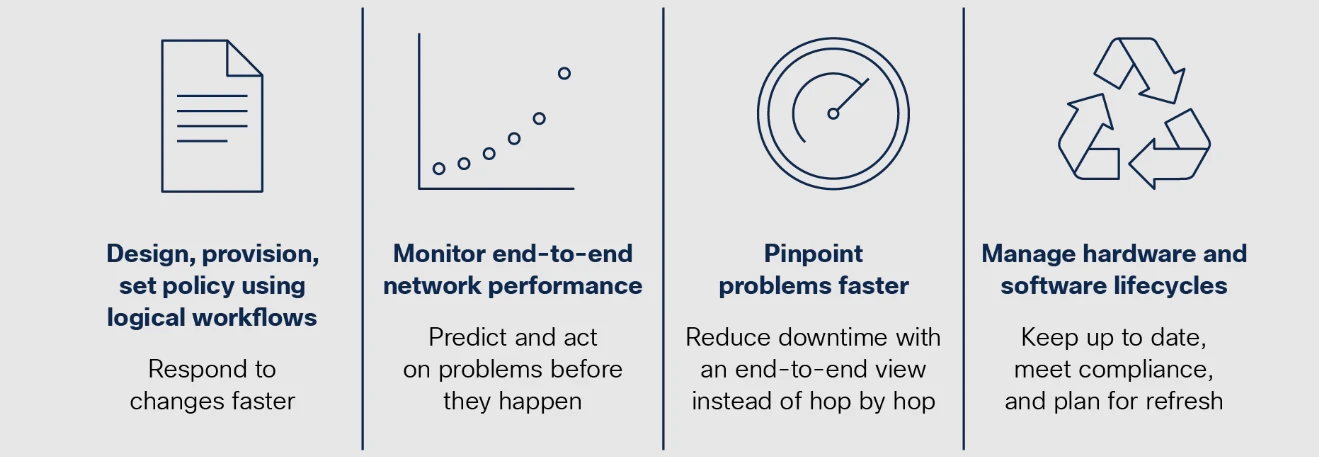
Formerly known as Cisco DNA Center, this platform is a comprehensive network management solution that streamlines network design, deployment, and monitoring. It significantly simplifies IT operations, allowing teams to rapidly address issues. Key features include
- Network Design – Utilizes guided workflows to define device placement and can import designs from older Cisco platforms.
- Policy Management – Enables creation of user/device profiles for secure access, network segmentation, and application-specific performance policies.
- Provisioning – Speeds up deployment via automation, including zero-touch provisioning for quick device setup. Cisco Secure Network Analytics enhances security by monitoring network traffic.
- Assurance – Provides continuous performance monitoring with real-time data, automated path-tracing, and guided troubleshooting.
- Platform Integration – Cisco Catalyst Center is an open platform that connects with third-party applications. This allows you to automate processes and improve IT operations by sharing network insights across systems.
Net2plan
A powerful, free, and open-source resource initially developed for educational purposes, Net2Plan is now used in both academia and industry for designing, optimizing, and evaluating communication networks.
Key Features:
- Network Design & Optimization – Aids in planning network topology, traffic routing, link capacity, and protection routes, supporting integration with various optimization solvers.
- Traffic Matrix Generation – Creates and normalizes complex traffic patterns using established research models.
- Online Simulation – Excellent for evaluating dynamic network strategies like recovery, connection-admission control, and dynamic provisioning.
- Flexible Interface – Offers both a graphical user interface (GUI) for visualization and a command-line interface (CLI) for handling large-scale simulations.
- Extensibility – Users can develop custom Java-based algorithms to test unique network strategies.
iBwave Design
iBwave Design specializes in planning and documenting indoor wireless networks with exceptional precision. It’s a unified platform that supports a diverse range of technologies, including DAS, Wi-Fi, and small cells. Key features include:
- Floor Plan Import – Allows import of building layouts (CAD, PDF, JPG) and assignment of materials to walls for highly accurate modeling.
- Component Database – Features an extensive library of over 40,000 network components for drag-and-drop design.
- Network Simulation – Uses advanced 3D modeling to accurately test coverage, capacity, and throughput before deployment.
- Automation – Reduces design time with features like automated access point placement, cable alignment, and integrated error checking.
Tetcos NetSim
Tetcos NetSim is primarily a network simulation tool aimed at research and development within universities. It provides a platform for testing and evaluating new technologies and communication algorithms.
Key Features:
- Network Design – Intuitive GUI allows users to easily drag and drop devices, links, and applications to construct network scenarios.
- Simulation – Presents simulation outcomes on a comprehensive dashboard with customizable tables and graphs.
- Customizable Libraries – Technology libraries can be modified to precisely fit specific research requirements.
GNS3
GNS3 is a popular, free, open-source network emulation tool widely used by engineers to design, configure, test, and troubleshoot real and virtual networks. It’s scalable, running on a laptop for small topologies or across multiple servers for complex networks.
Key Features:
- Network Design – Uses a graphical interface for easy creation of network topologies via drag-and-drop.
- Flexible Server Options – Can run locally, on a virtual machine (VM), or on a remote server/cloud for greater complexity.
- Emulation & Simulation – GNS3 supports both emulation (running actual device images, like Cisco IOS, on virtual devices) and simulation (where GNS3 mimics device behavior without using real OS images).
- Real Device Integration – GNS3 allows you to connect your simulation to real devices, making it possible to test and troubleshoot physical network components alongside virtual ones.
Top 4 network optimization tools
Businesses may use these tools to monitor and rearrange existing networks. Tools in the first section might be used for this purpose.
Solarwinds Network Performance Monitor
SolarWinds Network Performance Monitor is a network performance monitoring tool that helps maintain the reliability of your network. It offers broad visibility across hybrid and multi-vendor environments, allowing you to optimize performance and minimize downtime.
Key Features:
- Proactive Monitoring – Continuously track network performance to detect and fix issues before they disrupt operations.
- Network Availability – Ensure uninterrupted operations by monitoring your network’s availability in real time.
- Mapping – Automatically generate maps of your on-prem and hybrid networks to simplify management and performance monitoring.
- Custom Dashboards – Build dashboards that focus on the performance metrics that are most important to your network’s health.
SolarWinds Network Performance Monitor helps you stay ahead of potential network issues, ensuring smooth and efficient network operations.
Choose SolarWinds Network Performance Monitor for network planning
Get Free TrialPRTG Network Monitor
PRTG Network Monitor is a proprietary network monitoring software by Paessler GmbH. It is designed for small and medium IT infrastructures but also supports OT and IoT environments. The software runs on Windows servers and can scale as needed.
Key Features:
- Multiple Interfaces – Access via web, desktop, or mobile apps.
- Custom Dashboards & Maps – Use a drag-and-drop editor to create visual overviews.
- Alerts & Reports – Get real-time notifications and generate custom reports.
- Broad Compatibility – Works with on-premises, cloud, and hybrid environments without vendor lock-in.
- Preconfigured Sensors – Supports common protocols and integrates with major IT infrastructure providers.
PRTG monitors physical and virtual networks, including servers, switches, firewalls, applications, and data centers. It provides real-time insights to help maintain performance and reliability.
ManageEngine Site24x7
Site24x7 is a cloud-based monitoring tool designed to track the performance and availability of IT infrastructure, applications, and websites. It helps IT teams detect issues early and maintain stable operations across on-premises and cloud environments. Key features include:
- Automatic Network Discovery – Scans and detects devices in your network, including physical and virtual assets.
- Performance Monitoring – Tracks bandwidth usage, latency, packet loss, and device health in real time.
- Network Mapping – Creates topology maps to visualize device connections and dependencies.
- Capacity Planning – Tracks bandwidth usage, device health, and storage levels to predict future needs.
- Reports & Alerts – Generates over 100 reports and sends real-time alerts via email or SMS for critical issues.
Site24x7 helps organizations plan network growth by providing usage trends, performance insights, and clear visibility across distributed environments.
Forward AI
Forward AI is part of the Forward Networks platform. It is designed to help IT teams understand, verify, and improve complex enterprise networks. It builds a digital twin, a mathematically accurate model of the entire network.
This model allows teams to analyze how the network should behave before making changes. Key features:
- Digital Twin Modeling – Creates a complete, behavior-aware model of the network, including routers, switches, firewalls, and cloud environments.1
- Path Analysis – Shows exactly how traffic flows between any two points in the network.
- Change Simulation (“What-If” Analysis) – Tests configuration changes safely before deployment to reduce risk.
- Policy Verification – Confirms whether security rules and segmentation policies are correctly enforced.
- Vulnerability Insights – Compares device software versions against known CVEs to identify exposed systems.
- Natural Language Queries (Forward AI) – Allows engineers to ask network and security questions in plain language and receive contextual answers.
Forward AI is best suited for optimizing and validating existing networks. It helps reduce configuration errors, improve security posture, and support safer network changes.
Top 5 network mapping and diagramming tools
Visualization is key to effective planning. These tools are used to create accurate, virtual representations of network topology
SolarWinds Network Topology Mapper
SolarWinds Network Topology Mapper (NTM) helps automate the creation of detailed network diagrams. It discovers devices across your entire network and automatically updates the map when changes occur.
Key Features:
- Automated Discovery – NTM scans your network to detect devices and their connections, updating the map when devices change or are added.
- Logical & Physical Diagrams – It creates both logical and physical network diagrams for a complete view of your infrastructure.
- Network Mapping – Automatically generates diagrams in minutes, eliminating the need for manual updates.
- Network Compliance – Helps to ensure your network diagrams remain accurate and compliant by tracking changes automatically.
- Dynamic Updates – The tool continuously monitors and updates your network map to reflect any changes.
NTM makes network diagramming faster, easier, and more accurate, keeping your network records up to date with minimal effort.
Choose SolarWinds Network Topology Mapper for network mapping
Explore PlansEdrawMax
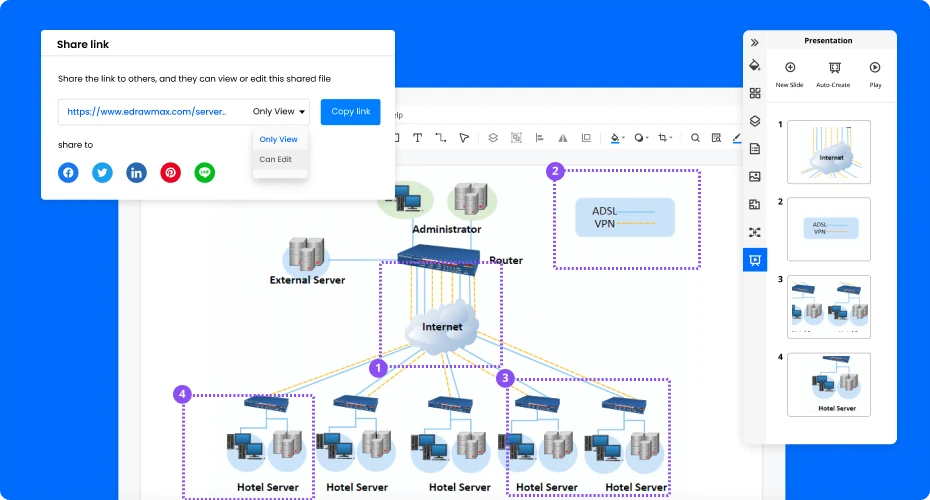
EdrawMax helps you create professional network diagrams for any need, from planning network structures to documenting and training. It offers a clear, visual way to organize your network, making it easier to understand and manage.
Source: EdrawMax2
Key features include:
- Quick Templates – Start fast with 500+ templates, perfect for any network design.
- Industry-standard Symbols – Access a wide range of network symbols for devices and servers.
- Collaboration Tools – Share files easily, import Visio files, and work together using cloud storage.
- Presentation Mode – Quickly turn your diagrams into presentations with full-screen or slideshow options.
EdrawMax also supports exporting files in multiple formats (Word, Excel, PDF, etc.) and provides tools for customizing fonts, shapes, and colors to fit your needs. It’s a versatile tool for streamlining network diagram creation.
Microsoft Visio
Visio, part of Microsoft 365, helps you design and visualize diagrams. It can be used to map out network devices and their connections in an easy-to-understand way.
Key Features:
- Real-Time Collaboration – Work together with team members through Visio in Microsoft Teams or the web app.
- Security & Support – As part of Microsoft 365, Visio benefits from strong security, data privacy, and customer support.
- Templates and Tips – Choose from basic templates and access expert tips to create detailed network diagrams.
- UML Diagrams – Use UML (Unified Modeling Language) diagrams to visualize complex systems like software or databases.
Visio also allows for linking external data to your diagrams, helping keep your network plans up-to-date and informative.
Visme
Visme offers an easy way to create network diagrams for visualizing computer networks. It provides a simple drag-and-drop interface for adding shapes and connecting lines, helping you quickly map out your network.
Key Features:
- Customizable Templates – Start with professional templates for different network types like wireless, routers, and firewalls, and personalize them to fit your needs.
- Visual Tools – Use a variety of shapes, icons, and line styles to represent network devices and connections.
- Personalization – Adjust fonts, colors, and icons to make your diagram suit your brand or preferences.
- Download & Share – Easily download, share, or embed your diagrams for easy collaboration.
Visme’s tool also supports a wide range of diagram types, so it can handle everything from network planning to flowcharts and presentations.
NET TERRAIN
NetTerrain helps document and visualize networks with up-to-date, searchable, and detailed diagrams. It replaces outdated spreadsheets with automated mapping and integrates data from existing systems.
Key Features:
- Network Discovery & Import – Detects physical and virtual environments using SNMP, WMI, and connectors. Imports from Visio, KMZ, CSV, and Excel.
- Topology Mapping – Documents network layers from physical to application-level connections.
- Rack & Stack Management – Models cabinets, floor layouts, and device placements.
- Cabling Visualization – Shows port-to-port connectivity and traces fiber and copper routes.
- GIS-Based Outside Plant Mapping – Tracks physical network infrastructure with precise location data.
- Multi-User Collaboration & Security – Role-based access control for team collaboration in real time.
With NetTerrain, users can drill down from site maps to individual ports, ensuring clear network visibility and better management.
Types of network planning and design software
Network mapping & diagramming tools: These tools help visualize network topologies and structures.
Simulation software: These tools simulate network performance to test designs before implementation.
Capacity planning tools: These tools are used to manage bandwidth and forecast traffic needs.
GIS-based tools: These integrate geographic data for accurate and efficient network planning.
Project management tools: Not specifically mentioned here, but typically used to track progress, resources, and timelines in network projects.
Complete suite: Tools include all or most of the capabilities that are mentioned above.
Matching a tool to the task
The right tool depends on the job at hand.
- Designing from scratch. A simulation or emulation tool models a layout before hardware is bought. GNS3 and Tetcos NetSim suit lab testing, Net2Plan fits topology and capacity design, and Cisco Catalyst Center covers guided enterprise design. iBwave Design is the pick for indoor wireless.
- Running an existing network. A monitoring tool tracks live performance and flags trouble early. SolarWinds Network Performance Monitor, PRTG Network Monitor, and ManageEngine Site24x7 fit here.
- Validating changes. A digital twin tests a change safely before rollout. Forward AI serves this role in the list.
- Documenting the network. A mapping tool keeps an accurate, current diagram. SolarWinds Network Topology Mapper and NetTerrain auto-discover and update maps, while EdrawMax, Microsoft Visio, and Visme suit hand-drawn diagrams.
Many teams use more than one. A design tool sets the plan, a twin checks changes, and a monitor watches the result.
 Add as preferred source
How AI is changing network planning
Network planning has moved past static diagrams. Three AI-driven methods now shape the work.
- Predictive capacity planning. A model reads past traffic and forecasts where a link will run short. Teams add capacity before a bottleneck forms, rather than after a complaint.
- Scenario simulation. A tool runs “what-if” tests on a proposed change and reports the likely effect before the change reaches production.
- Intent-based design. An engineer states a goal in plain terms, such as “keep these two sites isolated.” The system translates the goal into device settings and checks that the live network matches it.
These methods share a base: a clean, current model of the network. Without accurate data, a forecast or a simulation can mislead.
From assistants to agents
Early AI network tools answered questions. An engineer typed a question in plain language and read a reply. The 2026 tools go further: an agent plans and runs multi-step tasks, then checks its own work.
Read computer use agents, if you are interested in systems designed to operate a computer in a manner similar to a human.
A common loop has five stages: sense a problem, diagnose the cause, propose a fix, validate it against a digital twin, and deploy under set controls. Cisco groups these stages under a model it calls AgenticOps.
Trust sets the limit on how far this goes. In a production network, a confident wrong action can cause an outage. Vendors address this with audit trails, visible reasoning, and approval gates. A person keeps control of higher-risk changes, while the agent handles routine ones.
FAQs
Network planning tools help design and manage the entire network infrastructure. They make it easier to create efficient network layouts by simplifying complex tasks. These tools are used by IT teams, network engineers, and system architects to optimize both wired and wireless networks.
Network planning tools support these processes by streamlining tasks like mapping, designing, and optimizing the network. These tools offer several key features:
Network discovery: Automatically detects new devices added to the network.
Network mapping & diagramming: Visualizes the network layout.
Simulation & testing: Allows you to test designs before deployment, reducing the risk of network issues.
Capacity planning: Determines the necessary bandwidth to support traffic and prevent performance bottlenecks.
Security management: Implements policies and configurations to safeguard data, devices, and communication channels from unauthorized access.
Integration with other systems: Many network planning tools integrate with systems like firewalls, routers, and monitoring software, providing a comprehensive solution for network management.
Performance Monitoring: Tracks network performance in real time to identify potential issues and optimize resources effectively.
Using the right network planning tools can save time and effort during the design and deployment phases. They help optimize performance by reducing the risk of costly mistakes and improving network reliability.
These tools support effective network management by allowing organizations to monitor their network infrastructure in real time. With deep expertise and the right tools, businesses can optimize their network performance while reducing the total cost of ownership.
By integrating these tools into the network design process, organizations can create a solid foundation for their network. Whether you’re designing for an enterprise or a smaller business, these tools enable better decision-making, ensuring your network meets both current needs and future growth.
Network planning tools help IT teams design, run, and grow a network with fewer errors. The main benefits:
Fewer costly mistakes. Testing a design before rollout catches faults early, when a fix is cheap.
Better use of capacity. Traffic forecasts show where to add bandwidth before a slowdown hits users.
Faster troubleshooting. A current map and live data point to the source of a problem sooner.
Safer changes. A digital twin checks the effect of a change before it reaches production.
Clear records. Automated diagrams keep documentation accurate for audits and handovers.
Together, these lower total cost of ownership and support steadier performance as a network grows.
Cite this research
Pick the format that matches where you're publishing. Pasting the link version into your CMS preserves the backlink.
@misc{dilmegani2026,
  author = {Dilmegani, Cem and PhD., Ezgi Arslan,},
  title  = {{Top 14 Network Planning Tools: Key features & Benefits}},
  year   = {2026},
  month  = jul,
  howpublished    = {\url{https://aimultiple.com/network-planning-tools}},
  note   = {AIMultiple. Retrieved July 2, 2026}
}Results and timestamps of 14 data points. Download the summary data shown in this article's charts and tables as a ZIP file containing 3 CSV files.
Want the granular data behind it? Join Premium
Changelog
3 updatesAdded a section on matching tools to tasks and AI-driven network planning before the FAQs.
Replaced ManageEngine OpManager with Solarwinds Network Performance Monitor in the network optimization tools.
Reference Links
Cem's work at AIMultiple has been cited by leading global publications including Business Insider, Forbes, Morning Brew, and Washington Post, global firms like Deloitte and HPE, NGOs like World Economic Forum, and supranational organizations like European Commission. [1], [2], [3], [4], [5]
Throughout his career, Cem served as a tech consultant, tech buyer and tech entrepreneur. He advised enterprises on their technology decisions at McKinsey & Company and Altman Solon for more than a decade. He also published a McKinsey report on digitalization.
He led technology strategy and procurement of a telco while reporting to the CEO. He has also led commercial growth of deep tech company Hypatos that reached a 7 digit annual recurring revenue and a 9 digit valuation from 0 within 2 years. Cem's work in Hypatos was covered by leading technology publications like TechCrunch and Business Insider.
Cem regularly speaks at international technology conferences. He graduated from Bogazici University as a computer engineer and holds an MBA from Columbia Business School.





Be the first to comment
Your email address will not be published. All fields are required. Comments are left in their original language.