


AI Deep Research: Codex vs Claude vs Grok vs Exa

A deep research tool answers a question with a written report instead of a page of links. We ran five ways of producing one over the same 20 business research briefs and scored every report against rules written before the runs to find the best tool for deep research. Four of the five are coding agents, command-line tools built for software work that can also search and read the web; the fifth, Exa Agent, is built for research.
DR-20 Bench results
Each of the five tools produced one report for each of the 20 tasks, 100 reports in all, graded blind against rules written before the runs. See more details on methodology.
The only purpose-built deep research product finished below three of the four coding agents. Exa Agent scored 0.584, and each of those three gaps survives Holm correction across all ten pairwise comparisons. On these briefs, Codex CLI, Claude Code and Grok CLI all scored above the product built for the job.
Exa Agent and Gemini CLI showed no statistically significant difference in requirement scores.
We found no statistically significant difference between Codex CLI and Claude Code on these 20 tasks. The gap is 0.015 on a 0 to 1 scale, with an unadjusted p of 0.67 and 0.96 after Holm correction. Across 10,000 bootstrap samples, both had a 95% rank interval of 1 to 2. They lead on different measures: Codex CLI on the written requirements by 0.015, Claude Code on fact reproduction by 1.2 percentage points.
Exact facts reproduced
Claude Code fully reproduced 202 of the 434 required factual items, Codex CLI 198 and Exa Agent 89. No tool reached half. An item received credit only when the report correctly included all its required details. This check covered a predefined fact list; we did not audit every claim in the reports.
Cost & research quality
Grok CLI scored 0.699 at $1.91 per task; the two leaders cost $13.38 to $18.35, seven to ten times as much. Grok trailed Claude Code by 0.076, with a Holm-adjusted p of 0.006. Its 0.091 gap to Codex CLI was not significant after correction, at 0.072.
The two cheaper tools also scored lowest. Gemini CLI cost $0.58 a task and scored 0.565; Exa Agent cost $1.00 and scored 0.584, a difference with a Holm-adjusted p of 0.958.
Codex CLI, Claude Code and Grok CLI ran on subscriptions here; their figures are API list equivalents. See LLM pricing for what those subscriptions and their API rates cost. Exa was billed as API usage and $20.00 is its actual spend. Gemini’s $0.58 a task covers tokens only and excludes search grounding, whose billable query count was not captured.
Task time & research quality
The two leaders are also the two slowest. Codex CLI’s median task took 42 minutes for a score of 0.790 and Claude Code’s 36 minutes for 0.775, against 13 minutes for Grok CLI at 0.699. Runtime does not order the rest. Gemini CLI took 1.5 minutes longer than Exa Agent and scored 0.019 lower.
Report length & work done
The clearest counterexample to longer being better sits at the top of the table. In the median report, Claude Code spends 271 words per requirement satisfied and Codex CLI 137, and the two score within 0.015 of each other. Exa Agent is the most economical at 91 words per requirement, for a score of 0.584.
Breadth and source quality come apart. The median Claude Code report cites 28 distinct websites against Codex CLI’s 16, while a higher share of Codex CLI’s citations point to official and primary pages, 34.8% against 25.8%. Gemini CLI cites least densely at 4.2 links per 1,000 words.
Some cited links were broken. We counted URLs that returned a 404 or 410 error or had an invalid format. The totals across 20 reports per tool were:
- Gemini CLI: 63
- Claude Code: 26
- Grok CLI: 16
- Codex CLI: 14
- Exa Agent: 14
Developments in AI deep research tools
Deep research reached the Gemini API
Google added Deep Research to the Gemini API as an agent developers call directly, alongside the feature that already ships in the Gemini app.1 It ships in two versions: deep-research-preview-04-2026 for speed, and deep-research-max-preview-04-2026 for comprehensiveness.
Google prices it pay-as-you-go on the underlying models and tools, and estimates a typical task at $1 to $3 for the standard version and $3 to $7 for Max. A task runs in the background and is capped at 60 minutes, with most finishing within 20.
Exa indexed academic publications
Exa launched semantic search over academic papers on 23 July 2026, covering about 350 million publications and 30 million authors.2 The pitch is finding a paper from a vague memory rather than an exact title.
Exa reports 86.4% recall on its retrieval benchmark against 66.8% for Perplexity and 28.0% for Google Scholar. Those are the vendor’s own numbers on the vendor’s own benchmark, so treat them as a direction rather than a settled ranking; the same post quotes two different mean latencies, which is a reason to wait for an independent check.
Bright Data Deep Lookup answers a different question
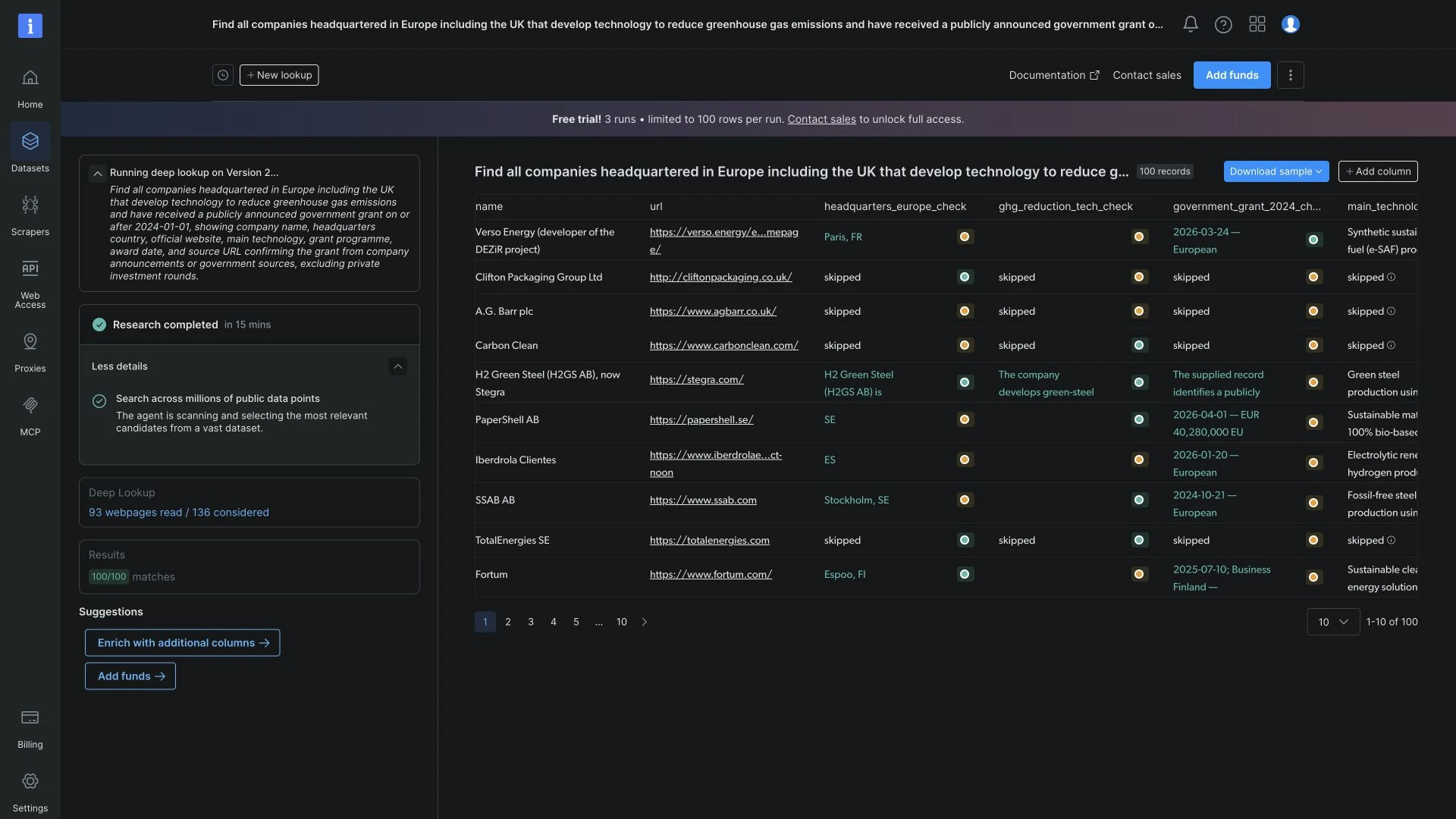
Bright Data’s Deep Lookup returns entity rows, not a written research report. Each row represents a company, person or product. Users can build lists for sales prospecting, investment research or recruitment.3
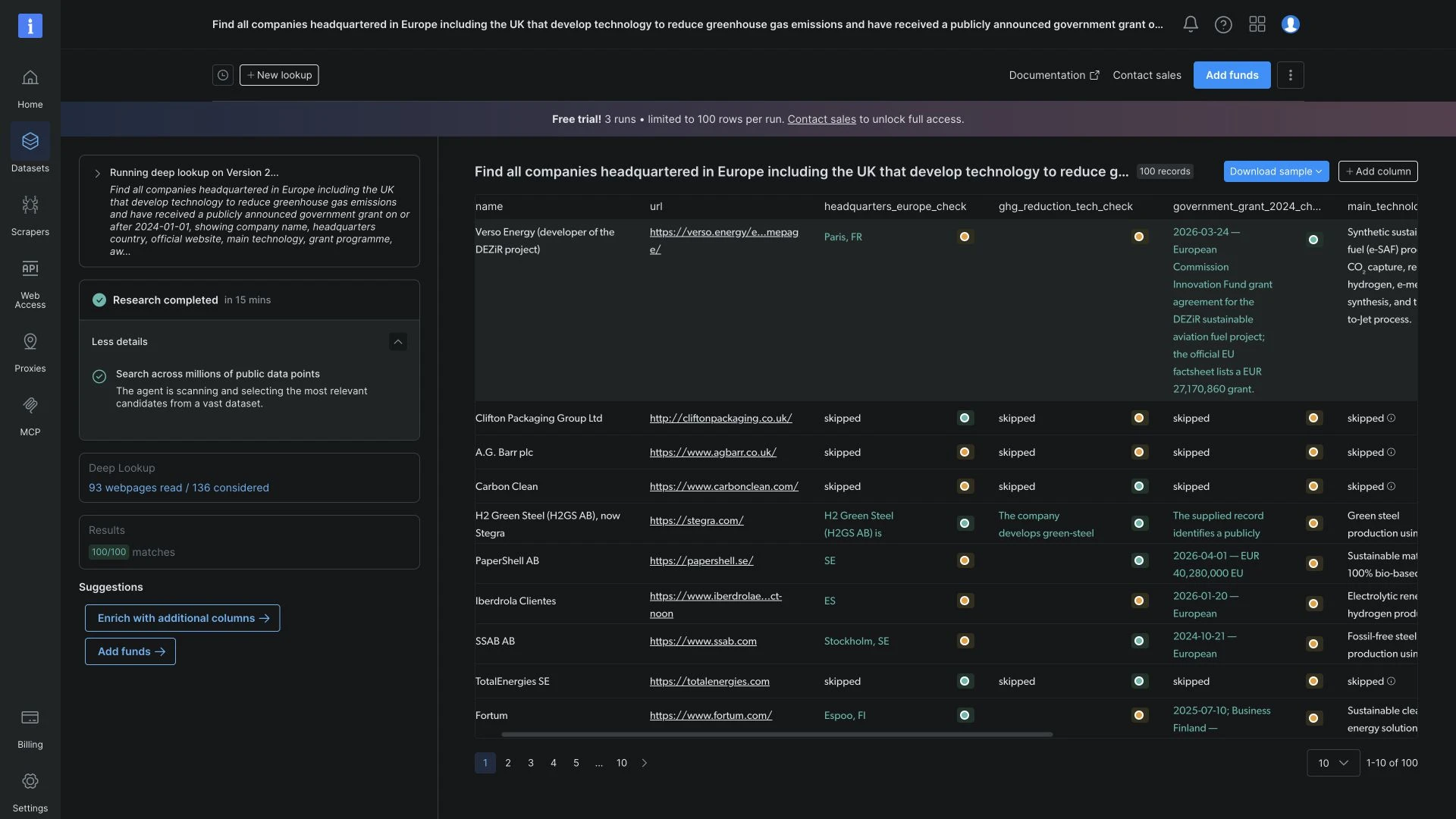
We searched for European companies developing technology to reduce greenhouse gas emissions. The query included the UK and required a publicly announced government grant since 1 January 2024.
Deep Lookup created a separate column for each condition. Expanding a row showed longer explanations, with coloured confidence indicators beside individual details. The interface reported a 15-minute run that reached the trial’s 100-record limit.
Additional columns held technology descriptions, grant programs, award dates, and source links. The links let us check grant claims against the announcements. The download menu offered CSV and JSON formats.3
Sales teams can use Deep Lookup to find companies in a target industry and region. Investors can identify businesses developing a particular technology or receiving public funding. Recruiters can search for professionals with relevant roles and experience.3
Combining several search conditions with custom result columns lets teams build lists around their own criteria and compare the details in one place.
Azure’s Deep Research tool carries a data-boundary warning
Microsoft offers Deep Research in Azure AI Foundry Agent Service, reachable from the Python, C# and JavaScript SDKs, and now documented under its classic agent tooling.4
The reason to read that page before adopting it is on the page itself: Microsoft states that the Bing search query, the tool parameters and the resource key are transferred outside the Azure compliance boundary to Grounding with Bing Search. Teams that picked Azure so that nothing leaves the boundary should check which parts of a research run cross it.
Benefits of AI deep research tools
A sourced research report in minutes
In our benchmark, median task times ranged from 5.5 to 42 minutes, depending on the tool. Each run produced a research report with source links. We did not measure how long a person would take to complete the same tasks.
Requirement scores reached 0.790 at the top across the five tools and 20 briefs. The requirements cover the whole report, from the sections asked for to the arithmetic in the cost table, so a score at that level means most of the brief was answered in the form it asked for.
Breadth in one pass
A research agent can gather material from multiple websites for a vendor comparison, a review of changes to an industry standard or an introduction to an unfamiliar research topic. The resulting report gives the reader an initial overview and sources to investigate further.
An editable research draft
The output is a document, so it can be edited, challenged and re-run. That is a different working mode from a search results page. A finished-looking document is also the risk: it invites less checking than a list of links.
 Add as preferred source
Challenges and limitations of AI deep research tools
The facts are the weak point, not the structure
Most people know an LLM can invent an answer, and they check what it produces. A deep research report invites less of that checking, because it is long, sourced and well organised, so it reads as already verified.
A report can satisfy requirements for its sections, tables and calculations while missing or misstating required facts.
Before using a report to make a decision, verify the relevant dates, figures and regulatory findings against the original sources.
Citations do not mean the source says it
Our citation audit checked whether links worked and classified their sources. It did not check whether each page supported the claim attached to it. Even a working link to an official source needs that check: the page may discuss the topic without supporting the report’s specific figure or conclusion.
Length is not depth
Claude Code’s median report contained 11,449 words against Codex CLI’s 5,734, with no statistically significant difference in requirement scores.
Readers should consider how much material they will need to review alongside the tool’s runtime and price.
Bias, privacy and over-reliance
Training data carries the biases of what was written, and a synthesis step can harden them into something that reads as a finding. With a hosted tool, any internal document uploaded for context leaves your systems, which is worth checking against the vendor’s terms before it becomes routine. The hardest risk to measure is the last one: a polished report that nobody checks erodes the habit of checking.
Methodology
Test environment
We ran the four CLI tools from a Linux cloud server and accessed Exa Agent through its API. Each used its own research tools.
Tasks and test procedure
- We wrote 20 briefs covering vendor selection, migration planning, cost models, and regulatory research. Each specified a reporting cutoff date and had reference answers built from primary sources.
- Every tool received the same task prompts. We evaluated one report per tool per task, giving 100 reports across five tools.
- We fixed the prompts, model configurations, and scoring rules before production. No task was rerun to improve a low score.
Scoring criteria
- Requirements: Each task had 42 to 74 pass/fail checks. For example, a cost table might need a unit price and its source.
- Penalties: Predefined defects reduced the score, such as treating an issue as settled after calling it unresolved elsewhere in the report. Score = max(0, (requirements passed − penalties triggered) / total requirements). Each tool’s overall score is the mean of its 20 task scores. We also checked an alternative formula that deducts 0.1 per penalty from the fraction of requirements passed, with a minimum score of zero. This is the chart’s Alternative penalty option. The order of the five tools was unchanged.
- Factual details: A separate checklist contained 434 required facts. An item earned credit only when the report correctly included every required detail within the stated tolerance. Partial answers earned no credit. These checks did not contribute to the requirement score. Fact percentages give each task equal weight. Counts combine the hits across all 434 items.
Model judges
- We removed identifying metadata and local file paths before grading. Both judges received the same report, task rules, reference facts and citation audit.
- GPT-5.6 Sol and Grok 4.6 graded each report independently. For every requirement and penalty, each judge recorded a reason tied to the report before assigning a pass/fail verdict. They also checked every factual item.
- Claude Opus 5 resolved disagreements using the same evidence. Decisions on which the first two judges agreed remained unchanged. The two initial judges agreed on 93.3% of rule verdicts and 89.1% of factual-item decisions.
Statistical analysis
We used paired tests across the 20 tasks and applied Holm correction across all ten pairwise tool comparisons. We estimated 95% rank intervals by resampling the tasks 10,000 times.
Limitations
- One report per tool per task does not measure how much the same tool’s answers vary between runs.
- We checked link availability and source type, but did not verify whether each cited page supported the attached claim. Checks requiring that verification received a fail verdict across all tools: positive checks earned no credit, and negative checks triggered no penalty.
- We refined eight tasks after an earlier pilot. We keep the briefs unpublished for future evaluations.
FAQs
AI-powered research uses AI tools to find, analyze and summarize information. A deep research tool goes beyond a chat answer: it runs for minutes, opens many sources, and produces a report with citations.
What it is good at, in our own measurement, is the form of the answer. What it is weak at is the specifics. The strongest of the five tools we tested reproduced 202 of the 434 required values, dates and names, and the weakest reproduced 89.
That’s why a deep research report needs checking before anything is published. The report may look finished even if the numbers are wrong. Related benchmarks: AI coding.
AI tools can assist with various aspects of literature reviews, including identifying relevant papers, summarizing key findings, and organizing research themes. These tools can process large volumes of academic literature quickly and help researchers identify gaps or patterns across studies. However, AI cannot fully replace human judgment in evaluating source quality, synthesizing complex arguments, or providing critical analysis. Researchers must still review, verify, and interpret AI-generated content to ensure accuracy and maintain academic rigor in their literature reviews.
AI tools can assist with data analysis and statistical work by cleaning datasets, performing statistical tests, creating visualizations, and identifying patterns in large datasets. These tools can suggest appropriate statistical methods based on data type and research questions. However, researchers must understand their data context and validate results, as AI may miss domain-specific nuances or make inappropriate assumptions.
Most modern AI research tools use natural language interfaces that do not require programming skills. However, basic data literacy and understanding of fundamental research concepts help users formulate better queries and interpret results more effectively. Advanced applications may benefit from technical knowledge for custom analysis or specialized workflows.
Open each source used for an important claim and check that it supports the report’s figures, dates and conclusions. Confirm that the source applies to the relevant time period and context. Our benchmark’s fact checklist covered predefined details, so its scores do not establish the accuracy of every claim in a report.
Cite this benchmark
Pick the format that matches where you're publishing. Pasting the link version into your CMS preserves the backlink.
@misc{kalelioglu2026,
  author = {Kalelioğlu, Berk},
  title  = {{AI Deep Research: Codex vs Claude vs Grok vs Exa}},
  year   = {2026},
  month  = sep,
  howpublished    = {\url{https://aimultiple.com/ai-deep-research}},
  note   = {AIMultiple. Retrieved September 11, 2026}
}Results and timestamps of 20 data points. Download the summary data shown in this article's charts and tables as a ZIP file containing 3 CSV files and a README.
Want the granular data behind it? Join Premium
Changelog
8 updatesReplaced the Agents vs. Deep Research Models summary with a finding that agents match deep research accuracy at lower cost.
Added an Agents vs. Deep Research Models benchmark section comparing six tools across five tasks.
Added a benchmark methodology section detailing the five research tasks, ground truth sources, scoring, and tool interfaces.
Added the DR-2T (Deep Research 2 Task) Bench to the AI deep research benchmark section.
Reference Links





Be the first to comment
Your email address will not be published. All fields are required. Comments are left in their original language.