


Demilitarized Zone (DMZ): Examples & Architecture

A Demilitarized Zone (DMZ) network is a subnetwork containing an organization’s publicly accessible services. It serves as an exposed point to an untrusted network, often the Internet.
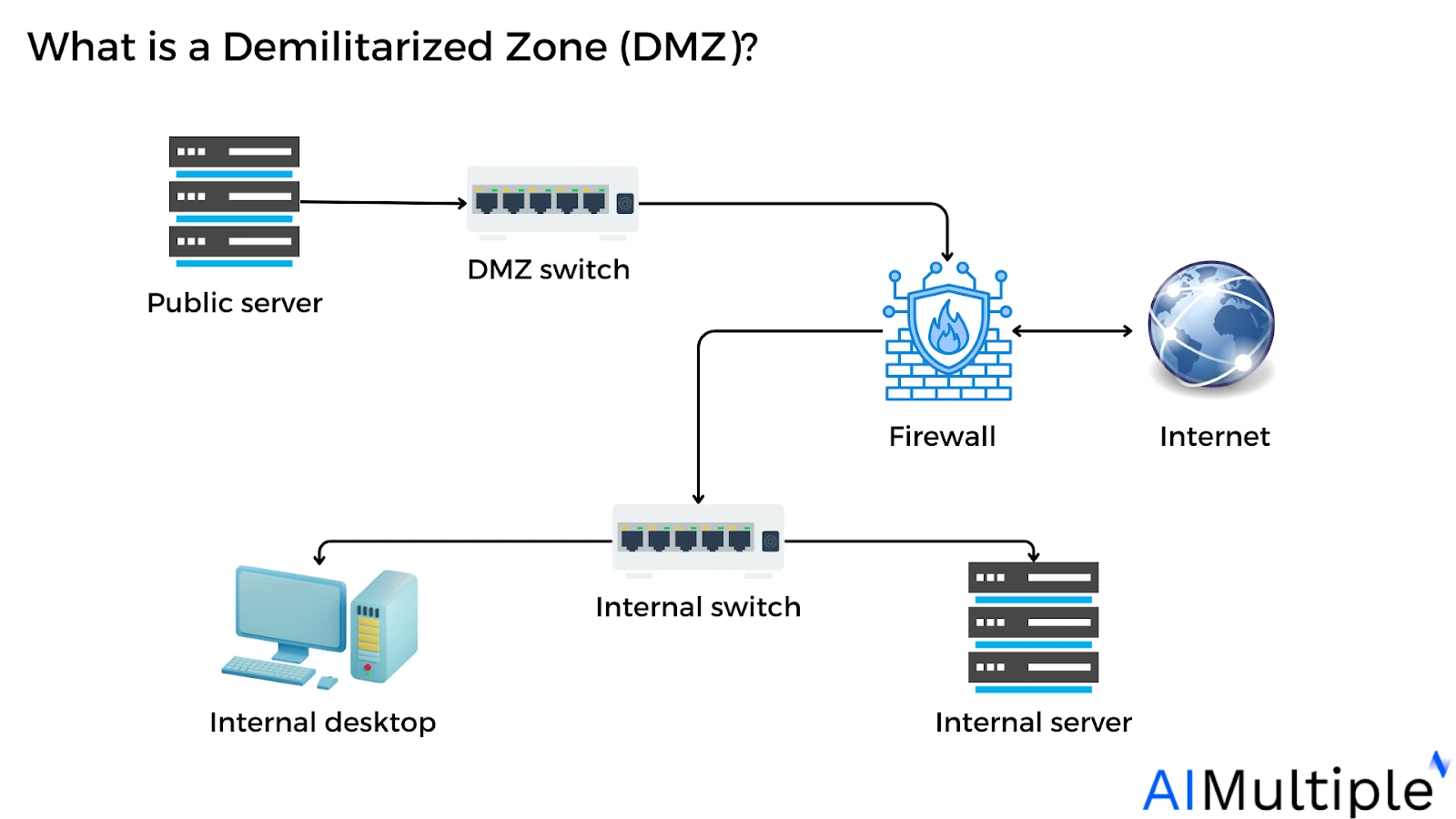
DMZs are used across various environments, from home routers to enterprise networks, to isolate public-facing services and protect internal systems. DMZs (demilitarized zones) host public-facing services while isolating them from an organization’s internal LAN. Organizations combine DMZ perimeters with Zero Trust microsegmentation and strict access controls.1
Explore real-world DMZ examples and different DMZ architectures (single vs. dual firewall):
Why is DMZ important in network security?
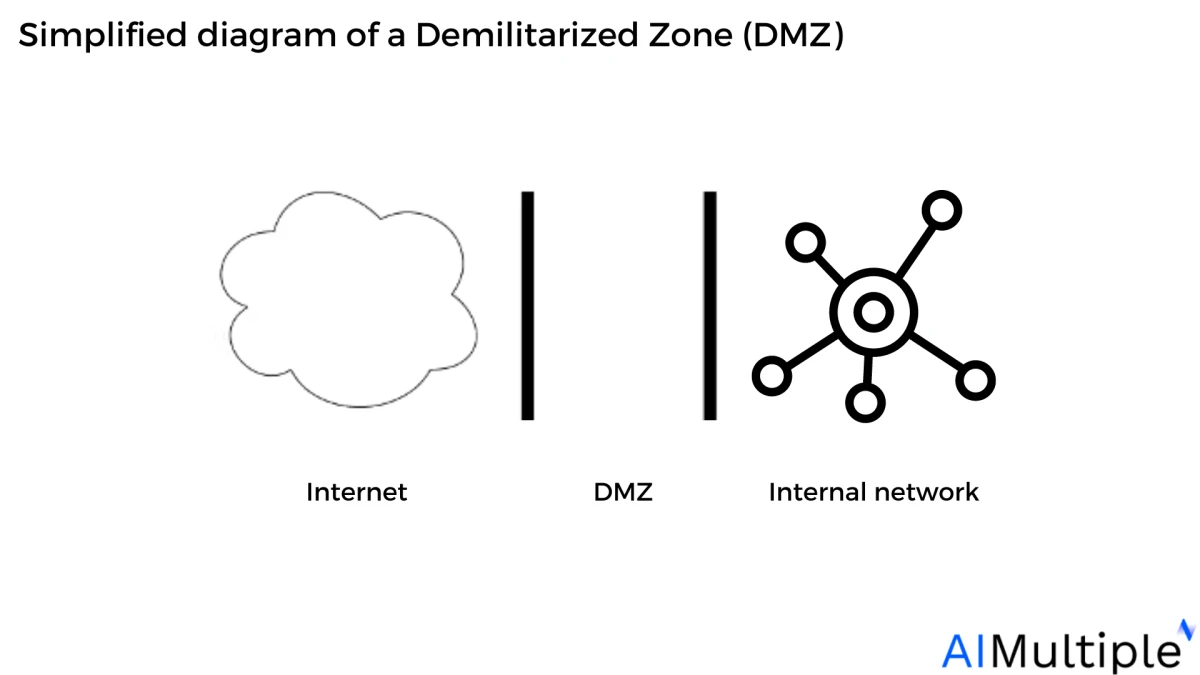
DMZs add a layer of network segmentation to defend the internal private network. It creates a buffer zone between the public internet and the organization’s private networks.
These subnetworks limit external access to internal servers and assets, making it more challenging for attackers to penetrate the internal network.
In typical configurations (see figure above), the DMZ subnet is placed between two firewalls or on a dedicated segment of a single firewall with multiple interfaces. This ensures that:
- Unauthorized access to the internal network is blocked, even if a DMZ-hosted service is compromised.
- All inbound traffic from the internet is first filtered and inspected before reaching the DMZ servers.
- Internal network traffic to and from the DMZ is tightly controlled and monitored.
DMZ examples
DMZ example 1: DMZ implementation with one firewall
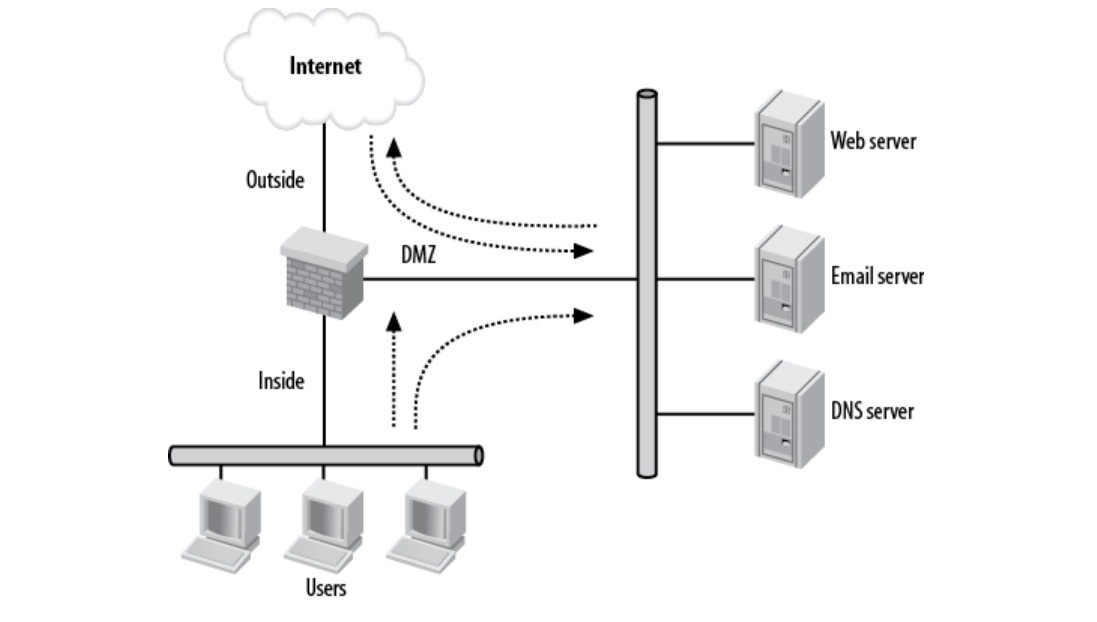
As seen in Figure 1, the DMZ network is neither within nor outside the firewall. It is accessible through both internal and external networks.
One of the primary advantages of this network diagram is isolation. For example, if the email server is hacked, the attacker will be unable to access the internal network. In this scenario, the attacker may access various servers in the DMZ as they share the same physical network.
Figure 1. Simple DMZ diagram
Source: International Journal of Wireless and Microwave Technologies2
In this configuration, the DMZ enforces the following access controls:
- Outside network: The outside network cannot establish connections with the inner network, however, the outside network can begin connections to the DMZ.
- Inside network: The internal network can start connections to external networks. External networks cannot start connections to the internal network
DMZ example 2: A DMZ connected to a third-party device
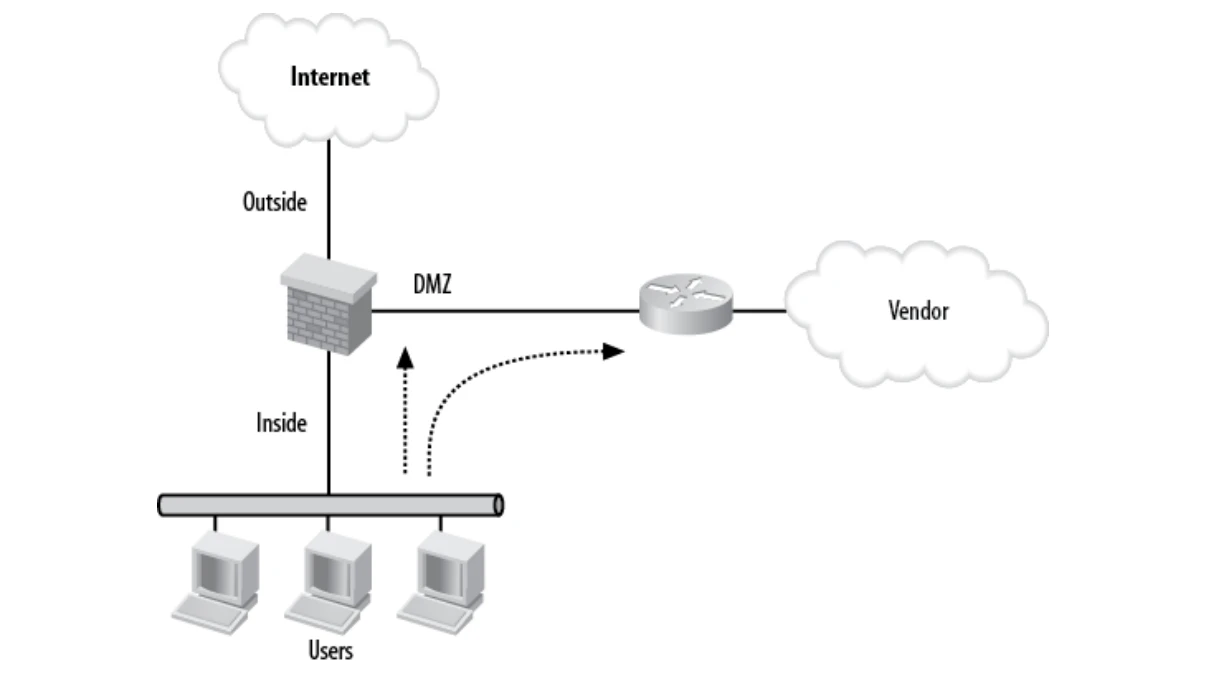
Another typical DMZ approach is connecting to a third-party device, such as a vendor. Figure 2 illustrates a network with a vendor connected via a T1 link to a router in the DMZ.
This DMZ example can be used when companies outsource their systems to an outside party, allowing direct access to the vendor’s server via this setup.
Figure 2. DMZ connecting to a vendor
Source: Network Warrior3
DMZ example 3: Multiple DMZs connected to a third-party device
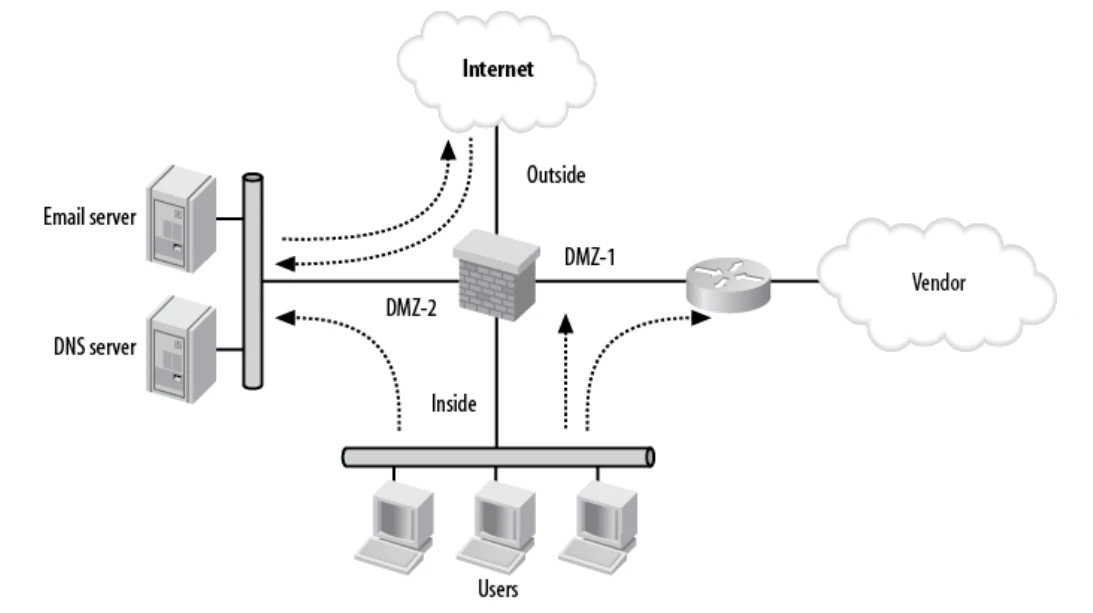
Sometimes a single DMZ is insufficient for organizations that operate complex networks. Figure 3 illustrates a network with multiple DMZs. The design combines the first two examples: the Internet is outside, and the users are within the network.
Figure 3. Multiple DMZs
Source: Network Warrior3
- DMZ-1 is an access point to a vendor.
- DMZ-2 is where the Internet servers are located.
The security requirements are consistent with the previous example (Example 2), but an additional consideration is needed: whether DMZ-1 is permitted to initiate connections to DMZ-2, and vice versa.
Evaluating this bi-directional access helps enforce granular security controls within complex network environments.
DMZ architectures
A DMZ can be configured in a variety of ways, ranging from a single firewall to dual or multiple firewalls. Most current DMZ architectures use two firewalls, which can scale to support complex networks.
1. Single firewall
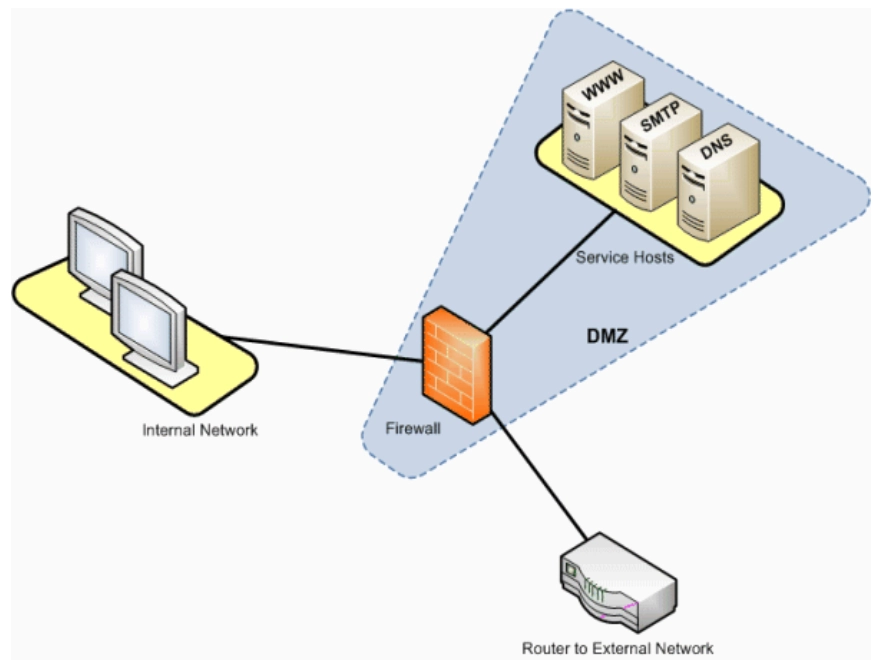
A single firewall with at least three network interfaces is needed to build a network architecture that includes a DMZ.
Figure 4. Illustration of a single firewall architecture
Source: SAP4
Why to use a single firewall: A single firewall simplifies network architecture by consolidating traffic control, policy enforcement, and logging into one device. This reduces administrative complexity and lowers both capital and operational costs. It is best for smaller environments where there is no need for multi-layered perimeter defenses.
2. Dual firewall
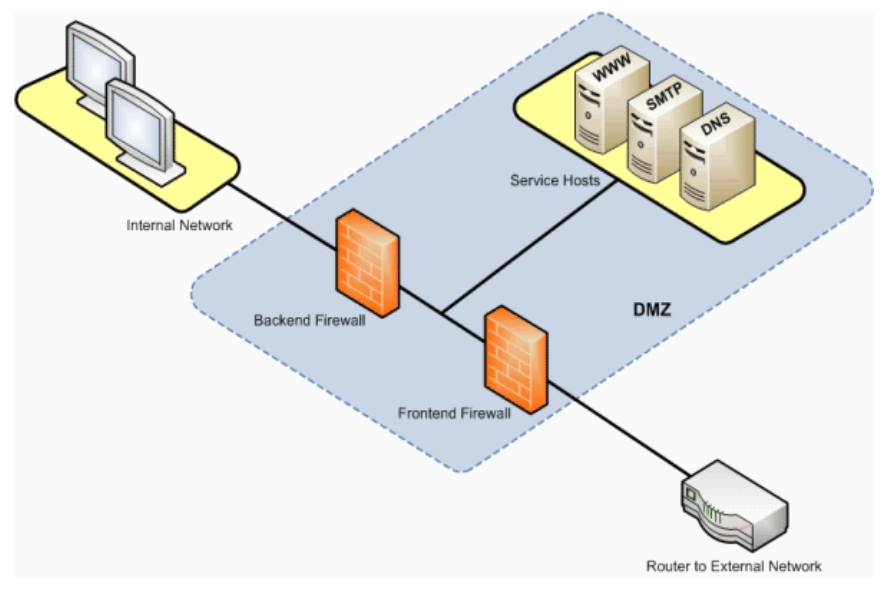
This implementation creates a DMZ using two firewalls.
Figure 5. Illustration of dual firewall architecture
Source: SAP4
Why to use dual firewalls: Dual firewalls offer a more secure system. In some companies, the two firewalls are offered by separate providers. If an external attack can breach the first firewall, it may take longer to breach the second firewall if it is built by a different manufacturer, making it less likely to fall victim to the same security vulnerabilities.
Recent hardware releases have introduced new options for DMZ firewall deployments, including WatchGuard’s Firebox M695 (released in December 2025), which features an Intel Core i7-14701E processor and delivers high throughput (45 Gbps raw) for large environments.5
For small and medium business deployments, the WatchGuard Firebox T185 (released in January 2026) provides multi-gigabit performance with approximately 5.7 Gbps raw firewall throughput and enterprise-class security features for branch office networks.6
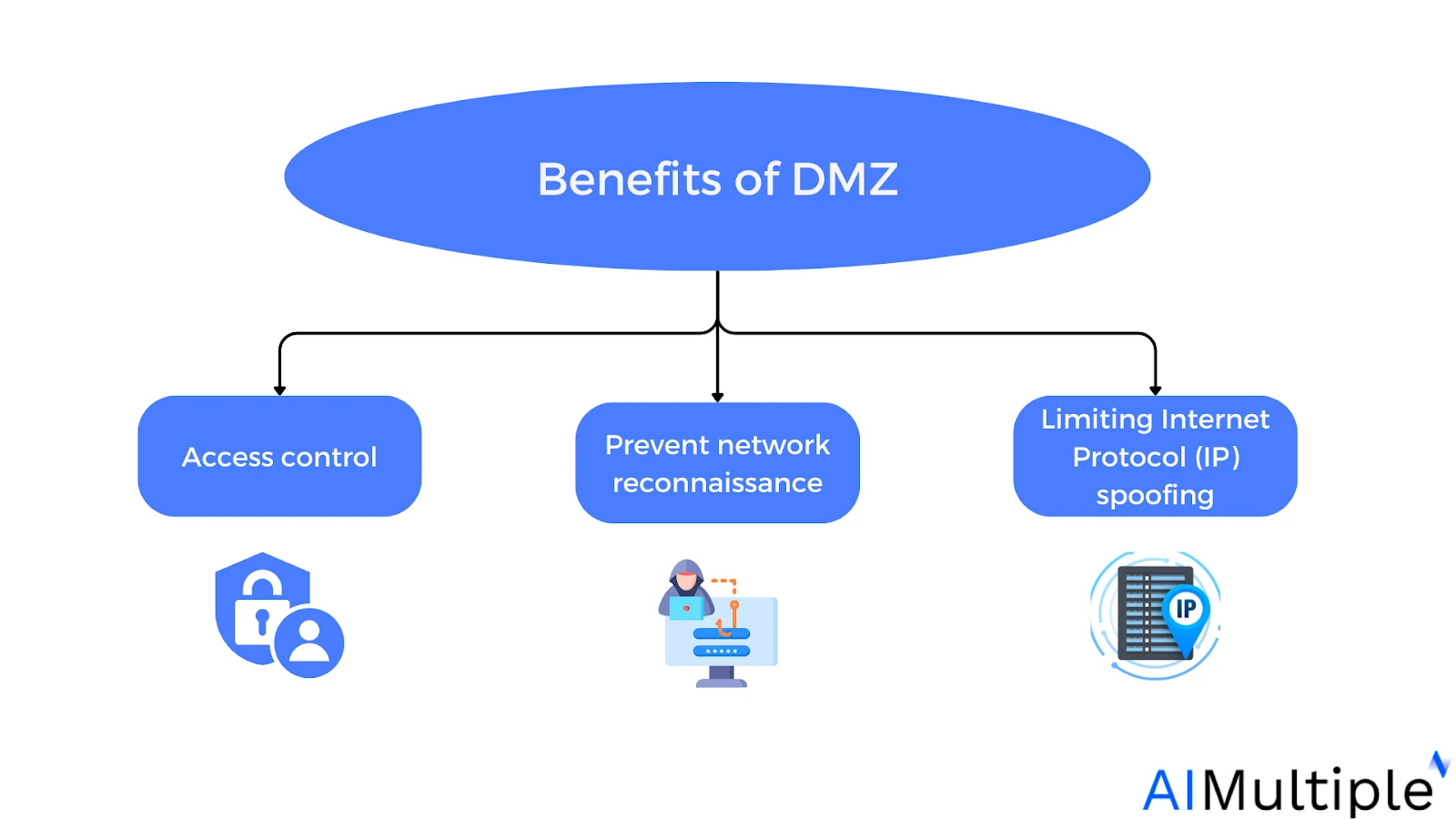
Benefits of Demilitarized Zone (DMZ)
The primary value of a DMZ lies in its ability to provide public internet users with access to specific external-facing services while serving as a protective barrier that shields the organization’s internal network.
The added layer brings several benefits:
1. Provides access controls
A DMZ network controls access to services accessible over the internet that are not within a company’s perimeter network. It also adds a layer of network segmentation, increasing the number of barriers a user must overcome before getting admission to a company’s private network.
2. Prevents network reconnaissance
A DMZ limits an attacker’s ability to assess prospective targets on the network. Even if a machine in the DMZ is hacked, the internal firewall defends the private network by isolating it from the DMZ. This configuration makes external network exploits more difficult.
3. Limits Internet Protocol (IP) spoofing
IP spoofing involves forging the source IP address of packets to gain unauthorized access. A DMZ helps detect and block spoofed traffic, especially when combined with additional security measures that validate IP authenticity, further protecting the internal network from impersonation attacks.
Top 5 vulnerabilities of DMZs in network security
A DMZ is useful, but it has weaknesses. These weaknesses can make it easier for attackers to find problems.
1. Public parts are easy to see from the internet
Servers in a DMZ must be open so people can use them. Hackers can find and scan these public-facing systems to look for weaknesses.
2. Misconfiguration creates risk
DMZ configuration and management can be complex. If firewall rules or access controls are wrong, attackers might get in.
3. Complexity increases mistakes
A DMZ adds more devices, rules, and settings to manage. More complexity means more chances for human error.
4. A false sense of security
Some people think a DMZ makes a network totally safe. It does not. A DMZ lowers risk, but cannot stop all attacks by itself.
5. DMZs may struggle with newer technologies
A DMZ assumes a boundary: outside is untrusted, inside is trusted. Three shifts weakened that assumption.
- Applications moved to cloud platforms, so fewer web servers sit in a company-run DMZ.
- Staff work from outside the office, so the boundary no longer matches where people are.
- Connected devices multiplied, widening what a perimeter has to cover.
Zero Trust answers this by dropping the assumption. It checks every request against identity and device state, wherever the request comes from. A DMZ filters mainly on IP addresses and ports; Zero Trust Network Access (ZTNA) verifies the user and device, then grants access to one resource and nothing else.
The two work together in practice. A DMZ isolates public-facing services, and Zero Trust checks each request inside.
Read more on Zero-Trust: ZTNA Solutions, ZTNA Open Source Components.
In February 2026, the U.S. Cybersecurity and Infrastructure Security Agency (CISA) issued new guidance for critical infrastructure operators following a cyberattack on Poland’s power grid.7 The advisory emphasizes strict network segmentation and other controls to help contain threats in operational technology (OT) networks.
 Add as preferred source
Applications of DMZs
1. Cloud services
Cloud platforms use the DMZ idea in two ways.
Between on-premises and cloud. Some companies run services partly on-premises and partly in a cloud network. A DMZ placed between the two controls what crosses.
Inside the cloud. A virtual private cloud splits into public and private subnets. Public subnets hold load balancers and gateways reachable from the internet. Private subnets hold application servers and databases, with no direct inbound route. Security groups and network access control lists replace firewall rules between the two.
The goal stays the same in both: an attacker reaching a public-facing component finds no direct path to the data behind it.
Cloud providers also offer managed firewalls for these boundaries. AWS Network Firewall is a managed, stateful firewall service for VPCs. Google Cloud’s Next-Generation Firewall adds URL filtering for domain-based traffic control and hierarchical policies for granular segmentation.
2. Home networks
A DMZ can also be useful for home networks that use LAN settings and broadband routers. Several household routers include DMZ options or DMZ host settings. These options enable users to connect one device to the internet.
3. The industrial DMZ (IDMZ)
Industrial networks give the DMZ a fixed address. The Purdue model splits industrial systems into levels:8
- Levels 0–3: operational technology, such as sensors, controllers, and SCADA
- Levels 4–5: enterprise IT
- Level 3.5: the industrial DMZ, or IDMZ
Traffic between OT and IT passes through Level 3.5. NIST SP 800-82, IEC 62443, and NERC CIP each codified the layer.9
What sits inside
An IDMZ uses the dual-firewall design: one firewall faces IT, a second faces OT. The zone between them holds shared services such as jump servers, patch servers, and replica historians.
The historian shows the pattern. A plant historian pushes data outward to a replica in the IDMZ. IT systems query the replica. Nothing reaches into the control network.
How IEC 62443 frames it
The standard uses two terms:
- Zone: a group of assets sharing the same security requirements
- Conduit: the controlled path between zones, enforced by the firewalls
Each zone carries a target Security Level from SL 1 to SL 4, which sets how strong its controls must be.
Some sites add a data diode. The hardware permits traffic one way and blocks the return path physically. NERC CIP-005 and IEC 62443-3-3 accept diodes as a control at the highest security levels.
Why the boundary matters
Attacks cross it. Reports place roughly 75% of OT incidents as starting on the IT side.10 Manufacturing drew 27.7% of all cyberattacks in 2025, the highest share of any industry for a fifth year, per the IBM X-Force 2026 Index.11
4. Web and email hosting
Public-facing services such as web servers are typically deployed within a DMZ to provide external users with access to essential resources while maintaining the security of the internal network.
5. Intrusion detection and prevention systems (IDS/IPS)
Some security architectures place IDS/IPS sensors in the DMZ to inspect incoming and outgoing traffic for malicious behavior before it reaches the internal network.
6. Partner and vendor access
Organizations that provide network access to third-party partners or vendors often use a DMZ to host shared services (e.g., APIs, SFTP portals). This limits the exposure of the internal network in case the external party’s access is compromised.
7. Remote access gateways
VPN concentrators, remote desktop gateways, or virtual desktop infrastructure (VDI) brokers are often deployed in a DMZ to allow secure remote access to internal systems without exposing them directly to the internet.
Cite this research
Pick the format that matches where you're publishing. Pasting the link version into your CMS preserves the backlink.
@misc{dilmegani2026,
  author = {Dilmegani, Cem},
  title  = {{Demilitarized Zone (DMZ): Examples & Architecture}},
  year   = {2026},
  month  = aug,
  howpublished    = {\url{https://aimultiple.com/dmz}},
  note   = {AIMultiple. Retrieved August 6, 2026}
}
Changelog
6 updatesReplaced the Industrial control systems section with a new Industrial DMZ (IDMZ) section.
Expanded the introduction with two sentences about DMZ purpose and related security concepts.
Reference Links
Cem's work at AIMultiple has been cited by leading global publications including Business Insider, Forbes, Morning Brew, and Washington Post, global firms like Deloitte and HPE, NGOs like World Economic Forum, and supranational organizations like European Commission. [1], [2], [3], [4], [5]
Throughout his career, Cem served as a tech consultant, tech buyer and tech entrepreneur. He advised enterprises on their technology decisions at McKinsey & Company and Altman Solon for more than a decade. He also published a McKinsey report on digitalization.
He led technology strategy and procurement of a telco while reporting to the CEO. He has also led commercial growth of deep tech company Hypatos that reached a 7 digit annual recurring revenue and a 9 digit valuation from 0 within 2 years. Cem's work in Hypatos was covered by leading technology publications like TechCrunch and Business Insider.
Cem regularly speaks at international technology conferences. He graduated from Bogazici University as a computer engineer and holds an MBA from Columbia Business School.






Be the first to comment
Your email address will not be published. All fields are required. Comments are left in their original language.