


Top 11 XDR Solutions Comparison and Features

We researched 11 XDR solutions, verifying vendor claims against official product documentation, MITRE ATT&CK evaluation results, and customer deployments. From that pool, we selected 5 for hands-on benchmarking, deploying each to dedicated Windows Server 2022 endpoints and a Linux VM pool, running 30 test cases across 8 categories. See our analysis on value and performance comparison.
Top 11 XDR solutions
XDR benchmark summary
- Acronis Cyber Protect was the only vendor to restore all 17 encrypted files in a live ransomware test, on the base license. Its Linux EDR coverage is narrower than documented lab testing confirmed support only for RHEL 6/7 (kernel ≤3.10), not the kernel 2.6.9–5.19 range in vendor documentation.
- Sophos Intercept X had the highest combined detect+prevent rate at 85% (11/13 tests), with 6 execution-time blocks and the strongest AI-assisted hunting output across the set.
- CrowdStrike Falcon led on raw detection at 92% but only blocked 38% of tests under its default policy. Switching to AGGRESSIVE brought prevention in line with the others out-of-box; it prioritizes visibility over blocking. It had the lightest agent (138 MB Windows idle) and the only kernel-agnostic Linux EDR via eBPF.
- Bitdefender GravityZone is the only vendor with a 100% AV-Comparatives EDR score and showed the deepest MITRE mapping in the UI. Its HyperDetect ML layer is the most aggressive in the set; environments with PowerShell-heavy automation will need tuning before production rollout. Organizations running PowerShell-heavy automation, RMM scripts, or CI/CD pipelines should test HyperDetect at each sensitivity level before production rollout. Under default settings, legitimate tooling can get caught alongside the malware.
- Trend Micro Vision One had the strongest alert correlation: a single Workbench incident grew from 2 alerts to 147 across 6 attack phases. The gap is a pipeline bug Apex One blocks several threat types without forwarding the events to Vision One, leaving SOC analysts with no console record of those blocks. Workbench insights also lagged 30 to 90 minutes in some cases.
1. Deployment & Installation
*Time to first protection(T2V): How long from running the installer to the endpoint showing as active and protected in the console.
- Acronis and Bitdefender are the only two with a real on-prem option. CrowdStrike and Sophos are cloud-only; Trend Micro has a hybrid path but full XDR telemetry still needs the cloud.
- Acronis documentation (KB 67747) lists Linux kernel support up to 5.19, but lab tests showed the real boundary at RHEL 6/7 (kernel 3.10). Ubuntu 24.04 and AlmaLinux 9.8 both failed. CrowdStrike’s eBPF design has no kernel dependency and ran cleanly on Ubuntu 24.04. This matters more than it sounds. Ubuntu 22.04+, RHEL 8/9, Debian 12, and AlmaLinux 9 are all out of scope for Acronis EDR. On those hosts, you get backup and basic anti-malware, not behavioral detection or kill-chain visibility. If your Linux fleet is modern, treat Acronis as backup-only there and plan a separate EDR layer.
- CrowdStrike was the fastest at 65 seconds on Windows.
- Sophos took ~10 minutes on Windows but 53 seconds on Linux.
- Trend Micro’s 15-minute Windows install requires a restart and two separate agents (Vision One sensor + Apex One), the most complex deployment in the set.
2. Detection Breakdown
Acronis ran in detect-only mode throughout; the EDR Playbooks were not enabled, so every incident landed as “Not mitigated” regardless of whether the underlying engine flagged it. That is a policy default, not a detection gap; enabling the playbooks flips incidents to auto-mitigated.
Trend Micro ran against 16 test cases versus 13 for the others, because the two-agent architecture created additional test surface. The three “Block (not logged to Vision One)” entries are the silent-block bug: Apex One stopped the threat on the endpoint but never sent the event to the Vision One console, so a SOC analyst watching Workbench would see nothing.
3. Response & Remediation
- Acronis and Sophos are the only two vendors that restore encrypted files. Acronis restored all 17 files within 76 seconds via backup snapshots, on the base license. Sophos uses behavior-based detection (CryptoGuard) without snapshots. CrowdStrike and Trend Micro block execution but cannot recover already-encrypted files.
- All five vendors support one-click host isolation. CrowdStrike keeps the RTR shell open post-isolation, allowing live investigation while the host is off the network.
- Sophos had the strongest threat hunting setup. One caveat: Threat Graphs are Windows-only. Linux detections surface as flat event lists without the automated kill-chain visualization. On Linux hosts, hunting drops from four layers to three.
4. Agent Performance
- CrowdStrike has the lightest Windows footprint at 138 MB idle, roughly 8x lower than Bitdefender’s 1,174 MB. On Linux, its eBPF agent starts at 43 MB but reached 445 MB under 10 minutes of sustained load.
- Sophos is the lightest on Linux at 297 MB.
- Bitdefender is the heaviest overall. EPSecurityService.exe alone consumed 1,005 MB; the modular process design limits crash impact but at a RAM cost. A concern for endpoints with 4 GB or less.
- Trend Micro’s 14-process, 563-thread Windows profile and 890 MB pre-install package put it in the same heavy tier as Bitdefender.
Comparison of top 11 XDR Solutions
Ratings are based on G2, Gartner, and Capterra. Vendors are listed in order of their review counts.
Employee counts are based on LinkedIn data.
Feature comparison of the top 11 XDR solutions
1. Acronis Cyber Protect
Acronis Cyber Protect combines backup with natively integrated EDR and XDR in one console, one agent, and one policy model. We tested it on the EU SaaS instance across two Windows hosts and three Linux VMs.

Installation and onboarding
Cloud SaaS (tested), on-prem Cyber Protect 15/16, and air-gapped Cyber Protect Local. Full EDR/XDR is cloud-only; an on-prem server gets backup plus anti-malware and Active Protection, but not full EDR. This still makes Acronis one of two tools here usable in an air-gapped environment, with Bitdefender, since CrowdStrike and Sophos are cloud-only.
Deployment offered six install paths: A GUI installer, offline installers for 32-bit, 64-bit, and ARM, network device discovery with remote push, a registration code, a registration token, and a .mst/.msi for unattended rollout. The token sets a lifetime and binds a protection plan at enrollment, so the agent attaches its plan automatically and carries no credentials. The same token worked for the Linux agent.
The Windows install ran about 50 seconds, including download, followed by a separate three-step register wizard (one to two minutes), for roughly two to three minutes interactive. The register step surfaced the “Detection and Response, Not available” warning, and the tray initially listed Backup only. CrowdStrike finishes in a single 65-second phase. Acronis is second-fastest; the registration step can be removed through a token, and an offline installer is available for bandwidth-constrained environments.
Management console
The left navigation held eight top categories, with Backup storage at the top level beside the security modules. Acronis is the only tool here that treats backup as a peer of security rather than an add-on. Enabling the EDR pack expanded the existing navigation rather than opening a separate portal.
Customization uses a widget model and a #CyberFit posture score. The test host scored 450 of 850, broken into anti-malware 275/275, backup 175/175, and zeros for firewall, VPN, disk encryption, and NTLM. Customization depth trails Bitdefender’s 30-plus saved views and Trend’s Companion AI.
Detection
The EDR engine worked in the lab. Even before the EDR pack, the anti-malware behavioral engine raised an incident for the wmic test (C-05), logged as “Not mitigated.” After the pack opened, incidents showed a full Cyber Kill Chain process tree, HIGH severity, a positivity score, and a Copilot pivot. The AI attack summary named a bare wmic command as Impacket’s WMIExec tool and merged the scheduled-task (C-02) and wmic (C-05) tests into one chain, a cross-test correlation rather than per-event detection.
Every test incident landed as “Not mitigated.” The out-of-box profile is detect-only with a manual Remediate option, the same posture as CrowdStrike, until the EDR Playbooks are enabled.
MITRE mapping came in three layers: A Detection by Tactics widget, technique labels on kill-chain nodes, and a T-numbered Attack Info list with STIX export. The mapping is less granular than Bitdefender’s sub-techniques or Sophos’s 51-plus techniques in one incident. Two categories are structural gaps: no dedicated NDR (network signal is endpoint-derived, like CrowdStrike), and conditional email and identity (a separate Advanced Email Security pack and an XDR-pack Entra ID integration), both behind the built-in coverage in Trend and Sophos.
Response and remediation
Ransomware rollback is the clearest result. Against the lawndoc simulator (256-bit AES) on a folder of 17 files, all 17 originals returned at their original sizes within 76 seconds, with content intact. Active Protection detected the encryption behavior, removed the encrypted copies, and restored the originals with no analyst action. It ran on the base license, before the EDR pack. CrowdStrike and Trend cannot reverse encryption; Sophos matches Acronis through CryptoGuard. Acronis adds native backup recovery beneath the behavioral layer.
Host isolation runs through an Isolate Workload playbook with a post-isolation remote toolset (command line, file transfer, screenshot), some actions 2FA-gated. Automation was the strongest live evidence in the set: enabling a playbook flipped new incidents to auto-mitigated, on top of a 109-script library and an AI script generator. Hunting uses Acronis’s XQL query language with one-year retention, newer and narrower than Sophos’s four-layer stack.
Performance
The Windows agent measured about 432 MB resident at idle across four processes, with CPU near zero, roughly three times CrowdStrike’s 138 MB because backup and security share one agent. Linux idle sat at 352 MB on CentOS. A full disk scan ran about 29 minutes and a quick scan 2 seconds; the scan caught EICAR, nbtscan, and APTSimulator drops live. Acronis also scans backup increments off-host in the cloud, sparing the production endpoint. On CentOS the Linux EDR caught a live EICAR drop in 9 milliseconds. Detection is hybrid: local engines work offline for baseline anti-malware and ransomware, with full EDR analytics dependent on the cloud.
Integration
SIEM forwarding is a dedicated configuration object exporting over CEF and JSON syslog, with native Sentinel and Splunk. The API library covers 12 services including an EDR endpoint, documented but without an official SDK on the level of CrowdStrike’s FalconPy. Third-party threat-intel import is a gap: the console carries Acronis’s own CPOC feed but no documented STIX, TAXII, or MISP ingestion. Ticketing is strong from the MSP heritage, with native ConnectWise, Datto Autotask, and ServiceNow.
Threat intelligence
Acronis runs a Threat Research Unit backed by four operation centers, smaller than CrowdStrike’s or Sophos’s but active, with a biannual Cyberthreats Report. The console feed is Acronis-native, and feed-freshness is not published, unlike Bitdefender’s five-minute figure. Alert enrichment is competitive: the AI attack summary generates automatically, reads in plain language, and performs cross-test correlation.
Reporting
The Reports module carries about 16 templates across operations, security, and usage, with a widget-based builder and scheduler. Export covers PDF, XLSX, CSV, and JSON, the broadest format set in the benchmark, with email and save-to-folder delivery. There is no native SFTP or webhook delivery.
2. CrowdStrike Falcon
Installation and onboarding
Falcon is cloud-only SaaS, with region selection (EU-1, US-1, US-2, GovCloud) but no on-prem appliance or air-gapped option. This rules it out of air-gapped environments, where Acronis and Bitdefender remain the only two candidates among the five. Sophos is in the same cloud-only position.

The Windows sensor installs through a GUI dialog with the Customer ID pre-filled, no command line required, and completed in about 65 seconds in a single phase, the fastest single-machine install measured. Mass deployment relies on documented CLI arguments rather than the six packaged paths that Acronis offers, so the breadth of deployment methods is narrower. The Linux sensor installed in about 7 seconds net (42.6 seconds including the SCP transfer), roughly nine times faster than Windows, reflecting the eBPF design that needs no kernel module. An uninstallation token and an optional installation token make the agent self-protecting, so an attacker cannot remove it without both tokens.
Management console
The left navigation lists 12-plus modules in one place: Next-Gen SIEM, Endpoint security, Identity protection, Counter Adversary Operations, Investigate, Fusion SOAR, Foundry, Asset inventory, and more. Opening a detection drills into a drawer rather than switching tabs or tenants, so the single-pane claim holds more completely than the other four tools, where identity, email, or XDR telemetry tend to live in separate panes.
Host management showed both the Windows and Ubuntu hosts in one table under the same Phase 2 policy, with a group abstraction that applies per-platform policy from a cross-platform group. Dashboard customization supports cloned dashboards, an Add widget panel with preset and custom widgets, and an Attack Path Analytics widget category fed by Identity Protection and Asset Inventory that the other tools did not carry.
Detection
We ran 13 Windows tests across signature, LoLBin, lateral-movement, and persistence groups. Under Phase 2, five produced an outright block: rundll32 JavaScript execution, certutil download, mimikatz launch (stopped by AMSI script-content analysis before the binary extracted), comsvcs.dll LSASS dumping, and an AMSI bypass attempt. An attempt to stop the Falcon service through CIM returned Access Denied, confirming sensor tamper protection.
EICAR was detected but not blocked: the file wrote to disk at 70 bytes and the detection logged as Informational, mapped to Execution via User Execution. CrowdStrike and Bitdefender both leave EICAR detect-only by default, while the other three block it. The APTSimulator run quarantined 12 malicious binaries (mimikatz family plus recon tools) within about 25 seconds of disk write.
Detection coverage came to roughly 12 of 13, near 92 percent. The weak area is persistence and log tampering: registry Run keys, scheduled tasks, and a Windows event-log clear were detected but not blocked, even under Phase 2. Detections carry MITRE technique labels, and the dashboard charts tactics, with CrowdStrike’s own “AI Powered IOA” category running alongside the standard tactics. On Linux, all five behavioral tests ran under eBPF telemetry with detection expected after heartbeat; prevention was off because the Phase 2 Linux policy was set to Moderate.
Two categories are structural gaps. Falcon markets no dedicated NDR sensor, so its network signal is endpoint-derived, the same model as Acronis. Email is not covered; Trend, Sophos, and Bitdefender bundle email security, while Falcon expects a separate product.
Response and remediation
Host isolation runs through a one-click Network Contain action that leaves a Real Time Response shell open for remote investigation after the host is cut off. We did not trigger it live, since the single test host had to stay reachable, but the action is present in both the host table and the detection drawer.
CrowdStrike cannot reverse encryption. Its model is to prevent before encryption through behavioral blocking and Volume Shadow Copy protection, with recovery handled manually through RTR. Sophos matches ransomware rollback through CryptoGuard and Acronis through native backup, so this is a clear gap relative to those two.
Automation uses the built-in Fusion SOAR with a no-code workflow builder. IOC management supports four indicator types (SHA256/MD5 hash, IP, domain, URL) with bulk CSV/JSON import, per-indicator scope (platform, host group, expiration date), and a mandatory audit-log comment on each change. Hunting spans detection filter chips, the Next-Gen SIEM event search returning full event JSON, and savable process trees and graphs, so a separate SIEM is not required.
Performance
The Windows agent measured about 138 MB resident across the CSFalconService process and four container helpers, with CPU near zero at idle, roughly three times lighter than Acronis and far below Trend’s Apex One at 890 MB.
The Linux eBPF agent sat at 43 MB idle but grew to about 445 MB under 10 minutes of event processing, a ten-fold increase worth monitoring on high-throughput hosts.
An on-demand path-based scan ran about 113 seconds with a selectable CPU cap of 25, 50, or 75 percent, and scan-time NGAV sliders that can differ from the real-time policy. A sensor-side machine-learning model keeps partial protection during internet outages, so detection is not cloud-only.
Integration
Two integration points were verified in the console. The API is exposed through an interactive OpenAPI specification with OAuth2 authentication and a 30-minute token, backed by the official FalconPy Python SDK covering 70-plus service collections, the most mature API surface in the benchmark; Acronis and Bitdefender ship no official SDK. The Next-Gen SIEM is built in, and its event search returned hits with full event JSON, so a separate SIEM is not required for hunting.
The SIEM layer (LogScale) adds native connectors for Splunk, Microsoft Sentinel, QRadar, Elastic, and Chronicle, plus Falcon Data Replicator and a streaming API; third-party threat-intel import covers TAXII, STIX, and MISP; and ticketing runs through the CrowdStrike Store (ServiceNow native, plus Jira, PagerDuty, Slack, and Teams) and Fusion SOAR webhooks. These were not exercised in the test.
Threat intelligence
Alert enrichment was the clearest result in the console. A single blocked detection carried a process tree, command line, MITRE mapping, hash details, global and local prevalence, 43 contextual behaviors, and a Google Threat Intelligence tab from the Mandiant integration. The feed acted in real time: the mimikatz binaries quarantined at disk write within seconds.
Per CrowdStrike’s documentation, the Counter Adversary Operations module tracks 200-plus named adversaries, among the largest intelligence operations of the five tools, with deeper attribution behind the separate Falcon Intelligence Premium tier. That tier was visible in the navigation but not exercised in the test.
Reporting
The activity dashboard surfaced CrowdScore as a 0-100 metric, new and recent detections, SHA-based detections, prevented-malware-by-host, and a Detections by Tactics chart. A dashboard could be cloned and edited through an Add widget panel carrying 30-plus preset widgets plus custom ones. Export was confirmed for table CSV and, at the incident level, for the process-tree graph and its data through the Open/Save action, a per-detection visual export the other tools did not surface.
Dashboards also support scheduled delivery, and reporting output extends to dashboard PDF or image, a real-time streaming API, and email subscriptions. These delivery paths were not exercised in the test.
3. Sophos Intercept X
Sophos Intercept X delivers EDR, NGAV, ransomware rollback, and a four-layer hunting stack through Sophos Central, a cloud-only console.

Installation and onboarding
Sophos Central is cloud-only SaaS; the on-prem Enterprise Console reached end of life in 2020, so there is no on-prem or air-gapped option. This rules it out of air-gapped environments, where Acronis and Bitdefender remain the only candidates, the same position as CrowdStrike.
The installer is a 2.66 MB stub, the smallest in the benchmark by a wide margin against Trend’s 890 MB package, with the full components pulled from the cloud at install time.
Three deployment methods are offered from one Installers page, and agent download sits two clicks from the top navigation. Licensing is dynamic, so adding a module later needs no reinstall, and an XDR Sensor mode runs alongside third-party AV for co-existence.
The Windows install ran about 4 minutes 23 seconds with an optional, not forced, restart, for a time-to-value near 10 minutes. The final dialog warns that the installer removes any third-party security software, so Defender and other AV are uninstalled automatically, which eases migration but warrants a custom installer in production to avoid unintended removal.
After install the endpoint registered as online with Tamper Protection on and three status badges (Active Adversary Protection, Isolation, Lockdown), and pulled two signature updates within seven minutes.
Management console
The console runs as a single pane across 13-plus modules: Endpoint, Server, NDR, Email Security, Phish Threat, ZTNA, Identity, Encryption, Firewall, Wireless, and more. Phish Threat, a security-awareness training and phishing-simulation module, is not present in the other four tools.
The Threat Analysis Center holds the detection and hunting tools. Policy is organized as 11 separate Base Policies, the broadest policy model in the set, with DLP, File Integrity Monitoring, Windows Firewall management, Unauthorized File Protection, and Linux Runtime Detection all built in.
Device health breaks into seven sub-categories, the most granular health view of the five tools. Account Health Check, a compliance-audit feature scoring agent mode, tamper protection, policies, and exclusions against a benchmark of other organizations, is specific to Sophos.
Detection
We ran 13 Windows tests. Six produced an outright block: mimikatz, comsvcs LSASS dumping (Creds_4b, T1003.001, Critical), an AMSI bypass (AMSI/Bypass-J), a certutil download (T1105), and an mshta AMSI bypass (Critical). An attempt to stop the Sophos service through CIM was rejected, with self-tamper blocked on all attempts. EICAR landed as a latent quarantine, and three tests (encoded PowerShell, rundll32, and a Windows event-log clear) were detected but not blocked.
Defender-disable and registry/scheduled-task persistence were missed. Coverage came to 11 of 13, near 85 percent, the highest in the benchmark, with prevention and detection both strong.
A consistent pattern set Sophos apart from Trend: each block wrote multiple events to the console rather than blocking silently. The LSASS test, for example, produced three timestamped events (process kill, signature detection, artifact cleanup), so the SOC view matched what the agent actually did.
The dashboard charts coverage as a MITRE TTP heatmap, a visual layout the other tools render as bar charts or lists, with more than 51 mapped techniques across the run and a per-detection technique label.
Two categories sit outside the endpoint. Sophos NDR is a separately licensed module with its own sensor that correlates network alerts into the same console, on par with Trend and ahead of CrowdStrike and Acronis. Email is covered through Sophos Email Security, and identity through Sophos ITDR.
Response and remediation
CryptoGuard is the clearest response strength. It detects ransomware encryption behaviorally through entropy and an I/O minifilter and restores affected files without relying on snapshots. CrowdStrike and Trend cannot reverse encryption; Sophos matches Acronis here through a behavioral rather than backup-based mechanism. Host isolation is present as an action on the device, and Active Adversary Protection and Server Lockdown (application allowlisting) add behavioral and hardening layers.
The correlation engine raised case-level alerts automatically for both the Windows and the Linux host, and surfaced a higher-level escalation on the dashboard (“an attacker is trying to access your devices”) above the individual detections, giving a SOC manager an executive view over the granular alert stream.
Case severity showed as N/A across the board. There is no auto-prioritization, so an analyst staring at 56 detections in 24 hours has to triage manually. For a product with this much detection breadth, that is a meaningful gap.
Performance
The Windows runtime measured about 653 MB across roughly 16 processes, heavier than CrowdStrike’s 138 MB and in the range of Trend, functional on modern endpoints but worth noting on constrained hardware.
The Linux agent was lighter at about 297 MB resident and 846 MB on disk, roughly four times lighter than Bitdefender’s Linux agent, and installed in 53.2 seconds. Local prevention (CryptoGuard, Active Adversary Protection, and the anti-exploit layer) runs without the cloud, so protection holds during an internet outage.
Integration
SIEM coverage includes a certified Splunk app, a certified Microsoft Sentinel connector, an IBM QRadar DSM, the Sophos Data Lake, and CEF syslog.
The platform exposes a region-aware REST API (Bearer token plus tenant header) but ships no official Python SDK, which CrowdStrike does. Third-party intel import covers STIX 2.1 and TAXII 2.1 with custom IOC upload and YARA/Sigma detection rules, though there is no one-click MISP connector.
Ticketing runs through certified ServiceNow and Jira apps, a built-in ConnectWise PSA path from the MSP heritage, and generic webhooks.
Threat intelligence
Alert enrichment was the strongest result in the console. Opening a case, Sophos AI merged two separate mimikatz rules into one narrative, auto-mapped six ATT&CK tactics, named the relevant technique context, scored severity on a 1-to-10 scale, and offered three suggested follow-up hunts.
The text quality and the proactive follow-ups went beyond what the other tools’ assistants produced.
Reporting
The report gallery is the broadest in the benchmark, with 8-plus categories and 20-plus templates spanning logs, endpoint, email, Cloud Optix, web, ZTNA, DNS, and a Hero Reports executive summary.
4. Bitdefender GravityZone
Bitdefender GravityZone runs EPP, EDR, XDR, risk management, patch, and compliance from one cloud console and one modular agent.

Installation and onboarding
GravityZone is offered as cloud SaaS and, per the datasheet, an on-prem appliance we did not test, so Bitdefender joins Acronis as one of the two tools with an on-prem path.
Login forced a 2FA enrollment wizard, with a skip option that a tenant policy can disable, and the dashboard carried a proactive maintenance banner, the only console of the five to announce maintenance windows in advance.
Deployment offered four methods from one wizard: local install, an email link to users, a manual relay package, and a console-orchestrated relay push, with a clear multi-tenant isolation warning on the packages.
The Windows installer ran a four-step visual flow (preliminary checks, install, complete) in about 250 seconds, the slowest Windows install measured, with no forced reboot.
The Linux install used a single 1.04 GB tar with one shell script and finished in 52 seconds, the fastest Linux install, activating 11 modules including an EventCorrelator that carries EDR and SIEM.
The installer removes competing AV automatically. The OS matrix is the broadest in the set, with legacy Windows 7/8 support through an add-on and a separate mobile MTD module.
Management console
The console is the most comprehensive single pane in the benchmark, spanning 11 top categories: Dashboard, Incidents, Threats Xplorer, Network, Risk management, Policies, Reports, Quarantine, Accounts, Sandbox Analyzer, Mobile security, and an Integrations hub, with an Attack Surface Management dashboard and a Compliance manager alongside.
Customization runs on a Saved Views system carrying more than 30 default smart views across Incidents, Response, Threats Xplorer, and Network, the richest set of the five tools. The custom detection-rule editor is a four-step builder with EDR and XDR labels and a VERIFY button that validates rule syntax before saving, a pre-save check the other tools do not offer.
RBAC pairs five granular rights (manage networks, view and analyze data, advanced investigation, manage endpoint settings, read-only) with a login-security policy covering password age, lockout, and concurrent sessions, and assigns role against target group as a dual axis.
Detection
We isolated the EDR engine by running four PowerShell execution attempts through WMI. Bitdefender blocked at three layers: the encoded command was rejected at process spawn, a runtime PowerShell spawn was caught by the behavioral and AMSI layer, and an SMB-dropped script was locked on file scan; a plain cmd redirection passed, since the behavioral pattern targeted WMI-spawned PowerShell.
The run produced two incidents, with the main one logging 11 alerts, 9 artifacts, a Blocked action, and 12 MITRE sub-techniques against a cmd.exe trigger.
EICAR was quarantined on write. The cmd-based ransomware simulation passed under the default policy, as noted above. On Linux, all five behavioral tests ran and logged a correlated incident at severity 44 in reporting mode, since Linux prevention is off by default. The behavioral engine is HyperDetect, a tunable pre-execution layer documented at 340-plus features with Permissive, Normal, and Aggressive sensitivity.
MITRE mapping was a clear strength. A single Windows incident surfaced 12 sub-techniques and a single Linux incident 14-plus, with sub-technique granularity (such as T1059.001 and T1564.004) shown directly in the UI, deeper than the tactic-level mapping the other tools tend to display.
Network detection runs through a separately licensed sensor that needs its own VM, which we did not deploy, and identity coverage spans six native connectors (Office 365, Active Directory, Azure AD, Intune, Google Workspace, Okta).
Response and remediation
Process-level auto-reject is on by default, and an Isolate action sits directly in the detection-details panel, though we did not trigger it live on the single test host. Quarantine held four files (EICAR plus three behavioral detections) with restore, retrieve, empty, and delete actions.
Ransomware Mitigation is entropy-based and runs a proprietary in-memory backup independent of Volume Shadow Copy, with up to 30 days of retention, which keeps it resistant to VSS-disabling attacks.
It is a mitigation-and-restore mechanism rather than a dedicated rollback engine like Sophos CryptoGuard, and under the default policy it did not catch the low-entropy cmd simulation.
Response automation uses a five-state workflow tracked through Smart Views and an auto-response toggle on custom rules, so workflow tracking is present but a full playbook designer is not. Hunting spans the custom-rule builder, search, the Threats Xplorer workbench with its own saved views, a three-tab incident view (graph, events, response), and an IOC scan that pushes a hash or IP list to endpoints as a task.
Performance
The Windows agent measured about 1174 MB resident across seven processes, with the main service alone at roughly 1005 MB, 1655 MB on disk, and CPU near 1 percent at idle; Defender was placed in passive mode, so there was no conflict.
The Linux agent measured about 1264 MB across eight modular processes. Both are roughly ten times CrowdStrike’s footprint, functional on modern 8 GB-plus endpoints but a consideration on 4 GB hardware; the modular process design isolates a module crash at the cost of RAM. Scanning offers four sensitivity modes (Aggressive, Normal, Permissive, Custom), three scan types, and scope toggles for boot sectors, OS, registry, and archives.
The scan engine pairs Central Scan (cloud-assisted) with a Hybrid Scan fallback that works offline at a reduced detection rate.
Integration
SIEM coverage runs in three layers: a native Splunk connector over HEC, a generic syslog forwarder for QRadar, Elastic, and Sentinel, and an Event Push Service API; there is no built-in SIEM engine of Bitdefender’s own.
The API is JSON-RPC 2.0 rather than REST, authenticated with HTTP Basic, exposing eight services at a 10-request-per-second limit, with no OAuth and no official SDK, so REST-shaped integration scripts need a custom envelope. Third-party intel is inbound through a manual IOC scan (CSV hash, IP, or domain lists); there is no automatic STIX, TAXII, or MISP feed subscription, though Bitdefender supplies scripts to translate its own telemetry outward. Ticketing covers Atlassian and HALOPSA with no native ServiceNow connector.
Threat intelligence
Bitdefender Labs publishes active research, including the Operation Saffron VPN takedown and a FamousSparrow APT analysis, surfaced live in a console news widget.
The cloud feed refreshes new indicators within about five minutes, with hourly agent content checks over the Arrakis CDN. Alert enrichment was strong, pairing an internal taxonomy (such as HPC.Malicious on Windows and a leak-prefixed family on Linux) with MITRE mapping, the detecting technology and module, and the parent process chain.
Two enrichment paths sit behind the IntelliZone add-on: full threat-actor attribution (base XDR carries MITRE technique tags but not actor profiles) and external reputation lookups such as VirusTotal. The third-party validation cited is strong: the AV-Comparatives EDR 2026 100-percent-telemetry certification and an AV-TEST 105/105 endurance score.
Reporting
The report library carries 10-plus built-in templates spanning security operations, compliance, and capacity (antiphishing, malware activity, top-10 lists, endpoint and patch status, license usage, an Indicators of Risk report tied to risk management, and blocked applications), plus a dedicated Ransomware activity report. Reports run now or on an hourly, daily, or weekly schedule with target-group scoping.
Export covers a PDF summary, a CSV details file, and a ZIP archive with email delivery, each selectable independently. There is no native JSON or XML export, so structured automation goes through the public API.
5.Trend Micro Vision One
Trend Micro Vision One is a 15-module cloud platform spanning endpoint, email, network, identity, cloud, and risk management, with the XDR sensor and the Apex One prevention agent provisioned as separate components.

Installation and onboarding
Vision One is cloud-only, with no on-prem console; the platform does, however, bridge existing on-prem Apex Central and Deep Security Manager deployments through a connector on the Activate screen, so it suits hybrid estates better than a pure-cloud product would.
Deployment is the most involved in the benchmark, because protection requires two agents. The Vision One Endpoint Security sensor (a 9.3 MB bootstrap) installs quickly but provides telemetry only; the console flags anti-malware and behavior monitoring as not supported until a Standard Endpoint Protection (Apex One) instance is created and its separate agent deployed.
That second package is 890 MB, the largest in the benchmark and roughly ten times CrowdStrike’s, and it requires a reboot because of its kernel-level drivers. End to end, time-to-value ran 15 to 20 minutes for the install and reboot, the longest measured; the sensor itself took a further 23 minutes to reach a Running state, and a download-folder capture confirmed the two binaries side by side. Licensing is granular per OS, which is why Linux fell outside the tested scope.
Management console
The left navigation spans 15 modules, the widest portfolio of the five tools. Email and Collaboration Security and Identity Security are separate top-level modules, Network Security is fed by the Deep Discovery Inspector NDR appliance, and Cyber Risk Exposure Management folds vulnerability management, attack-path prediction, and phishing simulation into one place. A Companion AI assistant sits across the console rather than in a single chat panel.
Two qualifiers temper the breadth. First, several capabilities carry Preview, Pre-release, or Coming soon labels (policy unification, Log Inspection, Integrity Monitoring, Sandbox Analysis), so the platform is mid-roadmap rather than fully consolidated.
Second, and more consequential, the single-pane claim broke down in testing: the mshta, rundll32, and LSASS-dump tests were blocked by Apex One behavior monitoring but generated no record in Endpoint Alerts, the Observed Attack Techniques table, or Workbench.
The console looks unified, but Apex One and the Vision One sensor run as two pipelines, and an analyst working in Workbench does not see the behavior-monitoring blocks.
Detection
We ran 16 Windows tests, and the results split across three mechanisms with three different levels of visibility.
Signature-based detection was strong and fully logged: EICAR was detected and blocked across three channels (endpoint toast, OAT, and Endpoint Alerts), and a mimikatz binary was quarantined pre-execution with rich ATT&CK enrichment.
The enrichment was the deepest of the five tools, tagging not just MITRE technique but the specific software ID for mimikatz plus Trend’s own intelligence and pattern identifiers. Self-tamper protection held: four attempts to stop the Apex One real-time scanner were all rejected at the service-control level.
The silo showed up as silent blocks. The mshta, rundll32, and comsvcs LSASS-dump tests were all stopped on the endpoint, but none reached any console panel, so an analyst would see no incident despite a successful block.
Several tests were missed outright: encoded PowerShell, a certutil download, AMSI bypass, event-log clearing, Defender disable, and the narrow registry-Run and scheduled-task persistence cases all passed without detection. Trend’s persistence rules favor named high-fidelity patterns (sethc, mimikatz) over generic registry or task creation. Net effective coverage came to roughly 8 of 16, with 8 misses.
Where Vision One pulled ahead was correlation. A single Workbench insight grew over the test window from 2 alerts and 1 phase (Medium, score 40) to 147 alerts and 6 phases (Critical) as lateral-movement and APTSimulator tests landed, reconstructing the process tree and kill chain automatically.
The trade-off is latency: signature alerts reached Endpoint Alerts in about 4 minutes, but Workbench insights lagged 30 to 90 minutes. That window suits investigation-grade SOC work, not real-time response. A 90-minute lag before a behavioral incident appears in Workbench is fine for post-incident forensics. It is a problem if your SOC expects to respond to live attacks from that console.
Response and remediation
Host isolation is available from the endpoint inventory action menu, though it was not triggered live.
The clearest gap is ransomware recovery: Vision One offers Damage Cleanup (removing malware artifacts) but no encrypted-file rollback, the same weakness as CrowdStrike and the opposite of Sophos CryptoGuard and Acronis backup restoration. Quarantine and a built-in SOAR layer (Security Playbooks, Case Management, API Automation Center) are present in the navigation; the playbook engine was not exercised in depth.
Performance
The runtime footprint was the heaviest measured: about 621.8 MB of RAM across 14 processes, with idle CPU near 9.7 percent, roughly 4.5 times CrowdStrike’s agent and well above the others. The weight comes from running Apex One anti-malware, behavior monitoring, and the Vision One sensor as parallel services. On the positive side, Apex One is offline-capable: its prevention layer keeps working during an internet outage, while the sensor’s visibility pauses. On-demand scan offers a CPU-cap slider but was not measured.
Integration
Vision One ships a built-in SIEM (the Agentic SIEM and XDR module with Data Source and Log Management and an XDR Data Explorer query interface), so it does not require a separate Splunk deployment, and it also maintains native Splunk, Sentinel, and QRadar connectors. The REST API is region-scoped with OAuth2 and a published Python SDK (pytmv1), on par with CrowdStrike’s developer surface.
The differentiator is third-party threat intel: TAXII feeds and MISP are supported natively from a dedicated page, the only tool of the five to do so, which matters for European CERT ecosystems where MISP is standard. Custom IOCs (hash, IP, domain, URL) are managed through Suspicious Object Management. Ticketing connectors (ServiceNow, Jira, Slack, Teams) are documented but were not verified in the console.
Threat intelligence
Trend’s research footprint is mature, anchored by Trend Research and the Zero Day Initiative, which sponsors the annual Pwn2Own contest and leads the field on disclosed vulnerabilities. The threat feed performed well in testing, recognizing mimikatz by its specific software ID rather than as a generic credential dumper, with the Smart Protection Network cloud lookup catching the binary within about a minute of landing. Attack Surface Discovery auto-detected two CVEs on the host within minutes of enrollment and produced an 8-factor risk score.
Alert enrichment was the strongest of the five for signature-based detections, combining MITRE mapping, software IDs, Trend’s intelligence and pattern identifiers, a process tree, and a timeline. The same silo caveat applies: behavior-monitoring blocks never reach the console, so they never receive any enrichment. Adversary attribution is campaign- and family-oriented (FIN7, APT41, Earth) rather than named-adversary like CrowdStrike’s catalog.
Reporting
Prebuilt templates cover executive, operations, and compliance reporting (PCI DSS, HIPAA, ISO 27001) alongside the Cyber Risk Overview dashboard, with custom and scheduled reports and multi-format export (PDF, Excel, CSV) plus email delivery. Companion AI can query dashboard widgets conversationally, and it answered in Turkish during the test, an enrichment path the other consoles did not offer at the same level.
6. Stellar Cyber Open XDR
Stellar Cyber is the leading Open XDR platform, built on a vendor-agnostic architecture that ingests telemetry from any existing security tool through 400+ prebuilt connectors.1 Rather than requiring organizations to replace their current EDR, NGFW, or identity tools, Stellar Cyber sits on top of the existing stack and provides unified detection, investigation, and response across all inputs.
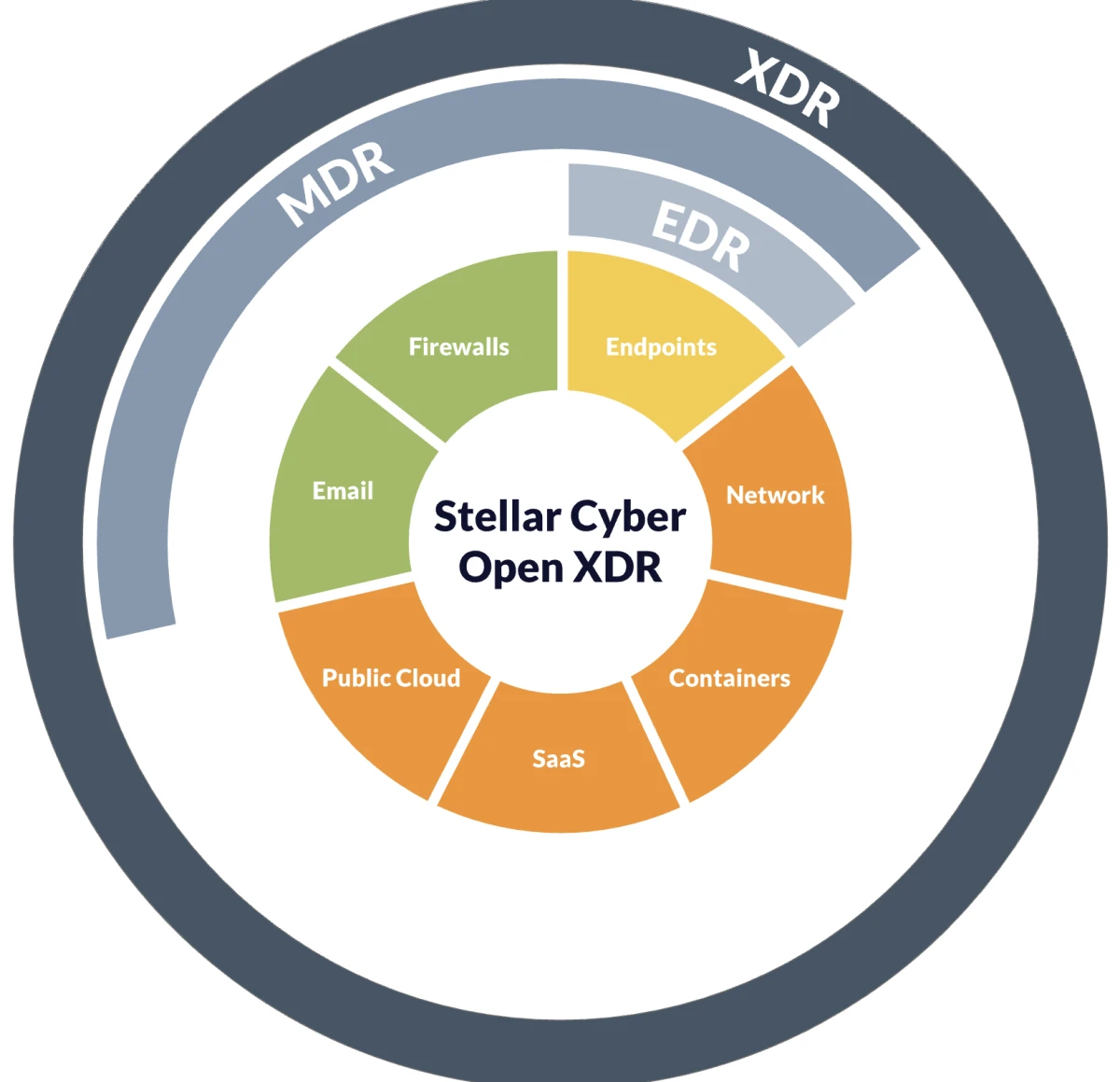
Source: Stellar Cyber
Key features:
- Open architecture: 400+ connectors ingesting from any EDR, NGFW, identity provider, or cloud platform
- Single license covering SIEM, NDR, XDR, and UEBA
- Interflow event modeling for cross-source attack chain correlation
- AI-driven triage, alert correlation, and case building
- Agentic AI capabilities for initial investigation and case summarization
Limitations:
- The platform is optimized for organizations with 50–500 employees and mid-market security teams; enterprise-scale customization and advanced forensic depth may lag behind CrowdStrike and Palo Alto
- Open XDR’s breadth of ingestion requires careful connector configuration; detection quality depends on telemetry quality from source tools
- Smaller partner and integration ecosystem than native XDR vendors with longer market presence
7. SentinelOne Singularity XDR
SentinelOne Singularity XDR is a native XDR platform known for its AI-driven detection and response at the endpoint layer, extended to cloud workloads, identity, and network through a single unified data lake.
Purple AI is SentinelOne’s natural-language threat hunting interface, allowing analysts to query the Singularity Data Lake in plain English and receive investigation summaries, threat hunt results, and recommended remediation steps.
Key features:
- Autonomous threat detection and one-click rollback for ransomware without analyst intervention
- Storyline for automatic root cause analysis and attack narrative construction
Limitations:
- Some users report that overly aggressive blocking of legitimate tools, including developer applications, has been blocked, requiring manual exception management
- Agent duplication issues have been reported in the management console during large-scale deployments
8. Cisco XDR
Cisco XDR is a cloud-native XDR platform that replaced the retired Cisco SecureX. Cisco XDR correlates telemetry from Cisco’s security portfolio and third-party integrations. Organizations evaluating Cisco’s detection and response capabilities should reference Cisco XDR, not SecureX, which has been fully retired.
The platform is a natural fit for organizations already using Cisco’s networking and security infrastructure, where native telemetry correlation among Cisco Secure Firewall, Catalyst switches, and endpoint agents significantly reduces integration overhead.
Key features:
- Native integration across Cisco’s security portfolio (endpoint, network, email, identity)
- Third-party integrations extending coverage beyond the Cisco ecosystem
- Automated incident investigation with prioritized alert correlation
- Integration with Cisco Talos threat intelligence
Limitations:
- Value is significantly higher for organizations invested in Cisco’s existing security portfolio; organizations running non-Cisco infrastructure will see less native integration benefit
- Cisco XDR is a relatively recent product; feature depth in some areas lags more established native XDR platforms
- Unlike SecureX, which was included free with Cisco security licenses, Cisco XDR requires a separate paid license a meaningful cost change for existing Cisco customers
9. Exabeam New-Scale Security Operations Platform
Exabeam was previously positioned as a SIEM and XDR platform. As of January 2026, Exabeam markets its primary offering as the New-Scale Security Operations Platform (sold as New-Scale Fusion), reflecting expanded capabilities that go beyond traditional SIEM and XDR functions.2
Key features:
- New-Scale Fusion platform: SIEM, UEBA, and XDR in a unified architecture
- Agent Behavior Analytics (ABA) for AI agent monitoring (January 2026)
- AI Usage Security for detecting risky employee AI tool interactions
- Behavioral analytics with 50+ pre-built threat scenarios mapped to MITRE ATT&CK
- Integration with 500+ security and IT data sources
- Outcome-based use cases with pre-packaged content for common threat types
Limitations:
- Platform rebrand from SIEM+XDR to New-Scale creates procurement confusion; buyers should verify which capabilities are included in base licensing vs. add-ons
- ABA and AI Usage Security are newly launched; production maturity and detection coverage should be validated before relying on them for critical use cases
 Add as preferred source
10. Microsoft Defender XDR
Microsoft Defender XDR is a native XDR platform that correlates signals across Microsoft Defender for Endpoint, Defender for Identity, Defender for Office 365, and Microsoft Sentinel into a unified incident investigation experience.
The platform’s primary competitive advantage is ecosystem integration: native connectivity to Entra ID, Intune, Azure, and the full Microsoft 365 stack eliminates the integration work required to achieve the same coverage with a third-party XDR. Microsoft Sentinel serves as the underlying SIEM and data lake.
Key features:
- Unified incident view correlating signals across endpoint, identity, email, and cloud
- Microsoft Sentinel as the SIEM and SOAR layer with 500+ data connectors
- Security Copilot integration for natural-language investigation and report drafting
Limitations:
- Detection efficacy is strong on Windows, but weaker on macOS and Linux endpoints. Non-Microsoft-stack environments may require layered coverage
- Governance of the platform requires navigating multiple consoles (Defender portal, Sentinel workspace, Entra admin center), which increases analyst cognitive load compared to single-console competitors
- Licensing tiers (E3, E5, Defender add-ons, Copilot for Security) are complex; total cost requires careful mapping
11. Palo Alto Cortex XDR
Palo Alto Networks Cortex XDR is a native XDR platform that integrates endpoint, network, and cloud telemetry with Palo Alto’s firewall and Prisma infrastructure to provide a unified detection and response layer.
Cortex XSIAM is Palo Alto’s full-platform response to the agentic SOC market. While Cortex XDR handles detection and response for endpoint and network, Cortex XSIAM consolidates SIEM, XDR, SOAR, and attack surface management into a single platform powered by 10,000+ detectors and 2,600+ ML models, with 500+ pre-built automation playbooks.3
Key features:
- 100% technique-level detection in MITRE ATT&CK Round 6
- Behavioral threat protection across endpoint, network, cloud, and identity from a single agent
- Incident views that stitch alerts into a single attack storyline with root cause and blast radius
- Native integration with Palo Alto firewalls and Prisma SASE for combined network and endpoint visibility
Limitations:
- Best value is achieved within the Palo Alto ecosystem (firewalls, Prisma); organizations without existing Palo Alto infrastructure face higher deployment overhead
- Cortex XDR is consistently rated at the premium end of the XDR pricing spectrum; the model’s total cost of ownership is early, including PRO licensing
Common Features
All platforms reviewed include the following as standard capabilities:
- Cross-domain telemetry ingestion: All platforms ingest data from an endpoint and at least one additional security domain (network, cloud, identity, or email). Coverage breadth and depth vary; buyers should map their specific telemetry sources against each vendor’s connector catalog before shortlisting.
- Unified incident detection: All platforms correlate multi-source telemetry into consolidated incidents, rather than surfacing individual alerts from each tool. This is the core XDR value proposition that differentiates it from standalone EDR.
- MITRE ATT&CK alignment: All platforms map detections to MITRE ATT&CK tactics and techniques, enabling consistent threat categorization and gap analysis against the framework.
- Automated response actions: All platforms support automated or semi-automated response isolating endpoints, blocking IPs, and revoking credentials, though the degree of automation and the domains covered vary significantly.
- Threat intelligence integration: All platforms include or integrate threat intelligence feeds. CrowdStrike (Adversary Intelligence), Palo Alto (Unit 42), and Cisco (Talos) operate proprietary threat research teams with global coverage.
- Compliance logging and reporting: All platforms maintain audit-ready logs of detection and response activity. SIEM-integrated platforms provide broader compliance coverage.
XDR vs EDR vs SIEM
These three categories overlap significantly in vendor marketing, but each solves a different scope problem.
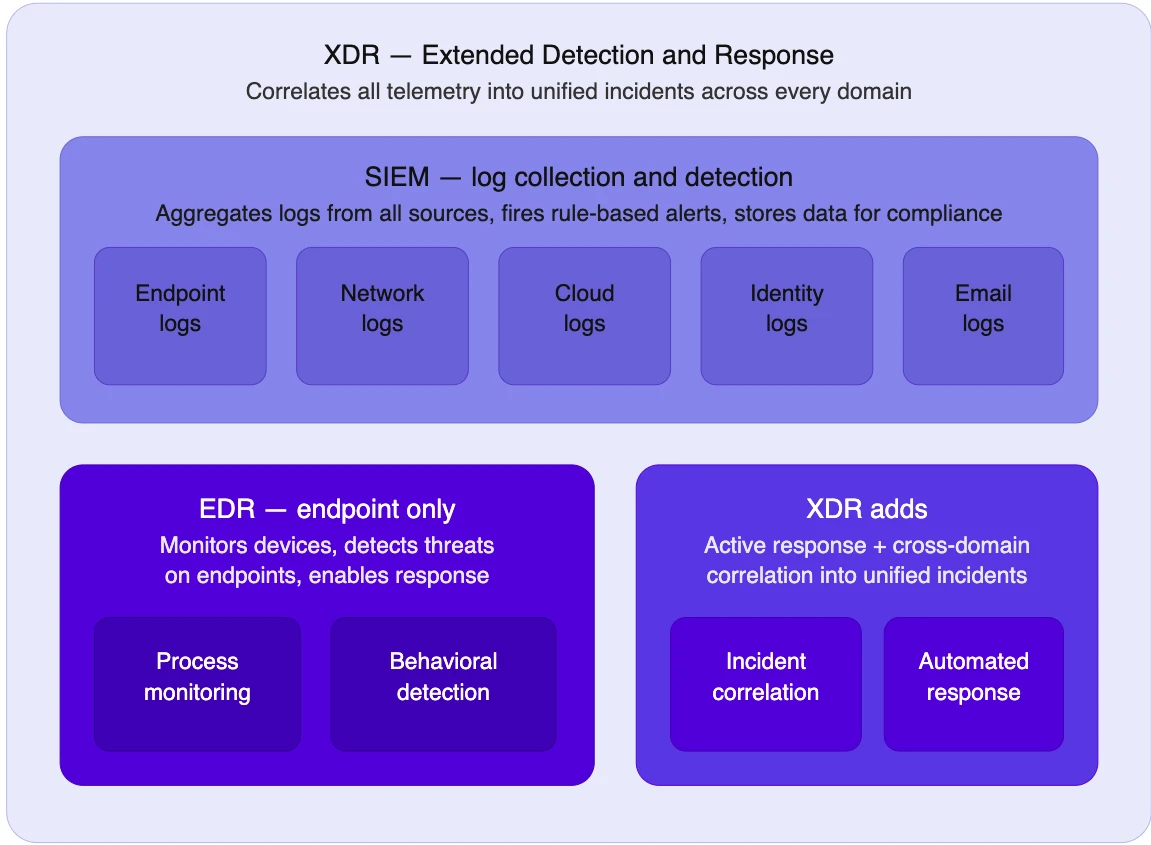
- EDR (Endpoint Detection and Response) monitors and responds to threats on endpoint devices, such as laptops, servers, and workstations. It collects telemetry from the endpoint agent, detects behavioral anomalies, and enables analysts to investigate and contain threats on individual devices.
- XDR extends EDR across multiple security layers. Where EDR covers the endpoint, XDR ingests and correlates telemetry from endpoints, networks, cloud workloads, identity systems, and email into a unified detection and response platform. Cross-domain correlation allows XDR to surface attack chains that appear as unrelated noise in separate tools.
- SIEM (Security Information and Event Management) collects and stores log data from across the environment for threat detection, compliance reporting, and historical investigation. Traditional SIEM is passive: it alerts on rule matches and stores data for queries. Modern SIEM platforms are converging with XDR and SOAR, with vendors like Microsoft (Sentinel + Defender XDR) and CrowdStrike (Falcon Next-Gen SIEM) treating SIEM as the data layer underneath an XDR detection engine.
Native XDR vs Open XDR
XDR market has formally bifurcated into two distinct architectural models that drive fundamentally different buying decisions.
- Native XDR is a single-vendor platform that integrates the vendor’s own endpoint, network, cloud, and identity products into a unified detection-and-response layer. CrowdStrike Falcon, Microsoft Defender XDR, and SentinelOne Singularity are native XDR platforms. The advantage is deep integration and a single data model; the trade-off is that you are purchasing into a vendor ecosystem.
- Open XDR is vendor-agnostic: it ingests telemetry from any existing security tool in the stack and provides unified detection, investigation, and response on top of those inputs without requiring rip-and-replace.
AI-Driven XDR
- AI-assisted detection uses machine learning models trained on adversary behavior to identify threats that evade signature-based rules. Anomaly detection, peer-group behavioral analysis, and indicators of attack (IOAs) are the primary mechanisms. CrowdStrike’s IOA framework, SentinelOne’s Storyline, and Palo Alto’s 2,600+ ML models in XSIAM represent mature implementations of this approach.
- Natural-language investigation allows analysts to query platform data and generate investigation summaries in plain language. SentinelOne Purple AI, Microsoft Security Copilot, CrowdStrike Charlotte AI, and Exabeam’s natural-language querying all allow analysts to ask questions like “what lateral movement occurred in the last 72 hours,” rather than writing detection queries manually.
- Agentic AI: AI systems that autonomously execute multi-step investigation and response workflows without human intervention at each step are the most-marketed capability in XDR in 2026, and the most overstated. According to a March 2026 report based on 30+ vendor briefings and CISO interviews, most production deployments of agentic SOC capabilities are handling enrichment, summarization, and report drafting, not autonomous remediation. Gartner places AI SOC agents at 1–5% enterprise adoption. CrowdStrike Agentic MDR, Microsoft Security Alert Triage Agent, and Exabeam ABA represent the most clearly scoped agentic capabilities announced to date; all retain human oversight for high-stakes decisions.4
FAQs
Extended Detection and Response (XDR) is a security platform category that ingests and correlates telemetry from multiple security layers into a unified detection, investigation, and response system. XDR replaces the siloed approach to managing separate EDR, SIEM, and SOAR tools by surfacing attack chains that span multiple domains rather than alerting on each event in isolation.
EDR (Endpoint Detection and Response) monitors and responds to threats on individual endpoint devices. XDR extends that scope: it ingests EDR telemetry alongside data from networks, cloud, identity, and email, then correlates all of it into cross-domain incident views. The practical difference is that EDR shows what happened on a machine; XDR shows what the attacker did across the entire environment before and after compromising that machine.
Native XDR is a single-vendor platform that integrates the vendor’s own security products. CrowdStrike, Microsoft, SentinelOne, and Palo Alto are examples. Open XDR ingests data from any existing security tool, regardless of vendor, and sits on top of the current stack without requiring a replacement. Organizations consolidating onto a single vendor should evaluate native XDR; organizations with heterogeneous tool stacks they want to retain should evaluate Open XDR platforms like Stellar Cyber.
Telemetry ingestion: The XDR platform collects data from deployed agents (endpoint), network sensors, cloud APIs, identity providers, and email security tools. Native XDR platforms ingest data from their own product suite; Open XDR platforms ingest data from any source via prebuilt connectors.
Normalization and correlation: Raw telemetry is normalized into a common data schema. The platform’s detection engine correlates events across sources, for example, linking a suspicious login from identity logs to an unusual process execution from the endpoint agent and a cloud API call from the workload layer, and surfaces these as a single incident rather than three separate alerts.
AI-assisted detection: Machine learning models trained on patterns of adversary behavior (often mapped to MITRE ATT&CK) detect anomalies that rule-based systems miss. Most platforms now include some form of AI-assisted triage, though the depth varies significantly between vendors.
Investigation and response: Analysts work from a unified incident view showing the full attack chain across domains. Response actions can be executed directly from the platform. Some platforms automate response steps via built-in SOAR capabilities.
Cite this research
Pick the format that matches where you're publishing. Pasting the link version into your CMS preserves the backlink.
@misc{dogan2026,
  author = {Dogan, Sedat},
  title  = {{Top 11 XDR Solutions Comparison and Features}},
  year   = {2026},
  month  = sep,
  howpublished    = {\url{https://aimultiple.com/xdr-solutions}},
  note   = {AIMultiple. Retrieved September 17, 2026}
}Results and timestamps of 50 data points. Download the summary data shown in this article's charts and tables as a ZIP file containing 6 CSV files.
Want the granular data behind it? Join Premium
Changelog
2 updatesAdded an XDR benchmark summary section with per-vendor findings for Acronis, Sophos, CrowdStrike, Bitdefender and Trend Micro.
Added a hands-on benchmark section covering Acronis, CrowdStrike, Sophos, Bitdefender and Trend Micro, with full vendor reviews.
Reference Links
- Has 20 years of experience as a white-hat hacker and development guru, with extensive expertise in programming languages and server architectures.
- Is a board advisor at a VC investing in early-stage technology firms and at Ödeal, a regional digital payment platform serving 125,000 merchants.
- Has led the technology infrastructure and cybersecurity of seven national elections, and has been recognized in the cybersecurity Hall of Fame by global technology leaders including Twitter.






Be the first to comment
Your email address will not be published. All fields are required. Comments are left in their original language.