


Top 30+ DevOps Automation Tools by POC Metrics

DevOps success relies on two distinct capabilities: end-to-end orchestration and specialized automation.
- Need to unify your entire lifecycle? Explore toolchain integration tools to bridge fragmented workflows.
- Looking for specific functional depth? Browse other DevOps automation tools focused on individual stages of the DevOps cycle.
Select a category below to explore DevOps automation tool comparisons, practical benefits, and hands-on operational insights:
Toolchain integration for end-to-end DevOps automation
Toolchain integration is the practice of connecting various tools used in the DevOps lifecycle to create a seamless, automated workflow. Instead of using a collection of disconnected tools for planning, coding, building, testing, and deployment, a well-integrated toolchain ensures that the output from one tool automatically becomes the input for the next.
Tools are categorized and ranked by review volume, with subscribers featured at the top. Note that each tool must be compared within its relevant category. High-scoring tools are selected and evaluated for further detail below:
Toolchain integration tools
Toolchain integration is primarily provided by two types of tools: CI/CD platforms and Service Orchestration and Automation Platforms (SOAPs).
Service orchestration and automation platforms
WLA tools, also known SOAPs, provide a centralized layer to orchestrate complex, end-to-end workflows that span the entire DevOps toolchain and beyond. They manage dependencies, integrate with disparate systems, and trigger workflows based on real-time events, acting as a control plane for enterprise-wide automation.
Stonebranch
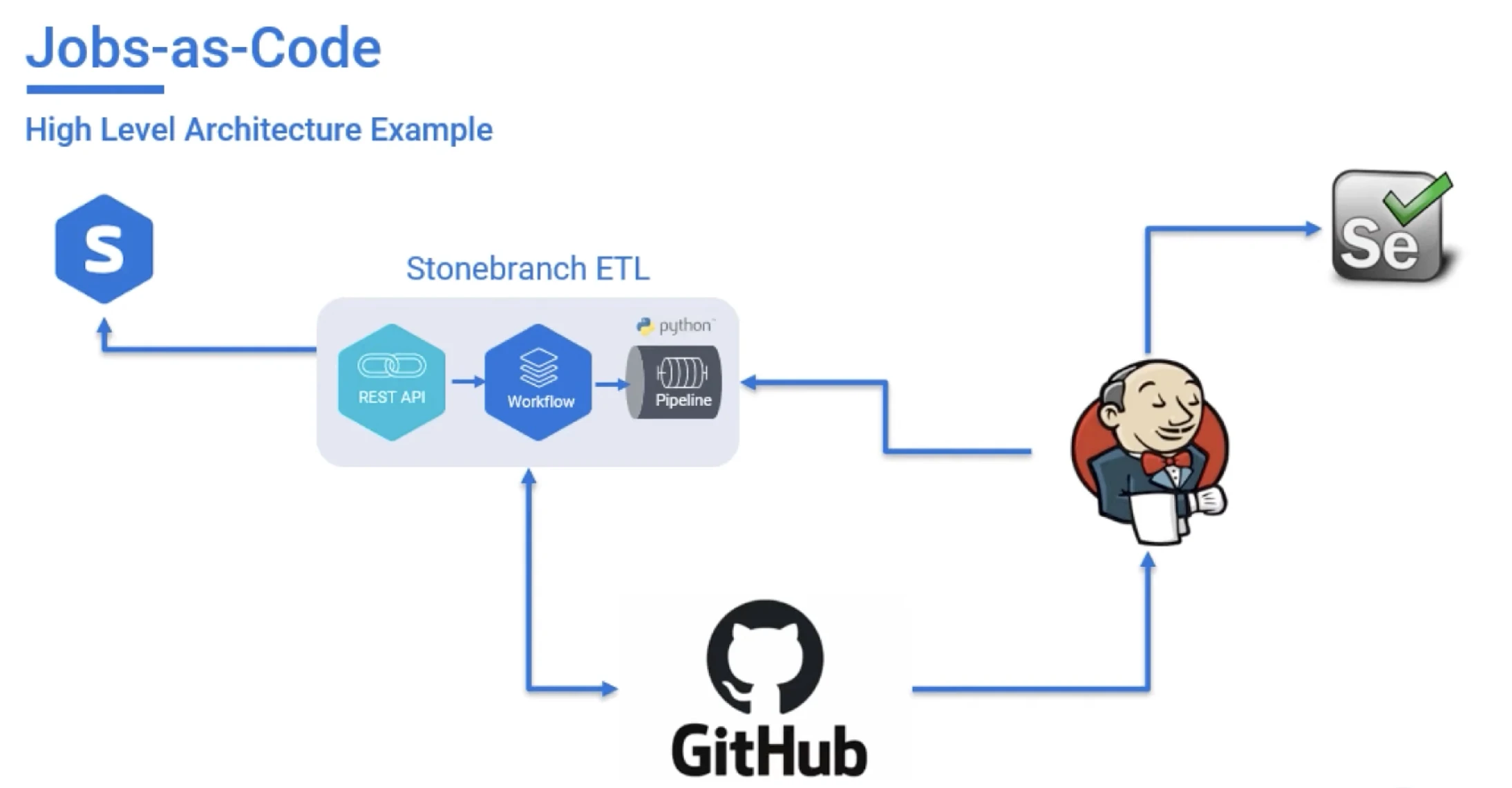
Stonebranch Universal Automation Center (UAC) is a SOAP that functions as a centralized “orchestrator of orchestrators,” managing complex workflows across hybrid IT environments, from legacy mainframes to cloud-native microservices.
Pros
- Integration: It integrates with a wide range of enterprise systems (SAP, APIs, cloud services like Azure Logic Apps) and DevOps tools like Jenkins, Ansible, and Terraform, reducing friction when connecting existing toolchains.
- Jobs-as-Code & Infrastructure-as-Code (IaC): Enables developers to define and version-control workflows using JSON/YAML within CI/CD pipelines.
- Event-driven workflow execution: It supports event-driven orchestration (API triggers, file events), which allows workflows to react to real-time system changes rather than relying on schedules.
- Hybrid & multi-cloud control: It provides centralized control across hybrid environments (on-prem + cloud), enabling coordination of dependencies across distributed systems.
Cons
- Set-up: Integration flexibility can introduce complexity during initial setup, especially in environments with many legacy dependencies.
Strength
- Strongest in toolchain orchestration in hybrid environments.
Stonebranch Case Study: BP (British Petroleum)
BP transitioned from legacy on-premise scheduling to a “Cloud-First” strategy to support their global energy transition. Stonebranch UAC provided a SaaS-based orchestration layer to unify their decentralized DevOps teams.
- Unified visibility: Single-pane-of-glass management across global AWS and Azure environments.
- 90% manual reduction: Significant decrease in manual intervention for job scheduling.
- Zero downtime migration: Seamless transition of mission-critical workloads from legacy systems to the cloud.1
Learn more on Stonebranch and compare it against its alternatives.
RunMyJobs (RMJ)
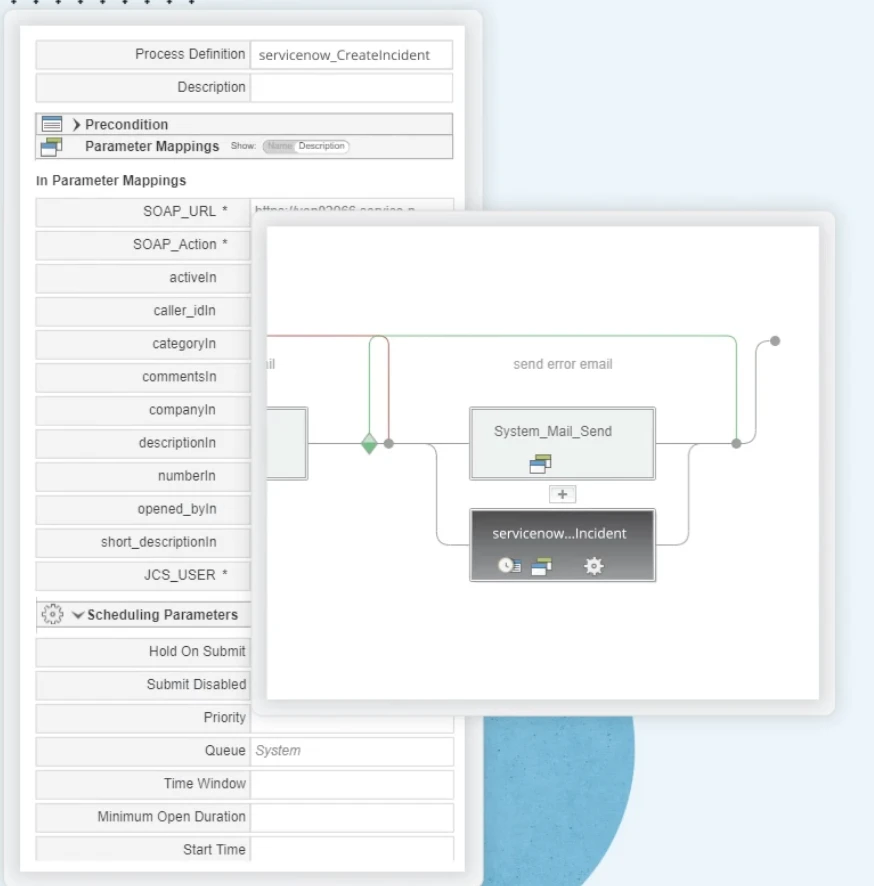
RunMyJobs is a Workload Automation platform that serves as a central hub for orchestrating end-to-end DevOps and business-critical workflows. Its design emphasizes control, with an object-based architecture that enables the creation of reusable, auditable automation across on-premise and multi-cloud environments, ensuring consistency and security.
Pros
- Workflow orchestration: It uses an object-based architecture that enables reusable and auditable workflows, which supports consistency and traceability in production environments.
- Integration: It integrates well with ServiceNow and cloud platforms, enabling both incident-driven automation and hybrid workload execution.
Cons
- Limited DevOps flexibility: It is more optimized for ERP and batch-driven environments, which can limit flexibility in less structured or highly dynamic DevOps use cases.
Strength
- Strongest in SAP-driven environments due to Redwood-SAP partnership.
Check out for more on RunMyJobs.
RunMyJobs case study
Anonymous global energy services company faced challenges migrating DevOps workloads to the cloud and keeping QA/testing and upgrades efficient. RunMyJobs helped by providing SaaS-based orchestration with rapid CI/CD-ready automation.
- Migration in 90 days
- 2M processes/month managed by one employee
- Upgrades in 2–5 minutes.3
ActiveBatch
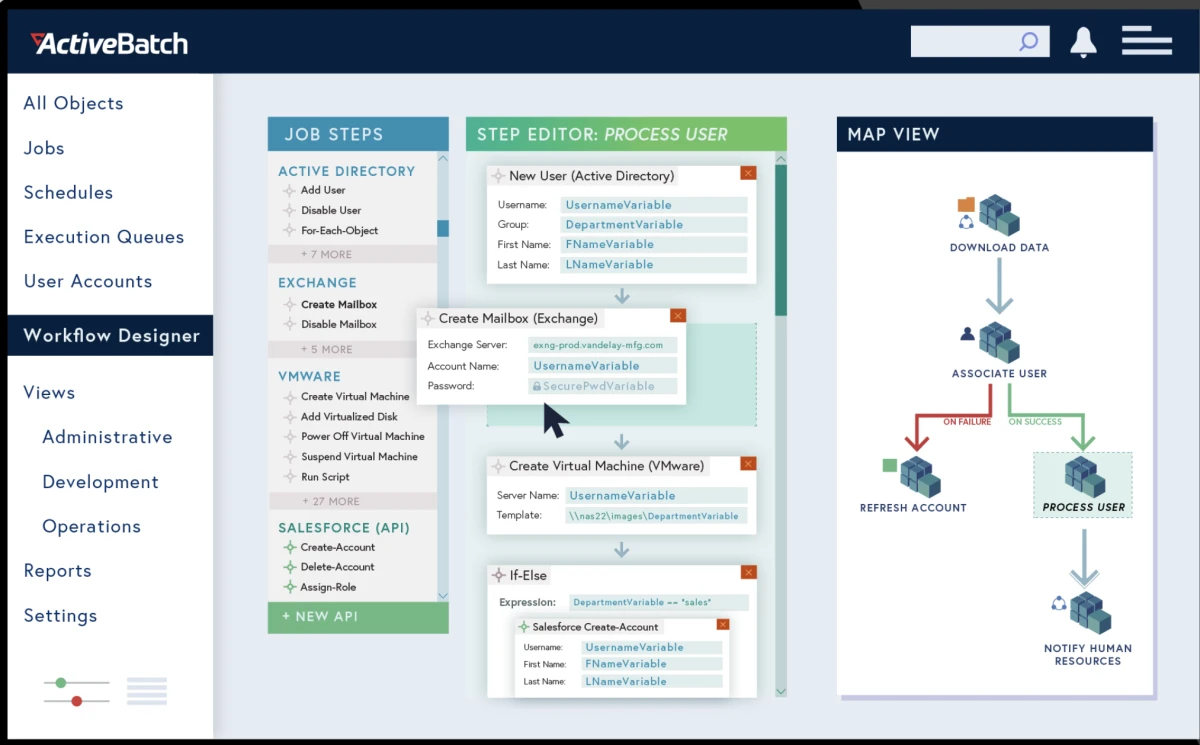
ActiveBatch is a powerful Workload Automation solution designed to unify disparate DevOps tools and automate complex workflows. It provides an extensive Integrated Jobs Library that allows developers to build sophisticated automations without scripting, while its Reference Plans promote consistency by enabling reusable, templated workflows for multiple projects.
Pros
- Integrated jobs library: It provides a set of prebuilt integrations and an integrated jobs library, which reduces the need for custom scripting when building workflows.
Cons
- Template-driven structure: It can deliver limited orchestration for dynamic DevOps tasks since it is more template driven.
Strength
- Strongest in standardized, template-driven workflow automation and centralized job control.
Explore more on ActiveBatch capabilities and its alternatives.
ActiveBatch case studies
Subway (QSR) struggled with slow pipeline changes across environments, and ActiveBatch streamlined DevOps data workflows through centralized orchestration and reusable workflows. The company achieved:
- >60% less time managing environments
- Workflows built/updated 75% faster.5
Vero Skatt faced complexity managing DevOps automation across multiple environments, and ActiveBatch unified these into one platform with centralized alerts and security features. The Finnish Tax Administration achieved:
- 6 environments consolidated
- 30+ alert types for real-time monitoring
- Reduced custom scripting and improved compliance.6
Continous Integration/Continous Delivery platforms
These are the foundational orchestrators of the software delivery pipeline. They automate the processes of integrating code changes, building applications, and running automated tests before deploying to production.
GitHub Actions
GitHub Actions is a built-in CI/CD automation platform that can enable custom autoscaling of self-hosted Actions runners (no Kubernetes required).
Pros
- Fast onboarding (GitHub-native) because no extra setup is needed since pipelines live in the same repository with team using GitHub.
- Strong for standard pipelines as it works well for repetitive build / test / deploy flows because these steps are predictable and can be easily reused across projects.
Cons
- YAML files become inconsistent and harder to maintain as the number of repositories grows, when reusable workflows and naming conventions are lacked.
Strength
- It delivers the most value when teams enforce shared workflow templates, ensuring consistency instead of each repository reinventing its own pipeline logic.
Bitbucket Pipelines
Bitbucket Pipelines is an integrated CI/CD service built directly into Bitbucket. It allows teams to automate their build, test, and deploy cycles using configuration-as-code (YAML) that lives right alongside their source files.
Pros
- Quick to start with a setup process that requires zero installation or server configuration.
- Integrated within the Atlassian ecosystem, providing native visibility into Jira issues, Confluence pages, and Bitbucket pull requests.
Cons
- Governance and standardization limitations become visible as an organization grows, making it difficult to enforce global security policies or shared templates across hundreds of repositories.
- Resource constraints on build environments can lead to bottlenecks for high-performance computing tasks compared to self-managed runners.
Strength
Best suited for small to mid-sized teams looking for a low-maintenance solution that prioritizes speed of delivery and ease of use.
Jenkins
Jenkins is a highly extensible, open-source automation server that provides hundreds of plugins to support building, deploying, and automating any project. It serves as a central hub for CI/CD pipelines, allowing developers to automate tasks and detect integration issues early.
Pros
- Maximum flexibility as it can support almost any pipeline design, including custom or legacy execution environments.
- Suitable for complex enterprise setups where standard CI/CD tools are not sufficient.
Cons
- High operational overhead, as plugins, upgrades, credentials, and agent stability require constant maintenance.
- Requires continuous ownership since it does not remain stable without active engineering effort.
Strength
- Best suited for environments requiring deep customization and full control over execution logic, especially in legacy-heavy systems.
CircleCI
CircleCI is a cloud-based CI/CD platform that automates the build, test, and deployment process for teams of any size. It focuses on speed and ease of use, providing a clean, consistent environment for every build to help teams release code reliably and with confidence.
Pros
- No infrastructure setup is required.
- Simple CI/CD workflows without complex dependencies.
Cons
- Harder governance and standardization as the organization grow and more teams define independent pipelines
- Cost unpredictability may occur, if parallel execution is not controlled.
Strength
- Strong fit for teams prioritizing speed of adoption and developer productivity over long-term orchestration complexity.
Azure DevOps
Azure DevOps is Microsoft’s platform that provides a suite of services for the entire software development lifecycle. Its integrated CI/CD component, Azure Pipelines, works with any language, platform, and cloud, offering a flexible and scalable way to automate builds, tests, and deployments.
Pros
- Integrates with cloud ecosystems, making authentication, deployment, and service orchestration straightforward.
- Supports structured release flows such as approval gates and staged deployments.
Cons
- Depends on a single cloud provider, which limits flexibility in multi-cloud strategies.
- Requires solid cloud expertise to configure correctly despite reduced infrastructure burden.
Strength
- Best for organizations fully committed to one cloud ecosystem and needing controlled, enterprise-grade release pipelines.
AWS CodePipeline
AWS CodePipeline is a fully managed continuous delivery service that automates the build, test, and deploy phases of your release process. It is designed as a native orchestration tool for the Amazon Web Services ecosystem.
Pros
- Service integration and release workflows, connecting AWS services like CodeBuild, CodeDeploy, Lambda, and ECS.
- IAM integration provides fine-grained security control.
- Secure promotion/approval flows, offering built-in manual approval gates that make it ideal for regulated industries requiring human sign-off before production deployments.
Cons
- Vendor lock-in by proprietary AWS APIs and configurations.
- Less suitable for multi-cloud strategies, as its primary value lies in its proximity to other AWS resources.
Strength
Best suited for organizations fully committed to the AWS ecosystem.
DevOps automation tools
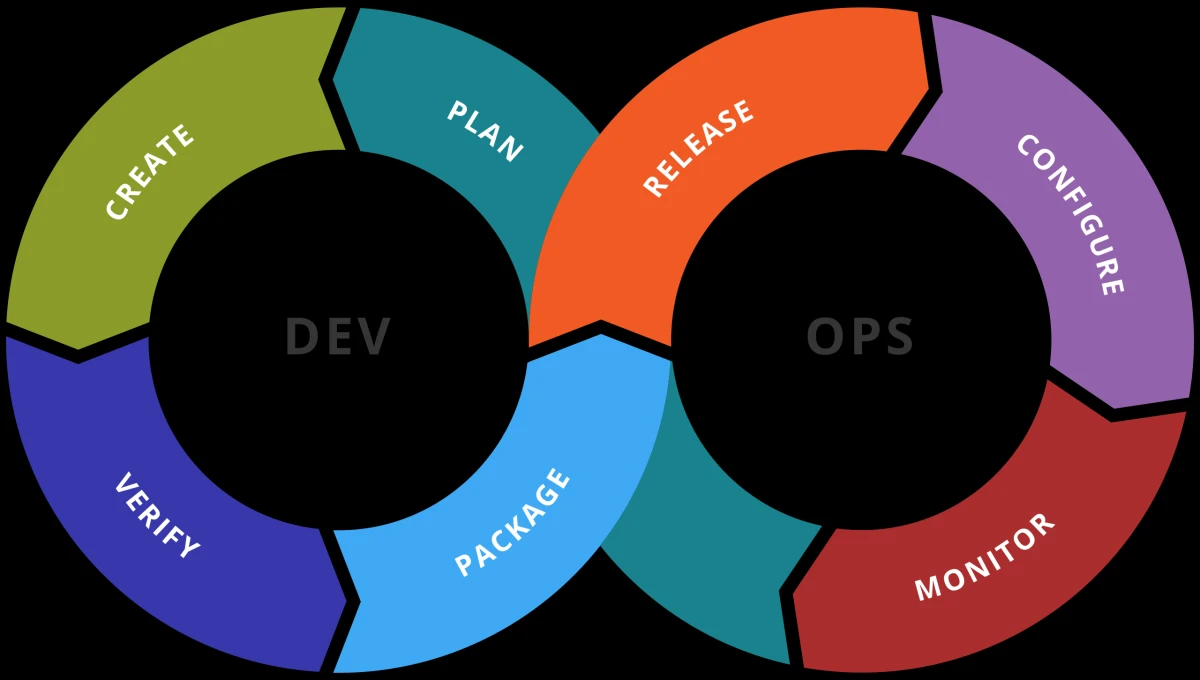
The DevOps lifecycle integrates development and operations through continuous collaboration, automation, and feedback, spanning planning, coding, building, testing, releasing, deploying, operating, and monitoring. Automation tools are integral to each phase, streamlining workflows and reducing manual intervention.
Infrastructure as Code (IaC)
These tools define and provision cloud resources through code templates, ensuring consistent and repeatable environments. They enable organizations to manage cloud infrastructure at scale and accelerate deployments by automating resource creation and updates.
Terraform by HashiCorp
Terraform, developed by HashiCorp, automates infrastructure provisioning across cloud and on-prem environments. It enables teams to define and manage multi-cloud infrastructure using code through a workflow.
Pros
- Unified infrastructure language across multiple cloud providers.
- Collaboration through reusable modules and predictable execution plans.
Cons
- Requires strict discipline in state management, naming conventions, and drift control.
- Without governance, it shifts from a productivity tool into a maintenance burden.
Strength
- Strongest in multi-cloud environments where infrastructure standardization is critical.
AWS CloudFormation
AWS CloudFormation provisions resources through infrastructure as code to simplify infrastructure provisioning and improve cloud infrastructure management.
Pros
- Reliable in AWS due to deep native integration.
- Built-in rollback behavior improves deployment safety.
Cons
- Limited to AWS, making it unsuitable for multi-cloud or future migration scenarios.
Strength
- Best for AWS-only environments prioritizing stability and native integration.
Pulumi
Pulumi is an infrastructure as code tool that enables infrastructure provisioning across cloud and on-prem environments using standard development practices like functions, loops, and version control.
Pros
- Infrastructure written in general-purpose programming languages to improve developer familiarity.
- Enables abstraction and reuse patterns closer to software engineering practices.
Cons
- Requires teams to manage both software engineering discipline + infrastructure discipline.
Strength
- Works best in engineering-heavy teams with strong coding maturity.
Configuration Management
Configuration management tools focus on enforcing and maintaining system states after infrastructure is provisioned. They allow organizations to manage infrastructure consistently across servers, applications, and services, reducing drift and enabling compliance.
Ansible
Ansible is an open-source automation platform that helps DevOps teams streamline configuration and orchestration by automating repetitive tasks across diverse environments.
Pros
- Agentless architecture simplifies deployment across environments.
- Incident-driven automation and remediation workflows.
Cons
- Requires disciplined structure (idempotency, inventory, secrets) to scale properly.
Strength
- Strong in event-driven operational automation, especially for incident response scenarios.
Chef DevOps
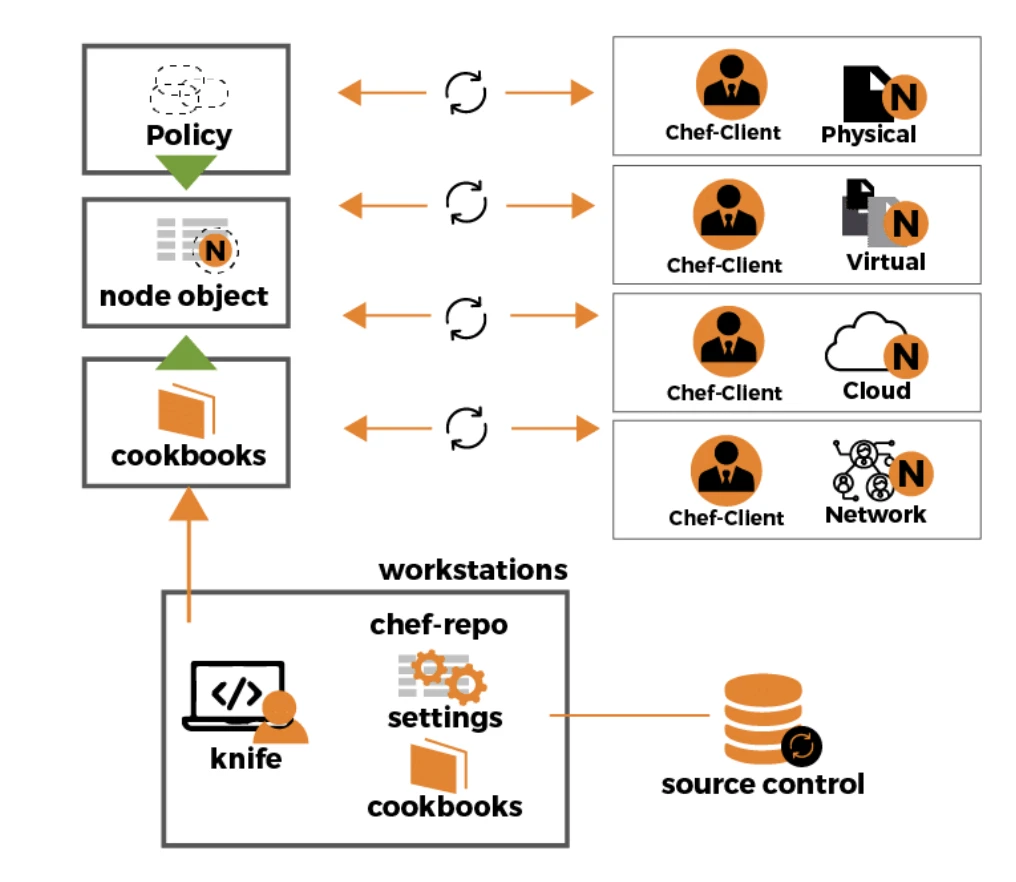
Chef DevOps is an automation framework that enables organizations to manage infrastructure at scale with policy-driven code, helping development teams improve consistency and improve code quality.
Observability & incident automation
These tools track system performance, collecting logs, and automatically notify teams of issues. They provide real-time feedback for continuous improvement and maintain operational efficiency and reliability.
Dynatrace
Dynatrace delivers AI-powered observability to optimize application performance monitoring and accelerate issue resolution across enterprise systems.
PagerDuty
PagerDuty is an incident management platform that leverages specialized tools to detect, escalate, and resolve service disruptions in real time.
Pros
- Ensures incidents are routed to the correct person through structured escalation flows.
- Standardizes incident response across teams.
Cons
- Depends on external monitoring tools as it does not offer observability.
Strength
- Essential for organizations that need consistent incident management processes.
Datadog
Datadog is a monitoring and analytics platform that provides unified visibility into systems with a focus on cloud infrastructure management and application performance.
Pros
- Reduced root-cause analysis time by correlating metrics, logs, and traces in one view.
- Provides contextual insight during incidents.
Cons
- Costs can increase quickly without strict tagging and data governance.
Strength
- Best for teams prioritizing fast incident resolution and deep system visibility.
New Relic
New Relic is a cloud-based observability platform that specializes in Application Performance Monitoring (APM).
Pros
- Context during incidents by using high-density telemetry to pinpoint the exact line of code or specific component causing a failure.
- Code-level visibility that allows developers to understand the “why” behind performance bottlenecks, rather than the “where.”
Cons
- Similar data governance considerations to Datadog, as it is a SaaS-only model that requires sensitive telemetry data to be sent to and stored in their cloud.
- Requires constant budget monitoring as unexpected costs can occur as data volume and user seats scale.
Strength
- Best suited for dev-centric organizations due to granular application diagnostics capability.
Grafana
Grafana is an open-source multi-platform data visualization and monitoring suite. It can pull data from disparate sources, such as Prometheus, SQL databases, and cloud providers, into highly customizable, interactive dashboards.
Pros
- Quick initial value through a vast library of community-built dashboards and no total vendor migration approach.
- Unmatched correlation of metrics, logs, and deployment events in one view, enabling teams to see how a code change directly impacts system health.
Cons
- Dashboards alone are insufficient for production reliability. It can become a passive wall of monitors without a rigorous strategy for alerting, SLOs, and runbook.
- High configuration effort is required to maintain consistency, as its extreme flexibility often leads to dashboard sprawl and fragmented monitoring logic.
Strength
Best suited for teams emphasizing open standards and composability.
Security automation (DevSecOps)
These are specialized DevOps automation tools that integrate security practices into CI/CD pipelines, automating vulnerability scanning, dependency updates, and compliance monitoring. The aim is to “shift left” security, embedding it from the earliest development stages.
Copado
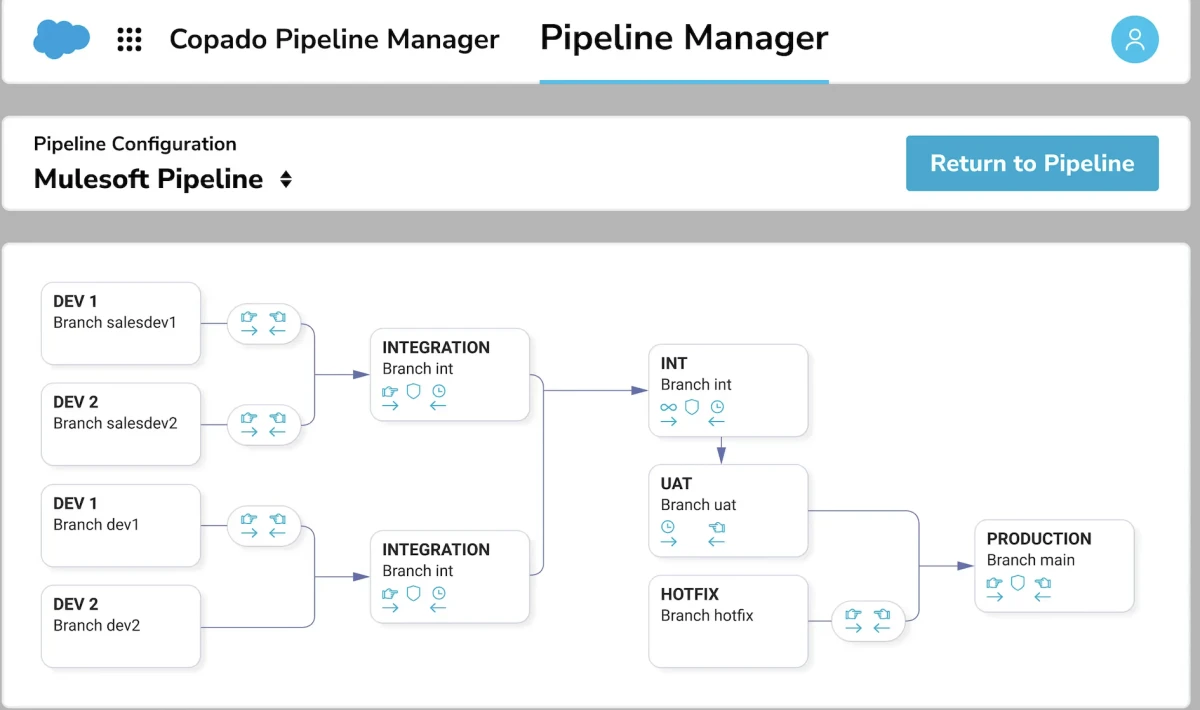
Copado is a Salesforce DevOps platform that enables organizations to manage cloud infrastructure securely, embedding compliance and automation into the release cycle.
Snyk
Snyk is a security tool that helps developers find and fix vulnerabilities in their code, dependencies, and containers. By integrating directly into the development workflow, it “shifts left” security, ensuring that vulnerabilities are caught and remediated early, before deployment.
Testing automation
These are essential DevOps automation tools for reducing manual intervention and enabling frequent, rapid error detection across the SDLC. They identify and fix bugs early, improving software quality and reducing defect resolution costs. Key tools include:
SonarQube
SonarQube is an open-source platform that continuously inspects code quality and security. It provides a static analysis engine to identify bugs, code smells, and security vulnerabilities, giving developers real-time feedback and preventing issues from reaching production.
Check out test automation documentation for more.
Planning and code management
In the initial planning phase, tools like Jira, Trello, and Asana are used for task planning and tracking, aligning project activities with business goals. For code management, version control tools such as Git, GitHub, GitLab, and Bitbucket are crucial for version control and code collaboration.
While these are general DevOps tools that facilitate human-centric processes like strategizing and versioning, they also serve as foundational enablers, often triggering automated CI/CD pipelines upon code commits.
Discover more on AI code editors and AI code review tools.
What is DevOps automation?
DevOps automation refers to systematic automation of manual tasks across the software development lifecycle (SDLC) and IT operations to enhance efficiency, reliability, and speed in software delivery. Built on continuous integration, delivery, and pervasive automation, it accelerates releases, improves quality, minimizes human error, and boosts productivity.
How to choose the right DevOps automation tool
Choosing a DevOps automation tool depends on which layer of the software delivery and operations lifecycle you need to optimize. Most environments require more than one category, but each serves a distinct role.
If your focus is:
- Automating code build and validation: Check CI tools such as Jenkins, GitLab CI/CD, or CircleCI.
- Automating deployments and releases: Look at CD tools such as Spinnaker, Azure DevOps, or AWS CodePipeline.
- Provision and manage infrastructure: Choose Infrastructure as Code (IaC) tools like Terraform, CloudFormation, or Pulumi.
- Standardize and maintain system configurations: Use Configuration management tools such as Ansible, Puppet, Chef, or SaltStack.
- end-to-end workflow coordination across multiple DevOps tools: Learn more on Service orchestration and automation platforms such as Stonebranch, ActiveBatch, or RunMyJobs.
- Monitoring systems and automating incident response: Explore observability & incident automation tools like Datadog, Dynatrace, PagerDuty, or Splunk.
- Automate testing across the software lifecycle: Use Testing tools such as Selenium, JUnit, PyTest, or TestNG.
- Embedding security into the development pipeline: Use DevSecOps tools such as Snyk, Trivy, Dependabot, or Copado.
DevOps trends overview
The industry has been moving from manual scripting toward autonomous orchestration with the developments in agentic AI. Here are some of these trends:
- Intent-driven infrastructure: The industry is moving away from hand-crafted Infrastructure as Code (IaC) toward Intent-Driven Infrastructure (IDI). While traditional IaC requires engineers to define the specific steps to build a resource, IDI allows them to define a “desired state” or business outcome.
- Agentic DevOps: Developers describe high-level product visions or constraints in natural language, while multi-agent systems (MAS) handle the implementation, PR creation, and deployment. This way developers act as orchestrators.
- FinOps-DevOps integration: With cloud and AI inference costs rising, financial accountability has become an integrated metric within the CI/CD pipeline. This approach allows developers to catch potential cost overruns during the pull request process rather than after a bill arrives.
Which DevOps processes to automate?
The specific DevOps processes that are ripe for automation are also the primary use cases for DevOps automation. They include:
Planning, coding, building, and testing
This stage involves managing projects, writing code, compiling, and verifying functionality. Manual practices are slow and error-prone. DevOps automation standardizes builds, runs checks automatically, and streamlines workflows, which reduces errors and accelerates development.
Continuous Integration / Continuous Delivery (CI/CD)
CI/CD integrates and deploys code. Manual handling often causes delays and failures. DevOps automation triggers builds and tests on every commit, then deploys tested code automatically, enabling frequent, stable releases.
Infrastructure as Code (IaC) & provisioning
Provisioning sets up servers and cloud environments. Manual setup is complex and inconsistent. DevOps automation with IaC defines infrastructure in code, allowing environments to be provisioned and scaled consistently with minimal human intervention.
Configuration management
This ensures systems remain consistent across environments. Manual configuration is error-prone and leads to downtime. DevOps automation continuously enforces the desired state, improving reliability and reducing security risks.
Software testing
Testing validates software quality and uncovers bugs. Manual testing is slow and limited. DevOps automation integrates testing into the pipeline, running suites automatically and frequently to ensure quick feedback and higher quality.
Monitoring and logging
Monitoring tracks system health through metrics and logs. Manual analysis is reactive and slow. DevOps automation collects, analyzes, and alerts in real time, enabling teams to detect and resolve issues proactively before users are affected.
 Add as preferred source
DevOps orchestration vs automation
DevOps orchestration is the process of linking and managing individual automation tasks in a coordinated workflow, while DevOps automation is the execution of a single task without manual intervention.
Orchestration takes automation a step further. It creates a cohesive, end-to-end workflow by coordinating multiple, automated tasks. Orchestration platforms, such as SOAPs, manage complex dependencies across diverse tools and teams, ensuring a smooth, continuous pipeline from development to deployment.
The core differences between DevOps orchestration vs DevOps automation include:
DevOps automation benefits
DevOps automation offers numerous strategic benefits, impacting key business outcomes:
Software delivery speed
DevOps automation accelerates software delivery by streamlining workflows:
- Faster time to market: Reduces code-to-deployment time, enabling rapid feature delivery and market responsiveness.
- Increased deployment frequency: Automating CI/CD allows more frequent, smaller releases, indicating an agile process.
- Reduced lead time for changes: Minimizes time from code change to production, with automated builds and tests enabling quick deployment.
Enhancing system reliability
Automation enhances system reliability by minimizing errors and enabling rapid recovery:
- Consistency: Ensures uniform task execution, reducing human errors and leading to dependable systems.
- Reduced change failure rate: Automated testing and consistent IaC environments significantly lower production defects.
- Reduced MTTR: Automated monitoring, alerting, and recovery processes enable quicker issue identification and service restoration. Self-healing capabilities also ensure application uptime.
Improving operational efficiency
DevOps automation improves operational efficiency by optimizing resource use and enabling focus on high-value tasks:
- Reduced operational overhead: Automating routine tasks frees teams for strategic, value-adding activities, minimizing costs.
- Scalability & resource optimization: Rapid provisioning/deprovisioning of resources manages changing demands, optimizing computing resource use.
- Automated environment provisioning: Streamlines consistent environment setup, reducing preparation time and accelerating development.
- Enhanced collaboration: Automated workflows break down silos, fostering integrated problem-solving and faster decision-making.
DevOps automation KPIs
Organizations should track key metrics to evaluate DevOps automation impact:
- Deployment frequency: How often code is deployed to production.
- Mean Time to Recovery (MTTR): Average time to restore service after an incident.
- Change failure rate: Percentage of production changes causing degraded service or rollback.
- Infrastructure automation rate: Proportion of automated infrastructure tasks.
- Percent of defects found in automation: Success rate of automation tools in catching early defects.
- Operational overhead: Quantified reduction in manual effort and resource use due to automation. Monitoring these metrics provides clear visibility for continuous improvement.
FAQs
To achieve effective end-to-end DevOps automation, several best practices are crucial:
Foster Collaboration: Promote trust and blameless communication for successful automation adoption.
Adopt CI/CD: Frequently integrate small code batches and automate builds, tests, and deployments for rapid feedback.
Embrace IaC: Treat infrastructure as version-controlled code for consistent, repeatable, and auditable provisioning.
Set Up Automated Testing: Increase test frequency to catch bugs early and reduce production defects.
Focus on Observability & Metrics: Implement continuous monitoring and track key metrics for feedback and improvement.
Incorporate Security Early (DevSecOps): Integrate automated security checks from planning to proactively prevent vulnerabilities.
Avoid Manual Work: Automate recurring, error-prone tasks to free teams for strategic activities.
Start Small & Iterate: Focus on incremental improvements rather than automating everything at once.
Define Goals Upfront: Clearly define orchestration objectives (e.g., faster deployment, better resource management) to guide tool selection.
Use Templates & Version Control: Employ templates and Git for consistent, traceable orchestration scripts.
Further reading
Check out other relevant tools and solutions:
- Top Process Orchestration Tools: Pros & Cons
- Compare Top 15 Data Orchestration Tools
- Top 40+ LLMOps Tools & Compare them to MLOPs
Cite this research
Pick the format that matches where you're publishing. Pasting the link version into your CMS preserves the backlink.
@misc{simsek2026,
  author = {Şimşek, Hazal},
  title  = {{Top 30+ DevOps Automation Tools by POC Metrics}},
  year   = {2026},
  month  = aug,
  howpublished    = {\url{https://aimultiple.com/devops-automation-tools}},
  note   = {AIMultiple. Retrieved August 4, 2026}
}Results and timestamps of 42 data points. Download the summary data shown in this article's charts and tables as a ZIP file containing 3 CSV files.
Want the granular data behind it? Join Premium
Changelog
9 updatesAdded AWS CodePipeline to the CI/CD platforms section.
Added Bitbucket Pipelines, New Relic and Grafana entries to the CI/CD and monitoring sections.
Removed GitHub from the version control and collaboration tools section.
Replaced GitLab CI/CD with GitHub Actions in the CI platforms section.
Added Pulumi as a new tool in the Infrastructure as Code section.
Added a Terraform entry to the infrastructure as code tools section.
Added a "How to choose the right DevOps automation tool" section before the DevOps trends overview.
Updated the percentage of automation efforts in the introduction.
Added a new section, DevOps trends overview.
Reference Links





Be the first to comment
Your email address will not be published. All fields are required. Comments are left in their original language.