


Top 10+ SAP Workload Automation Tools

According to SAP Corporate Fact Sheet, 99 of the top 100 global organizations use its ERP software, representing 87% of worldwide commerce.1 Many of these companies also run non‑SAP systems alongside SAP.
SAP workload automation tools solve this by automating tasks such as batch jobs, data transfers, report generation, and cross‑system workflows. Follow the links below to see SAP WLA tools’ benefits and case studies:
Top SAP Workload Automation Software
To learn more on SAP workload automation tools , read our articles:
- For a detailed comparison:
- For each tools’ overview and alternatives:
The chart below maps workload-automation tools by the number of SAP case studies we listed above:
| Name | Number of case studies | % of quantified results | SAP use cases addressed | Top use case |
|---|---|---|---|---|
| RunMyJobs | 48 | 54.2 | 9 | Interdepartmental data access and transfer |
| Stonebranch | 20 | 45 | 9 | Control SAP and Non-SAP jobs from a single point |
| ActiveBatch | 18 | 44.4 | 8 | Full-stack observability and analytics |
| JAMS | 10 | 0 | 8 | Full-stack observability and analytics |
| Other (article) | 4 | 25 | 7 | Full-stack observability and analytics |
Each bubble represents one tool:
- Horizontal: The number of case studies mentioning the tool.
- Vertical: The share of those case studies that report a quantified result.
- Bubble size: How many of the 10 SAP use cases the tool addresses (out of 10).
Please read this chart as which tools are most visibly documented in SAP use cases, not as a ranking of market share or capability. It reflects the case studies we were able to gather. Also, some vendors might publish more than others.
Top 10+ use cases of SAP orchestration with real-life examples
SAP Job Scheduling Software use cases with real-life examples
Process optimization

Workflow automation


Invoice processing
IT operations automation
Compliance
Batch / Enterprise job processing
Service Level Agreement (SLA) management
SAP job processing
System monitoring
Incident response management
Billing
The chart below shows the 10 SAP use cases by the number of case studies that address each:
| Use case | Quantified result | No quantified result |
|---|---|---|
| Job duration estimation | 0 | 2 |
| Self-healing & no-code | 2 | 2 |
| Hybrid & multi-cloud | 4 | 3 |
| Incident response | 2 | 7 |
| Control SAP & non-SAP | 6 | 14 |
| Job documentation | 10 | 12 |
| Scheduling & automation | 14 | 9 |
| Central governance | 8 | 18 |
| Data access & transfer | 10 | 17 |
| Observability & analytics | 10 | 21 |
We counted a case study once for each SAP use case it addresses, so one case can appear under several use cases. Each bar is split into:
- Quantified result: The case study reports an actual figure for that use case, such as a percentage or a before-and-after number.
- No quantified result: The case study describes the use case but gives no figure, so we cannot determine the exact impact delivered.
Note that use case named scheduling and automation is counted when a case matches no more specific use case, since nearly every case involves some scheduling.
1-Scheduling and automation
Enterprises can automate the scheduling and planning of night tasks with workload automation to decrease labor costs. For example, hospitals can use workload automation to receive patients at night, make appointments, check empty beds, handle invoices and payments, etc.
Real-Life Example: Columbia Sportswear uses Tidal (now part of Redwood) to run critical SAP business processes. In a 2022 ASUG webcast, Columbia’s workload automation engineer explained how the company centralizes scheduling management while delegating it to business teams.2
2-Central governance
A workload automation solution enables organizations to ensure centralized, comprehensive governance, planning, and monitoring of the business workloads.
Real-Life Example: Kaeser, a compressed-air systems manufacturer, moved its workload automation from on-premises SAP BPA by Redwood to RunMyJobs SaaS. A small core team now manages all automation centrally from RunMyJobs and can step in quickly when problems occur. A single automated process chain across SAP S/4HANA and SAP GTS supplies more than 40 countries3
3-Control SAP and Non-SAP jobs from a single point
A central control point enhances the scheduling efficiency of both SAP and non-SAP system jobs. It allows businesses to integrate SAP and Non-SAP workloads and provides better end-to-end monitoring and scheduling processes across the enterprise. Transmitting information between SAP and non-SAP systems for efficient day-to-day transactions is a critical part of the process.
- For example, Non-SAP tools may be used in manufacturing planning to improve the company’s production process and shop floor operations. Meanwhile, different departments, such as sales, purchase, and warehouse management, may use SAP jobs. Without workload automation, non-SAP systems would miss critical information about the type and amount of the product to be produced, as it is SAP systems that estimate demand based on the number of orders. SAP systems would also lack critical information about the inventory of the product to finalize their job.
- Real-Life Example: Roche uses Stonebranch UAC to centrally orchestrate SAP S/4HANA together with other SAP and non-SAP technologies, across several businesses and SAP implementations. The implementation took six months. 4
4-Facilitates interdepartmental data access and transfer
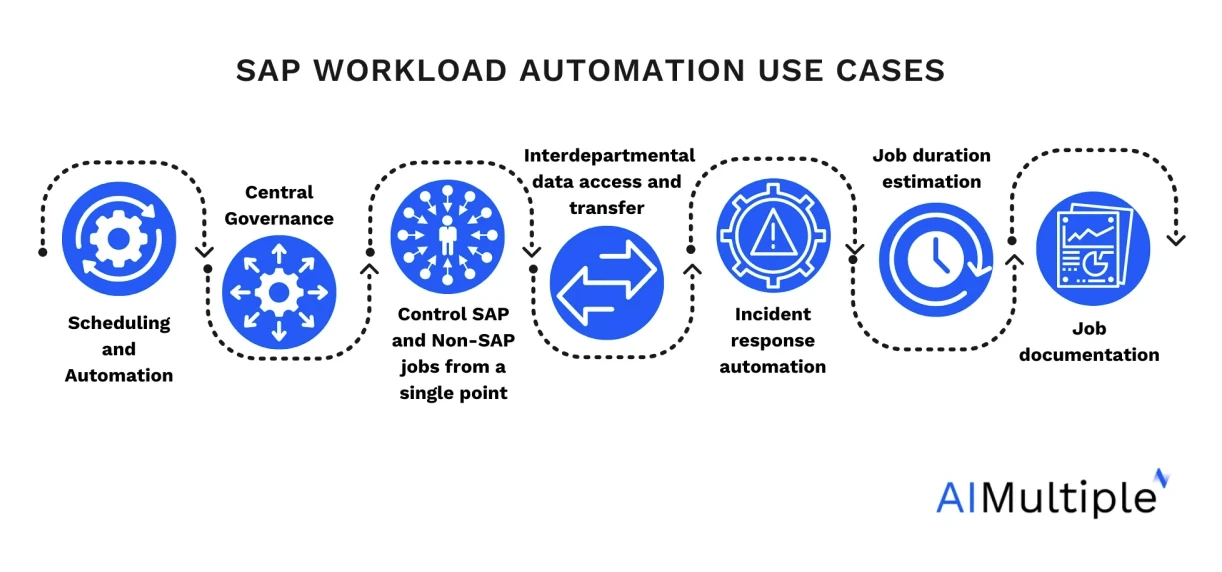
Workload automation enables SAP professionals to analyze data from across the enterprise without extracting data from different non-SAP systems.
Real-Life Example: rench Connection selected Redwood to automate its overnight processing. Redwood integrated with both the retailer’s SAP ERP and its custom-built applications, connecting every step from warehouse to point of sale, so staff no longer monitor and gather data manually each night.5
5-Incident response automation
Employees no longer need to prepare and execute response templates based on the situation. Workload automation schedules safety responses based on a specific trigger and removes manual labor. Such automation prevents incidents before they become critical.
Real-Life Example: Cisco’s Tidal Enterprise Orchestrator was used to automate incident response for SAP systems. The automation pack for SAP included workflows and knowledge base articles to automate and manage incident response processes, ensuring quick issue resolution and maintaining system integrity. 6
6-Job duration estimation
Based on previous data, some workload automation tools can estimate the job duration through machine learning. Better assessment of job complexity and duration helps with planning and increases efficiency overall.
Real-Life Example:
Mergen IT implemented automated incident response workflows using ServiceNow for a technology company. The automation included real-time analytics and reporting, providing actionable insights and enabling better estimation of job durations based on historical data. This allowed the company to plan and allocate resources more effectively, improving overall efficiency. 7
7-Job documentation
SAP and workload automation integration streamline the systematic updating of task documentation and information to guarantee that issues are tracked and resolved quickly.
Real-Life Example:
Epson used RunMyJobs to identify which SAP jobs needed to run, who owned each one, and the escalation procedures and dependencies for each. Sharing workloads across its SAP application servers cut processing time from 14 hours to 8, and Epson now saves 10.5 working days every quarter.8
8- Hybrid and multi-cloud orchestration
Modern enterprises often split their SAP landscapes between on-premises data centers and various providers like AWS, Azure, or Google Cloud. Workload automation acts as the “connective tissue” in these hybrid environments, ensuring that data flows seamlessly and jobs trigger across different infrastructures without latency. This allows an organization to run its core SAP ERP on-premises while using cloud-native AI tools for demand forecasting, bridging the gap between legacy and modern stacks.
Real-Life Example: Freudenberg IT, a global cloud and IT service provider, selected RunMyJobs for hybrid process and data orchestration across on-premises, cloud and containerized environments. Running a 20-step SAP process in parallel instead of one step at a time cut its weekend SAP sales update processing from 36 hours to fewer than six. 9
9- Self-healing and no-code configuration
Modern SAP orchestration has moved to autonomous operations by utilizing capabilities like:
- Agentic AI to plan and execute steps autonomously
- Generative AI for instant troubleshooting
If an SAP job fails due to a temporary system lock or data error, the platform intelligently diagnoses the root cause and executes a recovery sequence without an IT ticket being opened.
Leading platforms are deploying AI to enable self-orchestration. For instance:
- RunMyJobs introduced Redwood RangerAI, an assistant that provides automated job scripting and troubleshooting.
- Stonebranch introduced Robi AI that analyzes logs and execution history of failed jobs, explains the cause and recommends fixes, with optional remediation steps.
Real-Life Example: Stadtwerke München (SWM) used RunMyJobs to implement no-code automation for SAP IS-U mass activities, including the meter-to-cash process. The platform automates job sequencing across SAP HANA and provides self-healing orchestration, automatically retrying failed processes and triggering alerts when needed. This ensures reliable nightly data processing and gives service teams up-to-date customer information, improving efficiency and customer service.10
10- Full-stack observability and analytics
SAP workload automation platforms now embed full-stack observability, correlating job execution with underlying system performance and actual business outcomes. By integrating with tools like Splunk or New Relic, organizations gain visibility across the infrastructure, application, and job layers. This allows business teams to see exactly how a delayed batch job impacts orders, shipments, or financial reporting in real-time.
Real-Life Example: ALSO Group, one of Europe’s largest IT and telecommunications distributors, implemented RunMyJobs to get a single point of control over multiple SAP application servers, with a visual display of each business process’s progress. It aligned its warehouse application with SAP so orders are processed the minute they arrive, which helps it meet its goal of 100% next-day fulfillment for more than 5,000 orders a day.11
What is SAP workload automation?
Workload automation integration into SAP allows business managers to:
- Schedule non-SAP jobs without a problem,
- have centralized control over all the tasks within the SAP environment,
- create error-free business processes.
Built-in tools in SAP Solution Manager and SAP Business Warehouse software hinder centralized control over all workloads’ scheduling, as they do not support Non-SAP system jobs. Employees need to switch between their scheduling tool and SAP to streamline the workload. Manual work increases the time spent on the task and hampers audit trail documentation as the employees complete the jobs in different interfaces.
RunMyJobs by Redwood allows SAP users to maintain a clean core thanks to direct integrations to SAP ECC, SAP S/4HANA and BTP, numerous out-of-the-box SAP wizards and templates for swift automation development. RunMyJobs enables end-to-end process automation, control and visibility with real-time monitoring, predictive SLA notification and management.
For more, see the RunMyJobs by Redwood and SAP partnership.
Choose RunMyJobs for industry-leading SAP integrations delivered as SaaS
Get Free AccessSAP process automation vs SAP workload automation
While similar in their goal of automating tasks and processes, SAP Process Automation and SAP Workload Automation differ significantly in their focus and application areas.
SAP Process Automation is more aligned with automating and optimizing business processes involving user interactions and decision-making workflows. On the other hand, SAP Workload Automation is more focused on automating IT and system-level tasks, ensuring efficient and reliable IT operations. Both play critical roles in digital transformation but target different aspects of an organization’s operations.
Top 7 SAP workload automation benefits
1-Increased efficiency through business agility
Integrating workload automation into your SAP systems will improve overall workload management. Administrators will have access to monitor and schedule across the enterprise regardless of the type of job.
Stonebranch schedules SAP and non-SAP jobs from one controller with SAP-certified integrations for S/4HANA and RISE with SAP. Stonebranch‘s SAP-native component, BatchMan, runs inside the ABAP stack and covers SAP-specific processes such as BW process chains, payment and MRP runs, batch input sessions and IDoc monitoring.12 Additional SAP integrations, including SAP Integration Suite (iFlow) and SAP Kyma for SAP BTP, are available in the Stonebranch Integration Hub.
2-Customer satisfaction
Increased efficiency in enterprise resource planning shortens the time it takes the company to respond to customer needs.
3-Comprehensive audit trails under a single interface
As workload automation schedules all the tasks from a single point of control, such an arrangement such an arrangement makes it possible to monitor and gain better insights through audit trails.
4-Optimized Resource Usage
By managing and scheduling workload automatically, SAP Workload Automation ensures optimal use of resources, preventing the system from being overloaded at peak times and underutilized at off-peak times.
5-24/7 Operation
SAP Workload Automation can keep processes running 24/7, even when no human operators are available, ensuring continuous business operation and service availability.
6-Enhanced Reliability
It ensures business processes run as expected, increasing visibility and the overall reliability of your operations. It can also detect and resolve issues before they become critical, thereby preventing disruptions and maintaining the smooth functioning of the system.
7-Compliance
Automation reduces the cost of manual errors and creates a more accurate record-keeping system. This can support the company’s compliance efforts, especially those that are regulated or audited.
Automation reduces the cost of manual errors and creates a more accurate record-keeping system. This can support the company’s compliance efforts, especially those that are regulated or audited.
If you believe your business can benefit from a workload automation solution, check out:
- Top Enterprise Job Scheduling Software
- Leading Service Orchestration Platforms (SOAPs)
- Top Process Orchestration Tools List
- IT Orchestration Tools Market Landscape
- IT Automation Software Benchmark
 Add as preferred source
FAQs
Workload automation is crucial for timely data processing, optimal resource utilization, and the smooth functioning of SAP modules like SD, MM, and FICO. It allows organizations to maximize ROI by reducing manual work and enabling 24/7 operations.
Yes, many workload automation solutions offer compatibility with various systems and databases, allowing for integration beyond SAP modules. This enables more comprehensive and coordinated enterprise automation and strategies.
Workload automation ensures that tasks are performed at the optimal time and with the necessary resources, reducing bottlenecks and system downtime. This leads to faster data processing and more efficient operations.
Factors to consider include scalability, ease of use, compatibility with existing systems, and the ability to integrate with various SAP modules. Cost and vendor support are also important considerations.
While workload automation minimizes the risk of human error, choosing a solution that complies with security standards to safeguard customers against unauthorized access and data breaches is crucial.
Most modern workload automation solutions are designed to adapt to changes in the SAP environment, including updates and upgrades. However, it’s advisable to consult the vendor to ensure compatibility.
SAP Cloud Automation refers to the technologies and processes used to automate tasks, workflows, and operations within the SAP Cloud environment. This includes automating the deployment, management, and scaling of applications and resources on SAP’s cloud platform to help manage jobs.
SAP Signavio Process and SAP Workload Automation (WLA) serve different but complementary roles in business operations. SAP Signavio is focused on business process management, offering tools for visualizing, analyzing, and optimizing business processes to enhance efficiency and decision-making.
In contrast, SAP WLA is dedicated to the automation of routine tasks and processes, both in SAP and non-SAP environments, ensuring their efficient, consistent execution. While Signavio aids in improving how business processes are designed and function, WLA automates and streamlines the execution of these processes, reducing manual effort and increasing operational reliability.
SAP Automation refers to the use of various technologies and tools to automate business and IT processes within the SAP environment.
Automation in SAP can take several forms, including:
Business Process Automation: Automating routine tasks within SAP to improve efficiency and reduce manual errors. This includes automating processes like data entry, report generation, and transaction processing.
Robotic Process Automation (RPA): Using software robots or ‘bots’ to replicate a human’s actions interacting with the SAP system’s user interface. RPA is often used for repetitive, rule-based tasks that require interaction with multiple IT systems.
Workflow Automation: Streamlining complex business processes by automating workflow, which involves the integration of various tasks performed by different users or departments.
Test Automation: Automating the testing of SAP applications to ensure they function as intended during and after updates or modifications. This is critical for maintaining system integrity and performance.
Data Migration and Integration Automation: Automating the process of migrating data from legacy systems to SAP, as well as integrating SAP with other systems and applications within the organization.
Further reading on SAP WLA
Cite this research
Pick the format that matches where you're publishing. Pasting the link version into your CMS preserves the backlink.
@misc{dilmegani2026,
  author = {Dilmegani, Cem and Şimşek, Hazal},
  title  = {{Top 10+ SAP Workload Automation Tools}},
  year   = {2026},
  month  = nov,
  howpublished    = {\url{https://aimultiple.com/sap-workload-automation}},
  note   = {AIMultiple. Retrieved November 24, 2026}
}Results and timestamps of 25 data points. Download the summary data shown in this article's charts and tables as a ZIP file containing 3 CSV files.
Want the granular data behind it? Join Premium
Changelog
14 updatesAdded a chart showing SAP use cases ranked by number of case studies.
Replaced the Cortex telecom example with a Stadtwerke München case study and added Stonebranch in the self-healing section.
Added three new sections: Hybrid and multi-cloud orchestration, Self-healing and no-code configuration, and Full-stack observability and analytics.
Expanded the 'Top 10+ use cases of SAP orchestration with real-life examples' section with new links.
Reference Links
Cem's work at AIMultiple has been cited by leading global publications including Business Insider, Forbes, Morning Brew, and Washington Post, global firms like Deloitte and HPE, NGOs like World Economic Forum, and supranational organizations like European Commission. [1], [2], [3], [4], [5]
Throughout his career, Cem served as a tech consultant, tech buyer and tech entrepreneur. He advised enterprises on their technology decisions at McKinsey & Company and Altman Solon for more than a decade. He also published a McKinsey report on digitalization.
He led technology strategy and procurement of a telco while reporting to the CEO. He has also led commercial growth of deep tech company Hypatos that reached a 7 digit annual recurring revenue and a 9 digit valuation from 0 within 2 years. Cem's work in Hypatos was covered by leading technology publications like TechCrunch and Business Insider.
Cem regularly speaks at international technology conferences. He graduated from Bogazici University as a computer engineer and holds an MBA from Columbia Business School.





Be the first to comment
Your email address will not be published. All fields are required. Comments are left in their original language.