


eCommerce Technologies Use Cases & Examples

Increasing competition in the eCommerce sector requires businesses to understand how technology is changing customer expectations. Organizations must remain informed about emerging tools and market developments to respond effectively and sustain service quality.
Discover the top 15 eCommerce technologies in personalization and customer engagement, operations and efficiency, and payment systems:
eCommerce technologies for personalization and customer engagement
1. Chatbots and Intelligent Virtual Assistants (IVAs)
Chatbots and intelligent virtual assistants (IVAs) can be effective for engaging with customers and reducing engagement costs.
By leveraging natural language processing and machine learning, these tools can handle customer inquiries in real-time, providing personalized shopping experiences and improving customer service.
Sales chatbots and IVAs can perform the same functions across websites, mobile applications, and messaging services like WhatsApp.
Imagine purchasing in a physical store. Salespeople inform customers about the advantages of the products, display alternatives and complementary items, and may offer advice to help customers make decisions.
Real-life example: Chatbase
Chatbase helps eCommerce stores deploy AI agents that answer product, shipping, returns, and order status questions in real time.
Its agents can be trained on product catalogs, policies, FAQs, and past support conversations to provide accurate responses, recommend relevant products, manage Shopify carts, and connect to order systems for live tracking updates.
Chatbase reports that eCommerce stores using its AI agents can increase conversion rates from around 1.8% to 3.5-4%, raise average order value by 18-25%, reduce checkout abandonment from about 65% to 50-53%, and cut repetitive email volume by 60-70%. It also states that first response times can fall from 10-14 hours to under 10 seconds, while chat satisfaction can reach 90-93%.1
Real-life example: Kayako
Kayako offers an AI-powered retail support solution that helps eCommerce teams manage order tracking, returns, exchanges, and product questions 24/7.
The platform can pull order details, tracking numbers, delivery estimates, inventory data, and return information from connected systems, enabling customers to receive faster responses without agent intervention. Its AI also routes tickets to the right teams, drafts responses, processes common requests, and learns from agent resolutions.
Real-life example: ProProfs
ProProfs provides an eCommerce-focused live chat solution designed to increase sales, qualify leads, and support customers around the clock.
The platform includes tools for proactive engagement, such as personalized greetings, real-time visitor monitoring, and automated announcements for promotions or product updates. Its features, including customizable chatbots, pre-chat forms, and integrations with CRM, help desk, and email marketing systems, enable businesses to automate lead capture, streamline support processes, and reduce cart abandonment.2
Real-life example: PrintAbout
PrintAbout, a printer and printing supplies company, faced challenges in customer inquiries during the COVID-19 pandemic. To address the increased demand and manage customer service, they collaborated with Watermelon to implement an AI-powered chatbot named “Printy.”
Printy is designed to handle common questions about products like ink, toner, and paper. By drawing information directly from PrintAbout’s website, blogs, and FAQs, the chatbot operates 24/7.
The chatbot ensures customers receive immediate assistance, even during high-traffic periods. Its ability to recall prior conversations enables Printy to provide consistent, personalized responses.
The chatbot now manages approximately 90% of PrintAbout’s customer interactions, handling around 1,200 queries each month. This integration has reduced the load on traditional customer service channels, such as email and phone, while improving overall response time and customer satisfaction.3
2. Email marketing
Email marketing tools for eCommerce enable online businesses to design, automate, and deliver email campaigns directly to their consumers.
Email marketing for eCommerce involves sending customized messages, promotional content, and transactional information to targeted audiences to increase customer engagement, drive sales, and build brand loyalty.
Real-life example: Dukier with Omnisend
Previously reliant on generic, non-segmented campaigns, Dukier faced low relevance and inefficiencies. By implementing Omnisend’s automation, segmentation, and localized messaging across five languages, the brand achieved substantial gains: a 525% increase in revenue attributed to Omnisend, with 55% of that revenue driven by automated workflows such as Welcome, Abandoned Cart, and Lead Capture sequences.
Segmented campaigns further contributed to growth, supported by strong engagement metrics and minimal list fatigue, including a 0.36% unsubscribe rate.4
Real-life example: Livrarias Curitiba with GetResponse
Livrarias Curitiba, an online store in Brazil, used GetResponse’s customizable drag-and-drop editor to create personalized marketing emails, landing pages, and websites, boosting revenue by 200%. Additionally, they leveraged A/B testing and email analytics tools from GetResponse to improve and optimize their email campaign performance.
3. Image search engines
Google image searches make up more than 22% of all queries, according to SemRush.5
Customers can use Google Images to search for products by capturing images and performing reverse image searches to find related photos, a feature that enhances the online shopping experience.
eCommerce businesses can leverage this technology by uploading optimized images for each item in their online stores. By adding informative titles and alt texts to these photographs, businesses ensure Google search crawlers understand the image content, improving their Google rankings and increasing customer engagement.
4. Mobile apps
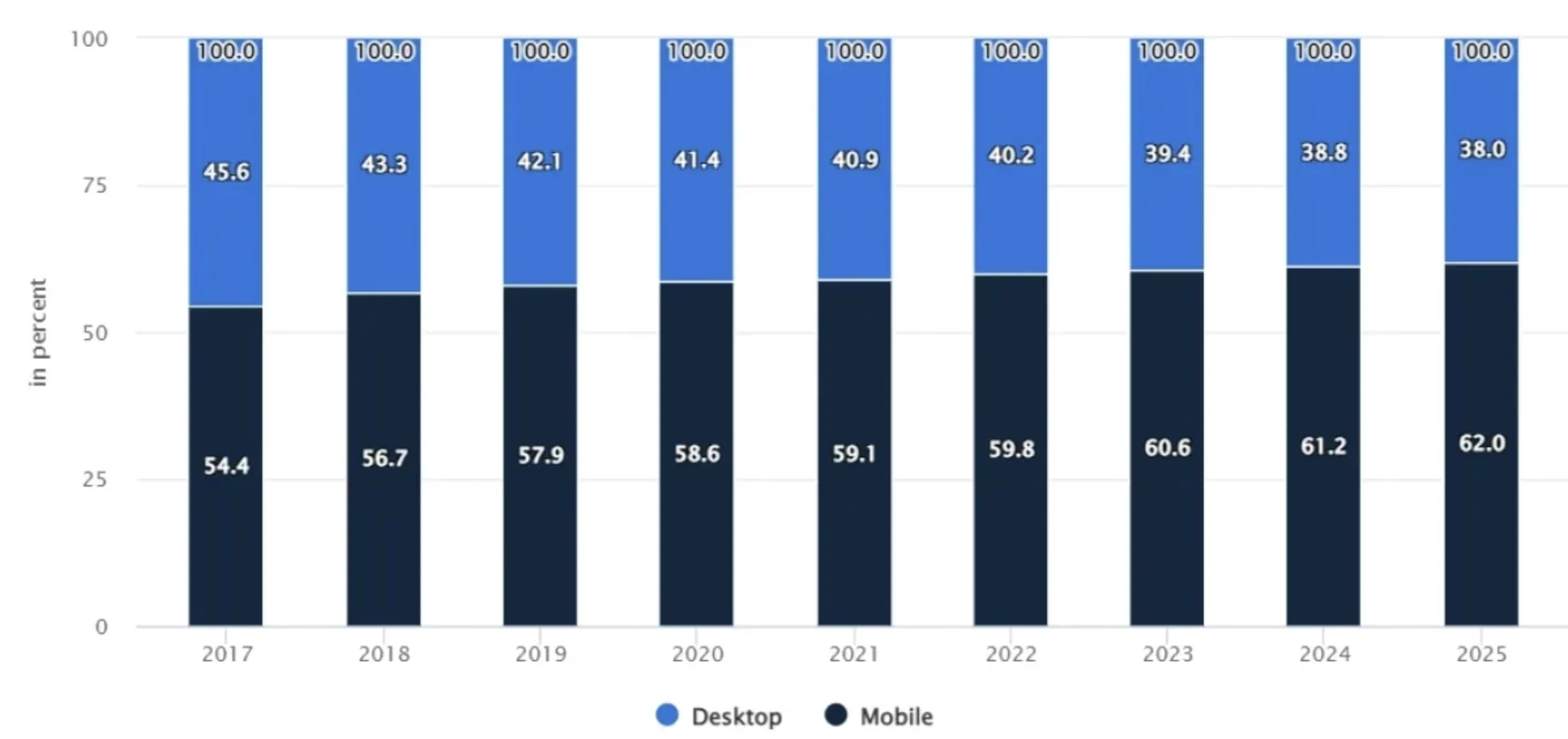
Customers can interact with your brand continuously through apps and learn about fresh, valuable purchasing opportunities. Additionally, mobile apps provide customers with a simple check-out process.
Figure 1: Sales channels mobile vs desktop comparison.
5. Recommendation systems
Employing recommendation systems is an essential part of effective eCommerce strategies, as approximately 30% of consumers are willing to pay more for things that are suggested to them.6
The aim is to enhance customer engagement by offering personalized shopping experiences based on customer data. These systems use machine learning to analyze online purchase and browsing behavior, enabling e-commerce platforms to tailor marketing campaigns and improve customer satisfaction.
By integrating into mobile apps and progressive web apps, recommendation systems improve customer service and loyalty, driving business growth and e-commerce sales.
The overall benefit of recommendation systems is higher engagement rates and boosted sales.
Recommendation systems can also integrate with pop-ups to alert users about discounts or unattended carts. Thus, eCommerce businesses can reduce site leakages and cart abandonment.
Real-life example: Rep AI with Shopify
Rep AI integrates with Shopify to help online stores provide AI-powered shopping assistance directly on their websites.
With a one-click setup, Rep can access a store’s product catalog, answer product-related questions, recommend relevant items, share deals or personalized offers, provide order status updates, and support repeat purchases. Its AI Concierge can also proactively engage inactive shoppers to guide product discovery and improve the shopping experience.
Real-life example: AB Tasty
AB Tasty’s Recommendations solution is an AI-powered product recommendation engine designed to increase revenue, average order value, and conversions by delivering personalized suggestions throughout the customer journey.
The platform enables marketers and eCommerce teams to deploy 1:1 recommendations, cross-sells, bundles, and complementary products without developer support. AB Tasty ingests and analyzes product data in real time, integrates with existing CMS and marketing systems, and allows recommendations to be placed across websites, mobile apps, emails, and other automation channels.7
6. Social commerce
Social commerce is the integration of eCommerce processes directly into social media platforms, enabling users to discover, engage with, and purchase products without leaving the app or site. With almost 19% of total online sales, social commerce has become highly significant for eCommerce businesses.8
This merging of social media and online shopping leverages the power of social networks to drive sales through social interactions, influencer collaborations, and user-generated content.
Social commerce use cases:
- Instagram shopping: Features shoppable posts and stories, as well as a dedicated “Shop” tab where users can browse and buy products.
- Facebook Shops: Allows businesses to create customizable online stores on Facebook and Instagram, with integrated checkout.
- TikTok shopping: Enables brands to add product links to videos and partner with influencers to promote products.
- Pinterest buyable pins: Users can purchase products directly from pins they discover on Pinterest.
Real-life example: TikTok Market Scope
TikTok Market Scope is an analytics and audience insights platform that helps brands understand how users interact with their content and move from discovery through consideration to conversion on TikTok.
It combines first-party behavioral data, content performance, creator activity, and market trends to show which touchpoints drive engagement and action, allowing advertisers plan and optimize more effectively.
Key features include detailed audience insights, brand perception analysis, product and category trends (especially for TikTok Shop), and dual purchase funnels for in-app and off-platform conversions.
With the recent updates, TikTok Market Scope:
- Expanded funnel visibility with separate TikTok Shop and web paths
- Added industry-specific analysis (such as telecom user migration)
- Supported mid-funnel tools like Brand Consideration ads that target high-intent users and refine ad delivery to balance attention and intent.9
7. Virtual reality
Another disadvantage of eCommerce vs. offline stores is that customers cannot try products before purchasing. Virtual reality technology solves that issue by creating 3D artificial environments that users can explore and interact with. With virtual reality technology, customers can virtually try out products and arrange furniture in their homes.
eCommerce technologies for operations and efficiency
8. Agentic commerce & shopping agents
In agentic commerce, AI agents act on behalf of consumers or businesses to research products, compare options, and complete purchases with limited human input.
Unlike traditional eCommerce processes where users manually browse, compare, and check out, agentic commerce shifts decision-making and execution to software agents that can plan multi-step actions, call APIs, and transact autonomously within predefined constraints (e.g., budget, delivery deadlines, preferred brands).
Real-life example: Google’s Universal Commerce Protocol (UCP)
Google’s Universal Commerce Protocol (UCP) is an open-source standard designed to create a common language between AI agents (like Gemini) and eCommerce systems.
Developed with major partners including Shopify, Walmart, and Target, UCP standardizes how AI tools handle the full shopping journey from product discovery and cart management to payment and post-purchase support. By aligning AI systems and merchant backends through shared technical rules, UCP removes the need for custom integrations for each retailer and ensures compatibility with existing standards such as the Model Context Protocol (MCP).
UCP enables AI-driven checkout in Google Search and Gemini by allowing these tools to act directly on a user’s behalf. Instead of redirecting shoppers to external websites, Gemini can surface products, manage selections, and complete purchases within the AI interface itself using integrated payment partners like Visa, PayPal, and Stripe.
This effectively embeds a “buy now” capability into AI search results and conversations, turning Search and Gemini into transactional platforms rather than discovery tools.10
Real-life example: Copilot Checkout
Copilot Checkout from Microsoft allows users to go from asking about products to completing a purchase entirely within the conversation. It shortens the traditional shopping funnel by integrating product discovery, comparison, and payment into one conversational flow.
The video below explains how Copilot Checkout operates:
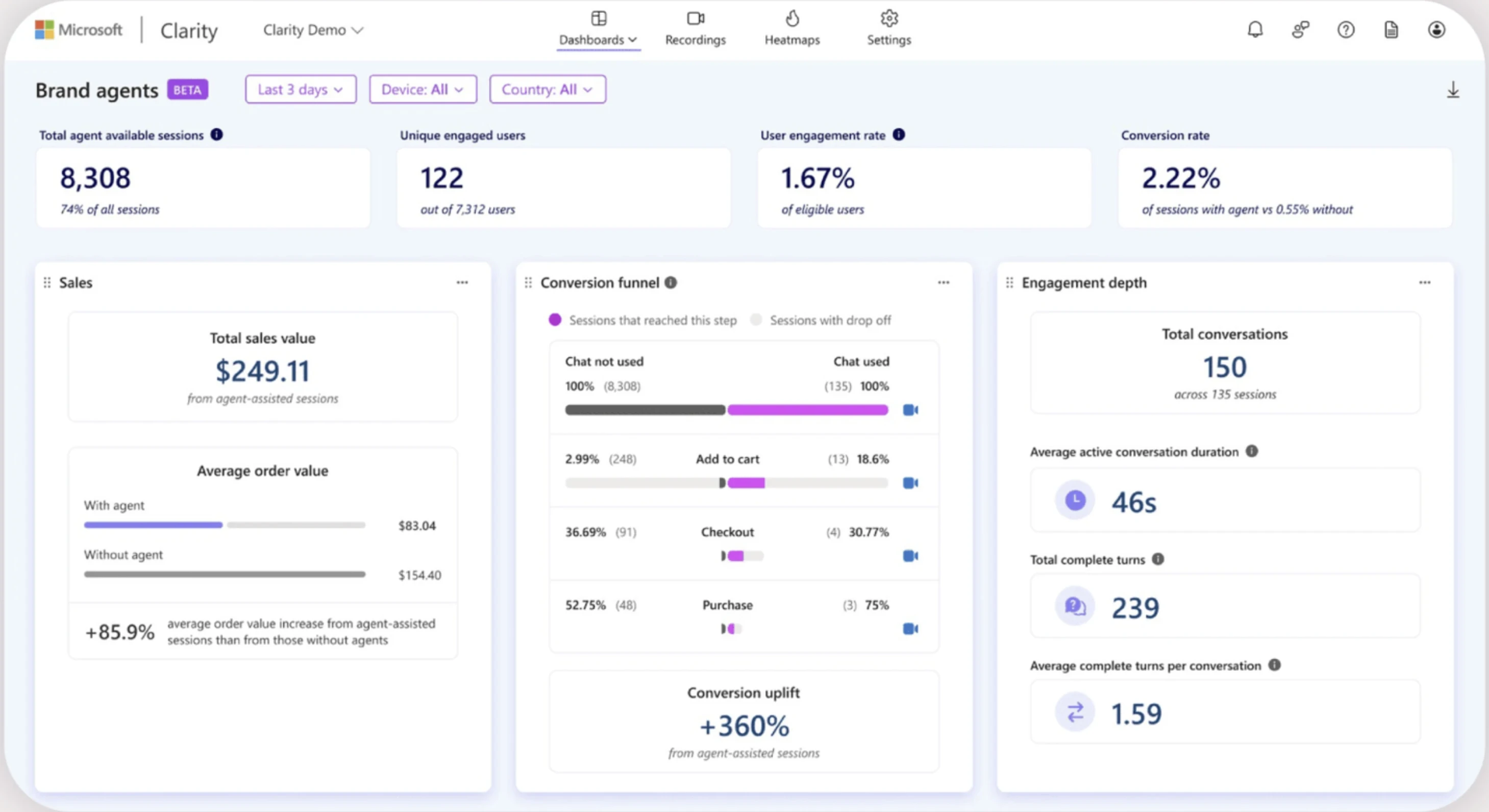
Brand Agents are retailer-controlled conversational AI assistants integrated into Microsoft Copilot shopping experiences, designed to guide customers naturally from discovery to purchase. Instead of guiding users through standardized processes, they behave more like in-store associates by responding in the brand’s voice, asking follow-up questions, comparing products, and narrowing choices based on shopper intent.
As customers move closer to checkout, Brand Agents facilitate this process by answering practical questions (like shipping and returns), providing purchase links, and suggesting complementary products in a helpful, non-intrusive way.
They also support upselling and cross-selling by using catalog knowledge and customer behavior signals to recommend add-ons, replenishments, or related items post-purchase, aiming to increase confidence, discovery, and conversions without sacrificing trust or brand identity.
Figure 2: Brand Agents analytics examples from Microsoft Clarity analytics tool.11
9. Sustainability solutions
Sustainability solutions for eCommerce are designed to reduce the environmental impact of online retail operations.
These solutions aim to address issues such as carbon emissions, waste production, and resource depletion while promoting eco-friendly practices throughout the supply chain.
Sustainability solutions for eCommerce companies include eco-friendly packaging, carbon-neutral shipping, waste-reduction initiatives, product takeback programs, and sustainable logistics, such as electric and hybrid delivery vehicles.
Real-life example: Pela
Pela, a phone case manufacturer and eCommerce business, outlines a sustainability strategy centered on measuring, reducing, and offsetting its environmental impact across the lifecycle of its plant-based phone cases and accessories.
The company’s 2022 carbon footprint assessment incorporates both direct and indirect emissions from product manufacturing, and Pela offsets these emissions through verified carbon credits to maintain Climate Neutral Certification.
Compared with conventional plastic products, Pela’s materials generate significantly fewer emissions, require less water, and produce substantially less waste. The brand’s ongoing reduction initiatives include optimizing transportation through additional distribution centers, expanding its Pela 360 recycling and circularity program, and supporting manufacturing partners in transitioning to renewable energy and more efficient operations.
Pela also collaborates with other companies by supplying its bioplastic materials to help reduce their environmental impact, reinforcing its broader mission to promote corporate responsibility and sustainable product design.12
Real-life example: Amazon
Amazon has made significant improvements in sustainable packaging by reducing single-use plastics by 11.6% in 2022 and implementing paper-based and flexible packaging solutions.
The company has also expanded its electric delivery vehicle fleet. It aims to power its operations with 100% renewable energy by 2025 as part of its commitment to reaching net-zero carbon by 2040.
These efforts have reduced material waste and carbon emissions and supported Amazon’s environmental efforts and customer engagement.13
10. Supply chain visibility software
The entire supply chain processes, from delivery to warehouses, can be managed using supply chain visibility tools. These systems automate invoice issuance and track inventory.
While automating supply chain operations, supply chain visibility software also helps generate reports that aid decision-making. They generate financial reports, and some supply chain management systems can calculate a company’s and a product’s carbon footprint.
As a result, you can identify your current carbon emissions pain points and take steps to strengthen your environmental, social, and governance (ESG) posture, ultimately increasing your sales.
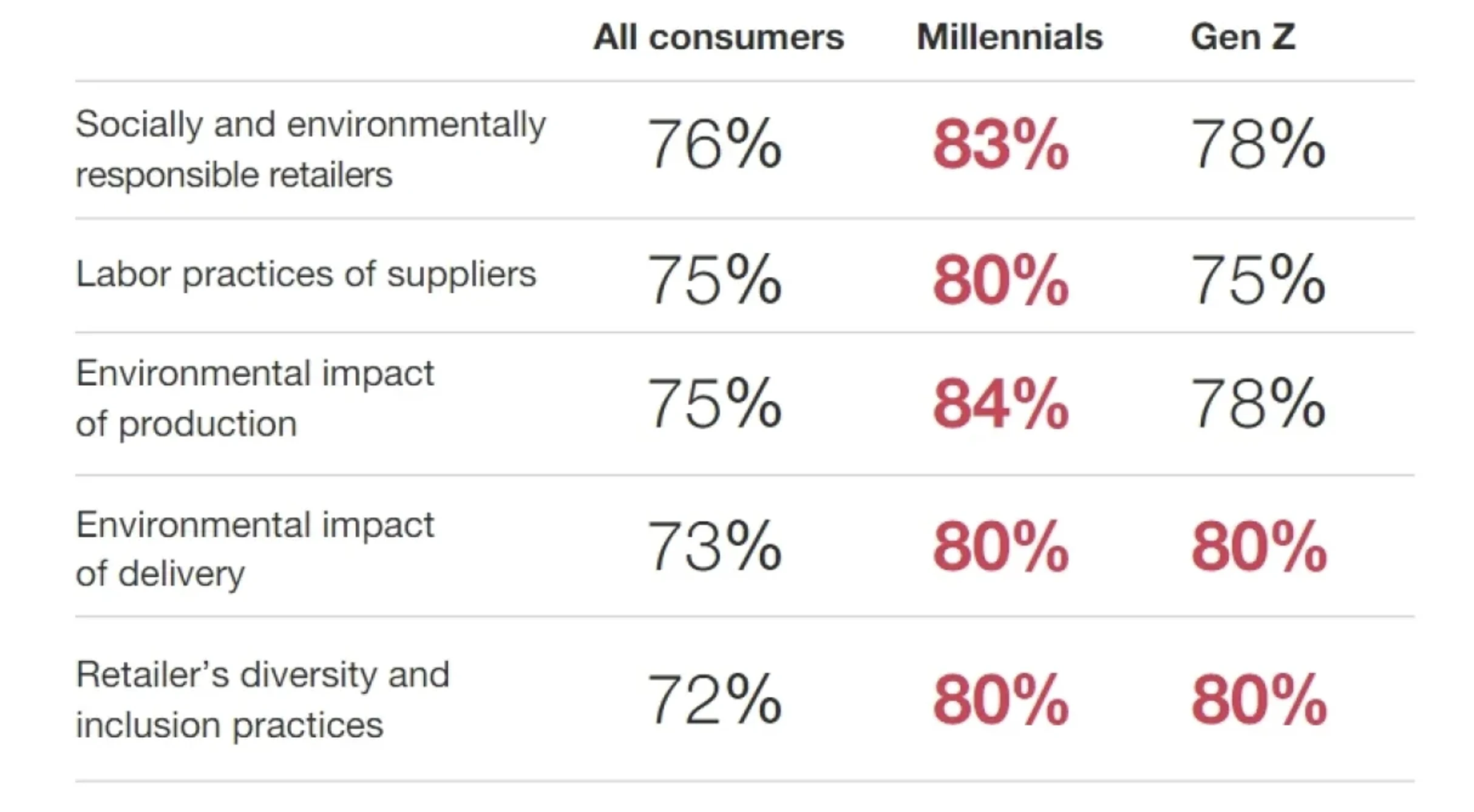
For instance, a PwC survey revealed that more than 75% of consumers consider firms’ ESG policies before making a purchase (see Figure 3).
Figure 3: Shoppers that are concerned with ESG practices of businesses.14
11. Warehouse automation technologies
Warehouse automation provides the following benefits:
- accurate scheduling of intermediate goods and final products,
- optimal inventory management,
- easier financial/environmental reporting, and
- carbon footprint reduction.
eCommerce technology enables the automation of warehouses with the following technologies:
- Internet of Things (IoT): Smart lighting and HVAC systems optimize product storage conditions while minimizing energy costs. Thus, you can reduce your carbon footprint by up to 4% while reducing waste.
- Intelligent automation: This technology automates order processing by using NLP to read, comprehend, and convert orders into machine-readable formats. Following that, RPA shares the data with the inventory management software and generates a shipping label based on it.
- Collaborative robots (Cobots): Cobots can work around the clock, package and palletize products, and augment your workforce.
12. Web scraping
Web scraping involves extracting data from websites using a scraping bot or web scraping API. The technique can be advantageous for eCommerce businesses since these companies produce:
- Customer data,
- Product data, and
- Financial data.
Leveraging web scraping initiatives can be beneficial for companies since they:
- Enable price comparison with competitors to stay competitive,
- Provide insights on customers’ purchase behavior and find in-demand products,
- Determine special users such as whales that bring significant income,
- Support execution of targeted ads,
- Conduct customer sentiment analysis.
See eCommerce Scraper APIs for more.
Real-life example: Bright Data
Bright Data scraping services collect public data from targeted websites. It allows companies to choose scraping frequency, such as real-time or scheduled. Scraped data is delivered in the desired format.
Bright Data provides datasets that require no programming or technical expertise, allowing users to skip data scraping and obtain the data directly.
Recent updates:
Bright Data updated its Model Context Protocol (MCP) and included:
- Custom MCP setup: Enables AI agents to be tailored by selecting the required tools from specialized categories including eCommerce, social media, and travel, improving performance and reducing token usage.
- One-Click MCP access: Allows instant connection to the MCP Free Tier with no configuration, integrating with Claude, Cursor, or Visual Studio Code.
AI-driven price monitoring tools
In highly competitive marketplaces, immediately changing pricing to match rivals’ can also significantly impact conversion rates and help you pounce on small margins.
Using dynamic pricing tools, you can instantly evaluate your prices by comparing them with competitors’ prices, as well as your stock levels and delivery policies.
With this knowledge, it is feasible to manually adjust sales figures or, more frequently, set up the virtual store so that prices are adjusted in response to changes in the competition. These strategies help your eCommerce company stay competitive.
eCommerce technologies for payment systems
13. Check-out free systems
eCommerce technologies and customer data are optimizing both the online and in-store retail experiences. Check-out free systems allow customers to make in-store purchases without queuing by utilizing the following technologies:
- Computer vision,
- Machine learning algorithms,
- Smart sensors,
- E-wallets, or custom mobile apps.
Real-life example: Amazon’s Just Walk Out
Amazon’s Just Walk Out lanes are checkout-free retail exits that allow customers to pick up items and leave without traditional scanning or cashier lines.
Originally powered by computer vision and sensors, the system incorporates RFID (radio frequency identification) tags, especially in portable lane formats ideal for pop-ups, events, and temporary retail setups, which can be installed in hours rather than weeks.
These lanes speed up transactions, improve customer flow with motorized gates and in-lane displays showing cart totals, and integrate with existing payment and retail systems. They also help reduce staff and labor needs, shorten wait times during peak traffic, support soft goods (like apparel), and enhance theft reduction and inventory tracking.
Figure 4: Just Walk Out automatic gates example from Amazon.15
14. Cryptocurrency payments
Cryptocurrency payments use digital currencies such as Bitcoin and Ethereum to facilitate transactions. These payments leverage blockchain technology to provide a secure, decentralized, and often faster way to transfer value than traditional fiat currency systems.
Typically, cryptocurrency transactions have lower fees compared to traditional payment methods, especially for international transactions.
Since all transactions are recorded publicly (blockchain), cryptocurrency payments ensure transparency and traceability.
15. E-Wallets
An “e-wallet,” or digital wallet, is connected to a person’s bank account and used for online purchases on a computer or smartphone.
The two primary components of an e-wallet are software and data information:
- The software component secures and encrypts the personal information.
- The data component includes a database containing information users have supplied, such as names, shipping addresses, preferred payment options, required payment amounts, and credit or debit card information.
E-wallets have three main benefits:
- Enhanced security,
- Support the payment process, thus reducing cart abandonment and
- Ease of refund, which takes a few seconds.
For more on successful pricing, read eCommerce Price Monitoring.
Conclusion
To compete effectively in the eCommerce sector, smaller businesses must adopt technologies that address key areas: customer engagement, operational efficiency, and payment systems.
Personalization tools, such as chatbots, recommendation systems, and social commerce features, help improve the customer experience and increase customer retention.
Operational technologies, including warehouse automation, supply chain visibility software, and sustainability initiatives, support cost control and align with consumer expectations on environmental responsibility.
In payment systems, innovations like checkout-free solutions, e-wallets, and cryptocurrency options respond to changing customer preferences and purchasing habits.
Together, these technologies form a practical set of solutions that businesses can implement to enhance performance, meet consumer demands, and achieve sustainable growth.
Cite this research
Pick the format that matches where you're publishing. Pasting the link version into your CMS preserves the backlink.
@misc{dilmegani2026,
  author = {Dilmegani, Cem and Ermut, Sıla},
  title  = {{eCommerce Technologies Use Cases & Examples}},
  year   = {2026},
  month  = may,
  howpublished    = {\url{https://aimultiple.com/ecommerce-technology}},
  note   = {AIMultiple. Retrieved May 18, 2026}
}
Changelog
13 updatesAdded Chatbase, Kayako, and Rep AI examples to the live chat and recommendation systems sections.
Added Agentic commerce & shopping agents to the eCommerce technologies for operations and efficiency section.
Reference Links
Cem's work at AIMultiple has been cited by leading global publications including Business Insider, Forbes, Morning Brew, and Washington Post, global firms like Deloitte and HPE, NGOs like World Economic Forum, and supranational organizations like European Commission. [1], [2], [3], [4], [5]
Throughout his career, Cem served as a tech consultant, tech buyer and tech entrepreneur. He advised enterprises on their technology decisions at McKinsey & Company and Altman Solon for more than a decade. He also published a McKinsey report on digitalization.
He led technology strategy and procurement of a telco while reporting to the CEO. He has also led commercial growth of deep tech company Hypatos that reached a 7 digit annual recurring revenue and a 9 digit valuation from 0 within 2 years. Cem's work in Hypatos was covered by leading technology publications like TechCrunch and Business Insider.
Cem regularly speaks at international technology conferences. He graduated from Bogazici University as a computer engineer and holds an MBA from Columbia Business School.

She previously worked as a recruiter in project management and consulting firms. Sıla holds a Master of Science degree in Social Psychology and a Bachelor of Arts degree in International Relations.






Be the first to comment
Your email address will not be published. All fields are required. Comments are left in their original language.