


Top 10 IAST Tools: Evaluating Focus, Integration, and Features

Over the course of my 17 years in cybersecurity, including time as CISO at a fintech serving 125,000 merchants, I’ve gained experience with the evolution of interactive testing methods.
Through working on Proofs of Concept (PoCs) with several vendors, I’ve gained insights that have helped me compile the list below. It includes IAST modules from tools that offer a variety of testing methods, along with links to my rationale for each.
When choosing an IAST tool, users often consider the tool’s:
- Focus on web apps or native mobile apps
- Integration with SIEM tools
- Deployment options, such as on-prem, cloud, and hybrid
- The inclusion of DAST and/or SAST as an additional testing capability.
With these features in mind, see the IAST tools and their key features:
IAST tools comparison
*All ratings are out of 5.
Ranking: Tools are ranked by focus and number of reviews, except for AIMultiple’s benchmarking services subscribers ranked at the top.
Vendor selection criteria:
- At least one review in a B2B review platform like G2.
- The number of employees serves as a proxy for the company’s revenues. The company should have at least 30 employees.
Differentiating features
IAST tools supported coding languages
Top IAST tools examined
Contrast Assess by Contrast Security
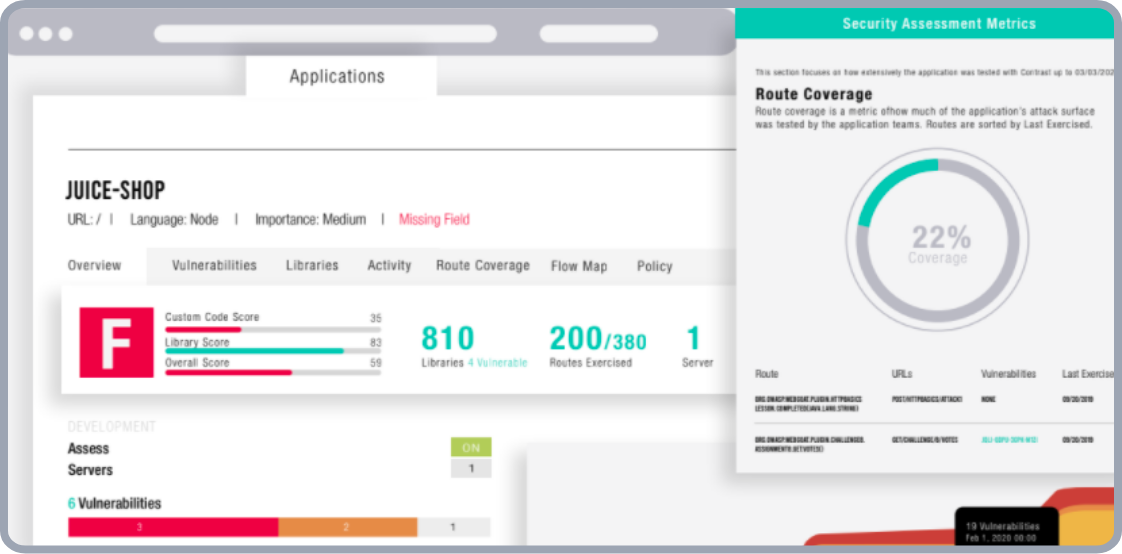
Contrast Assess uses an agent that instruments the running application with sensors. These sensors continuously monitor code execution, data flow, and configuration in real time. This approach pinpoints actual vulnerable, exploitable lines of code, reducing false positives compared to standalone SAST or DAST.
1
Contrast Assess is designed for both developers and AppSec teams. Developers receive immediate, actionable security feedback directly within their IDE, test, or QA environments as they code. It can scan code written in Java, Python, Node.js, and more.
Pros
- Provides comprehensive details about each vulnerability found in custom code and used libraries, simplifying triage.
- Reduces false positives by combining SAST and DAST analysis into a single runtime view, with real-time results.
- Integrates with DevOps tools, offering scalable, real-time protection with high detection accuracy.
Cons
- Default scoring on libraries can be discouraging, and adjusting it is not straightforward.
- Security risk and attack type coverage in the Protect module is not comprehensive across all scenarios.
- The interface can feel cluttered, and some software integrations require additional configuration.
Checkmarx One
Checkmarx One consolidates IAST, SAST, DAST, and SCA findings into a single issue; one SQL injection finding does not become three separate tickets across testing types.
There is a demo video available that shows how detection works in Checkmarx:
Checkmarx introduced a new Checkmarx One platform built around agentic, AI-driven security that spans code, open-source dependencies, AI assets, and runtime.2 The AI Query Builder for SAST is generally available, and Checkmarx extended IDE-native agentic application security into the Kiro IDE.3 Checkmarx has also published guidance on security vulnerabilities in AI-generated code, relevant to teams using IAST to monitor AI-assisted development pipelines.4
Pros
- The delta-scan feature, multi-language support, and vulnerability detection in databases are consistently valued by users.
- Detailed vulnerability reports, accurate scans, and CI/CD pipeline integration are well-regarded.
Cons
- Dashboarding and the user interface could be improved for better issue visibility and widget flexibility.
- Frequent false positives and duplicate positives increase the burden of manual validation.
- The cost of subscriptions, the complexity of integrating with tools like Jenkins, and customer service response times are noted areas for improvement.
HCL AppScan
HCL AppScan is an enterprise-grade IAST tool that identifies vulnerabilities in real time during application runtime by integrating into the development pipeline. It uses patented algorithms for Java and .NET to track data flow and validate findings, reducing false positives compared to traditional IAST scanners. The technology originated from IBM Security AppScan before HCL Technologies acquired the product line in 2019.
Recent updates to AppScan on Cloud include a new “IAST Key only” option for quickly creating an IAST session without re-downloading a new agent, which simplifies setup for environments such as the IAST .NET Core Site Extension for Azure App Services. The IAST agent now detects insecure usage of LLM outputs when generative AI responses are used in security-sensitive contexts without proper validation or controls.5 AppScan also added PHP IAST agents with support for Windows, Ubuntu, and Red Hat servers.6
Pros
- HCL AppScan provides comprehensive security testing, easy integration into the SDLC, and user-friendly management for DevOps.
- Users appreciate its advanced scanning capabilities, low false positives, and ease of installation and setup.
Cons
- Documentation complexity creates a steep learning curve for new users.
- Several users report issues with the license manager, the use of outdated TLS 1.0, and application scanning behind Azure with MFA.
- Findings correlation across IAST, DAST, and SAST relies on heuristics and may not catch all cross-method duplicates.
NowSecure
NowSecure is a specialized mobile application security testing platform that offers automated assessments for iOS and Android apps. It claims to perform over 600 security, privacy, and compliance tests, including static, dynamic, and interactive analyses, on real devices. NowSecure is particularly effective for organizations aiming to secure both custom-developed and third-party mobile applications.
NowSecure launched AI-Navigator, a feature that automates the authentication workflow for mobile app testing, reducing assessment time by up to 90%. Prior to AI-Navigator, unauthenticated testing overlooked up to 95% of a mobile app’s attack surface. AI-Navigator uses a vision-based LLM to navigate apps during testing, making decisions based on what it sees on screen rather than requiring scripted login flows. It is resilient to UI and UX changes, and is currently available for Android with iOS support incoming. 7
Supporting data from NowSecure founder Andrew Hoog, based on analysis of about 105,000 mobile app assessments, found that authenticated testing detects 78% more sensitive data exposure per scan. NowSecure is an authorized lab for Google’s App Defense Alliance (ADA) Mobile Application Security Assessment (MASA); apps that pass the review through NowSecure receive a verified security badge on the Google Play Store.8 NowSecure also launched the Agentic AI Data Partner Program, which makes its mobile application risk intelligence available to security vendors and AI-driven platforms, drawing on more than four million real-world mobile app assessments.9
Pros
- NowSecure’s detailed reports are appreciated for their ability to cover Static Application Security Testing (SAST) needs comprehensively.
- Users find the integration of NowSecure in their build and release cycles to be beneficial in improving mobile app security.
- The customer support provided by NowSecure is highly valued for its responsiveness and helpfulness.
Cons
- Users noted challenges with NowSecure’s integrations and lengthy scan times.
- Some found the user interface non-intuitive and the licensing costs high.
- Others mentioned issues with app configuration, report overload, and limitations in customization.
Offerings and limitations of IAST tools compared
Benefits
- Insights: IAST tools identify real-time insights and enable early vulnerability detection during testing/QA. A 2024 Gartner study found IAST can detect up to 30% more vulnerabilities than traditional SAST methods.10
- False positive reduction: By leveraging application logic and context, IAST delivers accurate results with lower false positives than DAST and SAST. A 2023 Forrester report observed that automated IAST testing can generate up to a 70% reduction in false positives. 10
Weaknesses
- Monitoring: One downside of IAST tools is that they are limited to identifying vulnerabilities in the functional testing environment; they cannot monitor security issues in areas of missing code coverage.
- Customizability: A key consideration is striking a balance between pre-configured rules and human tester control, as the selected tool may have limitations in customizability.
- Deployment complexity: IAST agents run inside the application. For traditional VMs this is straightforward; for Kubernetes and serverless architectures, modifying container images adds pipeline complexity.
SAST vs. DAST vs. IAST tools
*SAST: Static Application Security Testing
**DAST: Dynamic Application Security Testing
***IAST: Interactive Application Security Testing
 Add as preferred source
FAQs
An IAST (Interactive Application Security Testing) tool analyzes an application’s security in real time during runtime. It combines elements of both static and dynamic analysis by monitoring the application’s behavior as it operates, allowing it to detect vulnerabilities such as code flaws, misconfigurations, and other security risks.
IAST tools work by integrating directly into the application during testing or in a development environment. They track and analyze interactions between the app’s code and its data, offering detailed feedback that helps developers and security teams identify and fix security issues early in the development lifecycle.
IAST identifies vulnerabilities during the test/QA stage and reduces remediation costs by shifting security testing left in the SDLC. Unlike other application testing tools, IAST provides immediate vulnerability reports after code changes, enabling earlier detection and fix cycles. Integration with CI/CD pipelines supports continuous security testing throughout the software development lifecycle.
Cite this research
Pick the format that matches where you're publishing. Pasting the link version into your CMS preserves the backlink.
@misc{hafa2026,
  author = {Hafa, Adil},
  title  = {{Top 10 IAST Tools: Evaluating Focus, Integration, and Features}},
  year   = {2026},
  month  = jun,
  howpublished    = {\url{https://aimultiple.com/iast-tools}},
  note   = {AIMultiple. Retrieved June 3, 2026}
}Results and timestamps of 35 data points. Download the summary data shown in this article's charts and tables as a ZIP file containing 5 CSV files.
Want the granular data behind it? Join Premium
Changelog
7 updatesExpanded the Checkmarx One, HCL AppScan, and NowSecure vendor updates with new agentic AI platform, PHP IAST agents, and AI data partner program details.
Removed Invicti from the 'Top IAST tools examined' section.
Reference Links








Be the first to comment
Your email address will not be published. All fields are required. Comments are left in their original language.