


Top 20+ Active Directory Management Tools

Although many systems have moved to the cloud, Active Directory (AD) remains the central identity platform for managing users, devices, and access across most organizations.
We list the top 21 tools that support key areas of Active Directory management with their distinct capabilities:
Tool name | AD focus | Primary AD function |
|---|---|---|
Permission & access rights management | Full AD management | |
Backup & recovery | AD operational support | |
Identity lifecycle & user management | Full AD management | |
Permission & access rights management | Full AD management | |
Identity lifecycle & user management | Full AD management | |
Netwrix Directory Manager | Identity lifecycle & user management | Full AD management |
Microsoft AD Explorer | Lightweight AD & LDAP administration | Full AD management |
Hyena | Lightweight AD & LDAP administration | Full AD management |
Softerra LDAP Administrator | Lightweight AD & LDAP administration | Full AD management |
Dameware Remote Support | Remote support & administration | AD operational support |
Full AD management (Administrative control): Provide direct control over AD objects (users, groups), including creation, modification, delegation, and automation of directory tasks.
AD insight and oversight (Auditing, Monitoring, Security): Focused on monitoring, logging, auditing, and analyzing changes or access activity in AD for security and compliance purposes.
AD operational support: Enhance or complement AD environments (e.g., password policy enforcement, account recovery, remote support, system backups), but do not manage AD objects directly.
Detailed comparisons of AD management and AD-integrated tools
Platform support
All Active Directory Management Tools are compatible with Windows.
✓: Full native support
✕: No support
Web-based UI: Accessible via browser; no native desktop app for that OS.
Sensor-based Linux: Monitors Linux using lightweight agents or sensors, rather than a full application.
Licensing
One Identity Active Roles
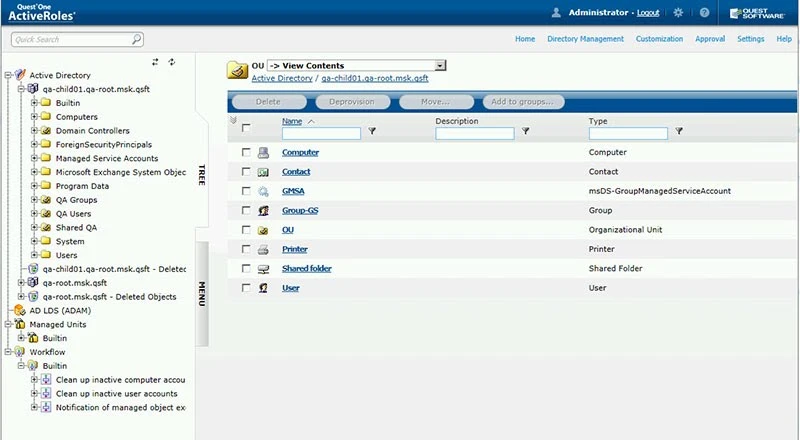
ActiveRoles uses a Windows-based console that supports delegation, policy enforcement, and workflow automation. It includes predefined roles, approval workflows, and policy-based provisioning to standardize access control and reduce manual admin tasks. ActiveRoles acts as a virtual firewall in front of AD, enforcing policy-driven, least-privilege delegation across hybrid AD/Entra ID/M365.1
The interface is configuration-heavy. Advanced features like custom policies and automation often require PowerShell scripting or REST API integration. Delegation is granular, but a proper setup is required to avoid privilege overlaps.
Choose Active Roles for active directory management.
Get Free TrialWho is it for: Large organizations with advanced identity governance needs across Active Directory and Microsoft Entra ID (Azure AD). Best for teams requiring policy-driven delegation, compliance automation, and granular access control at scale.
Distinct capabilities
- Rule-based membership that auto-updates from AD attributes
- Time-bound access that expires automatically
- Policy-based provisioning with attribute-level rules
- Stale object discovery for inactive users and orphaned objects
- PowerShell and REST API support for automation and integration
One Identity Active Roles enables policy-based delegation and compliance automation, but custom setup and scripting are steep to learn.
Licensing
Commercial software licensed per user or per managed object.
Acronis Cyber Protect Cloud
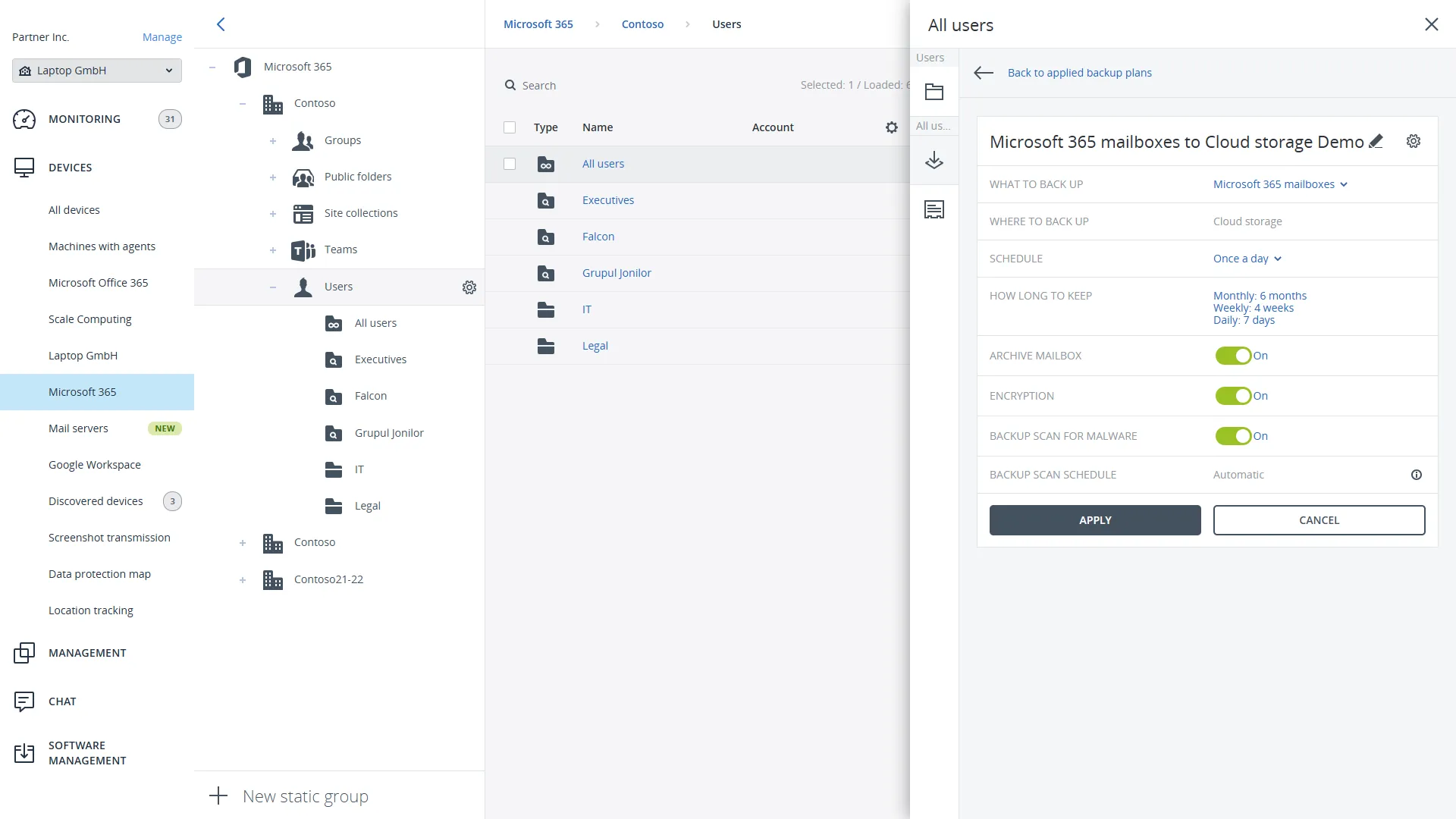
Acronis Cyber Protect Cloud is a backup and security platform sold through managed service providers. It is not a dedicated AD administration tool. Its AD role is protection: it backs up domain controllers and Microsoft Entra ID data and restores them after failure, deletion, or attack.
Choose Acronis Cyber Protect Cloud for active directory management.
Get Free TrialWho is it for: MSPs and IT teams that need to back up and recover domain controllers and Entra ID alongside the other workloads they already protect with Acronis.
Distinct capabilities
- Integrated cyber protection platform. Acronis is natively integrated with backup, disaster recovery, cybersecurity, endpoint management, and RMM capabilities, rather than with AD-specific account provisioning claims.
- Application-aware AD backup. Domain controllers are backed up as entire machines with Active Directory application backup enabled, using domain administrator credentials.
- Domain controller recovery. A domain controller is restored as a whole machine from the web console or bootable media, including to a virtual machine or dissimilar hardware. In domains with more than one domain controller, the restore is non-authoritative, which prevents USN rollback.
Acronis Cyber Protect Cloud protects AD rather than manages it. It does not create, modify, audit, or delegate AD objects, so native tools such as Active Directory Users and Computers remain necessary for administration.
Licensing
Commercial; licensed through Acronis for service providers. Pricing is quote-based and typically tied to deployment scale.
ManageEngine ADManager
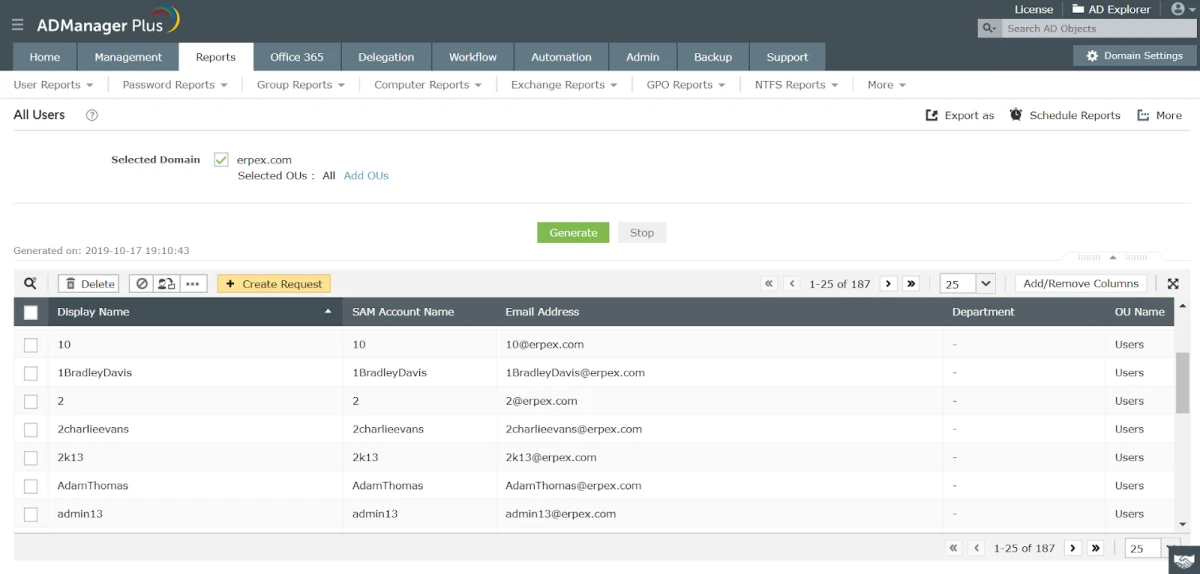
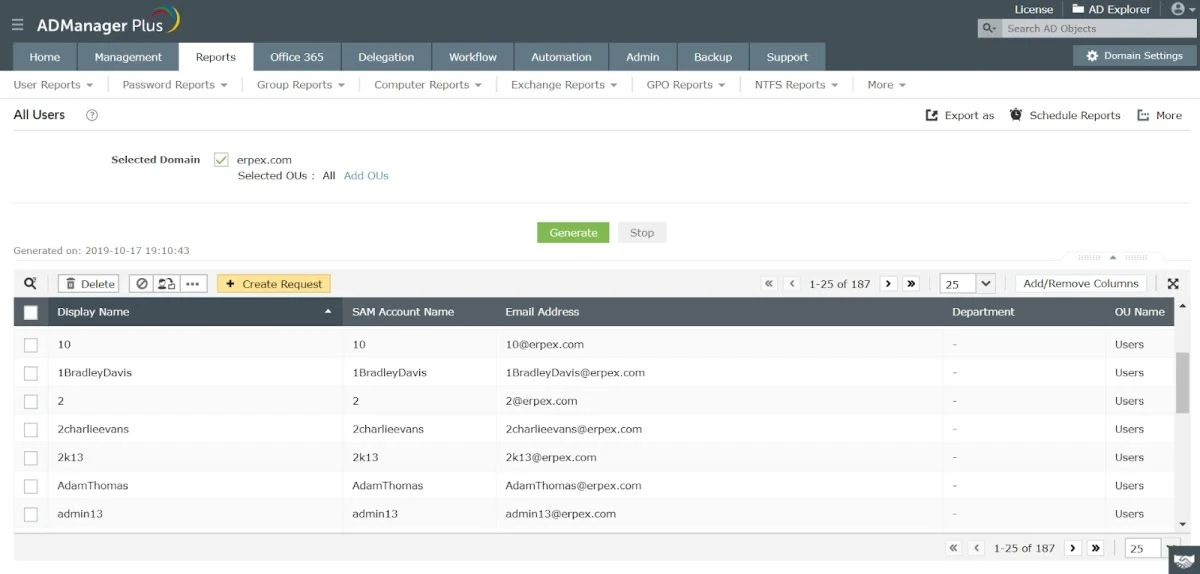
ManageEngine ADManager Plus is a web-based application for managing Active Directory, Exchange, Microsoft 365, and Google Workspace from a single console. It installs on a Windows server (on-premises or self-hosted in the cloud, e.g., on AWS) and is administered through a browser, so no per-admin desktop client is required.
Choose ManageEngine ADManager for active directory management.
Explore PlansWho is it for: Administrators managing users across multiple domains and platforms. It supports delegating tasks to non-administrative personnel, which suits environments where role-based access control is required.
Distinct capabilities
- Performs AD and Microsoft 365 tasks through the web console without PowerShell scripting.
- Delegates predefined tasks to non-admin help desk technicians, scoped per OU and domain
- Uses templates to standardize user creation and updates across domains
- Includes prebuilt reports (inactive accounts, last logon, group membership) and supports actions on objects from within a report
ManageEngine ADManager supports bulk provisioning, delegation, and compliance reporting. Advanced workflow automation and Microsoft 365 management require the Professional edition.
Licensing
Annual licensing, scoped by number of domains and help desk technicians:
- Free Edition: $0, limited to 100 Domain Objects
- Standard Edition: $595/year (AD management and reporting)
- Professional Edition: $795/year (adds workflow automation, Exchange/Microsoft 365 management, and helpdesk delegation)
- A 30-day trial of the full version is available. After the trial, the license reverts to the Free Edition unless a paid license is purchased.
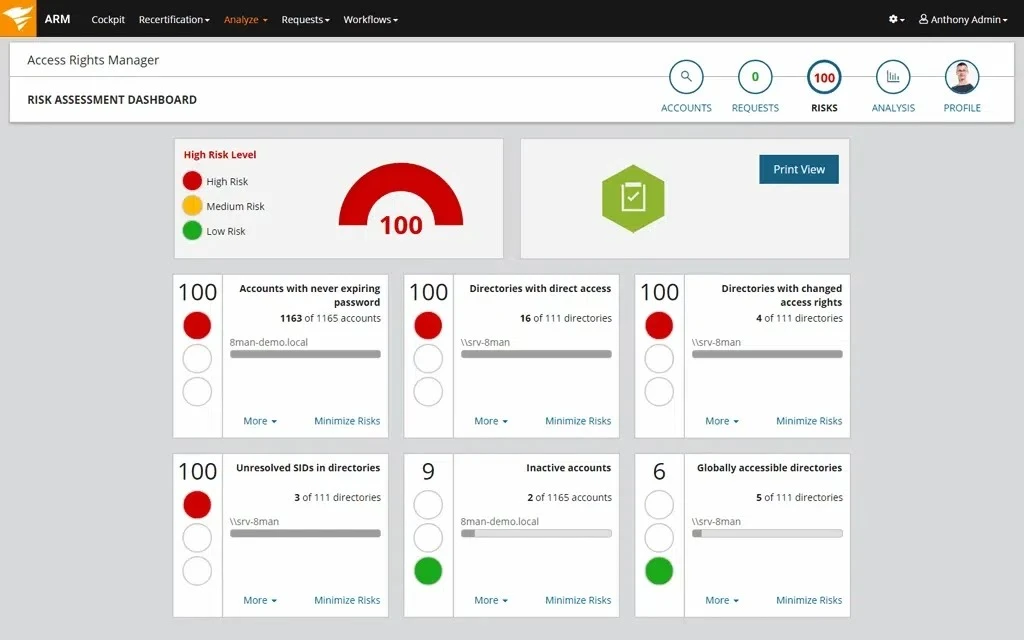
SolarWinds Access Rights Manager
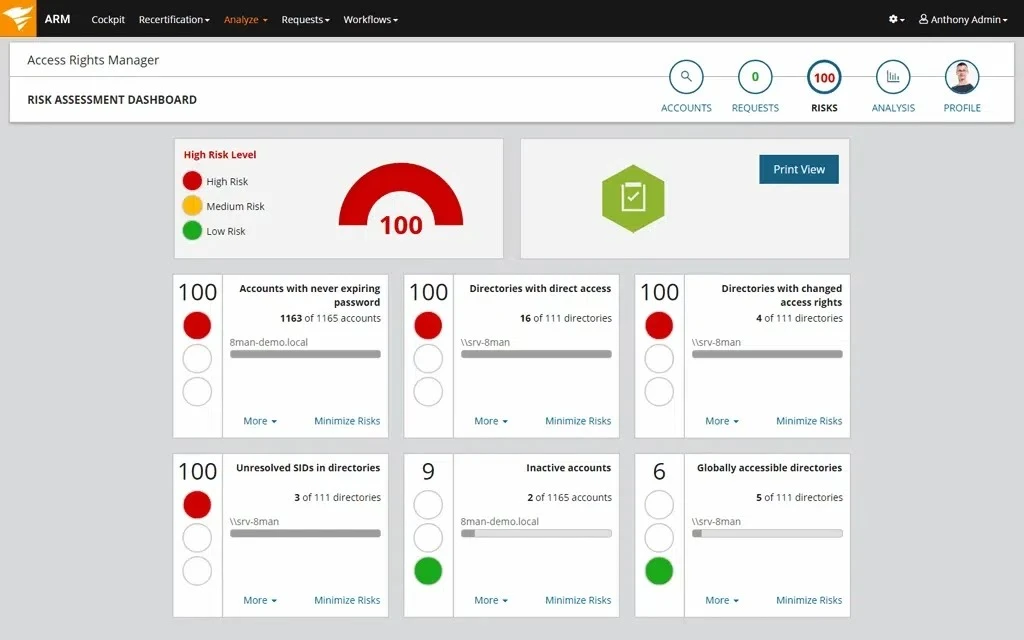
The Windows-based admin console is intuitive for browsing and editing access structures. The web portal enables business data owners to approve access requests or run delegated access reviews.
Some configuration tasks remain non-intuitive. For example, creating or editing user provisioning templates may require using a JSON editor or a separate UI tool, which admins have flagged as less user-friendly. Not all automation is fully GUI-driven, and there’s room to simplify advanced workflows.
Choose SolarWinds Access Rights Manager for active directory management
Get 30-Days Free TrialWho is it for: Mid-to-large organizations that manage complex AD and Microsoft 365 environments. A good fit for those needing to audit, control, and delegate user access, and enforce least-privilege policies.
Distinct capabilities
- Access mapping across users, groups, file shares, SharePoint, Exchange, and Teams
- AD & Enrta ID provisioning using role-based templates
- Data Owner Concept: Define data categories across the organization, assign functional owners, and delegate parts of permissions management to data owners.2
- Automated access reviews (attestation campaigns)
- Risk analysis dashboard highlighting over-provisioned accounts and policy violations
- File system integration with NTFS, NetApp, and EMC support
SolarWinds Access Rights Manager provides role-based access control and auditing, but advanced automation setup is not fully GUI-driven.
Licensing
The free trial is available for 30 days and includes all features in the full edition. Audit Edition offers read-only access, visibility, and reporting. Full Edition unlocks provisioning, permission changes, workflow automation, and delegation starting at $3,448. 3
Cayosoft Administrator
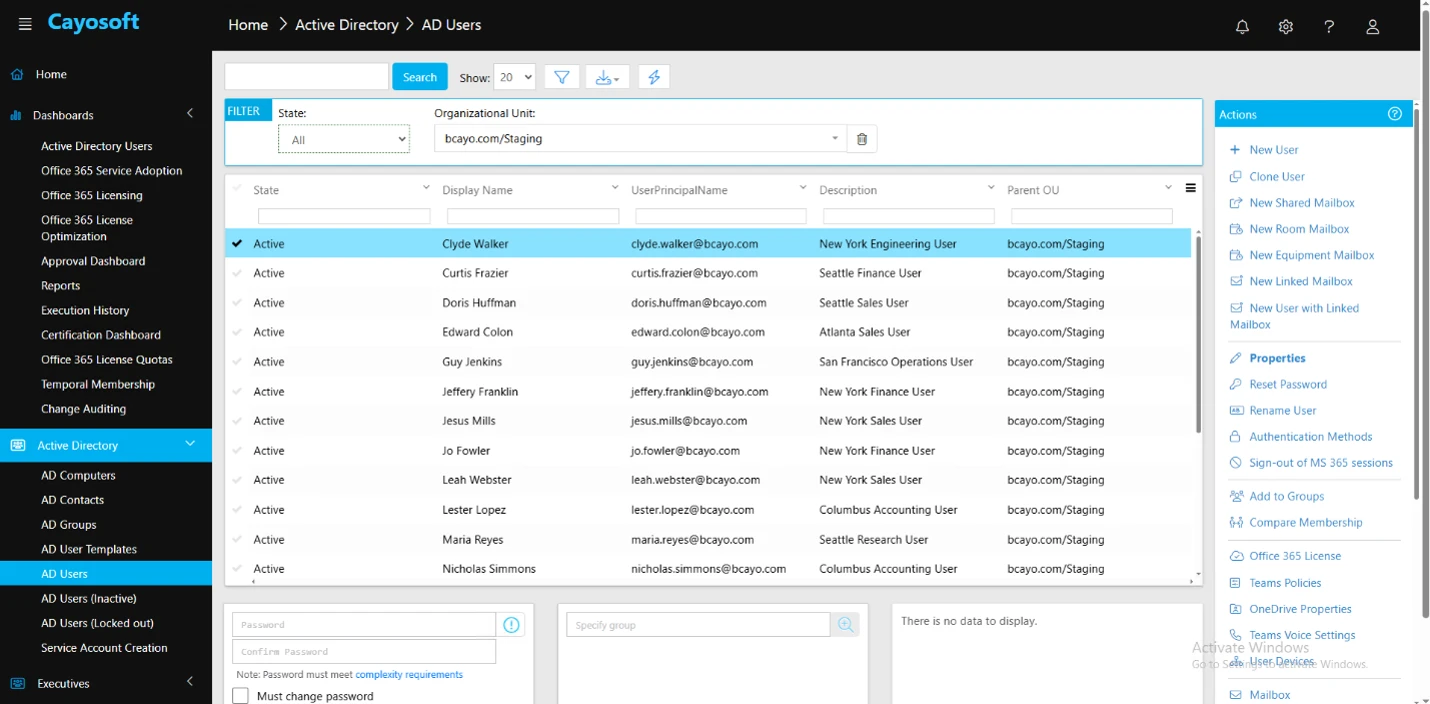
Cayosoft Administrator is a hybrid identity administration platform that manages Active Directory, Entra ID, Microsoft 365, Exchange, Teams, and Intune from one console. It covers identity lifecycle automation, delegated administration, group and license governance, and change auditing. Administration runs through policies and workflows instead of PowerShell scripts.
Choose Cayosoft Administrator for active directory management
Visit WebsiteWho is it for: IT teams that run hybrid Microsoft environments and want to reduce console switching and standing admin privileges. The platform suits organizations that need delegated self-service, least-privilege enforcement, and audit trails across on-premises AD and cloud identity, without writing scripts.
Distinct capabilities
- Single console for AD, Entra ID, Microsoft 365, Exchange, Teams, and Intune
- Joiner-mover-leaver automation driven by HR data and business rules
- Role- and attribute-based delegation with virtual OUs and no standing privilege
- Dynamic group membership, ownership, and certification for group governance
- Microsoft 365 license assignment, reclamation, and quota controls
- Change auditing that records the account, the change, the timestamp, and before-and-after values
Cayosoft Administrator centralizes hybrid identity tasks and removes script dependency, but it is built for the Microsoft identity stack.
Licensing
Subscription-based, licensed per user or per managed object. Cayosoft states one license covers all administrators, with no added cost for CPUs, nodes, or servers. Pricing is quote-based. The free trial runs 25 days.
Netwrix Directory Manager
Netwrix Directory Manager is an identity and group management tool that automates user provisioning, group updates, and account changes across Active Directory, Microsoft Entra ID, and other directories.
It’s enterprise-focused, not solely a scripting tool. It integrates with AD to support approval workflows, dynamic group logic, and delegated administration through a centralized web portal.
Who is it for: IT teams looking to reduce AD-related helpdesk load by automating identity tasks and delegating safe self-service capabilities to end users and managers. Useful in hybrid environments across AD, Microsoft Entra ID (formerly Azure AD), and LDAP.
Distinct capabilities
- HRIS-driven provisioning/deprovisioning without third-party connectors
- Dynamic groups with attribute-based queries, where parent attribute changes auto-propagate to child groups4
Netwrix Directory Manager automates user and group management with approval workflows, but patching and upgrades are complex.
Licensing
Subscription-based, licensed per enabled AD user. Free trial available. Pricing is quote-based and varies by user volume and organization type.
Free vs paid edition:
Microsoft AD Explorer
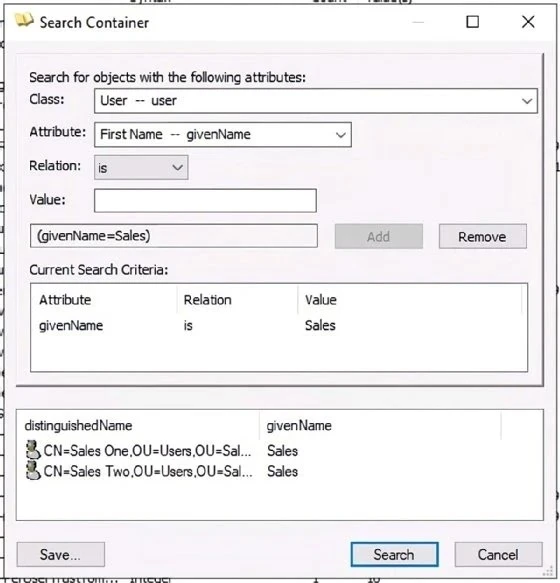
AD Explorer is a read-only utility for inspecting Active Directory objects. It supports attribute search, schema browsing, and snapshot comparisons for change tracking. The tool runs without installation and offers fast access to directory data.
It does not support write operations, provisioning, or workflow management. Usage is limited to inspection and auditing. No role-based delegation or task automation is available.
Who is it for: System administrators and auditors needing quick access to view and compare Active Directory object data. Best for read-only inspection, auditing, and troubleshooting, but not management.
Distinct capabilities
- Snapshot comparison of AD states, like user accounts, group memberships, or permission,
- Shows attribute-level changes
- No installation needed, the tool can run directly from a file (like .exe)
Licensing
Free tool from Microsoft Sysinternals suite.
Hyena
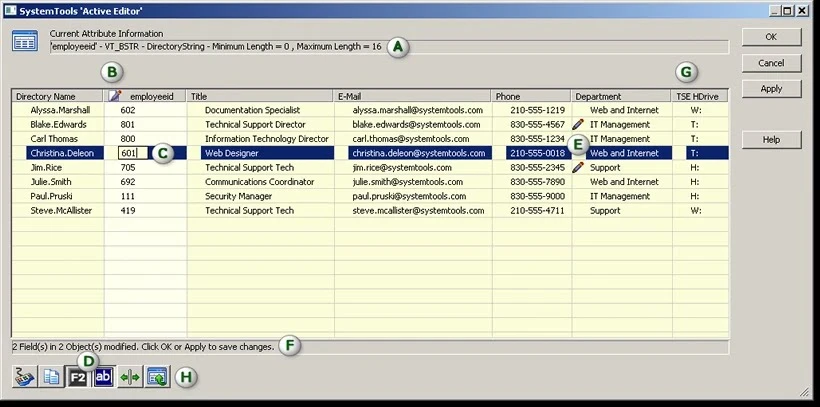
Hyena provides a central interface for managing AD users, groups, shares, and sessions. It enables bulk operations, event log access, and WMI queries from a single dashboard.
The interface is function-rich but uses an older design. It lacks RBAC, workflow delegation, and modern reporting tools. Setup and execution of tasks are manual and depend on the operator’s AD knowledge.
Who is it for: IT administrators who manage Windows servers, AD, and file systems from a unified console. Useful in small to mid-size environments for operational efficiency.
Distinct capabilities
- Active Editor: Excel-like grid for mass-editing AD attributes
- Active Task: script-free CSV-based bulk import/update for AD attributes5
Licensing
Commercial: per-seat pricing. Free trial available.
Softerra LDAP Administrator
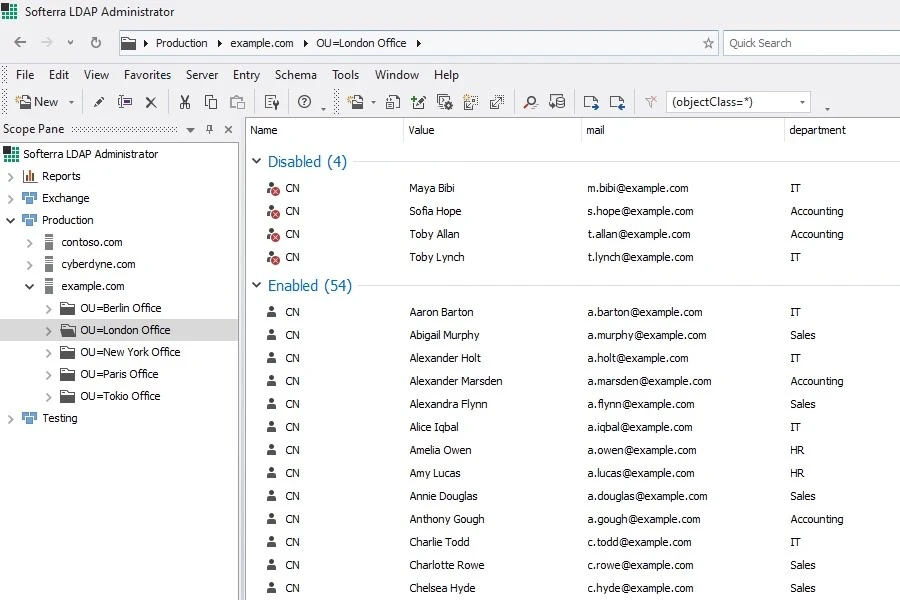
Softerra LDAP Administrator supports direct editing, schema navigation, and bulk changes across multiple LDAP directories, including AD. It provides attribute-level access, server session handling, and schema validation through a GUI.
It does not include role delegation, policy automation, or access workflows. The focus is on manual object management, with no built-in compliance or review controls.
Who is it for: Directory administrators working across LDAP environments, including Active Directory, OpenLDAP, and Novell eDirectory. Best for those managing schemas and entries directly.
Distinct capabilities
- Browse and manage the LDAP schema and entries
- Perform bulk edits and imports
- Supports multi-server views
- Visual schema browsing and comparison
Softerra LDAP Administrator provides detailed LDAP and AD object control, but offers no automation, delegation, or compliance support.
Licensing
Commercial; per-user license. Free trial available.
Dameware Remote Support
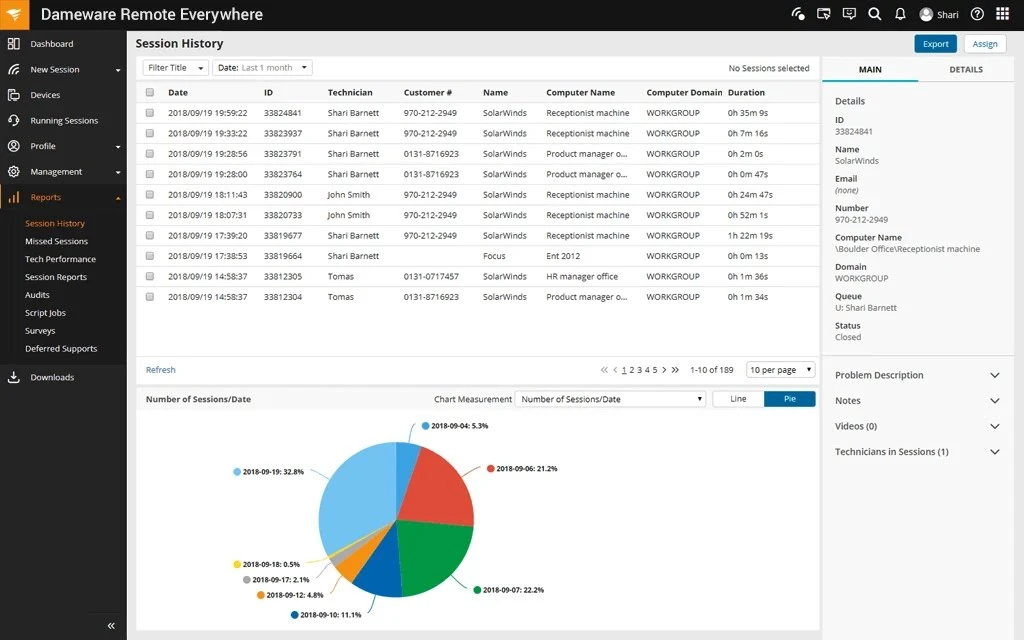
Dameware Remote Support is an on-premises AD management product.
Who is it for: IT helpdesk and support teams needing secure remote desktop access, live troubleshooting, and end-user support across platforms.
Distinct capabilities
- Multi-domain AD object management: create/delete/update Users, Groups, OUs, Containers from one console without logging into a DC
- Bulk AD object export
Dameware Remote Support includes remote Active Directory management features (users, groups, OUs, passwords).
Licensing
Subscription-based. Free trial available via SolarWinds.
Netwrix Auditor for Active Directory
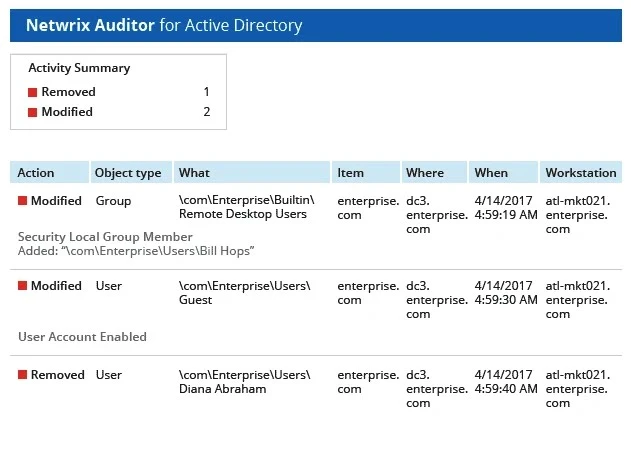
Netwrix Auditor for Active Directory is an auditing solution designed to provide visibility into AD changes, logon activity, and policy configurations across cloud, on-premises, and hybrid environments.
It supports organizations with compliance requirements (e.g., HIPAA, GDPR, PCI DSS, SOX, ISO/IEC 27001) by providing detailed audit trails, access monitoring, and prebuilt reports aligned with regulatory requirements.
Who is it for: Mid-to-large organizations that require deep visibility across multiple IT systems for compliance.
Distinct capabilities
- Prebuilt compliance reports aligned with standards such as HIPAA, GDPR, PCI DSS, SOX, and more
- Tracks changes to Active Directory and Group Policy with details on who made changes, what was changed, and when
- Monitors logon activity, including successful and failed attempts, for access visibility and investigation
- Offers configuration and permissions reporting for audit support
- Supports integration with ITSM platforms (e.g., ServiceNow) for automated ticket creation
Netwrix Auditor for Active Directory tracks changes and supports compliance reporting, but alerting is manual and licensing is costly.
Licensing
Netwrix Auditor tracks all user logons, object changes and sends daily email reports.
Key differences from the paid edition:
- No real-time alerts, but daily email summaries
- No interactive dashboards
- No integrations with SIEMs or ticketing systems
Paid edition includes full audit trail, alerting, custom reports, and prebuilt compliance reports.
LepideAuditor for AD
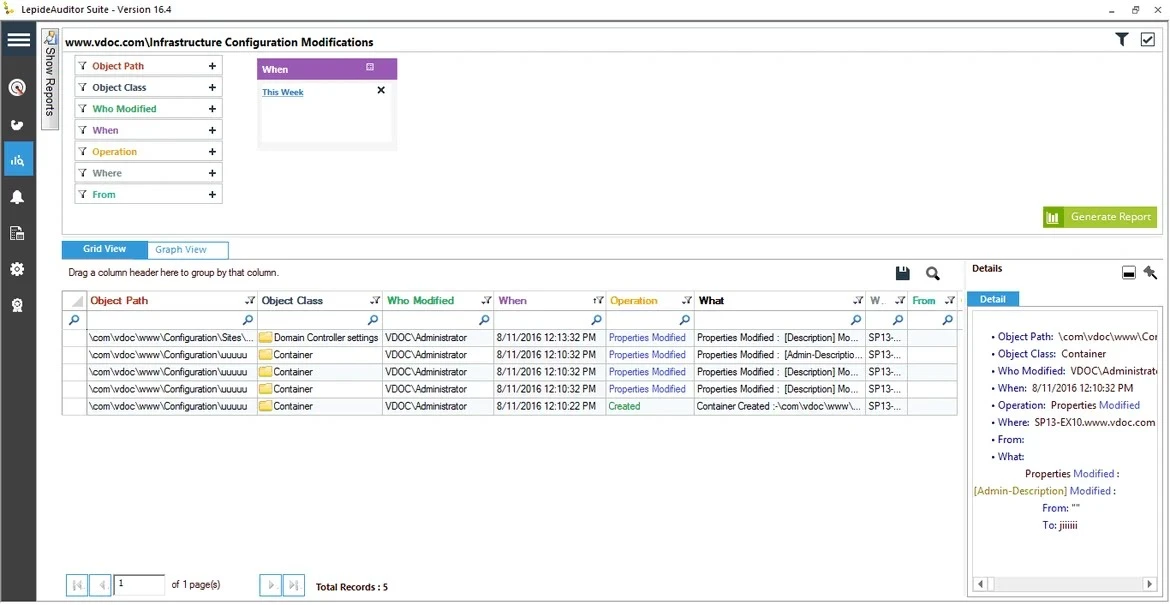
Lepide Active Directory Auditor is a centralized auditing and monitoring tool designed to track and report on configuration changes across multiple systems, including Active Directory, Group Policy, Exchange, SQL Server, and SharePoint. It offers real-time visibility into security and compliance-related events and supports automated alerting based on predefined thresholds.
Who is it for: IT administrators and security teams focused on real-time monitoring, auditing, and compliance enforcement within Active Directory environments.
Distinct capabilities
- Generates detailed reports on user and group activity
- Audits both successful and failed logons
- Audits changes to Group Policy, including who made changes and when
- Includes over 300 predefined reports for compliance tracking and monitoring
LepideAuditor for AD monitors and audits AD in real-time for compliance, but cannot manage users or passwords.
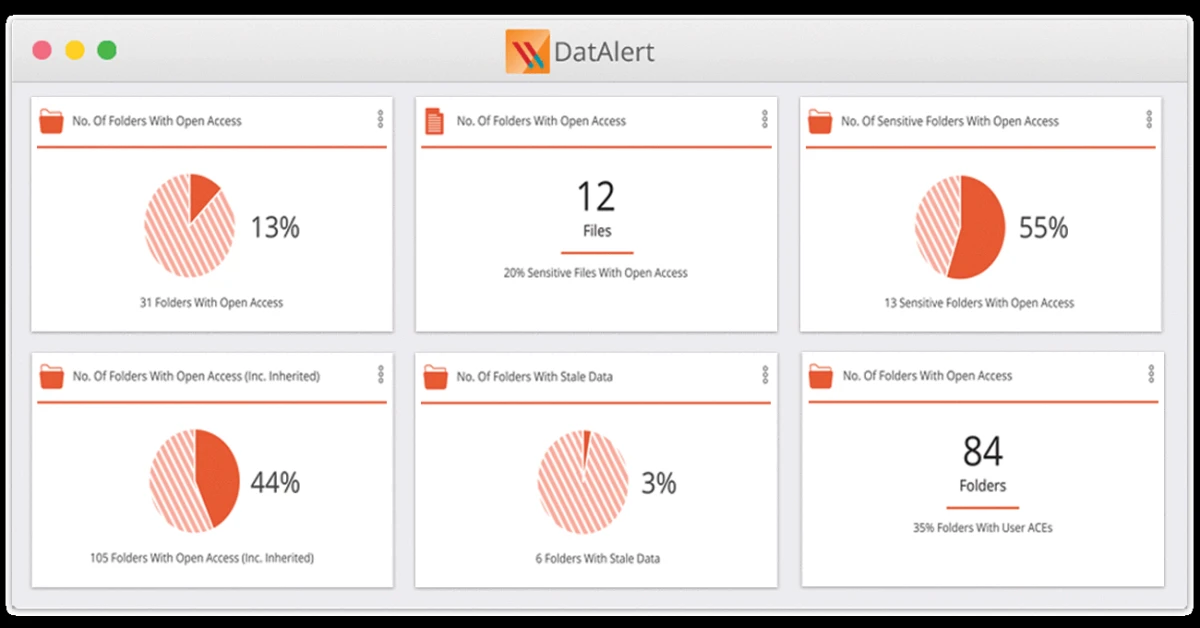
Varonis DatAdvantage for AD
Varonis provides a graphical interface with built-in analytics and investigation tools. Admins can track user behavior, flag anomalies, and simulate changes before committing them. Setup may require time due to agent-based deployment and environment scanning.
Who is it for: Organizations that need continuous monitoring of Active Directory access, privilege abuse, and data risk, especially in highly regulated or hybrid environments.
Distinct capabilities
- User behavior analytics for AD and file systems
- Automated privilege risk scoring
- What-if simulation before making access changes
- Audit trails for forensics and compliance
Varonis DatAdvantage for AD provides behavior-based monitoring and privilege risk insights, but does not provision users or manage accounts.
Licensing
Tiered pricing based on users or data volume. Free trial available on request.
 Add as preferred source
Paessler PRTG Active Directory Monitor
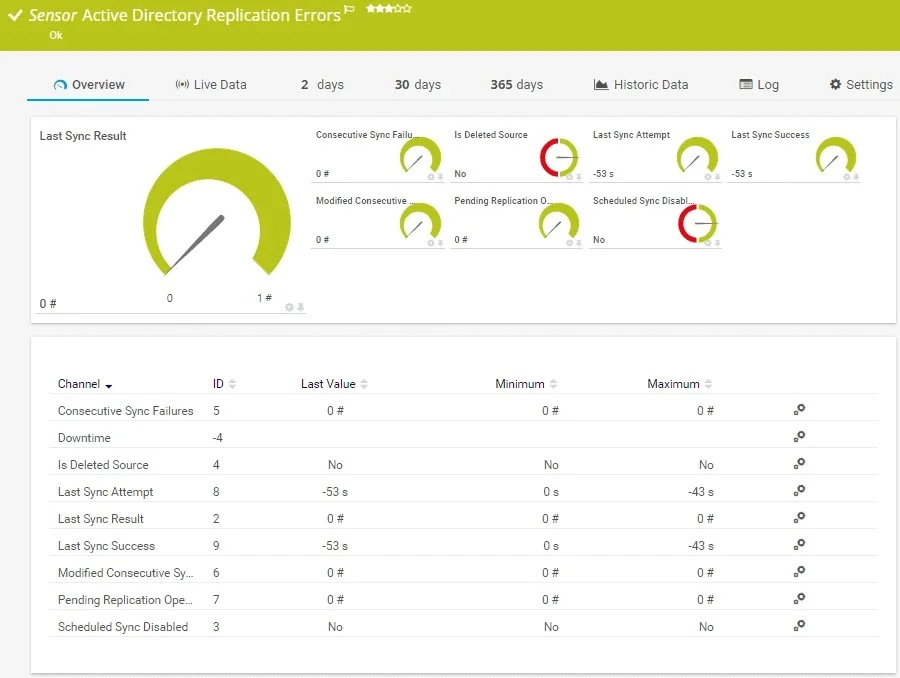
Paessler PRTG Active Directory Monitor is part of the broader PRTG Network Monitor platform developed by Paessler GmbH. It provides real-time monitoring of Active Directory environments as part of a sensor-based framework for tracking IT infrastructure. Supports both on-premises and cloud-based deployments.
Who is it for: IT administrators and network engineers responsible for maintaining Active Directory health and overall infrastructure performance.
Distinct capabilities
- Customizable sensors to monitor specific AD metrics
- Replication error detection and domain controller synchronization issue tracking
- Identification of logged-out and deactivated users across Active Directory
- Group membership change tracking and monitoring of AD object status
- Alerting system based on user-defined thresholds and sensor triggers
- Extended monitoring support for additional systems, including networks, applications, and databases
Paessler PRTG Active Directory Monitor observes AD health and replication, but does not handle access control or lifecycle management.
Licensing
PRTG is licensed based on the number of sensors.
For example, PRTG 500 (50 sensors, 1 server installation) starts at $179.
ENow Software’s COMPASS
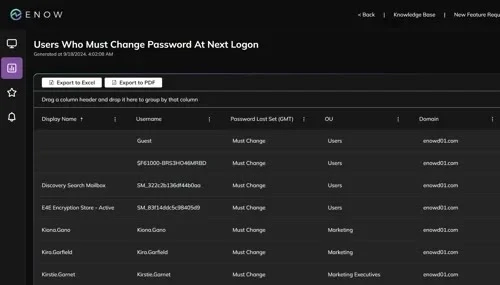
COMPASS offers a Web dashboard with color-coded visualizations, performance KPIs, and alert-based insights. Easy to deploy for operational teams, but doesn’t extend to access control or policy enforcement.
Who is it for: Enterprises requiring real-time health monitoring for Active Directory, DNS, replication, and related services.
Distinct capabilities
- Real-time AD health monitoring
- DNS, replication, and service validation
- Synthetic transaction testing
- Custom thresholds and alerting
ENow Software’s COMPASS tracks AD service health and replication, but cannot manage users or enforce policies.
Licensing
Annual subscription model. Pricing is based on AD infrastructure size.
ManageEngine ADAudit Plus
ManageEngine ADAudit Plus offers a web-based interface with prebuilt reports, alert rules, and live dashboards. Designed for quick deployment and a low learning curve. Customization and long-term log retention may require additional tuning.
Who is it for: Organizations needing real-time tracking of AD changes, logon events, and group modifications for security or compliance.
Distinct capabilities
- Tracks user logon/logoff, GPO changes, group modifications
- File server and DNS audit support
- Alerting and incident response integrations
- Built-in compliance reports for SOX, HIPAA, GDPR
ManageEngine ADAudit Plus gives real-time AD change visibility and reporting, but cannot manage accounts or delegate tasks.
Licensing
Based on # of domain controllers. Free and paid editions available.
SolarWinds Permission Analyzer
SolarWinds Permission Analyzer is a lightweight, free tool designed to visualize and analyze effective permissions in Active Directory.
Who is it for: Best for system admins who need quick insights into user and group permissions within Active Directory. Useful for troubleshooting access rights without the complexity of full-fledged IAM suites.
Distinct capabilities
Visualizes effective permissions, including inherited rights, without requiring deep navigation through AD, making it easier to identify misconfigurations and excessive access. Provides a tree view of group memberships and nested permissions.
SolarWinds Permission Analyzer clearly displays AD permissions, but cannot modify accounts or manage access.
Licensing
Available as a free tool from SolarWinds; no paid tier or version.
BeyondTrust AD Bridge
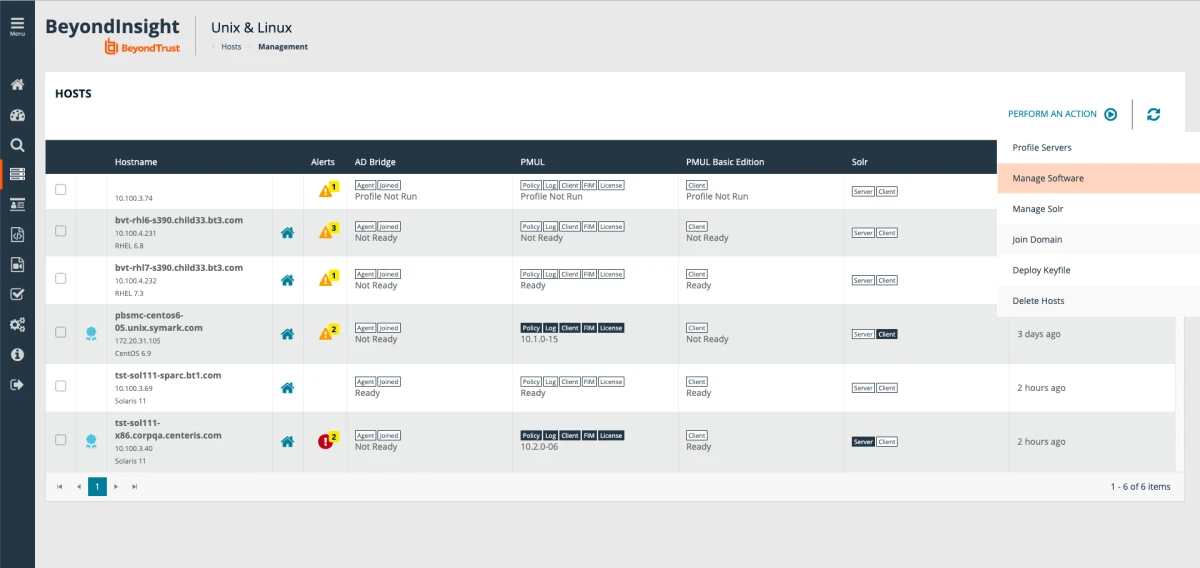
BeyondTrust AD Bridge extends AD authentication, GPO-based configuration, and SSO to Unix, Linux, and macOS systems, making non-Windows hosts “full citizens” of the AD domain.
Who is it for: Organizations seeking to enforce least-privilege access on endpoints without compromising productivity, especially across Windows/macOS.
Distinct capabilities
- Group Policy enforcement on Linux/Unix/Mac
- Centralized sudoers policy distribution via Sudo Manager
- Integration with AD, Entra ID, and ITSM tools
Licensing
Subscription-based. Tiered by number of endpoints/users.
Specops Password Policy
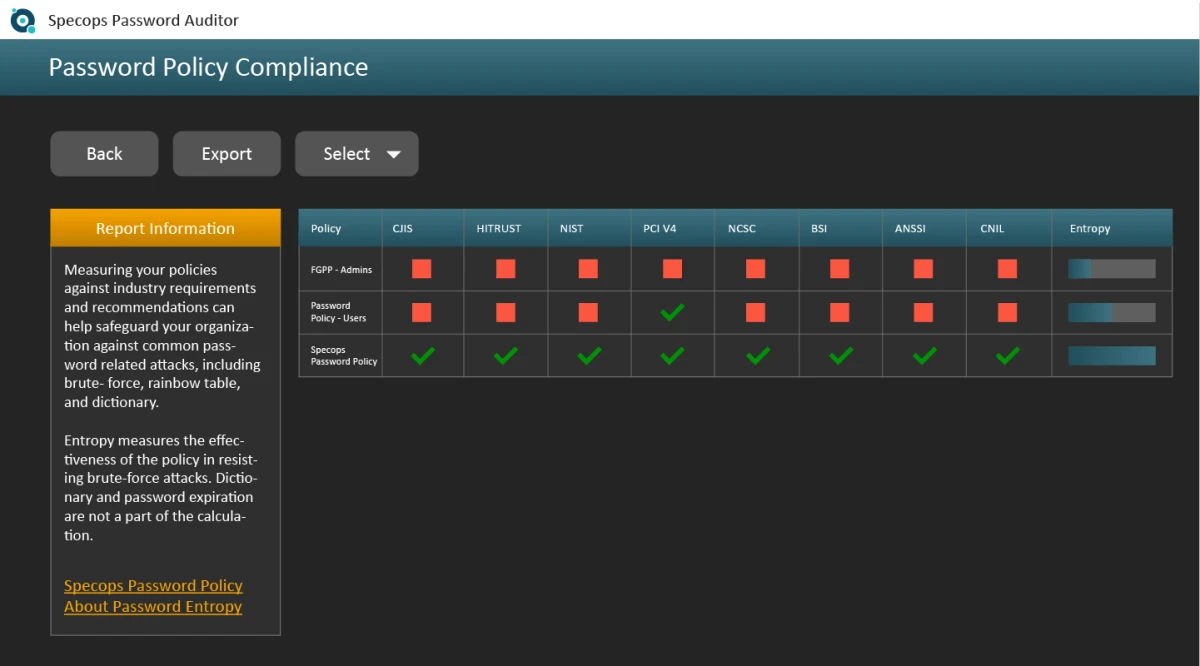
Specops Password Policy integrates into Group Policy Management Console (GPMC) with graphical rule configuration. Straightforward to deploy and manage. Includes real-time feedback at password change screens.
Who is it for: IT teams wanting to enforce stronger password complexity, length, and block lists beyond native AD Group Policy.
Distinct capabilities
- Custom password complexity rules
- Banned password dictionary and breached password check
- Real-time user feedback at reset/change
- Reporting for compliance audits
Specops Password Policy strengthens AD password rules, but cannot manage users or audit changes.
Licensing
Licensed per enabled user in AD. Free trial available.
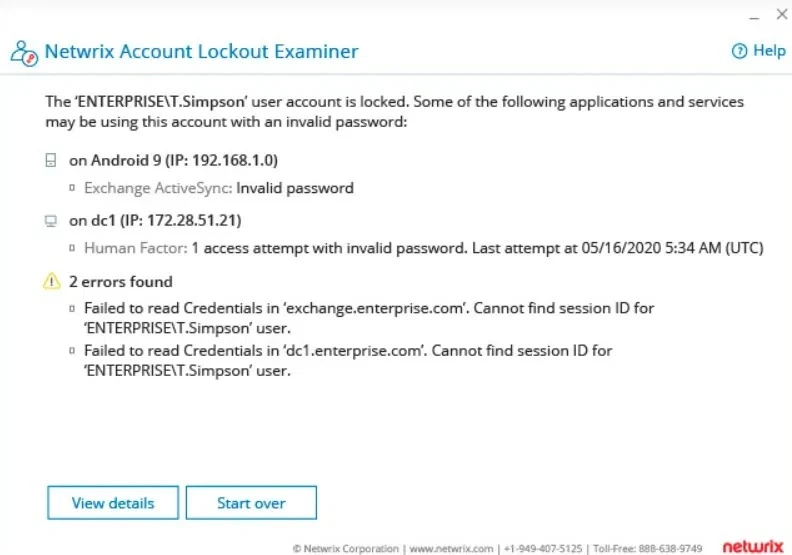
Netwrix Account Lockout Examiner
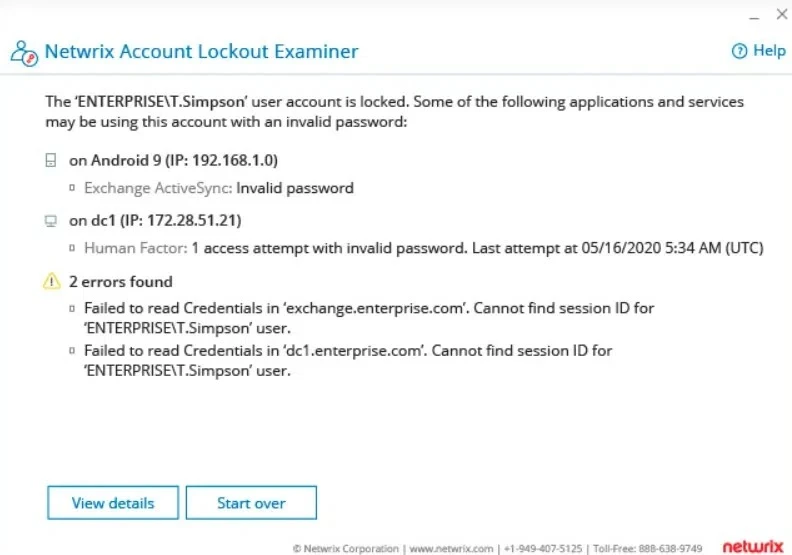
Netwrix Account Lockout Examiner is a free troubleshooting tool designed to help IT teams quickly identify the cause of Active Directory account lockouts. It provides targeted diagnostics to trace lockout events, including those caused by cached credentials, scheduled tasks, mapped drives, or mobile device sync errors. The tool is particularly helpful in diagnosing issues with service accounts, where lockouts can cause operational disruption.
Who is it for: Help desk teams and admins responsible for identifying and resolving Active Directory account lockouts.
Distinct capabilities
- Real-time root cause identification of AD account lockouts
- Credential and service issue tracing, including stale credentials, outdated passwords, and misconfigurations
- Quick diagnosis with minimal setup by accepting a username as input
- Lockout source visibility across multiple systems and services
Netwrix Account Lockout Examiner quickly diagnoses account lockouts, but does not manage AD objects or workflows.
Quest Recovery Manager for AD
Quest Recovery Manager for AD offers a GUI-based interface for backup configuration, object-level restore, and comparison with live AD.
Who is it for: Teams that need fast, granular recovery of AD objects, attributes, or even entire domain controllers after accidental or malicious changes.
Distinct capabilities
- Granular object/attribute restore
- Comparison reports for live vs. backup
- Restore from unbootable domain controllers
- Integration with Group Policy and DNS recovery
Quest Recovery Manager for AD restores deleted AD objects, but does not handle provisioning or access management.
Licensing
Commercial license based on domain/forest size. Trial available.
AD authentication for Linux systems
Linux systems can authenticate to Active Directory (AD) using tools like Samba and SSSD, which enable Kerberos-based authentication and LDAP directory protocols.
While this setup works well for centralized login and identity resolution, it does not fully replicate all AD capabilities (e.g., Group Policy enforcement) on Linux. There are important limitations:
- Linux does not support most Group Policy Objects (GPOs).
- Linux configuration is best managed with tools like Ansible, Chef, or Puppet, which are designed for Unix-based systems.
- Nested group membership resolution may be incomplete or inconsistent.
On the other hand, Windows supports AD natively, and LDAP-based integration with Windows is limited and unreliable.
Thus, Active Directory remains the most comprehensive and integrated identity and configuration management system for Windows environments.
For mixed OS setups, authenticating Linux systems to AD gives you the best of both worlds: centralized control over Windows and flexibility for Linux.
FAQs
Technically, you don’t. But if you’re managing more than a handful of systems, it becomes a highly effective and indispensable tool for centralized administration and access control.
Active Directory (AD) is Microsoft’s directory service, an implementation of Lightweight Directory Access Protocol (LDAP), an open protocol used to access and manage directory information.
It organizes your environment using objects (users, computers, printers, shares) and stores them in Organizational Units (OUs)—much like folders in a file system.
Local accounts vs. centralized authentication
Organizations typically manage user access through either local accounts or centralized authentication.
Local accounts can suffice in small environments with a few machines. Scripting can partially automate local account management, but it introduces several limitations:
Offline systems may miss updates.
Immediate deprovisioning, such as when an employee is terminated, is difficult to guarantee across all endpoints.
Moreover, as infrastructure scales to support hundreds, or even tens of thousands of systems, managing user creation, updates, and deactivation at the individual device level becomes operationally inefficient.
By contrast, centralized authentication, such as that provided by Active Directory (AD) offers a more scalable solution:
A single user account provides consistent access across all systems.
Disabling that account immediately revokes access organization-wide.
So, we recommend a centralized identity management solution such as Active Directory or an LDAP-based directory service to minimize the risk of access misconfigurations, particularly for teams managing complex organizational units (OUs), GPOs, and tiered access models.
Cite this research
Pick the format that matches where you're publishing. Pasting the link version into your CMS preserves the backlink.
@misc{dilmegani2026,
  author = {Dilmegani, Cem and Arslan, Ezgi},
  title  = {{Top 20+ Active Directory Management Tools}},
  year   = {2026},
  month  = oct,
  howpublished    = {\url{https://aimultiple.com/active-directory-management-tools}},
  note   = {AIMultiple. Retrieved October 2, 2026}
}Results and timestamps of 68 data points. Download the summary data shown in this article's charts and tables as a ZIP file containing 4 CSV files.
Want the granular data behind it? Join Premium
Changelog
7 updatesAdded a 25-day free trial to Cayosoft Administrator's licensing details.
Added Cayosoft Administrator to the Active Directory management tools list.
Replaced Acronis Cyber Protect with Acronis BackupAgent Server in the tool listing.
Replaced Acronis Cyber Protect, Dameware Remote Everywhere and BeyondTrust Privileged Management with AD-focused product entries.
Removed Acronis Cyber Protect from the Active Directory management tools list.
Added One Identity Active Roles to the list of Active Directory management tools.
Replaced the "Focus" and "Who is it for" sections with a summary for Netwrix Directory Manager.
Reference Links
Cem's work at AIMultiple has been cited by leading global publications including Business Insider, Forbes, Morning Brew, and Washington Post, global firms like Deloitte and HPE, NGOs like World Economic Forum, and supranational organizations like European Commission. [1], [2], [3], [4], [5]
Throughout his career, Cem served as a tech consultant, tech buyer and tech entrepreneur. He advised enterprises on their technology decisions at McKinsey & Company and Altman Solon for more than a decade. He also published a McKinsey report on digitalization.
He led technology strategy and procurement of a telco while reporting to the CEO. He has also led commercial growth of deep tech company Hypatos that reached a 7 digit annual recurring revenue and a 9 digit valuation from 0 within 2 years. Cem's work in Hypatos was covered by leading technology publications like TechCrunch and Business Insider.
Cem regularly speaks at international technology conferences. He graduated from Bogazici University as a computer engineer and holds an MBA from Columbia Business School.







Be the first to comment
Your email address will not be published. All fields are required. Comments are left in their original language.