


Analysis of Top 3 Open Source Firewall Management Tools

Substantial costs of data breaches, which average over $4 million globally. To safeguard their sensitive data and firewall security, businesses rely on firewall security management services.
If you are
- working at an enterprise, explore closed-source firewall management software for more comprehensive solutions.
- working at an SME or the company is starting its network security journey without a budget, see open source firewall management tools, their key features and benefits:
Top 3 open source firewall management software
Tool | User Rating* | IPS Platform | Platform Compatibility** |
|---|---|---|---|
pfSense | 4.6 baased on 344 reviews | Snort | N/A |
OPNsense | 4.8 based on 5 reviews | Suricata | N/A |
IPFire(Netfilter) | 5 based on 1 review | Suricata | Linux |
*Based on data from B2B review platforms
**Compatibility might be possible via some layer, such as virtualization.
You may explore details regarding
in the following sections.
Inclusion criteria: Each vendor listed in the table provides intrusion detection & prevention services in addition to other cybersecurity solutions.
An intrusion detection system (IDS) enables the detection of unauthorized network access, security breaches, and suspicious network activity. It is a vital component for detecting and alerting potential security threats.
An intrusion prevention system (IPS) goes beyond detection by actively preventing potential threats and malicious activities, enhancing overall network security.
Ranking is determined by the GitHub stars.
1. pfsense
pfSense is a popular choice for firewall management. pfSense is built on FreeBSD, although its web-based management interface can be accessed from any operating system via a browser. It comes in two editions. The open-source one is pfSense CE (Community Edition), currently version 2.8.1. pfSense Plus is Netgate’s commercial edition. Netgate states that pfSense is used in millions of deployments worldwide.
2. IPFire (Netfilter)
IPFire is a secure firewall management center. IPFire is a hardened Linux firewall. It uses the Netfilter packet filter and includes firewall policy management, rule cleanup, and security audits. You manage it through a web console.
IPFire ships frequent “Core Updates.” Core Update 202 (May 2026) moved to OpenVPN 2.7 with Data Channel Offloading, which shifts encryption work to the kernel for faster VPN speeds and lower CPU use. An earlier update, Core Update 200 (March 2026), added IPFire DBL, a built-in domain blocklist that filters malware and unwanted sites.1
3. OPNsense
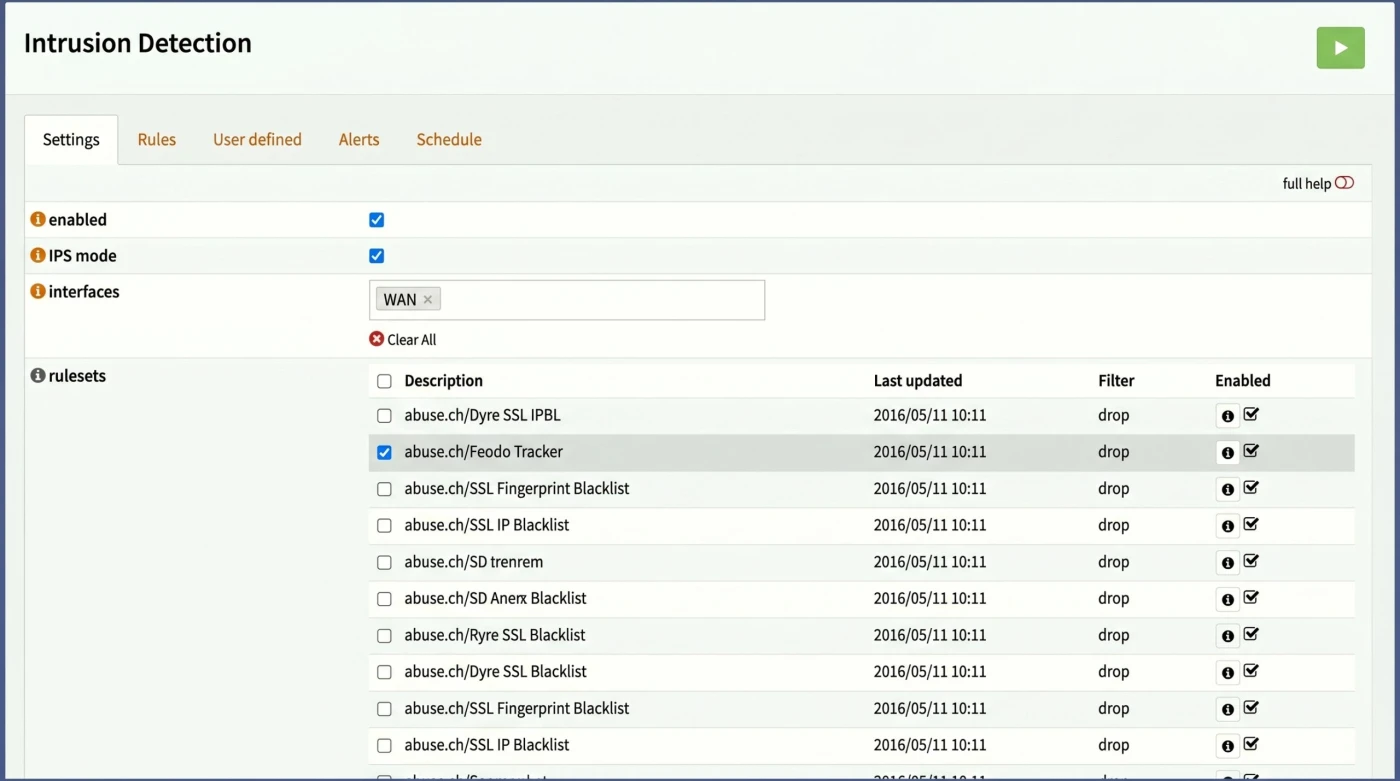
OPNsense, despite its limited GitHub presence, offers valuable firewall management features and compatibility with Suricata for IPS functionalities on MacOS.
Figure 1. Enabling IPS functionalities on OPNsense firewall management software
Source: OPNsense2
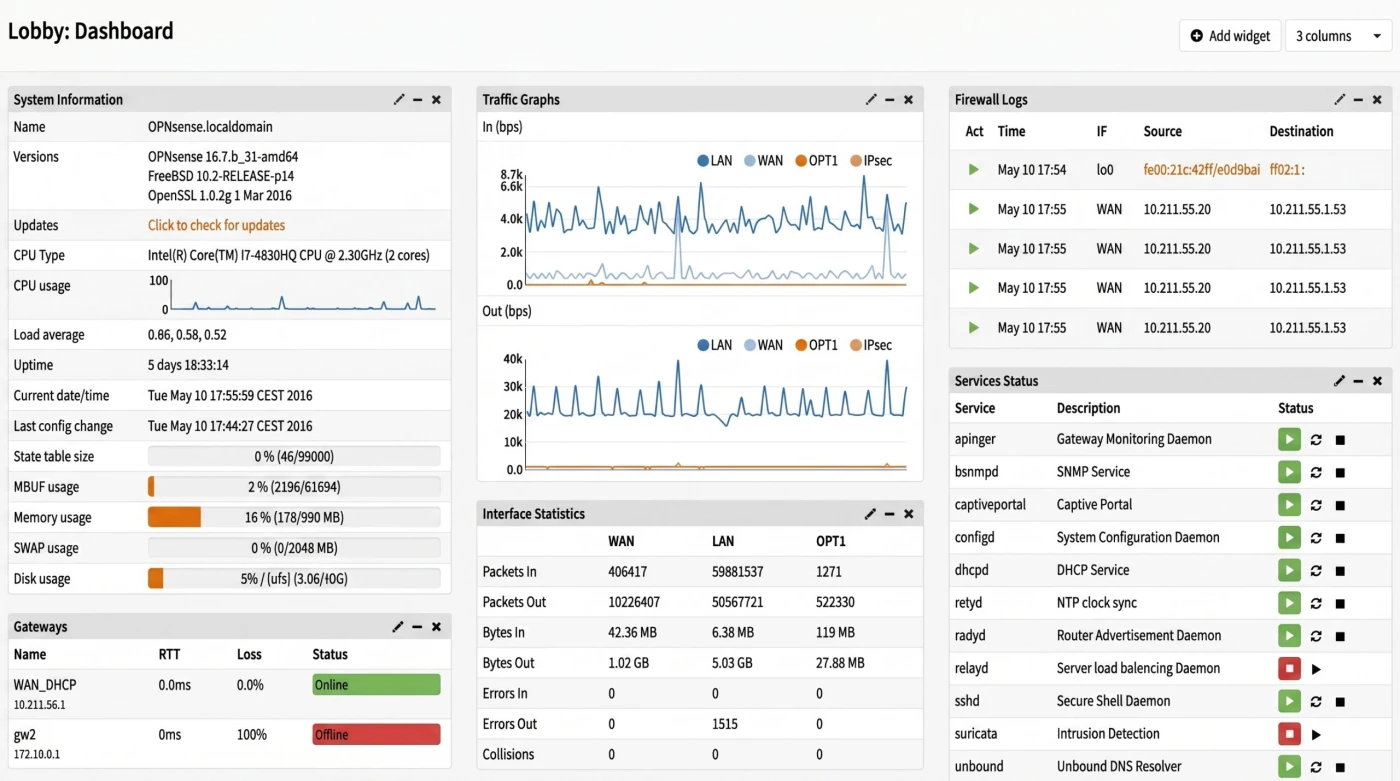
It simplifies firewall management tasks, allowing network administrators to implement effective firewall rule administration and optimize firewall configurations for enhanced security and network performance.
Figure 2. OPNsense firewall management software’s dashboard
Source: OPNsense2
OPNsense releases two major versions a year, with small updates about every two weeks. The current series, 26.1 “Witty Woodpecker,” reached 26.1.8 in May 2026. The previous series, 25.7 “Visionary Viper,” hit end of life on January 28, 2026, so anyone still on it should upgrade to keep getting security fixes. It includes Suricata 8 in inline mode (‘divert’), expanded MVC/API firewall rule management, and various IPv6 reliability improvements.3
OPNsense itself runs on a FreeBSD base and is managed via a browser-based GUI accessible from any OS. The OPNsense Business Edition (commercial tier) adds features such as a built-in Web Application Firewall and centralized management through OPNcentral.4
Exploring open source firewall management tools
At the core of open source firewall management software is the focus on network security. These tools empower network administrators and security teams to configure firewall rules, manage network traffic, and conduct regular security audits to detect and mitigate potential threats effectively. Open source firewall tools let teams manage security without expensive licenses. Paired with features like intrusion prevention systems (IPS), they not spot threats, they stop them before harm is done.
Key features for selecting the right firewall software
Intrusion prevention system (IPS) & platforms
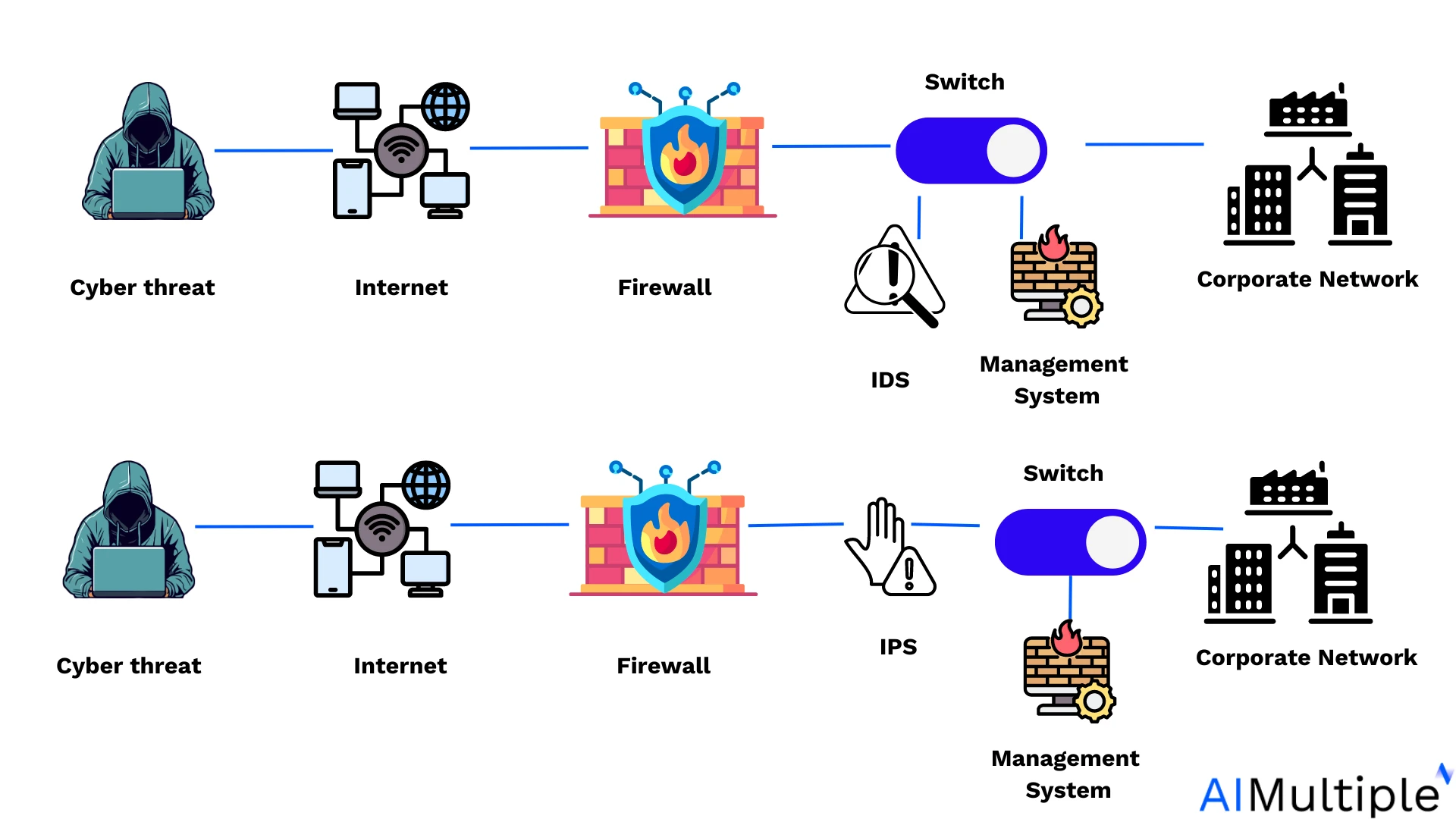
IPS blocks suspicious activities identified by the IDS.
Figure 3. The differences between IDS and IPS
Source: Wallarm5
IDS detects potential threats and alerts administrators, while IPS actively prevents cyber attacks by taking appropriate action upon detection.
The IPS platform is the foundation for effective threat prevention and mitigation, supporting robust security policies and real-time threat response.
Snort: Snort utilizes a signature-based rule set, where predefined signatures are used to identify known threats based on patterns and behaviors. It primarily focuses on real-time packet inspection and signature-based detection to identify and block malicious network traffic.
Suricata: Suricata features a multi-threaded rule engine with support for signature-based rules, protocol analysis, and emerging threat detection. It emphasizes high-speed security and traffic analysis, protocol analysis, and the detection of complex threats like zero-day exploits and evasion techniques.
Platform compatibility
Ensuring open source firewall management tools are natively compatible with the organization’s IT infrastructure, including Windows, MacOS, Linux, and network devices, is essential for seamless integration and effective firewall security management.
8 Benefits of open source firewall management solutions
1. Cost effectiveness and community support
Open source firewall security management software provides cost-effective solutions. Additionally, they often benefit from a collaborative community that continuously improves and updates the software, ensuring enhanced security and functionality.
2. Network security reinforcement
Open source firewall management software empower security administrators and security teams to strengthen network security by implementing effective firewall rules and security policies. These tools enable the management of traditional firewalls and next-generation firewalls, ensuring comprehensive protection against cyber threats.
3. Efficient firewall management
Proper firewall management is essential for regulating network traffic, optimizing firewall rulesets, and conducting regular security audits. Open source firewall tools let teams manage settings and security from one place. They make it easier to spot problems and apply changes quickly across the network.
4. Robust security firewall policies
With open source security management software, organizations can define and enforce robust security firewall policy tailored to their specific needs. These tools facilitate the creation of next-generation firewalls policies, incorporating features like deep packet inspection, intrusion prevention, and stateful firewalls to combat advanced threats effectively.
5. Comprehensive threat detection
Intrusion detection systems (IDS) and intrusion prevention systems (IPS) are vital components of open source firewall security management software, enabling the detection and prevention of unauthorized network access and malicious activities. These tools utilize deep packet inspection and threat management techniques to identify and block suspicious network traffic.
6. Centralized management and reporting
Open source firewall management solutions offer centralized management capabilities, allowing security administrators to monitor firewall changes, analyze firewall logs, and generate compliance reports. This centralized approach streamlines firewall management tasks and ensures network security policy management and regulatory requirements.
7. Optimized firewall configurations
Effective firewall management involves optimizing firewall performance and configurations to mitigate firewall security risks and prevent data breaches. Open source firewall management tools provide graphical user interfaces (GUIs) for configuring firewall rules, resolving conflicting configurations, and managing virtual appliances like proxy firewalls and web proxies.
8. Secure network connectivity
Open source firewall management tools automate firewall rule administration to help organizations secure network connectivity, authorize legitimate users, and block unauthorized access attempts. These tools facilitate the implementation of global rules, packet filtering, and destination IP address restrictions to safeguard network resources.
Further reading
- Open Source Firewall Audit Tools
- Comparison of Top 10 Firewall Audit Software
- Analysis of Top 5 Firewall Change Management Software
 Add as preferred source
FAQs
A management firewall focuses on protecting admin tools and control panels. It blocks unwanted access to places like remote settings and system dashboards, helping keep network operations safe and compliant. It helps secure these critical network management functions by controlling access and ensuring that authorized personnel can make changes or access sensitive network components.
A firewall manager is responsible for overseeing the configuration, compliance standards, deployment, monitoring, and maintenance of firewall systems within an organization’s network. Overall, a firewall manager plays a critical role in safeguarding network infrastructure, preventing cyber threats, and maintaining a secure network environment.
Cite this research
Pick the format that matches where you're publishing. Pasting the link version into your CMS preserves the backlink.
@misc{hafa2026,
  author = {Hafa, Adil and Arslan, Ezgi},
  title  = {{Analysis of Top 3 Open Source Firewall Management Tools}},
  year   = {2026},
  month  = jun,
  howpublished    = {\url{https://aimultiple.com/open-source-firewall-management}},
  note   = {AIMultiple. Retrieved June 4, 2026}
}Results and timestamps of 3 data points. Download the summary data shown in this article's charts and tables as a ZIP file containing one CSV file.
Want the granular data behind it? Join Premium
Changelog
3 updatesUpdated the pfSense, IPFire, and OPNsense entries with new edition, version, and release-cycle details.
Removed Ansible, Nmap, CrowdSec, OSSEC and Snort from the open source firewall management tools list.
Reference Links





Be the first to comment
Your email address will not be published. All fields are required. Comments are left in their original language.