


Top 17 IT Service Management Tools

We evaluated the top 17 IT service management tools based on user experience, performance, and feature set. Explore our findings to see how these leading solutions differ in areas including AI features, communication integrations, DevOps, monitoring & security connections, and deployment options.
Overview of the top 17 ITSM tools
Sorting in the above table: Our subscribers are listed at the top with their links. The rest of the table is sorted based on the number of reviews.
- *For vendors without pricing listed on their websites, the price is indicated as N/A. You may need to request a demo for pricing details.
- **Atomicwork and InvGate Service Management pricing information is listed as yearly on their websites. We calculated the monthly price for comparison.
AI capabilities
Note: Features marked with ✕ indicate that AIMultiple did not encounter these features.
AI-native platforms integrate machine learning, natural language processing, generative AI, predictive analytics, robotic process automation, and agentic AI.
Agentic AI in ITSM introduces autonomous, context-aware agents that extend beyond static automation to manage incidents, service requests, and IT operations through real-time reasoning.
CMDB, enterprise service management & compliance
For enterprise buyers, basic ticketing functionality is often not enough to differentiate ITSM platforms. Configuration visibility, automated discovery, support for non-IT service workflows, independently validated ITIL alignment, regulatory requirements, and data residency can have a greater impact on which platform suits an organization.
- CMDB/discovery: Tracks IT assets, configurations, relationships, and automatically discovered infrastructure.
- ESM capabilities (HR/facilities): Extend service management beyond IT to departments such as HR and facilities.
- ITIL certification/validation: Independent verification that the tool supports recognized ITIL practices.
- SOC 2: Independent audit of controls for security, availability, confidentiality, and related areas.
- HIPAA/BAA: Support for handling protected health information; BAA indicates contractual HIPAA coverage.
- EU data residency: Ability to store customer data in EU-based data centers.
- All tools support ISO 27001.
Messaging and email integrations
DevOps, monitoring & security connections
Deployment, Knowledge Base & SSO
Detailed evaluation of ITSM tools
SolarWinds Service Desk
SolarWinds Service Desk offers customizable reports and customer satisfaction scores for detailed operational insights. In addition, Service Desk provides integrations with SolarWinds observability solutions and ChatOps tools. SolarWinds combines suggestion-based and generative AI for service management.
- Suggestions for catalog items and KB articles
- Automatic routing and categorization of tickets
- Sentiment analysis of user messages
- Generative AI solutions, such as summary creation and runbook generation
- Chatbot supporting 40+ languages, real-time escalation, and self-service deflection
- Predictive assignment and similar incident detection
Figure 1: SolarWinds Service Desk incident summarization example.
NinjaOne
NinjaOne offers a unified remote monitoring and management (RMM) platform. NinjaOne’s Patch Intelligence AI focuses on managing patches and remediation workflows.
- Sentiment analysis on Windows KB updates
- Risk assessment of patches with predictive analytics
- Intelligent patch recommendations and auto-categorization by severity
- Generative summaries, proactive issue detection, and AI-assisted approvals
- Reliability scoring, real-time monitoring, automated remediation, and policy-based actions
Figure 2: NinjaOne ticketing platform overview.
Agentforce IT Service
Salesforce ITSM (via Agentforce) uses AI agents (digital co-pilots) to resolve issues, automate workflows, and predict outages.
- Service graph to map relationships between IT assets and systems for impact analysis
- AI-assisted SLA management, including risk prediction and proactive alerts
- Built on the broader Salesforce platform, enabling integration across business systems
Figure 3: Agentforce ITSM service request example.1
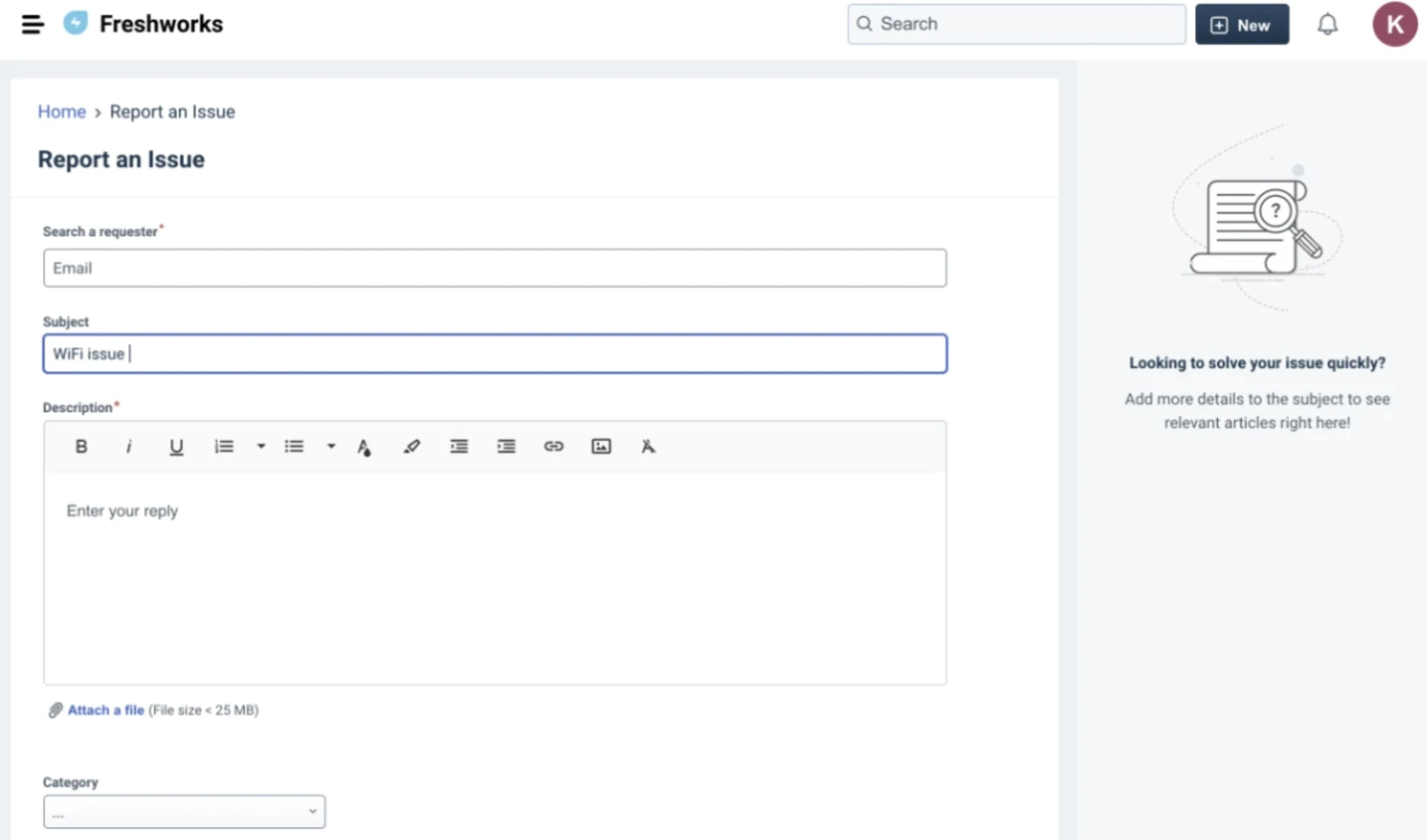
Freshservice
Freshservice is a cloud-based ITSM software. The Freddy AI platform supports a 24/7 virtual agent that handles over 40 languages.
With its latest version, tickets can be automatically linked to journey requests, making multi-step service flows easier to track. The platform also added email and mailbox synchronization logs and expanded audit logging to improve compliance and troubleshooting.
Figure 4: Freshservice self-service portal dashboard.
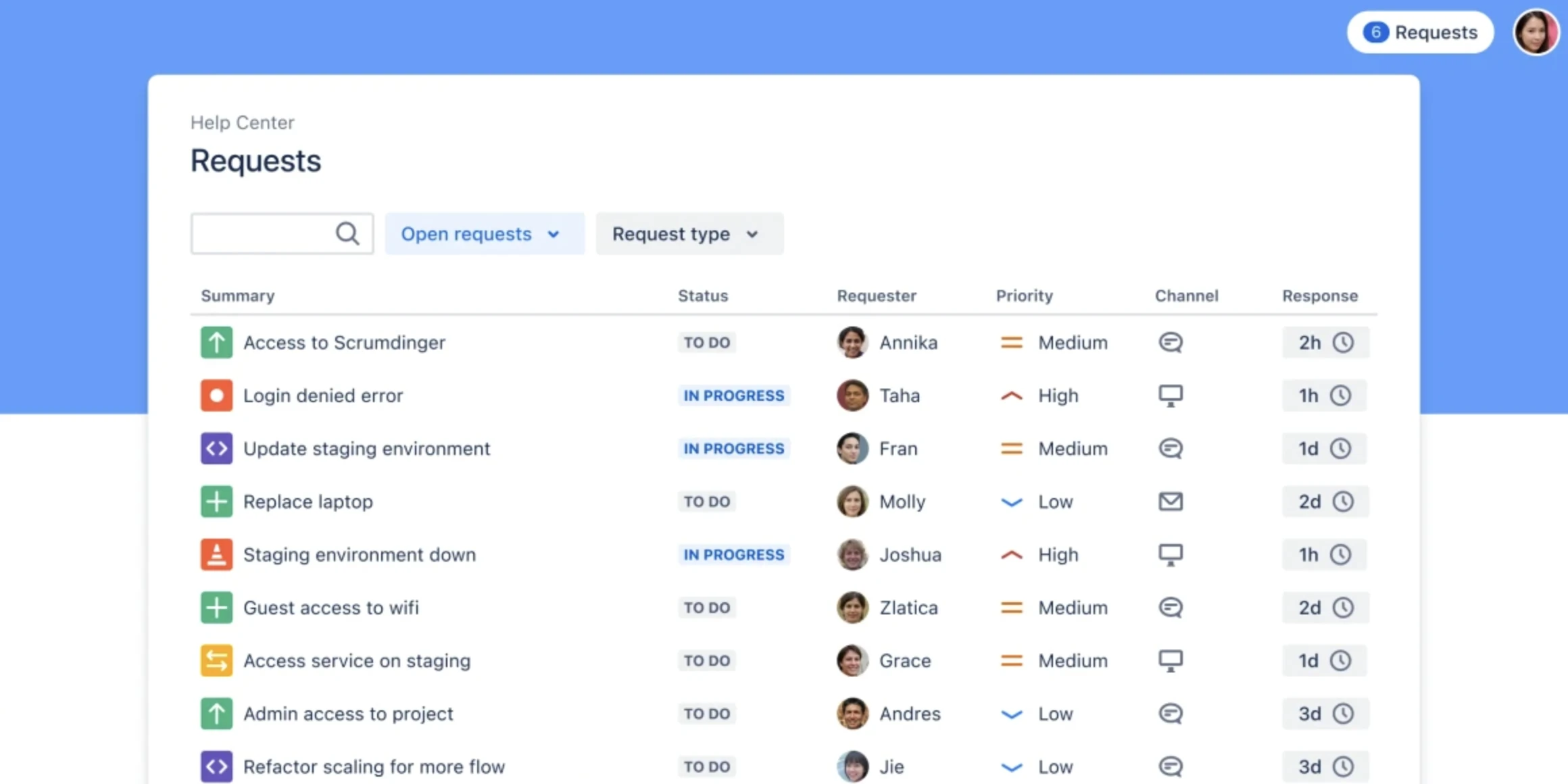
Jira Service Management
With Jira Service Management Connect, users can create custom add-ons with the REST API and integrate various software for incident resolution and change management. Atlassian Intelligence AI supports self-service and automated handling of requests.
- Global Background Scripts, currently in preview, allow developers to run shared logic across all Jira pages, enabling deeper cross-product integrations without visible UI components.
- Advanced Sandboxes that support copying selected JSM projects and CMDB assets into isolated environments, avoiding full production clones.
- Organization-wide default data classification levels to automate security and compliance policies.
- Conversational virtual agent with NLP and support for multiple languages; high ticket deflection
- Intelligent triage, prioritization, routing, and assignment
- Summarization of issues and draft responses with tone adjustment
- Article recommendations and alert grouping
- Root cause and post-incident review analysis; change risk assessment
- Natural-language search and specialized agents (Rovo Agents)
Figure 5: Jira Service Management solution help center dashboard.2
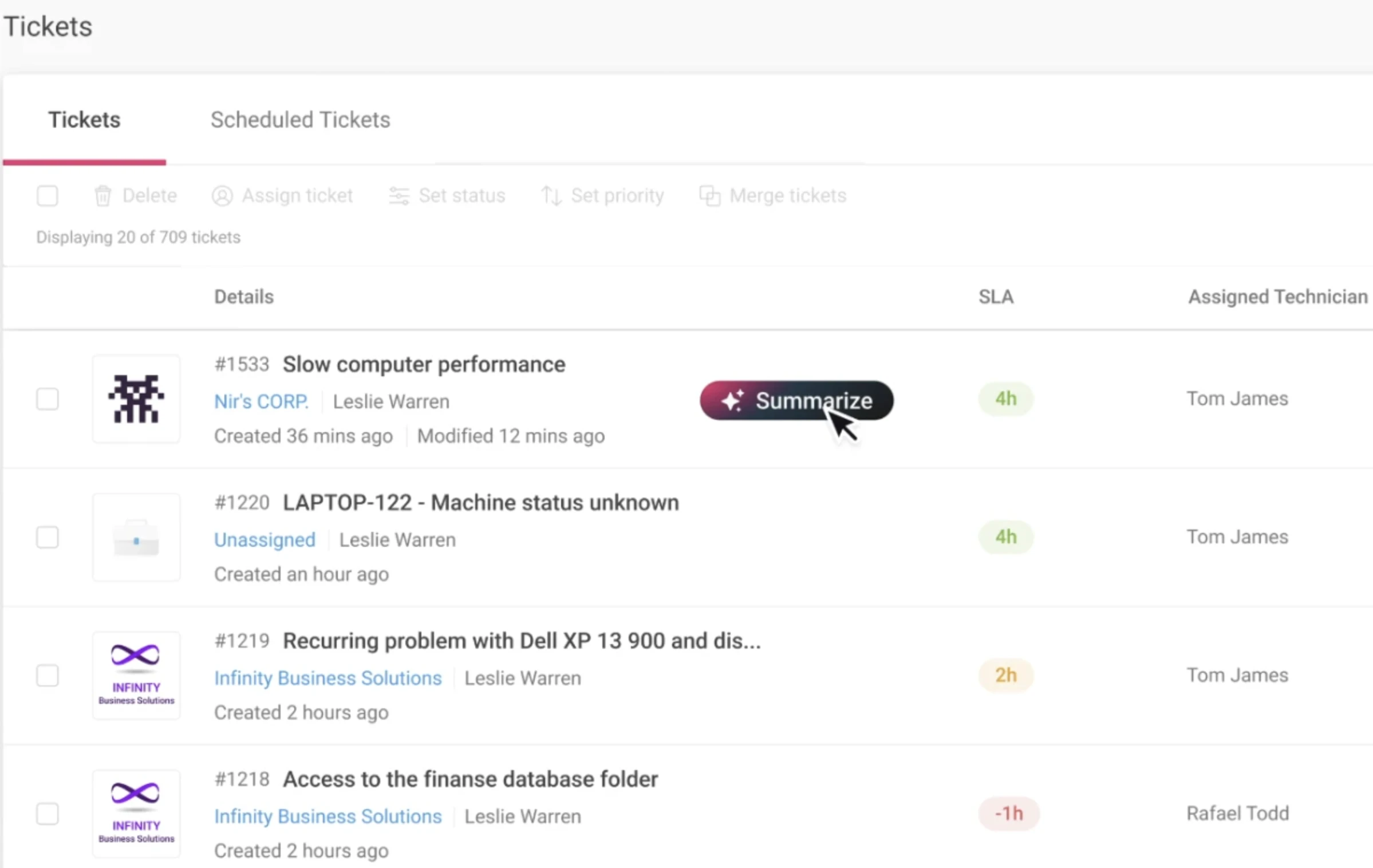
Atera
Atera is an all-in-one service management solution that provides remote monitoring, reporting, and help desk functionality.
Atera uses two AI modules: Copilot and Autopilot. Key features of AI Copilot include:
- Ticket summarization, sentiment detection, and AI-generated responses
- Auto-categorization, device diagnostics, and script generation from plain text
- KB article generation, trend reporting, and remote session summarization
Key features of IT Autopilot include:
- 24/7 handling of routine tasks such as password resets and reboots
- Predictive issue detection and intelligent escalation
- Multi-channel support, experiential learning, and ~25-35 % reduction in routine ticket volume
Figure 6: Atera ticket summarizer feature.
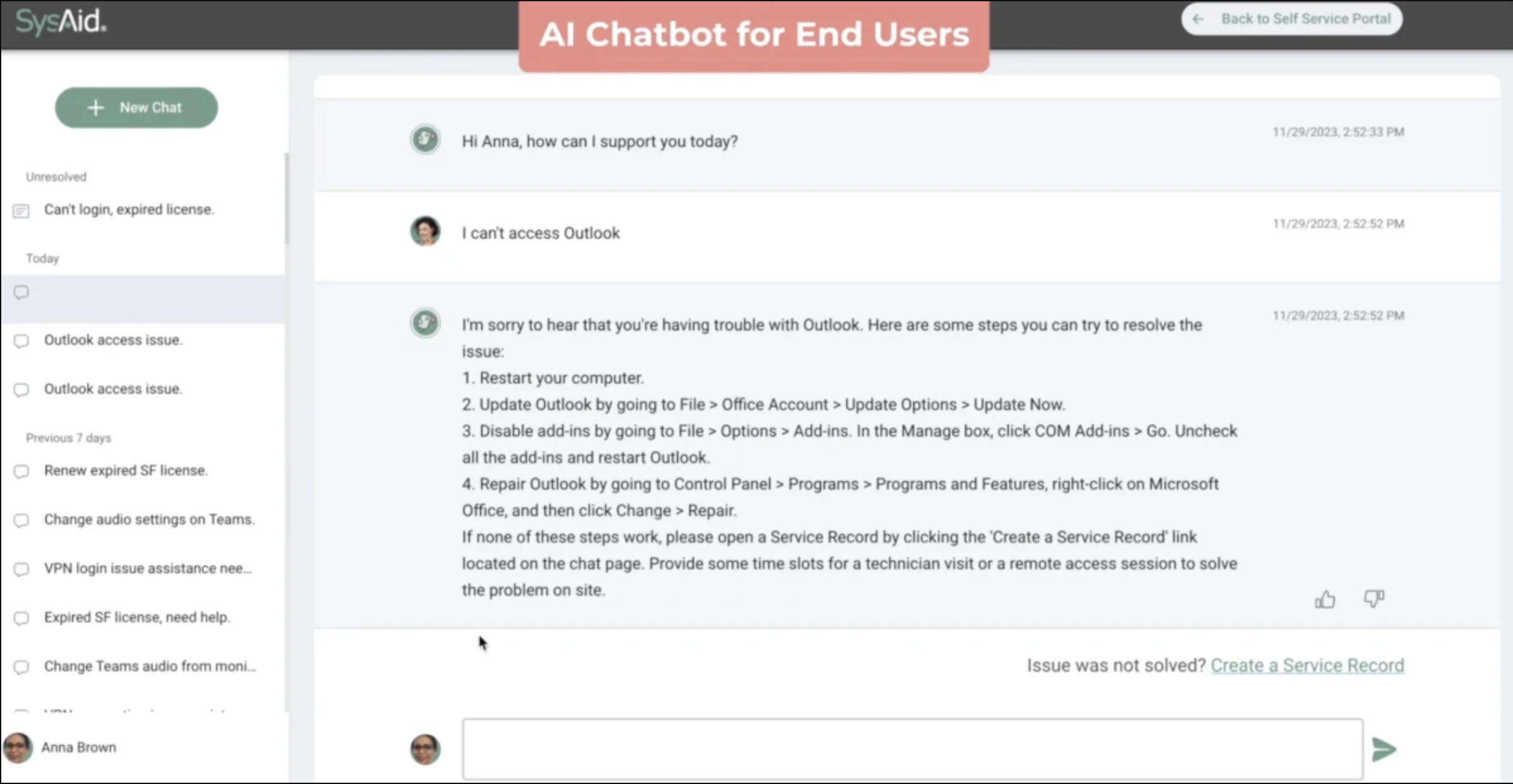
SysAid
SysAid’s IT service management platform allows IT operations teams to remotely access and control end-user devices directly from the platform.
- Auto-categorization, auto-prioritization, and intelligent assignment
- 24/7 multilingual chatbot and email-bot ticket creation
- Automated article generation and semantic content analysis
- Ticket summarization, response suggestion, and explainable AI support
- Forecasts for MTTR, bottlenecks, and threats; incident prediction
- Asset and CMDB intelligence, workflow automation, and sentiment analysis
Figure 7: SysAid AI-powered chatbot for service management.3
ServiceNow
ServiceNow is a cloud-based enterprise service management solution that includes capabilities for IT operations management, IT business management, and HR service delivery.
- Agentic AI capabilities, designed to automate full-service workflows.
- The system can diagnose infrastructure issues, correlate data across logs and monitoring tools, and trigger remediation actions such as rollbacks before a human operator reviews a ticket
- AI search and automated article creation
- Routing, categorization, similarity detection, and anomaly/incident prediction
- Task automation, workflow orchestration, and agent-to-agent communication
- Sentiment analysis, performance analytics, process mining, and AIOps support
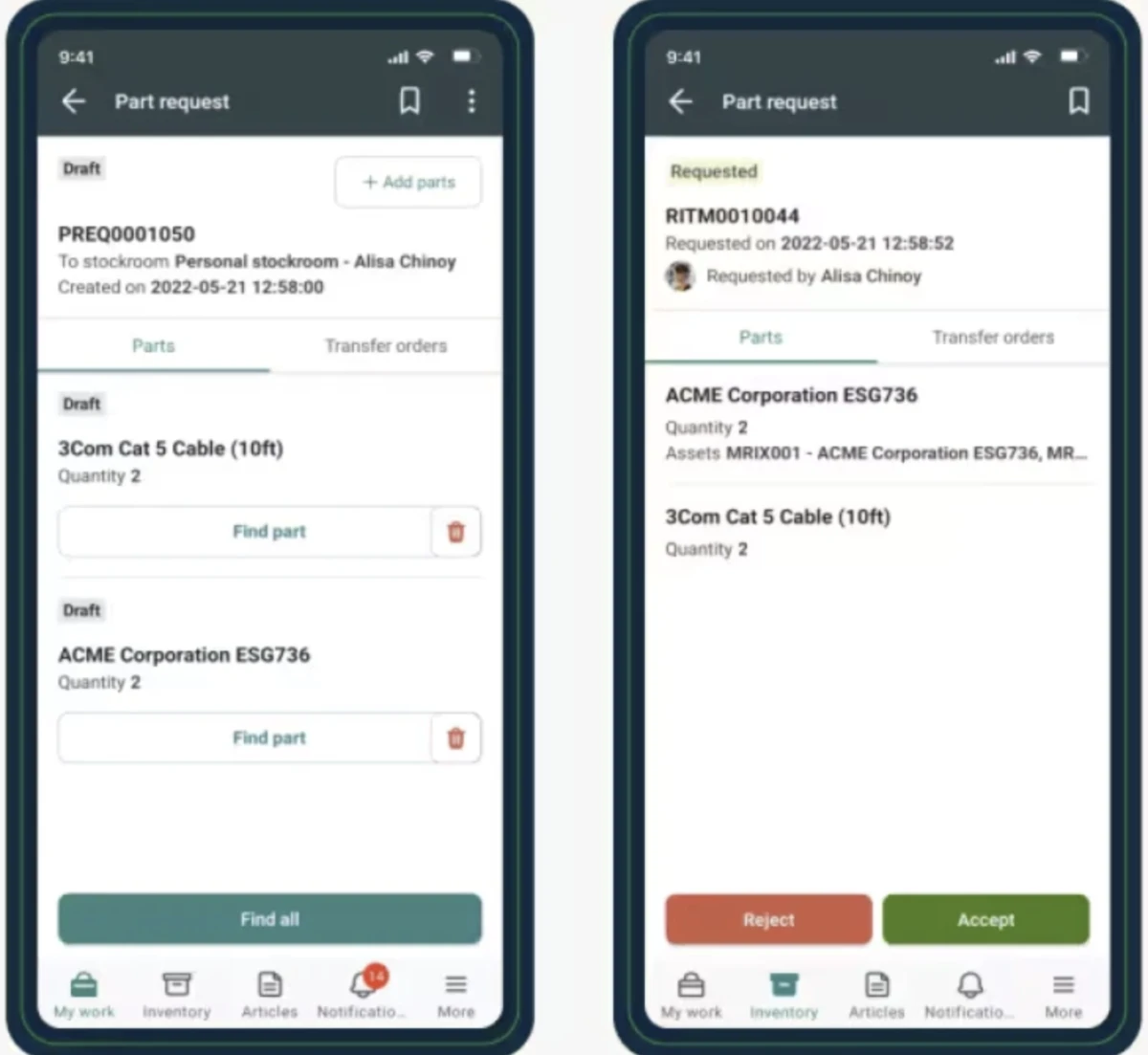
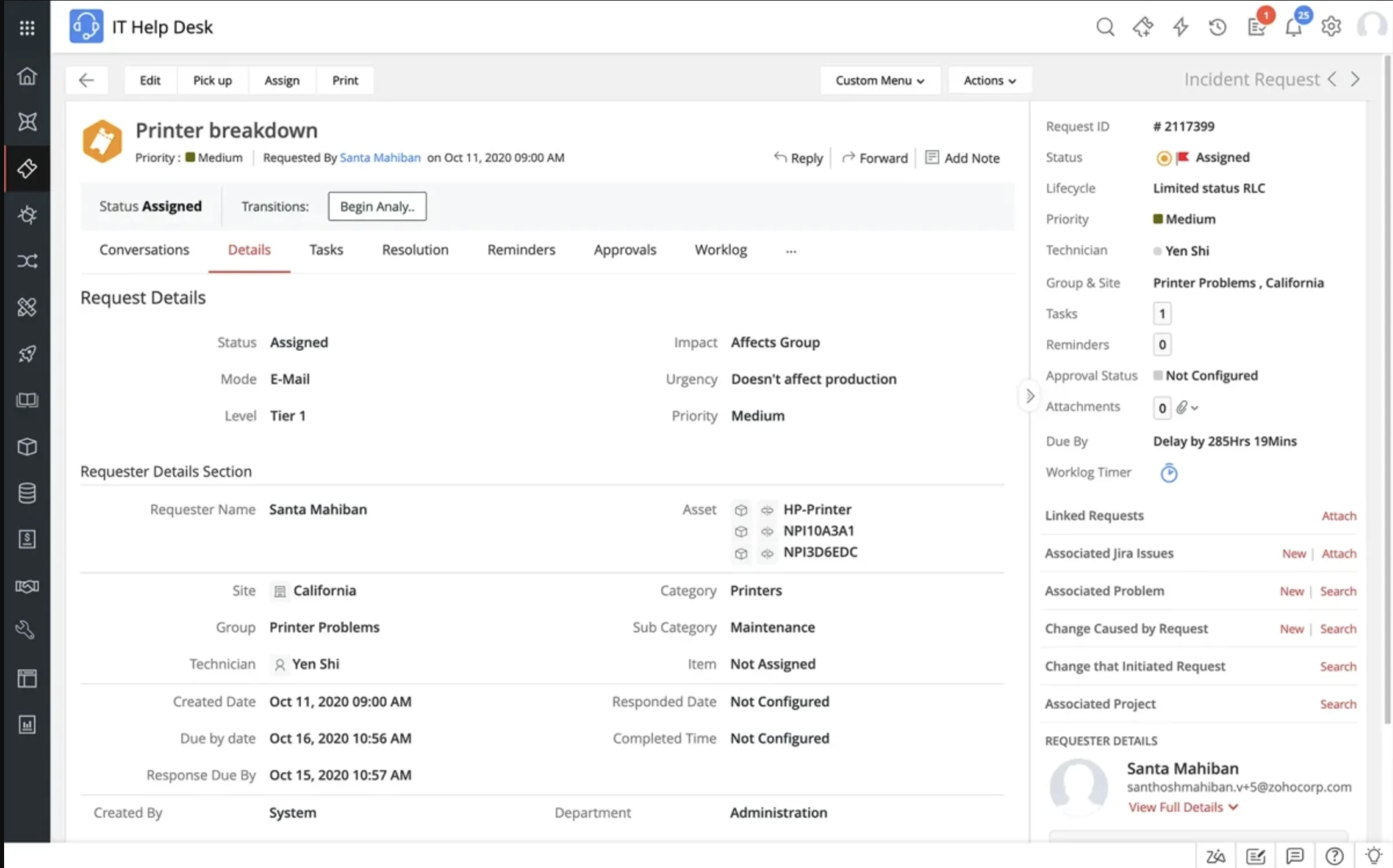
Figure 8: ServiceNow incident management workflows.4
ManageEngine ServiceDesk
ManageEngine ServiceDesk ITSM solution allows users to convert email requests into tickets automatically. ManageEngine’s Zia AI integrates both proprietary models and large-language tools.
- Predictive triage, sentiment/risk detection, and auto-approvals
- Conversational assistant (voice/text), including technician support
- Reply assistance, summarization, AI search, and solution suggestions
- Visual workflow creation and automation suggestions
- Integration with Microsoft Copilot and Power Automate for ticket/workflow handling
Figure 9: ManageEngine ServiceDesk incident management dashboard.5
InvGate Service Management
InvGate Service Management is an enterprise ITSM platform that combines no-code configuration with embedded intelligence.
- No-code workflow automation
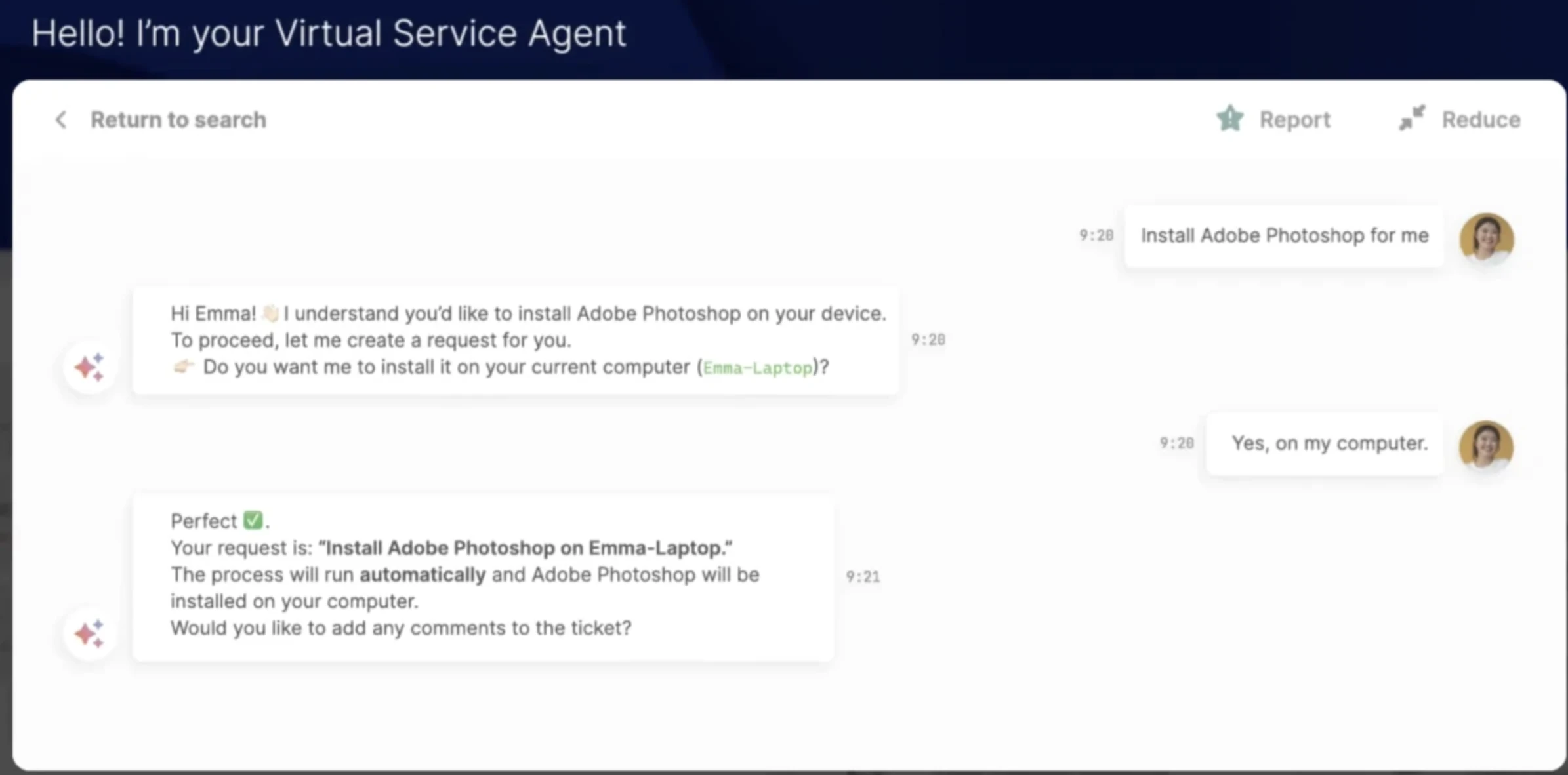
- AI-assisted ticket categorization, routing suggestions, and virtual service agent interactions to accelerate resolution.
- Analytics and real-time metrics for visibility into service performance and operational bottlenecks.
Figure 10: InvGate virtual service agent chat interface.6
Xurrent
Xurrent is an ITIL-Accredited SaaS ITSM and enterprise service management platform with a native CMDB, workflow automation, and multi-tenant service delivery.
Its Sera AI supports request classification, summaries, sentiment analysis, knowledge-article creation, and a virtual agent, while autonomous agents can complete defined service-management tasks with human guardrails.
It also includes a native integration platform with prebuilt connectors, APIs, webhooks, and MCP support.
Alemba Service Manager
Alemba Service Manager is a PinkVERIFY Certified provider, an independent certification program by Pink Elephant that evaluates IT service management tools against defined best-practice criteria.
- License-free access for end users to submit requests and resolve common issues.
- AI-assisted proactive problem identification.
- Connectors and APIs to link Alemba with external tools (e.g., monitoring systems, collaboration platforms).
- Governance and compliance support: Tools for SLA performance monitoring, asset and configuration management, and change control.
BMC Helix ITSM
BMC Helix ITSM is a cloud-based IT service management solution that integrates with GitHub and Bitbucket to automatically identify changes and offer risk assessments throughout the service framework.
BMC Helix’s latest version includes automated incident follow-ups, AI-generated incident summaries, centralized controls for GPT-based features, new collaboration dashboards, and more detailed activity logging.
- DocuAssistant: AI-based help assistant for authenticated users, designed to help users navigate complex BMC documentation and configurations directly within the product, reducing dependency on external documentation and support channels
- Knowledge recommendation, validation, translation, and creation
- ChatOps-style collaboration and narrative analytics
- Natural input handling, event correlation/deduplication, and custom agent development
Ivanti Neurons for ITSM
Ivanti Neurons for ITSM includes 4 modules: Foundational, Intermediate, Comprehensive, and Advanced. Ivanti’s AI provides multi-department support, predictive logic, and self-healing capabilities.
- AI summarization for business objects
- 24/7 virtual agent across departments and multiple languages
- Ticket classification, routing, and prioritization
- Predictive analytics, incident correlation, and self-healing of endpoint issues
- Knowledge generation, sentiment analysis, AI search, and dashboard widgets
- Config-hub governance and optional modules for additional automation
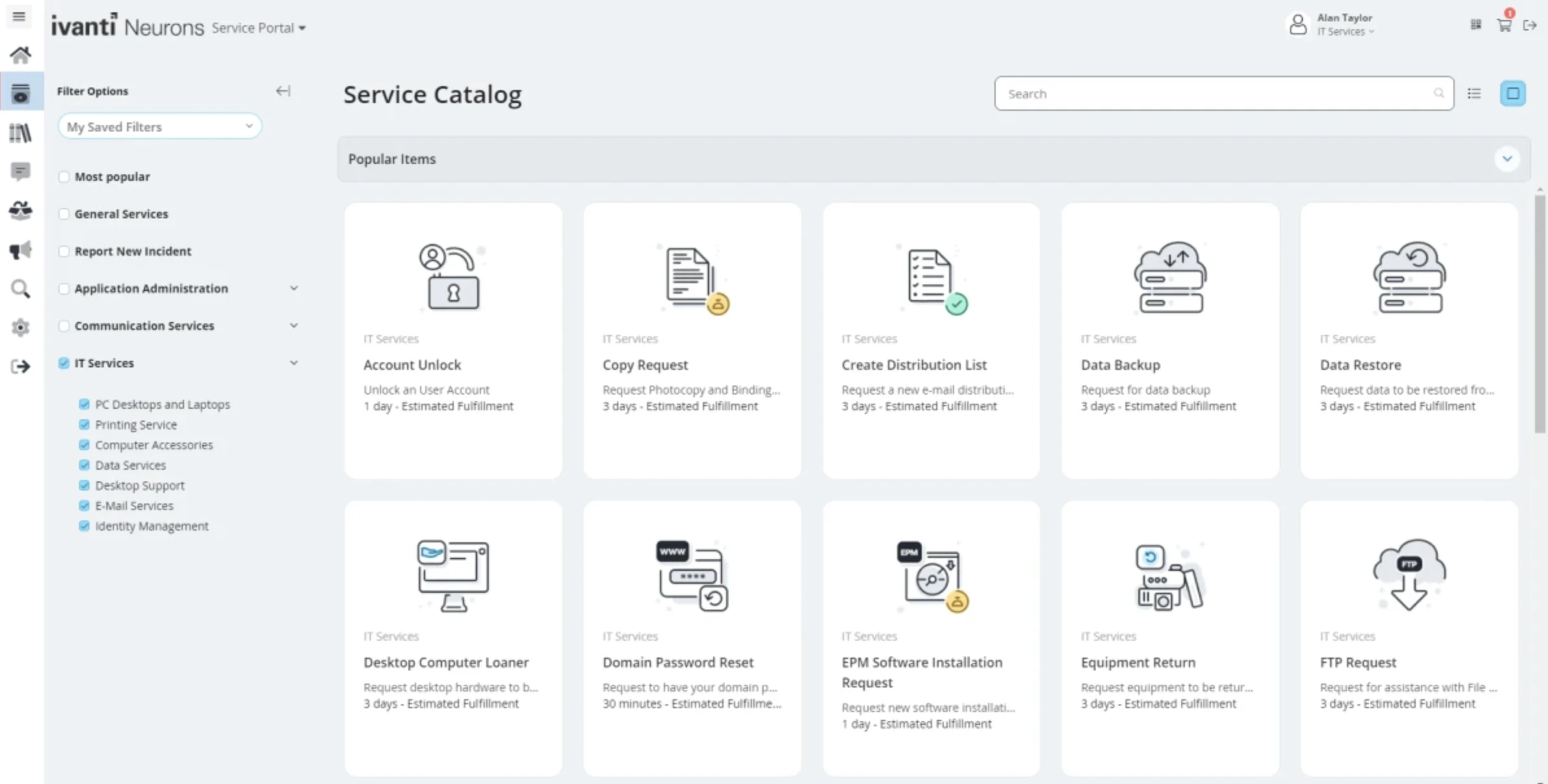
Figure 11: Ivanti Neurons self-service catalog dashboard.
Console
Console is a cloud-based, AI-native ITSM platform for internal service operations. It combines AI ticket handling, natural-language workflow automation, access management, and asset inventory.
It allows employees to submit and resolve requests through Slack, Microsoft Teams, Google Chat, and email. Console’s agents can execute actions across connected identity, device, and SaaS systems and escalate requests when human review is needed.
Console also provides SSO/SCIM, a knowledge layer that can connect sources such as Confluence, Notion, Google Drive and SharePoint, and more than 600 integrations. Its asset management product builds inventory from connected MDM, procurement, identity, and HRIS systems.
Atomicwork
Atomicwork is an AI-first ITSM platform built around autonomous agents.
- Universal Agent to provide conversational support across tools like Slack or Teams, often resolving requests without tickets
- Unified service management across IT, HR, and operations in a single platform
- AI-powered knowledge management
- Real-time insights and analytics for service performance and optimization
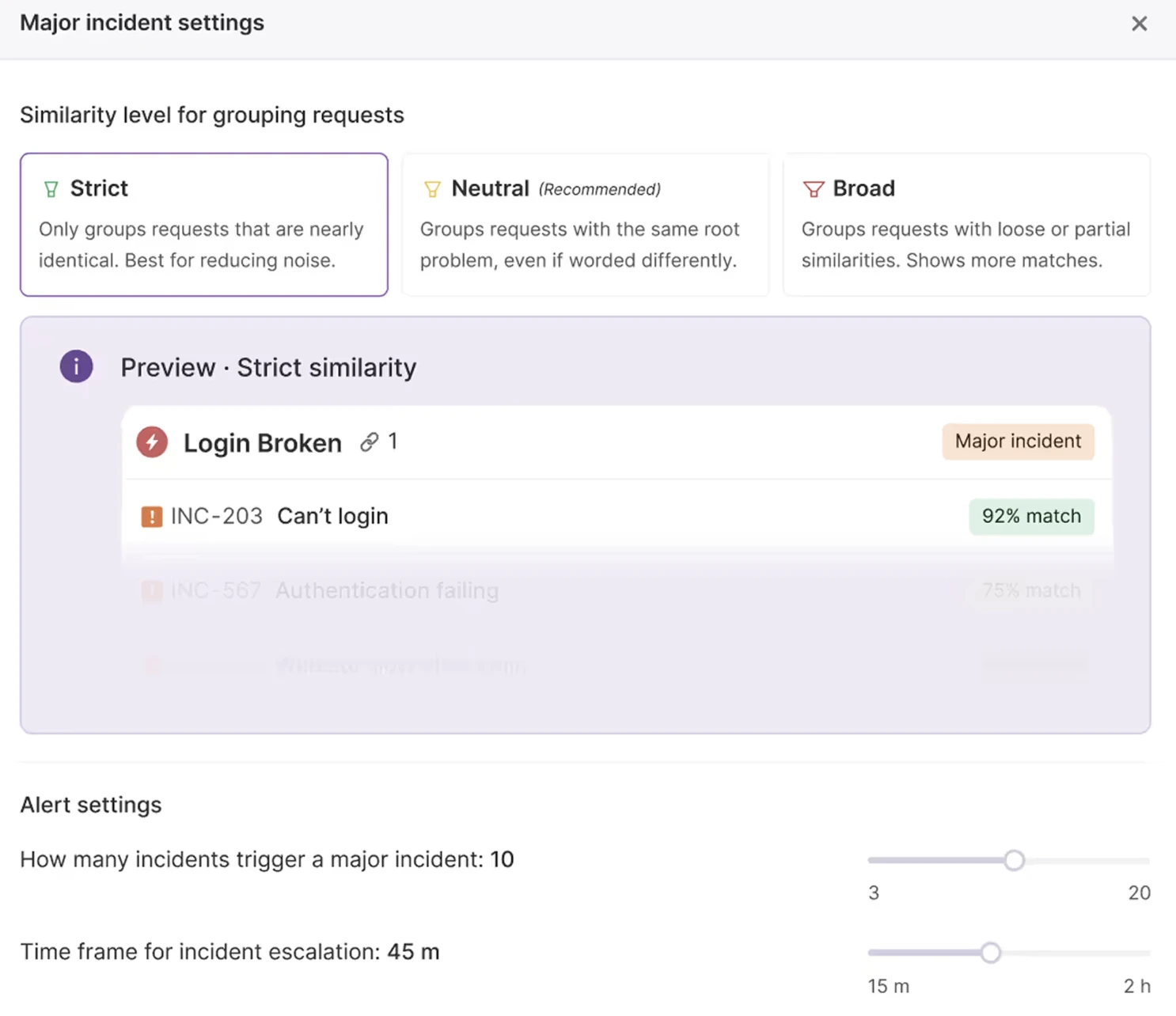
Figure 12: Atomicwork incident management dashboard.7
 Add as preferred source
What are ITSM processes?
ITIL is a best-practice framework for managing digital products and services. Organizations use ITIL guidance across ITSM practices, including incident management, problem management, change enablement, service request management, configuration management, and continual improvement.
ITIL (Version 5)
ITIL (Version 5), launched in January 2026,8uses the ITIL Value System and introduces a unified Product and Service Lifecycle. The ITIL Value System describes how an organization brings together its guiding principles, governance, value chain activities, and management practices.
ITIL 5 Product and Service Lifecycle connects product management and service management. The lifecycle consists of eight activities: Discover, Design, Acquire, Build, Transition, Operate, Deliver, and Support. ITIL 5 is:
- AI-native: The framework considers the use of AI across products and services, as well as the governance, controls, and management practices needed to use AI effectively and responsibly.
- Responsive to complexity: ITIL 5 recognizes that organizations often operate in uncertain and rapidly changing environments.9
Key features of ITSM tools
What to consider when choosing an ITSM tool
When comparing ITSM tools, focus on the factors that affect deployment, day-to-day administration, and total cost.
Deployment and infrastructure
Check whether the tool is available as SaaS, on-premises software, or both. SaaS products reduce infrastructure and maintenance requirements, while self-hosted options can provide greater control over hosting, data residency, and system administration.
Also review remote-management capabilities separately from deployment type. Some ITSM platforms, like NinjaOne, include remote monitoring or device-access features, while others require additional tools or integrations.
Customization and self-service
Compare how the platform can be adapted to your service processes. Relevant capabilities include custom workflows, forms, fields, automation rules, service portals, approval processes, and no-code workflow builders.
Self-service features can also differ substantially. Look for knowledge bases, AI-assisted article creation, natural-language search, virtual agents, and tools that suggest relevant documentation when users submit requests.
Pricing
Compare total cost. ITSM pricing can include per-agent or per-technician licenses, implementation or setup fees, AI usage, automation transactions, asset limits, premium integrations, and paid add-ons.
Pricing models also vary between vendors. Some charge primarily per agent, while others combine seat-based pricing with usage-based AI or automation costs. Estimate expected agent counts and feature usage before comparing plans.
Integrations
Prioritize integrations with the systems your IT team uses. Common categories include:
- Communication and email: Microsoft Teams, Slack, Gmail, and Microsoft 365
- DevOps and version control: GitHub, GitLab, Bitbucket, Jenkins, and Azure DevOps
- Monitoring and incident response: Datadog, New Relic, PagerDuty, Nagios, and Splunk
- Security and identity: Okta, Microsoft Entra ID, CrowdStrike, SentinelOne, and other identity or endpoint-security platforms
Also check whether integrations are native, require marketplace add-ons, or incur additional fees, since this can affect both implementation effort and total cost.
Cite this research
Pick the format that matches where you're publishing. Pasting the link version into your CMS preserves the backlink.
@misc{dilmegani2026,
  author = {Dilmegani, Cem and Ermut, Sıla},
  title  = {{Top 17 IT Service Management Tools}},
  year   = {2026},
  month  = sep,
  howpublished    = {\url{https://aimultiple.com/itsm-tools}},
  note   = {AIMultiple. Retrieved September 24, 2026}
}Results and timestamps of 112 data points. Download the summary data shown in this article's charts and tables as a ZIP file containing 7 CSV files.
Want the granular data behind it? Join Premium
Changelog
8 updatesAdded CMDB, enterprise service management, and compliance section
Updated the pricing footnote to include InvGate Service Management among vendors whose yearly pricing was converted to monthly.
Added Agentforce ITSM and Atomicwork to the list of ITSM tools.
Expanded the "Overview of the top 10 ITSM tools" section to include 12 tools.
Reference Links
Cem's work at AIMultiple has been cited by leading global publications including Business Insider, Forbes, Morning Brew, and Washington Post, global firms like Deloitte and HPE, NGOs like World Economic Forum, and supranational organizations like European Commission. [1], [2], [3], [4], [5]
Throughout his career, Cem served as a tech consultant, tech buyer and tech entrepreneur. He advised enterprises on their technology decisions at McKinsey & Company and Altman Solon for more than a decade. He also published a McKinsey report on digitalization.
He led technology strategy and procurement of a telco while reporting to the CEO. He has also led commercial growth of deep tech company Hypatos that reached a 7 digit annual recurring revenue and a 9 digit valuation from 0 within 2 years. Cem's work in Hypatos was covered by leading technology publications like TechCrunch and Business Insider.
Cem regularly speaks at international technology conferences. He graduated from Bogazici University as a computer engineer and holds an MBA from Columbia Business School.

She previously worked as a recruiter in project management and consulting firms. Sıla holds a Master of Science degree in Social Psychology and a Bachelor of Arts degree in International Relations.









Be the first to comment
Your email address will not be published. All fields are required. Comments are left in their original language.