


OCR Benchmark: Text Extraction / Capture Accuracy

OCR accuracy is critical for many document processing tasks, and SOTA multi-modal LLMs are now offering an alternative to OCR. We benchmarked leading OCR services in DeltOCR Bench to identify their accuracy levels in different document types:
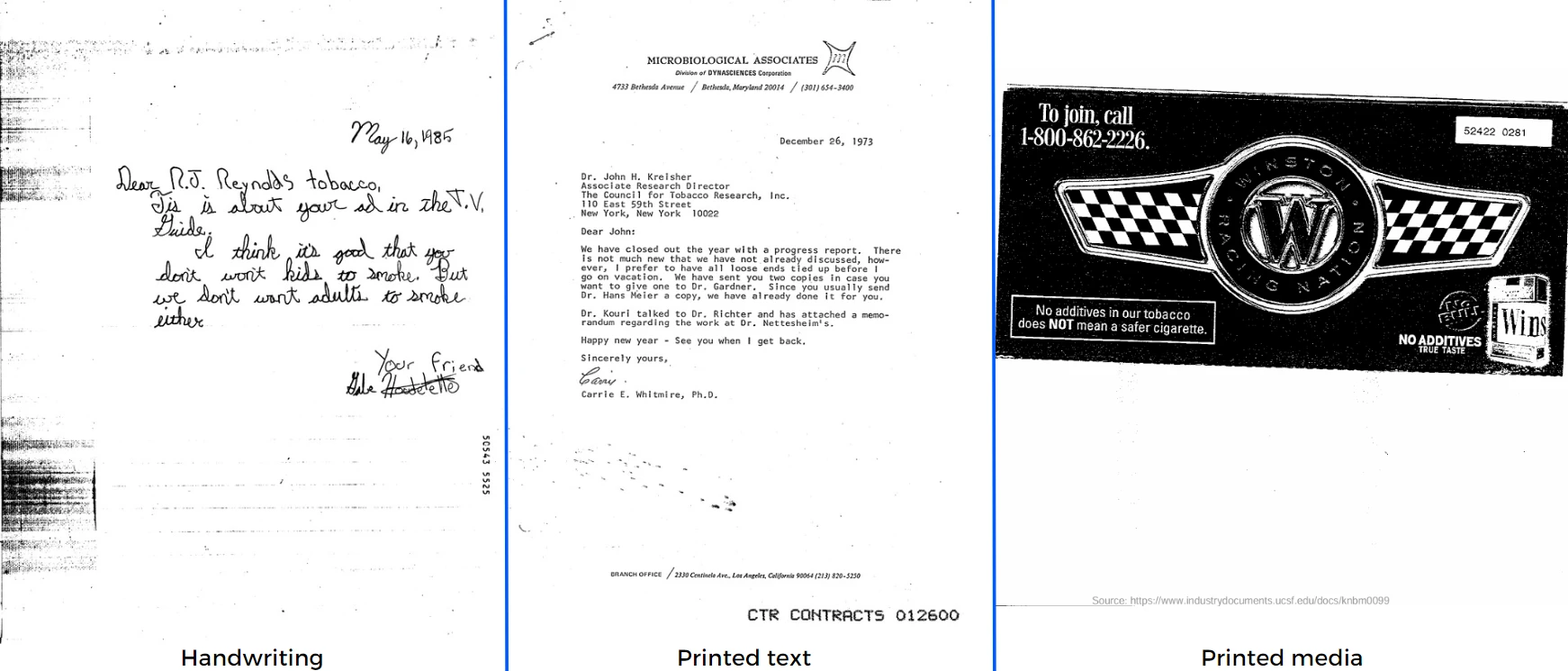
- Handwriting: GPT-5 (%95) stands out as the strongest performer, closely followed by olmOCR-2-7B (%94) and Gemini 2.5 Pro (%93).
- Printed media: Gemini 2.5 Pro, Google Vision, and Claude Sonnet 4.5 lead this category with the highest score (%85)
- Printed text: Microsoft Azure Document Intelligence API leads with a score of %96.
OCR Benchmark: DeltOCR Bench
The full names of the above products and their versions in use as of November 2025 are listed below. Our study covers both easily accessible API services and solutions requiring on-premises infrastructure, comparing key models in the market in a deep test environment.
- Handwriting:
- Accuracy Range: A wide range from %46 to %95.
- Highlights: GPT-5 (%95), olmOCR-2-7B (%94), and Gemini 2.5 Pro (%93) exhibit the highest performance. These high scores demonstrate the extraordinary accuracy potential of multimodal LLMs, such as GPT-5 and Gemini 2.5 Pro, in this domain.
- Recommendation: For recognizing highly complex handwriting, the top LLM solutions like GPT-5 or Gemini 2.5 Pro are recommended due to their API accessibility and ease of integration.
- Printed media:
- Accuracy Range: A range from %54 to %85.
- Highlights: Solutions such as Gemini 2.5 Pro, Google Vision, and Claude Sonnet 4.5 share the highest score (%85). This category is highly competitive among LLMs and traditional cloud-based OCR services (Azure, Dots OCR, Amazon Textract). GPT-5 lags behind other leading LLMs in this category (%77).
- Recommendation: For documents with complex visual layouts (multiple fonts, low resolution, etc.), LLMs like Gemini 2.5 Pro, or cloud-based services like Google Vision, or Microsoft Azure Document Intelligence API are recommended.
- Printed text:
- Accuracy Range: A high range from %55 to %96, though most leading solutions achieved scores of %94 and above.
- Highlights: Microsoft Azure Document Intelligence API (%96) takes the lead, closely followed by solutions like GPT-5, Gemini 2.5 Pro, Gemini 3 Pro Preview, Google Vision, and Amazon Textract, all scoring %95. This category is an area where all SOTA solutions achieve extremely high levels of accuracy.
- Recommendation: For simple printed texts requiring high accuracy, established cloud solutions like Microsoft Azure Document Intelligence API or Google Vision, or high-scoring LLMs (Gemini/GPT-5), can be used confidently.
API Solutions
The following models were included in our benchmarking list due to both their ease of access and performance.
- Claude Sonnet 4.5
- OpenAI GPT-5
- Gemini 2.5 Pro
- Gemini 3 Pro Preview
- Amazon Textract API
- Google Cloud Vision API
- Microsoft Azure Document Intelligence API
- Moondream OCR
- Mistral OCR 3
- Mistral OCR 2
Microsoft Azure Document Intelligence API is part of the Azure Cognitive Services family.
Locally deployed models
Testing these models is more challenging than API solutions due to installation, dependency management, and hardware requirements. All local tests were conducted in a dedicated server environment.
- olmOCR-2-7B
- PaddleOCR-VL
- Nanonets-OCR2-3B
- Deepseek-OCR
- Dots-OCR
We calculated the accuracy of results as the cosine similarity score for printed text, printed media, and handwriting. Each score visible in the chart represents the performance of the corresponding model within that category.
During our testing, we observed that the Nanonets-OCR2-3B model delivered the weakest performance in the benchmark, achieving the lowest scores. Generally, we found that some models struggled particularly with cursive handwriting and disorganized text layouts (mixed line ordering, inconsistent capitalization). Similar performance issues also emerged in the printed media category, especially with low-resolution images and those containing multiple font styles.
Dataset
We used a total of 300 documents in this benchmark, with 100 documents per category across 3 categories:
Printed text includes letters, website screenshots, emails, reports, etc.
Printed media includes posters, book covers, advertisements, etc. We aimed to see the success of the OCR tools in different text fonts and placements.
Files in these 2 categories were sourced from the Industry Documents Library (IDL).1
Handwriting: In the handwritten category, as some IDL documents were not easy to read, our team generated documents similar to the IDL documents. We manually prepared samples of human-legible handwriting. All samples were in a cursive handwriting style.
Methodology of DeltOCR Bench
This benchmark focuses on the text extraction accuracy of the products.
Preprocessing is performed only for the handwriting category. We took pictures of handwritten documents with our smartphones and used a mobile scanner app:
- Pictures were converted to black-and-white
- The contrast was increased, and the background was removed.
OCR: We ran all the products on the same dataset and generated text outputs as raw text (.txt) files. Then, we manually prepared the ground truth including the correct text in all of these files. The ground truth was verified twice by humans.
Comparison: We measured the accuracy of OCR solutions by comparing their outputs with the original texts. For this purpose, we used the Sentence-BERT (SBERT) framework to compute cosine similarity scores. In the benchmark, we used the high-performing multilingual paraphrase model, MiniLM-L12-v2, to compute the similarity score between each product’s output and the ground-truth texts. This score represents the text accuracy level.
The similarity function uses a cosine distance metric to calculate the similarity between two texts. We did not use Levenshtein distance for this benchmark because different products output texts in different orders.2
While Levenshtein distance takes these differences into account, we are only looking for how accurately the text is detected, but not where it is located. The cosine distance has negligible penalties for such cases, so we decided to use it in this benchmark.
Product selection
There are many OCR products on the market. We need to focus on the ones that can output raw text results. The products for this benchmark are chosen based on:
- Capability to extract text. We did not include solutions that only extract machine-readable (i.e., structured data) in this comparison
- Their popularity in the market
This is not a comprehensive market review, and we may have excluded some products with significant capabilities. If that is the case, please leave a comment, and we will be happy to expand the benchmark.
Limitations
Advanced capabilities such as text location detection, key-value pairing, and document classification were not evaluated in this benchmark.
The sample size will be increased in the next iteration. If you are looking for OCR for handwriting, see our handwriting OCR benchmark with 50 samples.
FAQs
Optical Character Recognition (OCR) is a field of machine learning that specializes in distinguishing characters within images like scanned documents, printed books, or photos. Although it is a mature technology, there are still no OCR products that can recognize all kinds of text with 100% accuracy. Among the products that we benchmarked, only a few products could output successful results from our test set.
OCR tools are used by companies to identify texts and their positions in images, classify business documents according to subjects, or conduct key-value pairing within documents. Based on OCR results, other technology companies build applications like document automation. For all these business cases, accurate text recognition is critical for an OCR product.
Cite this benchmark
Pick the format that matches where you're publishing. Pasting the link version into your CMS preserves the backlink.
@misc{alper2026,
  author = {Alper, Şevval},
  title  = {{OCR Benchmark: Text Extraction / Capture Accuracy}},
  year   = {2026},
  month  = jul,
  howpublished    = {\url{https://aimultiple.com/ocr-accuracy}},
  note   = {AIMultiple. Retrieved July 29, 2026}
}Results and timestamps of 60 data points. Download the summary data shown in this article's charts and tables as a ZIP file containing 4 CSV files.
Want the granular data behind it? Join Premium
Changelog
9 updatesReplaced Azure Cognitive Service with Microsoft Azure Document Intelligence API in the Highlights section.
Reference Links
Şevval focuses on AI coding tools, AI agents, and quantum technologies.




Comments 8
Share Your Thoughts
Your email address will not be published. All fields are required. Comments are left in their original language.
Did you ever think of oncluding multimodal llms in your comparison, like gpt4o, llama 3.2. gemini, claude etc.?
Hi Serhat and thank you for your comment, Yes, we added those for which we have API access like Claude and GPT-4o.
Just stumbled on this milestone assessment update. Could you kindly elaborate further on the three revised datasets: Thanks for this work. Character Sets When someone refers to 'handriting', that can mean many things: 'handwriting style' typefaces (per Docusign, etc.), and hand-printed (block printing and mixed-case printing) as often found in combs and box delineators, and finally, cursive or longhand writing (exclusive of signatures). Character Context Structured content, semi-structured content, and unstructured content. Image Qualities (bitonal, greyscale, full colour, spatial dpi, from a scanner/cell-phone/native rendering, image 'enhancements' prior to OCR (thickening, local gamma, background dropout, sharpening, smoothing, noise removal, etc.) These can have significant impacts, and some don't realize the importance of including these benchmark differentiators.
Hi there, thank you for the detailed comment, we are updating the article to include these details.
Hello, great work! Just curious, did you use a trained Tesseract when making these testing?
Hi, Webster. Glad you enjoyed the article. The tools we tested were: ABBYY FineReader 15 Amazon Textract Google Cloud Platform Vision API Microsoft Azure Computer Vision API Tesseract OCR Engine Hope this answers your question.
The graph images are not working for me at the moment. Otherwise great
Thank you Bobby! We have a glitch in the CMS and we are fixing it. Apologies for the issue, it should be fixed next week.
Thanks for sharing, can you add a free OCR for everyone to use? https://www.geekersoft.com/ocr-online.html
Hi Samsun, unfortunately, we don't share all OCR providers on this page, there are thousands of them. We tried to put together the largest ones in terms of market presence. If you have evidence that your solution is one of the top 10 globally, please share it with us at info@aimultiple.com so we can consider it.
What version of Tesseract did you test with? They recently released v5.
Hi Scott, we did the benchmarking before Tesseract 5. We will redo it soon and include the versions in the methodology section as well.
This is very informative, nice work. I assume your tests used documents/images in English? I've been experimenting with OCR tools on other languages and finding relatively poor accuracy.
Exactly, all text were in English. I hear similar things about OCR on non-Latin characters. We have an Arabic speaker in the team who claims that accuracy in Arabic is much lower compared to English. We can do a benchmark on non-Latin characters if there is demand for it.
interesting post!!! do you have any suggestion about improving accuracy on scanned image ? i'm using tesseract right now. anyway , great work!
Thank you for the comment. There are pre-processing approaches that can be implemented to improve image quality. But such approaches may already be used in Tesseract. A detailed research into Tesseract image processing would be helpful in your case.