


LLM Observability Tools: Weights & Biases, Langsmith

LLM applications have expanded from single-turn chats into multi-step agents that use tools, query databases, and coordinate with other models, making their behavior harder to interpret.
LLM observability provides continuous visibility into these complex workflows, helping organizations monitor quality, detect failures, troubleshoot issues, and manage performance and costs.
LLM observability tools feature comparison
Weights & Biases (W&B Weave)
W&B Weave is Weights & Biases‘ LLM observability platform for monitoring, evaluating, and optimizing language model applications. Weave automatically tracks every LLM call using the @weave.op decorator, capturing inputs, outputs, costs, latency, and evaluation metrics without manual setup.
The platform tracks token usage and calculates costs automatically, monitors response times to catch slow queries, and measures accuracy by comparing predictions against expected results. Different experiments can be compared side-by-side to see which model or prompt performs better. Error tracking shows which predictions failed and why, while automatic versioning preserves every configuration change for reproducibility. This makes it easy to test different approaches, identify what works best, and debug issues when models make mistakes.
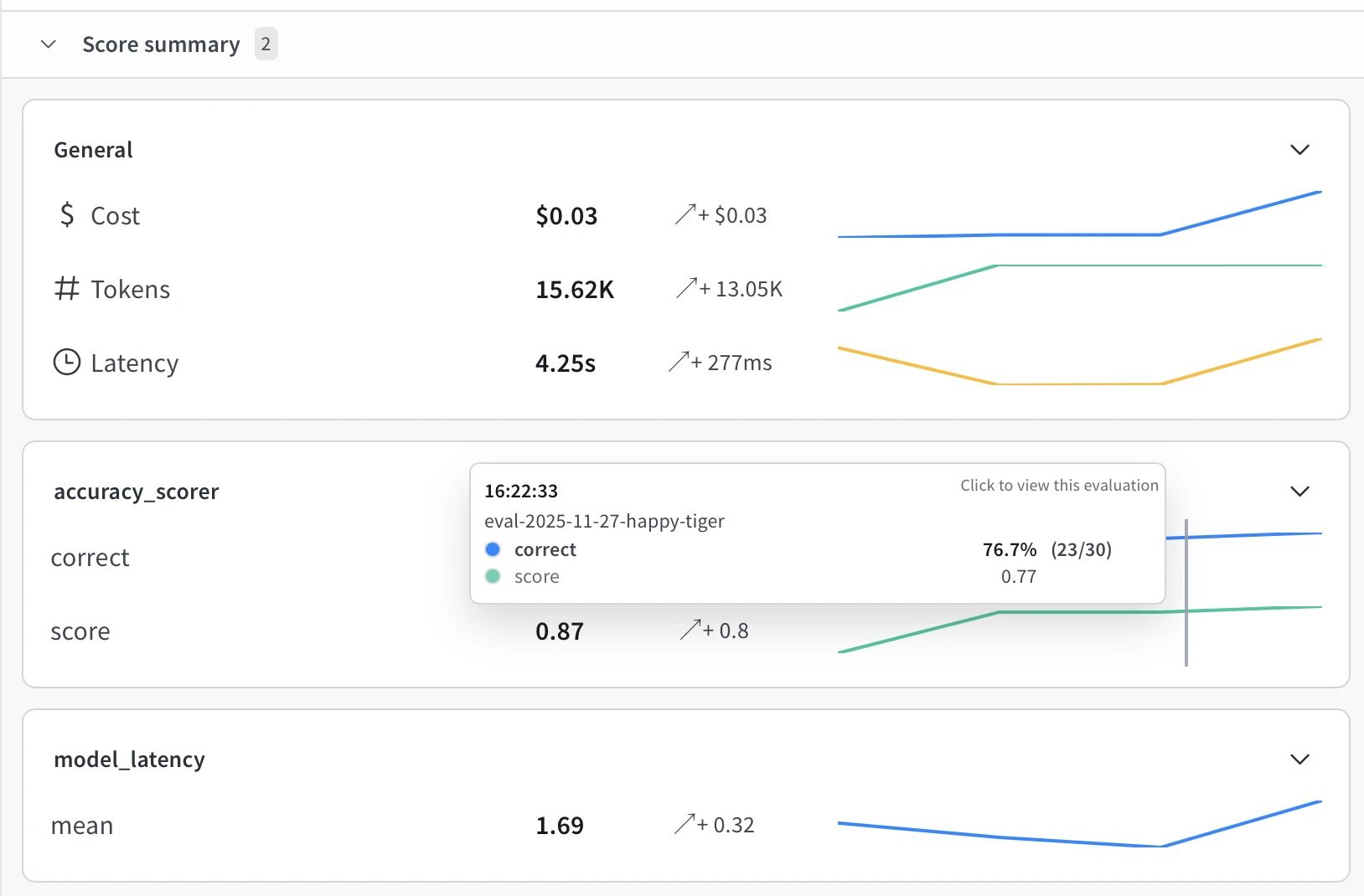
Score Summary Dashboard
Figure 1: Graphs showing the model performance metrics dashboard, tracking accuracy, cost, and latency trends.
Performance metrics are shown across all evaluation runs. Total cost, token usage, and response times are displayed with graphs showing changes. Custom metrics, such as accuracy and error rates, appear in separate panels. Trend lines help spot when performance gets worse, or costs increase unexpectedly, with the dashboard updating automatically as new tests complete.
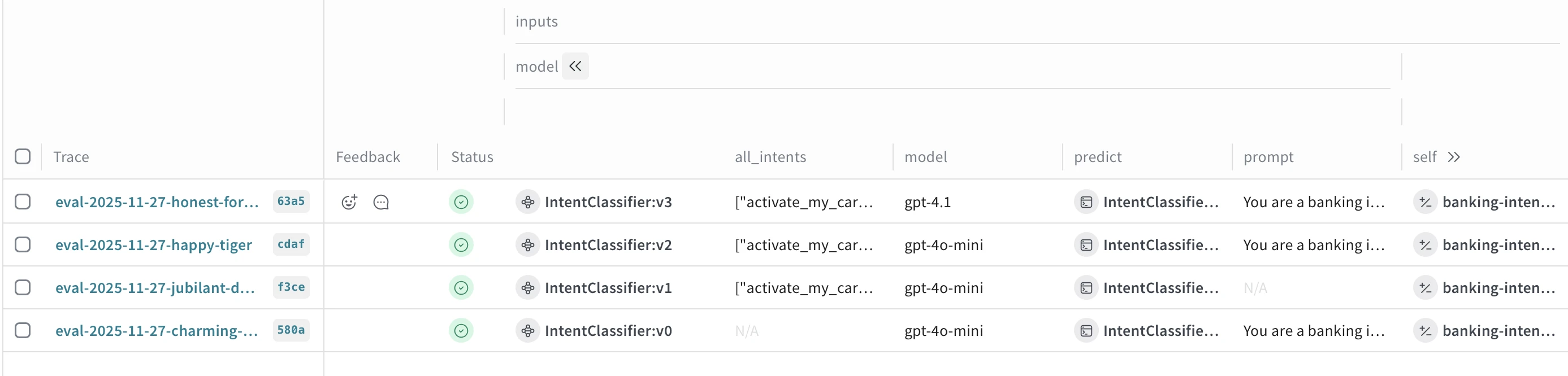
Traces View
Figure 2: Evaluation trace table showing model versions and their intent classification results.
Every test run is saved with complete details. Each trace shows which model was used, what prompt was sent, and all settings. Success or failure indicators indicate whether tests were completed correctly. The prompt column displays the text sent to the model for verification. This logging allows comparing different versions side-by-side, seeing what changed between runs, and repeating any test by using its saved configuration.
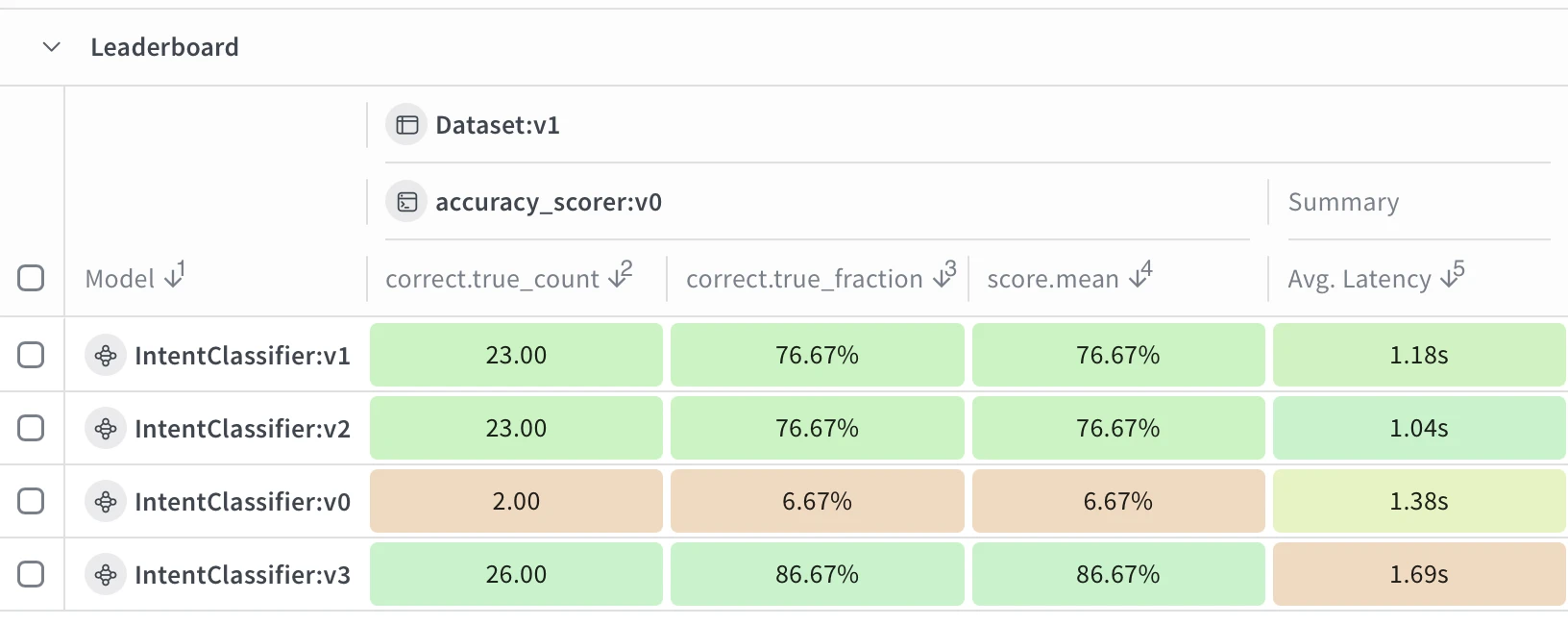
Model Comparison Leaderboard
Figure 3: Image showing the leaderboard comparing intent classifier model versions across accuracy and latency metrics.
Different models and settings can be compared on the same test data. Columns show accuracy, correct predictions, scores, and response times. Color coding highlights better performers in green. This comparison reveals trade-offs like higher accuracy at the cost of slower speed or faster responses with slightly lower accuracy, helping choose which configuration works best for production needs.
Model Versioning
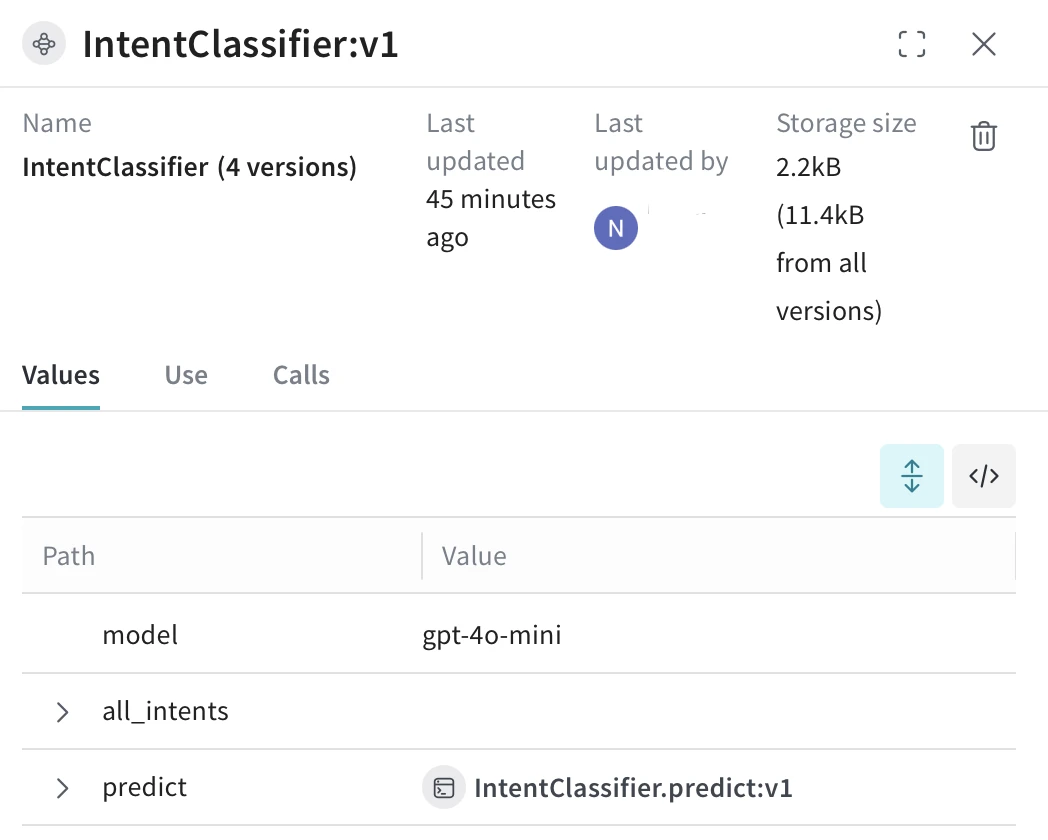
Figure 4: Intent classifier configuration panel showing model settings and version details.
Every configuration change automatically creates a new version, keeping a complete history. Version details show when changes happened, who made them, and storage used. The Values tab displays exact settings, including model name, parameters, and function versions. This versioning ensures any test can be repeated with identical settings, allows tracking how performance changed, and enables reverting to older versions if needed.
Detailed Evaluation Results
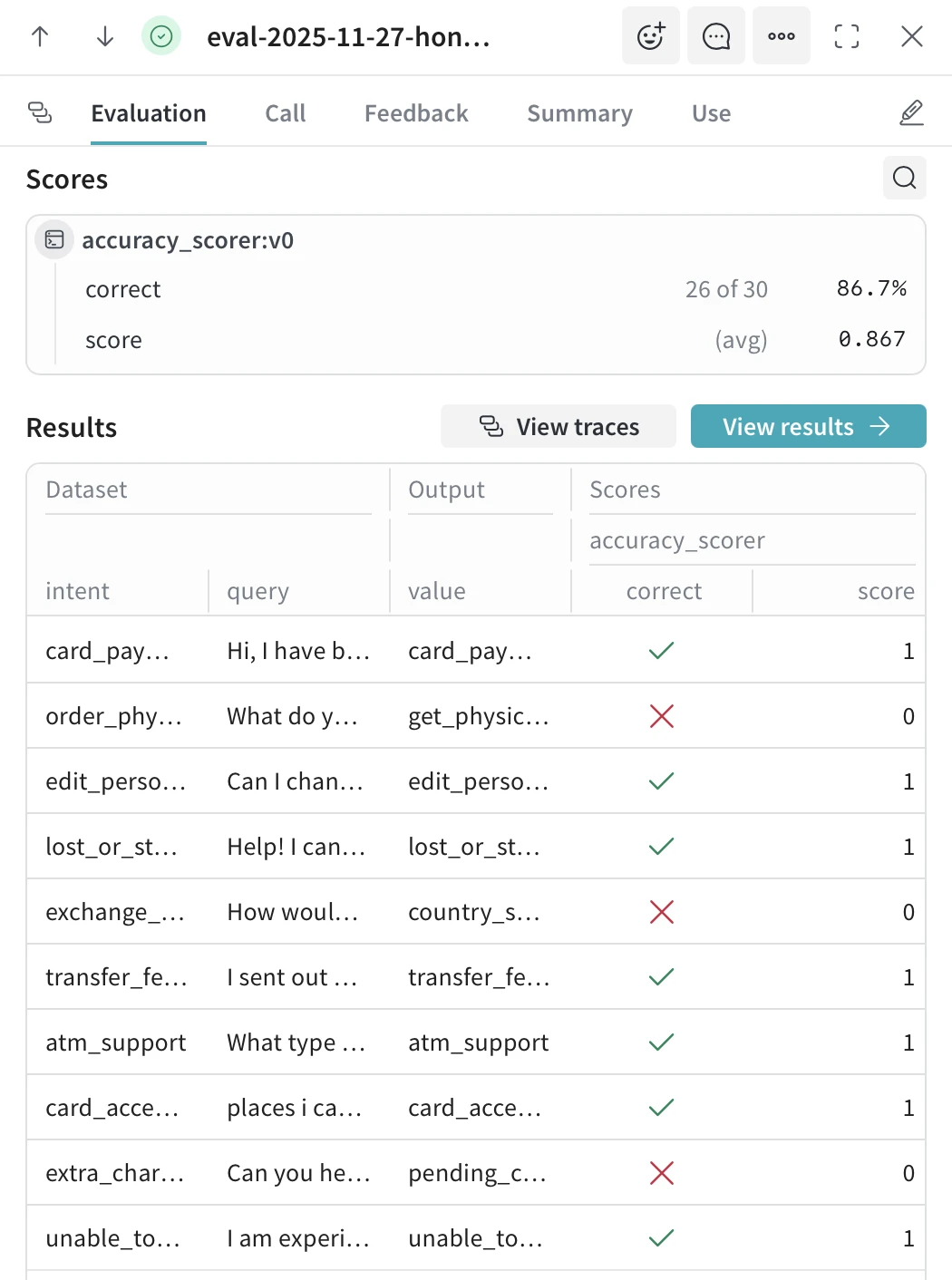
Figure 5: Evaluation results showing individual test cases with predicted intents and accuracy scores.
Individual test results are shown for every sample. The Scores section summarizes total correct predictions, accuracy percentage, and custom scores.
The Results table displays each query with its expected answer and the model’s prediction, using check marks for correct answers and X marks for incorrect answers. Failed predictions are easy to spot, often showing patterns such as confusion between similar categories.
Clicking any row opens the full trace, including the prompt, response, token counts, and timing, making it straightforward to debug failures and improve prompts or model selection.
Langsmith
LangSmith is LangChain’s observability platform for monitoring, debugging, and evaluating LLM applications. It automatically traces every LLM call, captures prompts and outputs, tracks costs and latency, and enables systematic evaluation through dataset-based testing. LangSmith integrates natively with LangChain but supports any LLM application through its SDK.
Per-Sample Evaluation Results
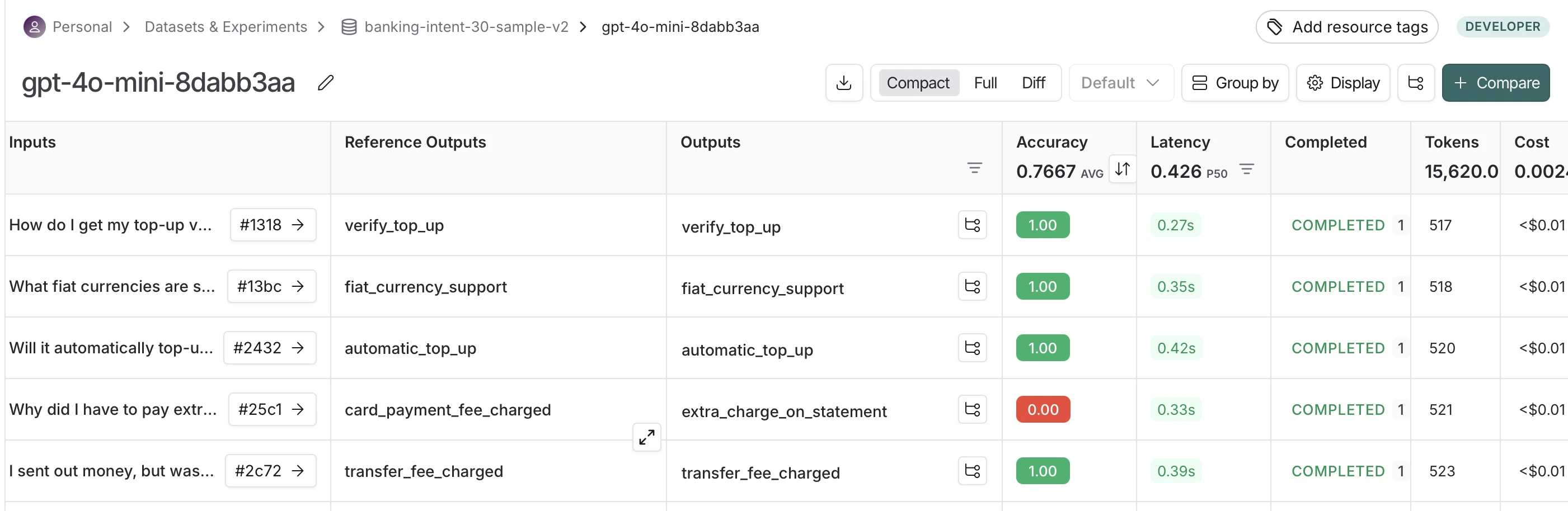
Figure 6: Image showing the individual test case evaluation on predictions and performance metrics.
Individual prediction outcomes are displayed alongside expected outputs, allowing you to identify where the model makes mistakes. Comparing expected versus actual predictions reveals confusion between semantically similar categories. Per-query latency and token counts show which input types are more expensive to process, enabling optimization of slow or costly queries.
Trace Volume and Health Monitoring
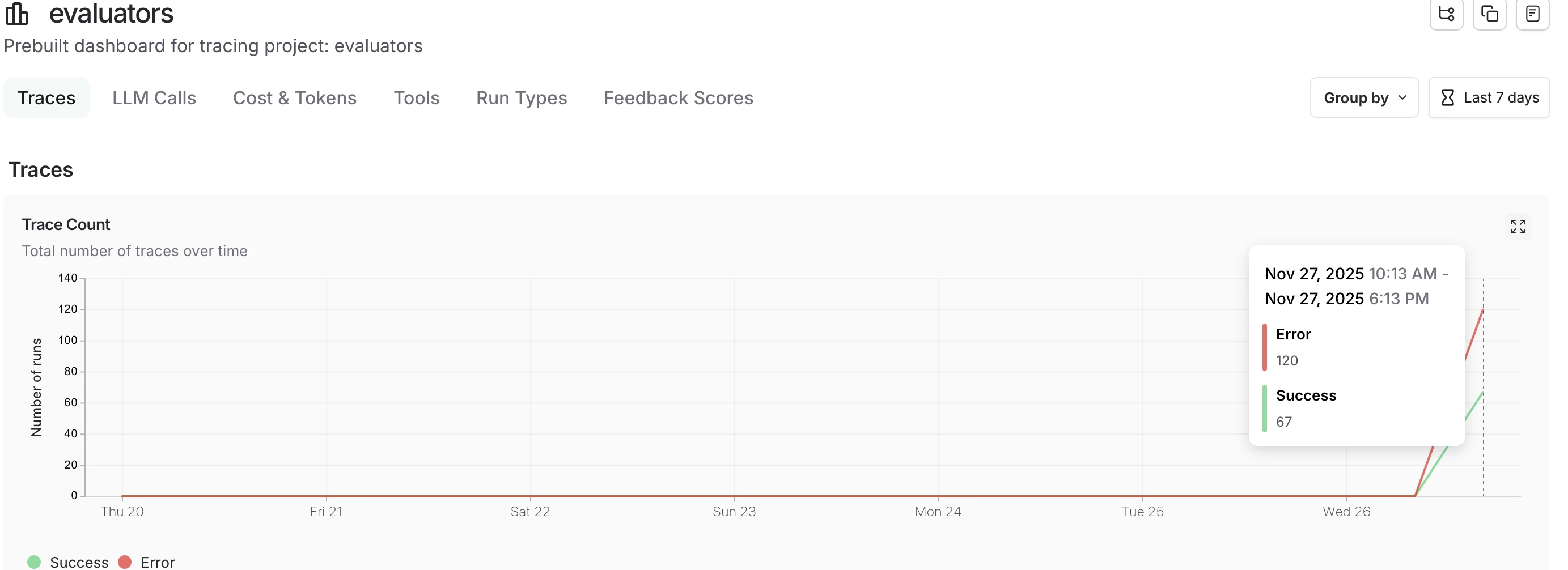
Figure 7: Graph showing the project traces visualization tracking success and error rates.
Application health is shown through trace volume trends and success/error ratios. Different views are available for analyzing LLM calls, cost trends, tool invocations, or feedback scores. Issues like error spikes or cost increases become visible, indicating problems that need investigation.
Model and Configuration Comparison
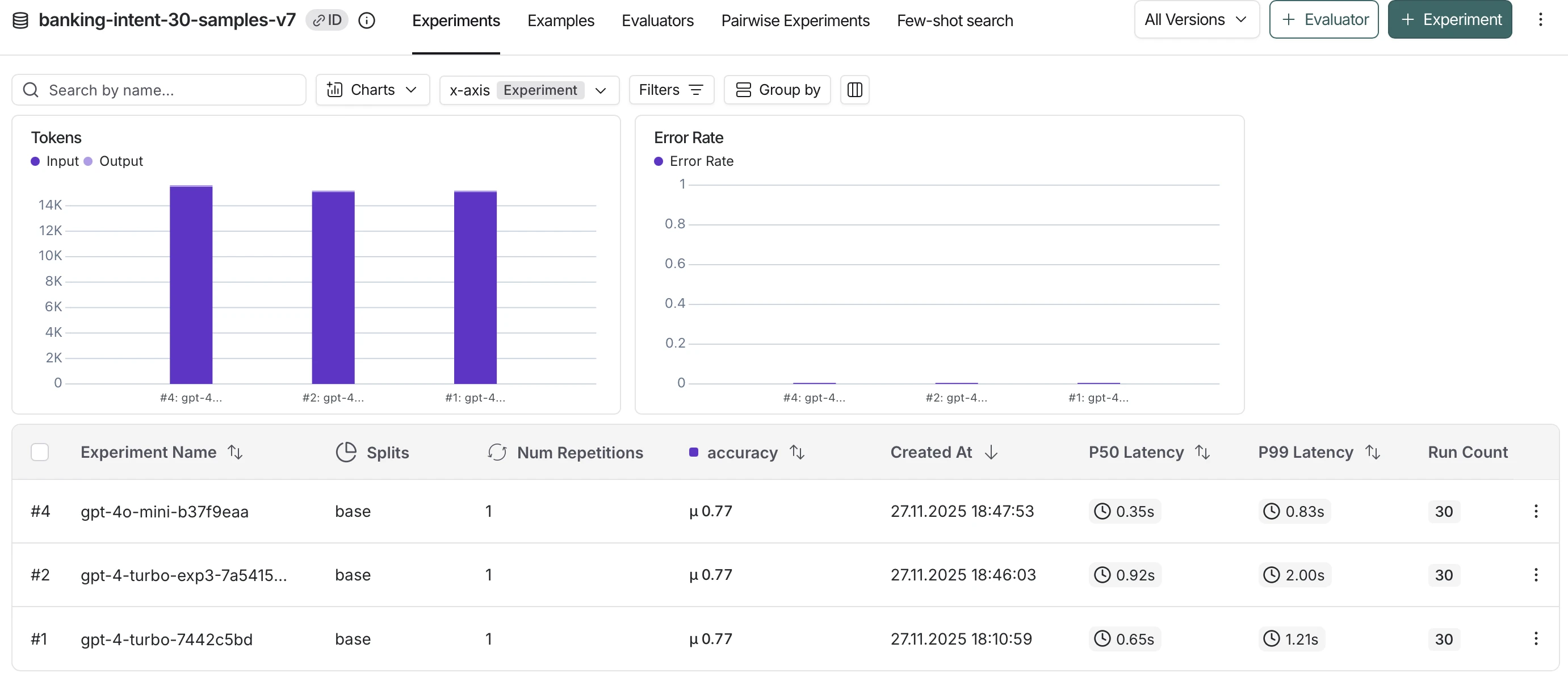
Figure 8: Experiment comparison view showing performance metrics across multiple test runs.
Different models can be compared side-by-side on the same test dataset. Tradeoffs between accuracy, latency (P50/P99), and token efficiency are displayed visually. Identifying which configuration best meets requirements – whether maximizing accuracy or minimizing cost and response time – is straightforward through these comparisons.
Langfuse
Langfuse is an open-source LLM observability platform designed for monitoring, debugging, and evaluating language model applications. Available as both self-hosted and cloud solutions, Langfuse provides comprehensive tracing with automatic capture of prompts, outputs, costs, and latency.
The platform supports any LLM framework through its flexible SDK and offers built-in evaluation capabilities, including LLM-as-a-judge for automated quality assessment. Langfuse tracks prompt versions across runs, enabling comparison of performance metrics between different formulations.
User feedback collection through thumbs-up/down ratings helps identify high- and low-quality outputs, while custom scoring allows tracking application-specific metrics. Automated evaluations can process thousands of traces at configurable sampling rates, enabling continuous quality monitoring at scale without manual review of every output.
Langfuse was acquired by ClickHouse and now operates as part of ClickHouse, while remaining open-source.1
Detailed Trace View
Figure 10: Trace logs showing API call details with performance and cost data.
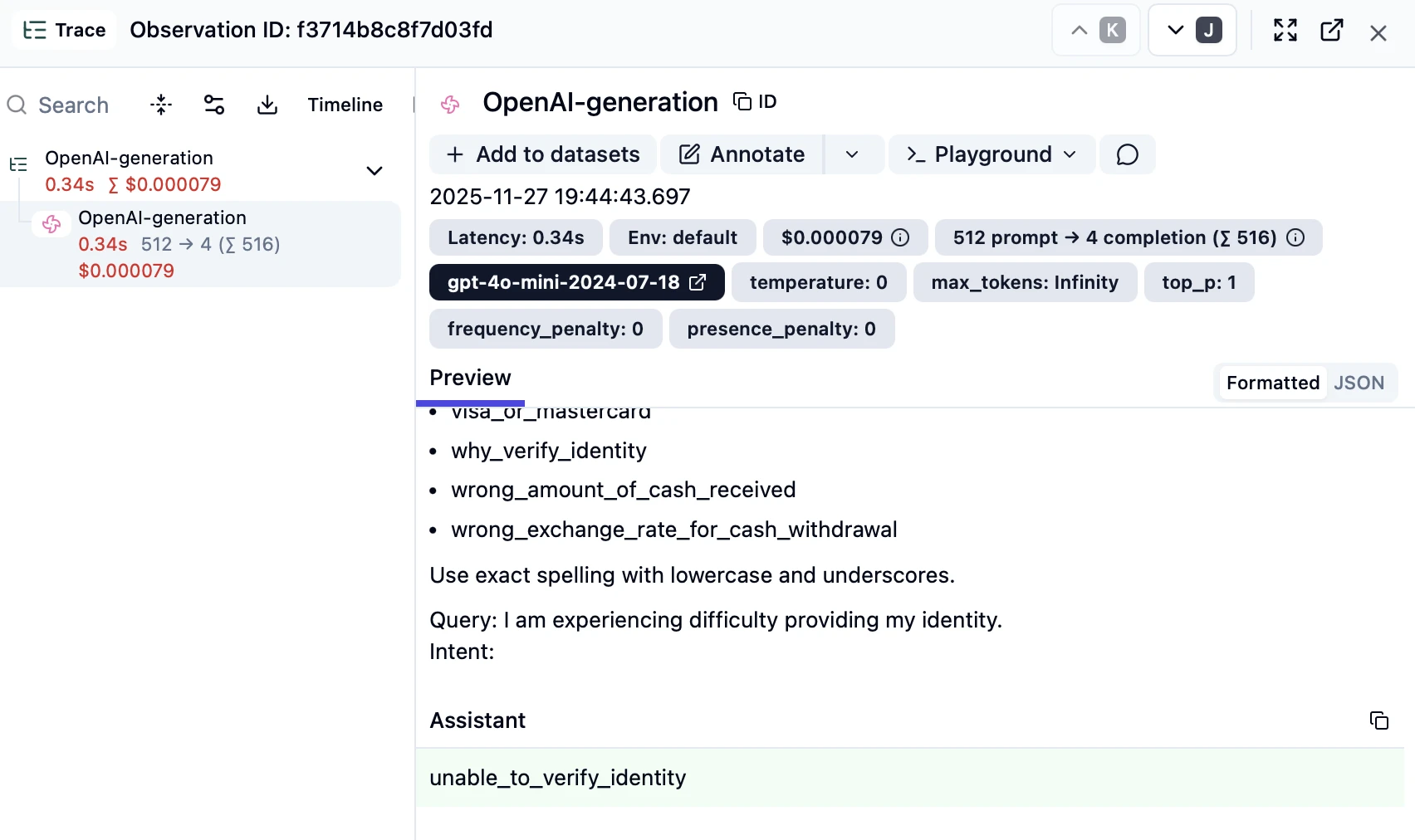
Individual traces display complete execution details for each LLM call. The trace view shows exact latency measurements, token consumption (prompt and completion tokens separately), and calculated costs per request.
Model configuration is preserved, including temperature, max_tokens, and other parameters. The Preview section displays the full prompt sent to the model alongside the complete response, allowing you to understand precisely what the model received and generated.
This granular visibility enables debugging of specific failures by examining the precise input-output pair that caused an error.
Traces Overview Table
Figure 11: Individual trace inspection showing request details and model response.
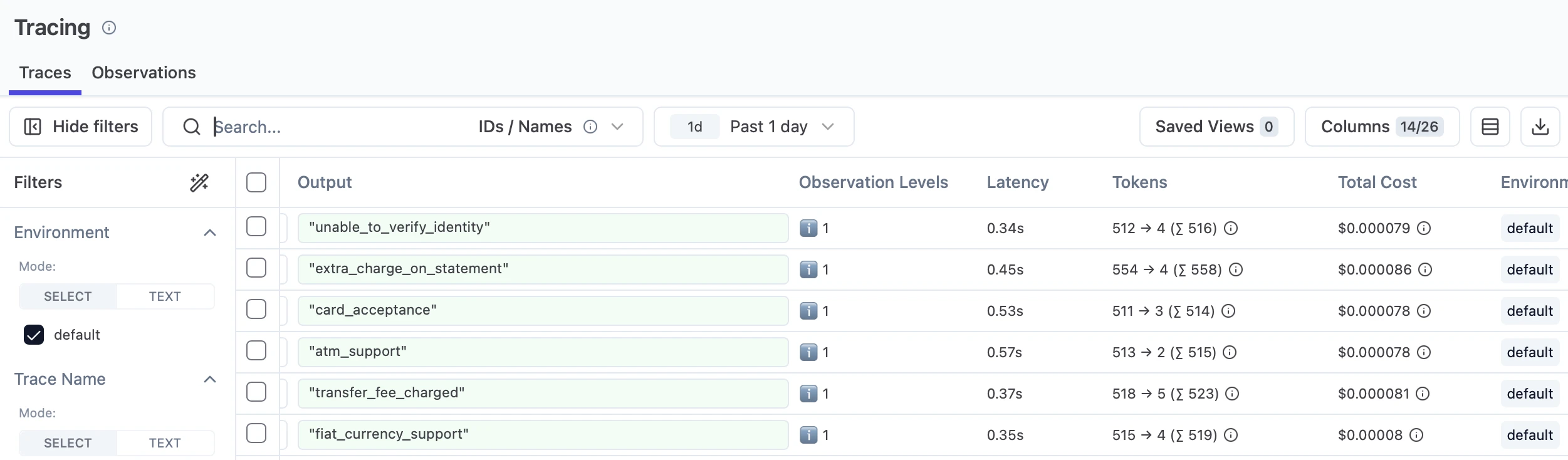
All traces are aggregated in a filterable table showing outputs, observation levels, latency, token usage, and total costs. Each row represents a single LLM call with color-coded observation levels indicating trace hierarchy or importance. Token counts display both prompt and completion tokens, along with totals, while cost calculations are automatically calculated based on the model used.
The Columns selector allows customization of displayed metrics, and filters enable narrowing down traces by environment, time range, or other criteria. This tabular view makes it straightforward to identify patterns such as consistently slow queries or unexpectedly expensive requests.
Braintrust
Braintrust is an LLM observability platform combining evaluation and production monitoring. The platform enables testing models against datasets, comparing different prompts or configurations, and tracking quality metrics through automated scoring. Built-in and custom evaluation functions measure accuracy, relevance, or domain-specific criteria, with results displayed in comparison tables showing performance differences between versions.
For production monitoring, Braintrust tracks real-time metrics including latency, cost, and custom quality scores as traffic flows through applications. Alerts trigger when quality thresholds are crossed or safety guardrails are violated. Brainstore, the platform’s log storage system, ingests application logs at scale with optimized search for AI interactions. The dashboard displays aggregated metrics across experiments and production runs, capturing cost tracking, token usage, and response metadata for both evaluation and production requests.
Helicone
Helicone is a proxy-based observability platform that monitors LLM applications by routing API requests through its proxy server. Integration requires changing the base URL without SDK installation or code modifications. The platform automatically captures requests, responses, costs, and token usage for monitoring application behavior.
The dashboard displays total request volumes, aggregated costs, and token consumption across all API calls. Request logs show complete input prompts and model outputs, enabling investigation of specific predictions or errors. Cost tracking breaks down spending by model type, user, or custom tags to identify expensive operations. Built-in caching detects duplicate requests and serves cached responses, reducing both API costs and response times. Rate limiting sets usage caps per user or endpoint to prevent unexpected spending spikes.
The platform focuses on monitoring individual API calls – each request appears as a separate log entry without built-in support for grouping related calls or visualizing sequences. This makes Helicone practical for applications such as independent LLM calls (e.g., single-turn chatbots), batch content generation, or classification tasks, but less suitable for tracking multi-step workflows where understanding relationships between sequential calls is important.
Comet Opik
Opik is an open-source LLM observability and evaluation platform from Comet, an established MLOps and experiment tracking vendor.2 Its core capabilities include:
- Tracing: captures LLM calls, agent steps, and tool invocations for end to end visibility into application behavior
- Evaluation: provides built in metrics and LLM as judge evaluators for scoring outputs such as hallucination, relevance, and moderation
- Integration with Comet: connects LLM traces with Comet’s experiment tracking platform, letting teams unify traditional ML metadata and LLM observability in one place3
Arize Phoenix
Arize Phoenix is an open-source platform for AI application development, observability, and evaluation, built by Arize AI and the open-source community.4 It is built on top of OpenTelemetry and powered by OpenInference instrumentation, so traces work with existing tooling without a proprietary format. Its core capabilities include:
- Tracing: captures every step an agent takes, including prompts, retrievals, tool calls, and outputs, giving end to end visibility into agent runs
- Evaluation: provides an evaluation framework that scores outputs and helps catch regressions before they reach users, with support for both human review and LLM as judge approaches
- Prompt engineering and iteration: includes a Prompt IDE for testing prompt and harness changes against real production examples
- Datasets and experiments: lets teams build datasets from traces and run experiments that compare changes on the same inputs to measure whether quality actually improves
- Annotations: supports labeling traces and spans to flag what worked and what broke during review
- Deployment options: can run locally, via Docker, on Kubernetes with Helm, or as Phoenix Cloud, with two free Phoenix Cloud instances available
- Open source and self hostable: ELv2 licensed with over 10,000 GitHub stars and 2.5 million downloads per month, with traces stored in the user’s own environment when self hosted
Monitoring platforms extending to LLM observability
Established application performance monitoring (APM) vendors are extending their platforms to cover LLM workloads.
Datadog
Datadog’s LLM Observability product is generally available and traces each step of an LLM pipeline, including prompts, model responses, retrieval steps, and tool calls. It tracks latency and token usage across these steps, and runs built-in evaluations on outputs, including checks for hallucinations, prompt injection, toxicity, and sensitive data exposure.5 6
IBM Instana
IBM Instana lists GenAI Observability as part of its full-stack application and infrastructure monitoring platform, positioned alongside its agentic-AI incident investigation capabilities.7
OpenObserve
OpenObserve introduced Observability 3.0, an AI-native platform that combines logs, metrics, traces, and real user monitoring with LLM observability in a single tool. Its AI SRE agent correlates alerts into incidents and identifies root causes automatically, while an AI Assistant converts natural language into SQL and PromQL queries, summarizes log patterns, and generates dashboards and alerts from plain-English descriptions. Anomaly detection is offered as a built-in alert type alongside threshold and composite options.8
Honeycomb
Honeycomb, an observability platform, has added AI and LLM-specific features to its product. Its Agent Timeline reveals relationships between user inputs, LLM interactions, tool calls, and agent invocations, while BubbleUp, a machine learning-powered anomaly detection tool, surfaces anomalies by combining metrics, traces, and logs. The platform also supports token usage monitoring and a natural-language Query Assistant for analyzing system behavior.9
New Relic
New Relic introduced Agentic AI Monitoring, adding agent-focused capabilities to its observability platform. It provides a service map of interactions between agents, performance metrics such as request volume, average latency, and error percentages, and trace-level drill-down into individual agent and tool calls.10
 Add as preferred source
What is LLM observability?
LLM observability is the practice of collecting and interpreting continuous data from large language models to understand how they behave during real-world usage. It focuses on gathering metrics, traces, and logs that show how LLMs respond to different prompts, tools, and external API calls.
Since language models operate through probabilistic reasoning, their internal processes cannot be directly inspected. This makes LLM monitoring dependent on reviewing LLM outputs, LLM inputs, and the intermediate steps that appear in agentic workflows. By studying these traces, LLM developers gain visibility into system performance, model behavior, and usage patterns that influence application performance and output quality.
LLM observability is vital for several reasons:
- Quality assurance: Large language models can produce incorrect or low-quality outputs for a wide range of reasons, including unclear prompts, drifting data, or unexpected user behavior. Monitoring prompts and responses helps track evaluation metrics such as correctness, coherence, relevance, and factuality. This allows teams to detect when LLM outputs start to decline in response quality or when the model begins generating hallucinations. As LLM use expands across enterprise workflows, ensuring consistent accuracy becomes a common challenge.
- Troubleshooting: When issues occur inside LLM applications, the root causes can come from many areas. Examples include poorly tuned prompts, faulty fine-tuning, failed external API calls, or logic errors inside multi-step agent workflows. By collecting LLM traces that show intermediate steps, developers can perform root-cause analysis efficiently and pinpoint the exact stage at which the behavior diverged. This reduces the need for human intervention and shortens error-tracking time.
- Optimization: Tracking system performance, resource usage, and token usage helps organizations identify bottlenecks and improve LLM performance. Teams can measure latency, throughput, memory usage, and error rates to understand how LLMs behave under varying load levels. They can also track tokens to control costs and review usage patterns to improve performance and cost efficiency. Continuous monitoring of these key metrics is especially valuable in retrieval-augmented generation and agent workflows, where performance bottlenecks often emerge from inefficient tool calls or unnecessary round-trip during reasoning.
Core metric categories
LLM observability tools typically group relevant metrics into three categories that support both software development teams and operational teams.
System performance metrics
- Latency: Measures the time between receiving a prompt and delivering a response.
- Throughput: Indicates how many requests the model can process within a given period.
- Error rates: Reveal how frequently the system returns invalid or failed responses.
Resource utilization metrics
- CPU and GPU consumption: Help understand how efficiently the system uses hardware.
- Memory usage: Affects scaling decisions and capacity planning.
- Token usage: Influences cost efficiency and helps teams control costs during heavy LLM usage.
- Throughput-to-latency trade-offs: Show how the system balances speed and processing volume.
Model behavior metrics
- Correctness, factuality, and response quality: For identifying low-quality outputs.
- User engagement and user feedback: Provide insights into how well the model meets user needs.
- Faithfulness and groundedness metrics: Reflect how closely the model adheres to the source material.
Manual vs. autonomous observability
Relying on manual observation presents several challenges. Large language models generate high volumes of data, and multi-step reasoning chains produce numerous logs and traces. The need for real-time monitoring increases the operational complexity, and even experienced teams struggle to review every LLM call without missing essential signals. Manual workflows also make it challenging to keep up with continuous changes in user behavior and prompt variations.
Autonomous observability systems address these challenges by using software agents that continuously analyze LLM activity. These agents detect anomalies, diagnose issues, and perform root cause analysis without constant human intervention. Automated evaluations also help identify risky behavior, such as prompt injection.
A system of this type supports continuous monitoring and ensures consistent tracking of evaluation metrics across the entire model. As a result, organizations benefit from faster troubleshooting, improved application performance, and better control over operational risks.
What to look for in LLM observability tools
Quality and security evaluations
- Hallucination detection to identify when the model deviates from reliable data.
- Prompt injection and jailbreak detection for addressing security concerns.
- Toxicity scoring and safety evaluations that support compliance and risk reduction.
- Clustering that groups similar LLM outputs to identify drift.
Experimentation features
- A/B testing for prompt management and configuration changes.
- Rapid comparison across multiple LLM models or parameters.
- Evaluation of accuracy, token consumption, and latency before deployment.
- Testing model changes against real-world scenarios using production-like data.
Correlation with infrastructure
- Connecting LLM traces to backend application performance monitoring data.
- Linking response time and response quality to real user sessions.
- Identifying how system performance affects LLM performance and application stability.
For on-premises LLM deployments, this correlation often extends down to GPU-level telemetry. OpenLIT, an OpenTelemetry-native observability tool for GenAI and LLM applications, includes built-in GPU monitoring with support for NVIDIA and AMD Radeon hardware, capturing metrics such as utilization, memory usage, temperature, and power draw during inference.
Correlating these metrics with model throughput lets operators identify when power or thermal limits are degrading inference performance, and helps tune hardware settings to sustain reliable AI workloads.11 12
LLMOps and governance
- Guardrails that filter unsafe prompts and block harmful responses.
- Dashboards for tracking PII exposure, hallucinations, and safety violations.
- Tools that support compliance, reporting, and analysis of security incidents.
Several products are built specifically around these governance and compliance needs:
Databricks Unity AI Gateway is a central control layer for agents, LLM endpoints, and Model Context Protocol (MCP) servers. Its capabilities include:
- Access and policy controls: configures permissions and enforces guardrails across endpoints
- Capacity management: manages capacity across providers and rate limits endpoints
- Payload logging: logs request and response payloads for auditing
- Usage and cost monitoring: tracks usage and cost through system tables
- MCP server governance: governs MCP servers through Unity Catalog permissions13 14
Openlayer is an AI governance and observability platform aimed at regulated industries. Its capabilities include:
- Pre-deployment testing: structured tests across hallucinations, bias, toxicity, and robustness
- Real-time observability: monitoring and tracing for LLM calls, retrieval pipelines, and multi-step agents
- Guardrails: protection against prompt injection and PII leakage
- Compliance support: automated compliance mapping with continuous evidence capture and audit-ready reporting, aligned with frameworks like the EU AI Act and ISO/IEC 4200115
OpenTelemetry as an emerging standard
OpenTelemetry is an open source, vendor neutral framework for collecting traces, metrics, and logs from software systems. It matters for LLM observability because AI applications combine many moving parts such as models, vector databases, tools, and agent frameworks, and without a shared standard each component emits data in its own format, which makes end to end debugging difficult and locks teams into whichever monitoring vendor they instrumented for first.
OpenTelemetry’s GenAI semantic conventions define a common schema for model calls, token usage, tool invocations, and agent workflows, so traces from different libraries can be captured and analyzed in a consistent way.16
Most major LLM observability platforms, including Arize Phoenix, Langfuse, and Honeycomb, ingest OpenTelemetry data natively, which lets teams instrument their applications once and switch backends later without rewriting their tracing code.17
Multi-agent workflow observability
As LLMs power multi-step agent workflows, observability requirements expand beyond single request-response pairs. Agentic applications introduce additional layers of complexity that require dedicated tracing approaches.
Key observability dimensions for agents:
- Planning and reasoning traces: Visibility into how the agent breaks down tasks, selects actions, and refines its approach based on intermediate results
- Tool call monitoring: Tracking external API calls, database queries, and function executions to identify latency bottlenecks or failures
- Handoff tracing: For multi-agent systems, monitoring how tasks transfer between agents and whether context is preserved correctly
- State evolution: Understanding how memory and context change across multiple turns within a session
Together, these dimensions form the foundation of agentic monitoring. LLM observability tools such as Langsmith, Langfuse, AgentOps and Weights & Biases provide agent-specific tracing views that display full execution graphs.
Beyond these general-purpose tools, some products focus specifically on agent reliability. One example is Omium, which positions itself as an observability and reliability product purpose-built for AI agents in production.18
Its main capabilities include:
- Structured spans: Captures spans for every LLM call, tool use, and agent decision
- Multi-agent tracing: Stitches cross-agent calls into a single unified trace for real-time diagnostics
- Failure classification: Auto-tags failures into categories such as hallucination, infinite loop, tool error, and context drop
- Checkpoint recovery: Snapshots agent state at every tool call and LLM response, allowing workflows to resume from any checkpoint instead of restarting from zero
- Framework support: SDKs for TypeScript, Python, and Go, with auto-detection for LangChain, LangGraph, OpenAI, and Anthropic
FAQs
Effective agent observability captures the full execution trace, from initial request through tool calls and final response. This includes how a model receives a request, selects tools, retrieves data from a data source, and generates a final response. Observability matters because LLM applications continue to grow in complexity, and the number of LLM-powered apps that rely on multi-step reasoning increases sharply. As a result, organizations need observability tools that provide real-time monitoring and automated evaluation to ensure consistent performance across all LLM apps.
Modern LLM observability tools aim to provide a detailed overview of every action within LLM-powered apps. This includes tracking every LLM call, every tool interaction, and every intermediate step that appears in an agentic reasoning chain. The ability to observe the whole workflow from prompt to final answer helps teams detect unexpected behavior and understand how LLM models make decisions.
Cost and token analytics have also become essential. Real-time tracking of token usage helps organizations maintain cost efficiency and avoid unexpected spending spikes. Teams can break down token usage by provider, model, feature, or application path to understand how different components contribute to cost. Some observability tools allow users to compare multiple LLM providers side by side, helping with performance and cost-efficiency decisions when routing requests across open-source LLMs and proprietary options.
Across the ecosystem, observability tools consistently frame LLM observability as a requirement for operating LLM applications at scale. Teams that rely on agent workflows need visibility into how the model moves through multi-step reasoning and how each decision affects model performance. Observability helps ensure consistent high-quality responses, detect failures early, and maintain user trust.
Another theme is the need to manage operational costs. Tracking token usage, memory usage, and resource utilization metrics helps organizations control spending while maintaining performance and cost efficiency. Observability also reveals performance bottlenecks that influence user satisfaction and application performance.
Finally, LLM observability matters because organizations increasingly rely on LLM models for critical functions. As these systems expand, monitoring tools must be framework-agnostic, able to integrate with open-source platforms, and capable of providing insights across multiple services. This supports safe deployment, reduces security concerns, and helps teams understand the model’s outputs in a broader operational context.
Cite this research
Pick the format that matches where you're publishing. Pasting the link version into your CMS preserves the backlink.
@misc{ermut2026,
  author = {Ermut, Sıla and Şipi, Nazlı},
  title  = {{LLM Observability Tools: Weights & Biases, Langsmith}},
  year   = {2026},
  month  = jul,
  howpublished    = {\url{https://aimultiple.com/llm-observability}},
  note   = {AIMultiple. Retrieved July 16, 2026}
}Results and timestamps of 7 data points. Download the summary data shown in this article's charts and tables as a ZIP file containing one CSV file.
Want the granular data behind it? Join Premium
Changelog
2 updatesAdded sections on Comet Opik, Arize Phoenix, APM vendors, OpenTelemetry, governance platforms, and Omium.
Added a section on observability for agentic workflows.
Reference Links
She previously worked as a recruiter in project management and consulting firms. Sıla holds a Master of Science degree in Social Psychology and a Bachelor of Arts degree in International Relations.








Be the first to comment
Your email address will not be published. All fields are required. Comments are left in their original language.