


Compare 15+ Script Schedulers

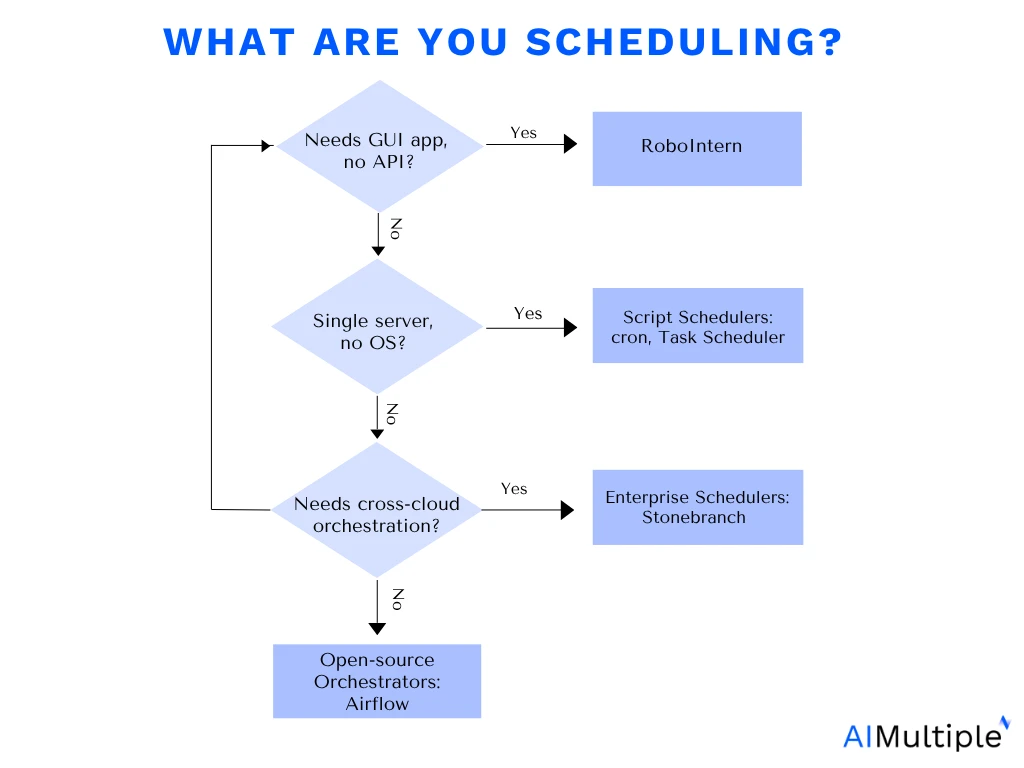
Script scheduling tools market is divided into two main categories:
- Task-specific script schedulers: Free, open-source tools for basic job scheduling. These script schedulers are ideal for organizations focusing on script and job scheduling without extensive workflow automation.
- Enterprise job schedulers: Orchestrate workloads across different systems and hybrid cloud environments for large enterprises. Enterprise job schedulers are often closed-source with high annual costs.
Task-specific script schedulers
Script-specific scheduling tools schedule and manage tasks and scripts at specified times or intervals. They often lack advanced settings like conditional logic but some offer monitoring and integration options.
These tools split into two groups by scope:
- Open-source orchestrators built for scripted or DevOps environments: Apache Airflow, Argo Workflows, Jenkins
- Windows-native tools for single-machine automation:
- Proprietary: Windows Task Scheduler, Advanced Task Scheduler, Z-Cron
- Free: Task Till Dawn, RoboIntern (freeware), FluentTaskScheduler (open-source, MIT)
Open-source script schedulers
Here is a GitHub stars graph from the open-source script schedulers listed above:
Windows-native script schedulers
Here’s a closer look at the three most widely compared Windows desktop tools:
Wintask scheduler
Windows Task Scheduler in Microsoft Window runs computer programs or scripts at scheduled times. It forms the basis for the PowerShell scheduled job feature. Yet, the built-in Task Scheduler in modern Windows (8 and later) no longer includes the “Send an e-mail” or “Display a message” actions.1
Administrators requiring similar functionality must use alternatives such as scripting or other tools; for example, using PowerShell’s Send-MailMessage cmdlet instead of the removed email action, or the msg.exe command-line utility instead of the removed message action. Windows Scheduler users can run PowerShell script to monitor and alert about any software installations on a local computer in the following steps:
- Create a scheduled task to run at a specified interval and under certain conditions
- Configure the task to execute a PowerShell script that is a set of instructions written in the PowerShell scripting language.
- Trigger an alert if the script identifies a new software installation
- Send an alert as a notification, email or any other method specified in the script.
Task Till Dawn
AfterTask Till Dawn supports PowerShell and Python scripts with cron-style scheduling on macOS and Windows. The scheduler’s features include:
- Scheduling options, allowing users to set intervals, fixed times, and validity periods for task automation while handling missed tasks intelligently.
- Event-based execution triggered by system events, screen changes, and events related to volumes, drives, and user sessions.
- Efficient workflows with built-in actions, covering file operations, system checks, and computer standby or shutdown.
- Notification support through channels like Notification Center and Windows Infocenter, alerting users through speaking notifications, tooltips, and warning sounds for error occurrences.
- Additional features: Task Till Dawn includes features like automatic startup, task grouping, multilingual support, a temporary Task Scheduler halt, a tolerance setting for missed schedules, and an automatic update check.
RoboIntern
RoboIntern is an operational automation tool that targets tasks that require direct application manipulation without developer overhead.
- Code-free application automation: RoboIntern features native, pre-built actions for Microsoft Office ecosystems. Users can automate Excel macro operations, run Access database queries, and generate Word documents through a graphical configuration wizard without writing code.
- GUI: RoboIntern includes a built-in user interface recorder capable of simulating mouse clicks, keystrokes, and graphical user interface (GUI) interactions. This way, RobotIntern helps automate legacy desktop applications that lack an API or command-line interface, a task native OS schedulers cannot perform alone.
- Built-in notification & token pipelines: The platform features native integration with email servers (SMTP/IMAP) and file systems. This allows users to pipe the output of a scheduled task (such as a newly generated PDF report) directly into an automated email notification or log repository without writing custom script logic.
- Script execution: RoboIntern supports the execution of scripts written in scripting languages like PowerShell, allowing users to incorporate custom automation logic.
Enterprise-focused alternatives to script schedulers
Enterprise script schedulers (also known as workload automation tools) manage end-to-end data pipelines and workloads in hybrid and multi-cloud environments. These enterprise platforms consolidate disconnected scripts across diverse operating systems into a single, centralized control point.
Common features:
- Integration capabilities and workflow orchestration
- Scalability and high availability
- Centralized management and cross-platform support
- Dependency management and robust error handling
- Security and access controls
This list below includes enterprise tools that mention script scheduling capabilities on their website and are rated on B2B review platforms:
Stonebranch
Stonebranch Universal Automation Center (UAC) supports Windows, Linux, and mainframe environments, with REST API integration for cloud services like SAP, Oracle databases, and AWS S3 event triggers. Stonebranch scheduling features include:
- Hybrid & cross‑platform scheduling: Centralizes workload automation across on‑premises, cloud, and multi‑cloud infrastructure.
- Real-time & event-driven triggers: Supports both scheduled jobs and reactive, event-driven automation.
- DevOps & Jobs-as-Code support: Enables jobs-as-code workflows integrated into CI/CD pipelines.
- Universal agent execution: Lightweight agents run jobs consistently on Linux, Windows, z/OS, and other platforms.
- Self-service automation: Role-based portals allow non-IT users to safely trigger workflows.
- MFT integration: Secure file transfers can be automated as part of scripts and workflows.
Activebatch
ActiveBatch includes pre-built connectors for Microsoft SQL Server and Oracle, reducing integration setup time compared to custom scripting. It supports no-code workflows and script execution in languages such as PowerShell, Python, Java, VBScript, and shell scripts. Some major capabilities are:
- Flow control job steps:Visually orchestrate and manage workflow tasks with drag-and-drop, simplifying creation, reducing errors, and speeding deployment.
- REST API adapter to integrate with internal systems.
- Running and modifying scripts in any programming language supported by the operating system.
- A job step library that offers ready-to-use, cross-platform job steps for building and automating workflows efficiently.
- Orchestration to route workflows based on script outcomes by linking scripts, running them in parallel or sequence, and integrating script-based and no-code actions into cohesive workflows.
- Scheduling features to support interval-based or date/time schedules to meet practical scheduling needs.
- For example, it provides customization options for holidays, fiscal calendars, and business rules, ensuring adaptability.
- Trigger support to facilitate various triggers, including FTP file triggers, database modifications, emails, tweets, and web service triggers. This ensures efficient script execution with zero slack time or false starts.
- Task scheduler library management tools like auditing, versioning, and a centralized repository to incorporate lifecycle management capabilities.
- Check-Out | Check-In functionality to enable multiple developers to work simultaneously on the same objects with a built-in conflict resolution tool.
JAMS Scheduler
JAMS Scheduler offers .NET API access for custom integrations and supports clustered failover configurations. Its capabilities include:
- Integrating batch processing into PowerShell scripts
- Managing batch tasks with PowerShell.
- Dividing large applications for improved server performance.
- Offering custom PowerShell host to enhance control, communication, and UI capabilities.
How do script schedulers work?
Script schedulers function like an automated operations assistant, using background services and system rules to run code without human intervention. They rely on persistent background routines, configuration parsers, and operating system-level APIs. Schedulers execute this automation using two primary architectural patterns:
Time-driven architecture
This architecture triggers automation based purely on the clock, matching the current system time against a pre-set schedule. Time-based schedulers run a low-overhead background service, known as a daemon (e.g., crond in Linux) or a system service (e.g., Windows Task Scheduler).
- The polling loop (Cron): This method uses a constant, recurring clock check to find matching tasks. The background daemon wakes up exactly at the
00second mark of every minute to evaluate system configuration files (crontabs). It checks the current time against a 5-to-6-field schedule matrix (e.g.,*/15 9-17 * * 1-5for every 15 minutes during work hours). If a match evaluates to true, it triggers the script. - The high-precision sleep delta: This method calculates the exact wait time until the next single event so the system can remain completely dormant between jobs. Instead of checking in every minute, engines calculate the precise duration until the next single scheduled task and put their active thread into a hardware-controlled sleep state. When the timer expires, the kernel fires an interrupt to wake the engine up instantly, reducing CPU consumption to near zero between runs.
Event-driven architecture
This architecture bypasses chronological time entirely, triggering scripts when a specific action or change occurs in the digital environment. Modern enterprise or cloud schedulers manage these real-time triggers via three main types of hooks:
- Kernel observers (
inotify): This trigger watches local storage folders for file activity. It monitors the filesystem directly at the operating system level; for instance, completing a file write triggers a processing script instantly without any continuous polling. - Webhooks & API listeners: This trigger waits for incoming network notifications sent by outside applications. The scheduler exposes a web address (a REST endpoint) that remains completely idle until an external system pushes an HTTP
POSTdata payload to it (such as a payment notification or repository update). - State dependencies: This trigger chains tasks together in a sequence, automatically launching the next step as soon as the previous one finishes. Complex jobs are organized into Directed Acyclic Graphs (DAGs). The scheduler evaluates internal state changes, such as “Job A finished with Exit Code
0“to automatically trigger downstream Job B. - AI agent orchestration: Agentic orchestration chains a trigger to a reasoning step instead of running a fixed script. For example, n8n can schedule a recurring Reddit data export using reddit-user-to-sqlite, route the archived data through an LLM for classification, and store the result in a vector database for retrieval or content generation. Learn more AI on workflow orchestration.
3. Execution isolation
When it is time to run a script, the scheduler isolates the execution process in a secure, temporary bubble so that errors or crashes cannot break the main scheduling system. It manages this containment through four strict steps:
- Forking: It spawns an isolated, independent child shell environment (e.g.,
/bin/bashorpowershell.exe) completely separate from its own system process. - Context Injection:It passes the specific environment variables, secure access tokens, and directory paths into that isolated bubble so the script has the credentials it needs to run.
- Stream Redirection:It redirects the script’s live text feedback into storage logs. By attaching the script’s standard output (
stdout) and standard error (stderr) streams to log files or database records, it captures all text outputs for later auditing. - Signal Catching: It listens for the OS exit code. An code of
0denotes success; any non-zero integer flags a failure, instantly kicking off retry logic or admin alerts.
Further reading
Check out other IT automation tools to run scripts:
- SAP Job Scheduler Alternatives
- Top Enterprise Job Scheduler Software
- Batch Scheduling Software: Vendor Benchmark
 Add as preferred source
Cite this research
Pick the format that matches where you're publishing. Pasting the link version into your CMS preserves the backlink.
@misc{simsek2026,
  author = {Şimşek, Hazal},
  title  = {{Compare 15+ Script Schedulers}},
  year   = {2026},
  month  = jul,
  howpublished    = {\url{https://aimultiple.com/script-scheduler}},
  note   = {AIMultiple. Retrieved July 6, 2026}
}Results and timestamps of 73 data points. Download the summary data shown in this article's charts and tables as a ZIP file containing 4 CSV files.
Want the granular data behind it? Join Premium
Changelog
5 updatesAdded a GitHub stars chart and open-source vs Windows-native tool grouping to the schedulers list.
Removed the "What is a script scheduler?" overview section.
Added Stonebranch to the enterprise-focused alternatives to script schedulers.









Be the first to comment
Your email address will not be published. All fields are required. Comments are left in their original language.