


Compare 16 Coding Agent Orchestrators by Features and Pricing

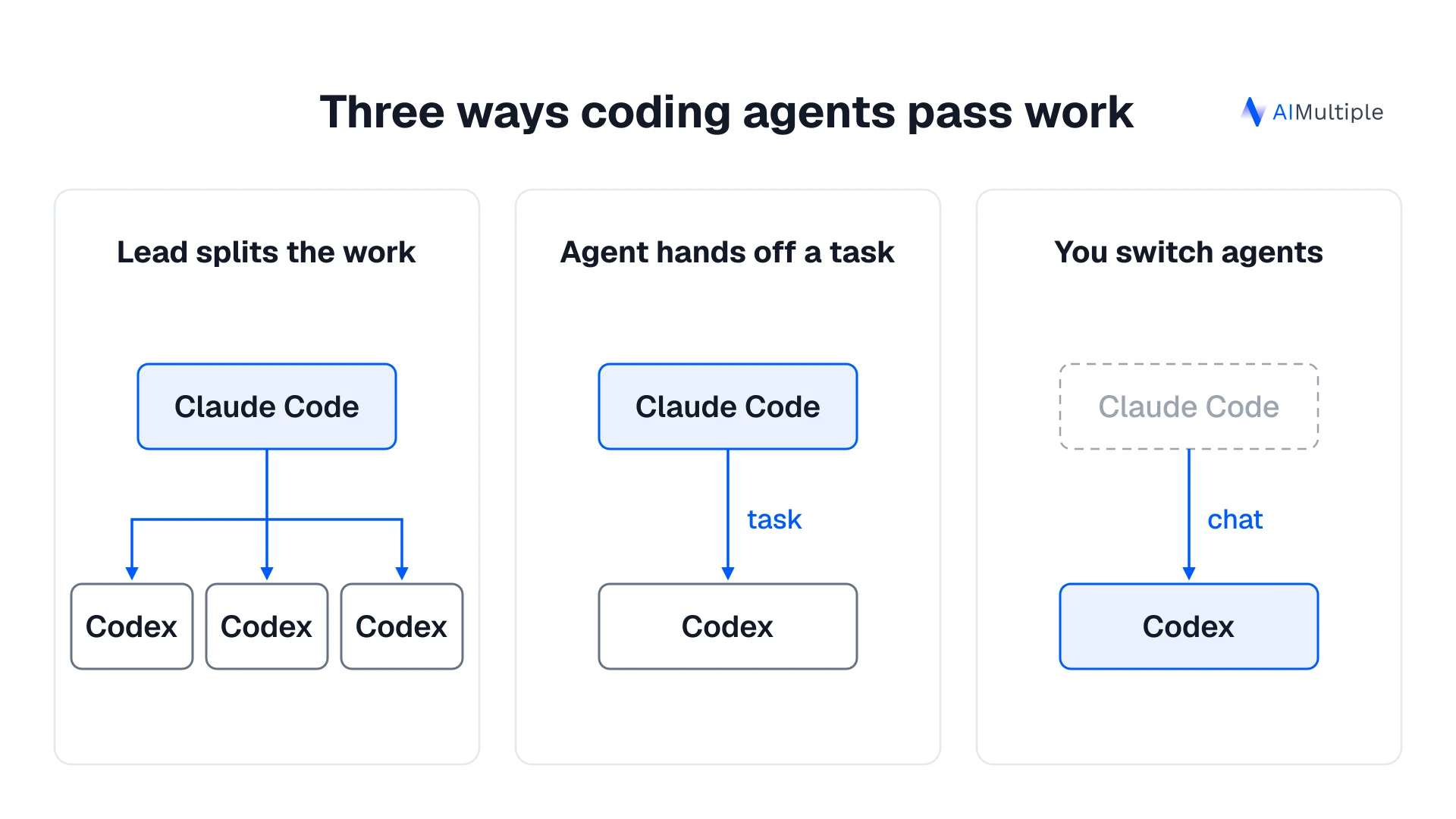
A coding agent orchestrator lets coding agents from different vendors, such as Claude Code and Codex, pass work to each other. We compared 16 of them. They pass the work to the agents in three ways, and some tools offer more than one:
- A lead splits the work: a lead agent hands parts of the work to workers, for example in AionUi, Omnigent and Agent Teams.
- One agent hands off a task: the other agent by default gets the task text but not your conversation, for example in T3 Code, Happy and Codeg.
- You switch the conversation to another agent: the new agent gets recent messages or a summary, for example in T3 Code, Happier and Paradev.
Overview and pricing
All 16 run Claude Code and Codex with either an API key or your Claude or ChatGPT subscription. ACP in the tables is the Agent Client Protocol, an open standard for how an app talks to a coding agent. If a tool and an agent both use ACP, the tool can run that agent without code written for that agent. The features you get depend on what the agent supports.
Tool | Type | Core capability | Standout feature | Free use | Paid plans from | Team plan | Commits (last 30 days) |
|---|---|---|---|---|---|---|---|
T3 Code | Desktop app | Runs the coding agents you already use in one app | Change the model in the middle of a thread, or let Claude hand a task to Codex | Free; T3 Connect remote access from phone or browser free for 3 machines | No T3 Code plan; a paid T3 Chat plan (Pro or Premier) links more machines to remote access | None, only settings an admin locks for a machine's users | 500+ |
AionUi | Desktop app | A desktop app with its own agent that also runs the coding agents you have installed | Its own agent works as soon as you install the app and add any API key | Free | None | None | 12 |
Happy | Phone and desktop apps | Runs coding agents and shares their sessions with your phone and your team | A teammate's agent task shows up in your sidebar as soon as it starts | Free; voice commands in the phone app: 20 free minutes per 30 days | Voice subscription: $19.99 per month (App Store) | None, free self-hosted server | 500+ |
Happier | Phone and desktop apps | Lets you follow and control the coding agents on your own computers from any device | Keeps each agent's own terminal interface and mirrors it to every device | Free | None | None, free self-hosted server | 500+ |
Paseo | Desktop app | Runs coding agents on your computer or a server and lets you reach them from any device | Agents can launch agents from other providers and talk to them | App free; Hub (starts agents from Slack or GitHub): 50 runs a month or self-hosted | Hub Pro: $15 per seat per month | Hub Pro or a self-hosted Hub | 500+ |
Paradev | Desktop app | Runs coding agents in terminals, each task in its own git worktree | Cloud workspaces from the Team plan, or your own cloud server from the Pro plan | Free plan | Pro: $20 per user per month | Team, with cloud workspaces: $60 per user per month; Enterprise: custom price | 500+ |
Agent Orchestrator | Desktop app | Runs many coding agents, each task on its own branch and worktree | A main agent plans the work and starts a worker for each piece | Local use free | Cloud Starter: $20 per month | None yet; Enterprise: custom price | 500+ |
Omnigent | Phone and desktop apps | A server you host that runs many coding agents behind one interface | Comes with two team agents: Polly splits work across agents, Debby runs a debate between models | Free | None | None, free self-hosted server | 500+ |
Conductor | Desktop app, closed source | Runs coding agents in parallel, one workspace per task | Cloud sandboxes where agents keep running, on paid plans | Desktop app free | Pro: Not published | Teams: Not published, invite-only | Not public |
AutoSwarm | Desktop app | Lets one agent bring in agents from other vendors for a task | Add it to the agent you already use, and it picks and coordinates the right agents for each task | Free | None | None | 84 |
Supported agents
In Other agents, Limited means you can add agents the tool does not list, but only ones that support ACP.
Feature comparison
Working with agents
Happy runs agents on its own harness in a sandbox on your computer, and Omnigent does the same for some of its agent types. Paradev, Agent Orchestrator and Conductor run agents in a sandbox in their paid cloud. Where the Sandbox column says Limited, the tool mostly adds no sandbox of its own and leaves isolation to the agent’s settings. Ghostex is the exception: it can also run agents in a Docker container on your Mac or Linux computer through agentbox, a free open source tool you install separately.
Platforms and integrations
For Happy, Happier and Omnigent, the operating system columns mean the machine that runs the agents. Usage tracking means you can see usage or quotas, not that a session moves to another account when one hits its limit.
Popularity
| Tool | Stars |
|---|---|
| CLI Agent Orchestrator | 1615 |
| Ghostex | 1714 |
| Happier | 2253 |
| Agent Teams | 2523 |
| AutoSwarm | 2668 |
| Codeg | 4553 |
| Munder Difflin | 9675 |
| Omnigent | 11475 |
| Agent Orchestrator | 14980 |
| Paradev | 16439 |
| Paseo | 24563 |
| Happy | 24740 |
| AionUi | 34418 |
| T3 Code | 68450 |
| Ruflo | 82188 |
Tool profiles
T3 Code (T3 Tools)
T3 Code is an open source desktop, web and phone app that runs the coding agents you are already signed in to, such as Claude Code, Codex and Cursor, in one interface. It is not an agent itself.
- Orchestration: You start threads and pick the agent. An agent uses its own subagents for work on the same provider, and can hand a task to another provider’s agent in a child thread.1 The agent that hands off the task can choose the provider and model. If it does not, the new thread uses the same ones.
- Context and memory: The child thread gets only the task prompt, not the parent’s history. The parent either waits for the result or keeps working and is woken when the task ends. If you switch the model in the middle of a thread instead, the new agent gets the recent messages but not the old agent’s reasoning.
- Usage and accounts: A usage page shows tokens, estimated API-equivalent cost and provider limits.
- Control: You can interrupt, queue or steer a running agent and answer its approvals in the thread, also from your phone. MCP servers are set per provider.
AionUi
AionUi is a free, open source “cowork” desktop app, also usable in a browser, with its own agent that can also host Claude Code, Codex, Gemini CLI and other CLI agents.
- Orchestration: In Team Mode, a leader agent splits your instructions into subtasks and assigns them to teammates.2 The leader proposes teammates from a catalog of assistants and waits for your approval, unless you asked for specific ones; you can also add or remove members while the team runs. Other ACP agents can join if they support stdio MCP.
- Context and memory: A teammate gets its task through a mailbox, all members work in one shared folder, and results go back to the leader and a shared task board.
- Usage and accounts: Conversations with a CLI agent show token and context use, and the cost when the agent reports it.
- Control: Agents ask for permissions in dialogs, the leader can interrupt a teammate, and tasks can run on a schedule. You add MCP servers once, and AionUi syncs them to each agent in the form that agent supports.
Happy
Happy is an open source team app: a daemon on your laptop or on a shared computer runs Claude Code, Codex, Grok and Gemini. Desktop and phone apps let you and your team follow and steer the agents.
- Orchestration: An agent can start subagents and choose their harness, model and effort; a setting limits which harnesses it can reach.3 Bots are standing agents with one job. They can answer people you let in on Telegram, or on Slack or Discord through a small bridge.
- Context and memory: By default a subagent gets only its task, or the parent’s thread if the parent asks for it. The parent is notified when a background subagent finishes, and a finished subagent can be resumed with more messages. Bots keep one long conversation and a notes folder.
- Usage and accounts: The app shows the quota of each account and token use for a whole tree of sessions. A pool of accounts from the same provider moves Happy’s own sessions to the next account after a quota error, but Claude Code and Codex sessions stay on the account they started on.
- Control: The desktop app shows each session’s phase, tools and subagents, and you can approve or steer from your phone. Agents on Happy’s own harness work in an OS sandbox unless you give them full access. Agents on another vendor’s harness keep their own permissions. MCP servers come from one Happy catalog shared by every model.
Happier
Happier is an open source app for your phone, desktop, browser and terminal that shows the coding agents running on your own machines on every device, where you can follow, message and approve them.
- Orchestration: You launch agents yourself, and an agent can start another session or ask another vendor’s agent to review, plan or take over a task, for example Claude asking Codex.4 A spawned agent chooses its backend and model within a spawn policy you can narrow, and never gets more authority than its parent.
- Context and memory: A spawned session gets a self-contained task, and the parent reads its status or transcript. If you switch a session from Claude to Codex in place, the new agent gets a summary of the recent conversation.
- Usage and accounts: Quota meters show your linked accounts’ quotas where the provider reports them. In an account pool where you turn on automatic switching, a Claude Code or Codex session moves to another account in the pool. The strategy you set picks it, for example the account with the most quota left.
- Control: One inbox gathers permission requests and agent questions from all your sessions. You can interrupt a session, and steer it during a turn where the agent supports that. MCP servers live in one list synced to your account.
Paseo
Paseo is an open source app for running many coding agents on your own computer or a server, with desktop, phone, web and command line clients.
- Orchestration: You start agents yourself, and once you turn on its tools, an agent can start agents from other providers and send them prompts.5 Agent profiles carry “When to use” notes that the lead agent reads to pick one, and you can tell it which profile or provider to use.
- Context and memory: A worker gets the prompt the lead writes and, if you choose, its own worktree. The lead is notified when the worker finishes and can read its status.
- Usage and accounts: A usage panel shows your accounts’ quotas. Each session shows its token use, and its cost when the provider reports it.
- Control: The lead can steer, cancel or stop its workers and answer their permission requests, and schedules and heartbeats start or prompt agents on a timer. MCP servers can be set per session through its SDK.
Paradev (formerly Superset)
Paradev is an open source desktop app and CLI that runs CLI agents in terminals, each task in its own git worktree, with cloud workspaces on the Team and Ultra plans.
- Orchestration: You run agents yourself, or ask for its bundled orchestration skill, which turns Claude Code or Codex into a coordinator that starts workers through Paradev’s CLI and picks an agent for each.6 You merge their branches yourself.7
- Context and memory: Each worker gets a bounded prompt with its task, files and acceptance criteria, and reports done or blocked for the coordinator to check. Continuing a session in another agent passes the last 36,000 characters of terminal output, without removing secrets.
- Usage and accounts: Quota meters cover Claude Code, Codex and other logins, with token cost estimates at API list prices. You can add several accounts and pick the default by hand.
- Control: A sidebar shows which agent is working, done or waiting, and pull requests go through checks, review and merge in the app. On the Pro plan, automations start agents on a schedule or on GitHub, Slack or Linear events.
Agent Orchestrator (Untrivial)
Agent Orchestrator is an open source desktop workspace and CLI for running a fleet of coding agents, each task with its own agent, branch and worktree, with paid cloud agents as an option.
- Orchestration: A project’s main agent plans the work and starts workers without coding itself, and you can also start workers by hand.8 Each role has a default agent in project settings, for example Claude Code to supervise and Codex to implement, and the main agent can pick another one per worker.
- Context and memory: A worker gets the prompt or issue the main agent writes, plus the project rules, and reports back when done.
- Usage and accounts: Chat shows usage per session. You can see the limits of several Claude Code or Codex accounts and move a session between them. A setting you turn on moves a Chat session to another account when it hits a usage limit.
- Control: The board sorts sessions into lanes such as Working, Needs you, In review and Ready to merge, and the phone app tells you when an agent needs you. You merge from the app or the CLI, or ask the main agent to if project rules allow it.9
Omnigent (Databricks)
Omnigent is an open source server from the Databricks AI team that you host yourself. It runs Claude Code, Codex, Cursor and other agents. You reach it from a terminal, a browser, desktop and phone apps or Slack.
- Orchestration: Its default agent, Polly, never writes code: it splits your goal into subtasks and hands each to a subagent with its own harness and git worktree.10 Polly picks among seven declared subagents by rules in its prompt, for example Claude Code for work across many files and Codex for narrow changes, and you can tell it which one to use.
- Context and memory: A worker gets its task and purpose, and a reviewer gets a saved diff, the commit range and the task’s contract. Results come back to Polly’s inbox. A shared memory across sessions and harnesses is available behind a feature flag, off by default.
- Usage and accounts: A usage page reports session and daily spend once you turn on its feature flag. Policies set cost thresholds that ask you first, a hard limit that blocks expensive models, and budgets per session, subagent or user.
- Control: You can open and steer any subagent, even during a turn, and policy cards ask you to allow or deny risky actions. MCP servers are declared per agent and passed to the harness it runs on, and on a server with an MCP registry, users pick shared services for a session.
- Watch out: Polly’s Codex and Cursor subagents run with approval prompts turned off by default, and the Codex one also runs without Codex’s sandbox. The Claude Code subagent runs in auto mode. A policy still blocks force pushes and
rm -rf /.
Conductor (Meta)
Conductor is a proprietary Mac and iPhone app that runs Claude Code, Codex, Cursor and OpenCode in parallel, one workspace per task, on your Mac or in Conductor Cloud on paid plans.
- Orchestration: Agents in local workspaces can create a workspace, start a chat with another agent, wait for its reply and send more messages. Through the Conductor MCP and API, both in beta, they can also manage cloud workspaces.11 Each chat runs one harness and model that you select.
- Context and memory: The other agent gets the prompt sent to it. Chats in one workspace share its code and a
.contextfolder for handoffs, and agents in local workspaces can search your earlier chats. - Usage and accounts: For local workspaces, a Usage page shows recent chats, tokens and estimated cost, and the composer shows provider limits.
- Control: The sidebar groups workspaces by status, a message you send while an agent works steers it, and you approve plans and, where tool approvals are on, tool calls.12 Local sessions use each agent’s own MCP config, and cloud organizations can add MCP servers centrally. Routines run agents on a schedule in the cloud on Pro or Team plans.
AutoSwarm (HKU Data Intelligence Lab)
AutoSwarm, from the Data Intelligence Lab at HKU, is a plugin and CLI you install into an agent you already use, plus a Windows and macOS app, AutoSwarm Desk.
- Orchestration: The agent you talk to becomes the lead and calls the other agents through AutoSwarm’s CLI.13 It matches each task to agents with its own table of which agents fit which tasks, and your choice of agent wins.
- Context and memory: A worker gets the task text, not the lead’s conversation, and its result comes back to the lead. There is no shared memory store: each agent keeps its own, and you can resume a worker’s session later.
- Usage and accounts: Desk shows time and tokens per conversation when the agent records them.
- Control: A worker’s approval requests and questions go to its parent first, which asks you when unsure. In Desk you answer them as cards, message any worker, stop a conversation, and set trigger rules for notifications. Agents keep their own logins, and AutoSwarm does not manage MCP servers.
- Watch out: AutoSwarm sets no limit on agents, turns or task time, and its installers are not signed by a verified developer.
Munder Difflin (Chaitanya Giri, HarnessMD)
Munder Difflin is an open source desktop app that runs each agent as a terminal CLI shown as a character at a desk, for coding and other knowledge work, using your existing subscriptions.
- Orchestration: An orchestrator agent, Michael, starts with the office, splits the work and hands pieces to other agents through message files; its guide pairs a Claude Code orchestrator with Codex workers.14 Michael prefers an agent already in the office, above all one you name, and starts a temporary one only when nobody fits, using a live list of each agent’s context fill and usage limits.
- Context and memory: A worker gets a short brief with the goal, expected output, tools and limits, and replies when done. Each agent keeps its own memory file, and the office shares one memory you can search.
- Usage and accounts: Usage limits are read from each engine’s login, where the engine reports them. You can cap tokens per agent, and a circuit breaker tells an agent that loops or overspends to change approach, then cuts its budget, and stops it if you allow that.
- Control: A task board, an Ask me queue for decisions and typing straight into any agent’s terminal. MCP servers are approved once for the whole office, and you can override that for each agent. A Cloud Office on the paid Max plan, opening one account at a time, runs every agent in a sandbox.
- Watch out: The open source Classic build includes the orchestrator, but the site now lists the orchestrator, shared office memory and token limits as Pro features, with a monthly free allowance of Pro tokens.
Codeg
Codeg is an open source desktop app, also a self-hosted server, that runs the twenty coding agents it ships with and any ACP agent in one chat interface.
- Orchestration: The agent you chat with is the lead and hands subtasks to other agents with a delegate tool. An @ mention tells the lead which agent to hand the work to, for example asking Claude Code to have Codex write tests; otherwise the lead picks among the agents you enabled.15 Delegation is off by default.
- Context and memory: A worker starts a fresh session with only the task text, not your conversation, and the lead reads its result. Handoffs return at once, so several workers can run in parallel. You can import and search the history each agent keeps and hand an old session to another agent, but saved assistants keep no memory between tasks.
- Usage and accounts: A token usage page shows estimated prices.
- Control: A side panel lists running workers, you can watch any of them live and answer their permission prompts, and cancelling the lead stops its workers. Separately, a task board runs each task in its own git worktree. You add an MCP server once and tick which agents get it.
CLI Agent Orchestrator (AWS Labs)
CLI Agent Orchestrator is an open source local server and CLI that runs coding CLIs such as Kiro CLI, Claude Code and Codex in tmux terminals.
- Orchestration: You launch a supervisor agent from a profile, and it hands work to workers through MCP tools. A handoff waits for the result, an assignment runs in the background, and a message goes to an inbox.16 The supervisor names a worker profile or searches profiles by keyword, and a profile’s provider setting decides which CLI the worker runs on.
- Context and memory: A worker gets the task message and the supervisor’s folder, or its own git worktree, and its result comes back as the handoff’s return value or an inbox message. Agents keep a persistent memory, on by default, that CAO feeds into new sessions for most providers.
- Usage and accounts: Each CLI keeps its own login.
- Control: A web UI shows live terminals, status and the inbox, and flows start agents on a cron schedule, with a script that can skip a run. Each agent profile lists its own MCP servers.
- Watch out: A worker’s tool limit is enforced by Claude Code, Copilot CLI and OpenCode themselves, but on Codex, CAO only asks for it in the system prompt, so Codex can still use a blocked tool.17 By default, Claude Code workers skip permission prompts, and the server asks for no token.
Ruflo (formerly claude-flow, by Reuven Cohen)
Ruflo is an open source extension for Claude Code and Codex: its installer or plugins add an MCP server, hooks and role agents to a project.
- Orchestration: Your Claude Code session stays the lead and starts other agents, and Ruflo’s hooks decide in the background which agent gets each task. Claude Code can also start Codex workers that run in the background.18 Ruflo picks each agent’s role from the type of task and from what worked on earlier tasks, or you name the role yourself.
- Context and memory: Workers get their task prompt and coordinate through a shared, persistent memory with vector search that Claude Code and Codex workers both use.
- Usage and accounts: An optional cost plugin tracks usage and cost per agent and model, with budgets that alert at 50, 75 and 90% and stop new non-essential agents at 100%. Cognitum, which powers Ruflo, sells ruFlo Proxy, a monthly subscription from $19 that adds model tokens and lets more agents run at once.19
- Control: Its Mission Control console, beside Claude Code or as a terminal UI, shows workflows, agents, tokens and cost, and by default Claude can only read and ask there. A federation plugin lets agents on other machines exchange work.
Ghostex (Mohamad Yahia)
Ghostex is a free, open source native desktop app, with iOS and Android companions, that puts Claude Code, Codex, OpenCode, Cursor and other agents in one sidebar, as a chat or a terminal.
- Orchestration: Any agent can start other agents through the
ghostexcommand, and you can create a coordinator that hands work to threads and manages a project in one thread.20 You name the agent, model and effort, or the coordinator picks. - Context and memory: A thread starts from a written brief and reports back to the coordinator automatically; a manual handoff carries the last 20 turns by default, or the whole conversation if you choose. Coordinators keep notes you can read and edit.
- Usage and accounts: You can link several Claude and Codex accounts and see their usage, and by default a session moves to another account with room when one hits its limit.
- Control: A work panel, an approvals list and push notifications keep you in the loop, and an optional Autopilot answers approvals for you. Its Agents Hub shows each agent’s configs and MCP servers.
Agent Teams (777genius)
Agent Teams is a free, open source desktop app for running a team of coding agents, a lead plus members with roles, on a kanban board.
- Orchestration: The lead splits the work into tasks and assigns them, and you can also assign tasks from the board.21 You set each member’s role, provider and model when you create the team, for example a Claude lead with OpenCode builders.
- Context and memory: Members read their tasks and messages from their own inboxes and report back with comments, status changes and diffs you can review.
- Usage and accounts: The app reports token use, alerts you on monthly token or cost budgets, and can prompt a Claude lead to continue after a rate limit resets.
- Control: The kanban board is the main view. You review each change by file or by hunk, message members, and either let them run on their own or approve their actions one by one. An MCP registry lets you search for and install user or project MCP servers, and its own server handles team coordination.
FAQs
Yes. All 16 have a free way to run them, and nine have no paid plan for the tool itself. The others charge for extras such as cloud machines, automations, team seats, remote access or voice.
 Add as preferred source
How we compared
We read each vendor’s pages and repository on November 19 and 21, 2026. We kept the tools whose docs name at least 3 third party coding agents and that had a release or commit in the last 30 days. Commit counts cover October 22 to November 21, 2026. We read GitHub stars on November 21, 2026. For the 15 open source tools, we tied ✓ and Limited marks to the tool’s code or repository docs on its default branch on November 21, 2026. We checked the marks again against live vendor pages and repositories on November 23, 2026. Conductor’s marks rest on its docs and changelog. Prices, plans and paid cloud features come from vendor pages. No vendor paid AIMultiple or saw the article before publication.
For broader lists, see AI coding tools and AI agent tools.
Cite this research
Pick the format that matches where you're publishing. Pasting the link version into your CMS preserves the backlink.
@misc{yila2026,
  author = {Yıla, Berkay},
  title  = {{Compare 16 Coding Agent Orchestrators by Features and Pricing}},
  year   = {2026},
  month  = nov,
  howpublished    = {\url{https://aimultiple.com/coding-agent-orchestrator}},
  note   = {AIMultiple. Retrieved November 23, 2026}
}Results and timestamps of 79 data points. Download the summary data shown in this article's charts and tables as a ZIP file containing 5 CSV files.
Want the granular data behind it? Join Premium
Reference Links





Be the first to comment
Your email address will not be published. All fields are required. Comments are left in their original language.