


Local AI Agents: Goose, Observer AI, AnythingLLM

Local AI agents are often described as offline, on-device, or fully local. We spent three days mapping the ecosystem of local AI agents that run autonomously on personal hardware without depending on external APIs or cloud services.
Our analysis categorizes the leading solutions into three key areas, based on hands-on testing across developer agents, automation tools, and productivity assistants.
Local AI agent categorization
Category | Tools/Frameworks | Primary use cases (Local / Offline) |
|---|---|---|
Developer & system agents | Goose, Localforge, Devika, Roo Code (Boomerang Mode), Continue.dev, Cursor, CodeGenie, SuperCoder, Aider, Cline, Kilo Code | Local coding, debugging, file/process automation, local DevOps tasks |
Local automation & control agents | Observer AI, Browser-Use, DeepBrowser | Local browser control, file automation, app interaction, on-device workflows |
Knowledge & productivity agents | AnythingLLM (Desktop), LocalGPT (Single-User), PrivateGPT | Offline document Q&A, summarization, local search/RAG |
1. Developer & system agents
*Execution types:
- Fully local: The tool runs natively on personal hardware using local runtimes. Tools capable of operating entirely offline.
- Hybrid local: The core model or task execution happens locally, but some features, such as IDE integration, context indexing, synchronization, or reasoning, still rely on cloud services or APIs.
** Explanation for on-machine column:
- Fully on-device: Complete offline operation inference, reasoning, and execution all run locally.
- Local inference, cloud-assisted: Core model runs locally, but IDE or management features use online services.
- Local execution, remote reasoning: Code runs locally, but external APIs power reasoning or planning steps.
Goose
Goose is an open-source development agent designed to operate entirely on local hardware.1
Core capabilities:
- Uses local LLM runtimes for reasoning and code generation
- Executes multi-step tasks such as writing, testing, and debugging code
- Interacts directly with the local file system and developer tools
- Does not require network connectivity when configured with local models.
Goose satisfies a strict definition of a local autonomous agent, as observation, reasoning, and action occur on-device.
Roo Code(Boomerang Mode)
Roo Code is an IDE-integrated coding assistant emphasizing iterative refinement.
- Boomerang Mode enables local execution of actions
- Reasoning commonly relies on cloud-based models
- IDE coordination and management features are not fully local
As a result, Roo Code should be classified as a hybrid, human-in-the-loop developer agent, rather than a fully local system.
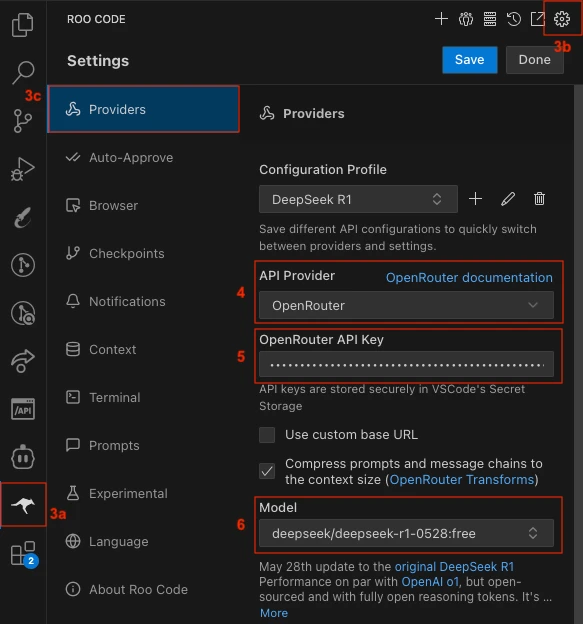
Local AI agent configuration in Roo Code:
Roo Code allows developers to create custom configuration profiles that define how it connects to different AI models, including locally hosted LLMs.
From Settings → Providers, you can add profiles through OpenRouter or other supported providers, then choose a local model running via Ollama or LM Studio.
Each configuration profile can store its own parameters, including temperature, reasoning depth, and token limits. This lets you switch between lightweight cloud models and fully local runtimes for on-device inference.
Cursor
Cursor allows the use of local LLMs for inference but remains dependent on cloud services for:
- Code indexing
- Edit application
- Workflow coordination
Therefore, Cursor supports local inference, but not a fully local agent loop, and cannot operate offline.
How to use a local LLM within Cursor:
Source:Logan Hallucinates2
Aider
Aider is an open-source, command-line–based AI coding assistant designed to work directly with local Git repositories. It modifies code by generating patches and commits rather than operating through an IDE interface.
Aider is often used with cloud-hosted models, but:
- The tool itself runs locally
- When paired with a local model runtime, it can operate fully on-device
Offline capability is therefore conditional on model choice, not intrinsic to the tool.
2. Local automation & control agents
Observer AI
Observer AI is an open-source local automation agent framework.
Core features:
- Executes agents using local LLMs
- Observes screen state via OCR or screenshots
- Runs Python code through an embedded execution environment
- Requires no cloud connectivity
Observer AI provides the infrastructure for agent behavior rather than a fixed agent policy, and is best described as a local control-loop framework.
Browser-Use
Browser-Use enables AI-driven browser interaction through Playwright.
- Browser actions are executed locally
- Reasoning may be performed using either local or remote models
- Offline operation is possible when paired with local inference
This places Browser-Use firmly in the hybrid automation category by default.
How to use a local LLM within Browser-Use:
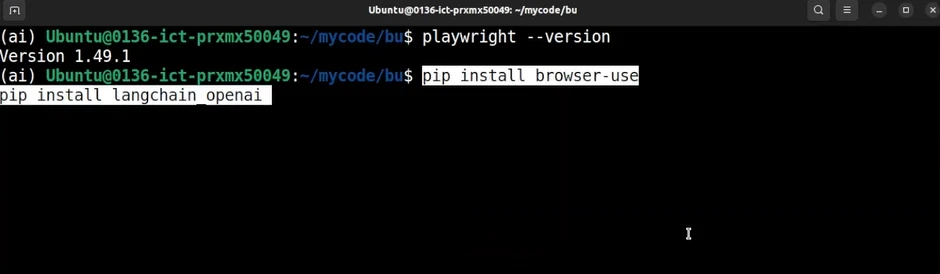
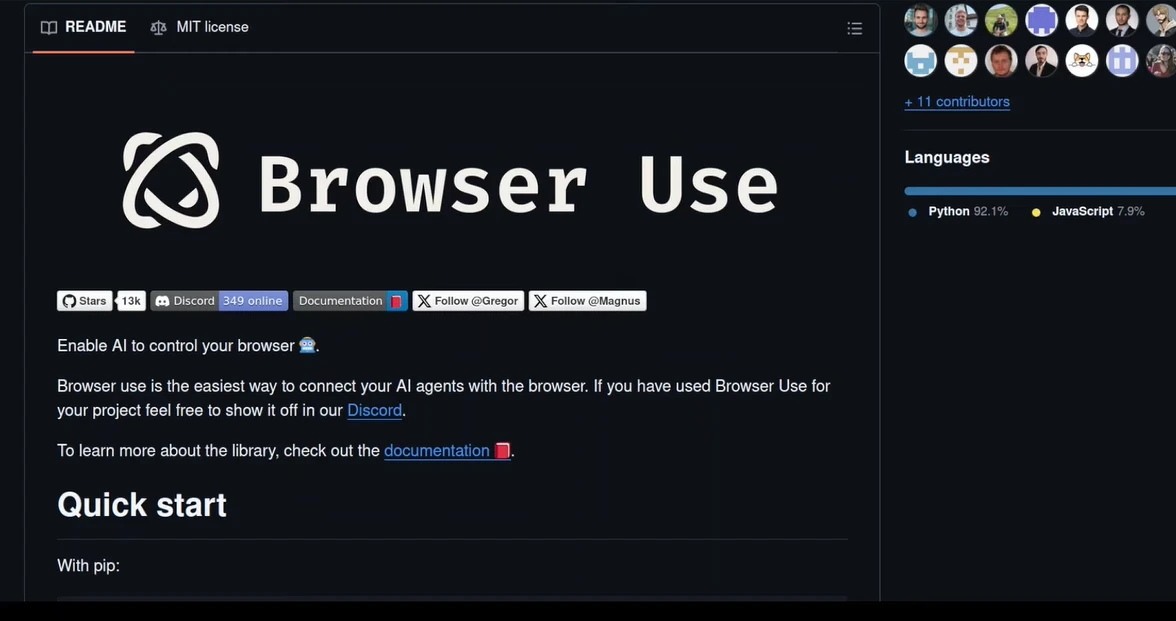
One method to install it is to use pip install browser-use command, which sets up both the Python interface and local browser control on the same machine.
When later run (for example, with python -m browser_use), it will open and control a browser instance locally, executing actions and reasoning either through a local LLM (e.g., via Ollama) or through connected APIs:
Setting Browser-Use up locally3
For those who want to see the complete setup in action, here’s a step-by-step video guide showing how to install and run Browser-Use on a local machine:
The walkthrough covers everything from installing dependencies like Playwright and LangChain to connecting Browser-Use with a local model via Ollama.3
3. Knowledge & productivity agents
AnythingLLM (Desktop)
When configured with local models, AnythingLLM Desktop:
- Performs document indexing locally
- Executes agent reasoning on-device
- Supports limited action capabilities (e.g., file writing)
- Does not require cloud connectivity
While its autonomy is constrained compared to system agents, it qualifies as a local productivity agent under a narrow task definition.
An exemplary use of a local AI agent
We tested AnythingLLM Desktop to see how a local, on-device agent works from setup to final output.
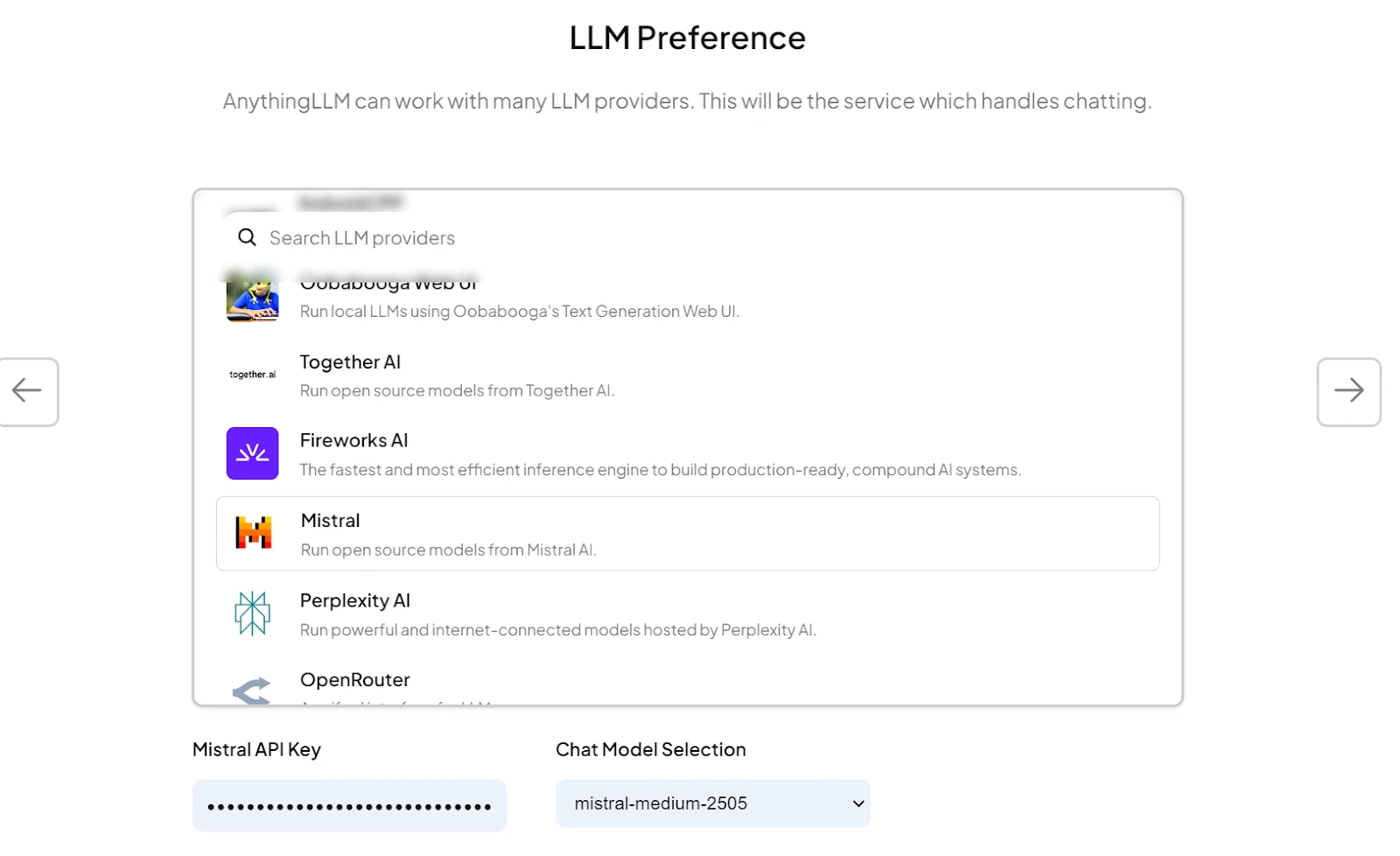
1. Setting up the workspace
We opened the workspace settings and went to Agent Configuration.
There, we chose an LLM provider and selected the mistral-medium-2505 model.
After clicking Update Workspace Agent, the workspace confirmed that the setup was complete.
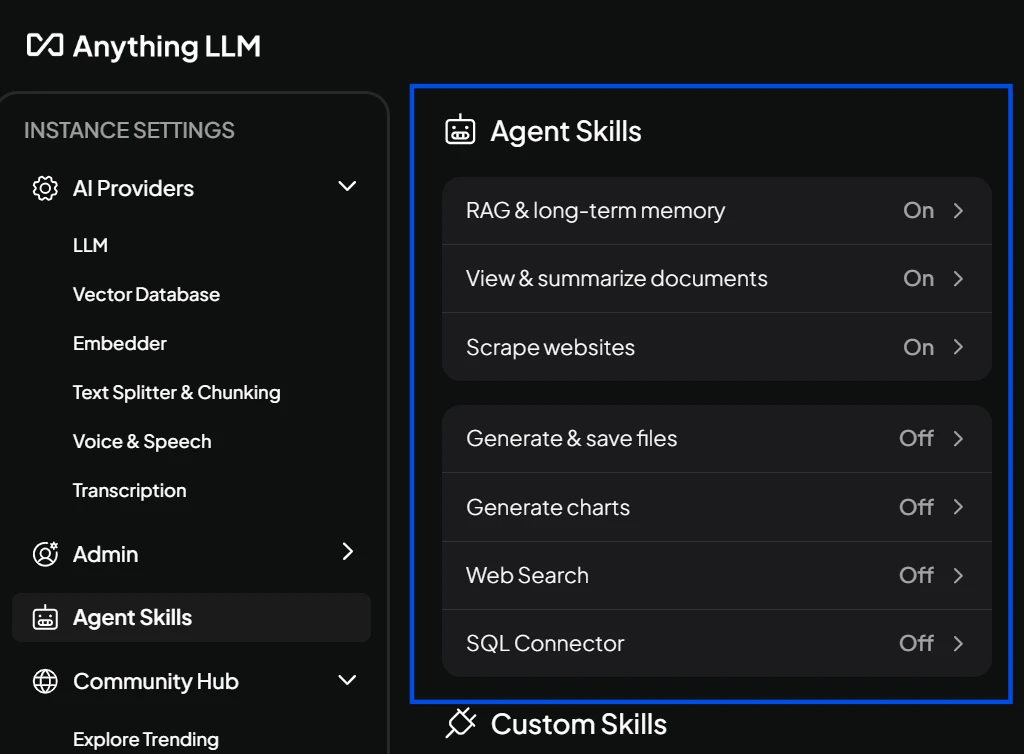
2. Enabling agent skills
Next, we opened the Configure Agent Skills panel.
This menu allows you to enable built-in agent capabilities with a single click. No coding is required.
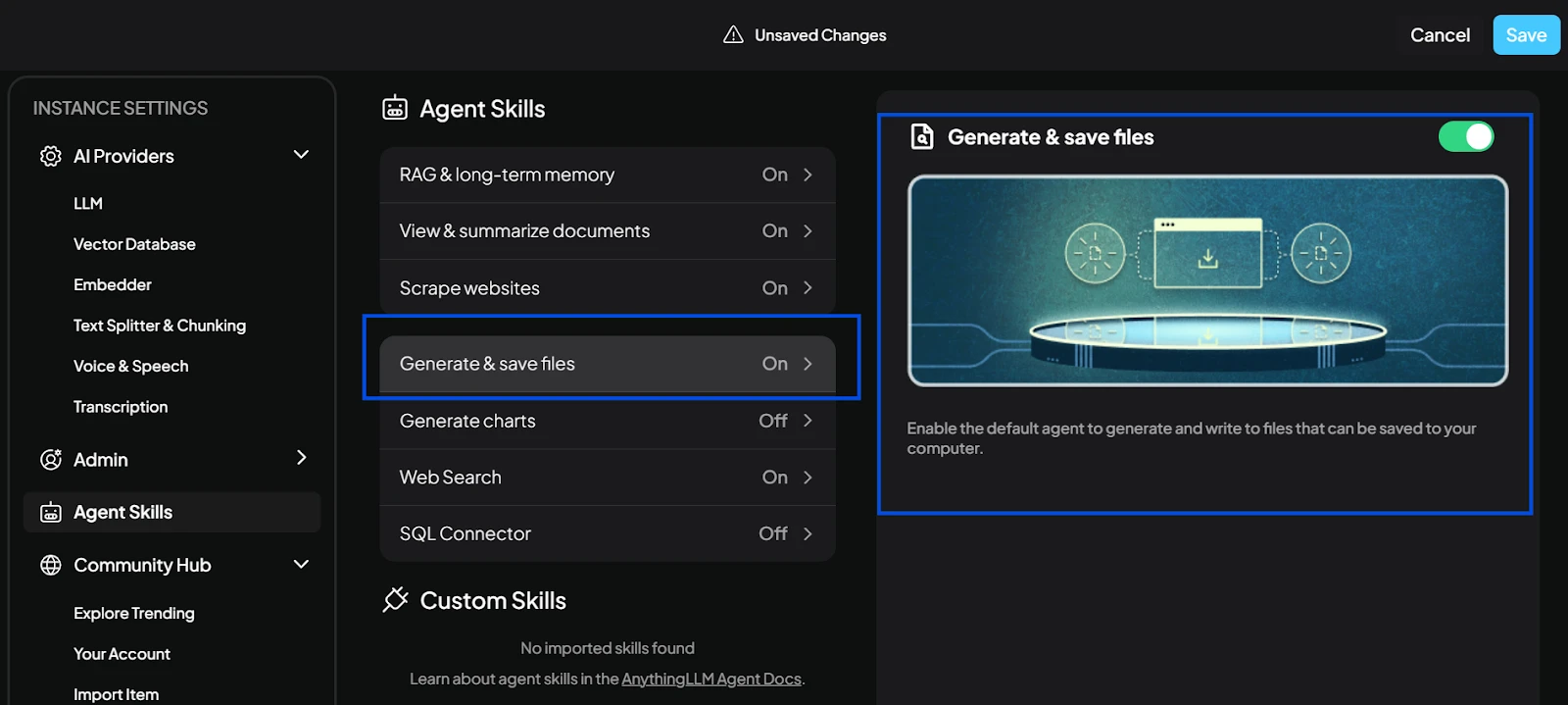
3. Testing the “Save Files” skill
We enabled the Save Files skill, allowing the agent to write outputs directly to the local machine.
After turning it on and saving the change, the agent was ready.
To test it, we went back to the chat window and used one of the sample prompts from the documentation.
This confirmed that the agent could generate a file and prepare it for local saving.
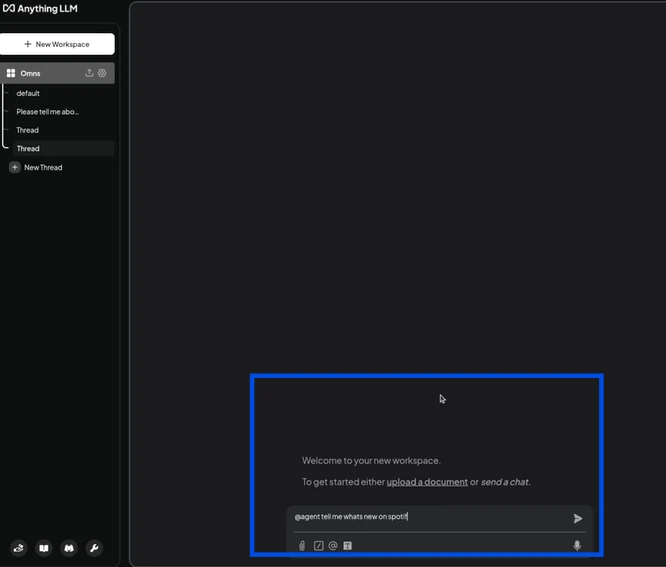
4. Running the agent in chat
We asked the agent to summarize a historical topic and invoked it using @agent.
We modified the command to save the output as a simple text file instead of a PDF.
The system confirmed that Agent Chat Mode was active and showed how to exit the loop.
The agent produced the summary and prepared the file for saving.
5. Saving the file locally
To save the output, we used the example command from the AnythingLLM docs:
“@agent can save this information as a PDF on my desktop folder?”
We ran the same structure in chat, but for a text file.
A file browser window opened, and we saved the output on the device.
The file appeared in the Downloads folder, indicating that the full process, reasoning, execution, and saving were all performed entirely on-device.
Local AI agent category descriptions
- Developer & system agents (action layer): Agents that run directly on your device to perform coding, system, and workflow automation tasks locally.
- Local automation & control agents: Agents that automate real-world actions on your machine by controlling the browser, UI, or OS.
- Knowledge & productivity agents: Local assistants for chat, summarization, and document handling without sending data to the cloud.
Architectural layers in the local agent stack
- Action layer (agents): Systems that observe state, invoke tools, and act on the local environment.
- Reasoning and orchestration layer (frameworks): Libraries such as LangGraph or LlamaIndex that support planning, memory, and coordination. These are not agents themselves.
- Execution layer (local runtimes): Model runtimes such as Ollama or LM Studio that enable local inference.
Hardware: what local agents actually need
The model and the framework are half the story. The hardware decides what is actually possible. For running language models locally, two numbers matter most: how much memory you have, and how fast that memory is.
RAM (or VRAM) sets the ceiling on model size
A model has to fit in memory before it can run. A rough guide for 4-bit quantized models: a 3B model needs around 2 GB, a 7–8B model needs around 5–6 GB, a 13B model needs around 8–10 GB, and a 70B model needs around 40–48 GB. Add headroom for context, the OS, and any other application running. In practice, memory is the bottleneck more often than compute, and on Copilot+ PCs the recommended target for comfortable local LLM use is at least 32 GB of RAM.4
Memory bandwidth sets the speed
Once a model fits, how fast it generates tokens depends mostly on how quickly the system can read the model’s weights from memory. This is why Apple Silicon’s high memory bandwidth (up to 800 GB/s on the M4 Max) is the practical advantage for LLM inference, not the number of neural engines.5
NPU TOPS matter less than the marketing suggests
A neural processing unit is a chip designed for AI math, and its rating is given in TOPS (trillions of operations per second). Microsoft’s Copilot+ PC certification requires at least 40 TOPS. That threshold is geared toward Microsoft’s own on-device features (live captions, image effects, Recall) rather than running a chat-style LLM. For LLM workloads, RAM and bandwidth dominate. NPU performance is a useful tiebreaker, not the headline number.
A practical rule:
- For 3B-class assistant models, a current laptop with 16 GB of unified memory or RAM is enough.
- For 7–8B models with comfortable speed, target 32 GB of RAM and high memory bandwidth. Apple Silicon, Snapdragon X-series, and current Intel/AMD Copilot+ PCs all work; the differences show up in tokens-per-second, not in whether the model runs.
- For larger models (30B and up), the options split. High-memory Apple Silicon (Mac Studio or MacBook Pro configurations with 64–192 GB of unified memory) can run large models that no consumer discrete GPU can fit. The alternative is a workstation with one or more high-VRAM discrete GPUs. Both paths work; they have different cost and power profiles.
 Add as preferred source
Practical guidance
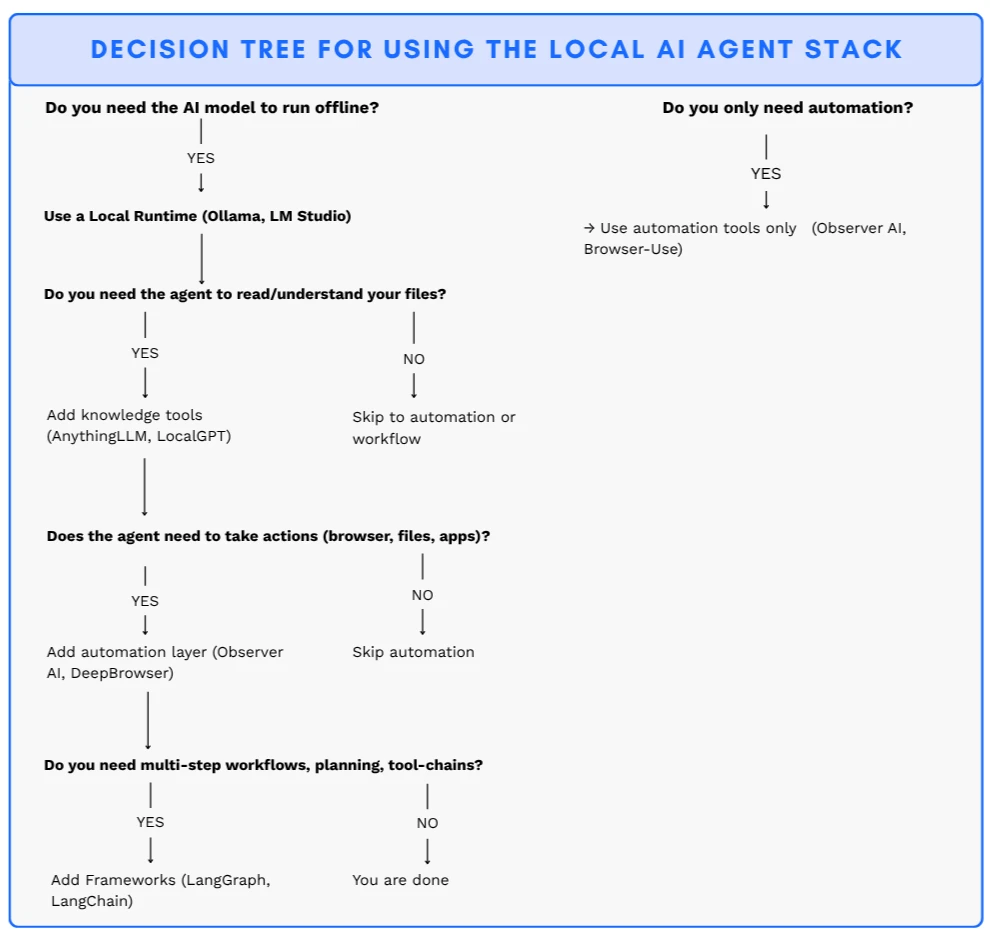
Local AI systems should be assembled incrementally:
- Begin with a local runtime if offline inference is required.
- Add a knowledge layer when document understanding is needed.
- Introduce automation or control agents when real-world actions are required.
- Use orchestration frameworks for complex, multi-step workflows.
In most cases, a fully layered stack is unnecessary.
How to approach the local AI agent stack
Start with the smallest set of layers your use case requires. If your agent needs offline reasoning, begin with a local runtime like Ollama or LM Studio. If it needs to understand your files, add a knowledge layer such as AnythingLLM or LocalGPT. For agents that must take actions (opening apps, controlling the browser, managing files) add a local automation layer. Use frameworks like LangGraph or LlamaIndex when you need multi-step workflows, planning loops, or complex toolchains.
Why run an agent locally
Privacy is a legal question, not a preference
Under the Digital Omnibus, the EU AI Act’s high-risk obligations now apply from 2 December 2027 for standalone (Annex III) systems and from 2 August 2028 for AI in regulated products; transparency obligations under Article 50 have applied since 2 August 2026.6 Penalties can reach €15 million or 3% of global annual turnover. A model running on your own hardware processes data in your environment, without transmitting it to a cloud provider. The risk of cross-border data transfer disappears.7
Latency
Cloud API calls add 200–500ms of network delay before the first token appears. On-device inference cuts that to under 20ms. For voice agents, code completion, and anything that touches a UI in real time, this is the difference between fluid and laggy
Cost at volume
Cloud calls are cheap per request and expensive in bulk. A local model has a fixed hardware cost and no per-token bill. The trade-off is still real: local agents are limited by the model that fits in memory and the hardware on the desk. The next sections cover both.
FAQs
Local AI agents operate autonomously on personal hardware without relying on external APIs or cloud infrastructure.
Cite this research
Pick the format that matches where you're publishing. Pasting the link version into your CMS preserves the backlink.
@misc{dilmegani2026,
  author = {Dilmegani, Cem and Arslan, Ezgi},
  title  = {{Local AI Agents: Goose, Observer AI, AnythingLLM}},
  year   = {2026},
  month  = jul,
  howpublished    = {\url{https://aimultiple.com/local-ai-agent}},
  note   = {AIMultiple. Retrieved July 30, 2026}
}Results and timestamps of 19 data points. Download the summary data shown in this article's charts and tables as a ZIP file containing 4 CSV files.
Want the granular data behind it? Join Premium
Changelog
3 updatesAdded "Why run an agent locally" and local hardware requirements sections.
Removed the 'Frameworks' and 'Local runtimes & infrastructure' sections.
Reference Links
Cem's work at AIMultiple has been cited by leading global publications including Business Insider, Forbes, Morning Brew, and Washington Post, global firms like Deloitte and HPE, NGOs like World Economic Forum, and supranational organizations like European Commission. [1], [2], [3], [4], [5]
Throughout his career, Cem served as a tech consultant, tech buyer and tech entrepreneur. He advised enterprises on their technology decisions at McKinsey & Company and Altman Solon for more than a decade. He also published a McKinsey report on digitalization.
He led technology strategy and procurement of a telco while reporting to the CEO. He has also led commercial growth of deep tech company Hypatos that reached a 7 digit annual recurring revenue and a 9 digit valuation from 0 within 2 years. Cem's work in Hypatos was covered by leading technology publications like TechCrunch and Business Insider.
Cem regularly speaks at international technology conferences. He graduated from Bogazici University as a computer engineer and holds an MBA from Columbia Business School.




Be the first to comment
Your email address will not be published. All fields are required. Comments are left in their original language.