


Arquivo da web APIs: 4 principais provedores testados & comparados

Um arquivo da web guarda páginas que foram coletadas antes de você pedir por elas, então você pode extraí-las sem rastrear os sites você mesmo. O que cada provedor armazena, e quanto disso eles entregam, varia muito.
Testamos 4 deles com consultas de exemplo para ver como funcionam e o que retornam.
Comparação de recursos das APIs de arquivo da web
- HTML bruto disponível: marcação da página como o servidor a enviou. Os termos do Webz.io mencionam “as páginas HTML completas”, mas o arquivo retorna um campo
texte não concede direitos aos arquivos brutos. - Entrega em massa para seu próprio armazenamento: uma seleção filtrada gravada em um destino que você controla. O corpus do Common Crawl fica em S3 público para você baixar; nada é enviado para lugar nenhum. O Webz.io entrega apenas por meio da sua API.
- Ao vivo scraping do mesmo fornecedor: abrange a família de produtos, não apenas o endpoint de arquivo, então responde se um único fornecedor pode cobrir tanto páginas arquivadas quanto nunca arquivadas. O Exa é o único em que o fallback fica dentro da mesma chamada.
Preço e gratuito créditos
O Bright Data cobra $0,2 por 1.000 páginas para dados das últimas 24 horas e $1 por 1.000 para qualquer coisa mais antiga. O Exa cobra $7 por 1.000 buscas além do preço da página, então localizar 1.000 páginas antes de recuperá-las adiciona cerca de $0,70, o que faz com que os dois números idênticos de $1 se comportem de forma diferente na prática.
Créditos gratuitos cobrem a entrega de dados: a consulta é gratuito nos quatro, então a diferença é se os créditos gratuito também pagam para extrair os dados. O Bright Data permite 100 buscas de arquivo por dia sem custo, cada uma retornando a contagem de registros correspondentes e o preço de entrega antes de qualquer cobrança, para que um trabalho possa ser dimensionado gratuito. O Webz.io funciona da mesma forma, com uma amostra gratuito e uma estimativa de custo, mas um dump exige créditos pré-pagos comprados separadamente. O Common Crawl e o Exa permitem que créditos gratuito paguem pela recuperação real.
APIs de arquivamento da web
Bright Data Web Archive API vende acesso a páginas que sua infraestrutura já coletou por meio do Unlocker e das SERP APIs. Em vez de executar um crawler, você descreve o que quer com filtros, revisa uma estimativa de custo e recebe as páginas correspondentes entregues em seu próprio armazenamento.
Filtros
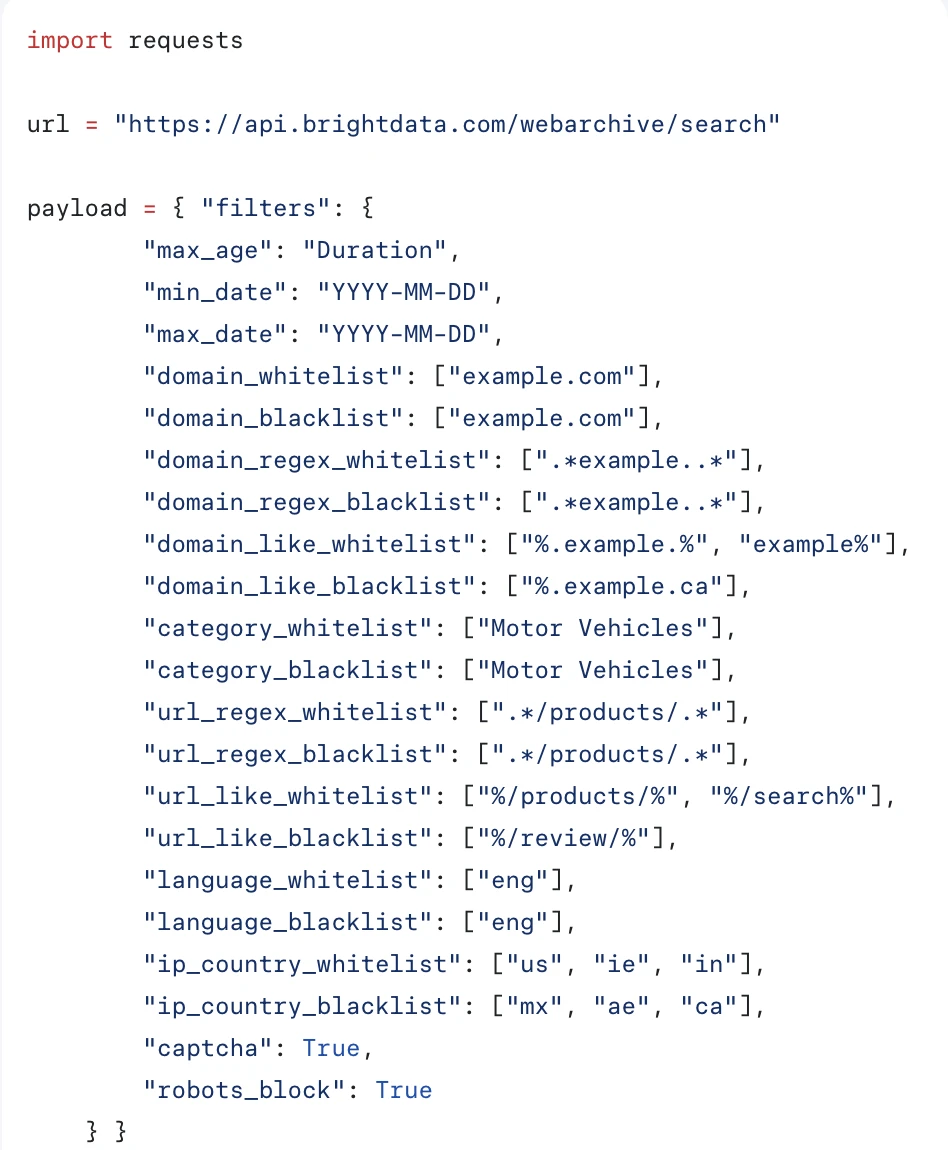
Tudo passa por um objeto filters com 20 campos: intervalo de tempo, domínio, padrão de URL, categoria, idioma, país e resultado da coleta. O tempo é obrigatório, e a categoria é uma lista fechada de 30 valores, portanto as páginas são classificadas na entrada.
Dois campos descrevem como a página foi coletada, e não o que ela contém. ip_country filtra pelo país do IP de saída que coletou a página, confirmando que o arquivo é um subproduto da rede de proxy. captcha e robots_block retornam apenas registros onde um CAPTCHA foi acionado ou uma regra de robots se aplicou, portanto tentativas bloqueadas são armazenadas em vez de descartadas.
Busca e custo
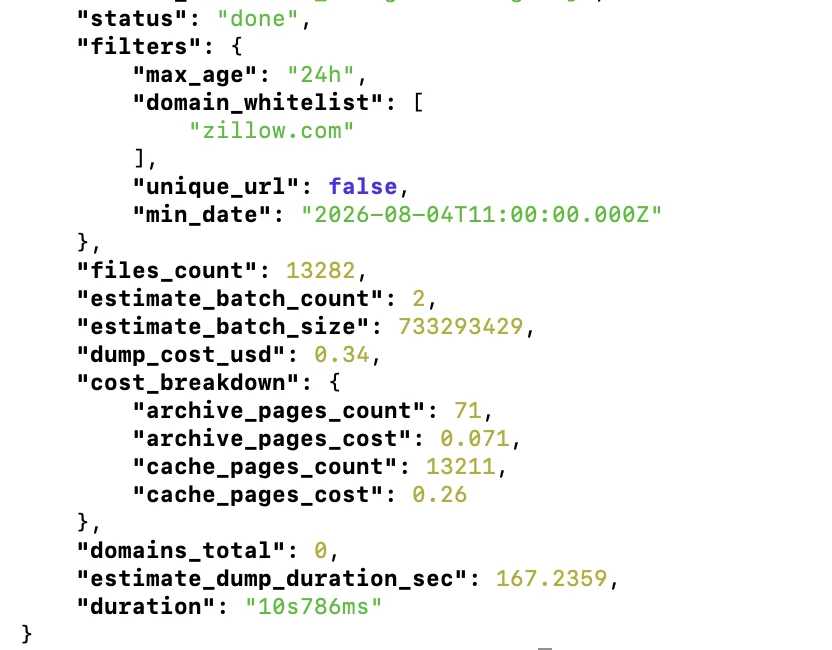
A busca é gratuito, até 100 consultas por dia, e a resposta traz tudo o que você precisa para dimensionar um trabalho antes de pagar: a contagem de registros correspondentes, o custo de entrega estimado e uma divisão mostrando quantas páginas estão na camada de cache de 24 horas versus a camada de arquivo.
- Cobertura de sites que bloqueiam crawlers: O Common Crawl não possui nenhuma página para zillow.com em um crawl mensal inteiro. O Bright Data retornou 13.282 registros para uma única janela de 24 horas.
- A velocidade da consulta aumenta com a janela: Uma consulta de 240 dias em redfin.com retornou 59.831 registros em 1 minuto e 53 segundos. A consulta de 24 horas em zillow.com retornou em 10,8 segundos.
- Duas camadas de armazenamento: Os dados das últimas 24 horas custam $0,2 por 1.000 páginas. Qualquer coisa mais antiga vai para o S3 Glacier Deep Archive a $1 por 1.000. O tempo de entrega segue: nosso trabalho de 24 horas chegou em cerca de 30 segundos, enquanto o trabalho de 240 dias permaneceu em
restoring_archive_datapor dezenas de minutos. - Entrega para seu próprio armazenamento: Amazon S3, Azure Blob Storage, Google Cloud Storage ou webhook. Testamos o caminho do webhook; dez páginas chegaram como um único tar com um
.html.gze um.meta.jsonpor página. - Amostra antes de se comprometer:
max_entrieslimita quantos arquivos uma entrega inclui, então uma consulta de 59.831 registros pode ser amostrada com dez páginas por uma fração de centavo.
Obtenha 100 gratuito buscas de arquivo/dia com Bright Data
Obter acesso grátisO que realmente está nos arquivos
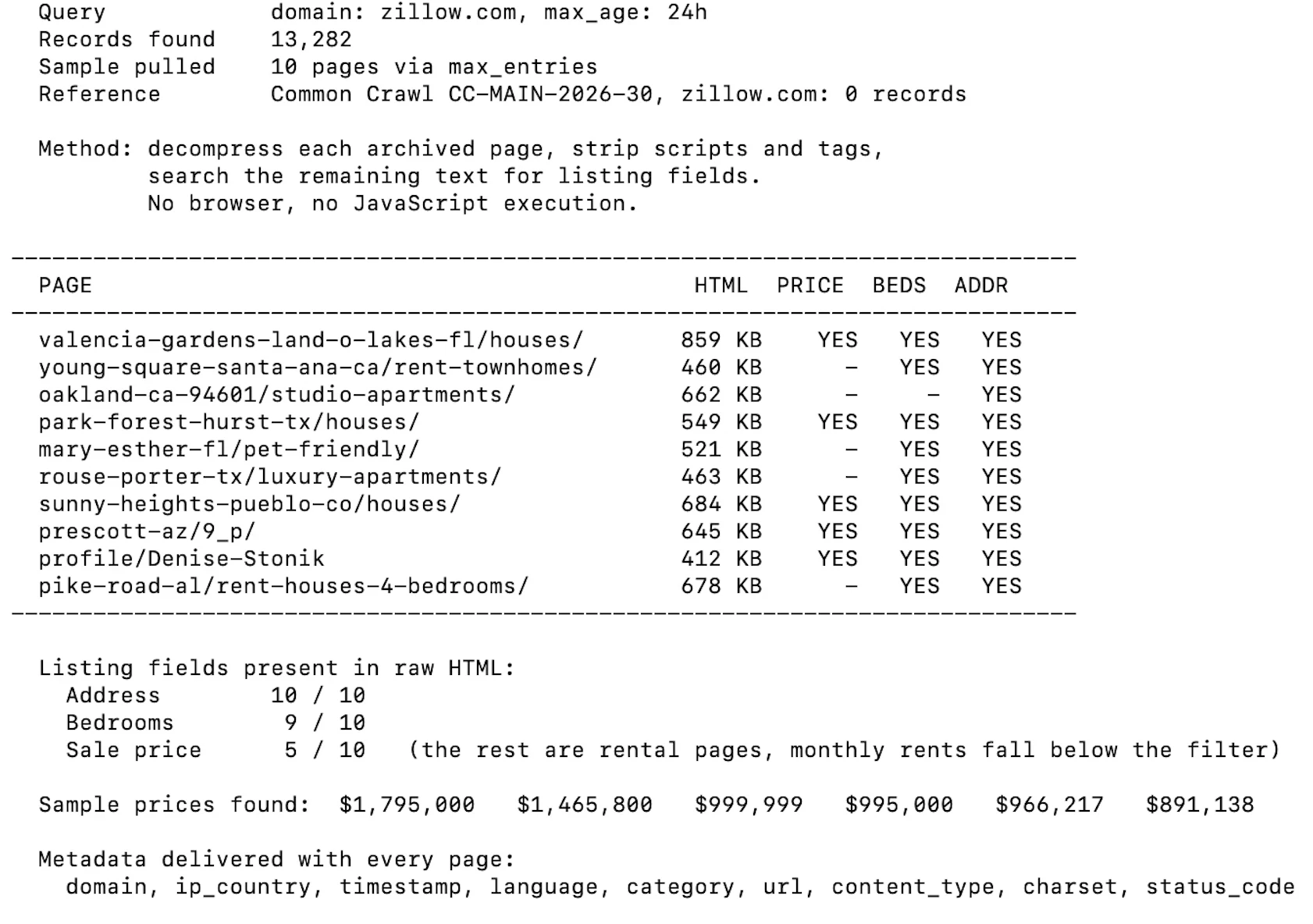
Cada página chega como o servidor a enviou, com nove campos de metadados: domain, url, timestamp, language, category, ip_country, content_type, charset e status_code. Para verificar se esse HTML bruto é utilizável sem um navegador, abrimos dez páginas arquivadas do Zillow, removemos scripts e tags e procuramos no texto restante por campos de listagem.
Common Crawl é uma organização sem fins lucrativos que publica um crawl da web aberta aproximadamente uma vez por mês e o fornece gratuitamente. Não há conta, chave nem cota. A contrapartida é que você recebe arquivos em vez de um serviço: nada é entregue a você, e qualquer coisa além de uma consulta de uma única página exige executar seu próprio processamento.
Escolhendo um formato
Cada crawl vem em vários formatos. Respostas HTTP brutas carregam o HTML original. Um extract de metadados carrega links, títulos e cabeçalhos como JSON. Uma versão em texto simples carrega o texto do artigo com a marcação removida. Dois conjuntos menores cobrem arquivos robots.txt e respostas não-200.
A escolha importa porque é de mão única. O texto simples é muito menor e mais rápido de trabalhar, mas tags, atributos e JSON-LD incorporados são removidos dele, portanto a extração estruturada precisa começar do conjunto bruto.
Não há entrega filtrada. Você escolhe um formato, baixa o que precisa e processa você mesmo.
Encontrando uma página
Existem dois mecanismos e eles respondem a perguntas diferentes. O servidor CDX lida com consultas de URL única por meio de um formulário web ou de uma API. O índice colunar, publicado como Parquet, lida com perguntas em massa por meio de SQL.
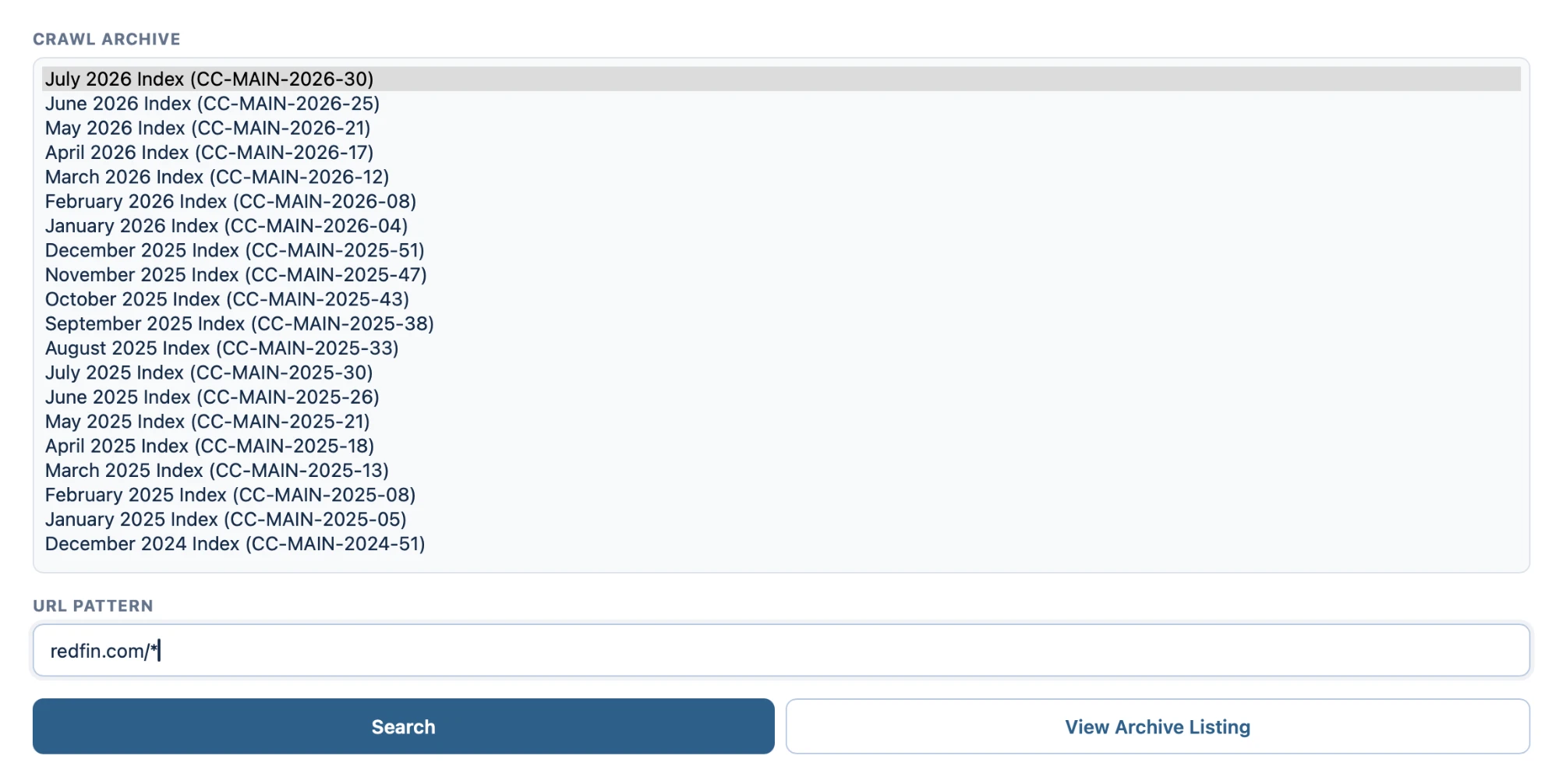
A interface CDX pede duas coisas: qual crawl mensal pesquisar, de uma lista que remonta a 2008, e um padrão de URL.
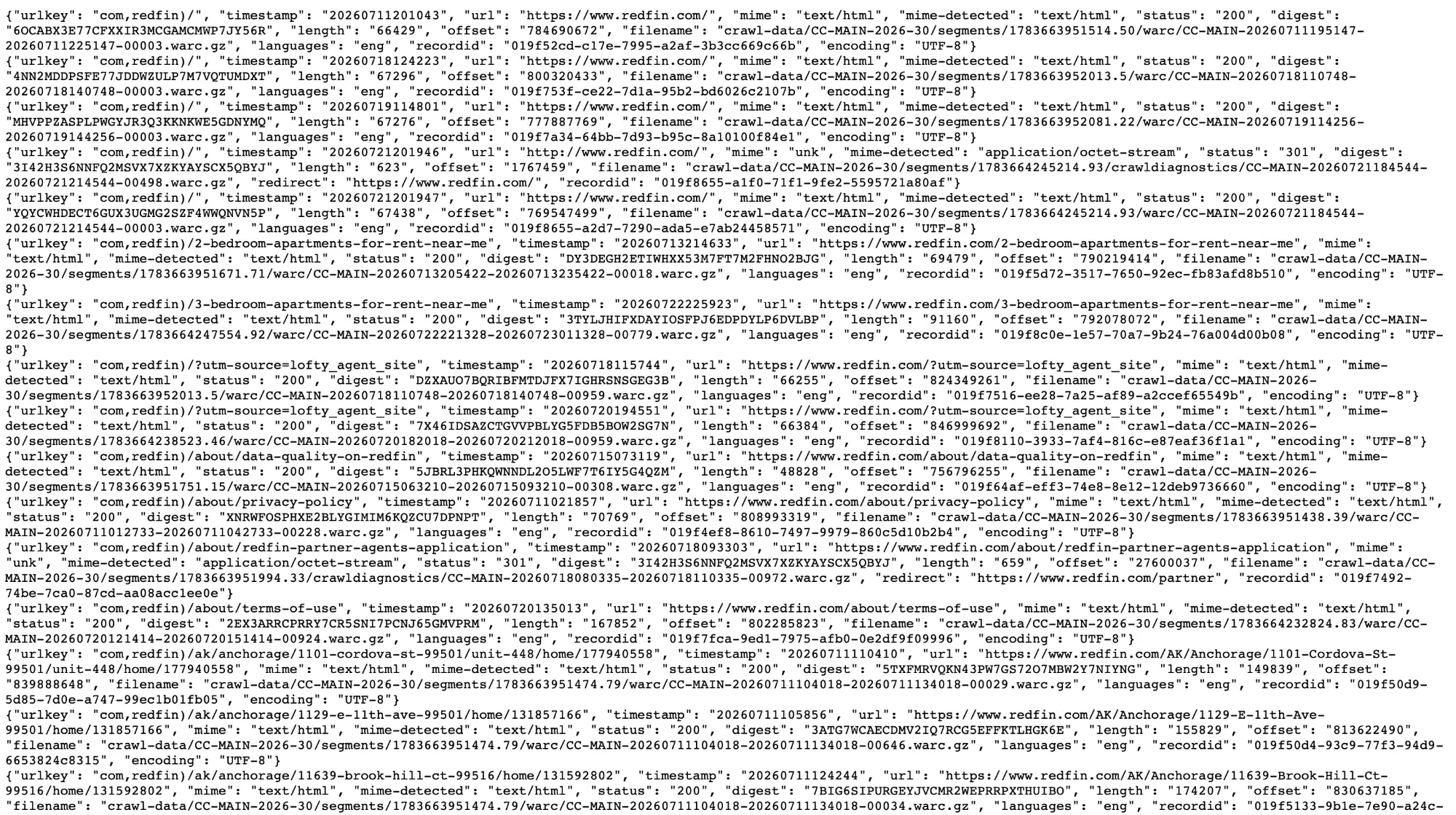
Os resultados retornam como JSON, uma linha por captura. Três campos importam mais que os outros: o nome do arquivo WARC, um deslocamento de bytes e o comprimento do registro.
Duas coisas são visíveis na saída. A mesma URL aparece várias vezes com timestamps diferentes, então um único crawl mensal não é um único snapshot. E respostas com falha são armazenadas separadamente, com redirecionamentos e erros em uma pasta crawldiagnostics e não ao lado de buscas bem-sucedidas.
Extraindo uma página sem baixar o arquivo em que ela se encontra
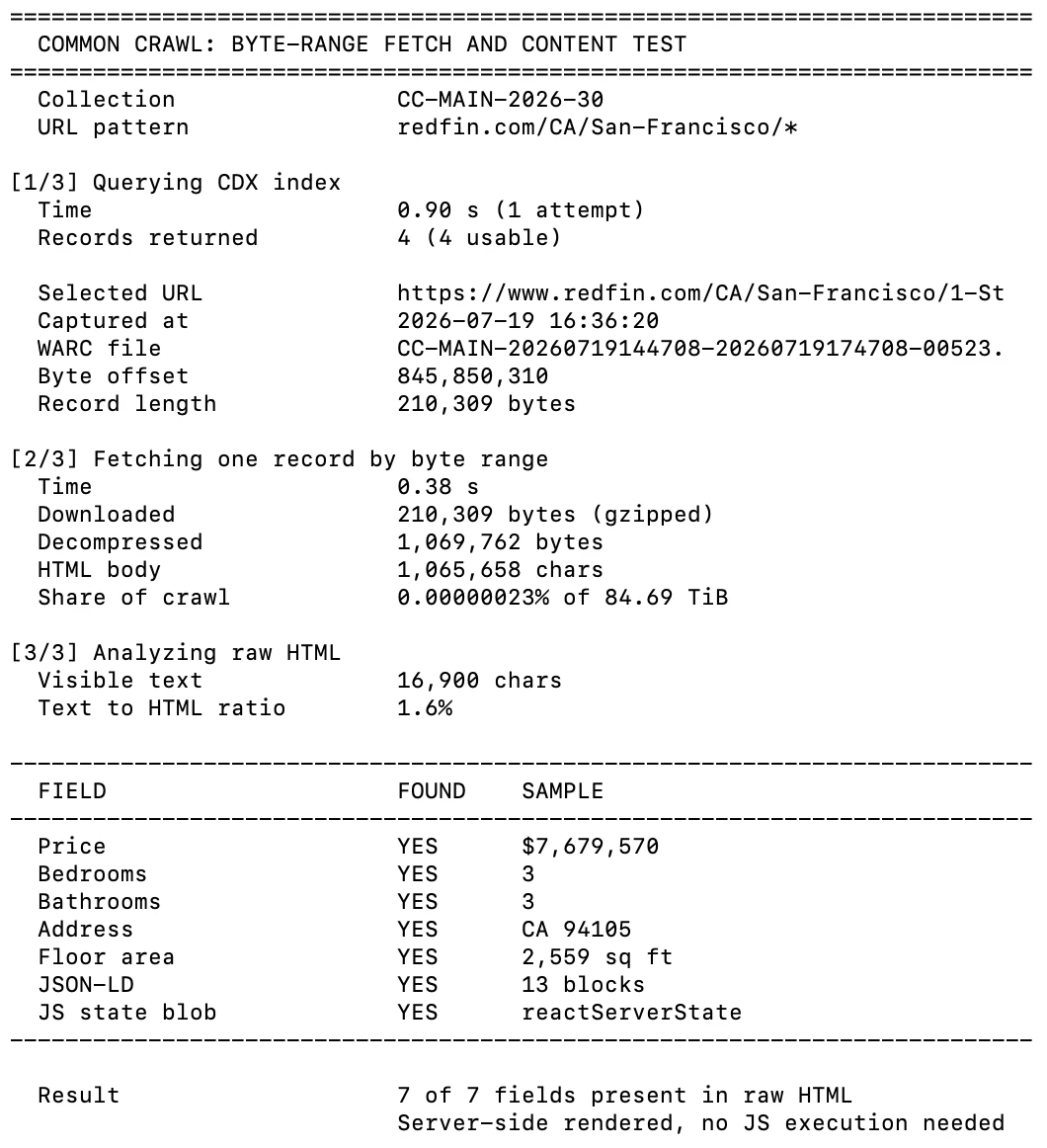
O nome do arquivo, o deslocamento e o comprimento permitem solicitar um único registro com um cabeçalho HTTP Range. Testamos isso em uma página de listagem do Redfin.
A consulta CDX retornou em menos de um segundo e a busca por faixa de bytes levou 0,38 segundos para 210 KB. Todos os sete campos de listagem que procuramos, incluindo preço, quartos e endereço, estavam presentes no HTML bruto com nenhum JavaScript executado.
Filtragem em massa com SQL
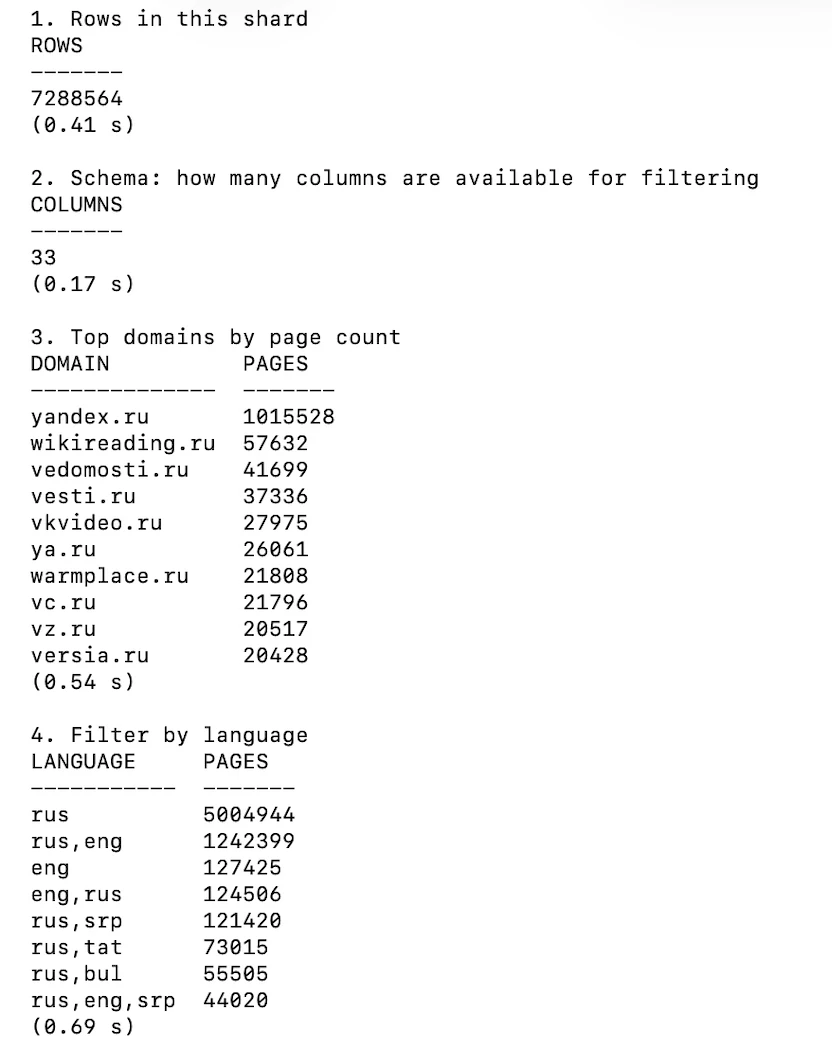
Para qualquer coisa maior que uma única URL, o índice colunar é o caminho. É Parquet, pode ser consultado via HTTPS e expõe 33 colunas cobrindo URL, host, TLD, idioma, tipo MIME, status de busca e timestamp.
Consultas contra um único shard de 7.29 milhões de linhas retornaram em bem menos de um segundo cada, com nada escrito em disco. Um detalhe a saber antes de usá-lo: os shards são indexados por um nome de host invertido, portanto cada arquivo contém uma fatia alfabética estreita em vez de uma amostra aleatória. Consultar um shard arbitrário para um domínio específico geralmente retornará nada.
Quanto ele armazena para um domínio específico
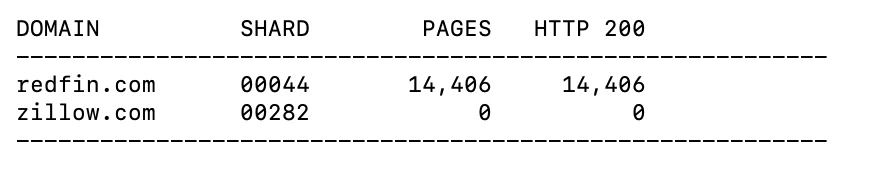
Consultamos o índice para dois domínios, redfin.com e zillow.com, localizando o shard que cobre cada um e contando suas linhas.
redfin.com retornou 14.406 páginas, todas elas HTTP 200. zillow.com não retornou nenhuma. Isso não é cobertura parcial nem uma busca falha; o domínio não está no índice. O Common Crawl respeita o robots.txt, portanto um site que proíbe seu crawler está ausente em vez de pouco representado.
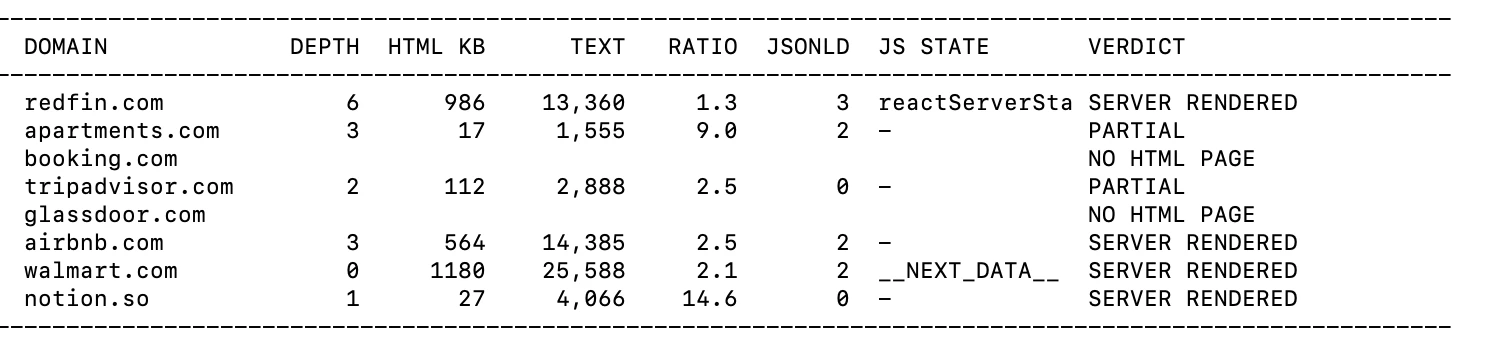
Extraímos uma página arquivada de cada um de oito grandes sites e medimos quanto texto sobrevivia sem um navegador. Dois deles não tinham nenhuma página HTML utilizável no arquivo. Entre os demais, a maioria era renderizada no servidor, incluindo Airbnb e Walmart. O TripAdvisor foi a exceção, retornando uma página de 18 KB que continha 282 caracteres de texto visível.
Custo e licença
Os dados são gratuito e o bucket de armazenamento está aberto sem uma conta. O que você paga é computação e largura de banda, e é por isso que se recomenda processar na mesma região de nuvem que os dados.
A licença não é uma licença de dados abertos. O Common Crawl concede uma licença limitada ao serviço, afirma que não pode licenciar o conteúdo da página em si e exige que os usuários o indenizem contra reclamações decorrentes do uso do conteúdo “em conexão com inteligência artificial, aprendizado de máquina ou outras tecnologias similares”. A responsabilidade total é limitada a $100.1
Webz.io vende acesso a um arquivo de artigos de notícias, posts de blog, threads de fórum e avaliações. As notícias remontam a 2008 e blogs e threads de fórum a dezembro de 2014, mas o arquivo de autoatendimento cobre apenas os últimos cinco anos; dados mais antigos chegam como dumps em massa mediante solicitação. 2 O que ele retorna não é a página, mas um registro processado: o texto do artigo mais entidades extraídas, pontuações de sentimento, contagens de engajamento social e metadados do site. Qualquer coisa com mais de 30 dias fica no produto de arquivo; material mais recente é servido pelas APIs de News, Blogs e Forums.
O construtor de consultas
As consultas combinam uma expressão booleana sobre o texto com condições no nível de campo, unidas por AND. Cada condição é construída a partir de uma propriedade, um operador e um valor.
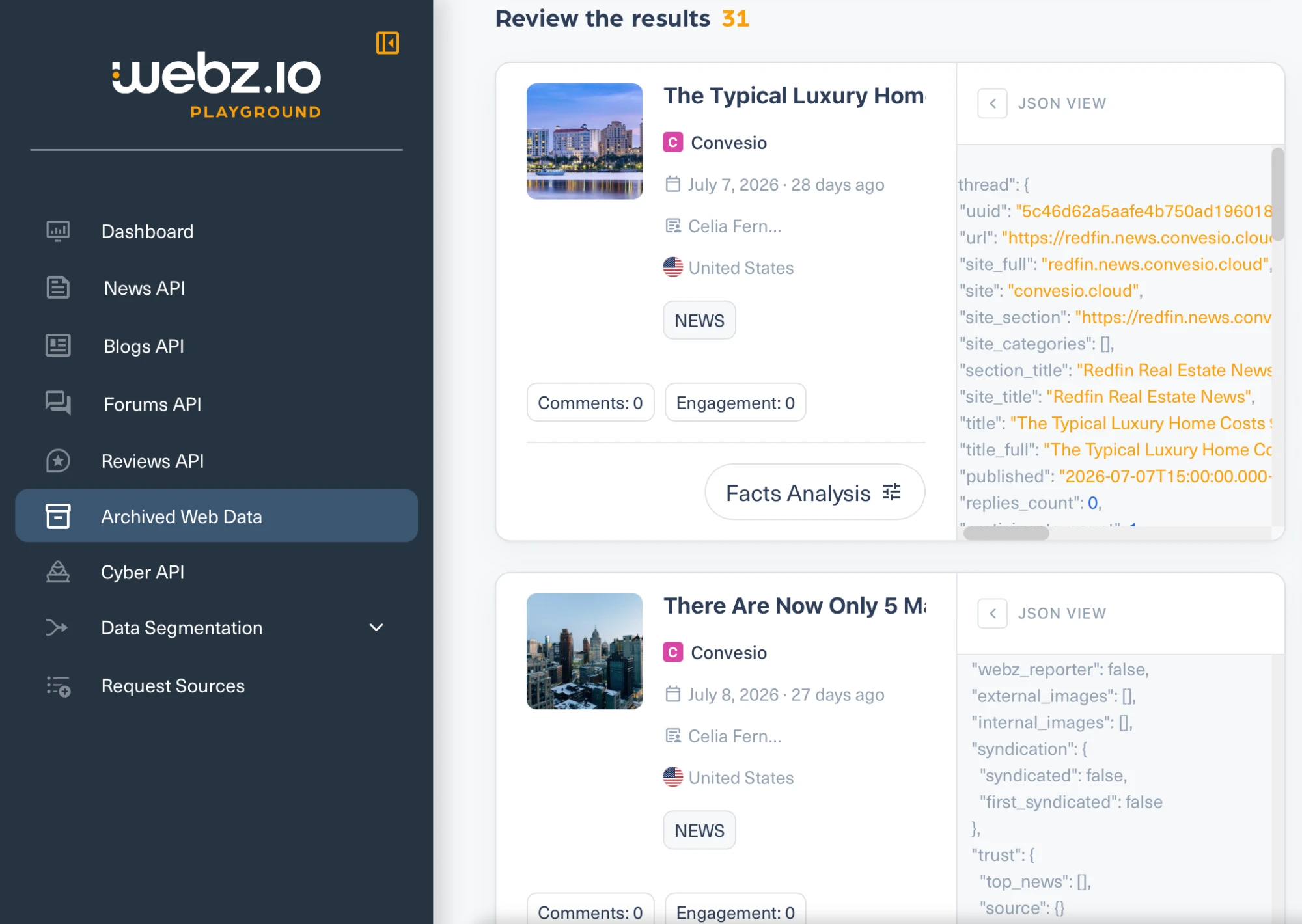
Um detalhe vale a pena saber antes de usar: o operador rotulado Equals não exige uma correspondência exata. Inserimos redfin no campo de título do site e ele correspondeu a um site cujo título é “Redfin Real Estate News”.
O que retorna
Cada resultado carrega o texto completo junto com entities, sentiment, social, categories, language, domain_rank, country e um objeto syndication que registra se a mesma história apareceu em outro lugar. Não há campo de HTML bruto. A página do produto descreve o que você recebe como “o texto completo de cada artigo, post, thread ou avaliação”, e a entrega é “via API ou executando uma consulta você mesmo”.
- O arquivo contém publicadores, não sites de listagem. A busca por Redfin retornou o blog de notícias corporativas da Redfin, hospedado em
convesio.cloud, em vez de páginas de redfin.com. Consultar diretamente o campo de domínio do site pararedfin.comretornou nada, enquantoconvesio.cloudeyahoo.comretornaram resultados, então a resposta vazia reflete cobertura e não uma consulta quebrada. - A coleta em massa é restringida por contrato. Os termos de serviço proíbem um filtro asterisco pega-tudo e filtros verticais como
site_type:newsoulanguage:english, que são exatamente os formatos de consulta que um comprador de corpus usaria. A própria interface sugere adicionarsite_type:newspara restringir uma busca.
Exa construiu seu próprio índice da web e vende busca sobre ele. A empresa relata mais de 500 bilhões de URLs. O Exa relata que seu índice rastreia mais de 2 trilhões de URLs e serve 100 bilhões de páginas.3
Para esta comparação, a parte relevante não é o endpoint de busca, mas /contents, que retorna o texto de uma página do cache do Exa em vez de buscá-la ao vivo.
Opções de cache ou ao vivo
Um único parâmetro o controla. maxAgeHours definido como 24 significa usar a cópia em cache se ela tiver menos de um dia, caso contrário, rastreie. Definido como 0, ele sempre rastreia. Definido como -1, ele nunca rastreia, retornando apenas o que já está armazenado. O valor máximo aceito é 720 horas, portanto o parâmetro não pode referenciar nada com mais de 30 dias.
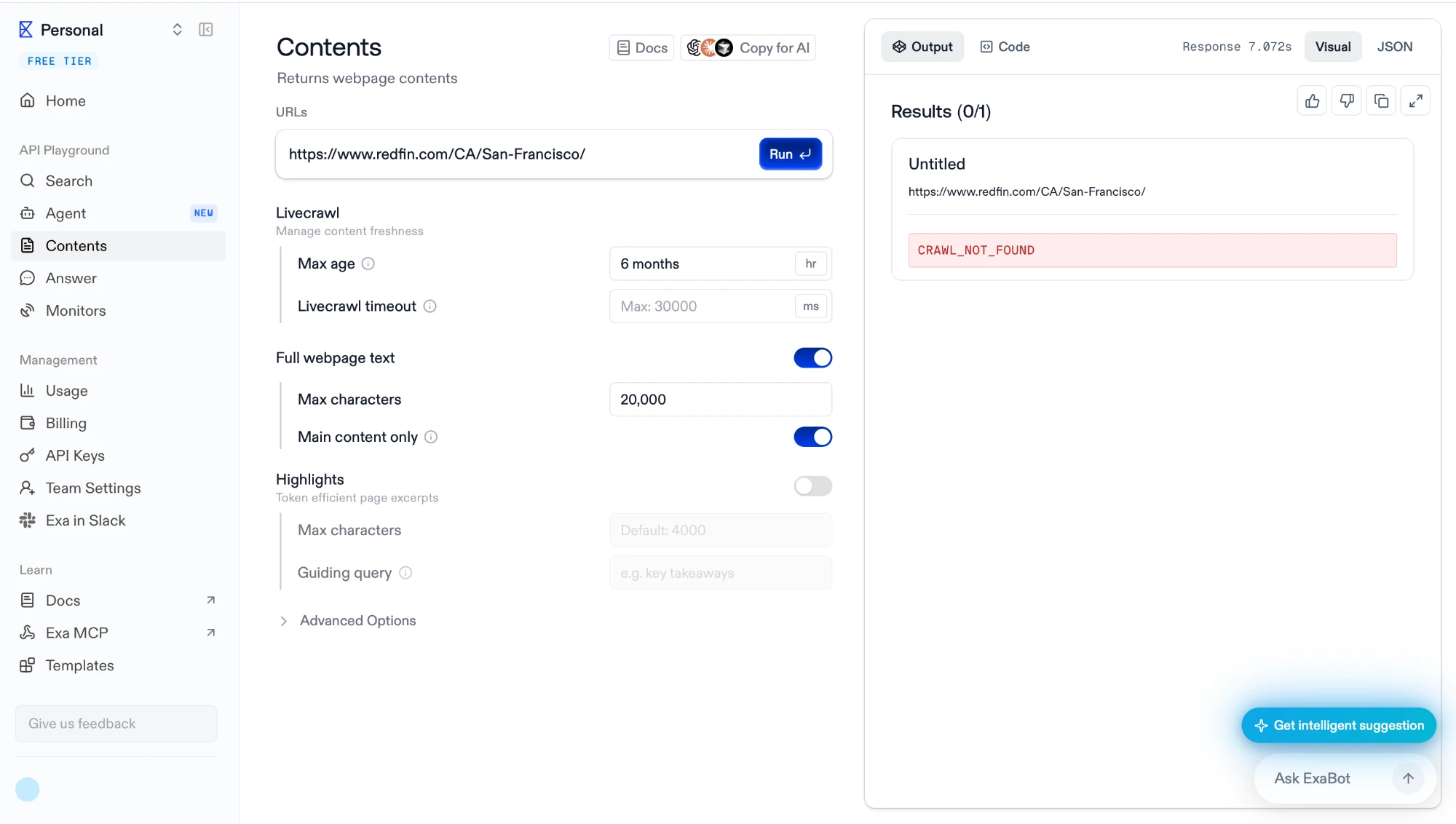
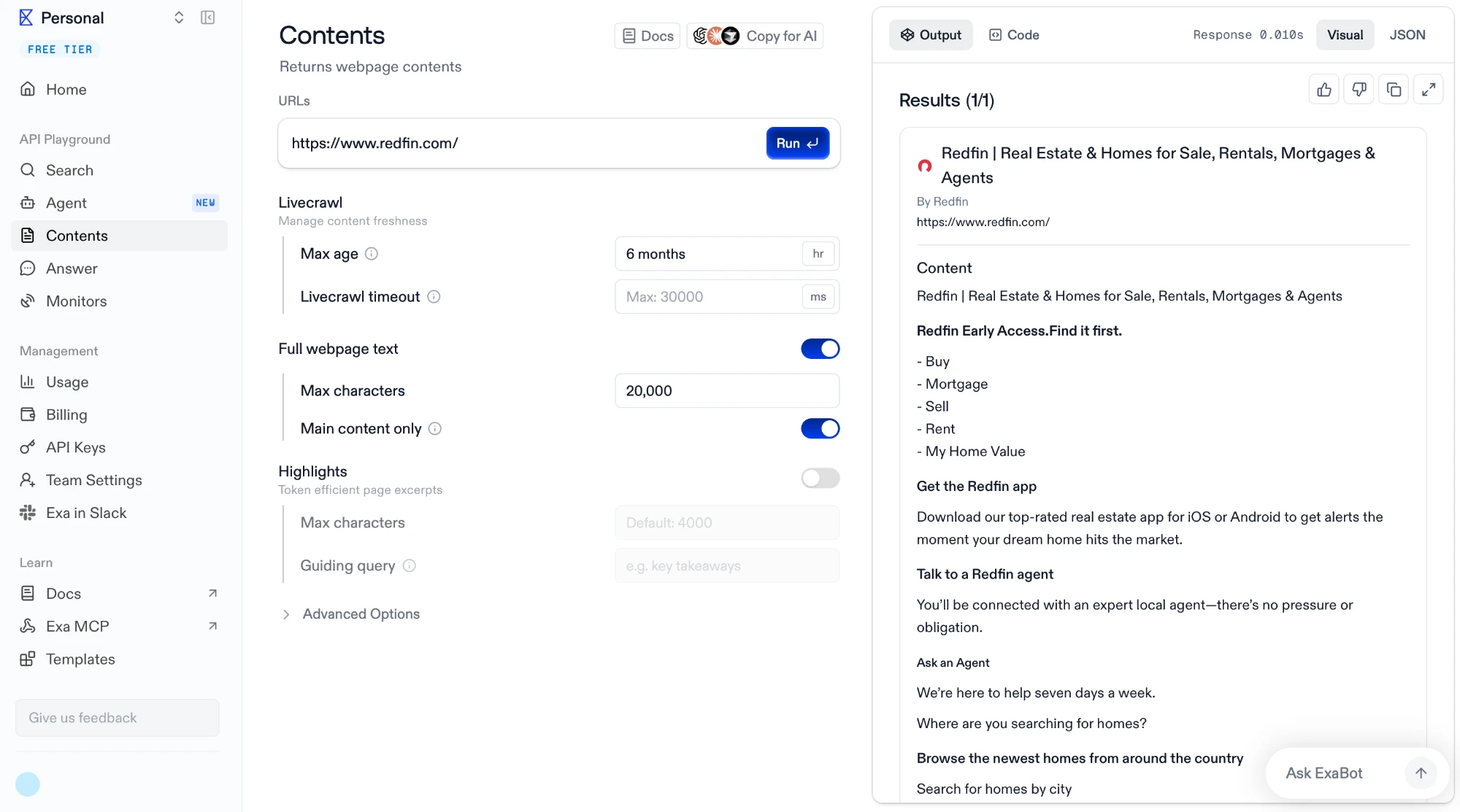
Executamos duas solicitações com o limite de idade definido como seis meses. A primeira pedia uma página de cidade do Redfin.
Retornou CRAWL_NOT_FOUND após 7,07 segundos. A segunda pedia a página inicial do Redfin.
Retornou o conteúdo completo da página em 0.010 segundos. Dez milissegundos é mais curto que uma viagem de ida e volta na rede, então essa resposta veio do armazenamento, não de uma busca. O cache é real, e a falha de sete segundos foi o Exa procurando e não encontrando.
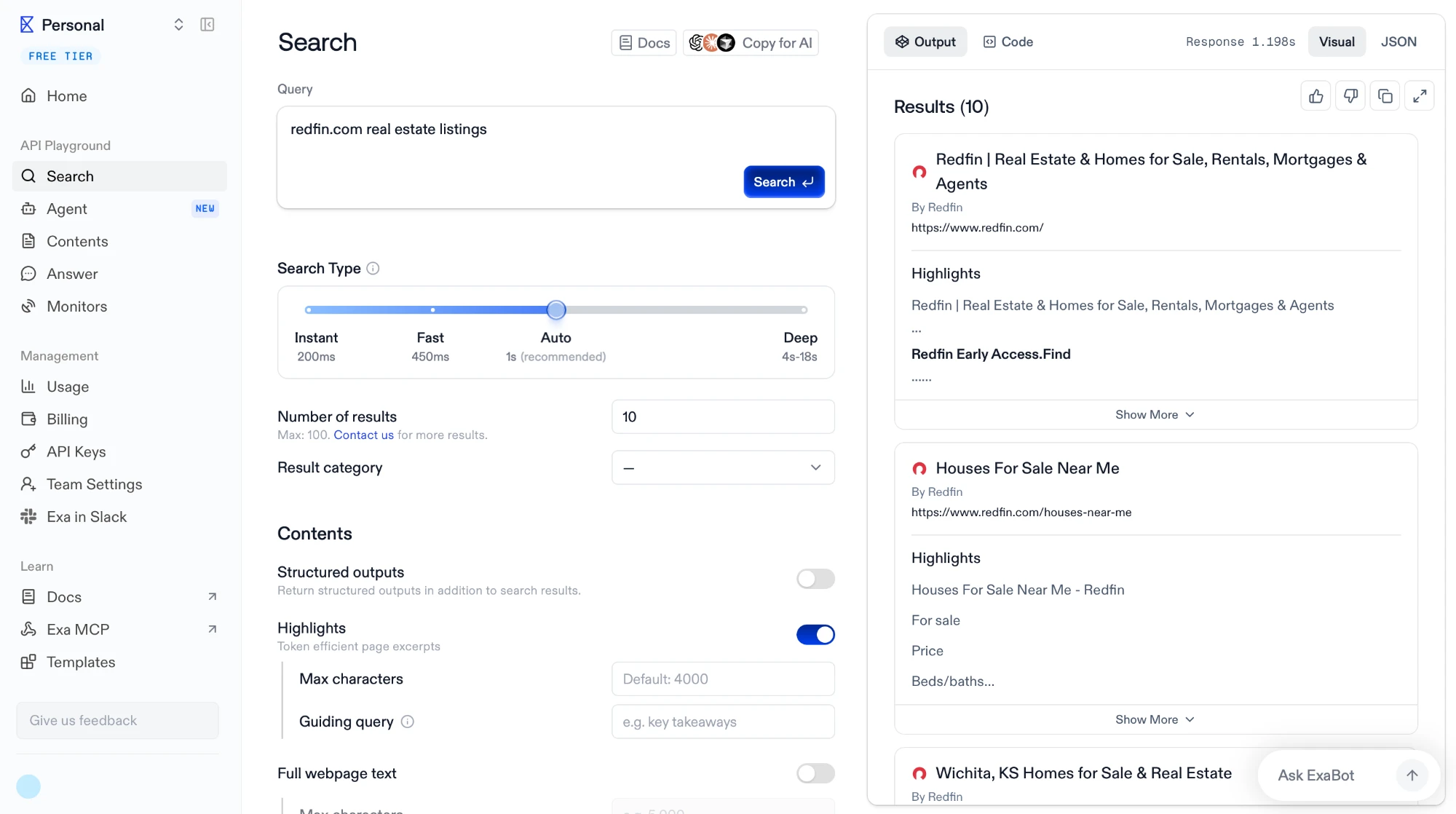
Dois outros padrões são visíveis na mesma tela. O conteúdo é limitado a 20.000 caracteres, e “apenas o conteúdo principal” está ativado, de modo que navegação e textos padronizados são removidos pela própria lógica do Exa, não pela sua.
A cobertura é irregular no nível da página
A página inicial estava em cache; a página da cidade de San Francisco não estava. Buscar o domínio mostra por que isso não é uma simples pergunta de presença ou ausência.
A consulta retornou a página inicial do Redfin, uma página “Houses For Sale Near Me” e uma página da cidade de Wichita, então páginas profundas existem no índice. A cobertura é espalhada por um domínio em vez de completa ou vazia.
Limitações
A mesma tela traz a frase que separa o Exa dos arquivos nesta comparação: “Número de resultados: 10. Máx.: 100. Entre em contato para mais resultados.”
Não há contagem total. O Common Crawl respondeu a essa pergunta com uma consulta SQL e o Bright Data respondeu com um campo files_count.
Sem exportação em massa, sem entrega para seu próprio armazenamento, sem firehose. O nível Enterprise menciona índices personalizados, que são índices sob medida servidos por meio da API, em vez de dados entregues.
Qual se encaixa em qual tarefa
Esses quatro produtos não são substitutos. A pergunta não é qual é o melhor, mas qual responde à pergunta que você tem.
- HTML bruto em escala, incluindo sites que bloqueiam crawlers. O Bright Data é o único aqui que grava uma seleção filtrada no armazenamento que você controla, e o único que mantém páginas de domínios que proíbem crawlers.
- Um corpus amplo sem custo, se você tiver capacidade de engenharia. O Common Crawl oferece crawls completos em WARC, enumeráveis com SQL, e não pede nada além da sua própria computação. O processamento é seu para construir.
- Texto de notícias, blogs e fóruns com entidades e sentimento já extraídos. O Webz.io retorna registros processados em vez de páginas, o que elimina o trabalho de extração, mas também elimina a marcação.
- Contexto da página no momento da consulta, para um agente ou um pipeline de RAG. O Exa retorna texto em cache em milissegundos e faz fallback para uma busca ao vivo quando uma página não está armazenada, dentro da mesma chamada.
 Adicionar como fonte preferencial
Como testamos as APIs de arquivo da web
Trabalhamos dentro de cada produto, e não a partir de sua documentação. Cada provedor foi acionado primeiro por meio de seu próprio console ou playground e depois por sua API, para que pudéssemos ver a solicitação que a interface gera e o que retorna antes de qualquer cobrança.
Para cada um, construímos uma consulta, a executamos e lemos a resposta bruta em vez do resumo renderizado. Quando o produto retornava uma contagem, uma estimativa de custo ou um objeto de status, registramos esses campos diretamente. Quando oferecia uma amostra ou uma entrega, a pegamos, descompactamos os arquivos e os abrimos.
Pequenos scripts cuidaram das partes que precisavam de repetição ou cronometragem: buscar um único registro de um arquivo de vários terabytes, descompactar um pacote entregue e procurar campos específicos no HTML bruto, consultar um índice colunar com SQL e medir quanto tempo uma resposta em cache leva em comparação com uma que precisa ser rastreada. Esses scripts estão vinculados ao lado dos resultados que produziram.
Cite esta pesquisa
Escolha o formato adequado ao local onde você vai publicar. Colar a versão com link no seu CMS preserva o backlink.
@misc{sipi2026,
  author = {Şipi, Nazlı},
  title  = {{Arquivo da web APIs: 4 principais provedores testados & comparados}},
  year   = {2026},
  month  = aug,
  howpublished    = {\url{https://aimultiple.com/web-archive-api}},
  note   = {AIMultiple. Acessado em 11 agosto 2026}
}Resultados e carimbos de data/hora de 15 pontos de dados. Baixe os dados resumidos exibidos nos gráficos e tabelas deste artigo como um arquivo ZIP contendo 2 arquivos CSV.
Quer os dados granulares por trás disso? Assine o Premium
Links de referência











Seja o primeiro a comentar
Seu endereço de e-mail não será publicado. Todos os campos são obrigatórios. Os comentários são deixados em seu idioma original.