


Compare Top 20 Container Orchestration Tools

Developers often allocate around 20% of their time to managing container configurations, failover protocols, security measures, and other infrastructure-related tasks.1 Container orchestration tools can automate these tasks.
Container orchestration tools fall into three groups:
- Orchestrators: Schedule containers
- Managed platforms: Deliver orchestration as a service
- Serverless container platforms: Run containers with no cluster to manage.
Workload automation platforms sit alongside these, coordinating containerized jobs within wider end-to-end IT processes. See our curated list of solutions based on B2B user reviews and key functionality:
Tool | Tool Type | Rating | Model | Cloud |
|---|---|---|---|---|
IT automation & orchestration | 4.8 based on 127 reviews | Commercial | Hybrid / multi / self-hosted | |
ActiveBatch | IT automation & orchestration | 4.4 based on 280 reviews | Commercial | Multi / self-hosted |
RunMyJobs | IT automation & orchestration | 4.8 based on 167 reviews | Commercial (SaaS) | Multi |
Kubernetes | Orchestrator | 4.5 based on 268 reviews | Open-source | Self-hosted / any |
Nomad by Hashicorp | Orchestrator | 4.1 based on 10 reviews | Open-source + Enterprise | Multi / self-hosted |
Docker Swarm | Orchestrator | 3.8 based on 45 reviews | Open-source | Self-hosted / any |
K3s | Orchestrator (lightweight K8s) | 4.4 based on 30 reviews | Open-source (CNCF) | Self-hosted / edge |
Amazon Elastic Container Service | Managed platform | 4.3 based on 276 reviews | Managed | AWS |
Amazon EKS | Managed platform | 4.6 based on 122 reviews | Managed | AWS |
Azure AKS | Managed platform | 4.4 based on 148 reviews | Managed | Azure |
Ranking is first by subscription. Then, top container orchestration tools are sorted alphabetically within their categories.
Service orchestration tools
Service orchestration tools, also known as WLA tools, sit alongside the other categories. They orchestrate containerized jobs within end-to-end IT processes, coordinating containers together with legacy and enterprise workloads.
1.) Stonebranch
Stonebranch UAC centralizes container orchestration, microservices scheduling, and workload automation, enabling seamless integration of IT processes across hybrid environments. Stonebranch UAC offers:
- End-to-End Docker orchestration to automate containerized and legacy workloads.
- Lifecycle management to Simplify promotion of tested processes with “bundle & promote.”
- Centralized credential management to secure registry and application connections.
- Micro-services scheduling that is compatible with HTTP, REST, SOAP, JMS, and WebSphereMQ.
- Proactive monitoring of Web-based dashboards ensure real-time visibility.
2.) RunMyJobs
RunMyJobs by Redwood is job scheduling and automation platform delivered as SaaS. It offers a central point of control for automating tasks, orchestrating processes, and managing jobs.
RunMyJobs supports multiple platforms and integrates with various enterprise systems, allowing users to automate a wide range of tasks, including those involving containerized applications. It provides features like:
- Support for 25+ scripting languages to improve flexibility and collaboration
- Customizable escalations and alerts to configure process SLAs and thresholds
- Lightweight and auto-updating agents to minimize resource use and manual intervention
- Built-in disaster recovery to integrate solutions for recovering data and maintaining operations
- AI-powered documentation assistant to answer questions, summarize content, and provide sources via a searchable avatar on the help site.
Learn how to integrate your entire technology stack for end-to-end processes with RunMyJobs:
Explore features, strenghts and weaknesses of RunMyJobs.
3.) ActiveBatch
ActiveBatch is an enterprise workload automation and job scheduling software that can orchestrate various tasks across various platforms including Windows and non-Windows environments, including containerized workloads, data integration, cloud automation, and IT processes.
Its features include change management, reporting and monitoring, security & governance, SLA management, Scale on-demand with Managed Queues. ActiveBatch users can benefit from unique features like:
- Super REST API adapters to access any server, application, or service using pre-built or low-code
- Job step library with production-ready functions for efficient process orchestration.
- Flow Control Job Steps to drag and drop jobs within workflows.
Explore more on ActiveBatch via the video:
More on ActiveBatch regarding its features, latest developments and pros & cons.
Container orchestration tools
Container orchestrators are the engines that schedule, scale, and self-heal containers across a cluster of machines. They are typically open-source, and users run and maintain them on-premises or on any cloud.
4.) Kubernetes
Kubernetes, or K8s, is an open-source container orchestration platform that can automate the deployment, scaling, and management of containerized applications. It allows developers to define complex workloads and their scaling policies.
Kubernetes can manage AI workloads on a cluster of servers and support GPU orchestration and fault-tolerant batch training jobs for cloud-native AI infrastructures. It supports various extensions and integrations, enabling users to create custom solutions that suit their specific needs. 66% of AI adopters report using Kubernetes to scale inference workloads.2
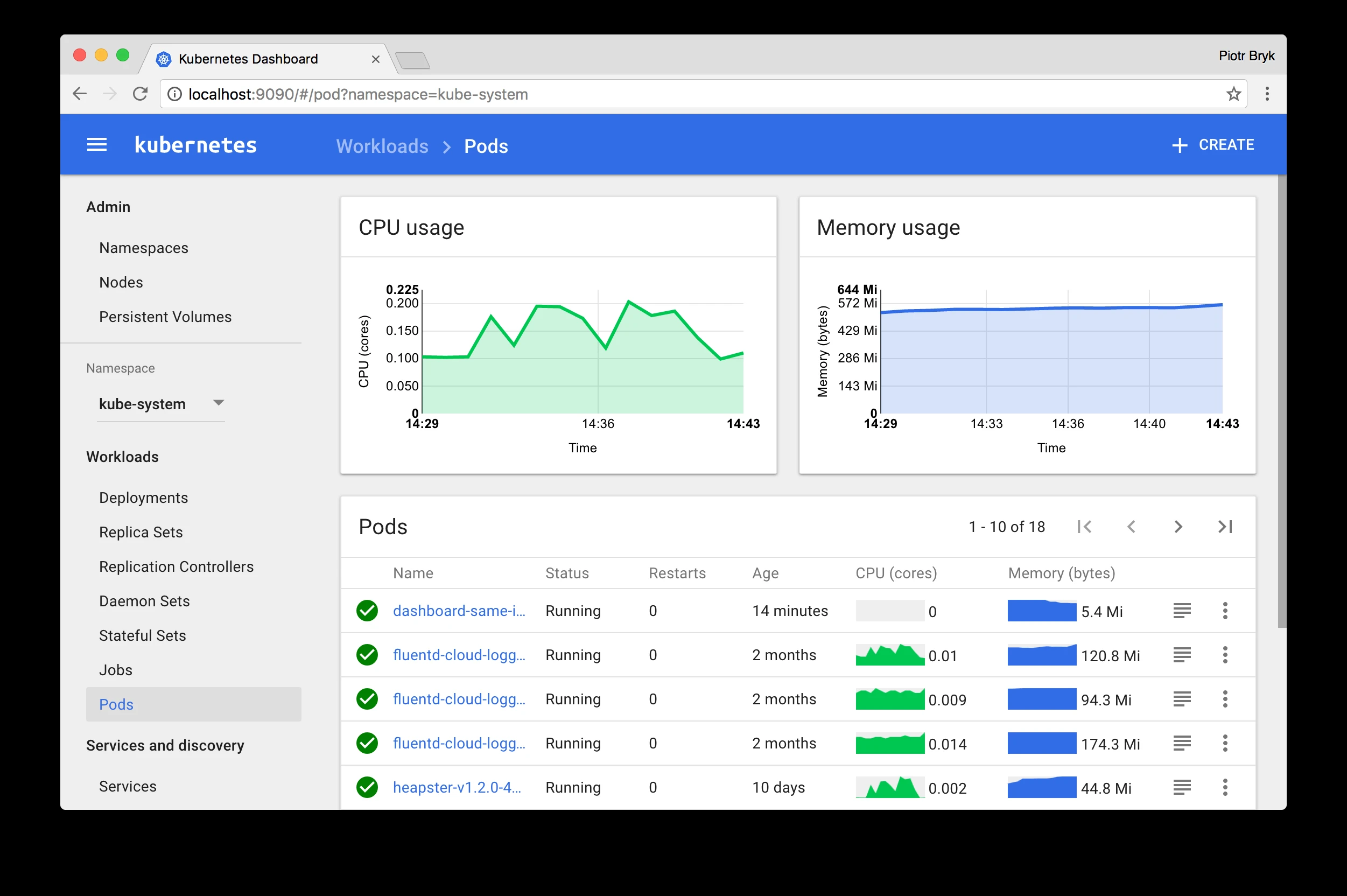
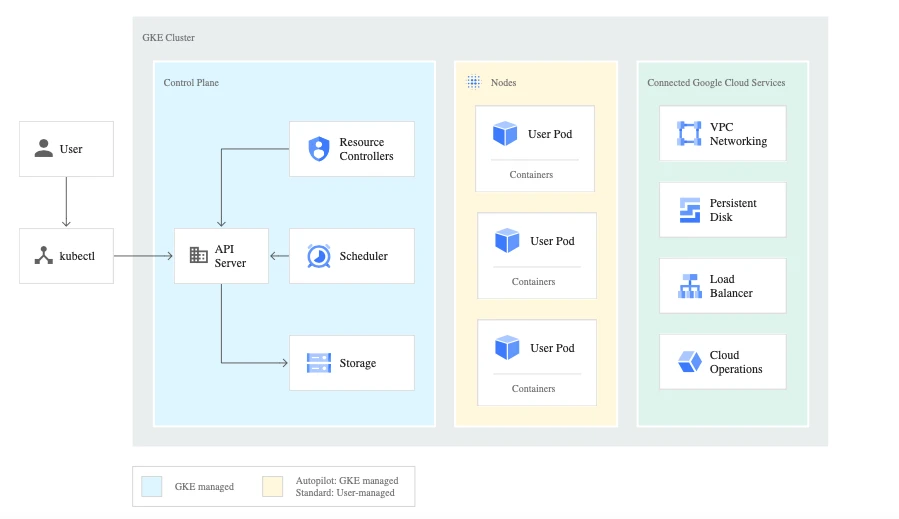
The visual below depicts Kubernetes’ operations:
5.) Hashicorp Nomad
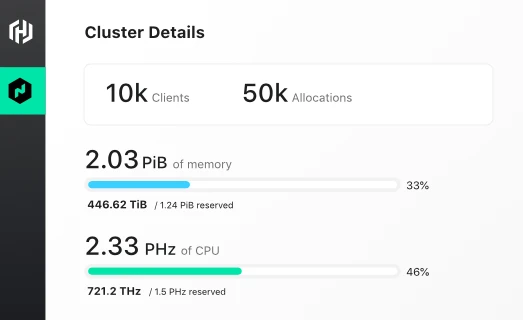
Hashicorp Nomad is an orchestration tool designed for deploying and managing containerized applications, non-containerized applications, and batch processing jobs. It supports multi-cloud and hybrid cloud deployments, providing a unified workflow for deploying applications across different environments.
Nomad offers a simplified approach to orchestration, focusing on ease of use and operational simplicity. It includes features like autoscaling, job scheduling, and integration with other Hashicorp tools, such as Consul for service discovery and Vault for secret management.
6.) Docker Swarm
Docker Swarm is a container orchestration tool built into the Docker Engine that turns a group of Docker hosts into a single virtual cluster. Docker Swarm offers:
- Native use of familiar Docker CLI commands to deploy and scale services.
- Built-in load balancing, service discovery, and rolling updates.
- Automatic TLS encryption and mutual authentication between nodes.
- A low learning curve for teams running Docker, with minimal additional setup.
7.) K3s
K3s is a lightweight, CNCF-certified Kubernetes distribution maintained by SUSE and packaged as a single small binary. K3s offers:
- A reduced memory and resource footprint suited to edge, IoT, and CI environments.
- Full Kubernetes API conformance, so standard workloads and tooling still work.
- Simplified installation that removes or replaces heavyweight Kubernetes components.
- Support for ARM and x86 hardware, including small devices.
Managed container platforms
Managed and commercial container platforms deliver orchestration as a managed service or a supported enterprise distribution, so the provider handles the control plane, upgrades, and availability.
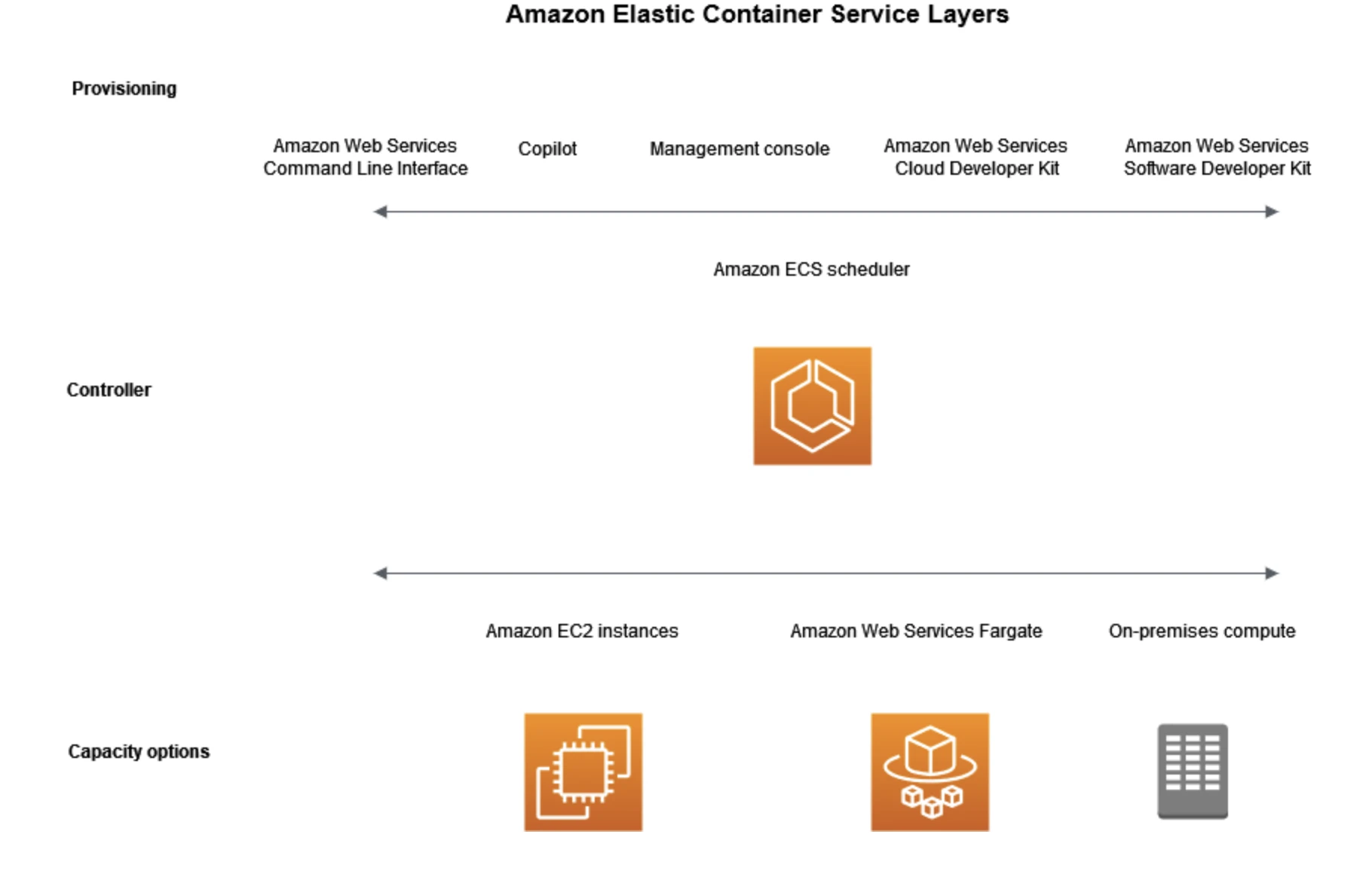
8.) Amazon Elastic Container Service (Amazon ECS)
Amazon Elastic Container Service (Amazon ECS) is a managed container orchestration service from AWS for deploying, managing, and scaling containerized applications. Amazon ECS offers:
- Two launch types: Fargate for serverless containers and EC2 for full control over infrastructure.
- Native integration with AWS services for security, monitoring, and scaling.
- Simpler operations than Kubernetes for teams committed to the AWS ecosystem.
- Built-in load balancing and service auto-scaling.
9.) Amazon Elastic Kubernetes Service (Amazon EKS)
Amazon Elastic Kubernetes Service (Amazon EKS) is a managed Kubernetes service from AWS that runs upstream Kubernetes. Amazon EKS offers:
- Certified, standards-compliant Kubernetes, so existing workloads and tooling run unmodified.
- A managed control plane distributed across multiple availability zones.
- EC2 or Fargate node options, for full control or serverless operation.
- Integration with IAM for access control, VPC for networking, and CloudWatch for monitoring.
10.) Azure Kubernetes Service (AKS)
Azure Kubernetes Service (AKS) is a managed Kubernetes service from Microsoft Azure that automates cluster provisioning, scaling, upgrades, and patching. AKS offers:
- A free control plane on the standard tier, with paid tiers for higher SLAs.
- Integration with Microsoft Entra ID, Azure Monitor, and GitHub Actions/Azure DevOps.
- Node autoscaling and both Windows and Linux node pools.
- Confidential computing options for sensitive workloads.
11.) Azure Service Fabric
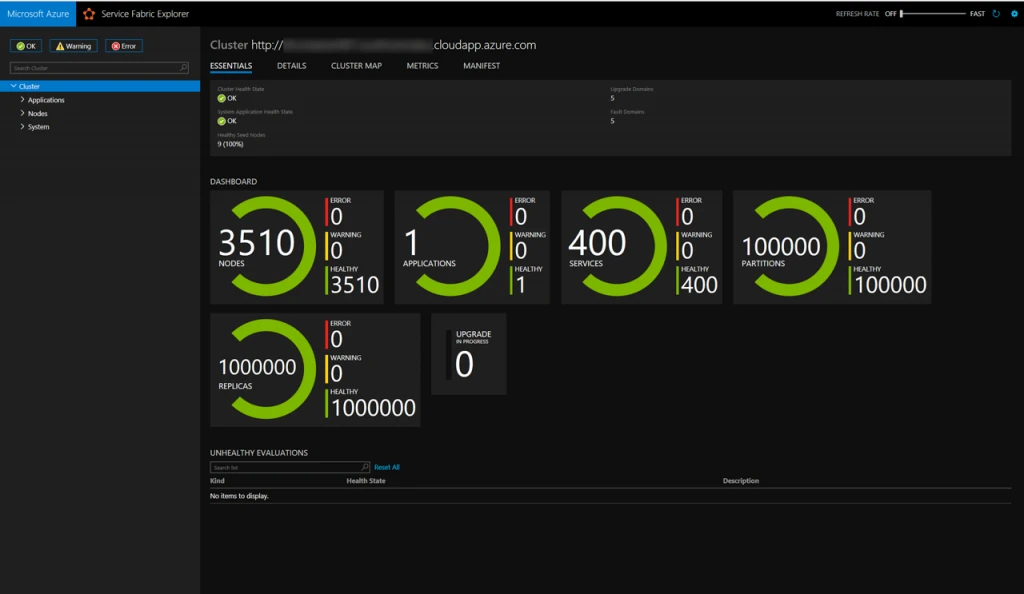
Azure Service Fabric is a distributed systems platform from Microsoft for building and managing scalable applications in the cloud. Azure Service Fabric offers:
- Support for a wide range of workloads, including microservices, containers, and stateful applications.
- Orchestration, health monitoring, and auto-scaling tools.
- Deployment across Azure, on-premises, or other clouds.
- Tight integration with Azure security, compliance, and monitoring services.
12.) DigitalOcean Kubernetes
DigitalOcean Kubernetes is a managed Kubernetes platform focused on developer-friendliness and operational simplicity. DigitalOcean offers:
- A simplified interface for creating and managing Kubernetes clusters.
- A free control plane with predictable, low-cost pricing.
- Suitability for startups and smaller-scale deployments that can still scale to enterprise needs.
- Integration with other DigitalOcean services and common third-party tools.
13.) Google Kubernetes Engine (GKE)
Google Kubernetes Engine (GKE) is a managed Kubernetes service from Google Cloud Platform. GKE offers:
- Automated cluster management, scaling, upgrades, and monitoring.
- Standard and Autopilot modes, the latter fully managing nodes for you.
- Strong support for AI workloads and serverless containers via Knative.
- Integration with Google Cloud security, compliance, and data services.
14.) Red Hat OpenShift
Red Hat OpenShift is an enterprise-grade, Kubernetes-based platform for deploying and managing containerized applications. OpenShift offers:
- A developer-friendly interface and integrated CI/CD pipelines on top of standard Kubernetes.
- Enhanced built-in security and policy controls.
- Support for multi-cloud and hybrid cloud deployments.
- Operators that automate complex tasks and an integrated service catalog for rapid deployment of pre-built applications.
15.) SUSE Rancher
SUSE Rancher is an open-source platform for deploying and managing multiple Kubernetes clusters from a single interface. Rancher offers:
- Centralized management of clusters running on EKS, AKS, GKE, on-premises, or edge environments.
- Unified authentication, role-based access control, and monitoring across all managed clusters.
- A built-in application catalog for deploying workloads consistently.
- Commercial support through Rancher Prime for enterprises.
16.) VMware Tanzu
VMware Tanzu (now part of Broadcom) is a commercial platform for building, running, and managing Kubernetes-based applications across clouds and on-premises infrastructure. Tanzu offers:
- Enterprise support and governance across hybrid infrastructure.
- A packaged Kubernetes runtime, developer application platform, and management tooling.
- Security, policy, and observability controls for operating at scale.
- Close integration with VMware vSphere environments.
Serverless container platforms
Serverless container platforms run containers on demand with no cluster to provision or scale.
17.) AWS Fargate
AWS Fargate is a serverless compute engine for containers that runs with Amazon ECS and Amazon EKS. Fargate offers:
- Serverless container execution with no servers or node clusters to manage.
- Per-second billing based on the vCPU and memory each task uses.
- Task-level isolation for security.
- Compatibility with existing ECS and EKS workloads.
18.) Azure Container Apps
Azure Container Apps is a serverless container platform from Microsoft built on Kubernetes, KEDA, Dapr, and Envoy. Azure Container Apps offers:
- Serverless execution of containerized apps and microservices without managing a cluster.
- Automatic scaling, including scale-to-zero, based on traffic or events.
- Support for HTTP services, background jobs, and event-driven processing.
- Built-in microservices features through Dapr and KEDA integrations.
19.) Azure Container Instances (ACI)
Azure Container Instances (ACI) is a serverless platform for running individual containers on Azure without provisioning infrastructure. ACI offers:
- Fast startup of single containers for bursts and simple jobs.
- Per-second billing based on the vCPU and memory consumed.
- No cluster or virtual machine management.
- Integration with other Azure services and use as serverless compute for AKS.
20.) Google Cloud Run
Google Cloud Run is a managed platform for running containerized applications in a serverless environment, built on the open-source Knative project. Cloud Run offers:
- Automatic scaling based on demand, including scale-to-zero.
- Support for stateless HTTP services and background processing.
- Pay-per-use billing for CPU, memory, and requests.
- Compatibility with standard containerized workloads via Knative.
FAQs
A container orchestrator is a system designed for managing containers and their related workloads. It allows developers to define container images, a configuration file and automates container deployment across multiple operating systems.
By acting as a cluster management tool, it provides functionalities like load balancing to ensure smooth traffic distribution.
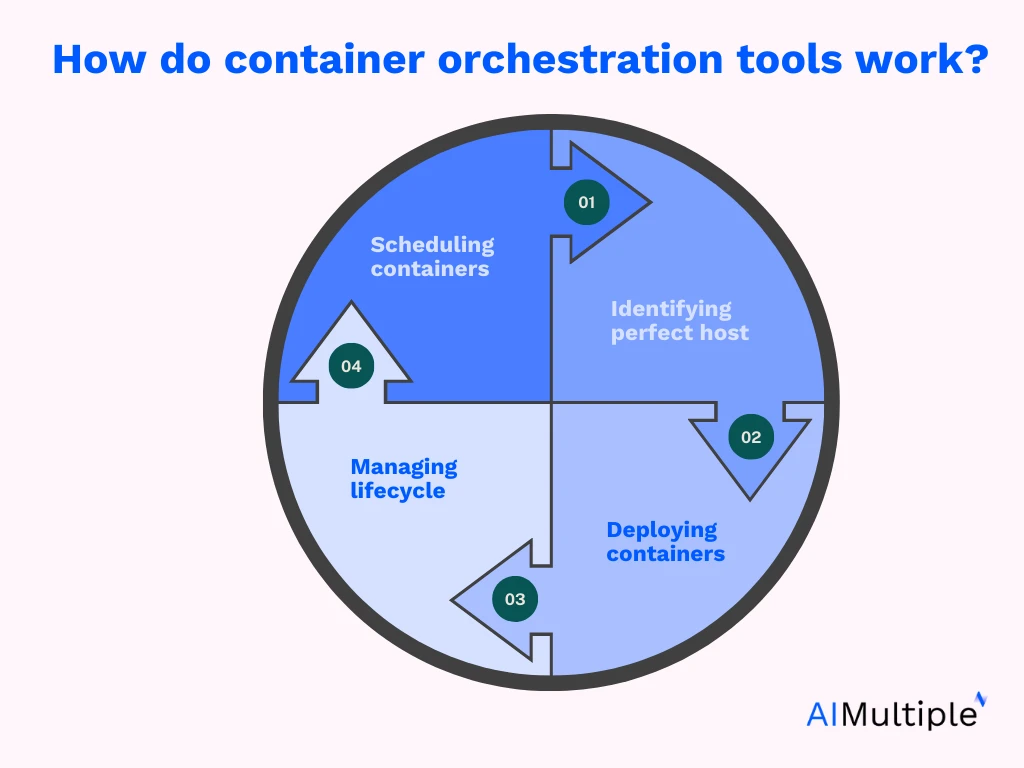
Container orchestration works by automating the deployment, scaling, and operation of containers in a cluster. It uses a container definition file to define the characteristics of each container, such as its image, environment variables, and resource requirements. Once the containers are defined, they are automatically deployed to the appropriate nodes within the cluster.
The orchestration tool continuously monitors the health of the running containers. If a container fails, the tool automatically restarts it or re-allocates it to another node. This automatic recovery ensures high availability and resiliency.
Additionally, the orchestration tool provides a centralized interface for container management, allowing users to control, scale, and update their containers as needed, ensuring efficient and smooth operation of containerized applications.
A container orchestration tool ensures that containers deployed within a cluster are managed efficiently. It dynamically handles resource allocation, ensuring that each container receives the appropriate CPU, memory, and storage resources based on its requirements. This process is automated, reducing the need for manual intervention and enabling scaling as demand fluctuates.
When containers are deployed, the orchestration tool manages them to maintain high availability and reliability. It monitors container health and automatically restarts or reassigns containers in the event of a failure, ensuring continuous service. This automation and resilience are key reasons to use container orchestration tools, as they facilitate scalable, reliable, and efficient container management.
These are 8 steps to consider while choosing the best container orchestration tool for your organization:
1.) Compatibility with existing infrastructure: Ensure the tool integrates with your current infrastructure, including operating systems, hardware, cloud providers, and DevOps tools.
2.) Scalability and flexibility: Consider the scalability requirements of your applications. Choose a tool that can handle your current workload and scale with future growth. Flexibility in supporting multi-cloud and hybrid environments is also crucial.
3.) Ease of use and deployment: Evaluate the user interface, documentation, and community support. A tool with a straightforward setup and clear documentation can reduce learning curves and deployment time.
4.) Integration with other tools: Determine whether the tool integrates with other services and applications in your ecosystem, such as CI/CD pipelines, monitoring, and logging solutions.
5.) Security and compliance: Assess the security features of the orchestration tool, including role-based access control (RBAC), encryption, and compliance with industry standards. Ensure it meets your organization’s security policies.
6.) Cost: Review the pricing structure, including licensing fees, infrastructure costs, and additional costs for add-ons or support. Choose a tool that aligns with your budget while providing the necessary features.
7.) Support and community: Consider the level of support available, including vendor support, community forums, and third-party resources. A strong community can be valuable for troubleshooting and guidance.
8.) Operational requirements: Evaluate the operational needs, such as high availability, disaster recovery, and monitoring capabilities. Ensure the tool supports these features to meet your operational goals.
 Add as preferred source
Further reading on other orchestrators
Explore more on orchestration tools by checking out:
- Compare Data Orchestration Tools Based on 800+ Reviews
- Compare Orchestration Tools: 5,000+ Reviews & Features
- Top Process Orchestration Tools based on 5,200 Reviews
Cite this research
Pick the format that matches where you're publishing. Pasting the link version into your CMS preserves the backlink.
@misc{simsek2026,
  author = {Şimşek, Hazal},
  title  = {{Compare Top 20 Container Orchestration Tools}},
  year   = {2026},
  month  = jun,
  howpublished    = {\url{https://aimultiple.com/container-orchestration-tools}},
  note   = {AIMultiple. Retrieved June 25, 2026}
}Results and timestamps of 20 data points. Download the summary data shown in this article's charts and tables as a ZIP file containing one CSV file.
Want the granular data behind it? Join Premium
Changelog
5 updatesAdded Managed and Serverless container platform sections with new vendors.
Replaced ActiveBatch with Stonebranch in the list of container orchestration tools.
Added AI-powered documentation assistant to the Stonebranch UAC features.
Reference Links


Be the first to comment
Your email address will not be published. All fields are required. Comments are left in their original language.