


AutoSys: Key Features and User Insights

Reviewers highlighted Broadcom AutoSys‘ limited features compared to the competition. This may be partially explained by Broadcom’s support for 8 workload automation solutions (Automic Automation, AutoSys, AppWorx, ESP dSeries, Dollar Universe, CA 7 Workload Automation Intelligence, IT Process Automation Manager, and ESP Workload Automation Intelligence) and 1 automation analytics solution (Automation Analytics & Intelligence) with overlapping capabilities, which may divert focus from developing new functionality for AutoSys.
We gathered AutoSys’s capabilities with user evaluations:
What is Broadcom’s AutoSys?
Broadcom Workload
Automation Solution | Key Features |
|---|---|
AutoSys Workload Automation | Cross-platform visibility and control, supports cloud and ERP |
Automation Analytics and Intelligence | Multi-vendor workload analytics |
Automic® Automation | Service orchestration for diverse tech stacks |
CA 7 Workload Automation Intelligence | Real-time analytics, cross-platform support, SLA-aware performance automation |
ESP Workload Automation Intelligence | Central orchestration with predictive analytics |
JCLCheck Workload Automation™ | JCL validation before production |
Workload Automation Agents | Extends automation to business apps for performance |
Workload Automation Restart Option for z/OS (CA 11) | Failed job restart management, repair time reduction |
AutoSys was originally developed by CA Technologies and acquired by Broadcom in 2018.
As a part of Broadcom’s workload automation providers (AutoSys and Automic Automation), AutoSys works as an IT process automation and batch scheduling software that allows visibility to complex workloads and cloud computing by:
- mapping workflow processes,
- monitoring to reduce the cost and complexity of IT business processes.
AutoSys can increase business responsiveness with dynamic workload deployment across on-premises and public cloud environments.
With AutoSys, businesses can receive forecasts and automatic actions for overdue jobs.
AutoSys pros
- AutoSys Workload Automation efficiently automates jobs in various environments, reducing workload and manpower needs.
- The tool provides scheduling, monitoring, and reporting capabilities, and is compatible with Linux and Windows platforms.
- The cloud-integration gap is narrower than older reviews suggest: AutoSys 24.1 added native job types for AWS Managed Workflows for Apache Airflow, Amazon S3, Azure Data Factory, Azure Airflow, Google Cloud Composer, Google Cloud Storage, Apache Airflow and IBM Cloud Object Storage, delivered through the marketplace and usable on any supported version from 12.1 SP1 onward.1
AutoSys cons
- Reviewers have reported that implementing and learning AutoSys Workload Automation can be challenging and that the GUI needs improvements, though this feedback predates the modernized Web UI shipped in AutoSys 24.2, which introduced a Define interface for object creation and management covering security profiles, templates, connection profiles and resources.2Broadcom positions the change as letting authorized personnel configure settings without command-line access, reducing reliance on central administrators.3
- AutoSys AI capabilities such as AI job types, MCP orchestration and AI-powered developer assistance are announced for V26 but are not in the shipping 24.2 release, and Broadcom states AutoSys V26 is being delivered on a different timescale than Automic Automation V26 by design.4
- AutoSys does not support creation of dynamic job pipelines and has issues with session logouts and job failure handling.
Components of AutoSys workload automation
AutoSys workload automation consists of several key components that work together to manage and automate job scheduling across different environments:
Event server (database)
Event server is the central repository storing all AutoSys objects, such as jobs, machines, and calendars, along with job events.
The application server manages these objects, and the scheduler retrieves event-related data from the event server.
AutoSys supports various databases like Oracle, Sybase, and Microsoft SQL Server by using specific communication protocols for database interactions.
The system can be configured with dual event servers for high availability to ensure operations continue if one server fails.
Application server
The application server acts as the communication hub between the event server and client utilities.
It processes requests from clients, interacts with the event server, and returns responses.
Scheduler
Scheduler is the core component that processes job events by continually scanning the database.
It determines job actions and communicates with agents to execute or monitor jobs.
AutoSys supports high availability through a shadow scheduler, which takes over if the primary scheduler fails, and a tie-breaker scheduler to resolve conflicts in dual event server setups.
Agent and agent plug-ins
Agents facilitate the automation and management of workloads across different platforms.
They can be extended with plug-ins for specific tasks, such as interacting with databases or specific applications like SAP or Oracle. As of 2026, AutoSys agents, plug-ins, and integrations that were previously distributed through marketplace.automic.com are obtained from the Broadcom Support Portal, with Broadcom publishing mappings from the old marketplace entries to their new Support Portal locations.5
Client
Clients are any executables that interface with the application server, including command-line tools (like JIL and autorep) and Web UI services.
Clients allow users to manage the scheduling environment by creating and monitoring jobs.
Web server
Apache Tomcat serves as the default web server for hosting web services in AutoSys. It is automatically installed and configured during the setup of AutoSys.
Web server handles communications between the Web UI and other components using specific ports.
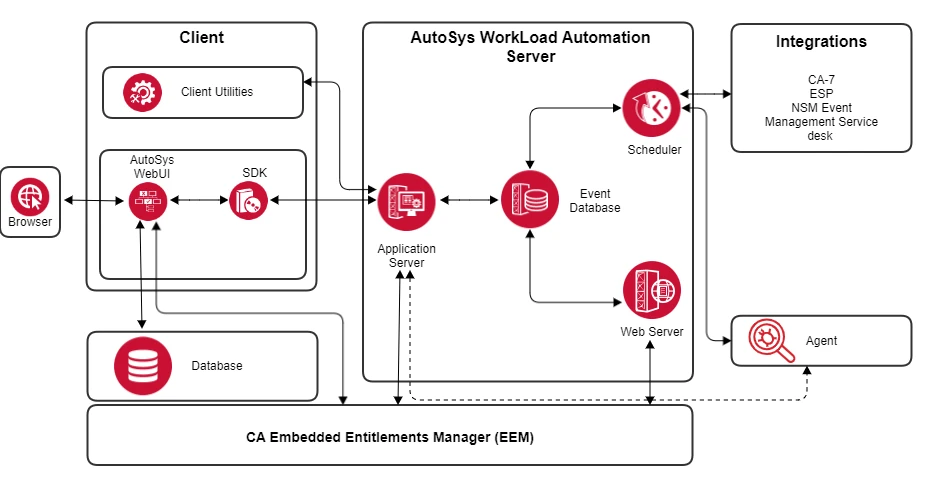
Figure 1: AutoSys workload automation components.6
AutoSys key features
Multi-platform job scheduling
AutoSys enables the management and visualization of business processes with event-based triggering, real-time alerting, and dynamic critical path management.
Jobs in AutoSys can be defined using the Job Information Language (JIL) or through the Web UI, with attributes that control when, where, and how jobs run.
AutoSys supports various job types, including command jobs, FTP jobs, and box jobs (containers for other jobs).
Monitoring and managing jobs
AutoSys provides real-time status updates for all jobs, including queued, running, success, failure, or terminated states.
It can also manage complex job dependencies and send notifications or trigger actions based on job outcomes or system conditions.
Scalability
Without the need for multiple servers, AutoSys can provide scalable monitoring and controlling of workloads across physical, virtual, and multi-cloud environments.
Built-in fault tolerance
With its built-in fault tolerance feature, AutoSys allows for an automated recovery for essential business processes by performing path analysis and forecasting while ensuring consistent workload automation.
Users can receive notifications about the overdue jobs as well as bypassing less critical jobs.
Self-service
AutoSys provides end-users the ability to request and execute workload processing according to company policies.
Application support
The platform offers workload management for key business applications like SAP, PeopleSoft, and Oracle E-Business Suite.
To learn more about job scheduling and workload automation providers, check out AutoSys alternatives.
What’s new in the workload automation market?
In 2026, the workload automation category is shifting from batch scheduling toward AI control planes:
- Broadcom describes an “intelligent control plane” that moves beyond rigid, deterministic batch scripts to support non-deterministic, agentic AI execution, positioning the scheduler as a “Manager of Managers” rather than a task executor.7
- Competing vendors have adopted near-identical positioning, with Stonebranch launching a Hybrid Orchestration Control Plane in October 20268and BMC marketing the Control-M MCP Server as a policy-controlled runtime through which every AI agent must route.9
Stonebranch’s 2026 Global State of IT Automation Report, released in March 2026 and based on 402 IT automation professionals, found that 50% of organizations are investing in workload automation and service orchestration platforms and that 88% now run hybrid IT environments, framing orchestration as the missing link for AI adoption and trust.10
 Add as preferred source
Cite this research
Pick the format that matches where you're publishing. Pasting the link version into your CMS preserves the backlink.
@misc{dilmegani2026,
  author = {Dilmegani, Cem and Ermut, Sıla},
  title  = {{AutoSys: Key Features and User Insights}},
  year   = {2026},
  month  = nov,
  howpublished    = {\url{https://aimultiple.com/autosys}},
  note   = {AIMultiple. Retrieved November 18, 2026}
}Results and timestamps of 8 data points. Download the summary data shown in this article's charts and tables as a ZIP file containing one CSV file.
Want the granular data behind it? Join Premium
Changelog
5 updatesReplaced the "AutoSys pros" and "AutoSys cons" sections.
Reference Links
Cem's work at AIMultiple has been cited by leading global publications including Business Insider, Forbes, Morning Brew, and Washington Post, global firms like Deloitte and HPE, NGOs like World Economic Forum, and supranational organizations like European Commission. [1], [2], [3], [4], [5]
Throughout his career, Cem served as a tech consultant, tech buyer and tech entrepreneur. He advised enterprises on their technology decisions at McKinsey & Company and Altman Solon for more than a decade. He also published a McKinsey report on digitalization.
He led technology strategy and procurement of a telco while reporting to the CEO. He has also led commercial growth of deep tech company Hypatos that reached a 7 digit annual recurring revenue and a 9 digit valuation from 0 within 2 years. Cem's work in Hypatos was covered by leading technology publications like TechCrunch and Business Insider.
Cem regularly speaks at international technology conferences. He graduated from Bogazici University as a computer engineer and holds an MBA from Columbia Business School.

She previously worked as a recruiter in project management and consulting firms. Sıla holds a Master of Science degree in Social Psychology and a Bachelor of Arts degree in International Relations.



Be the first to comment
Your email address will not be published. All fields are required. Comments are left in their original language.