


How to Hide Your IP Address: 6 Methods Compared

Your IP address reveals your approximate proxy location and ISP and can be used to track you across sites. Six methods hide it, with different trade-offs in coverage, encryption, speed, and cost.
Methods compared
Method | Hides IP from | Encrypts traffic | Covers whole device |
|---|---|---|---|
Proxy | The sites you route through it | HTTPS proxies | ✕ (per app/browser) |
VPN | All sites and your ISP sees only the VPN | ✓ | ✓ |
Tor Browser | All sites | ✓ | ✕ (browser) |
iCloud Private Relay | Trackers and sites, in Safari | ✓ | ✕ |
Browser tracker | Listed tracker domains | ✕ | ✕ |
Proxy
A proxy server sits between one app (usually a browser) and the internet, forwarding requests under its own IP. Unlike a VPN, it normally covers the app you configure and does not encrypt traffic unless it is an HTTPS proxy.
- What a proxy hides: your IP address and IP-based location from the destination site.
- What it does not hide: your traffic contents (unless HTTPS), the fact that you are using a proxy from your ISP, and your identity from sites that fingerprint you.
A SOCKS5 proxy carries any traffic type and is faster than a VPN for changing location, but it must be obtained from a provider and configured manually.
Learn how to set up a proxy on macOS or configure a proxy on Windows 11/10.
VPN
A VPN routes your whole device’s traffic through an encrypted tunnel to a server you choose, so sites see the VPN server’s IP and your ISP sees an encrypted connection to the VPN. It is the most complete consumer method because it covers every app.
Free VPNs often limit speed, server choice, and data, and some fund themselves by logging and selling browsing data. Check the provider’s logging policy before relying on one for privacy.
Tor Browser
Tor routes browser traffic through three volunteer-run relays, hiding your IP from the sites you visit. It is free, but slow, and it protects traffic inside the Tor Browser.
Connect through a different network
Connecting via mobile data or another Wi-Fi network gives you a different IP address, since the new network assigns one. This changes your IP but is not a privacy method: traffic is unencrypted, the new network’s operator and your carrier can still see your activity, and on public Wi-Fi, others may intercept non-HTTPS data. Pair it with a VPN for actual privacy.
iCloud Private Relay (Apple)
iCloud Private Relay hides your IP in Safari using a two-hop design: an Apple ingress relay sees your IP but not your destination, and a separate partner’s egress relay sees the destination but not your IP. No single party sees both.
Requirements and limits:
- Needs an iCloud+ subscription and iOS 15 / macOS Monterey or later.
- Works in Safari and some system traffic.
 Add as preferred source
Built-in browser tracker-IP masking
These features limit IP-based tracking but do not hide your IP from sites you visit, so they are a supplement, not a replacement for a VPN or proxy.
- Chrome IP Protection: applies in Incognito mode, for domains on Google’s Masked Domain List in third-party contexts (known trackers). It does not mask your IP from the site you are actually visiting.
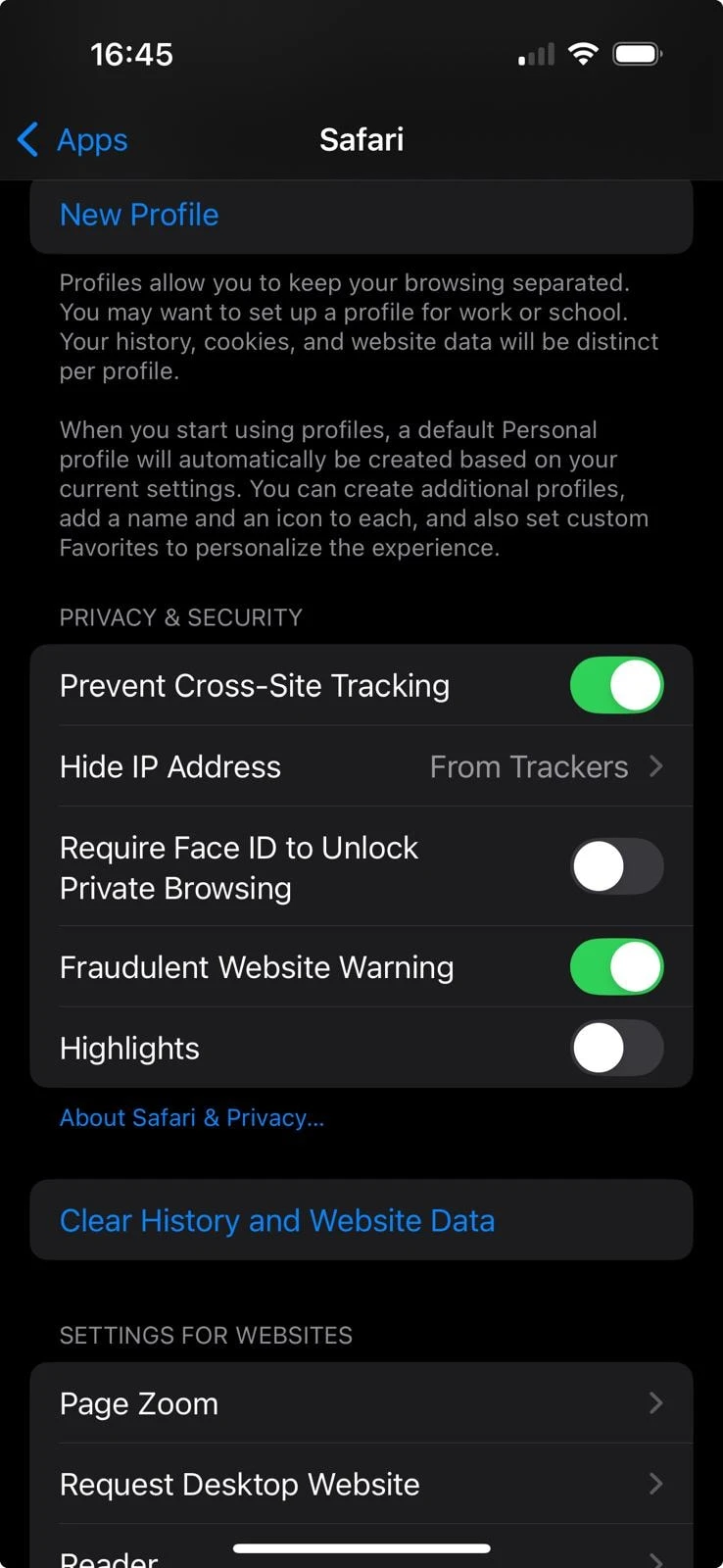
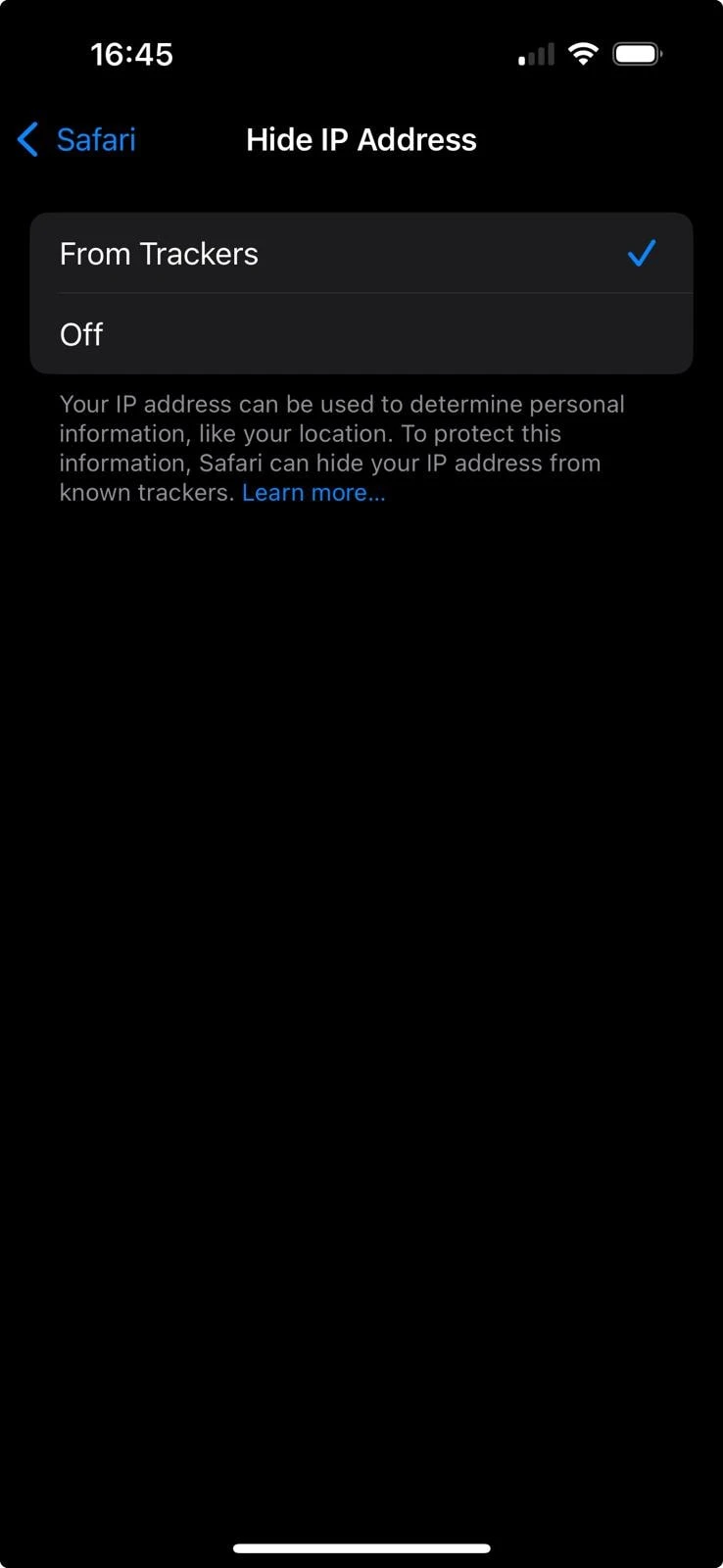
- Safari Hide IP Address: Settings → Apps → Safari → Hide IP Address (from trackers). Limits tracker access to your IP; does not cover non-Safari apps.
- Brave: hides your IP through private windows with Tor, or it’s paid Firewall + VPN.
On a phone
Safari built-in settings (Safari)
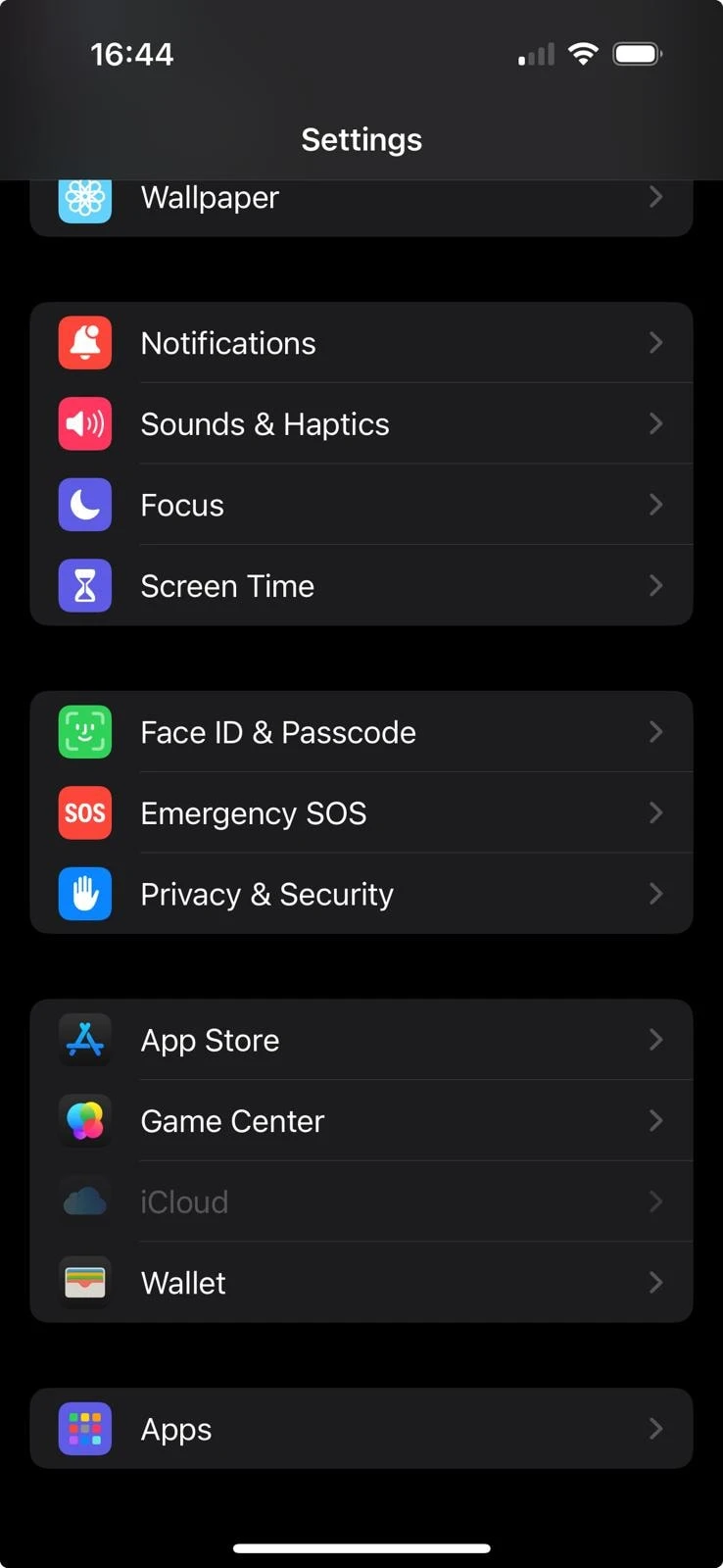
Apple has a built-in privacy feature for hiding users’ IP addresses from trackers. However, this method doesn’t protect non-Safari apps and websites, as they can still use your browser fingerprinting and cookies.
- Open your settings, then scroll to the Apps section.
- Go to Safari and Scroll to Privacy & Security.
- Tap Hide IP Address.
See also: proxy settings on iPhone.
FAQs
An Internet Protocol address is a unique identifier an ISP assigns to a device on a network. IPv4 uses four numbers separated by dots (e.g., 192.168.1.4). IPv6 uses a longer hexadecimal format (e.g., 2001:0db8:85a3::8a2e:0370:7334).
Yes. Cookies and browser fingerprinting can identify you without your IP. Blocking third-party cookies and limiting fingerprinting reduces this.
Your approximate location (city or region, not your street address), your ISP, and your network type (mobile, Wi-Fi, or corporate).
Cite this research
Pick the format that matches where you're publishing. Pasting the link version into your CMS preserves the backlink.
@misc{karatas2026,
  author = {Karatas, Gulbahar},
  title  = {{How to Hide Your IP Address: 6 Methods Compared}},
  year   = {2026},
  month  = aug,
  howpublished    = {\url{https://aimultiple.com/how-to-hide-ip-address}},
  note   = {AIMultiple. Retrieved August 4, 2026}
}Results and timestamps of 5 data points. Download the summary data shown in this article's charts and tables as a ZIP file containing one CSV file.
Want the granular data behind it? Join Premium
Changelog
3 updatesReplaced the browser masking, ultra-masking and app-specific obfuscation sections with a six-method comparison section.
Expanded the introduction with new methods for IP obfuscation, including browser-native masking, Apple's ultra-masking, and app-specific obfuscation.


Be the first to comment
Your email address will not be published. All fields are required. Comments are left in their original language.