


Compare Top 6 AI Presentation Makers

We evaluated the top 6 AI presentation makers across 9 dimensions with 4 different prompts to assess their context and prompt understanding, visual AI integration, voice and brand style adaptation capabilities:
See the methodology and evaluation criteria to understand how we reached these results.
Why did the tools perform differently?
The score variations across Gamma, Google Slides with Gemini, SketchBubble, Canva, and SlidesGO stem mainly from differences in product architecture, primary use cases, and integration depth.
1. AI-first vs. template-first design
- Gamma and Presentations.AI are built as AI-native presentation generators. These tools create complete decks, automatically align content and visuals, and support iterative refinements.
- SlidesGO relies on static, pre-made templates with minimal AI involvement. Users can customize slides after downloading, which limits AI-generated content, multimodality, customization, and iteration capabilities. This results in the lowest overall score.
2. Integrated AI assistant vs. standalone generation
- Google Slides with Gemini adds AI into a traditional slide editor. It performs well in refinement, integrations, and speed, but generates one slide at a time. This constraint lowers its scores in content structuring and overall deck generation.
- Canva follows a design-first model with AI layered on top. It excels in customization, exporting, and brand alignment, but shows inconsistent context and visual consistency because the AI module operates independently of the broader design engine.
3. Template intelligence vs. generative intelligence
- SketchBubble combines structured templates with AI-generated content. It performs reasonably well on context accuracy and visual alignment, but offers limited AI-driven iteration and customization. This positions it mid-tier in total scores.
4. Multimodal and workflow integration differences
- Tools with deeper multimodal pipelines (such as Gamma, Presentations.AI, and Google Slides) handle external files, URLs, and content sources more effectively, thereby improving context and structure.
- Tools without such pipelines (SlidesGO, partially Canva, and SketchBubble) score lower in multimodal input/output and revision capabilities.
Top 6 AI presentation makers
Gamma
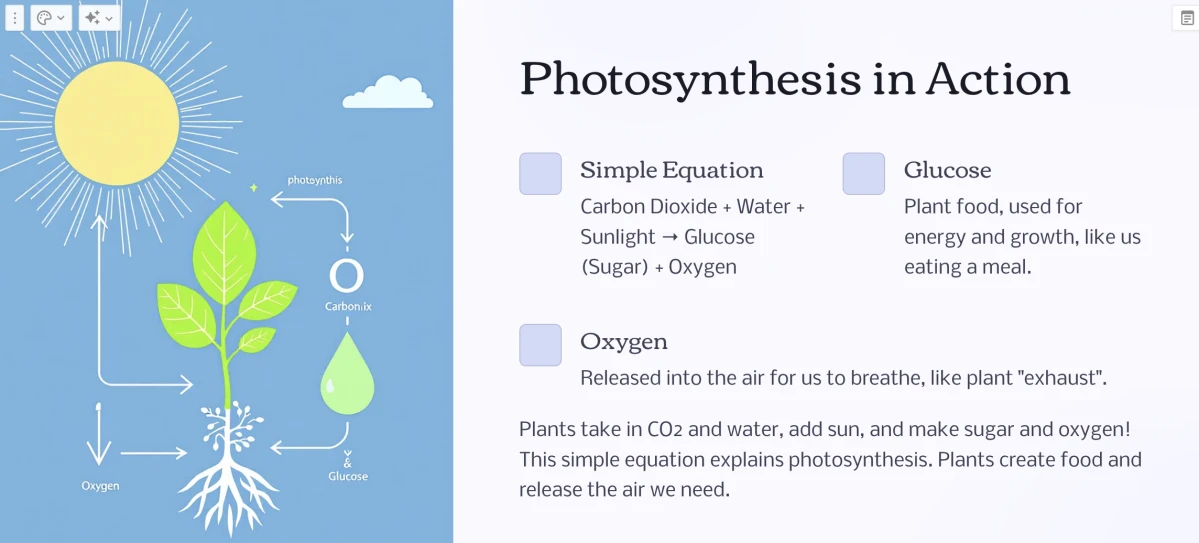
Figure 1: An example slide on photosynthesis created with Gamma.
Prompt: “Generate a presentation explaining the basics of photosynthesis for 8th-grade students. Use simple language, diagrams, and examples.”
Gamma received a score of 10 out of 10 for producing a contextually relevant image and providing explanations that aligned well with the prompt.
Presentations.AI
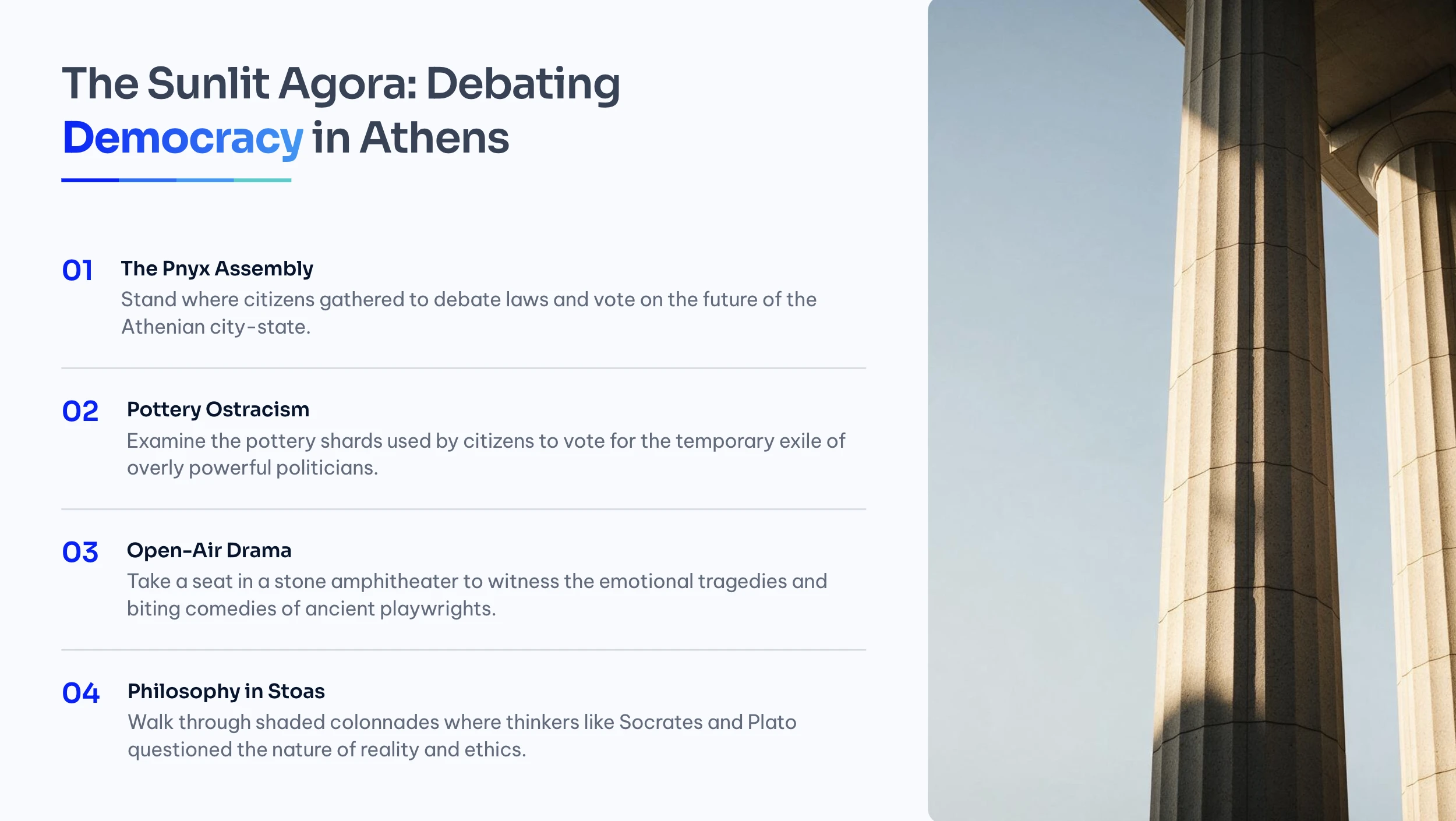
Figure 2: An example slide on time traveling created with Presentations.AI.
Presentations.AI received the full score (10/10) because it integrated authentic visuals, added a game that encouraged readers to engage with a riddle, and included the 5 steps the prompt required.
Google Slides
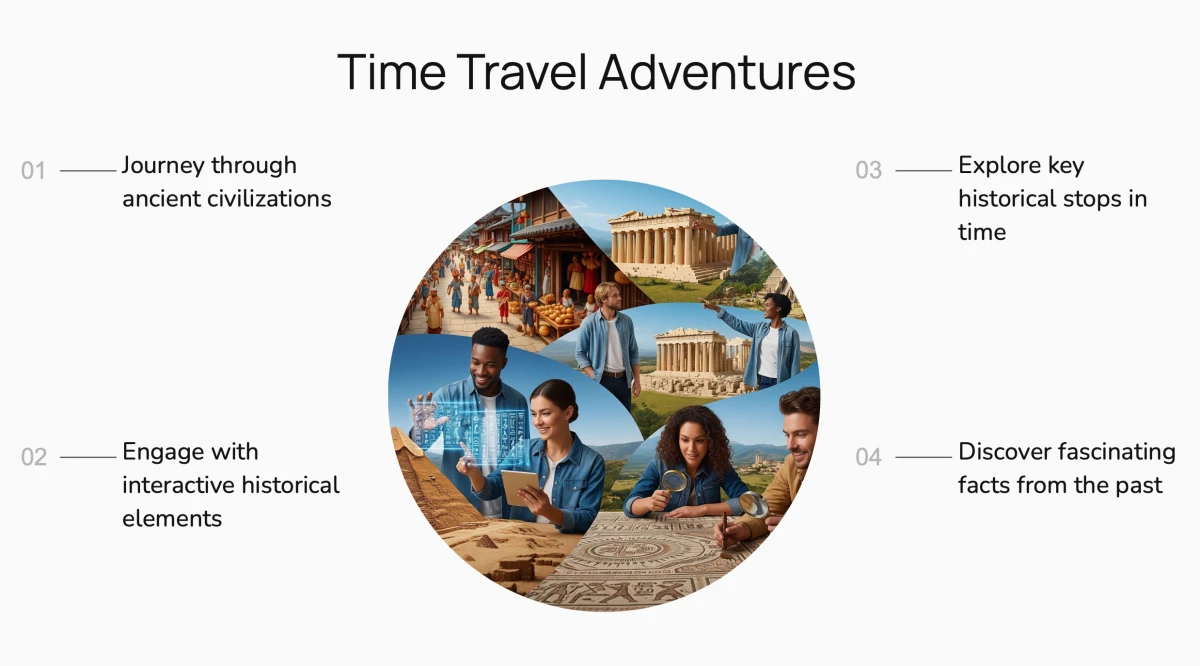
Figure 3: An example slide on time traveling created with Google Slides.
Prompt: “Create a visually engaging presentation that tells the story of a time traveler exploring ancient civilizations. Include 5 key historical stops, fun facts, and interactive elements.”
Google Slides received a score of 9 out of 10. While the tool demonstrated strong visuals, adequate writing, and a clear understanding of the prompt, the final output was somewhat plain and limited to a single slide, rather than producing multiple slides as requested.
SketchBubble
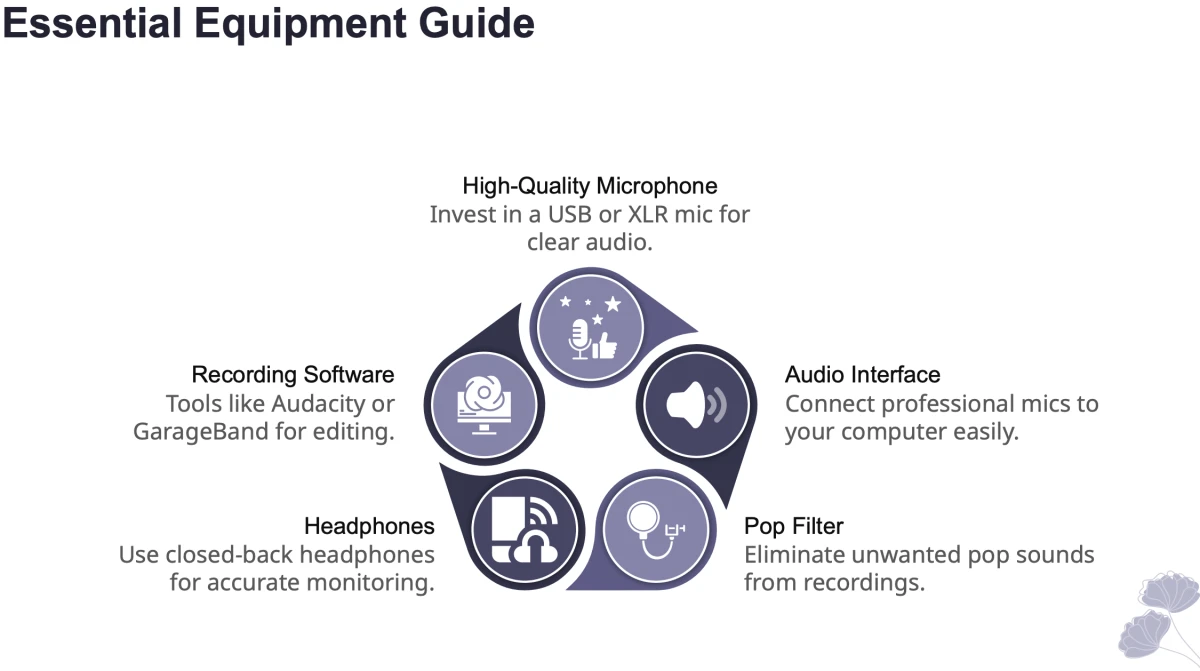
Figure 4: An example slide on “how to start a podcast” created with SketchBubble.
Prompt: “Build a presentation titled: How to Start a Podcast in 2025. Include equipment needed, planning tips, recording tools, publishing platforms, and growth strategies.”
SketchBubble received a score of 6 out of 10. The slide performs well in terms of clarity, visual integration, and accessibility. However, it could be improved by enhancing visual AI integration, expanding contextual understanding, and offering increased design customization options.
Canva
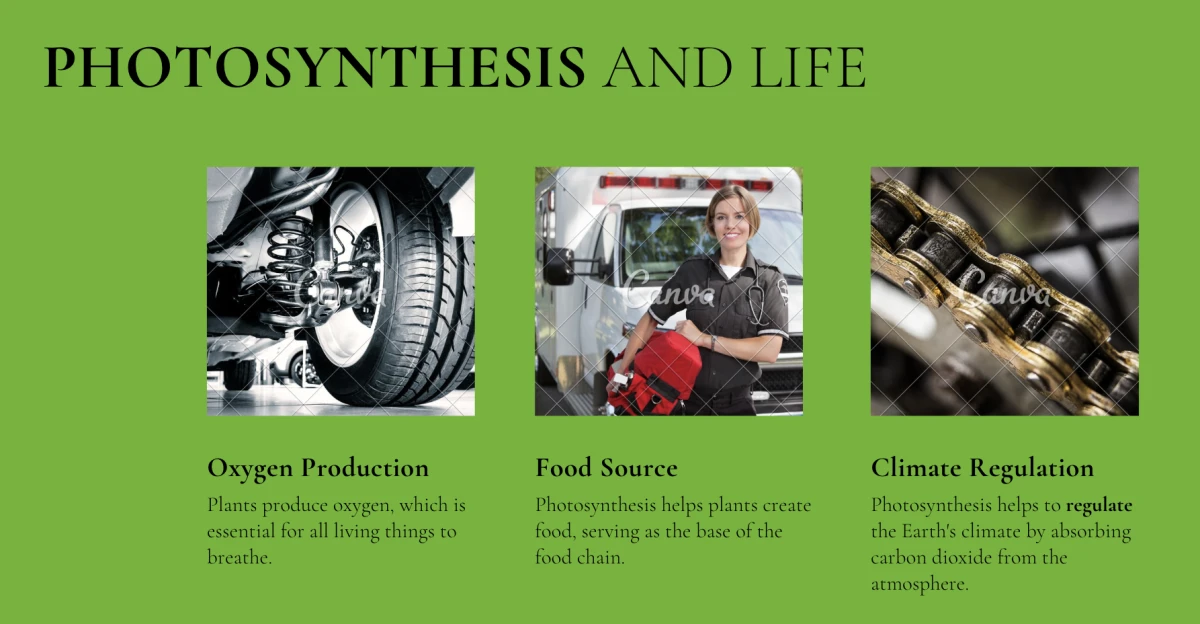
Figure 5: An example slide on photosynthesis created with Canva.
Prompt: “Generate a presentation explaining the basics of photosynthesis for 8th-grade students. Use simple language, diagrams, and examples.”
This presentation received a score of 6 out of 10. One issue noted was its inability to generate contextually appropriate images, for example, displaying a car tire to represent oxygen production and using a picture of a person to depict a food source.
SlidesGo
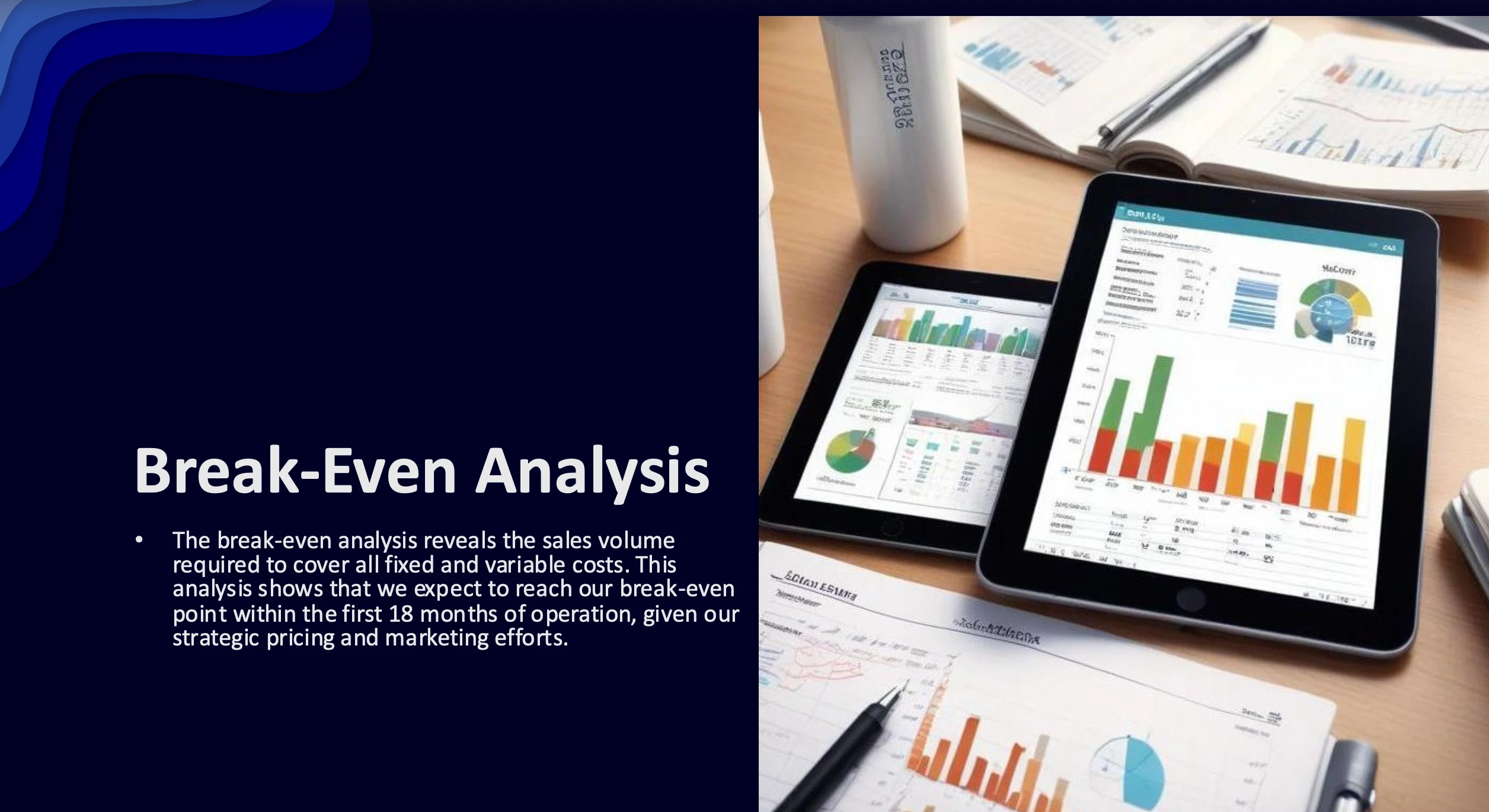
Figure 6: An example slide about an investor pitch created with SlidesGo.
Prompt: “Create a 10-slide investor pitch deck for a new eco-friendly water bottle startup. Include market analysis, product features, business model, and financial projections.”
SlidesGo received a score of 4 out of 10. There are multiple problems with the SlidesGo slide. The letters and numbers in the image on the right are unreadable, undermining the quality and integrity of the visuals.
Also, the slide claims to present a break-even analysis. Still, the visuals show generic dashboard charts rather than an actual break-even chart, creating a mismatch between the message and the visuals.
Limitations of AI presentation makers
Our benchmark results showed three recurring weaknesses that limit AI presentation makers’ effectiveness in real-world workflows. These limitations stem from architectural choices and integration depth rather than from a ceiling on AI capability.
1. Understanding the prompt well enough to select relevant visuals
One of the most consistent failures across tools is the inability to translate prompt context into appropriate visuals. Even when the written content aligns with the user’s request, the accompanying images often miss the mark, undermining the slide’s communicative value and forcing users ty replace AI-generated images manually.
When AI fails to interpret the prompt well enough to choose or generate relevant imagery, users lose the time-saving benefit these tools are supposed to provide, and the final deck risks confusing or misleading the audience.
2. Producing a full deck
A presentation is more than a collection of individual slides. Users expect a logical progression, such as intro, problem, solution, and conclusion. Several tools fall short of producing this structured output, shifting the burden of narrative design back to the user.
When tools generate fragments instead of full decks, most of the value proposition of AI presentation makers is lost, since users still need to assemble and structure the deck themselves.
3. Integrating AI generation with the rest of the design workflow
AI generation is most useful when it operates as part of a continuous workflow that spans content ingestion, slide creation, refinement, and export. Several tools struggle in this dimension because AI features are layered on top of existing design systems rather than built into them.
When AI features sit outside the main design and collaboration pipeline, users face inconsistent results and additional manual work, which directly reduces the productivity gains these tools promise.
AI presentation maker benchmark methodology
- Use the prompts below for each tool:
- “Create a 10-slide investor pitch deck for a new eco-friendly water bottle startup. Include market analysis, product features, business model, and financial projections.”
- “Generate a presentation explaining the basics of photosynthesis for 8th-grade students. Use simple language, diagrams, and examples.”
- “Create a visually engaging presentation that tells the story of a time traveler exploring ancient civilizations. Include 5 key historical stops, fun facts, and interactive elements.”
- “Build a presentation titled: How to Start a Podcast in 2025. Include equipment needed, planning tips, recording tools, publishing platforms, and growth strategies.”
- Select a number of slides (1-10).
- Generate an outline, if possible, and make any necessary adjustments.
- Select a theme or create one that aligns with the brand image.
- Generate slides.
 Add as preferred source
Evaluation criteria for our AI presentation maker benchmark
AI content generation
1. Context awareness & prompt understanding
- The tool can process basic instructions, often producing generic or off-topic content that requires substantial manual editing. (0 points)
- Accurately interprets complex prompts, maintains topic relevance, and adjusts tone appropriately for different audiences or purposes. (2 points)
2. Content structuring ability
- Generates disconnected or flat slides with no clear storyline or flow between ideas. (0 points)
- Organizes content coherently with logical sequencing (e.g., intro–problem–solution) and meaningful slide titles. (1 point)
3. Visual-AI integration
- Provides visuals that are irrelevant or mismatched, leading to a disjointed or unprofessional presentation. (0 points)
- Suggests or auto-generates visuals (e.g., images, graphs) that enhance and align with the slide content, creating a cohesive design. (1 point)
4. Voice & style adaptation
- Produces content in a generic tone that is often inconsistent with the desired voice or audience. (0 points)
- Adjusts tone and style to the use case (e.g., persuasive for sales, formal for academia), ensuring a consistent voice throughout. (1 point)
5. Multimodal input/output
- Primarily supports manual text input, with no ability to extract or repurpose content from external sources. (0 points)
- Allows input from documents, web pages, audio, or images, enabling richer and more flexible content generation. (1 point)
6. Revision & iteration capabilities
- Lacks options for making refinements; users must start over for significant changes. (0 points)
- Enables iterative edits like rephrasing, shortening, or expanding slides, supporting a collaborative workflow. (1 point)
7. Speed
- The AI takes noticeable time to generate or edit presentations, causing delays and breaking user flow. (0 points)
- Fast (i.e., under 1 minute) generation and seamless slide editing, maintaining user engagement and productivity. (1 point)
8. Customization
- Offers minimal flexibility with locked templates and limited design control. (0 points)
- Provides advanced design control, letting users modify themes, animations, fonts, and even interactivity to match their brand or style. (1 point)
9. Exporting & integrations
- Supports basic downloads (e.g., PDFs), with no options for connecting to external tools. (0 points)
- Supports diverse export formats and enables real-time collaboration or syncing with tools like Notion, Figma, Slack, or Google Workspace. (1 point)
Cite this benchmark
Pick the format that matches where you're publishing. Pasting the link version into your CMS preserves the backlink.
@misc{dilmegani2026,
  author = {Dilmegani, Cem and Ermut, Sıla},
  title  = {{Compare Top 6 AI Presentation Makers}},
  year   = {2026},
  month  = sep,
  howpublished    = {\url{https://aimultiple.com/ai-presentation-maker}},
  note   = {AIMultiple. Retrieved September 25, 2026}
}Results and timestamps of 12 data points. Download the summary data shown in this article's charts and tables as a ZIP file containing 2 CSV files.
Want the granular data behind it? Join Premium
Changelog
6 updatesAdded a Limitations of AI presentation makers section covering visual selection, full-deck generation, and workflow integration.
Added Canva and SlidesGo to the "Examples from AI presentation makers" section.
Added the "What is an AI presentation maker?" section.
Cem's work at AIMultiple has been cited by leading global publications including Business Insider, Forbes, Morning Brew, and Washington Post, global firms like Deloitte and HPE, NGOs like World Economic Forum, and supranational organizations like European Commission. [1], [2], [3], [4], [5]
Throughout his career, Cem served as a tech consultant, tech buyer and tech entrepreneur. He advised enterprises on their technology decisions at McKinsey & Company and Altman Solon for more than a decade. He also published a McKinsey report on digitalization.
He led technology strategy and procurement of a telco while reporting to the CEO. He has also led commercial growth of deep tech company Hypatos that reached a 7 digit annual recurring revenue and a 9 digit valuation from 0 within 2 years. Cem's work in Hypatos was covered by leading technology publications like TechCrunch and Business Insider.
Cem regularly speaks at international technology conferences. He graduated from Bogazici University as a computer engineer and holds an MBA from Columbia Business School.

She previously worked as a recruiter in project management and consulting firms. Sıla holds a Master of Science degree in Social Psychology and a Bachelor of Arts degree in International Relations.




Be the first to comment
Your email address will not be published. All fields are required. Comments are left in their original language.