


Top 10+ Managed File Transfer Software Tested: See the Best One

We tested Files.com, Thru, Cerberus FTP Server, Serv-U MFT Server, Diplomat MFT, and bTrade TDXchange hands-on, working through setup, file transfer workflows, security configuration, automation, and administration.
MFT benchmark results
MFT Products | SaaS | Self-hosted | Feature coverage* | Free Trial |
|---|---|---|---|---|
✓ | ✓ | – | ✓ for 7 days | |
✓ | ✓ | – | N/A | |
✓ | ✕ | 73% | ✓ for 7 days | |
✕ | ✓ | 67% | ✓ 15 days after initial call | |
✓ | ✓ | 80% | Free Trial: Contact for demo | |
✕ | ✓ | 47% | ✓ for 25 days | |
 GoAnywhere MFT by Fortra | ✓ | ✓ | – | ✓ for 30 days |
 ActiveBatch | ✓ | ✓ | – | ✓ for 30 days |
 MOVEit | ✓ | ✓ | – | ✓ for 30 days |
 Serv-U by Solar Winds | ✕ | ✓ | 40% | ✓ for 14 days |




See the MFT benchmark methodology for our scoring criteria and how each score was calculated.
* Providers with “-” have not provided us access yet.
Comparison of top MFT solutions
Feature coverage data come from our benchmark results, covering both SaaS/usability and security features. It reflects the breadth of capabilities a tool offers.
For platform-by-platform deep dives and definitions of every capability scored above, see our full MFT benchmark.
Where to host your MFT solution
A critical decision in MFT is whether you prefer a self-hosted solution that can support any data security requirements or a SaaS solution which is easier to maintain.
SaaS
Easier to maintain with no servers to provision. Everything can be managed from the browser.
Choose it if you do not want to run infrastructure, need to collect files from outside parties via web form or email inbox, or need cloud-storage and SIEM connectors. Availability and data residency depend on the vendor.
Self-hosted
Provides full control over your data, but you handle installation, updates, and availability.
Choose it when data must stay on your own infrastructure for compliance or sovereignty.
Self-hosting and SaaS capable vendors
JSCAPE
JSCAPE by Redwood is a managed file transfer (MFT) solution designed for enterprise environments across healthcare, financial services, retail, and government sectors.
Key features:
- Protocol support: This module handles a variety of protocols, including SFTP, FTP/S, AS2, HTTP/S, OFTP2, AFTP, Agent, and WebDAV, ensuring compatibility across different systems.
- Platform compatibility: Operates across Windows, Linux/UNIX, Solaris, and macOS X environments. Available as on-premises, cloud, or SaaS deployment options with support for legacy and hybrid infrastructure integration.
- No file type restrictions: Transfers any file type, including large EDI files like XML, without size limitations.
- Automation features: Provides trigger-based and workflow automation templates for recurring file transfer tasks. Automation can be configured based on events, timeframes, or specific objects.
- Audit and compliance: This service provides full audit trails of user and administrative activity, supporting compliance with HIPAA, PCI DSS, SOX, GDPR, and more.
- JSCAPE triggers: Automates file transfers and business processes without custom scripting, enhancing operational efficiency and SLA fulfillment.
Choose JSCAPE for an enterprise-grade MFT solution with multi-OS support.
Stonebranch
Stonebranch offers a workload automation solution that enables companies to organize, automate, and synchronize IT tasks through a single integrated platform. It simplifies workflow management across multiple platforms and applications, even when data is stored in disparate locations. Its user-friendly drag-and-drop interface enables users to create workflows and manage the entire organization’s workload with ease.
Key features:
- Command center-style platform: Enables users to manage and monitor the entire IT environment from a single interface, facilitating seamless execution of changes and system restoration without disruption.
- SaaS and on-premise: The solution can be deployed as a cloud-based service or on-premises, giving flexibility to meet specific organizational needs and preferences.
- Data pipeline orchestration: Supports large-scale data operations, ensuring efficient management of complex data workflows.
- Stonebranch integration hub: Provides access to a community-driven source of integration blueprints, allowing users to extend functionality and customize integrations.
- Low-code user interface: Enables users to create and manage workflows with an intuitive drag-and-drop interface, reducing the need for complex scripting.
bTrade / TDXchange
bTrade TDXchange is a web-based managed file transfer and enterprise data exchange platform for securely automating, governing, and monitoring data exchanges across files, EDI, APIs, cloud services, and trading partners.
Unlike general-purpose MFT tools, TDXchange validates EDI content on upload and routes files based on the receiver identifier embedded in the EDI envelope, making it a B2B gateway rather than a file mover. Access is built on trading-partner relationships rather than folder permissions, isolating each partner. It supports HIPAA, SOC2, and PCI-DSS compliance out of the box.
- Relationship-based security: Access and routing follow defined trading-partner relationships, not shared folders; a participant can reach only its related partners.
- EDI-aware routing: Files uploaded to EDI mailboxes are validated against supported EDI standards (X12, EDIFACT) and routed to the correct trading partner mailbox based on the receiver identifier in the ISA envelope. Files that do not contain valid EDI structures are rejected before transfer.
- Protocol support: Supports AS2, AS1, SFTP, FTP(S), HTTP(S), AFTP, UDP, SMB, and SMTP. Multiple protocol services run simultaneously on independent ports, allowing trading partners to connect over their preferred protocol.
- Post-quantum cryptography: Certificates and at-rest message encryption support PQC algorithms including KYBER and FrodoKEM alongside standard X509, SSH, and PGP, one of the few platforms in this benchmark with documented PQC support. At-rest encryption also guards against “harvest-now-decrypt-later” attacks.
- Per-participant controls: Connection/rate limits and IP allow/deny lists per participant, so one partner cannot degrade service for others.
- Selective content scanning: ICAP antivirus/DLP applied per relationship (e.g. external inbound only); failed files are quarantined.
- TDCompress: Proprietary compression + encryption, tighter than OpenPGP.
- SLA monitoring: Relationships between trading partners carry SLA rules defining expected file counts, time windows, and filename patterns. Alerts fire when expected transfers do not arrive within the defined window.
- Access re-certification: Native periodic review of which participants and users still need access.
- Ad-hoc secure send: Two-way person-to-person sharing with password, expiration, and dual-channel notification.
- DMZ relay architecture: Relay nodes deployed in the DMZ terminate inbound connections externally, keeping the core TDXchange server off the public network.
- bTrade AI bot: A natural language search interface that accepts free-text queries and returns matching transfer records with direct links to message details and activity trails; the only platform in this benchmark with a functional natural language interface over transfer history.
- Deployment: Available as on-premise (TDXchange), SaaS (TDCloud), or hybrid. Databases supported: H2 for smaller deployments, Oracle, PostgreSQL, and MSSQL for larger ones. Runs on Linux, Windows, and Unix. Clustering and high availability are built in. The on-premise and hybrid options are self-installed, while the SaaS option (TDCloud) requires no installation and is used through a URL.
- Email options: AS1 (EDI over email) and SMTP/POP at the protocol level, plus AttachGuard, an Outlook plugin that replaces email attachments with secure download links.
- Folder handling: Through the web interface, folder contents are transferred as a compressed file that the server unzips. At the automation level, storage adapters can recursively scan and transfer complete folder and subfolder structures, preserving the original directory hierarchy. Trading partners can also create folders during upload.
GoAnywhere MFT
GoAnywhere Managed File Transfer (MFT) is a software solution by Fortra. It is designed to streamline and secure data exchange between systems, employees, customers, and trading partners.
Key features:
- Security & compliance: Supports protocols such as SFTP, FTPS, HTTPS, and AS2. It offers FIPS 140-2 validated encryption and detailed audit trails to meet compliance standards such as GDPR, HIPAA, and PCI DSS.
- Automation & workflow: Provides a browser-based interface for designing workflows, scheduling tasks, and automating file transfers without scripting.
- Deployment flexibility: Available for on-premises, cloud, and hybrid environments.
- Integration capabilities: Features connectors for cloud services (e.g., AWS, Azure) and applications like Salesforce and SharePoint
ActiveBatch
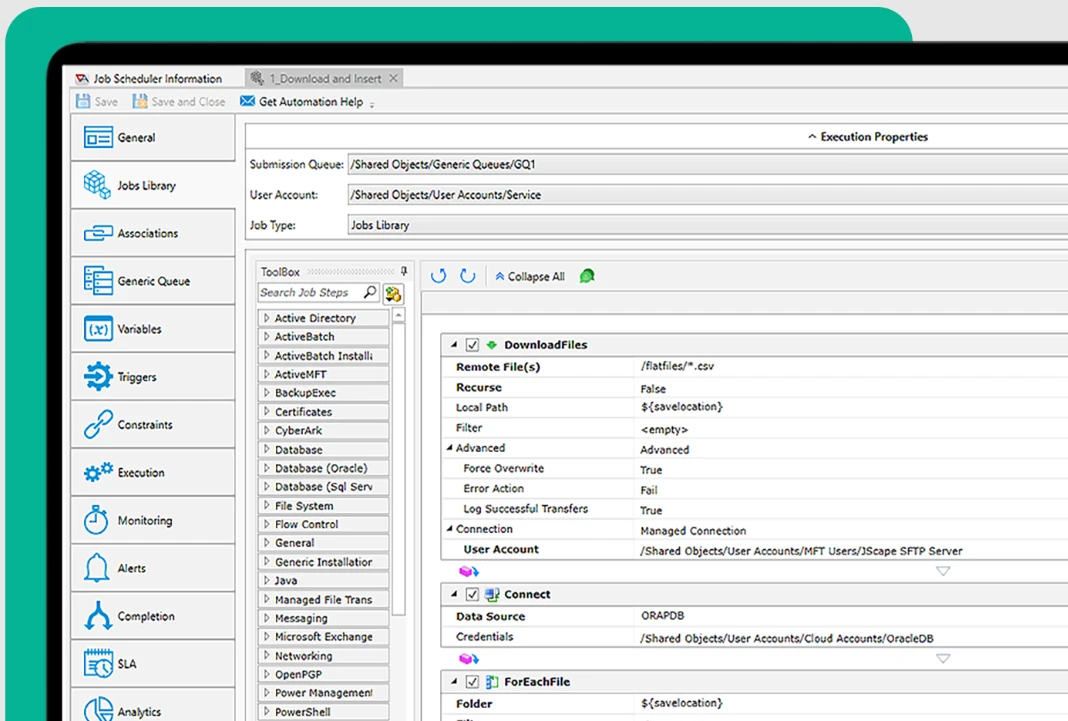
ActiveBatch is a workload automation platform that streamlines managed file transfer (MFT) processes. It supports protocols such as FTP and SFTP, enabling users to schedule and manage file transfers across various systems and environments.
With features such as automated retries, error handling, and real-time monitoring, ActiveBatch reduces the need for manual intervention and ensures secure, reliable data movement.
It is a suitable solution for organizations seeking to automate and centralize their complex file transfer workflows.
Source: ActiveBatch Automation Dashboard
Key features:
- Integrated jobs library: Offers pre-built Job Steps for common file operations like MoveFile, CopyFile, For-Each-File, and IfFile, allowing for easy construction of file transfer workflows.
- Super REST API: Enables integration with other MFT solutions for managing scheduled and ad hoc file transfers.
- Business applications: These are compatible with Microsoft’s application suite, as well as ERP, BPM, and BI tools.
- Data warehousing: Works with a variety of data systems, including the Hadoop Ecosystem, SAP, Microsoft SQL Server, Oracle Databases, Informatica, and IBM.
- IT infrastructure: Supports both on-premises data centers (Windows, UNIX, IBM iSeries, AS/400) and cloud environments like VMware, Amazon EC2, and Microsoft Azure.
- Event-driven architecture: Advanced scheduling features streamline high-volume and complex data transfers.
- Automation features: Includes parallel transfer capabilities, automatic restarts, and built-in file authentication checks to improve SLAs.
MOVEit
MOVEit Managed File Transfer (MFT) is a software solution designed to manage, view, and control all file transfer activities within an organization. MOVEit MFT provides a secure and compliant way for organizations to exchange sensitive data internally and externally with business partners, customers, or employees.
Read: MOVEit Alternatives
Key features:
- End-to-End Encryption: Ensures secure file transfers with encryption both at rest and in transit.
- User Access Controls: Implements granular permissions and multi-factor authentication.
- Audit & Reporting: Offers comprehensive logging and reporting tools to support compliance and troubleshooting.
- Cloud Integration: Supports integrations with various cloud storage providers and services.
Globalscape EFT
Globalscape Enhanced File Transfer (EFT) is a robust managed file transfer (MFT) solution designed to securely automate and manage enterprise data transfers. It offers a modular architecture, allowing organizations to customize features according to their specific needs.
- Modular architecture: Allows customization with modules for advanced workflows, auditing, and compliance.
- Security features: Includes antivirus scanning, data loss prevention, and encryption.
- Compliance support: Assists in meeting standards like SOX, HIPAA, and PCI DSS.
- Automation: Facilitates automated file transfers and event-driven workflows.
IBM Aspera
IBM Aspera Managed File Transfer (MFT) is a solution that facilitates the secure, fast, and reliable transfer of large files and data sets across wide area networks. This product integrates Aspera’s patented FASP (Fast and Secure Protocol) technology with features typically found in managed file transfer solutions, like automation, monitoring, and control over file transfers.
Key features:
- High-speed transfers: This method utilizes the FASP protocol to achieve high-speed data transfers, regardless of file size or network conditions.
- Security: Provides robust security features, including encryption and user authentication.
- Integration: Offers APIs and SDKs for integration with existing workflows and applications.
SaaS-only vendors
Files.com
Files.com is a cloud-native file transfer service designed to replace legacy FTP systems with modern security and automation features.
The platform focuses on developer-friendly features and API access, making it particularly suitable for organizations that need to build file transfer capabilities into their applications or automate file operations through code.
Core capabilities:
- API-first design: RESTful APIs with ready-made code libraries for Python, Ruby, PHP, Node.js, .NET, Java, and Go programming languages.
- Zero-infrastructure setup: Cloud-based service requiring no servers or software installation, with automatic scaling and global content delivery
- Modern security: AES-256 encryption, SOC 2 Type II compliance, customer-controlled encryption keys, and detailed activity logging
- Account lifecycle rules: User Lifecycle Rules automatically disable or remove accounts that stay inactive for a configured number of days, keeping stale access from piling up.
- Process automation: trigger- and rule-based automation (schedules, webhooks, ad-hoc runs) with file organization rules for rename, move, and copy.
- Two-way ad-hoc sharing: Users send files through share links and receive them via a dedicated inbox email address or web upload page.
Thru MFT
Thru Managed File Transfer (MFT) is a software solution designed to securely manage, send, and receive files within and outside an organization.
Key features:
- Cloud integration: Connects with various cloud storage services for seamless operations.
- Technical features: Flexible external storage, though node setup can be intricate. Improved error messaging is needed.
- Performance: Comparable to on-prem FTP servers, strong real-world metrics.
- Storage provisioning: It does not provide its own storage; it relies entirely on the resources the users supply.
- Anti-virus feature: Good anti-virus capability is integrated into the system.
Self-hosted vendors
Diplomat MFT
Diplomat MFT is a managed file transfer solution that handles secure automated file transfers for regulated industries, such as healthcare, financial services, government, retail, and manufacturing, with compliance tools and encryption included rather than sold separately.
Core capabilities:
- Built-in PGP encryption: PGP encryption is included across editions without requiring a separate tool or third-party plugin.
- PGP enforcement: Configurable rules to require PGP encryption on jobs and browser uploads; available as an add-on Professional and included on Enterprise (not on Standard).
- One-click PGP automation: PGP key management and encryption steps are embedded directly into file transfer workflows.
- SFTP audit report: One-click generation of audit reports covering transfer activity, user access, and connection history, directly useful for HIPAA, PCI DSS, and DORA audits.
- Connection map: Visual one-click view of all configured connections and data flows, supporting regulatory reviews and security assessments.
- Edge gateway: A DMZ-deployed component that protects the Diplomat MFT SFTP Server by keeping it inside the internal network. Inbound connections terminate at the Edge Gateway, preventing external access to internal systems.
- Per-partner controls: Automatic lockout after repeated failed logins and IP access rules (default allow or deny with an exception list) restrict who can connect, and Remote Agent transfers can be given a bandwidth cap.
- Post-quantum cryptography: Quantum-safe (post-quantum) encryption is available alongside standard PGP, SSH, and SSL.
- FIPS 140-2: Supports FIPS 140-2 validated cryptography.
- Remote agents: Deploy lightweight agents at remote sites or endpoints to enable distributed file collection, delivery, and monitoring, useful for multi-location organizations where files originate or are needed outside the central server.1
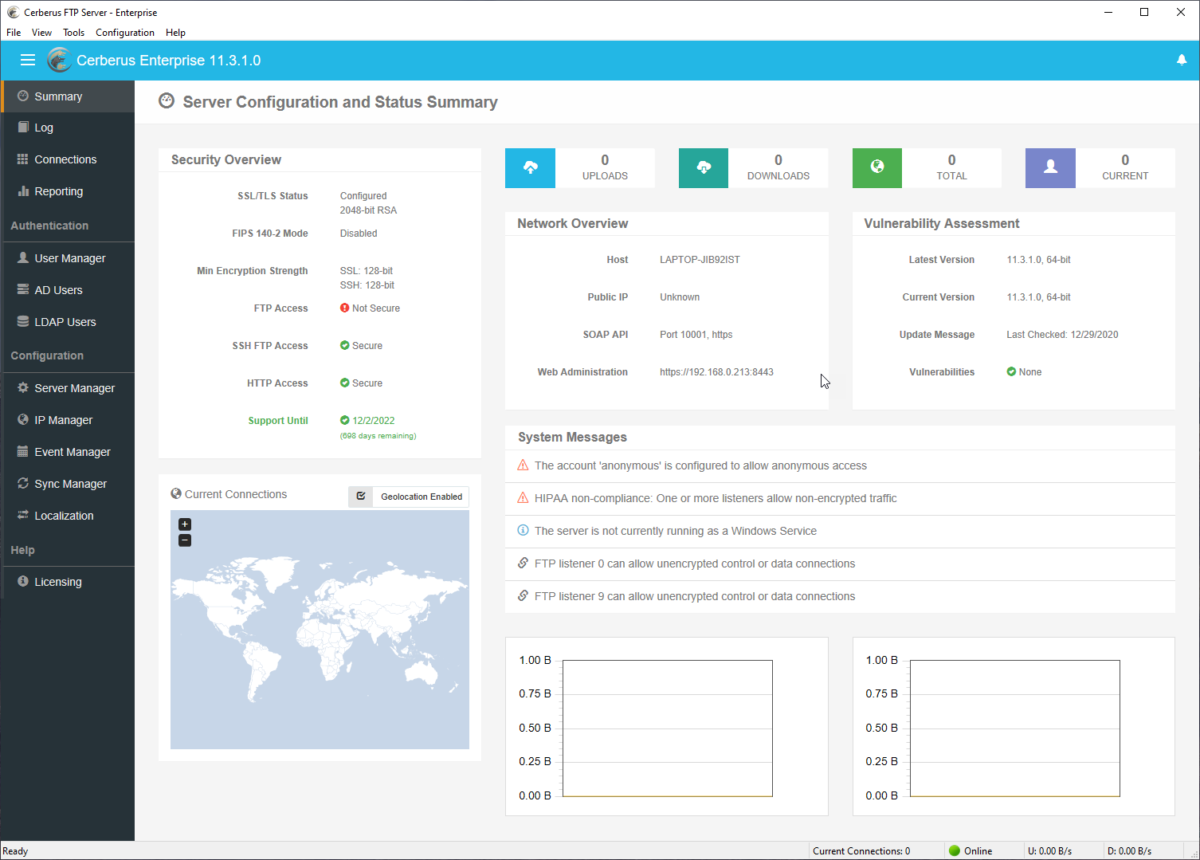
Cerberus FTP Server
Cerberus FTP Server enables organizations to achieve cost-effective file transfers thanks to its:
- Affordable pricing
- Support for compliance with standards like HIPAA and GDPR
- Features like audit trail generation
Key features:
- Security: It supports encryption for data in transit and at rest, and offers features such as two-factor authentication (2FA), virus-scanning integration, and rogue-transfer detection to ensure secure file transfers.
- DoS protection: Built-in DoS protection and auto-blocking guard the server against connection floods and repeated failed logins.
- Automation and integration: It includes robust automation options for scheduling transfers and event triggers and integrates with Active Directory, LDAP, and cloud storage providers, making it suitable for complex workflows.
- User management: Cerberus FTP provides flexible user account and permission management, allowing businesses to configure file access and manage user groups efficiently.
- Account lifecycle: Accounts can be automatically disabled after a configurable period of inactivity, based on last-login tracking.
Choose Cerberus FTP server for a cost-effective, Windows-based MFT software.
Solarwinds Serv-U
Serv-U is a file transfer protocol (FTP) server software that facilitates secure file transfers over the Internet or within a private network.
Key features:
- Security: Provides secure file transfer with encryption and firewall protection.
- Connection limits: Limits can be set per user, group, domain, and globally to prevent any single account from exhausting server resources.
- Customization: Customizable web interfaces for branded user experiences.
- Integration: Can integrate with Active Directory and LDAP for user authentication.
- Two-way ad-hoc sharing: Users can send files via a download link and receive files through inbound requests.
 Add as preferred source
How do you choose the right MFT tool for your business?
If you need to share files:
- with a few parties,
- Non-confidential data: Use free versions of cloud file transfer services like Files.com.
- confidential data: Paid versions of cloud file transfer services offer a cost-effective solution. However, these bring on 3rd party cybersecurity risk
- highly valuable confidential information: On-prem solutions like GoAnywhere MFT minimize 3rd party cloud related risks.
- with tens of different parties (e.g. remote locations of your business), business-critical, confidential data of
- low volume (e.g. up to 1 TB): SaaS MFT solutions like Aspera provide easy maintenance and volume-based pricing
- high volume: On-prem MFT solutions like Solarwinds Serv-U or Cerberus MFT can help save costs but bring on maintenance and update tasks to the tech team.
MFT benchmark methodology
We tested six platforms: Files.com, Thru, Cerberus FTP, Serv-U, Diplomat MFT, and bTrade TDXchange. In our detailed hands-on MFT benchmark, we installed and documented each one in full, across ten sections (setup and deployment, admin panel access, file transfer interface, upload throughput and transfer reliability, inbound file collection, protocol support, automation and workflow, security, user and access management, and monitoring and audit).
Drawing from those sections, we scored each platform on sixteen selected capabilities spanning usability, security, reliability, and integration:
- No-install setup
- A remote admin panel
- Folder upload
- An email inbox
- Flow-based automation
- FIPS 140-2 support
- Per-user rate limiting (DoS prevention)
- Account re-certification
- Antivirus/DLP content scanning over ICAP
- Two-way ad-hoc transfer
- Automatic subfolder per submission
- Password-protected sharing
- Clickwrap / registration gate
- High availability / clustering
- Checkpoint restart / resumable transfers
- REST API
A capability from those sections qualified for scoring only if it was binary and verifiable (present or absent, not a measurement), differentiating across the MFT market (a real distinguishing feature that not every product offers), and relevant to a real MFT buying decision. Some sections yielded no scored capability: protocol support baselines (FTP, FTPS, SFTP, HTTPS) are universal transport standards present in every product, and monitoring and audit is present in some form across all products, so neither differentiates.
Feature coverage is the share of these sixteen capabilities a platform provides, with each weighted equally: a supported capability counts as 1 and a missing one as 0.
Cite this research
Pick the format that matches where you're publishing. Pasting the link version into your CMS preserves the backlink.
@misc{dilmegani2026,
  author = {Dilmegani, Cem and Şipi, Nazlı},
  title  = {{Top 10+ Managed File Transfer Software Tested: See the Best One}},
  year   = {2026},
  month  = sep,
  howpublished    = {\url{https://aimultiple.com/managed-file-transfer-solutions}},
  note   = {AIMultiple. Retrieved September 7, 2026}
}Results and timestamps of 19 data points. Download the summary data shown in this article's charts and tables as a ZIP file containing 2 CSV files.
Want the granular data behind it? Join Premium
Changelog
26 updatesAdded post-quantum cryptography and FIPS 140-2 support to the Diplomat MFT section.
Expanded MFT benchmark scoring from ten to sixteen capabilities.
Updated GoAnywhere MFT's deployment details on its no-install classification in the benchmark.
Expanded bTrade TDXchange security features with relationship-based access and per-participant controls.
Removed the "How to choose: cloud vs on-premise vs B2B gateway" comparison section.
Removed the MFT pricing benchmark section comparing Cerberus, Aspera, Serv-U, and Thru.
Added Files.com, Diplomat MFT, and bTrade TDXchange to the tested vendor comparison.
Added bTrade TDXchange vendor profile to the comparison
Added an MFT benchmark results section covering hands-on tests of Files.com, Thru, Cerberus FTP Server, and Serv-U.
Added Diplomat MFT by Coviant Software to the product list.
Added Stonebranch and Files.com to the product list.
Cem's work at AIMultiple has been cited by leading global publications including Business Insider, Forbes, Morning Brew, and Washington Post, global firms like Deloitte and HPE, NGOs like World Economic Forum, and supranational organizations like European Commission. [1], [2], [3], [4], [5]
Throughout his career, Cem served as a tech consultant, tech buyer and tech entrepreneur. He advised enterprises on their technology decisions at McKinsey & Company and Altman Solon for more than a decade. He also published a McKinsey report on digitalization.
He led technology strategy and procurement of a telco while reporting to the CEO. He has also led commercial growth of deep tech company Hypatos that reached a 7 digit annual recurring revenue and a 9 digit valuation from 0 within 2 years. Cem's work in Hypatos was covered by leading technology publications like TechCrunch and Business Insider.
Cem regularly speaks at international technology conferences. He graduated from Bogazici University as a computer engineer and holds an MBA from Columbia Business School.

Next to Read
Compare Top 10 All-in-One IT Management Platforms


MFT Benchmark: Files.com, Diplomat MFT, Cerberus, and Serv-U Tested


Top 11 XDR Solutions Comparison and Features

Be the first to comment
Your email address will not be published. All fields are required. Comments are left in their original language.