


Sites change their layout and the fields you need from a page shift over time. These changes break manually-coded scrapers. AI scrapers can be updated with simple prompts, and some can repair a saved scraper when the site changes.
We benchmarked top AI web scraping tools across the top 10 e-commerce domains to see their performance, and also compared how each one leverages AI.
Ranking is by success rate for benchmarked vendors, and by feature coverage for the rest.
AI web scraping tools benchmark
Each vendor takes a different approach to AI, and our goal was to compare those approaches and the trade-offs they bring. See the benchmark methodology section for more details on the testing process.
Price and currency data was extracted from the top 10 e-commerce sites worldwide.
Key findings about AI web scraping tools from the benchmark
- Failures come back looking like data. When a tool cannot read a price, often because the page hit an anti-bot wall, the response can come back as 0 rather than as a failure. A null can be retried or skipped; a 0 passes validation unnoticed. For example, Apify and Oxylabs returned null in these cases, and Firecrawl’s documentation recommends adding “Return null if not found on the page” to each field in the schema so the model does not guess a value.
- Extra fields arrive uninvited. Ask for price and currency and you may also get brand, description or image URLs. A schema limits the response to the fields you name. For example, Bright Data lets you lock the output schema at build time, so the same shape comes back on every call.
- The wrong element gets pulled. Discounted versus original price, with-tax versus without-tax, regional toggles: the tool may grab the number you did not want.
- Numbers drift. Prompt-to-JSON tools can add decimals, truncate values, or return currency-converted approximations that appear nowhere on the page.
- Locale changes the answer. Some sites price by geo-IP, so a vendor on US proxies sees one number where a European user sees another.
Schema and proxy region are the parameters that let you catch most of this before it reaches your data.
AI web scraping tools pricing
Kadoa publishes no rates, offering a consumption-based Flex tier and a contact-sales Enterprise tier.
AI web scraping tools comparison
Time to first scraper: For tools that build a scraper you then call by ID, how long the setup takes. “Single HTTP call” means there is no build step at all.
User-defined output schema: Whether you can set the output fields and their types yourself before the scrape runs, instead of describing them in a prompt and letting the LLM decide the structure at runtime.
Build-once, call-many endpoint: Whether the scraper is built once, stored on the vendor’s side, and then called with nothing but a URL. Here the LLM (or, for recording-based tools, your click-through) runs at build time and its output is frozen into a scraper you own and can change in place, which is what schedules, webhooks and integrations bind to. Where this is missing, the extraction is worked out again on every call and the full definition travels with each request.
Self-healing saved scraper: Whether a saved scraper is repaired when the target site changes, without rebuilding it from scratch. The fix applies to the same stored scraper under its existing identifier, so triggers, schedules and integrations keep working.
* Kadoa stores the scraper and calls it by ID, but target URLs are bound when the workflow is created. Pointing it at a new URL takes a separate metadata update before the run.
Tools that run an LLM over the page on every call are not counted here: there is no persisted extraction logic to repair, which makes them tolerant of layout changes but also means there is no artifact to inspect, version or approve. Neither are internal caches with no identifier you can point at, since there is again nothing to inspect, version or approve.
Beyond things like pages changing constantly, in agentic pipelines you often need a simple API you can call: give a URL, get structured data back. But you can’t always find a ready scraper API for every domain you need to scrape regularly; and when you do, the fields you want may not be there, or you need to customize the schema to your own needs. There are different approaches that address these problems.
Build-once, call-many AI web scraping platforms
If you build your own scraper, you have to write the crawler, wire up proxies, run headless browsers, and handle queues, retries and anti-bot on your own.
AI has moved into scraping to cut that manual work and make setup simpler. It’s involved in most of these tools, but each vendor uses it differently and answers a different set of needs.
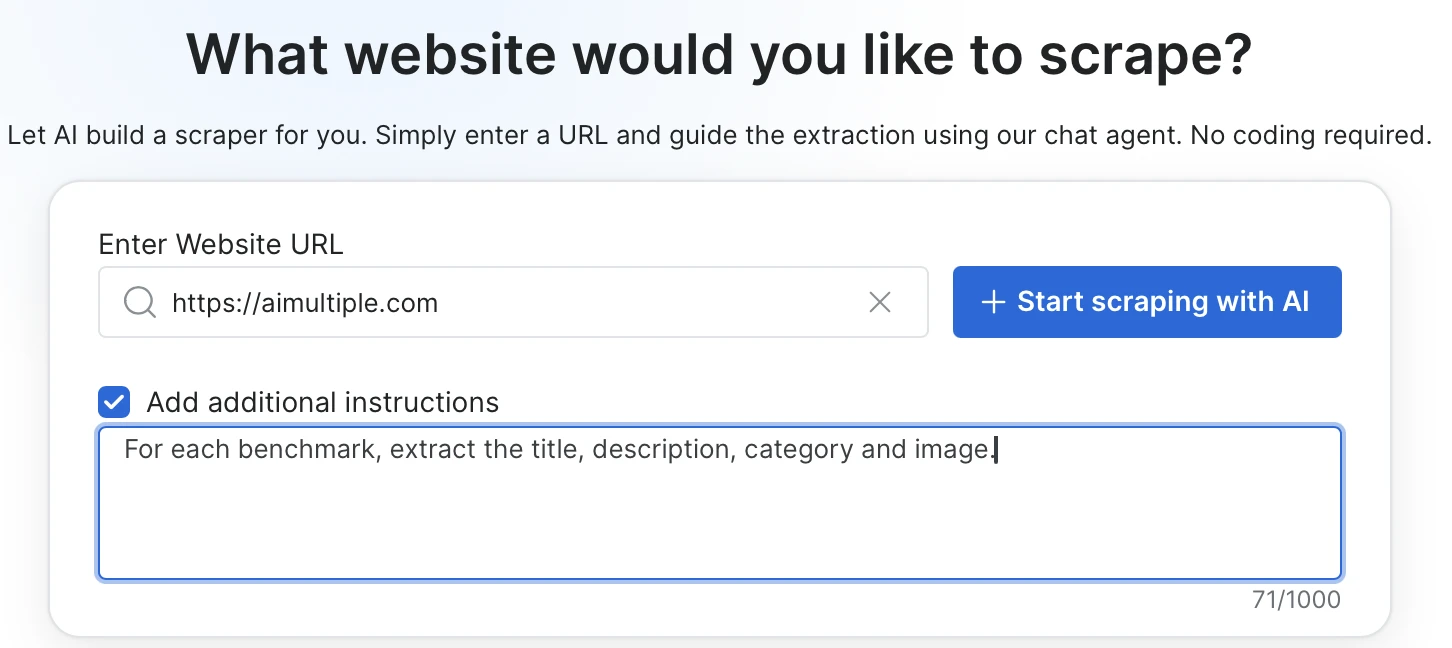
Bright Data Scraper Studio offers a two-phase approach where you build the scraper for any URL with a prompt and then call it as a stable API. You set it up once, and from then on you just pass in URLs.
You describe the fields you want to extract in plain language, and you can optionally add CSS selectors, required on-page actions, or page-load behavior.
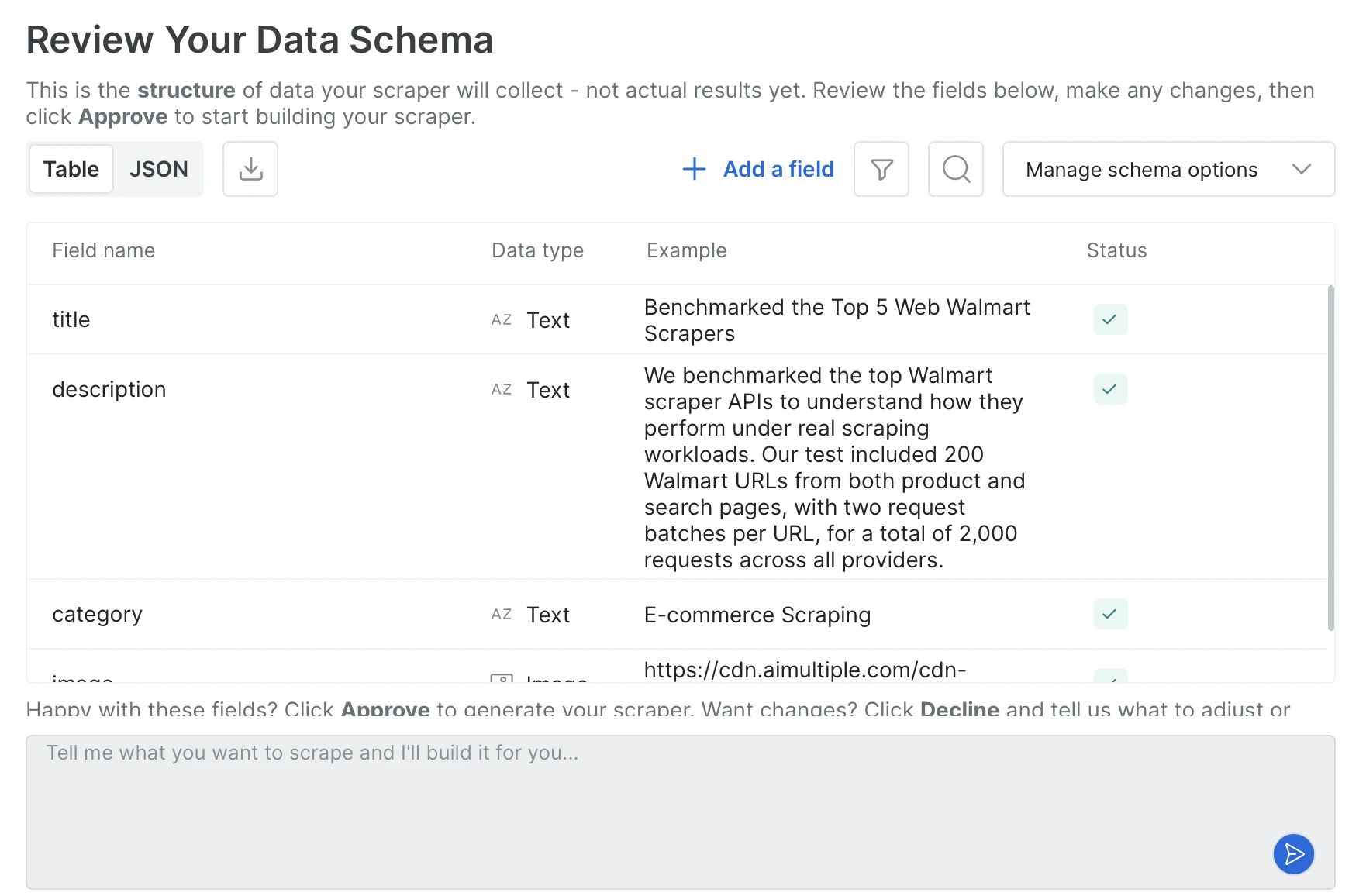
The agent generates the output schema from the prompt; you approve it by adding or removing fields or changing types, and then the scraper code is written.
- Build-once, call-many endpoint: Once you approve the schema, the scraper is registered as a long-lived endpoint with a fixed identifier. Every call hits the same endpoint with just a URL, and the output schema stays the same across calls. In our tests, building a dedicated scraper took around 10 minutes on average.
- Two build methods: You can chat with the Agent in the browser, or use the Bright Data CLI to build the scraper from your terminal with a single command that takes a URL and a prompt. Both produce the same scraper.
- Coding-agent workflow: The terminal commands run unchanged inside Claude Code, Cursor and Codex, so the agent can build, run or self-heal a scraper without leaving the editor. You can also pin the scraper’s identifier in the agent’s rules file so future sessions reuse it.Results can be delivered through API, SDK, CLI, webhooks, or directly to cloud storage on S3, GCS, Azure, or OSS.
- Combined with pre-built scrapers: Bright Data maintains a library of ready scrapers for popular sites like Amazon, LinkedIn and Zillow.
- Self-healing saved scraper: When the site changes and the scraper breaks, you describe what broke in plain language; the AI produces a fix and shows it with sample output, and nothing goes live until you approve. Because the scraper’s identifier doesn’t change, every trigger, schedule and integration tied to it keeps working.
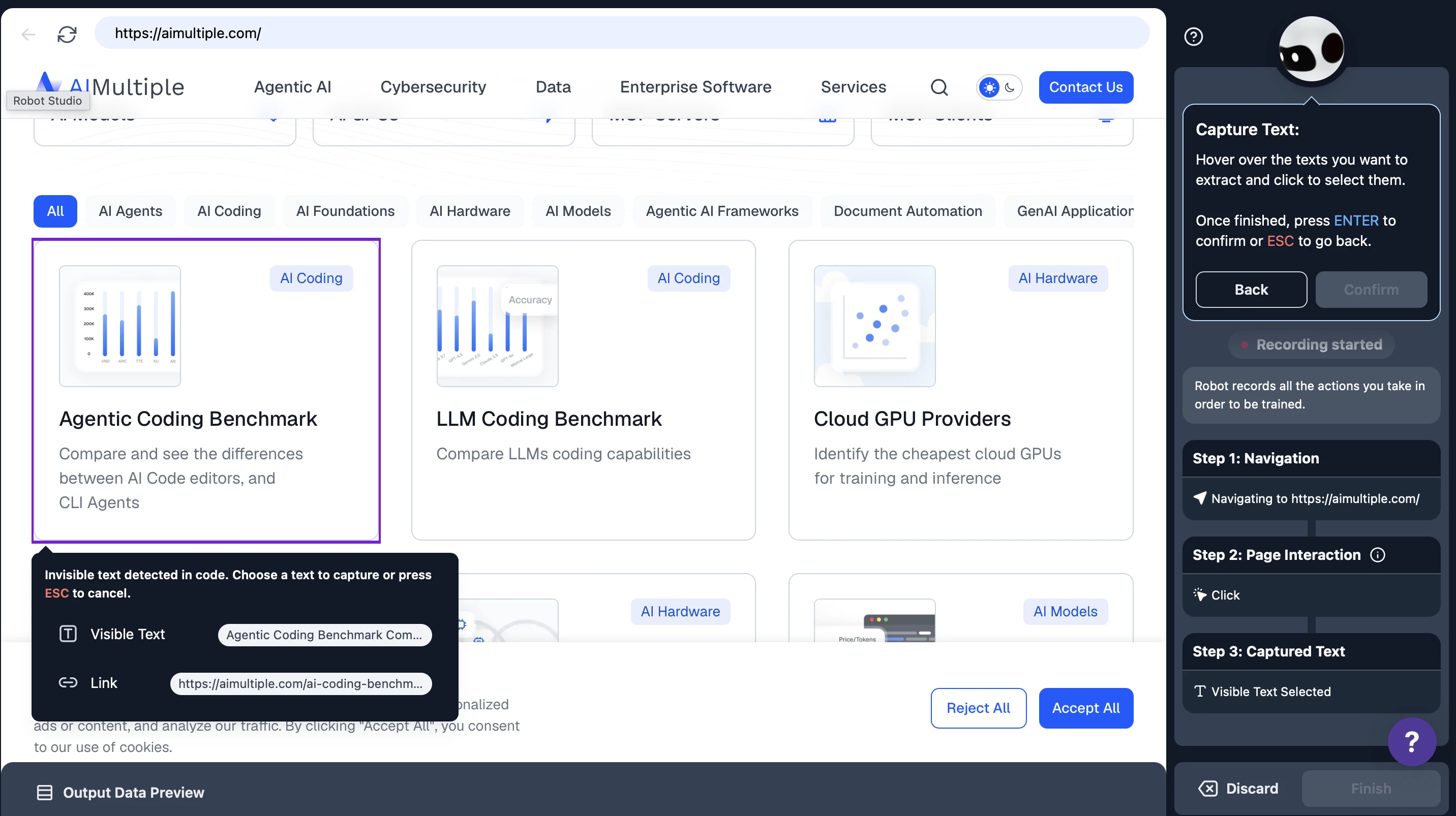
In Browse AI you still build the scraper yourself, but the setup is visual: you go to the target page and click to mark which fields should be captured, and the robot saves the navigation steps and the selected fields as a recording. That recording then runs over and over; when the page changes, the robot adapts on its own in most cases, and is retrained when it cannot.
- Visual setup with Robot Studio: Scrapers are built with a click → capture field → save flow.
- Built-in monitoring and alerting: Hourly, daily or weekly schedules + change detection + email/webhook alerts in the same product.
- Schema is formed from the captured fields: A separate capture step is added for each field; no prompt-to-schema.
- Automatic adaptation: Browse AI’s engine adapts the scraping code when a site changes, and most robots keep running without intervention. When adaptation is not enough you retrain the robot, which preserves its history, runs and workflows.
Kadoa also builds the scraper from a prompt, but binds the target URLs when the workflow is created instead of accepting them per call. What it stores is generated code rather than a prompt, so there is a concrete artifact to monitor and repair.
- Build-once, call-many endpoint: A saved workflow gets a persistent ID and is called with
PUT /v4/workflows/{id}/run. The request carries only variables and a row limit; the schema and the extraction code stay on Kadoa’s side. Pointing the same workflow at a different URL means updating its metadata first, so it is not a single call with a URL in it. - Prompt to typed schema: You describe the data in the setup prompt and Kadoa proposes a schema you edit in a visual or JSON view. Fields carry types such as STRING, NUMBER, MONEY, DATE and LINK, and can be marked as keys.
- Self-healing saved scraper: Repair is triggered by a failed run rather than a schedule. Kadoa regenerates the extraction code and validates it against previously extracted data, under the same workflow ID, so schedules and integrations keep working. There is no approval step before the fix goes live. When automatic recovery fails, a ticket goes to Kadoa’s ops team.
- Coding-agent workflow: A hosted MCP server with 40+ tools, plus first-party Node and Python SDKs and a CLI (
kadoa create,kadoa run,kadoa export). - Delivery: API, SDK, CLI, MCP and Google Sheets for pull; S3, GCS, Azure Blob, webhooks, WebSockets, email and Slack for push; Snowflake and Databricks for sharing. Cloud storage connectors are set up through support rather than self-serve.
One-shot AI extraction APIs
Oxylabs AI Studio is a suite of five separate AI applications under a single SDK (pip install oxylabs-ai-studio): AiScraper, AiCrawler, BrowserAgent, AiSearch, and AiMap. Nothing is persisted on the server side, every scrape call runs a fresh fetch plus LLM extraction.
- AiScraper flow: generate_schema(prompt=…) optionally calls the LLM to produce a JSON schema, then scrape(url, schema) fetches the page and runs LLM extraction. You can keep and reuse the schema on your side, but the server does not register a long-lived scraper.
- Five applications, one SDK: AiScraper for single-URL structured extraction, AiCrawler for prompt-driven site traversal, BrowserAgent for on-page actions, AiSearch for natural-language search plus extraction, and AiMap for filtered URL maps of a site.
- Output formats: markdown (default), json, csv, toon (a token-optimized format), screenshot, and html (browser agent only).
- Hand-written schemas:
generate_schemais optional. Theschemaparameter takes any JSON Schema you write, and Oxylabs’ own examples pass a hand-written Pydantic model. A schema is mandatory for JSON, CSV and TOON output. - Notable parameters: render_javascript=”auto” lets the service decide whether JS rendering is needed, geo_location takes an ISO country code or name for proxy location, and max_credits sets a per-request spending cap.
Apify offers an open developer ecosystem where “Actors”, executable scraping and automation programs, are built and run on its platform. You can write your own Actor from scratch, start from a ready template, or use Actors that others have published in the Apify Store.
- AI extraction actor: Apify also has a ready-made apify/ai-web-scraper Actor that takes a natural-language prompt and returns structured JSON from any URL. You re-enter the prompt every run, and the JSON output is not guaranteed to stay consistent between calls, which is common behavior for prompt-driven tools.
- Prompt only: The Actor’s input has five fields:
startUrls,extractionMode,prompt,maxPagesToVisitandmaxCrawlDepth. There is no parameter for a user-defined output schema. - Build your own actor: If no ready scraper exists for your target site or none of them scrapes the data fields you want, you write your own Actor and decide which fields to extract, where they live on the page, and how to handle the rest. How long this takes depends on your coding skills and the complexity of the site. If you prefer not to build it on your own, you can also get help from Apify professional services.
- Combined with pre-built scrapers: A marketplace where developers publish their own Actors. Scrapers for popular sites are mostly published and maintained by third parties.
- Platform services: Actors come with scheduling, monitoring, dataset storage, proxy pool and API access out of the box.
- Agent access, not agent authoring: Apify’s MCP server lets a coding agent search and run Actors, but there is no built-in flow for building or maintaining an Actor from inside the agent.
- Maintenance ownership: If you built the Actor yourself, you fix it when the site changes. If you’re using one from the Store, you wait for the Actor’s owner to ship the fix on their timeline.
Firecrawl turns a URL plus a prompt or a JSON schema into JSON in a single synchronous call. Each request runs the extraction pipeline at the moment the call is made.
- Prompt or schema: A schema fixes the field names and types before the call, so the response only contains the fields you named. A prompt leaves the structure to the model, which is quicker to write but can vary between calls.
- Page-type formats:
product,menu,branding,audioandvideoreturn a fixed structure set by Firecrawl.productcovers title, price, availability, variants and sale price. They take no parameters and run without an LLM. deterministicJson: Takes a schema and caches a generated extractor per site, so repeat scrapes skip the LLM. Cannot be combined with thejsonformat.- Per-request execution: Every call carries its own prompt or schema and runs at request time, so the output reflects the page as it looks at that moment and there is nothing to register upfront.
- Coding-agent support: Official MCP server and CLI, with quickstarts for Claude Code, Cursor, Codex CLI and Gemini CLI, plus an official Claude plugin.
- Agent: Firecrawl also offers an Agent product where the URL is optional. You describe what you want and the agent navigates the web to find it.
ScrapingBee uses the same single-call, stateless model as Firecrawl. The difference is in how you describe what you want.
- Three extraction modes: ai_query for a single field in natural language (returns a string), ai_extract_rules for a JSON schema where each field has its own description, and an advanced form of the same with types, enums, and nested output.
- ai_selector: Pass a CSS selector to focus the LLM on a specific part of the page. Faster and more accurate than letting it read the full DOM.
- Classic scraping in the same call: render_js for JS-heavy sites, screenshot, extract_rules for CSS/XPath extraction without AI, and json_response to get HTML, cookies, XHRs, and iframes in one envelope.
How to choose right tool for your pipeline?
In practice, the right tool depends less on feature lists and more on what your pipeline does with the data over time. A few patterns are worth keeping in mind:
One-off or occasional scraping
If you just need data from a URL once and you’re fine describing it or passing a schema each time, one-shot AI extraction APIs are the fastest path. No scraper to build, no schema to register.
Repeated scraping in a pipeline
If you’re running the same scraper over and over and need a stable endpoint that returns the same schema every time, or if you need to customize the data fields for the URLs you want, a build-once, call-many platform fits better. Your pipeline just passes URLs in and the output shape stays predictable.
How long it takes to get there
Build time varies by approach. Writing a scraper or actor from scratch typically takes days to weeks, since the crawler, proxy wiring and retries are on you. Prompt-based platforms generate the schema and code in minutes. Recording-based tools also land in minutes, with point-and-click setup instead of a prompt. One-shot AI extraction APIs skip the build step; the first response comes back in a single HTTP call.
Site already covered by a ready scraper
Using a ready scraper for popular sites is usually faster than building your own, but who keeps it working depends on where it comes from. A vendor-maintained library is updated by the vendor when the site changes.
Site not covered by anything ready
Then the question becomes who fixes things when layouts shift. Building your own means the maintenance is on you. A recording-based tool means re-training the robot when things break. AI self-healing on code you own sits in between: the fix is proposed on your existing code, and you approve it before it goes live.
Building with coding agents
If your workflow runs through Claude Code, Cursor or Codex, it matters whether the tool exposes a CLI or MCP integration the agent can drive end to end, or whether the agent can only call a plain HTTP API.
 Add as preferred source
AI web scraping benchmark methodology
To build the dataset, we selected the top 10 fashion and apparel sites worldwide from Semrush. For each site, a single product page was chosen, and the ground truth (price and currency) was recorded manually by visiting the page directly.
Five AI scraping tools were tested: Firecrawl’s Scrape API, Bright Data’s Scraper Studio, ScrapingBee’s AI Extract, Apify’s AI Web Scraper actor, and Oxylabs AI Studio’s AI Scraper. Each vendor received the same single-sentence prompt: “Extract price and the currency of the product and return json.”
Each URL was sent once to each vendor. There were no retries, fallbacks, schema enforcement, or post-processing steps. The raw response was stored as-is, exactly as the vendor returned it.
For validation, the raw JSON output was scanned with a regular expression for the expected price and currency. Price matching tolerates common formatting variations such as 26.49 and 26,49, 2,140 and 2140, and small decimal-precision differences. Currency matching accepts either the ISO code (USD) or the symbol ($).
Two metrics were tracked. Success rate is calculated per URL as a binary check for whether the price was correctly returned and another for the currency; the two are then averaged together to produce a single success score for each URL, and the scores are averaged across all ten URLs for each vendor. End-to-end completion time is the wall-clock duration from request to response, averaged across the ten URLs. For Bright Data, the one-time collector build is excluded.
How we selected these tools
We included tools that use AI, such as LLMs, NLP or vision models, to interpret page structure without hardcoded rules, or to extract data from a prompt. We excluded general-purpose libraries with no built-in AI, such as Scrapy and Playwright, even though both are widely used for scraping.
In the sections above, tools are grouped by how they work rather than by who uses them. The dividing line is where the model runs: build-once platforms resolve the page structure once and store the result as a scraper you call by ID, while one-shot APIs resolve it again on every request. That distinction drives cost, output consistency and who fixes things when a site changes, so it separates the tools more usefully than a no-code versus developer split.
FAQs
Yes. Open-source libraries such as Crawl4AI, Skyvern, and Browser Use are free to self-host, and most commercial tools, including Browse AI, Firecrawl, and Thunderbit, offer a free tier with usage limits.
Cite this research
Pick the format that matches where you're publishing. Pasting the link version into your CMS preserves the backlink.
@misc{sipi2026,
  author = {Şipi, Nazlı},
  title  = {{Best AI Web Scraping Tools Benchmarked}},
  year   = {2026},
  month  = aug,
  howpublished    = {\url{https://aimultiple.com/ai-web-scraping}},
  note   = {AIMultiple. Retrieved August 25, 2026}
}Results and timestamps of 56 data points. Download the summary data shown in this article's charts and tables as a ZIP file containing 2 CSV files and a README.
Want the granular data behind it? Join Premium
Changelog
5 updatesAdded a benchmark section comparing AI web scraping tools across top e-commerce sites.
Replaced the tool list with named entries for Browse AI, Firecrawl, ScrapeGraphAI, Diffbot, Kadoa, Skyvern and others, and added an FAQ section.
Replaced the introduction to AI web scraping tools with a description of Autonomous AI Agents, Vision-based Scraping (VLM), and Self-healing scrapers.













Be the first to comment
Your email address will not be published. All fields are required. Comments are left in their original language.