


Best Common Crawl Alternatives: Bright Data & Webz.io

Common Crawl publishes a ücretsiz monthly crawl of pages that you download and filter yourself. We tested five alternatives that sell pages they have already collected and compared what each stores and hands over.
Common Crawl alternatives feature comparison
- Bulk delivery to your own storage: the vendor writes the data you select to your S3, Google Cloud or Azure bucket, or to your webhook. Common Crawl’s public bucket, which you download from yourself, does not count.
- Reports how much it holds for a domain: you see how many pages it holds for a domain before you download them.
- Live scraping available from the same vendor: the same company also sells a live fetch of any URL, for pages the archive does not have.
- Continuous push feed of new pages: new pages or posts arrive on their own as they are crawled. Scheduled searches, such as Exa Monitors, do not count.
- Filter by publication date: the date filter refers to when the content was published, not when it was crawled.
- Link graph data: data on which sites and pages link to each other.
Price & ücretsiz credits
Bright Data allows 100 ücretsiz archive searches a day, and each shows the delivery cost before you pay. Its monthly ücretsiz credits do not cover Web Archive or Data Firehose, and Data Firehose is set up through sales.
Webz.io’s rate is the card price for one Archive order; credit packs and older dumps are priced by sales.
Exa also bills search, at $7 per 1.000 requests, so finding 1.000 pages at 10 results per search adds about $0.70.
Ahrefs Firehose bills only new, de-duplicated matches, and its paid plans cost $39 to $299 per month.
Billing rules differ between products of the same provider, so check the documentation of the product you plan to use.
Web archiving APIs
Bright Data Web Archive API sells pages that Bright Data’s Unlocker and SERP APIs have already collected for customers. Unlocker solves CAPTCHAs and handles anti-bot systems such as Cloudflare, Akamai and DataDome, so the archive holds pages from sites that block crawlers. Common Crawl’s crawler follows robots.txt and leaves those sites out.
The pool follows what customers scrape rather than a crawl schedule. It held more than 115 PB across about 800 billion pages from about 380 million domains, and it adds about 1.6 billion pages a day. Data Firehose sends the same kind of pages as they are collected, so the customer does not have to search for them.
- Pages older than 24 hours are first restored from S3 Glacier Deep Archive, so their delivery can take up to 72 hours.
- Every search needs a time range, and a search that runs longer than 30 seconds returns a search ID to poll instead of results.
- A metadata export returns the URLs and metadata of a search as a gzip-compressed CSV, without page content.
Data Firehose
Bright Data sets up each Firehose feed with the customer before the first record arrives: target domains, categories, languages and countries, and whether recrawls of the same URL are kept. Recrawls matter for price monitoring, where each new copy of a product page can carry a new price, while a product catalog needs only one copy per page.
Pages then arrive as raw HTML, parsed output, images or video, through Amazon S3, a webhook or a stream, one by one or in batches by time or size. Only pages that returned HTTP 200 are delivered, and pausing, filter changes and volume run through an API.
Web Archive API
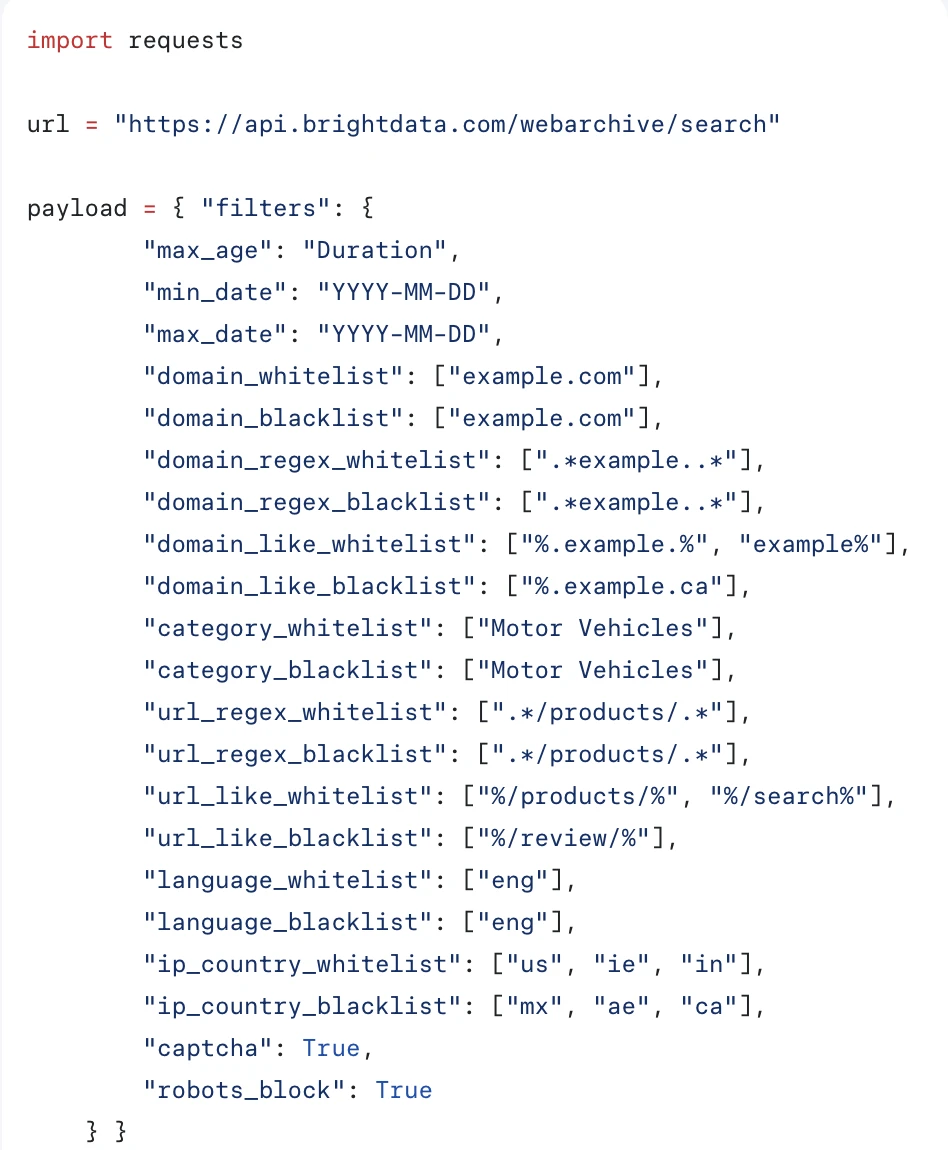
We used the Web Archive API hands-on. A search filters the pool by time range, domain, URL pattern, category, language and country, and returns the record count and the delivery cost before anything is delivered. A dump then writes the matching pages to Amazon S3, Azure Blob Storage, Google Cloud Storage or a webhook.
We searched the archive for zillow.com and redfin.com, took a sample delivery through a webhook and opened the files.
Filters
Everything runs through one filters object with 20 fields: time range, domain, URL pattern, category, language, country and collection outcome. Time is mandatory, and category is a closed list of 30 values, so pages are classified on the way in.
Two fields describe how the page was collected rather than what it contains. ip_country filters by the country of the exit IP that collected the page, confirming the archive is a by-product of the proxy network. captcha and robots_block return only records where a CAPTCHA fired or a robots rule applied, so blocked attempts are stored rather than discarded.
Searching and cost
Searching is ücretsiz, up to 100 queries per day, and the response carries everything you need to size a job before paying: the matching record count, the estimated delivery cost, and a split showing how many pages sit in the 24-hour cache tier versus the archive tier.
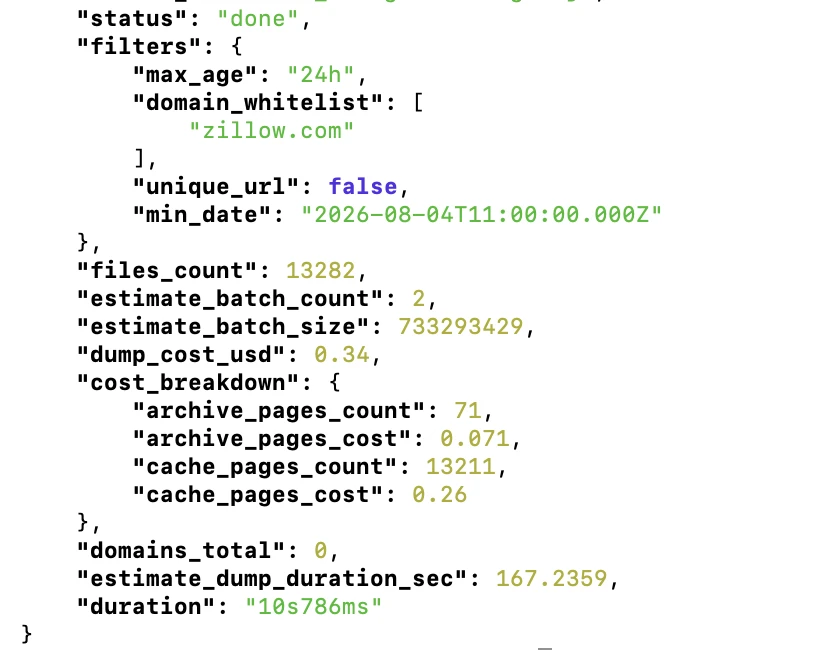
- Coverage of sites that block crawlers: Common Crawl holds zero pages for zillow.com across an entire monthly crawl. Bright Data returned 13.282 records for a single 24-hour window.
- Query speed scales with the window: A 240-day query on redfin.com returned 59.831 records in 1 minute 53 seconds. The 24-hour zillow.com query returned in 10.8 seconds.
- Two storage tiers: Data from the last 24 hours costs $0,2 per 1.000 pages. Anything older moves to S3 Glacier Deep Archive at $1 per 1.000. Delivery time follows: our 24-hour job arrived in about 30 seconds, while the 240-day job stayed in
restoring_archive_datafor tens of minutes. - Delivery to your own storage: Amazon S3, Azure Blob Storage, Google Cloud Storage or webhook. We tested the webhook path; ten pages arrived as a single tar with one
.html.gzand one.meta.jsonper page. - Sample before committing:
max_entriescaps how many files a delivery includes, so a 59.831-record query can be sampled with ten pages for a fraction of a cent.
Get 100 ücretsiz archive searches/day with Bright Data
Ücretsiz Erişim AlWhat is actually in the files
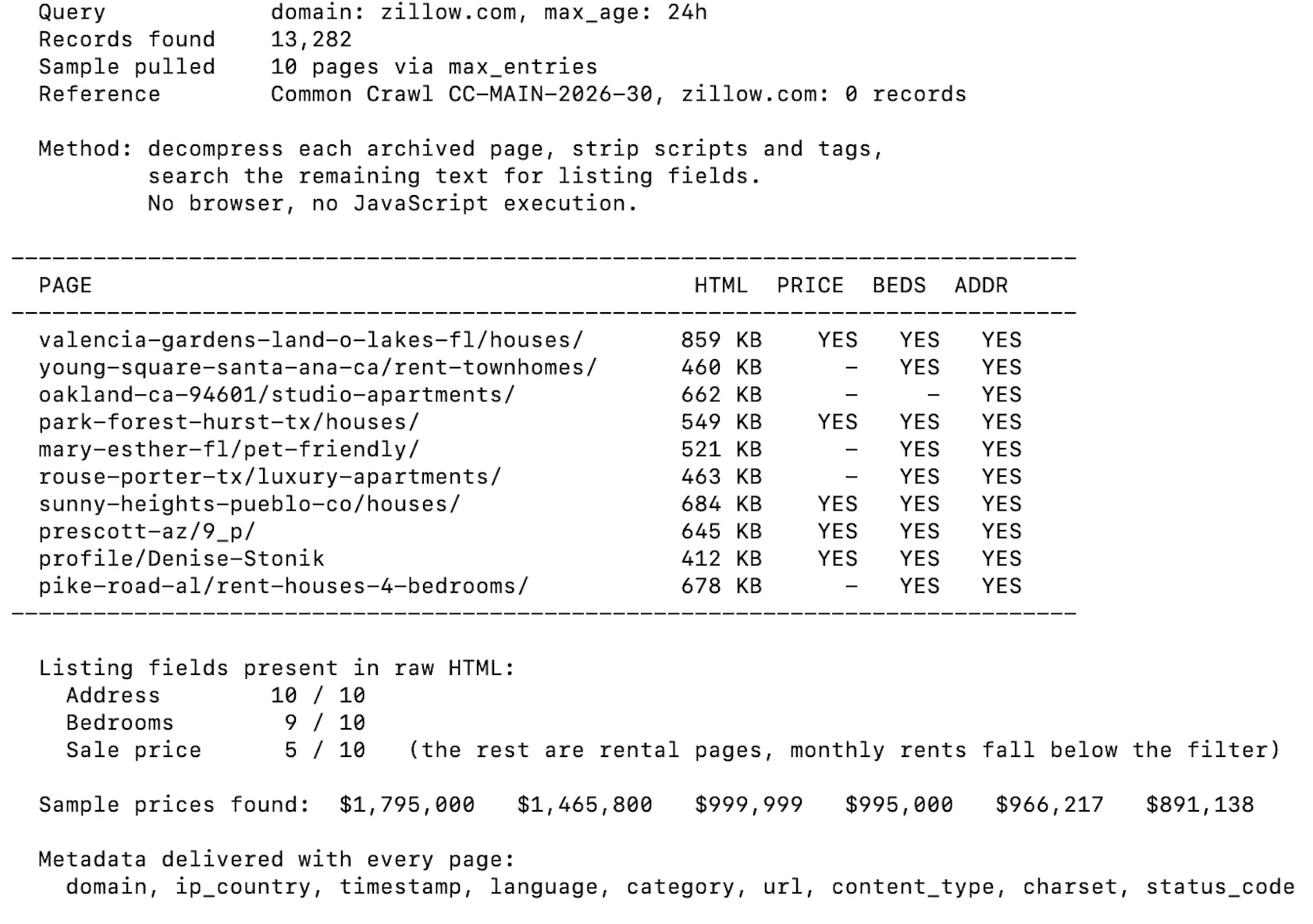
Each page arrives as the server sent it, with nine metadata fields: domain, url, timestamp, language, category, ip_country, content_type, charset and status_code. To check whether that raw HTML is usable without a browser, we opened ten archived Zillow pages, stripped scripts and tags, and searched the remaining text for listing fields.
Webz.io collects posts from news sites, blogs, forums and review sites and returns each one as a structured JSON record, where Common Crawl keeps the raw page. Its Firehose sends new posts for filters set up per customer, while the Archive and bulk dumps cover past years.
- The self-serve Archive reaches back five years. Bulk dumps of whole, unfiltered months go back to 2008 for news and to December 2014 for blogs and forums, and they come from AWS Glacier on request.
- Entities carry their own sentiment in English, German, Spanish and Italian, and enrichment fields appear only in data from about 2015 onward.
- An Archive order must match at least 10 posts in the last 30 days and delivers NDJSON only. Files split at 500 MB, and the download link stays valid for seven days.
- The News API reaches back about one year for news, while blog and forum posts stay searchable for about 31 days.
- An `ai_allow` field shows whether Webz.io found a source-level restriction on AI training, and queries can filter on it.
The query builder
Queries combine a Boolean expression over the text with field-level conditions, joined by AND. Each condition is built from a property, an operator and a value.
One detail is worth knowing before you use it: the operator labelled Equals does not require an exact match. We entered redfin against the site title field and it matched a site whose title is “Redfin Real Estate News”.
What comes back
Each result carries the full text alongside entities, sentiment, social, categories, language, domain_rank, country and a syndication object that records whether the same story appeared elsewhere. There is no raw HTML field. The product page describes what you get as “the whole text of every article, post, thread or review”, and delivery is “via API or by running a query yourself”.
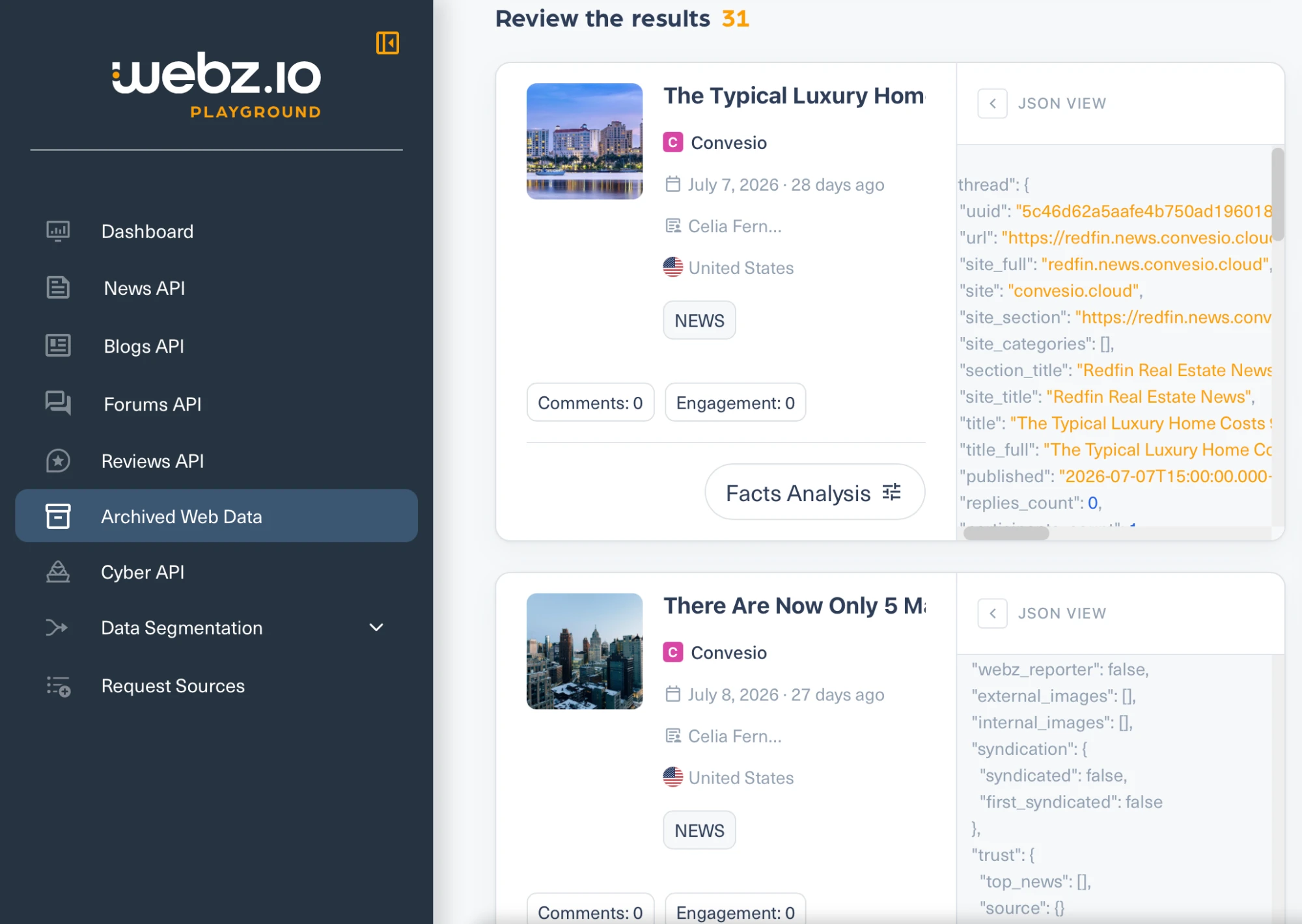
- The archive holds publishers, not listing sites. Searching for Redfin returned Redfin’s corporate news blog, hosted on
convesio.cloud, rather than pages from redfin.com. Querying the site domain field directly forredfin.comreturned nothing, whileconvesio.cloudandyahoo.comreturned results, so the empty answer reflects coverage rather than a broken query. - Bulk collection is restricted by contract. The terms of service prohibit a catch-all asterisk filter and vertical filters such as
site_type:newsorlanguage:english, which are exactly the query shapes a corpus buyer would use. The interface itself suggests addingsite_type:newsto narrow a search.
Exa built its own web index and sells search over it. Exa reports its index tracks over 2 trillion URLs and serves 100 billion pages.
For this comparison the relevant part is not the search endpoint but /contents, which returns the text of a page from Exa’s cache rather than fetching it live.
Cache or live options
A single parameter controls it. maxAgeHours set to 24 means use the cached copy if it is less than a day old, otherwise crawl. Set to 0 it always crawls. Set to -1 it never crawls, returning only what is already stored. The maximum accepted value is 720 hours, so the parameter cannot reference anything older than 30 days.
We ran two requests with the age limit set so Exa never crawls and returns only what it has already stored. The first asked for a Redfin city page.
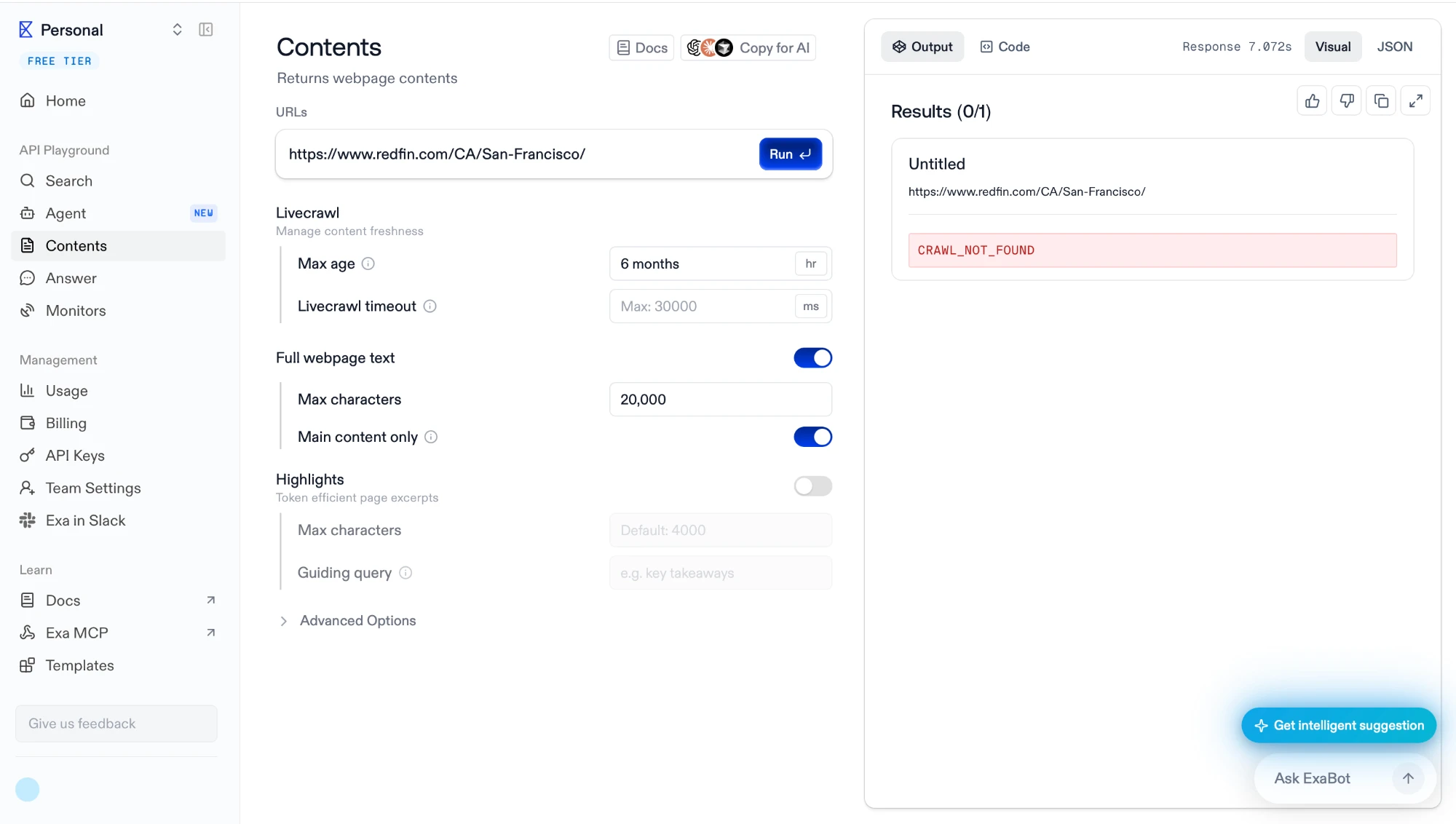
It returned CRAWL_NOT_FOUND after 7.07 seconds. The second asked for the Redfin homepage.
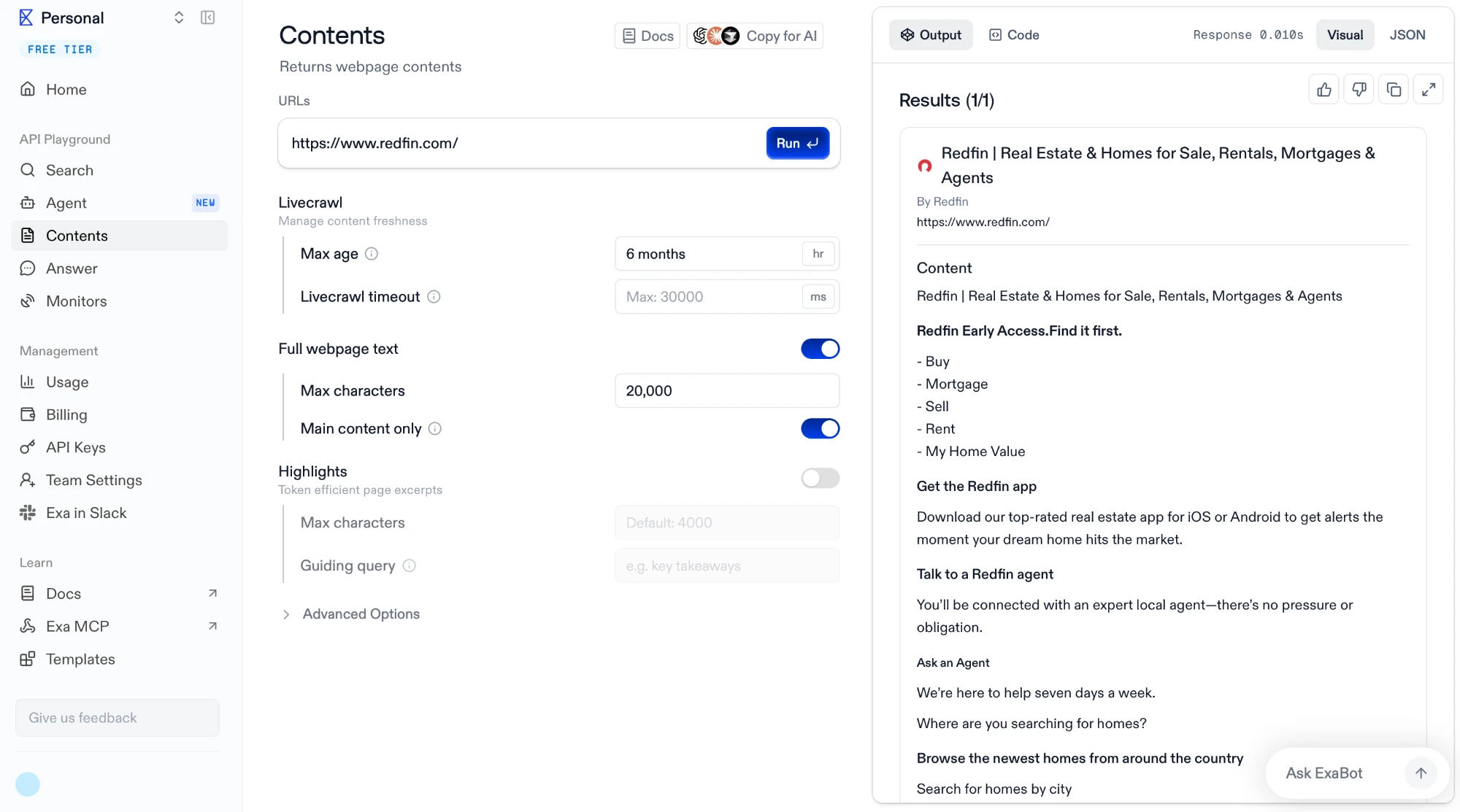
It returned the full page contents in 0.010 seconds. Ten milliseconds is shorter than a network round trip, so that response came from storage, not from a fetch. The cache is real, and the seven-second failure was Exa looking and not finding.
Two other defaults are visible in the same screen. Content is capped at 20.000 characters, and “main content only” is on, so navigation and boilerplate are removed by Exa’s own logic rather than yours.
Coverage is patchy at the page level
The homepage was cached; the San Francisco city page was not. Searching the domain shows why that is not a simple presence-or-absence question.
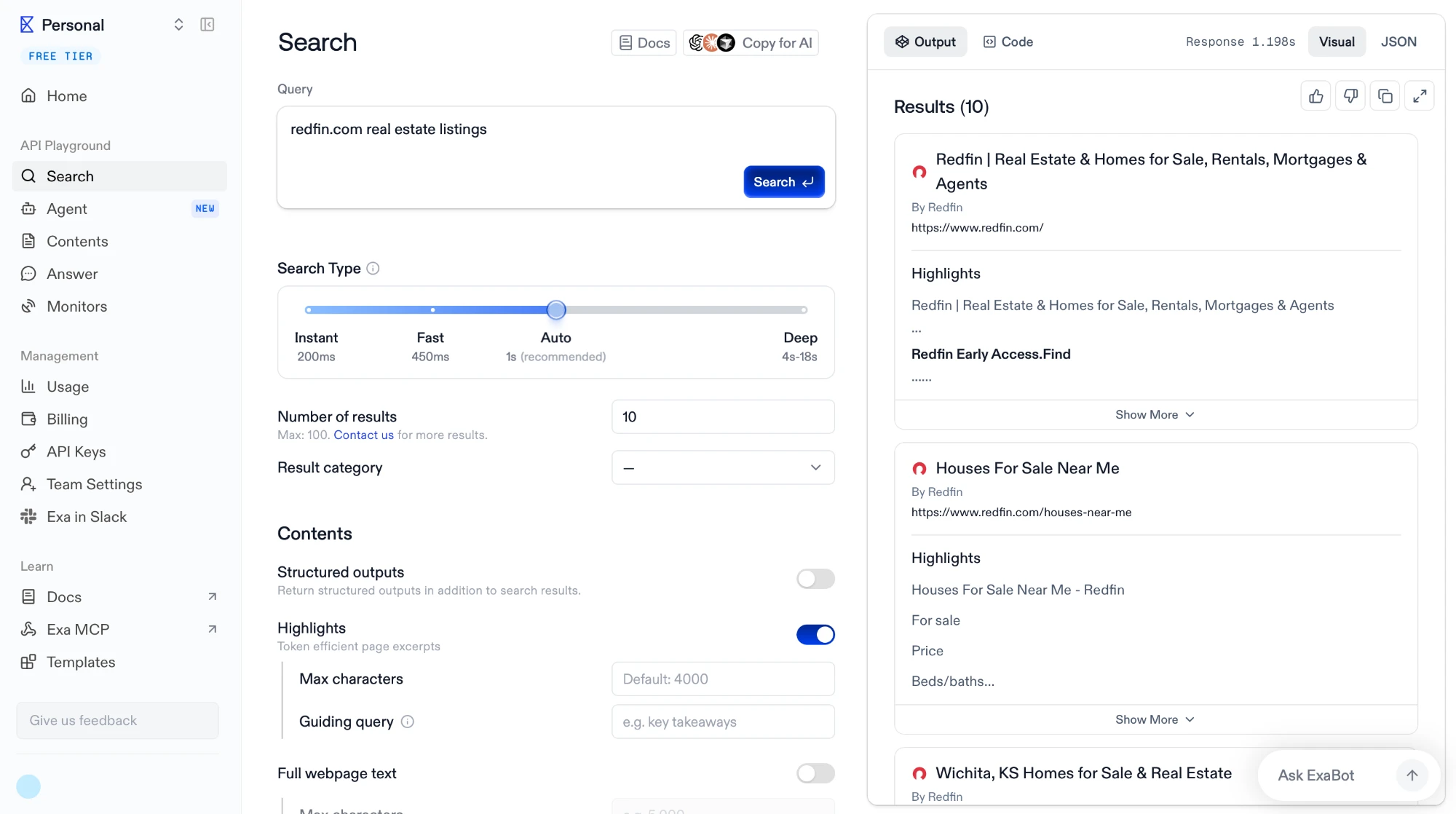
The query returned the Redfin homepage, a “Houses For Sale Near Me” page and a Wichita city page, so deep pages do exist in the index. Coverage is scattered across a domain rather than complete or empty.
Limitations
The same screen carries the sentence that separates Exa from the archives in this comparison: “Number of results: 10. Max: 100. Contact us for more results.”
There is no total count. Common Crawl answered that question with a SQL query and Bright Data answered it with a files_count field.
No bulk export, no delivery to your own storage, no firehose. The Enterprise tier mentions custom indexes, which are tailored indexes served through the API rather than data handed over.
Ahrefs Firehose streams the pages AhrefsBot crawls that match a customer’s rules, but each event carries the changed text of a page, while Common Crawl stores the whole page. Rules use Lucene syntax and run against the text added or removed since the last crawl.
- An event holds the URL, title, publish time and the inserted and removed text chunks with some surrounding context. Events arrive over Server-Sent Events, stay buffered for about 24 hours, and a client resumes with the last event ID.
- URL Watch recrawls a chosen list of URLs on a schedule and keeps each crawl’s diff and a rendered snapshot.
- Smart Digest, in beta, has an agent read a tap’s matches on a schedule from hourly to weekly and email one report on what changed.
- Backlink and referring-domain data come from the Ahrefs API Site Explorer, a separate product from Firehose.
Creating the rule
We set Firehose to track models newly listed on OpenRouter and model announcements from AI labs, with one tap and two rules. A rule can start from a plain-language description, a visual builder or a Lucene query typed directly. The first rule, domain:openrouter.ai, catches new model pages on OpenRouter. We added a second rule to the same tap for the sites of OpenAI (openai.com), Anthropic (anthropic.com), Google (blog.google and deepmind.google), Mistral (mistral.ai), xAI (x.ai) and Meta (ai.meta.com). It matches pages on those sites whose titles contain “introducing”, “model” or “launch”.
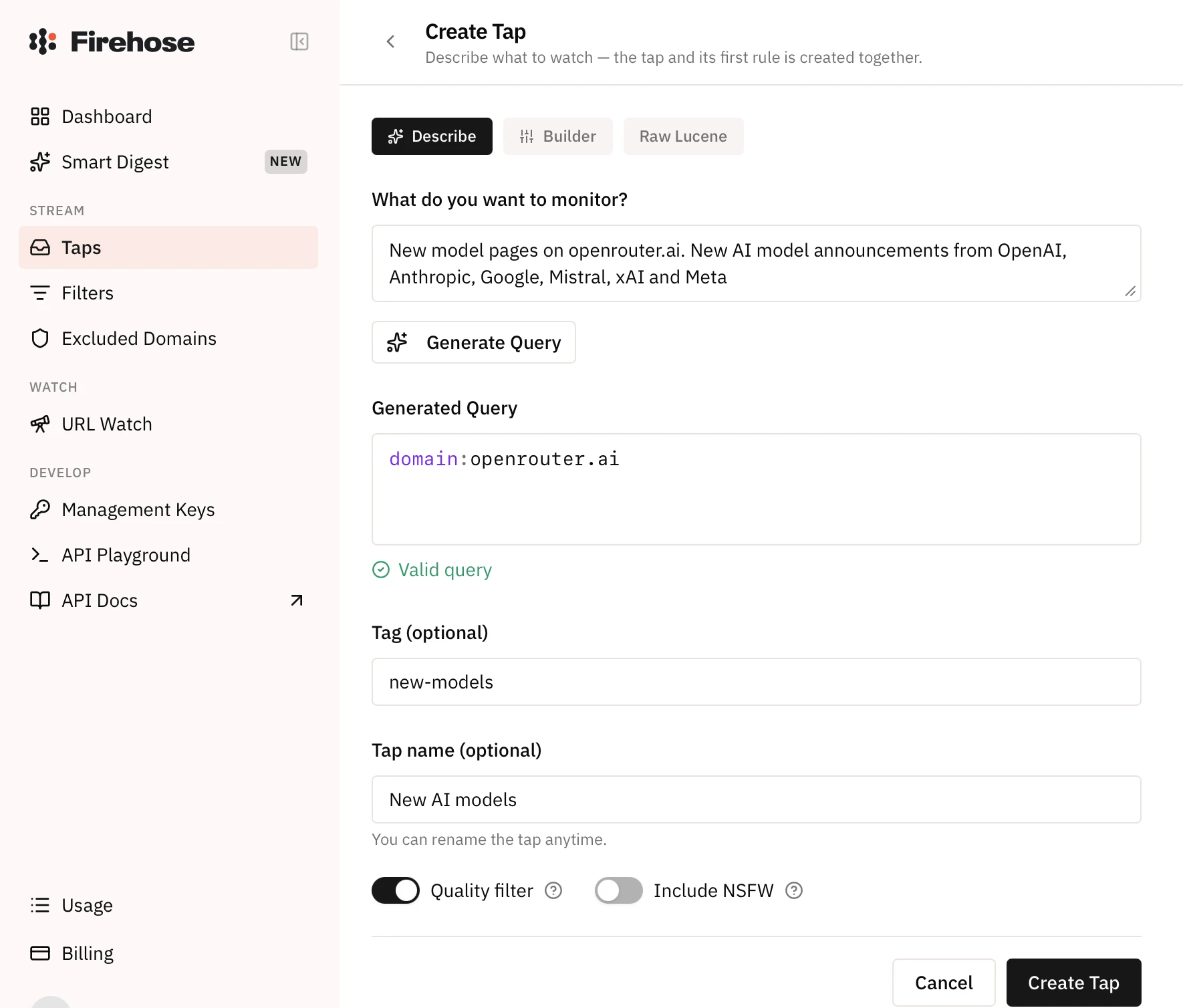
The preview explains the rule in plain words (“Domain is openrouter.ai”) instead of listing sample pages, so a rule’s reach shows only after matches arrive. A new rule matches pages crawled after it goes live and does not search past crawls. The quality filter is on by default and passes only pages published in the last 7 days, leaving out pagination, tag pages and query-string URLs.
What a match contains
Within about 90 minutes of the tap going live, it returned 10 matches, all from the OpenRouter rule. They were the German, Spanish, French and English pages of three models that OpenRouter had added to its catalog that morning: Gemini 2.5 Pro TTS, Gemini 2.5 Flash TTS and Pixtral Large 2502.
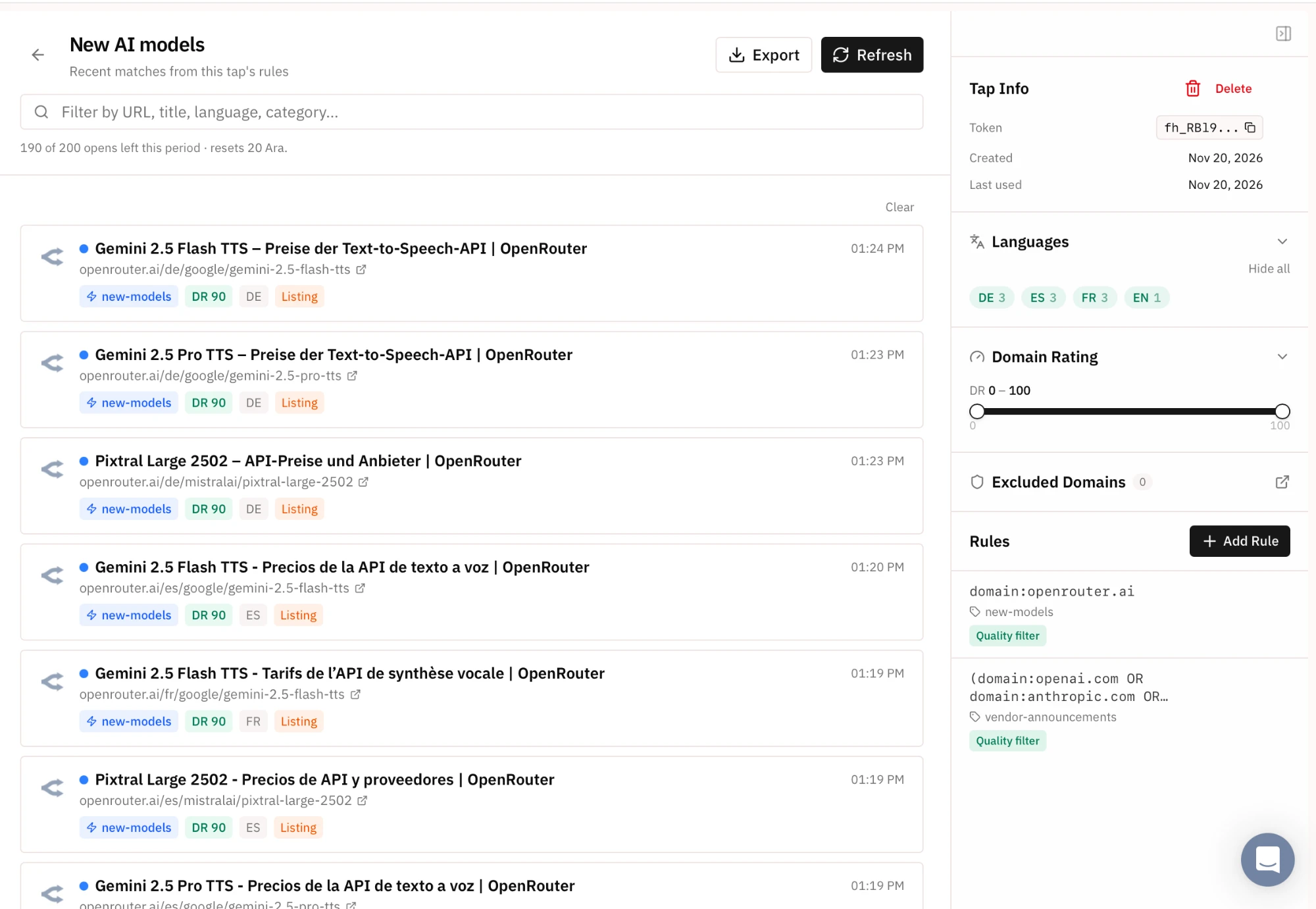
Firehose flags a page that is new to its crawler, not a product that is new, so catalog sites such as OpenRouter bring older models into a release-tracking feed.
URL Watch
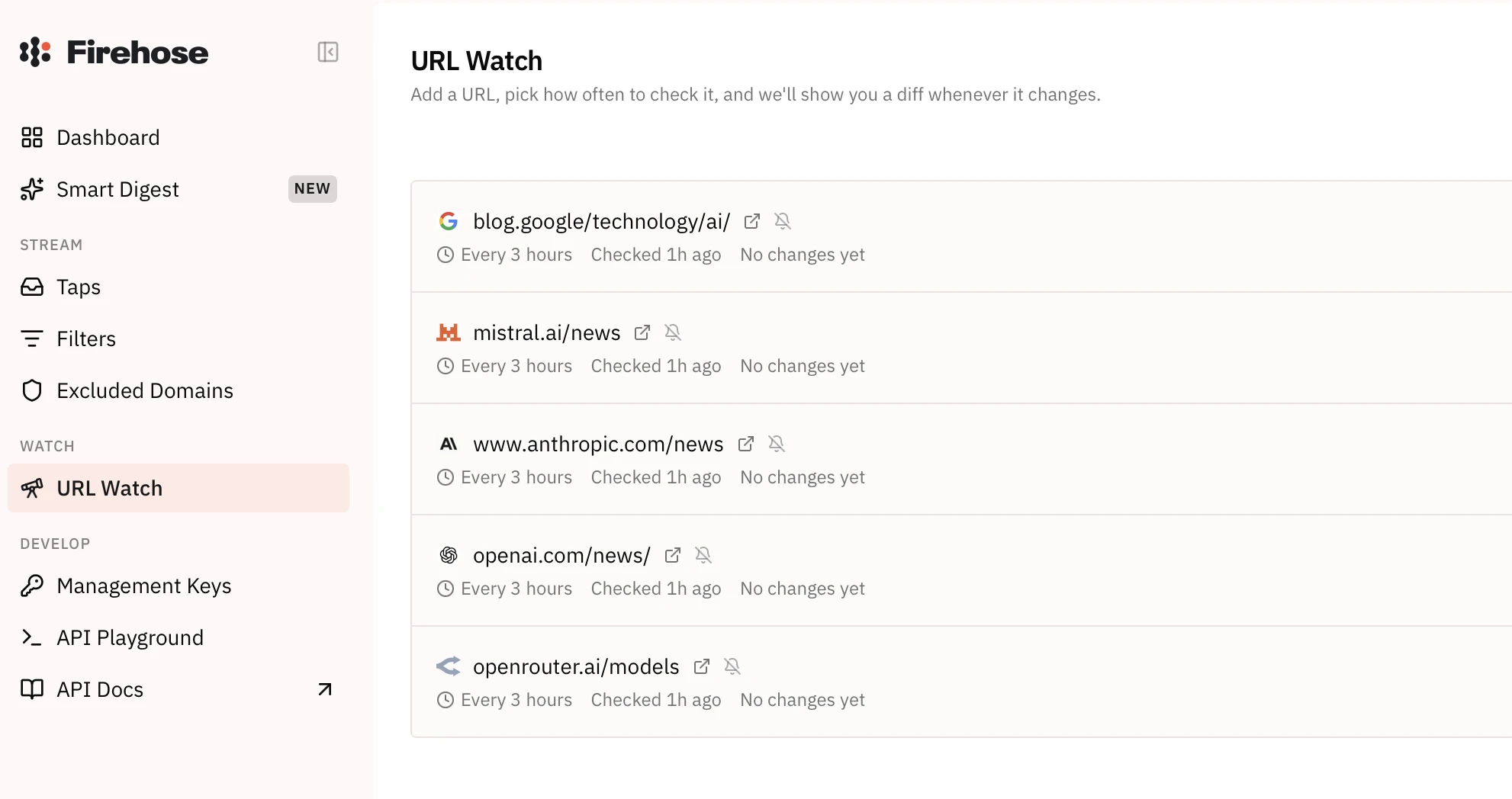
URL Watch works the other way round: instead of waiting for the crawler to reach a page, Firehose rechecks pages the customer picks on a fixed schedule and shows a diff when one changes. We watched OpenRouter’s model list and the news pages of OpenAI, Anthropic, Mistral and Google, each every 3 hours.
How Common Crawl works
Common Crawl is a nonprofit that publishes a crawl of the open web roughly once a month and gives it away. There is no account, no key and no quota. The trade is that you get files rather than a service: nothing is delivered to you, and anything beyond a single page lookup means running your own processing.
Choosing a format
Each crawl comes in several formats. Raw HTTP responses carry the original HTML. A metadata extract carries links, titles and headers as JSON. A plain-text version carries the article text with markup removed. Two smaller sets cover robots.txt files and non-200 responses.
The choice matters because it is one-way. Plain text is far smaller and quicker to work with, but tags, attributes and embedded JSON-LD are gone from it, so structured extraction has to start from the raw set.
There is no filtered delivery. You pick a format, download what you need, and process it yourself.
Finding a page
Two mechanisms exist and they answer different questions. The CDX server handles single-URL lookups through a web form or an API. The columnar index, published as Parquet, handles bulk questions through SQL.
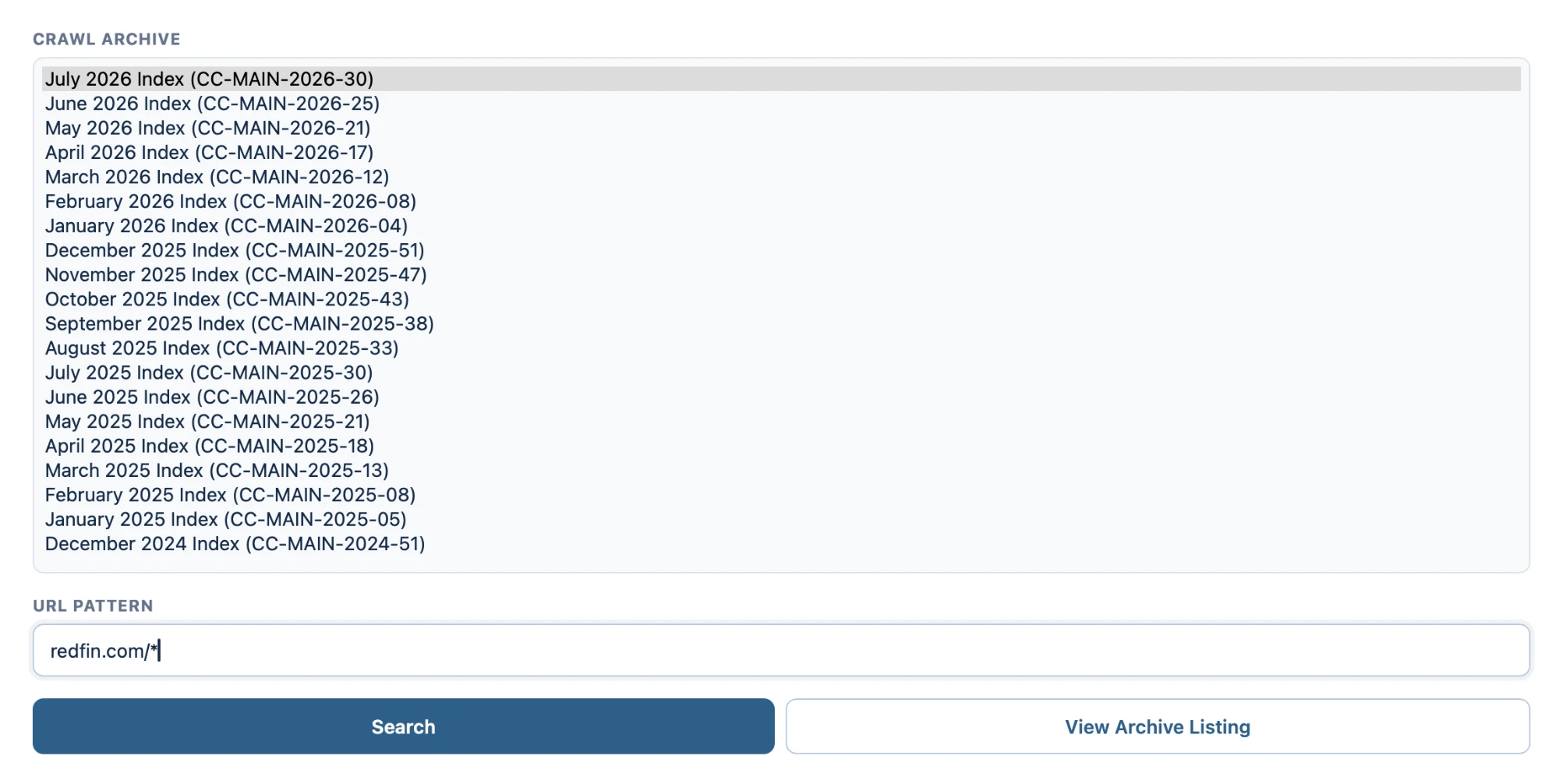
The CDX interface asks for two things: which monthly crawl to search, from a list running back to 2008, and a URL pattern.
Results come back as JSON, one line per capture. Three fields matter more than the rest: the WARC filename, a byte offset and a record length.
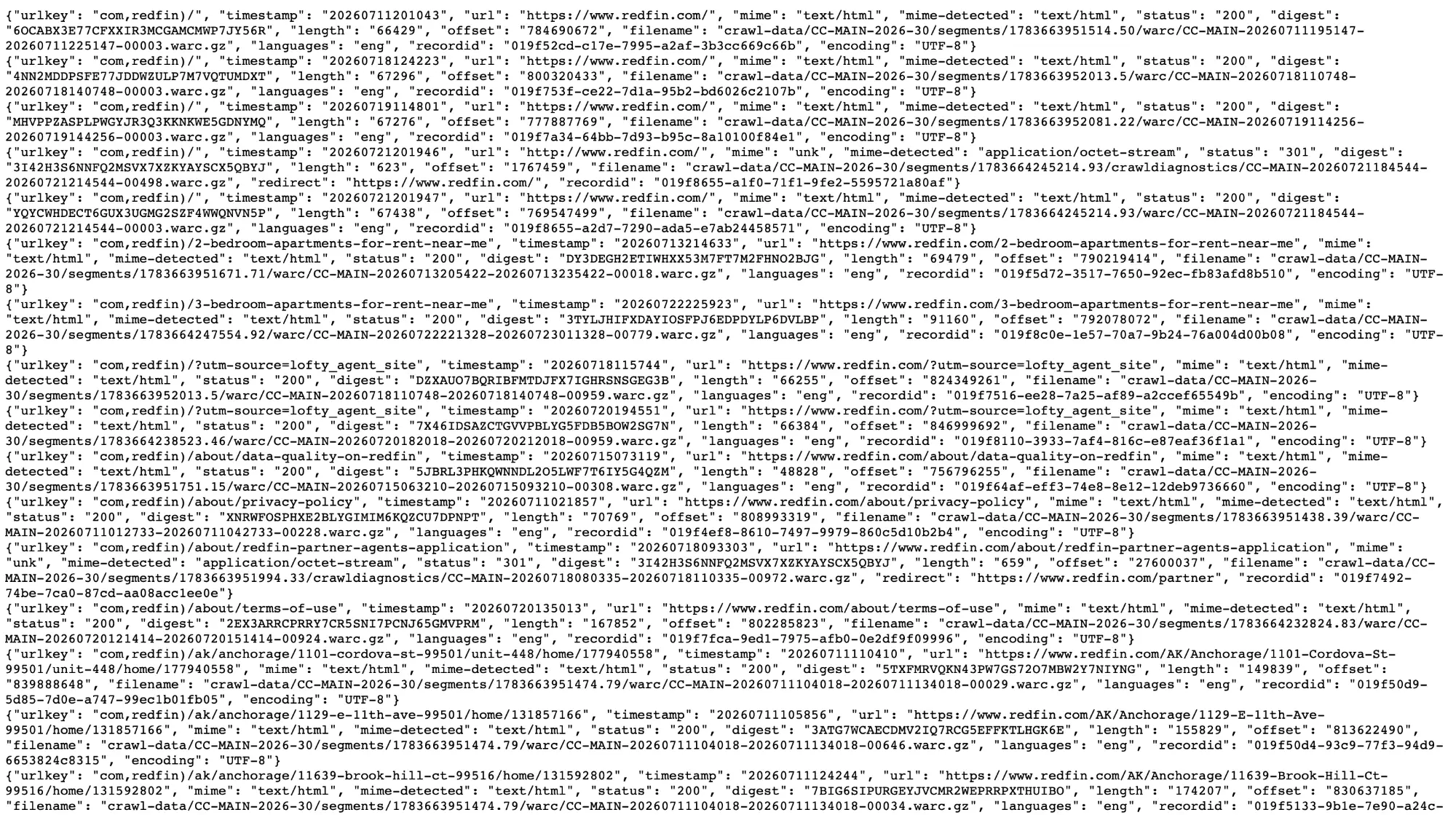
Two things are visible in the output. The same URL appears several times with different timestamps, so a single monthly crawl is not a single snapshot. And failed responses are stored separately, with redirects and errors in a crawldiagnostics folder rather than alongside successful fetches.
Pulling one page without downloading the file it lives in
The filename, offset and length let you request a single record with an HTTP Range header. We tested this on a Redfin listing page.
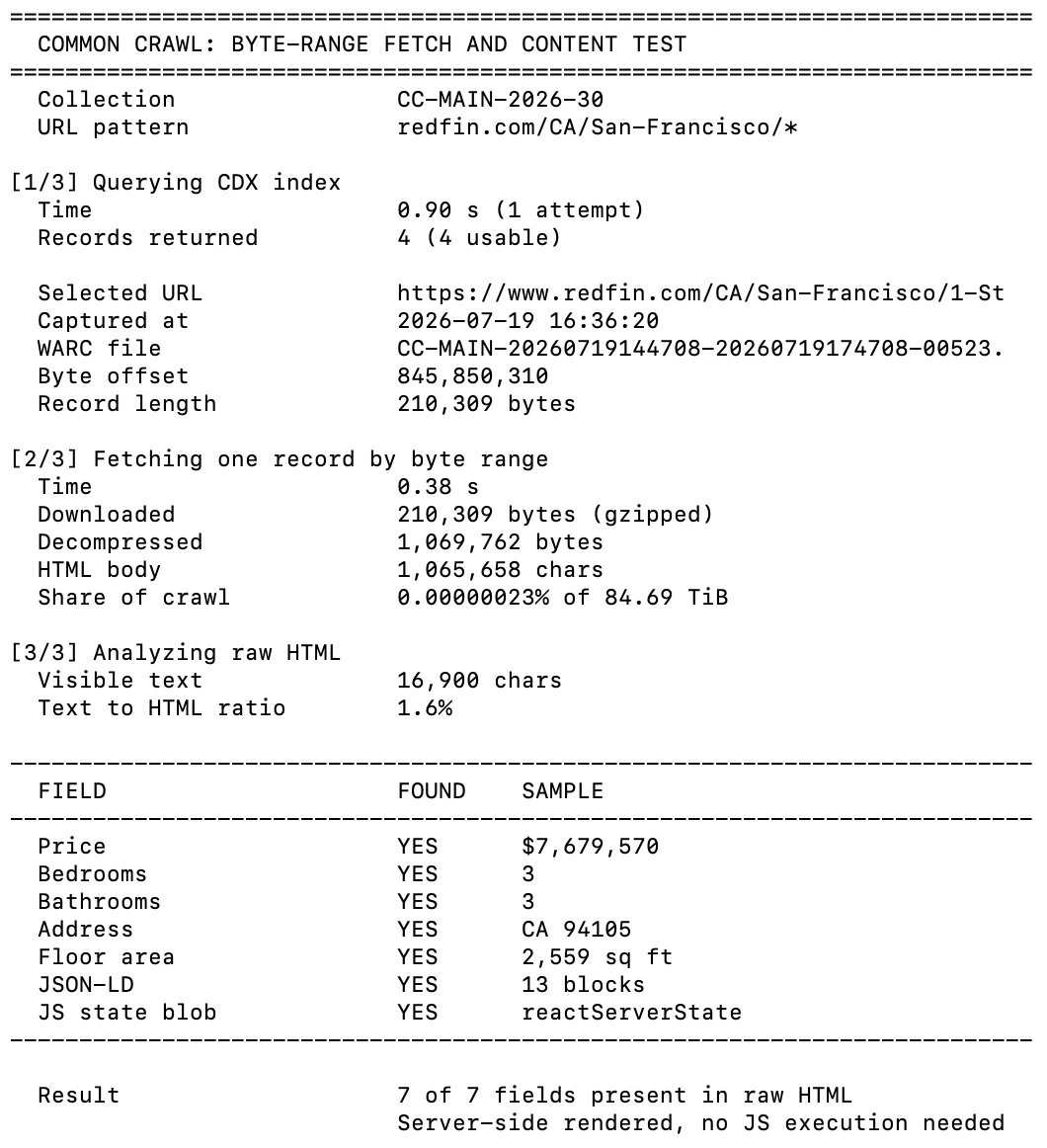
The CDX lookup returned in under a second and the byte-range fetch took 0.38 seconds for 210 KB. All seven listing fields we searched for, including price, bedrooms and address, were present in the raw HTML with no JavaScript executed.
Bulk filtering with SQL
For anything larger than a single URL, the columnar index is the route. It is Parquet, it is queryable over HTTPS, and it exposes 33 columns covering URL, host, TLD, language, MIME type, fetch status and timestamp.
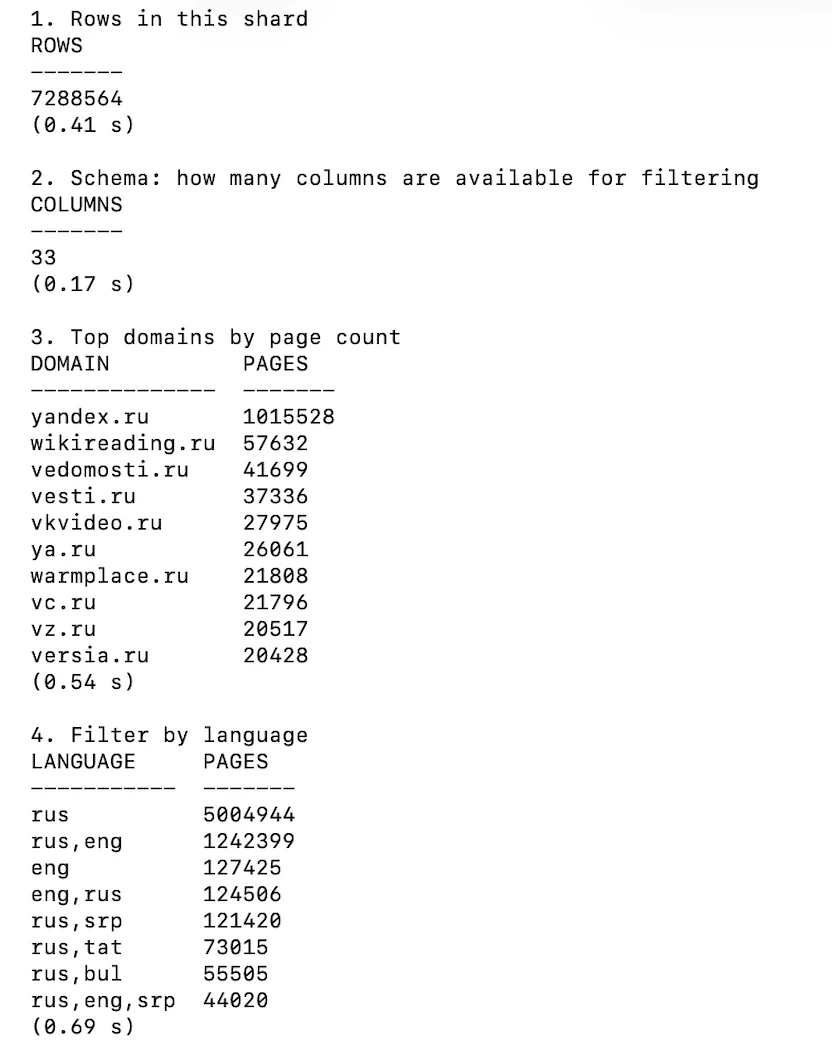
Queries against a single shard of 7.29 million rows returned in well under a second each, with nothing written to disk. One detail to know before using it: the shards are keyed by a reversed host name, so each file holds a narrow alphabetical slice rather than a random sample. Querying an arbitrary shard for a specific domain will usually return nothing.
How much it holds for a given domain
We queried the index for two domains, redfin.com and zillow.com, locating the shard that covers each one and counting its rows.
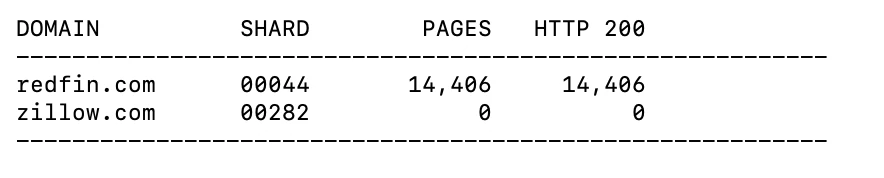
redfin.com returned 14.406 pages, all of them HTTP 200. zillow.com returned none. This is not partial coverage or a failed fetch; the domain is not in the index. Common Crawl honours robots.txt, so a site that disallows its crawler is absent rather than thinly represented.
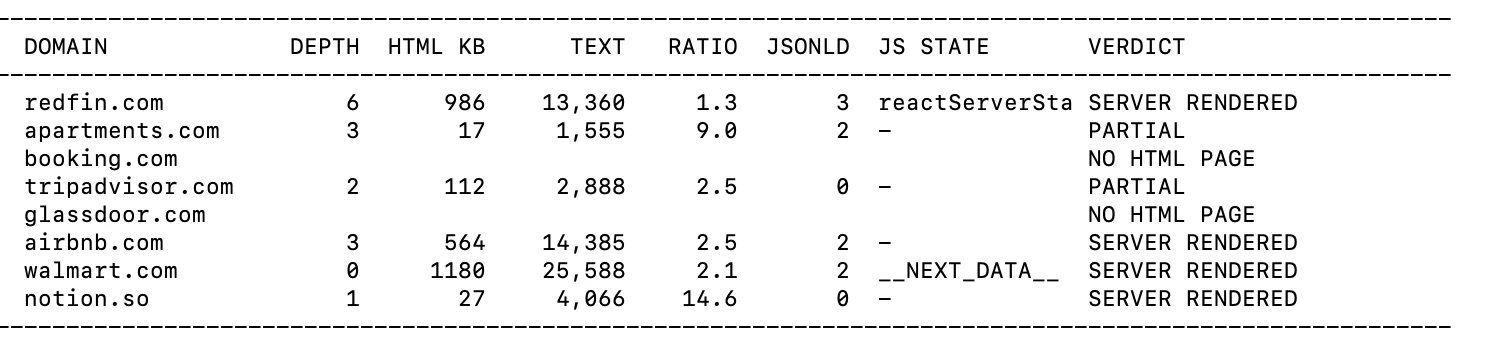
We pulled one archived page from each of eight large sites and measured how much text survived without a browser. Two of them had no usable HTML page in the archive at all. Among the rest, most were server rendered, including Airbnb and Walmart. TripAdvisor was the exception, returning an 18 KB page that held 282 characters of visible text.
Cost and licence
The data is ücretsiz and the storage bucket is open without an account. What you pay is compute and bandwidth, which is why processing in the same cloud region as the data is recommended.
The licence is not an open data licence. Common Crawl grants a limited licence to the service, states that it cannot license the page content itself, and requires users to indemnify it against claims arising from use of the content “in connection with artificial intelligence, machine learning, or other similar technologies”. Total liability is capped at $100.1
Which one fits which job
These products are not substitutes. The question is not which is best but which one answers the question you have.
- Raw HTML at scale, including sites that block crawlers. Bright Data’s Web Archive API writes a filtered selection to storage you control, and its archive holds pages from sites that block crawlers, which Common Crawl leaves out.
- New pages as soon as they are crawled. Bright Data Firehose streams full pages to S3, a webhook or a stream. Ahrefs Firehose sends the changed text of pages that match your rules, and its URL Watch rechecks the pages you pick on a schedule.
- A broad corpus at no cost, if you have engineering capacity. Common Crawl gives you complete crawls in WARC, enumerable with SQL, and asks for nothing beyond your own compute. The processing is yours to build.
- News, blog and forum text with entities and sentiment already extracted. Webz.io returns processed records rather than pages, which removes the extraction work but also removes the markup. Its Firehose sends new posts every few minutes.
- Page context at query time, for an agent or a RAG pipeline. Exa returns cached text in milliseconds and falls back to a live fetch when a page is not stored. Snapshot returns the version of a page from a past date within the last five months.
 Tercih edilen kaynak olarak ekle
How we tested web archive APIs
We worked inside each product rather than from its documentation. Every provider was driven through its own console or playground first, then through its API, so we could see the request that the interface generates and what comes back before anything is charged.
For each one we built a query, ran it, and read the raw response rather than the rendered summary. Where the product returned a count, a cost estimate or a status object, we recorded those fields directly. Where it offered a sample or a delivery, we took it, unpacked the files and opened them.
Small scripts handled the parts that needed repeating or timing: fetching a single record out of a multi-terabyte archive, decompressing a delivered package and searching the raw HTML for specific fields, querying a columnar index with SQL, and measuring how long a cached response takes against one that has to be crawled. Those scripts are linked next to the results they produced.
Bu araştırmayı kaynak gösterin
Yayınlayacağınız yere uygun formatı seçin. Bağlantılı sürümü CMS'inize yapıştırmak, geri bağlantıyı korur.
@misc{sipi2026,
  author = {Şipi, Nazlı},
  title  = {{Best Common Crawl Alternatives: Bright Data & Webz.io}},
  year   = {2026},
  month  = nov,
  howpublished    = {\url{https://aimultiple.com/common-crawl-alternatives}},
  note   = {AIMultiple. Erişim tarihi: 20 Kasım 2026}
}
Referans Linkleri












Yorum yapan ilk kişi olun
E-posta adresiniz yayınlanmayacak. Tüm alanlar gereklidir. Yorumlar orijinal dilinde bırakılır.