


Web Archive API: 4 migliori provider testati e confrontati

Un archivio web conserva pagine raccolte prima della tua richiesta, così puoi recuperarle senza eseguire tu stesso il crawling dei siti. Cosa archivia ciascun fornitore e quanta parte di tali dati consegna varia molto.
Ne abbiamo testati 4 con query di esempio per vedere come funzionano e cosa restituiscono.
Confronto delle funzionalità delle API di archivio web
- HTML grezzo disponibile: il markup della pagina come inviato dal server. I termini di Webz.io menzionano «le pagine HTML complete», ma l'archivio restituisce un campo
texte non concede diritti sui file grezzi. - Consegna in blocco al proprio storage: una selezione filtrata scritta su una destinazione che controlli. Il corpus di Common Crawl si trova su S3 pubblico da scaricare; non viene inviato nulla da nessuna parte. Webz.io effettua la consegna solo tramite le sue API.
- Live scraping dallo stesso fornitore: copre la famiglia di prodotti, non solo l'endpoint di archivio, quindi risponde alla domanda se un unico fornitore può coprire sia pagine archiviate sia pagine mai archiviate. Exa è l'unico in cui il fallback avviene nella stessa chiamata.
Prezzi e crediti gratuito
Bright Data addebita $0,2 per 1.000 pagine per i dati delle ultime 24 ore e $1 per 1.000 per quelli più vecchi. Exa addebita $7 per 1.000 ricerche oltre al prezzo per pagina, quindi individuare 1.000 pagine prima di recuperarle aggiunge circa $0,70, il che fa comportare in modo diverso nella pratica le due cifre identiche di $1.
I crediti gratuito coprono la consegna dei dati: l'interrogazione è gratuito su tutti e quattro, quindi la differenza è se i crediti gratuito pagano anche l'estrazione dei dati. Bright Data consente 100 ricerche di archivio al giorno gratuitamente, ciascuna delle quali restituisce il conteggio dei record corrispondenti e il prezzo di consegna prima che venga addebitato alcunché, quindi un lavoro può essere dimensionato gratuito. Webz.io funziona allo stesso modo, con un campione gratuito e una stima dei costi, ma un dump richiede crediti prepagati acquistati separatamente. Common Crawl e Exa consentono ai crediti gratuito di pagare l'effettivo recupero.
API di archiviazione web
Bright Data Web Archive API vende l'accesso alle pagine che la sua infrastruttura ha già raccolto tramite Unlocker e SERP API. Invece di eseguire un crawler, descrivi ciò che vuoi con i filtri, controlli una stima dei costi e fai recapitare le pagine corrispondenti al tuo storage.
Filtri
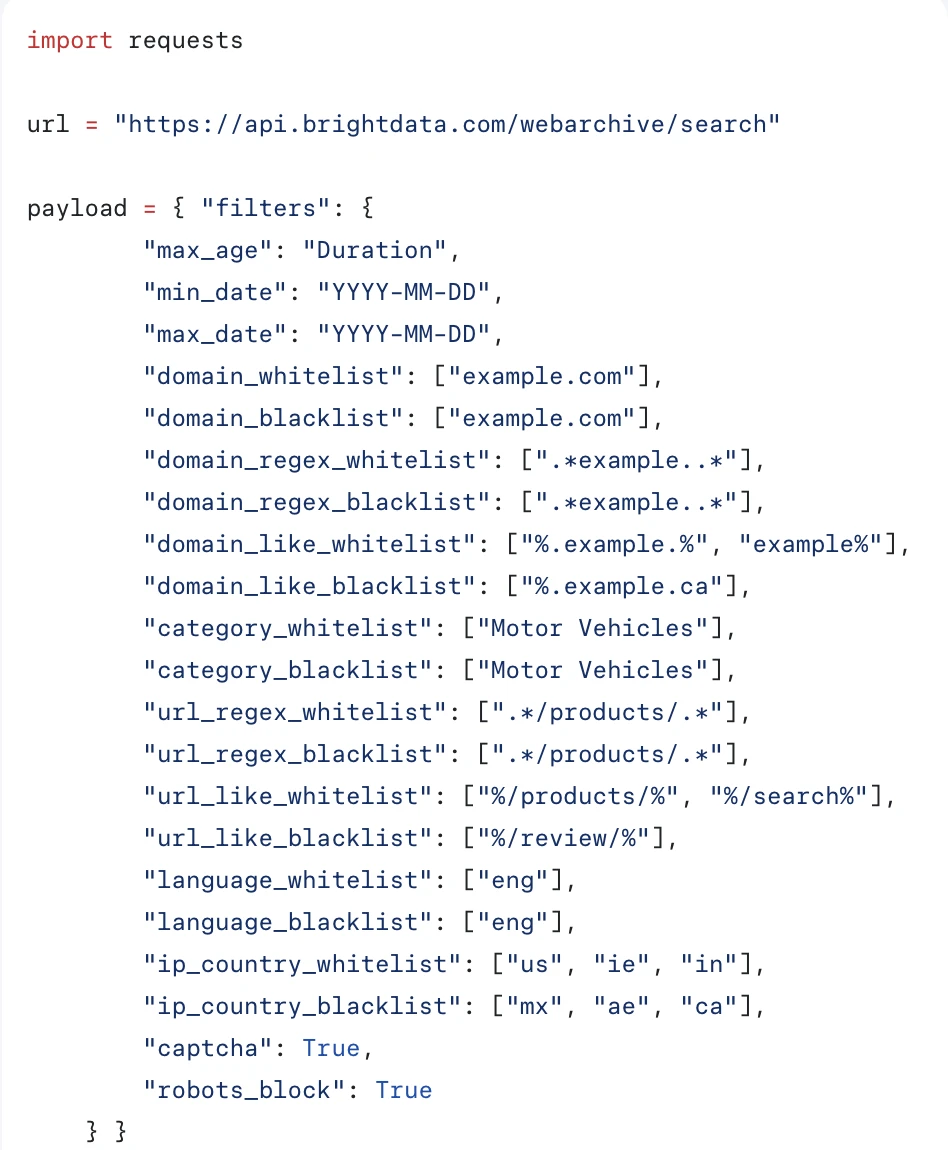
Tutto passa attraverso un oggetto filters con 20 campi: intervallo temporale, dominio, pattern URL, categoria, lingua, paese ed esito della raccolta. L'intervallo temporale è obbligatorio e la categoria è un elenco chiuso di 30 valori, quindi le pagine vengono classificate in ingresso.
Due campi descrivono come è stata raccolta la pagina piuttosto che il suo contenuto. ip_country filtra per paese dell'IP di uscita che ha raccolto la pagina, confermando che l'archivio è un sottoprodotto della rete proxy. captcha e robots_block restituiscono solo i record in cui è scattato un CAPTCHA o è stata applicata una regola robots, quindi i tentativi bloccati vengono archiviati anziché scartati.
Ricerca e costi
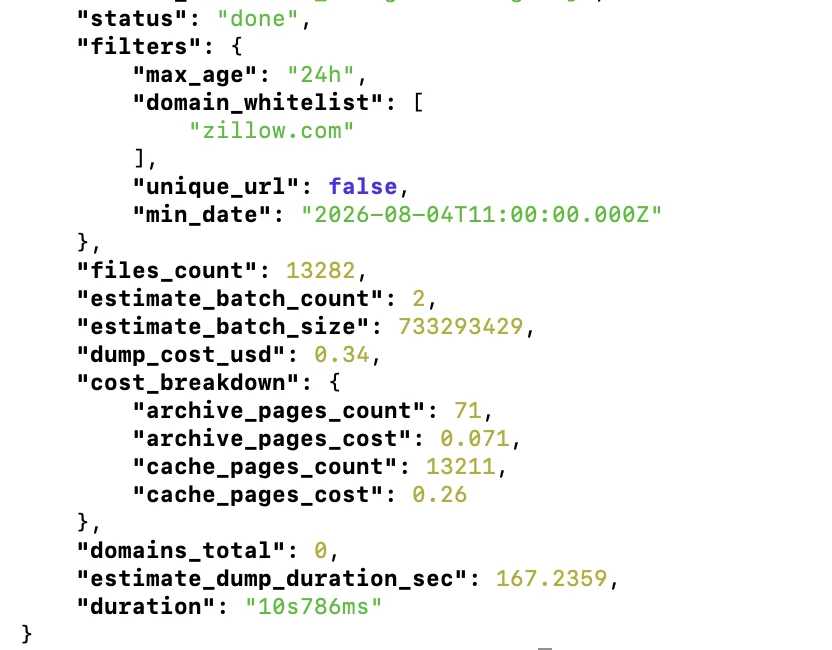
La ricerca è gratuito, fino a 100 interrogazioni al giorno, e la risposta contiene tutto il necessario per dimensionare un lavoro prima di pagare: il conteggio dei record corrispondenti, il costo di consegna stimato e una suddivisione che mostra quante pagine rientrano nella fascia di cache di 24 ore rispetto a quella di archivio.
- Copertura dei siti che bloccano i crawler: Common Crawl non conserva alcuna pagina per zillow.com in un intero crawl mensile. Bright Data ha restituito 13.282 record per una singola finestra di 24 ore.
- La velocità delle interrogazioni dipende dalla finestra: un'interrogazione su redfin.com su 240 giorni ha restituito 59.831 record in 1 minuto e 53 secondi. L'interrogazione di zillow.com di 24 ore è stata completata in 10,8 secondi.
- Due livelli di archiviazione: i dati delle ultime 24 ore costano $0,2 per 1.000 pagine. Quelli più vecchi vengono spostati su S3 Glacier Deep Archive a $1 per 1.000. Segue il tempo di consegna: il nostro lavoro su 24 ore è arrivato in circa 30 secondi, mentre il lavoro su 240 giorni è rimasto in
restoring_archive_dataper decine di minuti. - Consegna al proprio storage: Amazon S3, Azure Blob Storage, Google Cloud Storage o webhook. Abbiamo testato il percorso webhook; dieci pagine sono arrivate come un singolo tar con un
.html.gze un.meta.jsonper pagina. - Campiona prima di impegnarti:
max_entrieslimita il numero di file inclusi in una consegna, quindi un'interrogazione da 59.831 record può essere campionata con dieci pagine per una frazione di centesimo.
Ottieni 100 ricerche di archivio gratuito al giorno con Bright Data
Ottieni accesso gratuitoCosa contengono davvero i file
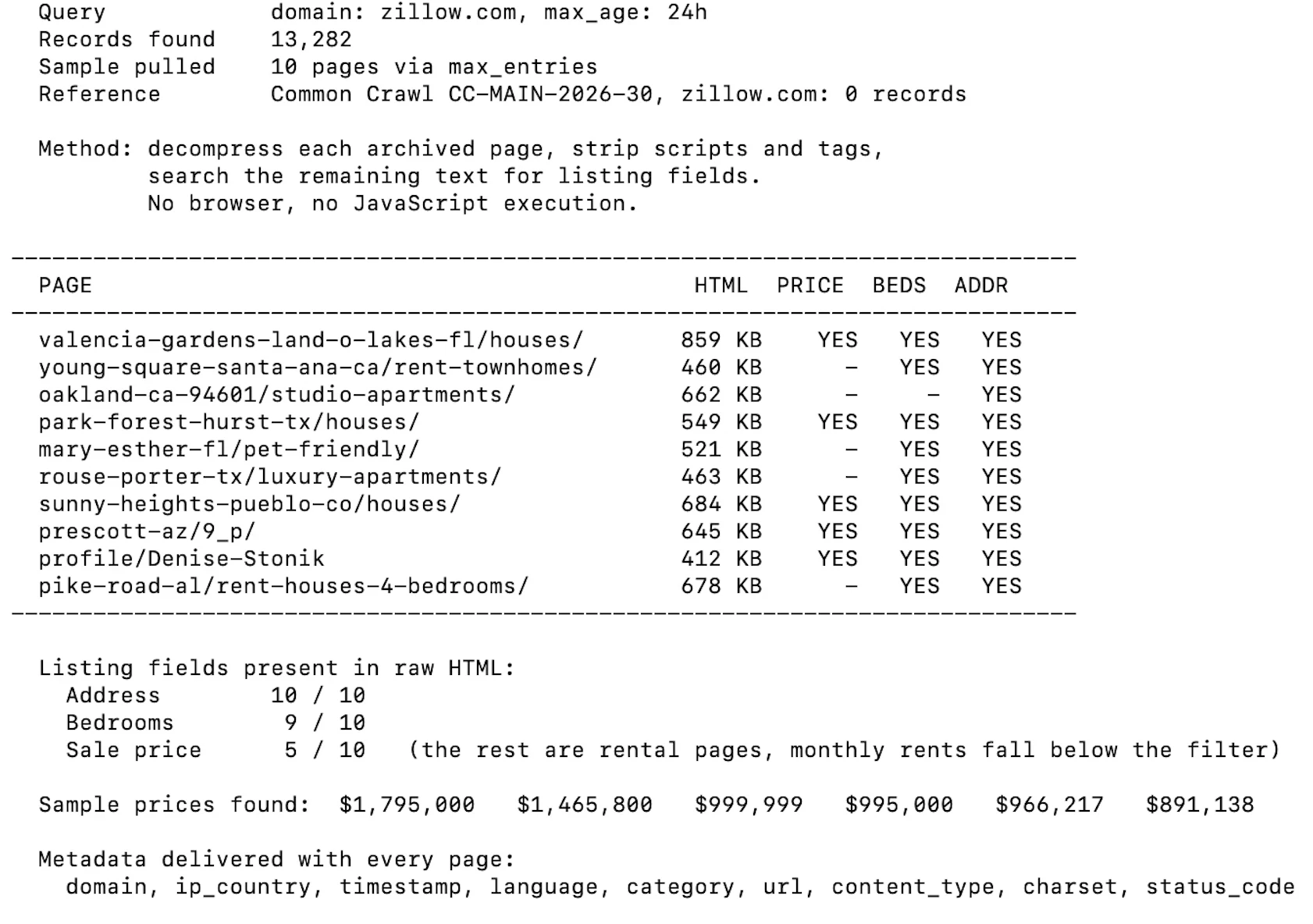
Ogni pagina arriva come inviata dal server, con nove campi metadati: domain, url, timestamp, language, category, ip_country, content_type, charset e status_code. Per verificare se quell'HTML grezzo è utilizzabile senza browser, abbiamo aperto dieci pagine archiviate di Zillow, rimosso script e tag e cercato nel testo rimanente i campi degli annunci.
Common Crawl è un'organizzazione non profit che pubblica una scansione del web aperto circa una volta al mese e la distribuisce gratuitamente. Non ci sono account, chiavi o quote. Il compromesso è che ricevi file piuttosto che un servizio: non ti viene recapitato nulla e qualsiasi cosa oltre la ricerca di una singola pagina richiede l'esecuzione di una propria elaborazione.
Scelta di un formato
Ogni scansione è disponibile in diversi formati. Le risposte HTTP grezze contengono l'HTML originale. Un estratto di metadati contiene link, titoli e intestazioni come JSON. Una versione in testo semplice contiene il testo dell'articolo con il markup rimosso. Due set più piccoli coprono i file robots.txt e le risposte non-200.
La scelta è importante perché è a senso unico. Il testo semplice è molto più piccolo e rapido da elaborare, ma tag, attributi e JSON-LD incorporati sono assenti, quindi l'estrazione strutturata deve partire dal set grezzo.
Non esiste una consegna filtrata. Scegli un formato, scarichi ciò che ti serve e lo elabori autonomamente.
Trovare una pagina
Esistono due meccanismi e rispondono a domande diverse. Il server CDX gestisce le ricerche di singoli URL tramite un modulo web o un'API. L'indice colonnare, pubblicato come Parquet, gestisce le interrogazioni di massa tramite SQL.
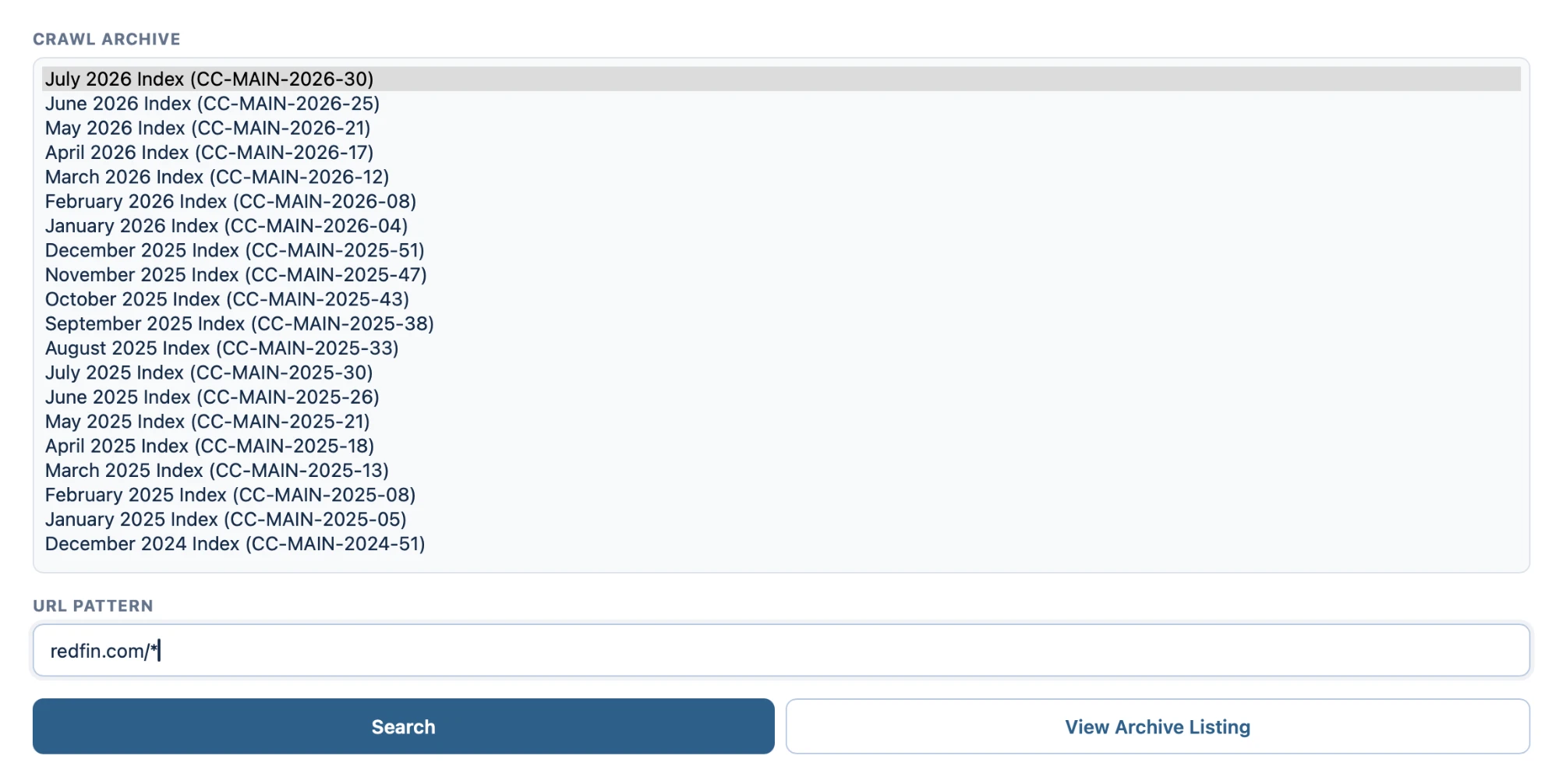
L'interfaccia CDX richiede due cose: quale scansione mensile cercare, da un elenco che risale al 2008, e un pattern URL.
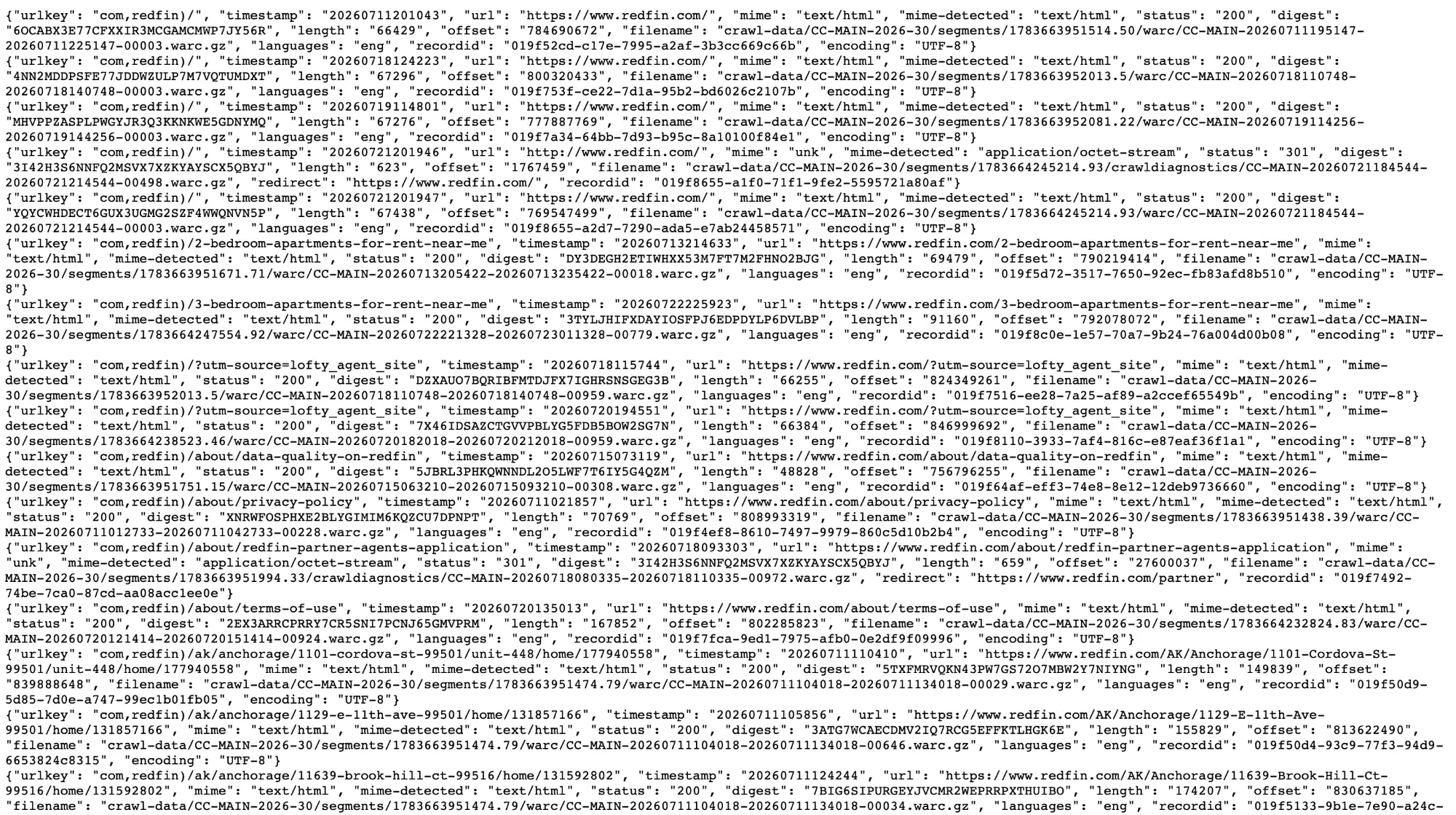
I risultati vengono restituiti come JSON, una riga per cattura. Tre campi contano più degli altri: il nome del file WARC, un offset in byte e la lunghezza del record.
Nell'output sono visibili due cose. Lo stesso URL compare più volte con timestamp diversi, quindi una singola scansione mensile non è un'unica istantanea. E le risposte non riuscite vengono archiviate separatamente, con redirect ed errori in una cartella crawldiagnostics piuttosto che insieme alle acquisizioni riuscite.
Recuperare una pagina senza scaricare il file che la contiene
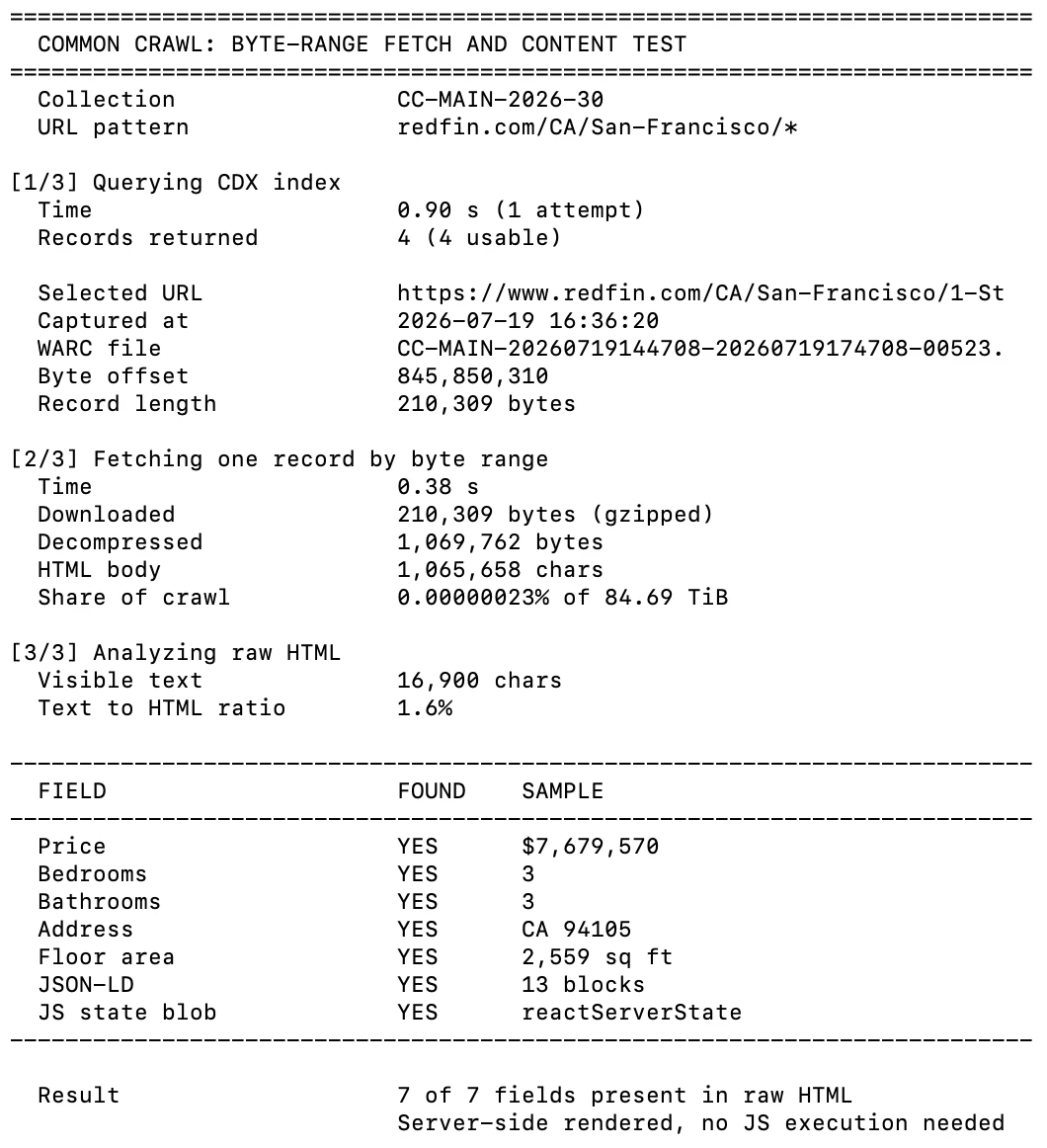
Il nome del file, l'offset e la lunghezza consentono di richiedere un singolo record con un'intestazione Range HTTP. Lo abbiamo testato su una pagina di annunci di Redfin.
La ricerca CDX è stata completata in meno di un secondo e il recupero per intervallo di byte ha richiesto 0,38 secondi per 210 KB. Tutti i sette campi degli annunci che abbiamo cercato, inclusi prezzo, camere e indirizzo, erano presenti nell'HTML grezzo senza esecuzione di JavaScript.
Filtraggio in blocco con SQL
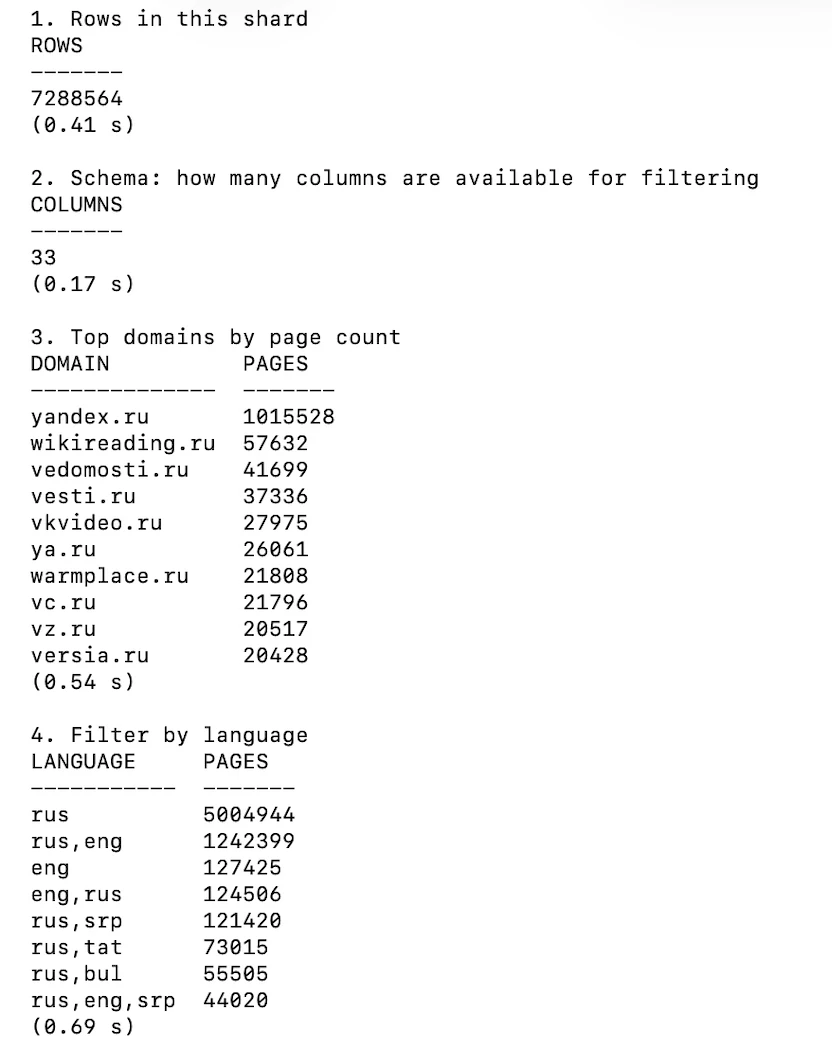
Per qualsiasi cosa più grande di un singolo URL, la strada è l'indice colonnare. È Parquet, è interrogabile tramite HTTPS ed espone 33 colonne che coprono URL, host, TLD, lingua, tipo MIME, stato di fetch e timestamp.
Le interrogazioni su un singolo shard di 7.29 milioni di righe sono state completate in ben meno di un secondo ciascuna, senza scrivere nulla su disco. Un dettaglio da conoscere prima di usarlo: gli shard sono indicizzati per nome host invertito, quindi ogni file contiene una ristretta sezione alfabetica piuttosto che un campione casuale. Interrogare uno shard arbitrario per un dominio specifico di solito non restituisce nulla.
Quanto contiene per un determinato dominio
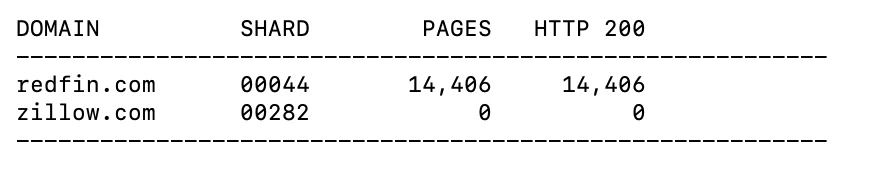
Abbiamo interrogato l'indice per due domini, redfin.com e zillow.com, individuando lo shard che copre ciascuno e contando le relative righe.
redfin.com ha restituito 14.406 pagine, tutte HTTP 200. zillow.com non ne ha restituita alcuna. Non si tratta di copertura parziale o di un recupero fallito; il dominio non è nell'indice. Common Crawl rispetta robots.txt, quindi un sito che vieta il proprio crawler è assente piuttosto che scarsamente rappresentato.
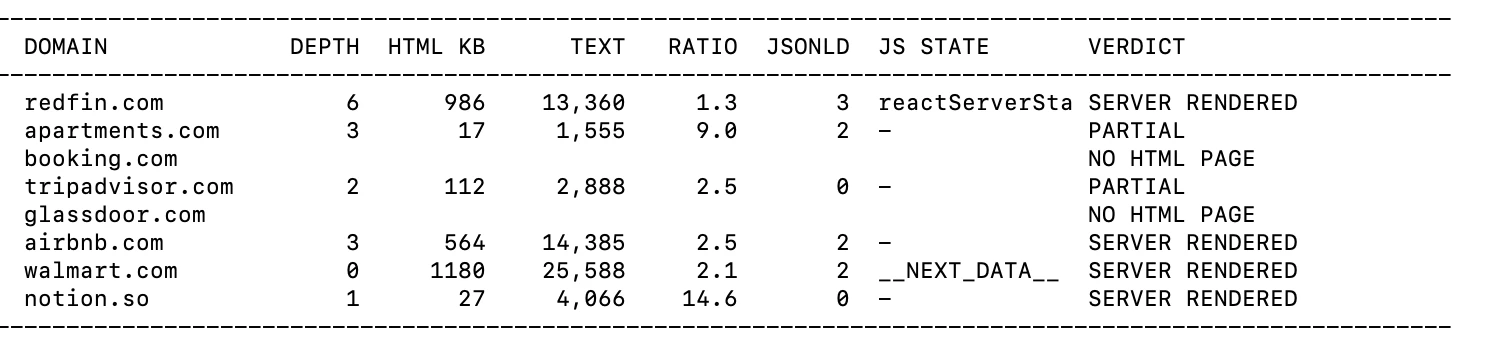
Abbiamo estratto una pagina archiviata da ciascuno di otto grandi siti e misurato quanto testo sopravviveva senza browser. Due di essi non avevano affatto una pagina HTML utilizzabile nell'archivio. Tra gli altri, la maggior parte era renderizzata lato server, inclusi Airbnb e Walmart. TripAdvisor era l'eccezione, restituendo una pagina di 18 KB che conteneva 282 caratteri di testo visibile.
Costi e licenza
I dati sono gratuito e il bucket di archiviazione è aperto senza account. Ciò che paghi è calcolo e larghezza di banda, motivo per cui si consiglia l'elaborazione nella stessa regione cloud dei dati.
La licenza non è una licenza di dati aperti. Common Crawl concede una licenza limitata al servizio, dichiara di non poter concedere in licenza il contenuto delle pagine stesso e richiede agli utenti di manlevarla da rivendicazioni derivanti dall'uso del contenuto «in relazione a intelligenza artificiale, apprendimento automatico o altre tecnologie simili». La responsabilità totale è limitata a $100.
Webz.io vende l'accesso a un archivio di articoli di notizie, post di blog, discussioni di forum e recensioni che raccoglie dal 2008. Ciò che restituisce non è la pagina ma un record elaborato: il testo dell'articolo più entità estratte, punteggi di sentiment, conteggi di coinvolgimento social e metadati del sito. Tutto ciò che è più vecchio di circa 30 giorni si trova nel prodotto di archivio; il materiale più recente è servito dalle API News, Blogs e Forums.
Il generatore di query
Le query combinano un'espressione booleana sul testo con condizioni a livello di campo, unite da AND. Ogni condizione è costruita a partire da una proprietà, un operatore e un valore.
Un dettaglio vale la pena di essere conosciuto prima di usarlo: l'operatore etichettato Equals non richiede una corrispondenza esatta. Abbiamo inserito redfin nel campo del titolo del sito e ha trovato corrispondenza con un sito il cui titolo è «Redfin Real Estate News».
Cosa viene restituito
Ogni risultato contiene il testo completo insieme a entities, sentiment, social, categories, language, domain_rank, country e un oggetto syndication che registra se la stessa storia è apparsa altrove. Non c'è un campo HTML grezzo. La pagina del prodotto descrive ciò che ottieni come «l'intero testo di ogni articolo, post, discussione o recensione» e la consegna avviene «tramite API o eseguendo tu stesso una query».
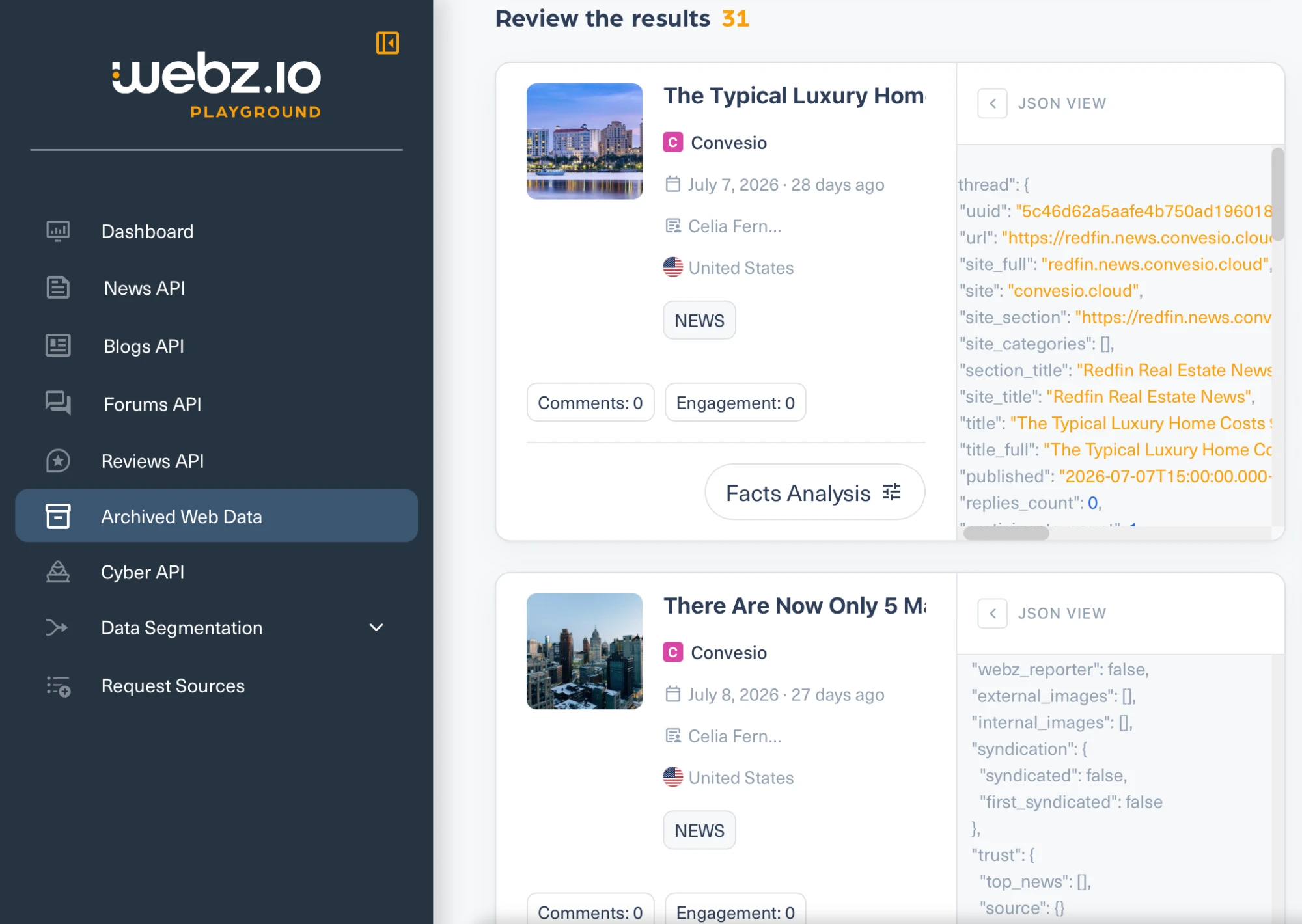
- L'archivio contiene editori, non siti di annunci. La ricerca di Redfin ha restituito il blog aziendale di Redfin, ospitato su
convesio.cloud, piuttosto che pagine di redfin.com. Interrogare direttamente il campo del dominio del sito perredfin.comnon ha restituito nulla, mentreconvesio.cloudeyahoo.comhanno restituito risultati, quindi la risposta vuota riflette la copertura piuttosto che una query rotta. - La raccolta in blocco è limitata per contratto. I termini di servizio vietano un filtro asterisco catch-all e i filtri verticali come
site_type:newsolanguage:english, che sono esattamente le forme di query che un acquirente di corpus userebbe. L'interfaccia stessa suggerisce di aggiungeresite_type:newsper restringere una ricerca. - La documentazione dell'archivio non è scritta. Esistono quattro pagine nella navigazione della documentazione, che coprono dump di dati, limiti, creazione di dataset e il riferimento delle API. Ciascuna contiene un'intestazione e nient'altro.
Exa ha costruito il proprio indice web e vende la ricerca su di esso. L'azienda dichiara più di 500 miliardi di URL. Per questo confronto la parte rilevante non è l'endpoint di ricerca ma /contents, che restituisce il testo di una pagina dalla cache di Exa invece di recuperarla dal vivo.
Opzioni cache o live
Un singolo parametro lo controlla. maxAgeHours impostato a 24 significa usare la copia in cache se ha meno di un giorno, altrimenti effettuare il crawl. Impostato a 0 effettua sempre il crawl. Impostato a -1 non effettua mai il crawl, restituendo solo ciò che è già archiviato. Il valore massimo accettato è 720 ore, quindi il parametro non può riferirsi a nulla di più vecchio di 30 giorni.
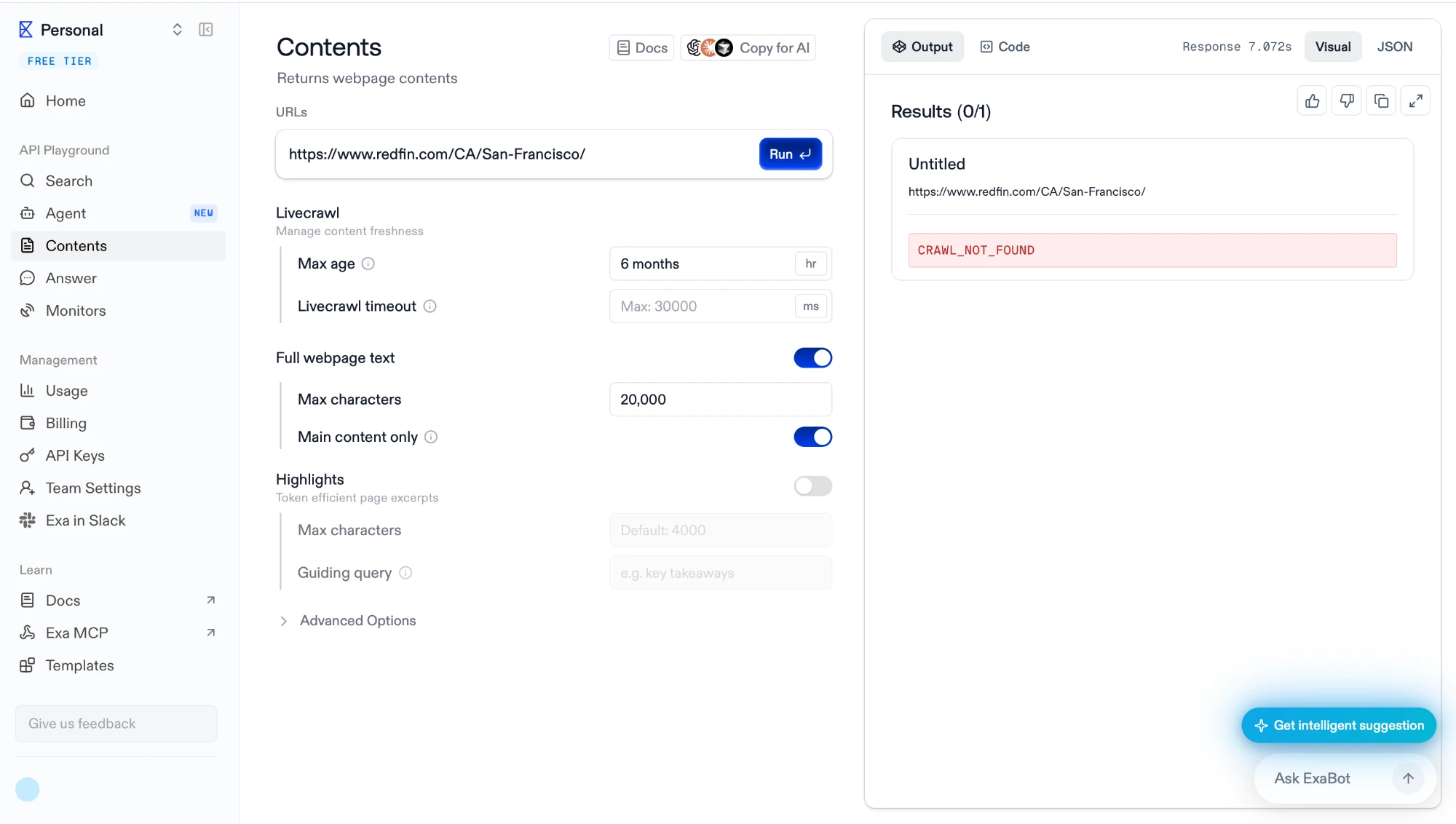
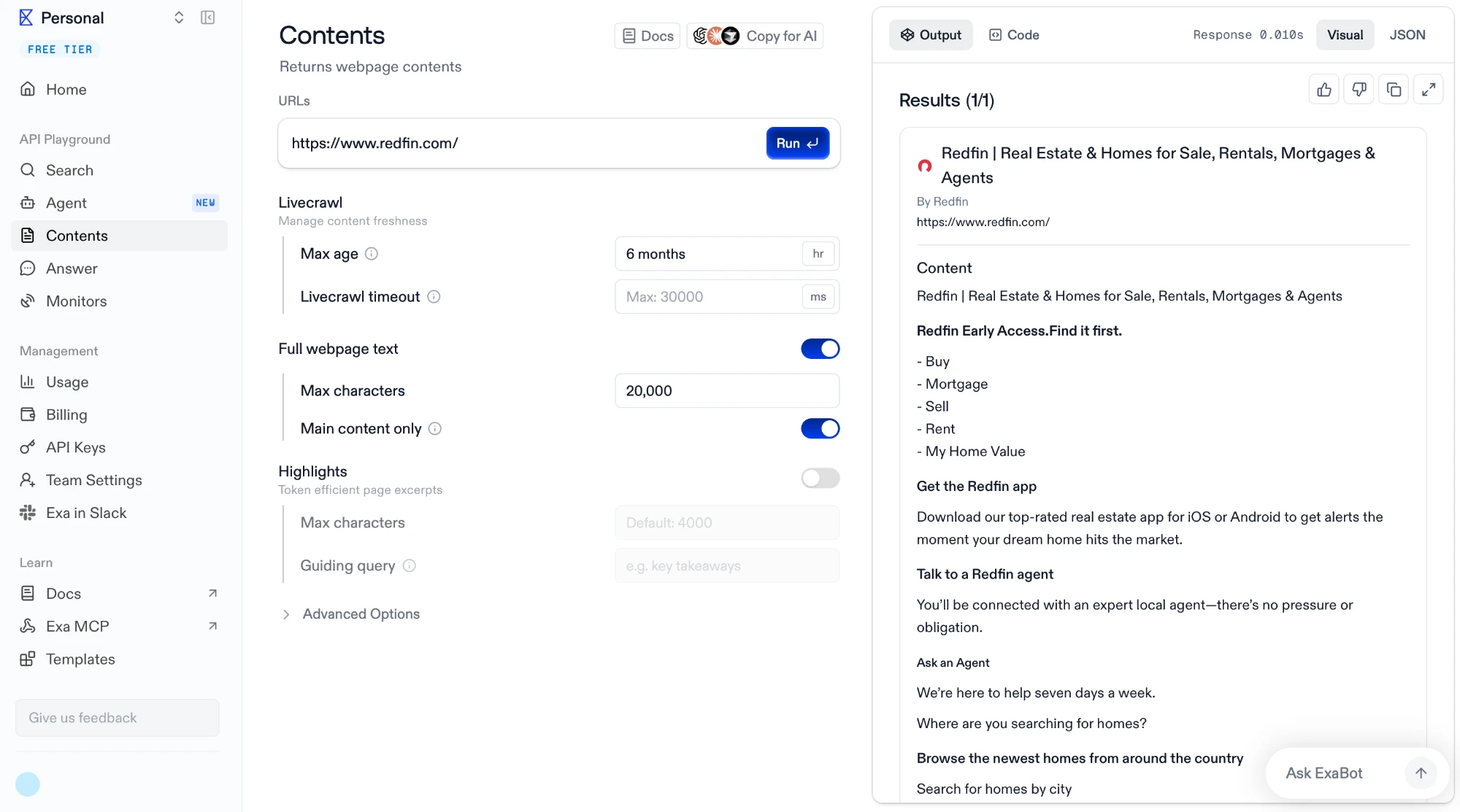
Abbiamo eseguito due richieste con il limite di età impostato a sei mesi. La prima chiedeva una pagina di città di Redfin.
Ha restituito CRAWL_NOT_FOUND dopo 7,07 secondi. La seconda chiedeva la homepage di Redfin.
Ha restituito il contenuto completo della pagina in 0.010 secondi. Dieci millisecondi sono meno di un round trip di rete, quindi quella risposta proveniva dallo storage, non da un fetch. La cache è reale e il fallimento di sette secondi era Exa che cercava e non trovava.
Nella stessa schermata sono visibili altre due impostazioni predefinite. Il contenuto è limitato a 20.000 caratteri e l'opzione «solo contenuto principale» è attiva, quindi navigazione e testo boilerplate vengono rimossi dalla logica di Exa piuttosto che dalla tua.
La copertura è discontinua a livello di pagina
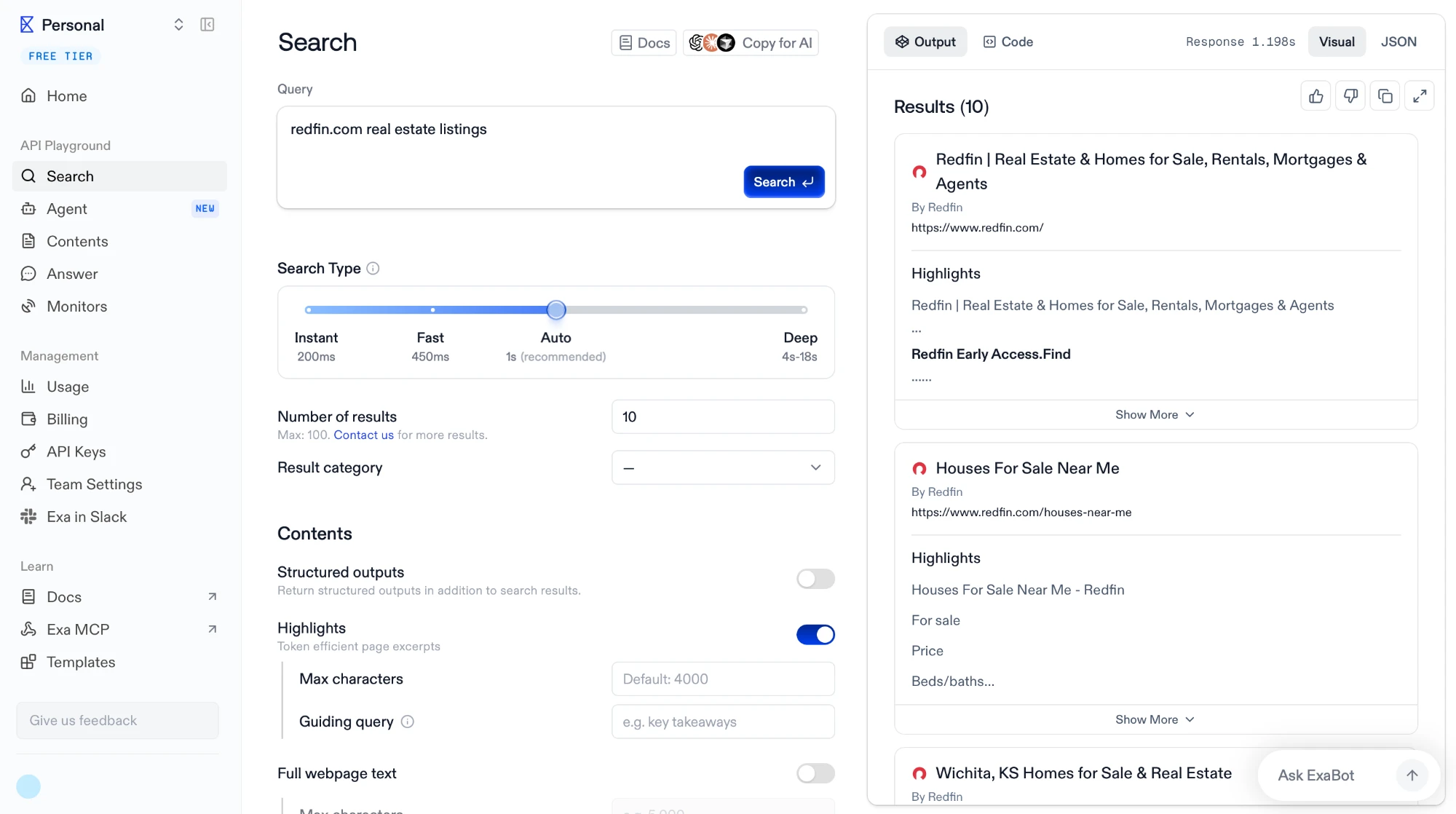
La homepage era in cache; la pagina della città di San Francisco no. La ricerca nel dominio mostra perché non si tratta di una semplice questione di presenza o assenza.
La query ha restituito la homepage di Redfin, una pagina «Houses For Sale Near Me» e una pagina della città di Wichita, quindi le pagine profonde esistono nell'indice. La copertura è distribuita in modo discontinuo su un dominio piuttosto che completa o vuota.
Limitazioni
La stessa schermata contiene la frase che separa Exa dagli archivi in questo confronto: «Numero di risultati: 10. Massimo: 100. Contattaci per ulteriori risultati.»
Non c'è un conteggio totale. Common Crawl ha risposto a questa domanda con una query SQL e Bright Data vi ha risposto con un campo files_count.
Nessuna esportazione in blocco, nessuna consegna al proprio storage, nessun firehose. Il livello Enterprise menziona indici personalizzati, ovvero indici su misura serviti tramite le API piuttosto che dati consegnati.
Quale scegliere per quale lavoro
Questi quattro prodotti non sono sostituti. La domanda non è quale sia il migliore ma quale risponde alla domanda che hai.
- HTML grezzo su larga scala, inclusi i siti che bloccano i crawler. Bright Data è l'unico qui che scrive una selezione filtrata su uno storage che controlli e l'unico a conservare pagine di domini che vietano i crawler.
- Un corpus ampio a costo zero, se hai capacità di ingegneria. Common Crawl ti fornisce scansioni complete in WARC, enumerabili con SQL, e non chiede nulla oltre al tuo calcolo. L'elaborazione spetta a te costruirla.
- Testo di notizie, blog e forum con entità e sentiment già estratti. Webz.io restituisce record elaborati piuttosto che pagine, il che elimina il lavoro di estrazione ma elimina anche il markup.
- Contesto di pagina al momento della query, per un agente o una pipeline RAG. Exa restituisce testo in cache in millisecondi e ripiega su un recupero live quando una pagina non è archiviata, all'interno della stessa chiamata.
 Aggiungi come fonte preferita
Come abbiamo testato le API di archivio web
Abbiamo lavorato all'interno di ciascun prodotto piuttosto che a partire dalla sua documentazione. Ogni fornitore è stato utilizzato prima tramite la propria console o playground e poi tramite le sue API, così abbiamo potuto vedere la richiesta generata dall'interfaccia e ciò che viene restituito prima che venga addebitato alcunché.
Per ciascuno abbiamo costruito una query, l'abbiamo eseguita e abbiamo letto la risposta grezza invece del riepilogo renderizzato. Quando il prodotto restituiva un conteggio, una stima dei costi o un oggetto di stato, abbiamo registrato direttamente tali campi. Quando offriva un campione o una consegna, l'abbiamo presa, spacchettati i file e aperti.
Piccoli script hanno gestito le parti che richiedevano ripetizione o cronometraggio: recuperare un singolo record da un archivio multi-terabyte, decomprimere un pacchetto consegnato e cercare campi specifici nell'HTML grezzo, interrogare un indice colonnare con SQL e misurare quanto impiega una risposta in cache rispetto a una che deve essere sottoposta a crawl. Tali script sono collegati accanto ai risultati che hanno prodotto.
Cita questa ricerca
Scegli il formato adatto a dove pubblicherai. Incollare la versione con link nel tuo CMS preserva il backlink.
@misc{sipi2026,
  author = {Şipi, Nazlı},
  title  = {{Web Archive API: 4 migliori provider testati e confrontati}},
  year   = {2026},
  month  = aug,
  howpublished    = {\url{https://aimultiple.com/web-archive-api}},
  note   = {AIMultiple. Consultato il 11 agosto 2026}
}Risultati e timestamp di 15 punti dati. Scarica i dati di sintesi mostrati nei grafici e nelle tabelle di questo articolo come file ZIP contenente 2 file CSV.
Vuoi i dati granulari che ci stanno dietro? Passa a Premium











Sii il primo a commentare
Il tuo indirizzo email non verrà pubblicato. Tutti i campi sono obbligatori. I commenti vengono lasciati nella loro lingua originale.