


Melhores ferramentas de web scraping com IA avaliadas

Os sites mudam de layout e os campos que você precisa de uma página mudam com o tempo. Essas mudanças quebram scrapers codificados manualmente. Scrapers de IA podem ser atualizados com prompts simples, e alguns podem reparar um scraper salvo quando o site muda.
Avaliamos as principais ferramentas de web scraping com IA nos 10 principais domínios de e-commerce para ver o desempenho delas e também comparamos como cada uma aproveita a IA.
A classificação é por taxa de sucesso para os fornecedores avaliados e por cobertura de recursos para os demais.
Benchmark de ferramentas de web scraping com IA
Cada fornecedor adota uma abordagem diferente em relação à IA, e nosso objetivo foi comparar essas abordagens e as compensações que elas trazem. Consulte a seção metodologia do benchmark para mais detalhes sobre o processo de teste.
Os dados de preço e moeda foram extraídos 10 principais sites de e-commerce do mundo.
Principais conclusões sobre ferramentas de web scraping com IA a partir do benchmark
- As falhas voltam parecendo dados. Quando uma ferramenta não consegue ler um preço, muitas vezes porque a página encontrou um muro anti-bot, a resposta pode vir como 0 em vez de uma falha. Um nulo pode ser tentado novamente ou ignorado; um 0 passa na validação sem ser notado. Por exemplo, Apify e Oxylabs retornaram nulo nesses casos, e a documentação do Firecrawl recomenda adicionar “Retorne null se não for encontrado na página” a cada campo do esquema para que o model não adivinhe um valor.
- Campos extras chegam sem serem convidados. Peça preço e moeda e você também pode receber marca, descrição ou URLs de imagem. Um esquema limita a resposta aos campos que você nomeia. Por exemplo, a Bright Data permite bloquear o esquema de saída no momento da criação, para que o mesmo formato volte em cada chamada.
- O elemento errado é capturado. Preço com desconto versus preço original, com imposto versus sem imposto, alternâncias regionais: a ferramenta pode pegar o número que você não queria.
- Os números oscilam. Ferramentas de prompt para JSON podem adicionar decimais, truncar valores ou retornar aproximações convertidas em moeda que não aparecem em lugar nenhum na página.
- A localidade altera a resposta. Alguns sites definem preços por geo-IP, então um fornecedor em proxies dos EUA vê um número enquanto um usuário europeu vê outro.
O esquema e a região do proxy são os parâmetros que permitem detectar a maior parte disso antes que chegue aos seus dados.
Preços das ferramentas de web scraping com IA
A Kadoa não publica tarifas; oferece um plano Flex baseado em consumo e um plano Enterprise vendido por contato com vendas.
Comparação de ferramentas de web scraping com IA
Tempo até o primeiro scraper: Para ferramentas que criam um scraper que você depois chama por ID, quanto tempo a configuração leva. “Chamada HTTP única” significa que não há etapa de criação.
Esquema de saída definido pelo usuário: Se você pode definir os campos de saída e seus tipos por conta própria antes da execução da raspagem, em vez de descrevê-los em um prompt e deixar o LLM decidir a estrutura em tempo de execução.
Endpoint de criar uma vez e chamar muitas vezes: Se o scraper é criado uma vez, armazenado no lado do fornecedor e depois chamado apenas com uma URL. Aqui, o LLM (ou, para ferramentas baseadas em gravação, seu percurso de cliques) é executado no momento da criação e sua saída é congelada em um scraper de sua propriedade que pode ser alterado no lugar, que é o que as programações, webhooks e integrações vinculam. Quando isso não existe, a extração é refeita em cada chamada e a definição completa viaja com cada solicitação.
Scraper salvo autorreparável: Se um scraper salvo é reparado quando o site de destino muda, sem ser recriado do zero. A correção se aplica ao mesmo scraper armazenado sob seu identificador existente, para que gatilhos, agendamentos e integrações continuem funcionando.
* A Kadoa armazena o scraper e o chama por ID, mas as URLs de destino são vinculadas quando o fluxo de trabalho é criado. Apontar para uma nova URL exige uma atualização de metadados separada antes da execução.
Ferramentas que executam um LLM sobre a página em cada chamada não são contadas aqui: não há lógica de extração persistida para reparar, o que as torna tolerantes a mudanças de layout, mas também significa que não há artefato para inspecionar, versionar ou aprovar. Também não são caches internos sem identificador que você possa apontar, pois novamente não há nada para inspecionar, versionar ou aprovar.
Além de coisas como páginas mudando constantemente, em pipelines agênticos você geralmente precisa de uma API simples que possa chamar: forneça uma URL, receba dados estruturados de volta. Mas nem sempre você encontra uma API pronta de scraper para cada domínio que precisa raspar regularmente; e quando encontra, os campos desejados podem não estar lá, ou você precisa personalizar o esquema de acordo com suas necessidades. Existem diferentes abordagens que resolvem esses problemas.
Plataformas de web scraping com IA de criar uma vez e chamar muitas vezes
Se você criar seu próprio scraper, terá que escrever o crawler, configurar proxies, executar navegadores headless e lidar com filas, tentativas e anti-bot por conta própria.
A IA entrou no scraping para reduzir esse trabalho manual e simplificar a configuração. Ela está presente na maioria dessas ferramentas, mas cada fornecedor a utiliza de forma diferente e atende a um conjunto diferente de necessidades.
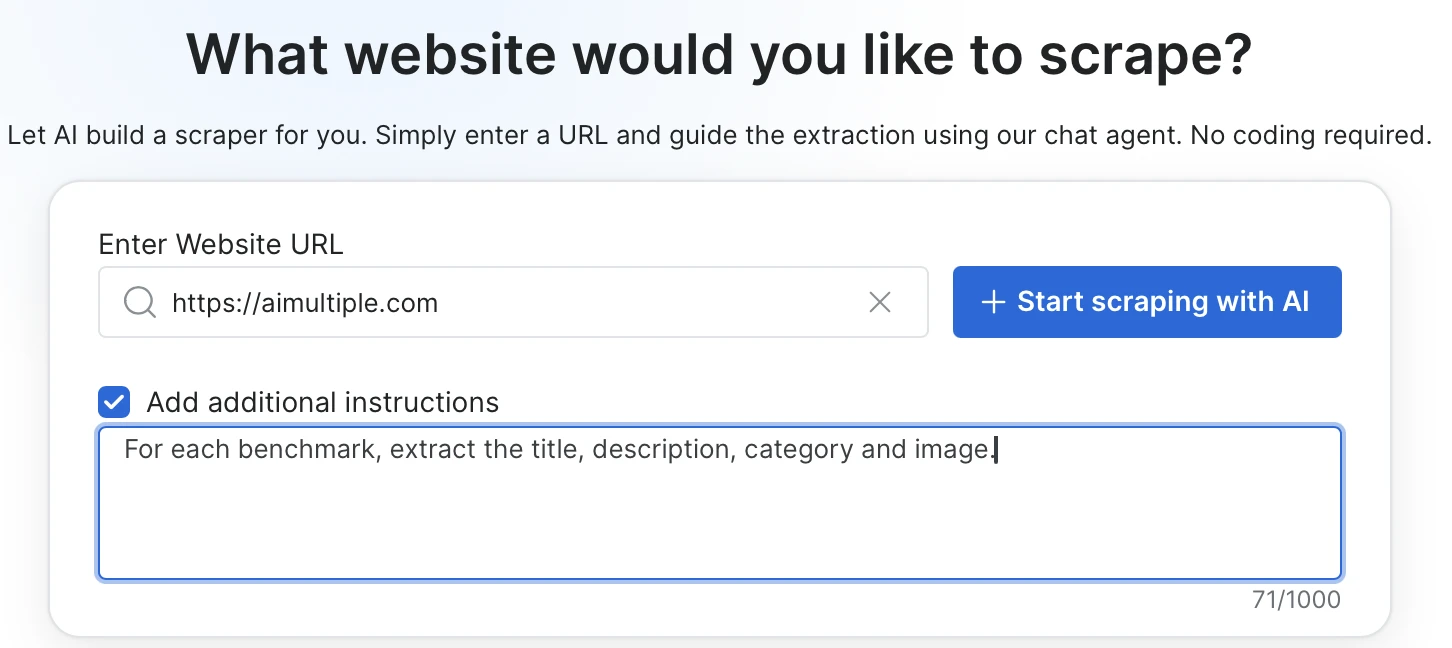
O Bright Data Scraper Studio oferece uma abordagem em duas fases, na qual você cria o scraper para qualquer URL com um prompt e depois o chama como uma API estável. Você o configura uma vez e, a partir de então, basta passar as URLs.
Você descreve os campos que deseja extrair em linguagem simples e pode, opcionalmente, adicionar seletores CSS, ações obrigatórias na página ou comportamento de carregamento da página.
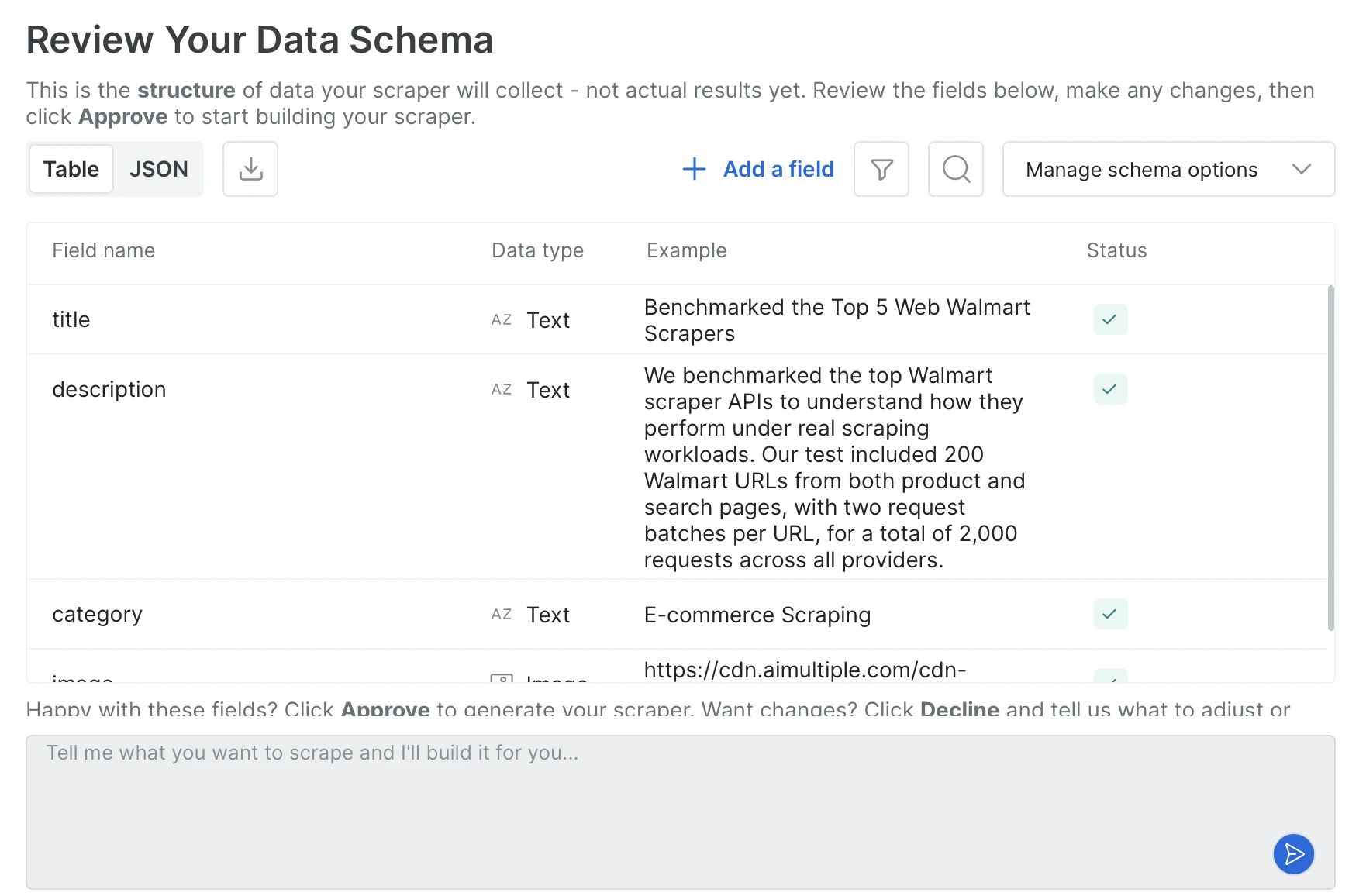
O agente gera o esquema de saída a partir do prompt; você o aprova adicionando ou removendo campos ou alterando tipos, e então o código do scraper é escrito.
- Endpoint de criar uma vez e chamar muitas vezes: Depois que você aprova o esquema, o scraper é registrado como um endpoint de longa duração com um identificador fixo. Cada chamada acessa o mesmo endpoint com apenas uma URL, e o esquema de saída permanece o mesmo entre as chamadas. Em nossos testes, criar um scraper dedicado levou em média cerca de 10 minutos.
- Dois métodos de criação: Você pode conversar com o Agent no navegador ou usar a CLI do Bright Data para criar o scraper a partir do seu terminal com um único comando que recebe uma URL e um prompt. Ambos produzem o mesmo scraper.
- Workflow de coding agent: Os comandos do terminal são executados sem alterações dentro do Claude Code, Cursor e Codex, para que o agente possa criar, executar ou autorreparar um scraper sem sair do editor. Você também pode fixar o identificador do scraper no arquivo de regras do agente para que sessões futuras o reutilizem. Os resultados podem ser entregues por API, SDK, CLI, webhooks ou diretamente no armazenamento em nuvem no S3, GCS, Azure ou OSS.
- Combinado com scrapers pré-criados: A Bright Data mantém uma biblioteca de scrapers prontos para sites populares como Amazon, LinkedIn e Zillow.
- Scraper salvo autorreparável: Quando o site muda e o scraper quebra, você descreve o que quebrou em linguagem simples; a IA produz uma correção e a mostra com saída de exemplo, e nada entra em produção até você aprovar. Como o identificador do scraper não muda, cada gatilho, agendamento e integração vinculado a ele continua funcionando.
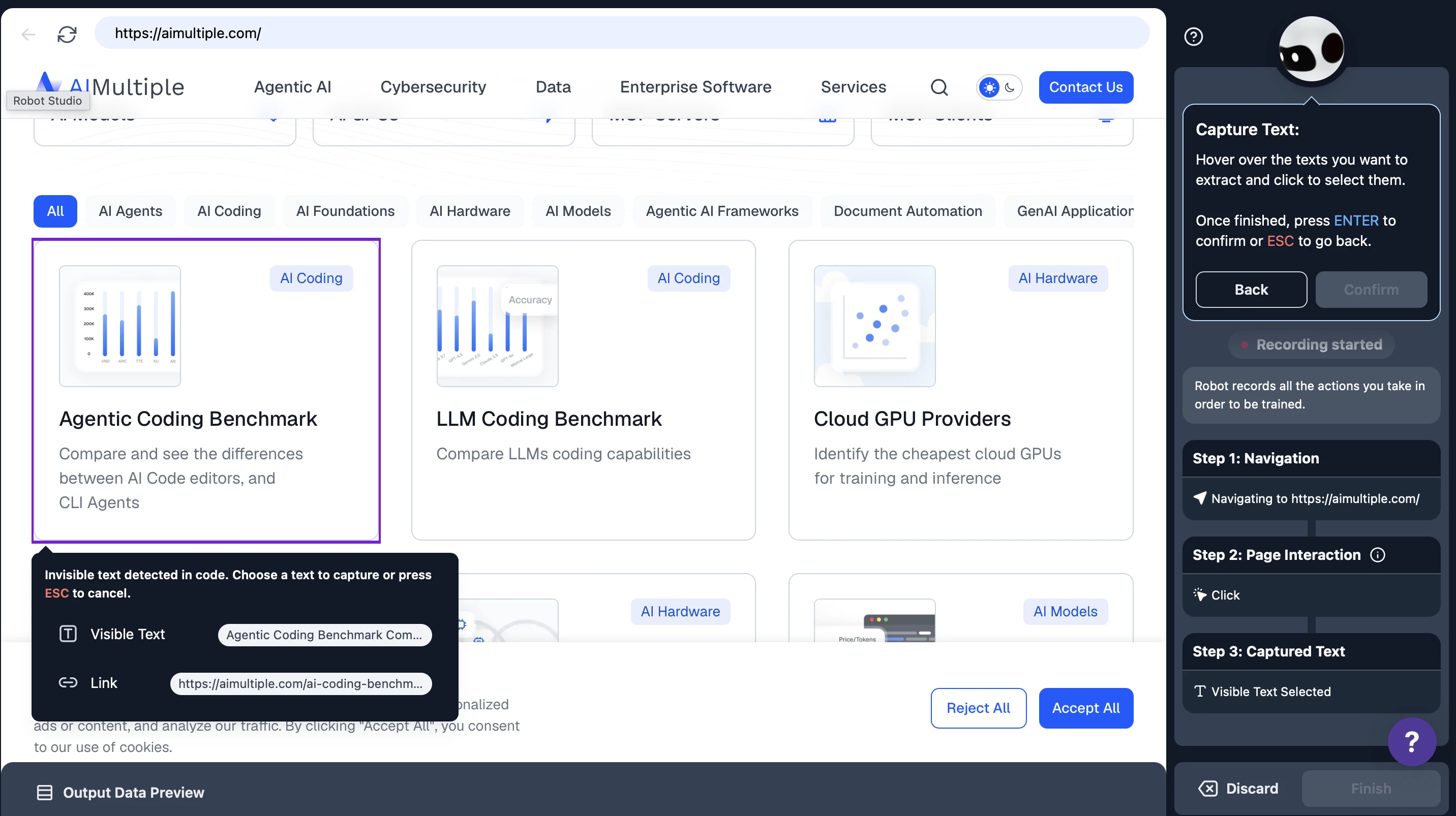
No Browse IA, você ainda cria o scraper por conta própria, mas a configuração é visual: você acessa a página de destino e clica para marcar quais campos devem ser capturados, e o robô salva as etapas de navegação e os campos selecionados como uma gravação. Essa gravação é executada repetidamente; quando a página muda, o robô se adapta sozinho na maioria dos casos e é retreinado quando não consegue.
- Configuração visual com o Robot Studio: Os scrapers são criados com um fluxo de clique → capturar campo → salvar.
- Monitoramento e alertas integrados: Agendamentos por hora, dia ou semana + detecção de mudanças + alertas por e-mail/webhook no mesmo produto.
- O esquema é formado a partir dos campos capturados: Uma etapa de captura separada é adicionada para cada campo; sem prompt para esquema.
- Adaptação automática: O motor do Browse IA adapta o código de scraping quando um site muda, e a maioria dos robôs continua funcionando sem intervenção. Quando a adaptação não é suficiente, você retreina o robô, o que preserva seu histórico, execuções e fluxos de trabalho.
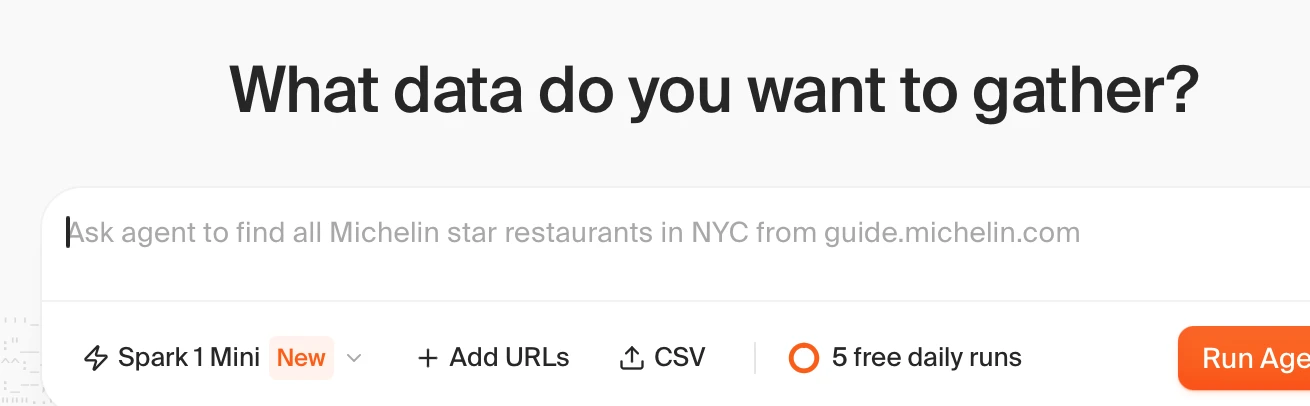
A Kadoa também cria o scraper a partir de um prompt, mas vincula as URLs de destino quando o fluxo de trabalho é criado, em vez de aceitá-las por chamada. O que ela armazena é código gerado, e não um prompt, portanto há um artefato concreto para monitorar e reparar.
- Endpoint de criar uma vez e chamar muitas vezes: Um fluxo de trabalho salvo recebe um ID persistente e é chamado com
PUT /v4/workflows/{id}/run. A solicitação carrega apenas variáveis e um limite de linhas; o esquema e o código de extração permanecem no lado da Kadoa. Apontar o mesmo fluxo de trabalho para uma URL diferente significa atualizar seus metadados primeiro, então não é uma única chamada com uma URL nela. - Do prompt ao esquema tipado: Você descreve os dados no prompt de configuração e a Kadoa propõe um esquema que você edita em uma visualização visual ou em JSON. Os campos carregam tipos como STRING, NUMBER, MONEY, DATE e LINK, e podem ser marcados como chaves.
- Scraper salvo autorreparável: O reparo é acionado por uma execução com falha, e não por um agendamento. A Kadoa regenera o código de extração e o valida em relação aos dados extraídos anteriormente, sob o mesmo ID de fluxo de trabalho, para que agendamentos e integrações continuem funcionando. Não há etapa de aprovação antes de a correção entrar em produção. Quando a recuperação automática falha, um ticket é enviado para a equipe de operações da Kadoa.
- Workflow de coding agent: Um servidor MCP hospedado com mais de 40 ferramentas, além de SDKs próprios para Node e Python e uma CLI (
kadoa create,kadoa run,kadoa export). - Entrega: API, SDK, CLI, MCP e Google Sheets para pull; S3, GCS, Azure Blob, webhooks, WebSockets, e-mail e Slack para push; Snowflake e Databricks para compartilhamento. Os conectores de armazenamento em nuvem são configurados por meio de suporte, e não de autoatendimento.
APIs de extração com IA de uma única chamada
O Oxylabs IA Studio é um conjunto de cinco aplicações de IA separadas sob um único SDK (pip install oxylabs-ai-studio): AiScraper, AiCrawler, BrowserAgent, AiSearch e AiMap. Nada é persistido no lado do servidor; cada chamada de raspagem executa uma nova busca mais extração via LLM.
- Fluxo do AiScraper: generate_schema(prompt=…) opcionalmente chama o LLM para produzir um esquema JSON e, em seguida, scrape(url, schema) busca a página e executa a extração via LLM. Você pode manter e reutilizar o esquema do seu lado, mas o servidor não registra um scraper de longa duração.
- Cinco aplicações, um SDK: AiScraper para extração estruturada de URL única, AiCrawler para travessia de site orientada por prompt, BrowserAgent para ações na página, AiSearch para busca em linguagem natural mais extração e AiMap para mapas filtrados de URLs de um site.
- Formatos de saída: markdown (padrão), json, csv, toon (um formato otimizado para tokens), screenshot e html (somente no browser agent).
- Esquemas escritos à mão:
generate_schemaé opcional. O parâmetroschemaaceita qualquer JSON Schema que você escrever, e os próprios exemplos da Oxylabs passam um Pydantic model escrito à mão. Um esquema é obrigatório para saída em JSON, CSV e TOON. - Parâmetros notáveis: render_javascript=”auto” permite que o serviço decida se a renderização de JS é necessária, geo_location aceita um código de país ISO ou nome para a localização do proxy, e max_credits define um limite de gastos por solicitação.
A Apify oferece um ecossistema aberto de desenvolvedores, no qual “Actors”, programas executáveis de scraping e automação, são criados e executados na sua plataforma. Você pode escrever seu próprio Actor do zero, começar a partir de um modelo pronto ou usar Actors publicados por outras pessoas na Apify Store.
- Actor de extração com IA: A Apify também tem um Actor apify/ai-web-scraper pronto que recebe um prompt em linguagem natural e retorna JSON estruturado de qualquer URL. Você insere novamente o prompt a cada execução, e a saída JSON não tem garantia de permanecer consistente entre chamadas, o que é um comportamento comum em ferramentas orientadas por prompt.
- Somente prompt: A entrada do Actor tem cinco campos:
startUrls,extractionMode,prompt,maxPagesToVisitemaxCrawlDepth. Não há parâmetro para um esquema de saída definido pelo usuário. - Crie seu próprio Actor: Se não existir um scraper pronto para o site de destino ou nenhum deles raspar os campos de dados que você deseja, você escreve seu próprio Actor e decide quais campos extrair, onde eles estão na página e como lidar com o restante. O tempo necessário depende de suas habilidades de programação e da complexidade do site. Se você preferir não criar sozinho, também pode obter ajuda dos serviços profissionais da Apify.
- Combinado com scrapers pré-criados: Um marketplace onde os desenvolvedores publicam seus próprios Actors. Scrapers para sites populares são, em sua maioria, publicados e mantidos por terceiros.
- Serviços da plataforma: Os Actors vêm com agendamento, monitoramento, armazenamento de datasets, pool de proxy e acesso à API prontos para uso.
- Acesso de agente, não autoria de agente: O servidor MCP da Apify permite que um coding agent pesquise e execute Actors, mas não há um fluxo integrado para criar ou manter um Actor a partir do agente.
- Responsabilidade pela manutenção: Se você mesmo criou o Actor, você o corrige quando o site muda. Se estiver usando um da Store, você espera o proprietário do Actor disponibilizar a correção no cronograma dele.
O Firecrawl transforma uma URL mais um prompt ou um esquema JSON em JSON em uma única chamada síncrona. Cada solicitação executa o pipeline de extração no momento em que a chamada é feita.
- Prompt ou esquema: Um esquema fixa os nomes e tipos dos campos antes da chamada, para que a resposta contenha apenas os campos que você nomeou. Um prompt deixa a estrutura a cargo do model, o que é mais rápido de escrever, mas pode variar entre chamadas.
- Formatos de tipo de página:
product,menu,branding,audioevideoretornam uma estrutura fixa definida pelo Firecrawl.productcobre título, preço, disponibilidade, variantes e preço promocional. Eles não recebem parâmetros e são executados sem um LLM. deterministicJson: Recebe um esquema e armazena em cache um extrator gerado por site, para que raspagens repetidas ignorem o LLM. Não pode ser combinado com o formatojson.- Execução por solicitação: Cada chamada carrega seu próprio prompt ou esquema e é executada no momento da solicitação, então a saída reflete a página como ela aparece naquele momento e não há nada para registrar antecipadamente.
- Suporte a coding agents: Servidor MCP oficial e CLI, com guias de início rápido para Claude Code, Cursor, Codex CLI e CLI do Gemini, além de um plugin oficial do Claude.
- Agente: O Firecrawl também oferece um produto Agent no qual a URL é opcional. Você descreve o que deseja e o agente navega na web para encontrá-lo.
O ScrapingBee usa o mesmo model de chamada única e sem estado que o Firecrawl. A diferença está em como você descreve o que deseja.
- Três modos de extração: ai_query para um único campo em linguagem natural (retorna uma string), ai_extract_rules para um esquema JSON em que cada campo tem sua própria descrição, e uma forma avançada do mesmo com tipos, enums e saída aninhada.
- ai_selector: Passe um seletor CSS para focar o LLM em uma parte específica da página. Mais rápido e mais preciso do que deixá-lo ler o DOM completo.
- Scraping clássico na mesma chamada: render_js para sites com muito JS, screenshot, extract_rules para extração via CSS/XPath sem IA e json_response para obter HTML, cookies, XHRs e iframes em um único envelope.
Como escolher a ferramenta certa para seu pipeline?
Na prática, a ferramenta certa depende menos de listas de recursos e mais do que seu pipeline faz com os dados ao longo do tempo. Vale a pena ter alguns padrões em mente:
Scraping pontual ou ocasional
Se você precisa apenas de dados de uma URL uma vez e não se importa em descrevê-los ou passar um esquema a cada vez, as APIs de extração com IA de uma única chamada são o caminho mais rápido. Nenhum scraper para criar, nenhum esquema para registrar.
Scraping repetido em um pipeline
Se você executa o mesmo scraper repetidamente e precisa de um endpoint estável que retorne o mesmo esquema todas as vezes, ou se precisa personalizar os campos de dados para as URLs desejadas, uma plataforma de criar uma vez e chamar muitas vezes se encaixa melhor. Seu pipeline apenas passa URLs e o formato de saída permanece previsível.
Quanto tempo leva para chegar lá
O tempo de criação varia conforme a abordagem. Escrever um scraper ou Actor do zero normalmente leva de dias a semanas, pois o crawler, a configuração de proxy e as tentativas são responsabilidade sua. Plataformas baseadas em prompt geram o esquema e o código em minutos. Ferramentas baseadas em gravação também ficam prontas em minutos, com configuração por apontar e clicar em vez de um prompt. As APIs de extração com IA de uma única chamada pulam a etapa de criação; a primeira resposta chega em uma única chamada HTTP.
Site já coberto por um scraper pronto
Usar um scraper pronto para sites populares geralmente é mais rápido do que criar o seu próprio, mas quem o mantém funcionando depende de onde ele vem. Uma biblioteca mantida pelo fornecedor é atualizada por ele quando o site muda.
Site não coberto por nada pronto
Então a questão passa a ser quem corrige as coisas quando os layouts mudam. Criar o seu próprio significa que a manutenção é sua. Uma ferramenta baseada em gravação significa retreinar o robô quando as coisas quebram. A autorreparação com IA em código do qual você é dono fica no meio: a correção é proposta no seu código existente, e você a aprova antes de entrar em produção.
Criando com coding agents
Se o seu fluxo de trabalho passa pelo Claude Code, Cursor ou Codex, importa se a ferramenta expõe uma CLI ou integração MCP que o agente possa conduzir de ponta a ponta, ou se o agente só pode chamar uma HTTP API simples.
 Adicionar como fonte preferencial
Metodologia do benchmark de web scraping com IA
Para criar o dataset, selecionamos os 10 principais sites de moda e vestuário do mundo a partir do Semrush. Para cada site, uma única página de produto foi escolhida, e a referência (preço e moeda) foi registrada manualmente visitando a página diretamente.
Cinco ferramentas de scraping com IA foram testadas: a Scrape API da Firecrawl, o Scraper Studio da Bright Data, o IA Extract da ScrapingBee, o IA Web Scraper actor da Apify e o IA Scraper do Oxylabs IA Studio. Cada fornecedor recebeu o mesmo prompt de uma frase: “Extraia o preço e a moeda do produto e retorne json.”
Cada URL foi enviada uma vez a cada fornecedor. Não houve novas tentativas, fallbacks, imposição de esquema nem etapas de pós-processamento. A resposta bruta foi armazenada como veio, exatamente como o fornecedor a retornou.
Para validação, a saída JSON bruta foi analisada com uma expressão regular em busca do preço e da moeda esperados. A correspondência de preço tolera variações comuns de formatação, como 26.49 e 26,49, 2.140 e 2140, além de pequenas diferenças de precisão decimal. A correspondência de moeda aceita tanto o código ISO (USD) quanto o símbolo ($).
Duas métricas foram acompanhadas. A taxa de sucesso é calculada por URL como uma verificação binária para saber se o preço foi retornado corretamente e outra para a moeda; as duas são então combinadas para produzir uma única pontuação de sucesso para cada URL, e as pontuações são calculadas em média entre as dez URLs para cada fornecedor. O tempo de conclusão de ponta a ponta é a duração real desde a solicitação até a resposta, calculada em média entre as dez URLs. Para a Bright Data, a criação única do coletor é excluída.
Como selecionamos essas ferramentas
Incluímos ferramentas que usam IA, como LLMs, NLP ou vision models, para interpretar a estrutura da página sem regras fixas ou para extrair dados de um prompt. Excluímos bibliotecas de propósito geral sem IA embutida, como Scrapy e Playwright, embora ambas sejam amplamente usadas para scraping.
Nas seções acima, as ferramentas são agrupadas por como funcionam, e não por quem as utiliza. A linha divisória é onde o model é executado: plataformas de criar uma vez resolvem a estrutura da página uma vez e armazenam o resultado como um scraper que você chama por ID, enquanto as APIs de uma única chamada o resolvem novamente a cada solicitação. Essa distinção determina custo, consistência da saída e quem corrige as coisas quando um site muda, separando as ferramentas de forma mais útil do que uma divisão entre no-code e desenvolvedor.
Perguntas frequentes
Sim. Bibliotecas de código aberto como Crawl4AI, Skyvern e Browser Use são gratuito para auto-hospedagem, e a maioria das ferramentas comerciais, incluindo Browse IA, Firecrawl e Thunderbit, oferece um plano gratuito com limites de uso.
Cite esta pesquisa
Escolha o formato adequado ao local onde você vai publicar. Colar a versão com link no seu CMS preserva o backlink.
@misc{sipi2026,
  author = {Şipi, Nazlı},
  title  = {{Melhores ferramentas de web scraping com IA avaliadas}},
  year   = {2026},
  month  = aug,
  howpublished    = {\url{https://aimultiple.com/ai-web-scraping}},
  note   = {AIMultiple. Acessado em 25 agosto 2026}
}Resultados e carimbos de data/hora de 56 pontos de dados. Baixe os dados resumidos exibidos nos gráficos e tabelas deste artigo como um arquivo ZIP contendo 2 arquivos CSV e um README.
Quer os dados granulares por trás disso? Assine o Premium
Registro de alterações
5 atualizaçõesAdicionada uma seção de benchmark comparando ferramentas de web scraping com IA nos principais sites de e-commerce.
Substituiu a lista de ferramentas por entradas nomeadas para Browse AI, Firecrawl, ScrapeGraphAI, Diffbot, Kadoa, Skyvern e outras, e adicionou uma seção de FAQ.
Substituída a introdução às ferramentas de web scraping de IA por uma descrição de Agentes de IA Autônomos, Scraping Baseado em Visão (VLM) e scrapers de autocorreção.















Seja o primeiro a comentar
Seu endereço de e-mail não será publicado. Todos os campos são obrigatórios. Os comentários são deixados em seu idioma original.