


Optimisation des coûts Kubernetes: 8 étapes & 23 outils

Les clusters Kubernetes peuvent sembler parfaitement sains pendant que la facture grimpe. L'autoscaling est configuré, les tableaux de bord sont verts, et les dépenses augmentent quand même. Dans une enquête, 42 % des 455 ingénieurs plateforme ont cité le coût comme leur principal défi Kubernetes, tandis que 88 % ont vu le coût total de possession augmenter d'une année sur l'autre.1
Nous avons rassemblé 68 études de cas sur l'optimisation des coûts Kubernetes et cartographié chaque cas d'usage mentionné pour chaque fournisseur qui l'a publié :
Les cellules plus foncées signifient plus de mentions. Les cellules vides signifient que cet outil n'a publié aucun cas pour ce cas d'usage.
Faites défiler pour un guide en 8 étapes avec des exemples concrets pour réduire les dépenses de cluster et la comparaison de l'outil d'optimisation des coûts Kubernetes.
1. Mesurer avant de changer quoi que ce soit
Chaque chiffre dans le reste de ce guide est un delta, et un delta a besoin d'un point de départ. Sans une référence capturée avant le premier changement, il n'y a aucun moyen de dire si l'étape 1 a fonctionné, ni d'attribuer les économies de l'étape 3 à la consolidation plutôt qu'au redimensionnement qui l'a précédée. Cela importe davantage ici que dans la plupart des travaux d'ingénierie, car les six actions réduisent toutes la même facture et leurs économies ne s'additionnent pas. Libérer de la capacité à l'étape 1 ne produit rien sur la facture tant que l'étape 3 ne supprime pas les nœuds.
Mesurez quatre choses :
- Demandé par rapport à l'CPU et à la mémoire utilisés, par workload. L'écart est votre backlog de l'étape 1, trié par taille.
- Coût par namespace et par workload. C'est ce qui fait des quotas de l'étape 2 une négociation plutôt qu'une imposition.
- Efficacité du bin packing, allouable par rapport au demandé par nœud. L'objectif de l'étape 3.
- Coût inactif par heure de la journée et jour de la semaine en non-production. Dimensionne l'étape 5 avant de la construire.
Mesurez sur au moins un cycle d'activité complet. Sept jours est le minimum et trente est préférable. La fenêtre n'est pas une précaution procédurale. L'étape 1 définit les demandes de mémoire au maximum observé, et un maximum observé ne vaut que ce que vaut la fenêtre qui l'a observé. Un maximum relevé sur 48 heures manque un traitement par lots hebdomadaire et produit un OOMKill le dimanche suivant.
Outillage
- Répartition des coûts : OpenCost, le projet CNCF à l'origine du modèle d'allocation, est le plancher gratuit. Le niveau gratuit de Kubecost enveloppe le même moteur dans une interface jusqu'à 250 cœurs.
- Utilisation : Prometheus avec kube-state-metrics est le substrat. Robusta KRR le lit directement sans installer quoi que ce soit dans le cluster.
- Dépenses plus larges : Là où Kubernetes est une partie d'une facture que la finance doit aussi expliquer, CloudZero, Vantage et Finout se placent au-dessus de cette couche plutôt que de la remplacer.
Les deux outils de coût attribuent par libellé, donc l'étiquetage vient en premier. Les dépenses non étiquetées sont la raison la plus courante pour laquelle une référence s'avère inutile trois semaines plus tard.
Chaque action ci-dessous indique la recommandation, la méthode, la configuration et une entreprise qui a franchi cette étape. Chaque étude de cas et chaque statistique comporte un lien source.
2. Définir des quotas de namespace comme garde-fous
Les économies se dégradent à mesure que les équipes déploient de nouveaux workloads sans demandes spécifiées. Un LimitRange fournit des demandes par défaut aux conteneurs qui les omettent, et une ResourceQuota plafonne ce qu'un namespace peut consommer au total.
Déployez le LimitRange avant la ResourceQuota. Une fois qu'un quota contraint une ressource, tout pod sans demande pour cette ressource est rejeté à l'admission, donc l'ordre inverse casse les déploiements.2
Chaque équilibreur de charge est facturé séparément par le fournisseur cloud, et les volumes orphelins continuent d'être facturés après la disparition de leurs pods.
2. Redimensionner les demandes de CPU et de mémoire
Les demandes déterminent le nombre de nœuds, et le nombre de nœuds détermine la facture. La plupart des clusters fonctionnent bien en dessous de la capacité qu'ils paient, parce que les demandes ont été devinées une fois et jamais revues. Une analyse de 23 000 clusters de production sur AWS, Azure et Google Cloud a révélé une utilisation moyenne du CPU de 8 %, de la mémoire de 20 % et du GPU de 5 %. 3
Définissez les demandes de CPU près du 95 percentile de l'utilisation observée. Définissez les demandes de mémoire au maximum observé plutôt qu'à un percentile, et définissez la limite de mémoire égale à la demande. Un percentile laisse le conteneur à court pendant le trafic restant, et comme la limite correspond à la demande, ce manque arrive sous forme d'OOMKill plutôt que de ralentissement.
Omettez la limite de CPU. L'étranglement du CPU dégrade la latence sans tuer le pod, et la demande réserve ce dont le workload a besoin.
Le Vertical Pod Autoscaler en mode recommandation uniquement produit ces chiffres sans risque de production.
Lisez les recommandations avec kubectl describe vpa payments-api et comparez la valeur cible à la demande actuelle.
Étude de cas réelle : Tryg Insurance
Tryg Insurance est le plus grand assureur généraliste de la région nordique et exécute Kubernetes sur l'infrastructure Oracle Cloud. Son équipe d'ingénierie a combiné le Horizontal Pod Autoscaler et le Vertical Pod Autoscaler pour redimensionner dynamiquement les workloads tout en maintenant les niveaux de service, et a réduit les coûts cloud Kubernetes de 50 % en utilisant uniquement des autoscalers open source, sans plateforme d'optimisation commerciale.4
4. Consolider les nœuds avec Karpenter et mettre à l'échelle zéro les workloads inactifs
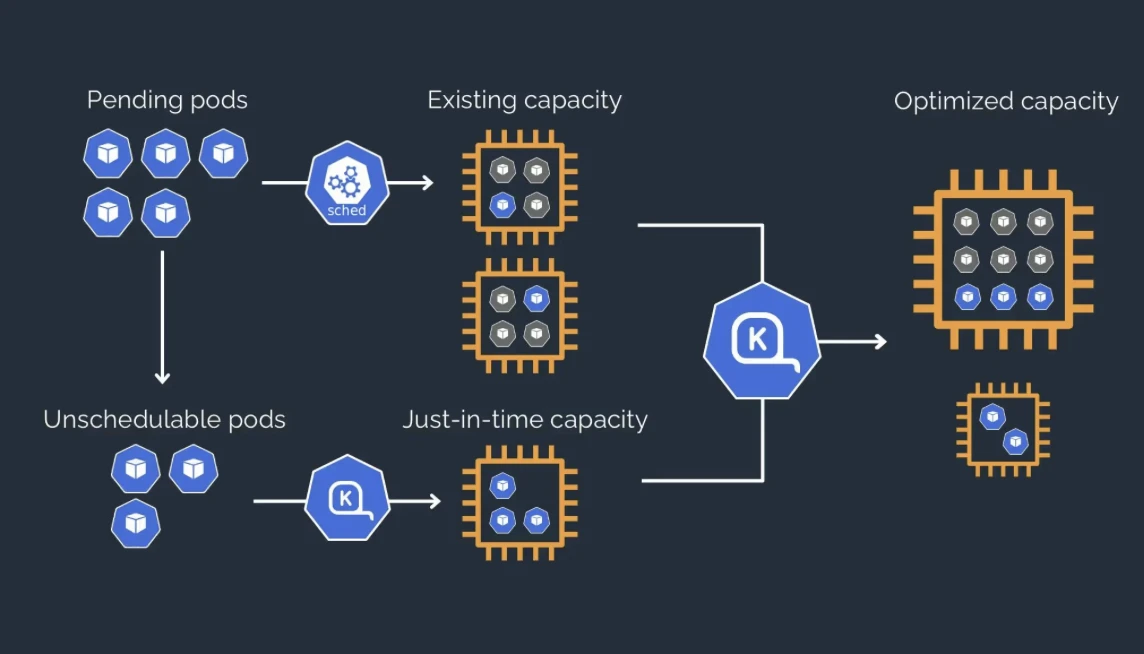
Le redimensionnement libère de la capacité, mais cette capacité repose sur des nœuds qui continuent de fonctionner jusqu'à ce que quelque chose les supprime. Karpenter provisionne les instances à temps et recompacte les workloads sur moins de nœuds. KEDA met à l'échelle zéro les workloads pilotés par file d'attente, ce qu'un Horizontal Pod Autoscaler standard ne peut pas faire.
Définissez la politique de consolidation sur WhenEmptyOrUnderutilized. L'alternative, WhenEmpty, limite la perturbation aux nœuds ne contenant aucun pod de workload, et ceux-ci se produisent rarement sans intervention. 5
Une liste d'instances étroite va à l'encontre de cela, car Karpenter ne peut pas trouver les valeurs aberrantes bon marché et votre résilience au spot diminue. Vous devriez le laisser choisir parmi des familles d'instances entières.
Étude de cas réelle : Adidas
Adidas exécute plusieurs clusters Kubernetes sur AWS EKS. Leur équipe d'ingénierie plateforme a adopté Karpenter pour le provisionnement des nœuds, ajouté KEDA pour la mise à l'échelle pilotée par événements, auto-créé des objets Vertical Pod Autoscaler via des politiques Kyverno, et utilisé kube-downscaler pour les environnements inactifs. Ils ont réduit le coût d'exécution de leurs clusters Kubernetes sur AWS jusqu'à 50 %, en utilisant une pile entièrement open source.6
5. Bien se préparer avant de déplacer les workloads vers le spot
Les instances spot offrent la plus grande remise disponible et l'applicabilité la plus étroite. Rien ne doit passer au spot tant que les PodDisruptionBudgets, la diversification des instances, la répartition topologique et la gestion des interruptions ne sont pas en place.
Un PodDisruptionBudget qui ne laisse aucune marge bloque toute interruption volontaire, y compris la consolidation Karpenter ; les valeurs ont donc besoin de marge. 7
Étude de cas réelle : Delivery Hero
Delivery Hero exploite 390 applications dans 43 pays, avec environ 90 % des workloads exécutés sur AWS EKS. Leur équipe a migré vers des instances Spot sur environ six mois, en intégrant la gestion des interruptions et un déscheduleur dans le processus plutôt qu'en basculant directement les types de capacité.
- Les coûts d'infrastructure ont baissé d'environ 70 %
- Les remises spot ont atteint jusqu'à 90 % par rapport à la tarification à la demande
- La plateforme absorbe des pics de trafic de 4 à 5 fois le volume normal.8
6. Arrêter la non-production selon un calendrier
Les environnements de développement et de staging supportent peu ou pas de charge la nuit et le week-end. L'arrêt planifié est techniquement simple et politiquement incontesté, ce qui en fait l'économie la plus rapide à réaliser et une première action utile là où des changements plus difficiles nécessiteront un soutien ultérieur.
Appliquez le calendrier par défaut dans les namespaces de non-production et exigez des équipes qu'elles se désinscrivent explicitement. Une politique qui exige une action pour adhérer atteint moins d'équipes qu'une politique qui exige une action pour se retirer.
L'économie atteint la facture si la consolidation des nœuds est en cours, car les déploiements réduits laissent des nœuds vides derrière eux.
Étude de cas réelle : Bud Financial
Bud Financial enrichit les données de transactions financières pour le secteur des services financiers et exécute environ 25 clusters sur Google Kubernetes Engine. Leur équipe a utilisé la pause et la reprise planifiées pour réduire les nœuds des clusters la nuit et le week-end, parallèlement à un rééquilibrage quotidien.
- Les coûts ont baissé de 47 % grâce au seul changement de planification
- Le calendrier a supprimé 80 heures d'exploitation de cluster par semaine
- L'utilisation des ressources est passée au-dessus de 90 %.9
7. Migrer les workloads compatibles vers ARM
Les instances basées sur ARM modifient le prix unitaire plutôt que de concurrencer la même capacité inactive que les actions ci-dessus ; ces économies s'additionnent donc véritablement au reste. Les blocages seront les dépendances sans builds ARM64.
Les utilisateurs devraient définir ce périmètre par workload plutôt que sur l'ensemble du parc, et construire des images multi-architectures avant de planifier quoi que ce soit.
Étude de cas réelle : Pinterest
Pinterest a migré son workload web API vers des instances AWS Graviton exécutées sur ARM64, motivé à la fois par la réduction des coûts et du carbone.
- Les coûts ont baissé de 47 %
- La consommation de calcul a baissé de 38 %
- Les émissions de carbone ont baissé de 62 %.10
8. Quand l'optimisation atteint ses limites, changez l'architecture
Les six actions ci-dessus optimisent les workloads au sein des clusters existants. Une fois qu'elles sont épuisées, des gains supplémentaires nécessitent un changement architectural plutôt qu'une optimisation supplémentaire.
Deux résultats publiés marquent la limite pratique. InCred Finance a réduit les dépenses de 30 % sur des clusters que son équipe considérait optimisés11, et Yotpo a atteint 30–40 % tout en exécutant 80 % des workloads sur des instances spot12. Au-delà de cette fourchette, le gaspillage restant ne se situe plus dans les clusters mais dans le nombre de clusters. Chacun porte une charge de plan de contrôle et forme un îlot d'ordonnancement que le bin packing ne peut pas franchir.
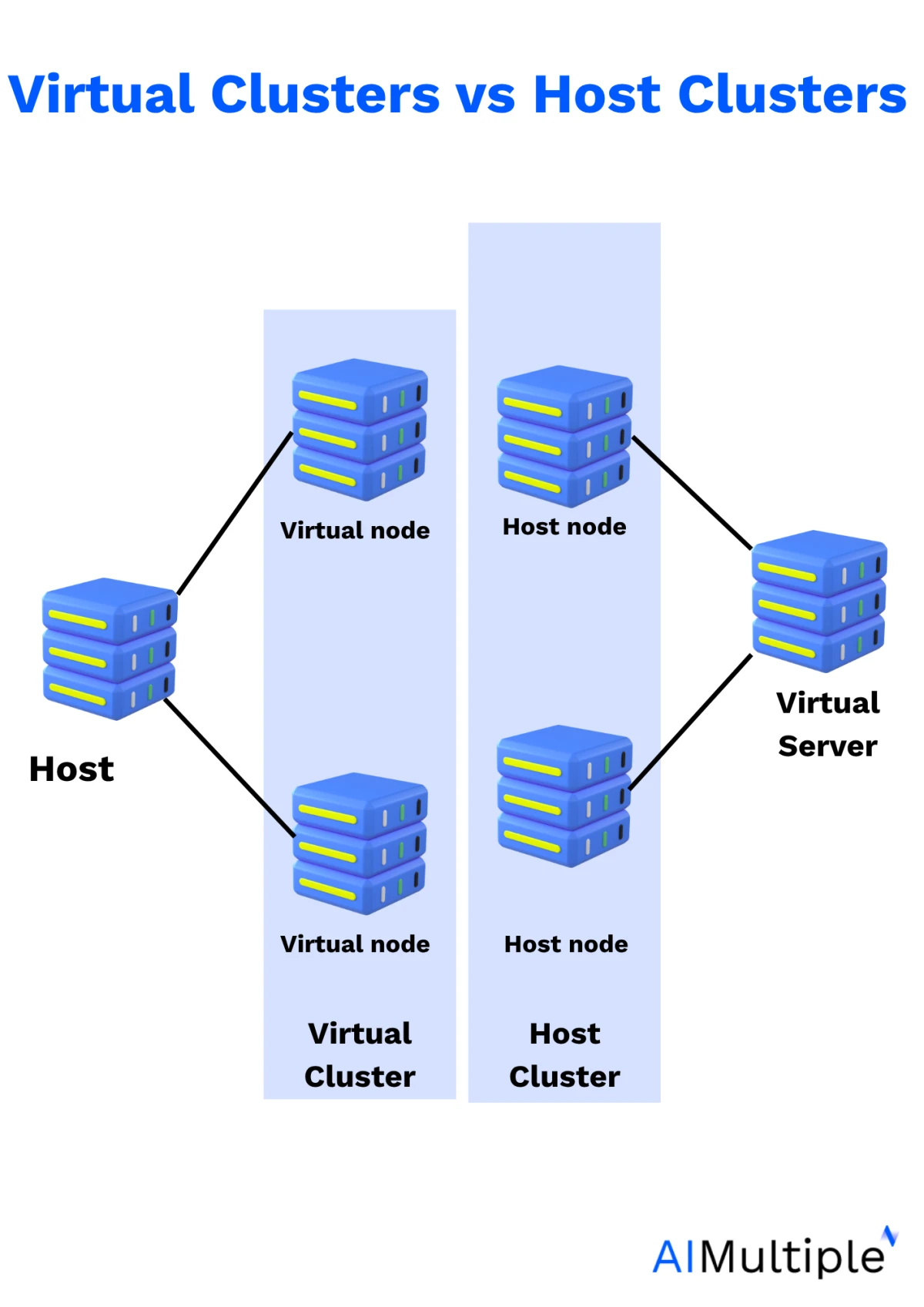
La multi-location supprime ces deux coûts. Au lieu de dédier un cluster à chaque client, équipe ou environnement, des clusters virtuels s'exécutent sur une infrastructure physique partagée. Chaque locataire reçoit son propre serveur API et son plan de contrôle virtuel tandis que les nœuds sont mis en commun. Cela élimine la charge de plan de contrôle par cluster et permet le bin packing sur le pool de nœuds partagé plutôt qu'au sein de domaines isolés.
yaml
bash
Deux mécanismes sont disponibles. Les namespaces sont toujours moins chers, donc le choix se fait sur la séparation exigée par les locataires, pas sur le coût.
- Les namespaces partitionnent un seul cluster et n'ajoutent aucun plan de contrôle propre. Ils suffisent lorsque les locataires se font confiance et peuvent partager un serveur API et un ensemble de CRD.
- Les clusters virtuels donnent à chaque locataire son propre serveur API, s'exécutant comme un workload sur l'hôte. Ce coût est justifié dans deux cas : les locataires qui ont besoin de leurs propres ressources à l'échelle du cluster, et les exigences d'isolation qu'un serveur API partagé ne peut pas satisfaire.
Étude de cas réelle : Atlan
Atlan est une société de catalogue de données qui héberge la plateforme pour environ 95 % de ses clients, dont beaucoup dans la santé et la finance où l'isolation des données est contractuelle. Elle exécutait un cluster EKS complet par client et a dépassé 100 clusters, un parc coûteux à faire tourner 24h/24 et difficile à maintenir. À partir du T1 2022, elle a évalué les options de multi-location et reconstruit sur vCluster, donnant à chaque client un cluster virtuel plutôt que physique.
- Les clusters EKS physiques sont passés de plus de 100 à 20, servant toujours 100+ clients
- Les dépenses Kubernetes ont baissé de 600 000 $.13
 Ajouter comme source préférée
Ordre d'exécution
Les engagements viennent en dernier bien qu'ils soient l'action la plus facile. Les acheter avant le redimensionnement verrouille un à trois ans de gaspillage que le redimensionnement était sur le point de supprimer. C'est l'erreur de séquencement la plus coûteuse qui soit, et elle est courante car elle nécessite un achat plutôt que du travail d'ingénierie.
L'action 7 est une branche, pas une étape. Effectuez-la une fois que les six premières sont terminées et que le résultat est encore insuffisant, car elle modifie le nombre de clusters exécutés plutôt que l'efficacité de chacun.
Outils d'optimisation des coûts Kubernetes
Nous avons tracé les outils avec trois études de cas publiées ou plus couvrant 47 des 68 études de cas du jeu de données :
- Horizontal : combien d'études de cas chaque outil possède, comptées une fois chacune.
- Vertical : combien de catégories de cas d'usage distinctes ces cas couvrent, sur dix. Un outil compte une fois par catégorie, peu importe la fréquence à laquelle il y apparaît. Ainsi, CAST IA possède 12 mentions distinctes de redimensionnement qui contribuent à hauteur de 1 à son score de 10.
- Taille de la bulle : dans combien des huit étapes de stratégie l'outil apparaît.
Frameworks open source
Les frameworks open source peuvent être déployés pour les étapes de 0 à 6. Les utilisateurs assument les mises à niveau, le renouvellement des versions, la facture de rétention Prometheus et les décisions qu'un recommandeur commercial prendrait pour eux.
Chacun de ces outils occupe un champ différent, c'est pourquoi plusieurs s'exécutent en même temps.
- Robusta KRR ou VPA dans
updateMode: "Off"produit le backlog de l'étape 1. N'écrit rien. - Karpenter possède les nœuds : provisionnement, consolidation, sélection des instances, diversification du spot, architecture. Prend en charge les étapes 3, 4 et 6.
- KEDA possède le nombre de réplicas, y compris la mise à zéro, ce que HPA seul ne peut pas faire.
- py-kube-downscaler ou kube-green possède le calendrier de non-production. L'économie la moins chère de la liste.
- OpenCost mesure en permanence et ne participe à rien.
Plateformes commerciales
Chaque outil commercial adopte l'une des trois positions sur la couche des nœuds. C'est la décision, et elle importe plus que le prix ou le nombre de fonctionnalités, car le manifeste NodePool de l'étape 3 survit ou ne survit pas.
- Laissez-le tranquille : StormForge, PerfectScale, Sedai et Kubex redimensionnent les workloads. Ils ont besoin de Karpenter ou du Cluster Autoscaler en dessous et n'y touchent jamais. L'ajout le plus sûr à une configuration existante.
- Travaillez avec : ScaleOps ajoute le bin packing au-dessus de Karpenter. nOps ajuste un Cluster Autoscaler ou Karpenter existant plutôt que de substituer le sien. Plus de couverture, le provisionneur reste le vôtre.
- Remplacez-le : CAST IA et Spot Ocean installent leur propre provisionneur et écartent le manifeste. Couverture la plus large, contrôle minimal.
- Les outils de visibilité restent à l'extérieur : OpenCost, Kubecost, CloudZero, Vantage et Finout sont en lecture seule, donc n'entrent en conflit avec rien et s'empilent librement. Exécutez-en un quel que soit ce qui est adopté par ailleurs.
Comment combiner ces outils
La facture est basée sur les nœuds en cours d'exécution, pas sur les demandes déclarées. Le redimensionnement réduit les demandes, ce qui libère de l'espace sur les nœuds existants mais n'en supprime aucun, donc la facture ne change pas tant qu'un outil de nœuds ne consolide pas cet espace. Les outils de nœuds seuls échouent pour la raison inverse : ils compactent les demandes qu'on leur donne, donc des demandes surdimensionnées sont compactées plus étroitement.
Deux façons de couvrir les deux couches :
- Deux outils : VPA, StormForge ou PerfectScale pour les demandes, plus Karpenter pour les nœuds. Moins cher, et la couche des nœuds reste sous contrôle direct.
- Une plateforme : CAST IA, Zesty ou Spot Ocean font les deux dans un seul produit. Plus cher, et leur provisionneur remplace Karpenter.
Cinq combinaisons d'outils qui cassent des choses :
- Deux redimensionneurs mutants sur un même déploiement : VPA dans
Autoaux côtés de StormForge, ScaleOps, PerfectScale ou Zesty signifie deux contrôleurs écrivant des nombres différents dans le même champ. Un contrôleur d'admission mutant par workload. - Karpenter et Cluster Autoscaler sur un même groupe de nœuds : Les deux provisionnent par rapport aux mêmes pods non planifiables, donc le cluster se retrouve avec environ le double des nœuds nécessaires.
- VPA et HPA sur la même métrique : L'utilisation augmente, VPA augmente la demande, l'utilisation mesurée baisse car il s'agit de l'utilisation sur la demande, HPA supprime des réplicas, la charge par pod augmente, répéter. Sans danger lorsque HPA évolue sur quelque chose que VPA ne touche pas, comme la profondeur de file d'attente via KEDA.
- Deux outils d'engagement sur un même compte payeur : Les deux achètent par rapport aux mêmes dépenses non couvertes, verrouillant un surengagement d'un à trois ans.
- Deux plateformes complètes : CAST IA, Zesty et Spot Ocean installent chacun leur propre provisionneur et chacun s'attend à le posséder.
Filtrez toutes les études de cas que nous avons recueillies :
Pour en savoir plus sur les coûts cloud
Lisez-en plus pour maîtriser le placement des pods et réduire vos dépenses de calcul cloud :
- Comparer les meilleurs outils d'orchestration de conteneurs
- Comparer 20+ orchestrateurs cloud
- Meilleurs planificateurs de tâches cloud hybrides
Citer cette recherche
Choisissez le format qui correspond à votre lieu de publication. Coller la version avec lien dans votre CMS préserve le lien retour.
@misc{simsek2026,
  author = {Şimşek, Hazal},
  title  = {{Optimisation des coûts Kubernetes: 8 étapes & 23 outils}},
  year   = {2026},
  month  = sep,
  howpublished    = {\url{https://aimultiple.com/kubernetes-cost-optimization}},
  note   = {AIMultiple. Consulté le 18 septembre 2026}
}Résultats et horodatages de 249 points de données. Téléchargez les données de synthèse présentées dans les graphiques et les tableaux de cet article sous forme de fichier ZIP contenant 6 fichiers CSV.
Vous voulez les données détaillées derrière ? Rejoindre Premium
Liens de référence





Soyez le premier à commenter
Votre adresse courriel ne sera pas publiée. Tous les champs sont obligatoires. Les commentaires sont laissés dans leur langue d'origine.