


Meilleurs serveurs proxy Spotify & paramètres proxy

Les commandes proxy de Spotify sont disponibles dans l’application de bureau. Le client de bureau prend en charge HTTP, SOCKS4 et les proxies SOCKS5, ainsi qu’une option de détection automatique qui hérite des paramètres proxy de votre système d’exploitation et une valeur par défaut sans proxy.
Il n’existe aucun champ proxy intégré sur iOS ou Android ; le routage mobile est géré au niveau de l’OS ou du VPN, ce qui est abordé plus bas.
Meilleurs fournisseurs de proxy pour Spotify
Les listes publiques de proxies sont mal adaptées au streaming. Elles sont surchargées, lentes et souvent mortes en quelques heures. Pour Spotify en particulier, les fonctionnalités qui comptent le plus sont :
- Prise en charge des protocoles (le client de bureau prend en charge HTTP et SOCKS5),
- Endpoints authentifiés (Spotify Desktop dispose de champs nom d’utilisateur/mot de passe),
- Stabilité des sessions et sessions persistantes (un changement d’IP en plein morceau peut entraîner une réauthentification ou une coupure du flux), et une marge de bande passante. Concernant la bande passante, une règle pratique utile : la qualité de streaming la plus élevée de Spotify (~320 kbps) utilise environ 0.15 Go par heure, donc un plafond de 1 Go gratuit représente environ 6 à 7 heures d’écoute.
Le choix à faire si vous comptez dépasser le niveau gratuit ; Bright Data gratuit réseau de datacenter est ce qui permet à une session de ressembler à un auditeur ordinaire, et ses endpoints sont authentifiés et bien documentés, de sorte qu’une configuration testée gratuit se transpose proprement vers une mise à niveau payante.
Le niveau gratuit lui-même est de type datacenter, jusqu’à 15 IPs et 2 Go/mois, SOCKS5, donc considérez-le comme un essai de la plateforme plutôt que comme une ligne de streaming à long terme.
Oxylabs offre l’une des meilleures gratuit allocations de données avec 5 Go/mois, soit environ 33 heures d’audio haute qualité, de quoi réellement l’utiliser au quotidien plutôt que de simplement le tester. Il prend en charge HTTP et SOCKS5 ainsi que jusqu’à 20 connexions simultanées, mais les IP gratuit sont aux États-Unis, donc cela convient à une connexion vers la région américaine et guère plus.
Webshare propose un forfait gratuit permanent avec 10 proxies de datacenter partagés et 1 Go de bande passante par mois. Aucune carte de crédit n’est requise et les proxies n’expirent pas.
Il prend en charge SOCKS5, de sorte que les endpoints se connectent directement aux paramètres proxy de Spotify Desktop. Le hic, c’est le plafond de 1 Go : en haute qualité, cela ne représente qu’environ 6 à 7 heures d’écoute par mois, donc cela fonctionne mieux comme option d’essai avant achat que comme solution quotidienne.
Paramètres proxy pour Spotify (bureau)
- Ouvrez l’application de bureau Spotify.
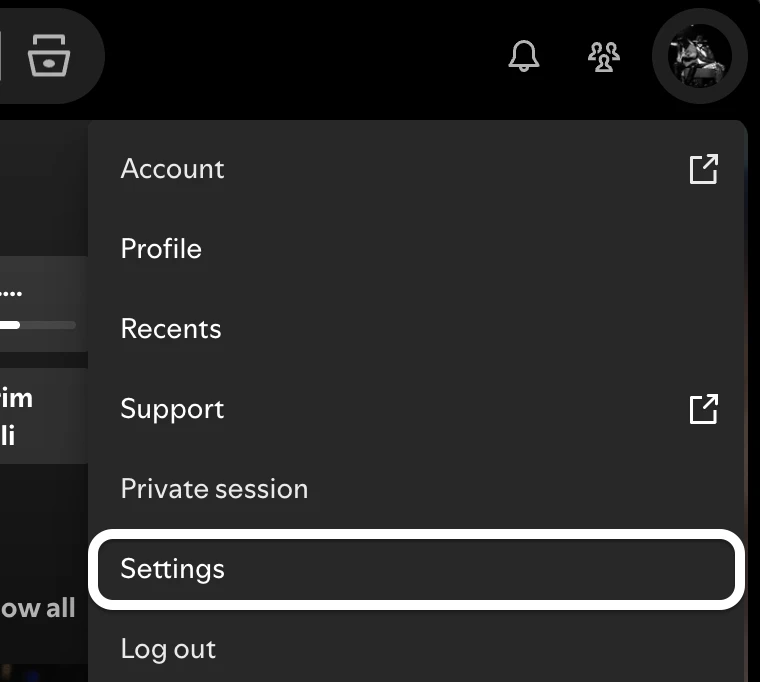
- Cliquez sur votre nom de profil dans le coin supérieur droit, puis sélectionnez Paramètres.
- Faites défiler vers le bas jusqu’à la section Proxy.
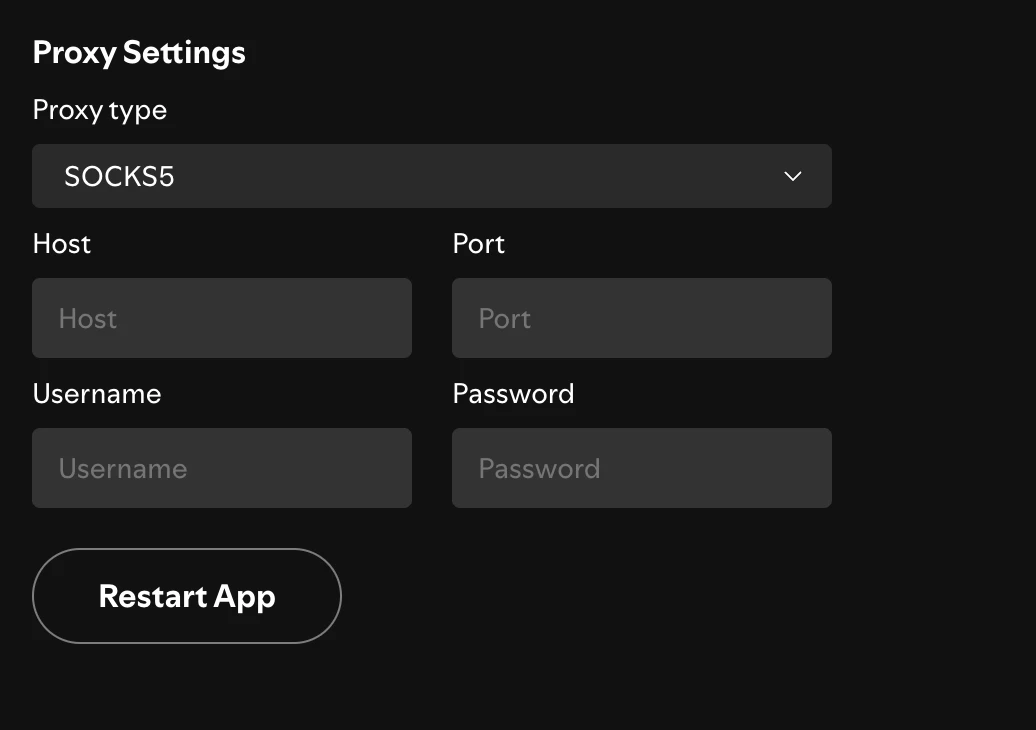
- Ouvrez le menu Type de proxy et choisissez HTTP, SOCKS4 ou SOCKS5 en fonction de votre fournisseur. (Choisissez Détection automatique si vous souhaitez que Spotify hérite de votre proxy système.)
- Saisissez les informations de connexion fournies par votre fournisseur : le nom d’hôte va dans Hôte, l’endpoint numérique va dans Port.
- Si votre proxy nécessite une authentification, remplissez les champs Nom d’utilisateur et Mot de passe.
- Cliquez sur Redémarrer l’application pour appliquer la modification. Spotify redémarre avec le proxy actif.
Après le redémarrage, votre trafic passe par le proxy que vous avez saisi. Si Spotify ne parvient pas à se connecter, que l’hôte/le port est incorrect, que les identifiants sont manquants ou que le proxy est hors service, revérifiez les détails avant de supposer que Spotify est en cause.
Utiliser un proxy avec Spotify sur mobile
Les applications mobiles de Spotify n’ont pas de paramètre proxy intégré. Pour router le trafic mobile, vous le configurez plutôt au niveau de l’appareil :
Proxy Wi-Fi : définissez un proxy HTTP dans les paramètres du réseau Wi-Fi actif (iOS : Réglages → Wi-Fi → votre réseau → Configurer le proxy ; Android : appui long sur le réseau → Modifier → Avancé → Proxy). Cela s’applique à l’ensemble de la connexion, pas seulement à Spotify.
Comment désactiver le service proxy sur Spotify
- Ouvrez l’application de bureau Spotify.
- Cliquez sur votre nom de profil, puis Paramètres.
- Faites défiler jusqu’à la section Paramètres proxy.
- Ouvrez le menu déroulant Type de proxy et sélectionnez Pas de proxy.
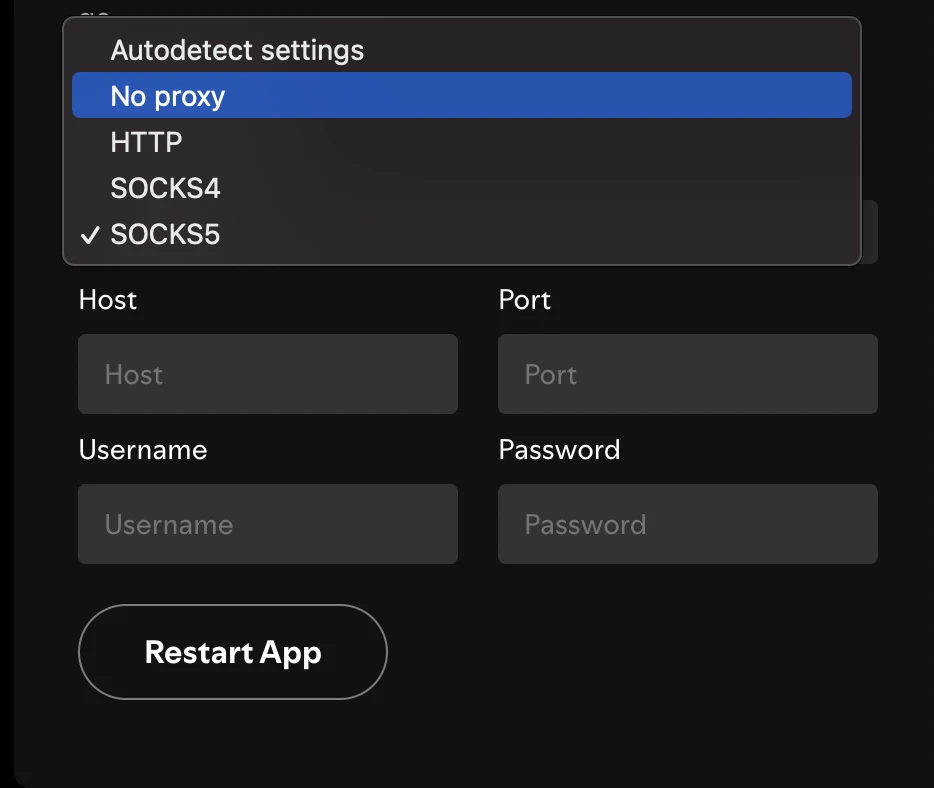
- Cliquez sur Redémarrer l’application pour appliquer la modification.
Sur mobile, il n’y a rien à désactiver dans Spotify ; supprimez le proxy Wi-Fi ou déconnectez le VPN au niveau de l’appareil.
Types de proxy dans Spotify : HTTP vs SOCKS4 vs SOCKS5
Le client de bureau de Spotify prend en charge trois types de proxy manuels. Ils diffèrent par le trafic qu’ils gèrent et les fonctionnalités qu’ils prennent en charge.
Choisissez SOCKS5 si :
- votre fournisseur fournit des endpoints SOCKS5
- vous voulez une prise en charge large des protocoles et une prise en charge de l’authentification
- vous voulez l’option la plus flexible pour une connexion de streaming durable
Choisissez HTTP si :
- votre fournisseur émet des endpoints proxy HTTP/HTTPS
- vous cherchez à vous aligner sur un proxy d’entreprise ou de réseau existant basé sur HTTP
SOCKS4 est l’option plus ancienne et plus limitée ; il ne prend pas en charge l’authentification et ne vaut la peine d’être utilisé que lorsqu’un fournisseur n’offre aucune autre option.
 Ajouter comme source préférée
Proxies Spotify pour un accès personnel
Spotify vérifie davantage que votre adresse IP :
- Votre moyen de paiement est lié au pays de votre compte. Une carte émise aux États-Unis signifie un compte américain, peu importe d’où vous connectez. C’est pourquoi l’astuce populaire consistant à « s’abonner dans un pays moins cher » est fragile, et il convient de signaler qu’elle enfreint les conditions d’utilisation de Spotify, donc ce n’est pas quelque chose sur quoi compter.
- L’application mobile peut lire le GPS, pas votre IP. Les lecteurs de bureau et web s’appuient sur la géolocalisation basée sur l’IP, mais votre téléphone sait où il se trouve physiquement. Cela rend un proxy beaucoup moins fiable sur mobile que sur ordinateur.
- Premium revérifie périodiquement votre position. Si le pays de votre compte et l’emplacement réel de votre connexion ne correspondent pas de manière constante, vous pouvez rencontrer un message « période de voyage dépassée » vous demandant de reconfirmer votre position.
FAQ
Oui. L’application de bureau de Spotify prend en charge SOCKS5, ainsi que HTTP et SOCKS4, plus une option Détection automatique qui utilise le proxy de votre système.
Un type de proxy, un hôte (adresse du serveur) et un port. Si votre proxy nécessite une authentification, vous saisissez également un nom d’utilisateur et un mot de passe. Vous cliquez ensuite sur Redémarrer l’application pour l’appliquer.
Pas dans l’application. Les applications mobiles de Spotify n’ont pas de champ proxy, vous pouvez donc configurer un proxy au niveau du Wi-Fi ou de l’OS, ou utiliser un VPN / VPN par application pour router le trafic de Spotify.
Les gens utilisent des proxies Spotify pour y accéder dans les régions où il n’est pas officiellement disponible, pour consulter des contenus, des playlists ou des tarifs qui diffèrent selon le pays, et pour préserver la confidentialité de leur connexion.
Citer cette recherche
Choisissez le format qui correspond à votre lieu de publication. Coller la version avec lien dans votre CMS préserve le lien retour.
@misc{karatas2026,
  author = {Karatas, Gulbahar},
  title  = {{Meilleurs serveurs proxy Spotify & paramètres proxy}},
  year   = {2026},
  month  = aug,
  howpublished    = {\url{https://aimultiple.com/spotify-proxies}},
  note   = {AIMultiple. Consulté le 4 août 2026}
}À lire ensuite
Meilleurs proxies pour moteurs de recherche: Benchmark

Serveur proxy WhatsApp & code: guide de configuration
Meilleurs proxies indiens: classement basé sur des benchmarks
Meilleurs proxies Japon: taux de réussite et temps de réponse
Fournisseurs de proxies IPv6: tarification et performance
Meilleurs proxies haute vitesse d'après notre benchmark





Soyez le premier à commenter
Votre adresse courriel ne sera pas publiée. Tous les champs sont obligatoires. Les commentaires sont laissés dans leur langue d'origine.