


Systèmes SCADA: Comparaison des 10 principaux logiciels SCADA

Les systèmes de supervision et d'acquisition de données (SCADA) constituent l'épine dorsale opérationnelle des infrastructures industrielles. Mais choisir une plateforme est un engagement à long terme. Ces systèmes fonctionnent souvent pendant 10 à 20 ans, et le coût total de possession est élevé. Ce qui rend le choix difficile à annuler.
Nous comparons 10 systèmes SCADA majeurs selon leurs modèles de licence, architectures techniques, certifications de sécurité et capacités de contrôle spécifiques à l'industrie pour guider les décisions d'achat.
Comparaison des systèmes SCADA
Plateforme | Modèle de licence | OS non-Windows* | Déploiement cloud | Essai gratuit | Prix |
|---|---|---|---|---|---|
Ignition SCADA | Par serveur illimité | MacOS, Linux | ✕ | ✓ | $13 500 |
AVEVA System Platform | Par tag ou par utilisateur | ✕ | ✕ | ✕ | $12 360 |
AVEVA Enterprise SCADA | Par tag échelonné | Linux | ✕ | ✕ | N/A |
AVEVA Plant SCADA | Par tag échelonné | ✕ | ✕ | ✕ | N/A |
SIMATIC WinCC Unified | N/A | ✕ | ✕ | ✕ | N/A |
GE iFIX | Par tag échelonné | ✕ | ✓ | ✓ | N/A |
GE CIMPLICITY | Par tag échelonné | ✕ | ✓ | ✕ | N/A |
Schneider Geo SCADA Expert | Par client échelonné | ✕ | ✕ | ✕ | N/A |
Honeywell Experion PKS | N/A | ✕ | ✕ | ✕ | N/A |
zenon (COPA-DATA) | Par tag ou illimité | ✕ | ✕ | ✕ | N/A |
*Toutes les plateformes ci-dessus fonctionnent nativement sur Windows.
NA indique que nous n'avons trouvé aucune information à ce sujet.
Ignition SCADA
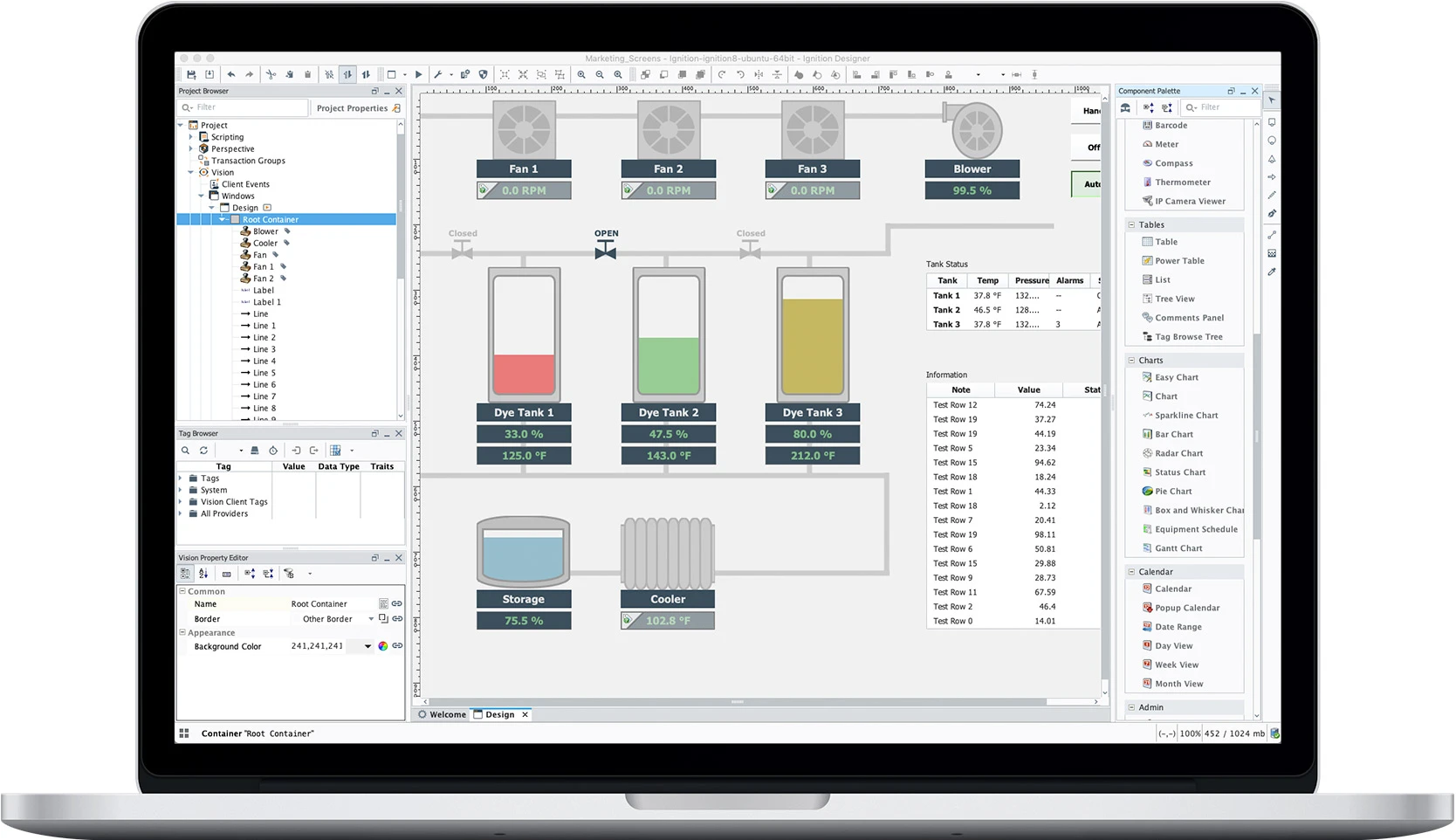
Il convient à la fabrication multi-sites et aux services d'eau, car il permet d'ajouter des sites sans limites. Ignition 8.3, publié en septembre 2025, a ajouté le contrôle de version Git intégré, des API REST natives et une fonction store-and-forward améliorée pour les réseaux non fiables.1 Cependant, la prise en charge native de MQTT Sparkplug B nécessite l'achat de modules Cirrus Link séparés.
Module Perspective pour la visualisation réactive HTML5 sur les ordinateurs de bureau, tablettes et appareils mobiles sans licences client séparées.
AVEVA System Platform (anciennement Wonderware)
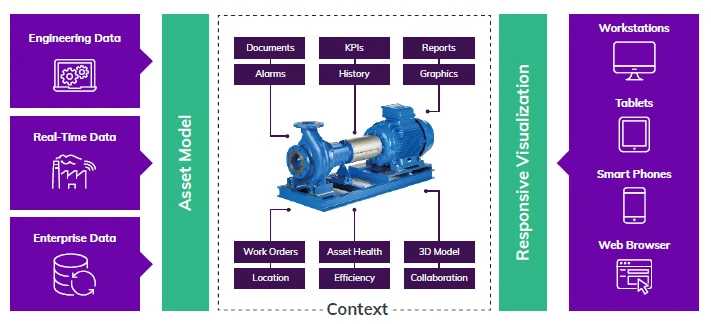
AVEVA System Platform est construite autour d'une interface de gestion des opérations (OMI) et d'un modèle d'ingénierie basé sur des modèles. Elle prend en charge les configurations sur site, cloud et hybrides, avec un chiffrement TLS de nœud à nœud intégré. La visualisation s'exécute sur les ordinateurs de bureau, tablettes, smartphones et navigateurs web, avec une authentification unique via AVEVA Connect ou des fournisseurs tiers. Les applications OMI complémentaires couvrent des tâches supplémentaires : vues géographiques cartographiques, vues d'actifs en 3D, dépannage de la logique PLC et surveillance des flux de caméras avec Vision IA.
AVEVA Enterprise SCADA
AVEVA Enterprise SCADA est conçu spécifiquement pour les opérations de pipelines de pétrole et de gaz et de distribution de gaz, et non pour un usage généraliste. Il sert de couche de plateforme sous-jacente aux applications Midstream d'AVEVA et utilise une architecture push multi-redondante pour transmettre les données en temps réel aux opérateurs de salle de contrôle.
AVEVA Plant SCADA (anciennement Citect SCADA)
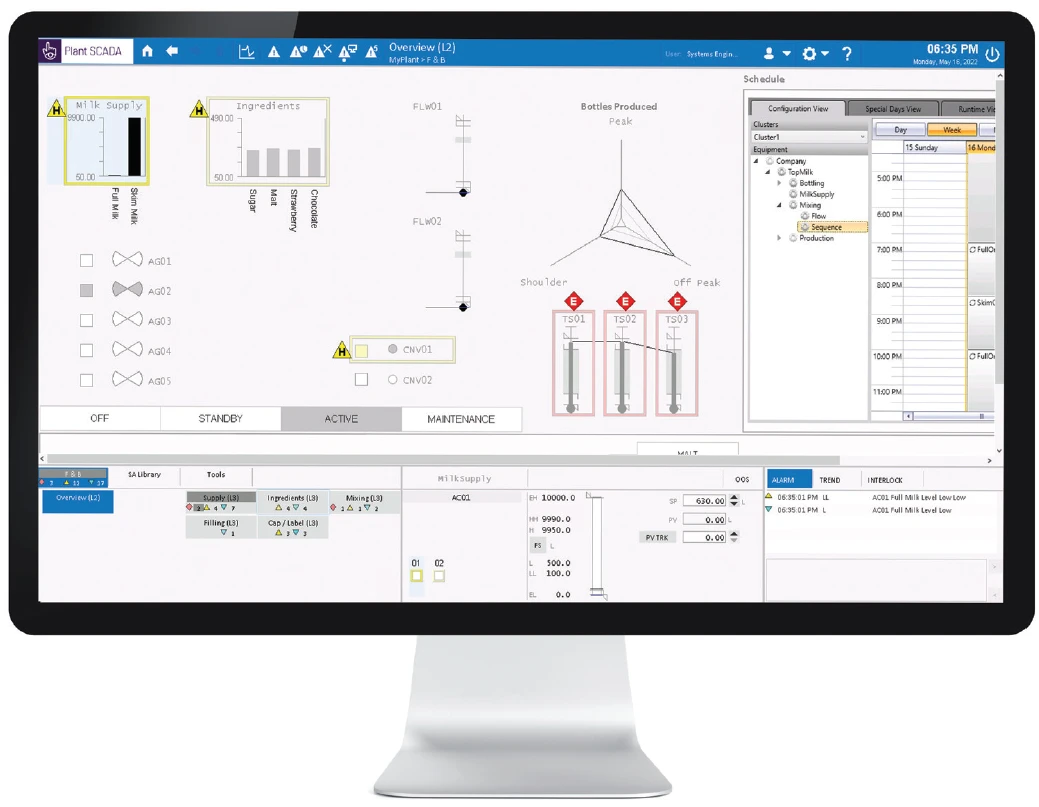
AVEVA Plant SCADA est conçu pour les opérations d'usines industrielles nécessitant un nombre élevé de tags. La bibliothèque de connectivité prend en charge plus de 150 pilotes de protocoles natifs, y compris OPC UA, BACnet, IEC 61850, Modbus, DNP3 et IEC 60870. L'ingénierie est organisée autour du référencement des tags par équipement ; par exemple, une pompe regroupe ses tags, alarmes, autorisations, communications, planifications et scripts en une seule structure logique. L'architecture est distribuée par défaut, avec quatre types de tâches (communication E/S, alarmes, rapports, et tendances et visuels) qui peuvent s'exécuter sur le même nœud ou être répartis sur plusieurs nœuds pour la redondance.
Siemens SIMATIC WinCC Unified
SIMATIC WinCC Unified est le logiciel SCADA et IHM de dernière génération de Siemens, et fonctionne pour des configurations de toute taille, d'une machine unique à une usine entière. Il prend en charge un nombre illimité de points de données (tags) et de clients illimités, afin que les utilisateurs distants puissent se connecter via un navigateur web standard sans installer de logiciel client.
La plateforme se connecte à la couche informatique via des interfaces ouvertes OPC UA et GraphQL, et les scripts d'exécution utilisent JavaScript via ses interfaces Openness. WinCC Unified propose également des modules complémentaires pour des tâches spécifiques : SIQENCE pour le contrôle de lots et de recettes ISA-88, la suite PM (PM-CONTROL, PM-ANALYZE, PM-QUALITY) pour la gestion des recettes et la documentation des lots, et ResCon pour la gestion de la consommation d'énergie, de gaz et des médias. Il a également été le premier produit à prendre en charge MTP 2.0 (Module Type Package), une norme qui permet aux utilisateurs d'importer et de visualiser automatiquement les configurations de machines de différents fournisseurs.
GE Vernova iFIX
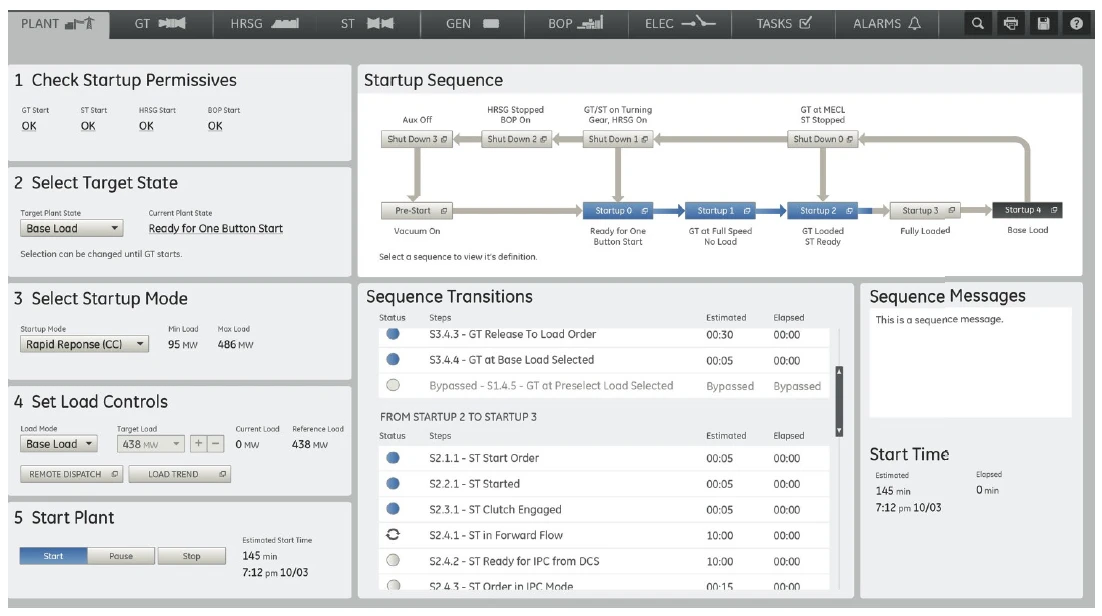
iFIX est la plateforme IHM et SCADA de GE Vernova, qui fait partie de la famille Proficy. La configuration est centralisée et basée sur le web via le Configuration Hub, où les utilisateurs se connectent aux automates programmables, créent des modèles d'objets réutilisables pour les équipements tels que les réservoirs et les pompes, et créent automatiquement des tags dans iFIX et Proficy Historian.
La connectivité comprend un serveur OPC UA, un client MQTT5 qui traduit vers OPC UA, et plus de 70 pilotes via l'Industrial Gateway Server optionnel. Il s'exécute sur site, dans le cloud (Azure ou AWS) ou dans une configuration hybride, prend en charge les signatures électroniques CFR 21 Part 11 et utilise la synchronisation SCADA native pour le basculement.
GE Vernova CIMPLICITY
CIMPLICITY est l'autre plateforme IHM/SCADA de GE Vernova dans la famille Proficy, conçue pour la visualisation client/serveur. La configuration est centralisée via le Configuration Hub, partagé avec le SCADA, l'historien et la visualisation, et la plateforme utilise une conception orientée objet (classes et objets), afin que les utilisateurs puissent créer des modèles réutilisables au lieu de repartir de zéro.
Les scripts prennent en charge Python, .NET et VB. La connectivité comprend un serveur OPC UA, un client MQTT5 qui traduit MQTT en OPC UA, et plus de 70 pilotes via l'Industrial Gateway Server optionnel. Il s'exécute sur site ou dans le cloud (Azure, AWS, hybride), historise vers SQL et Proficy Historian, et suit les directives de sécurité ISO 27001 et IEC 62443 avec une communication basée sur des certificats.
Schneider Electric EcoStruxure Geo SCADA Expert (anciennement ClearSCADA)
Geo SCADA Expert est la plateforme SCADA de Schneider Electric pour les actifs répartis sur une vaste zone, tels que les systèmes d'eau, la distribution électrique et les pipelines. Son client ViewX est l'outil que les opérateurs utilisent pour configurer, contrôler et surveiller à distance le système, et il s'exécute sur Windows. La plateforme est conçue pour communiquer avec le matériel de terrain propre à Schneider, y compris les RTU SCADAPack (les séries 300, 47x, 57x et E) et les radios sous licence et sans licence gratuit Trio.
Honeywell Experion PKS
Experion PKS (Process Knowledge System) est la plateforme de Honeywell pour les grandes opérations de process. Une chose à noter : Experion PKS est un DCS (système de contrôle distribué) avec SCADA intégré, et non un outil SCADA autonome. Un DCS contrôle un seul grand processus, comme une unité de raffinage, tandis que le SCADA surveille généralement les équipements répartis sur de nombreux sites. Experion convient donc mieux aux grandes usines de process continu qu'aux tâches de surveillance légères. Les opérateurs utilisent les interfaces utilisateur Experion Station et Console, qui visent à accélérer les temps de réponse, réduire la fatigue et améliorer la connaissance de la situation.
Honeywell propose également Experion Elevate, une version SCADA en tant que service fournie sous forme d'abonnement hébergé, et Experion HS pour les besoins IHM/SCADA plus modestes.
Zenon de COPA-DATA
Zenon est une plateforme SCADA et IHM de COPA-DATA, une entreprise autrichienne. COPA-DATA l'appelle une vaste « plateforme logicielle », mais à la base, elle accomplit les tâches SCADA standard : collecter des données à partir des automates programmables et des dispositifs de terrain, afficher et contrôler les machines en temps réel, gérer les alarmes et stocker l'historique pour les rapports et les tendances.
Choisir une plateforme SCADA par industrie
Différentes industries ont des besoins différents : protocoles, réglementations, échelle et automates programmables sur site. Voici quelles plateformes conviennent où, en fonction de ce que chacune fait bien.
Fabrication discrète et automobile
Les usines Siemens bénéficient du même avantage avec WinCC Unified via TIA Portal. CIMPLICITY convient aux opérations vastes et complexes : il passe à l'échelle au-delà de 500 000 points, et GE Vernova cite des déploiements supérieurs à 1.5 million. zenon est également courant dans l'automobile ; ses utilisateurs incluent Toyota et Ford.
Fabrication en continu et par lots
Les industries chimiques, agroalimentaires et similaires ont souvent besoin d'un contrôle de lots conforme à la norme ISA-88. AVEVA System Platform gère cela via son module Batch Management. Pour les grandes usines de process continu, Honeywell Experion PKS va plus loin : les deux combinent contrôle, sécurité et optimisation des processus en un seul système.
Pipelines de pétrole et de gaz
AVEVA Enterprise SCADA est spécialement conçu pour les pipelines, avec des affichages de salle de contrôle conçus selon la norme API RP 1165. GE iFIX a également une longue expérience dans les pipelines. Pour les grands projets de raffinage et de GNL, Honeywell Experion PKS est le choix courant.
Services publics d'électricité et sous-stations
Schneider EcoStruxure Geo SCADA Expert est conçu pour les actifs répartis sur une vaste zone. Il inclut une cartographie SIG native et une prise en charge robuste de DNP3 et IEC 60870-5. Pour les sous-stations numériques, Zenon est une option solide : son client IEC 61850 Edition 2 est certifié et il prend en charge une large gamme de protocoles énergétiques.
Eau et eaux usées
Ignition fonctionne bien ici car sa licence illimitée le rend économique à étendre sur de nombreuses stations de pompage distantes. Geo SCADA Expert est un autre choix solide, offrant des rapports de conformité et une surveillance fiable sur les réseaux à faible bande passante.
Automatisation des bâtiments et infrastructures intelligentes
ICONICS GENESIS64 convient ici, avec une prise en charge native de BACnet et une visualisation 3D pour les bâtiments et les campus.
Industries pharmaceutique, biotechnologique et réglementées
Ces usines ont besoin de la prise en charge de 21 CFR Part 11 pour les enregistrements et signatures électroniques. GE iFIX et AVEVA System Platform bénéficient tous deux d'une prise en charge bien documentée, tout comme AVEVA InTouch HMI. La modélisation d'équipement ISA-95 de zenon est également utile dans les environnements réglementés. La plupart des grandes plateformes revendiquent un certain niveau de prise en charge de la Part 11, la vraie question est donc de savoir avec quelle clarté chacune la documente pour vos auditeurs.
Fonctionnement des systèmes SCADA modernes
Les architectures SCADA organisent l'automatisation industrielle en quatre couches distinctes.
Couche 1 : Dispositifs de terrain composés de capteurs, d'actionneurs et d'instruments intelligents mesurant des conditions physiques telles que le débit, la pression et la température. Ces dispositifs critiques produisent des signaux bruts, généralement des boucles analogiques 4-20 mA ou des variantes numériques telles que HART et Foundation Fieldbus.2
Couche 2 : Couche de contrôle contient les automates programmables industriels (PLC) et les unités terminales distantes (RTU). Les automates exécutent une logique de contrôle en temps réel par cycles de millisecondes indépendamment du serveur SCADA, continuant à fonctionner même en cas de défaillance de la couche SCADA. Les RTU desservent des sites géographiquement distribués, en utilisant une transmission pilotée par événements plutôt que des intervalles d'interrogation fixes pour économiser la bande passante sur les réseaux cellulaires, satellites ou radio.3
Couche 3 : Couche du serveur SCADA recueille les données via des serveurs d'acquisition, maintient des bases de données de tags mappant les variables de process industriel à des adresses nommées, stocke les séries chronologiques dans des historiens avec compression, gère les états d'alarme et restitue les affichages IHM pour les opérateurs.4
Couche 4 : Intégration d'entreprise inclut les outils MES, ERP et de business intelligence consommant les données SCADA. Les architectures modernes adoptent de plus en plus le modèle d'espace de noms unifié (UNS), où un broker MQTT sert de hub central, découplant les producteurs de données des consommateurs et remplaçant les intégrations point à point traditionnelles.5
Principaux protocoles de communication SCADA
La prise en charge des protocoles détermine la complexité d'intégration et l'interopérabilité à long terme.
OPC UA sert de norme industrielle neutre vis-à-vis des fournisseurs pour l'intégration en atelier, offrant une prise en charge multiplateforme, des modes de sécurité intégrés incluant SignAndEncrypt et une modélisation riche des données brutes.6 L'Office fédéral allemand de la sécurité de l'information a mené une analyse formelle, ne trouvant aucune erreur systématique dans la spécification OPC UA. Cependant, ils notent également que le déploiement pratique d'OPC UA présente des défis significatifs.6
MQTT avec Sparkplug B est désormais un choix courant pour les nouveaux projets IIoT. Il utilise un modèle léger de publication-abonnement qui s'exécute via un broker, réduisant la bande passante et maintenant les systèmes faiblement couplés.5 Sparkplug B ajoute des formats de charge utile structurés utilisant les Google Protocol Buffers et des certificats de naissance et de décès pour la gestion de l'état des dispositifs.
Modbus TCP/RTU reste omniprésent pour l'intégration de dispositifs existants, bien qu'il manque de sécurité intégrée et nécessite des protections réseau supplémentaires.
DNP3 domine les services publics d'électricité nord-américains, optimisé pour les réseaux de communication étendus non fiables avec des fonctionnalités telles que la synchronisation temporelle, la classification des données et l'authentification sécurisée pour la conformité NERC CIP.7
IEC 60870-5-104 sert de contrepartie internationale à DNP3 pour la télémétrie des services publics d'électricité, en particulier sur les marchés européens et latino-américains.8
BACnet fournit une norme pour l'automatisation des bâtiments, permettant l'intégration avec les systèmes de CVC, d'éclairage et de contrôle d'accès.
 Ajouter comme source préférée
Comment choisir un système SCADA
La sélection d'une plateforme SCADA nécessite l'évaluation des spécifications techniques, des coûts de licence et de l'expertise opérationnelle interne.
Étape 1 : Définir les besoins en documentant le nombre de tags et les projections de croissance, le nombre de sites, les mandats réglementaires (FDA 21 CFR Part 11, NERC CIP, EPA) et les besoins d'intégration avec les systèmes ERP ou MES.9
Étape 2 : Évaluer la compatibilité de l'écosystème d'automates programmables. Les ateliers Allen-Bradley bénéficient des bases de données de tags partagées de FactoryTalk.10 Les sites multi-fournisseurs devraient évaluer Ignition ou FrameworX pour une prise en charge neutre d'OPC UA.
Étape 3 : Calculer le TCO sur 10 ans, y compris les licences logicielles (perpétuelles ou par abonnement), les frais de maintenance annuels variant généralement de 16 à 25 % de la valeur de la licence, les coûts matériels et les coûts de service d'intégration et de mise en œuvre.
Étape 4 : Évaluer la viabilité du fournisseur et la disponibilité des intégrateurs régionaux. Le programme d'intégrateur système Platinum de Rockwell désigne des partenaires tels que SAGE Automation ayant démontré des capacités de projets à grande échelle.
Étape 5 : Exécuter les tests de preuve de concept avec de vrais automates programmables et de vrais opérateurs, pas des démonstrations de fournisseurs. Évaluez la gestion des avalanches d'alarmes, les performances de récupération de l'historien en charge et le comportement de basculement lors de pannes matérielles simulées.
Étape 6 : Sélectionner un modèle de déploiement basé sur la fiabilité de la connectivité et la souveraineté des données réglementaires. Le déploiement sur site reste obligatoire pour les infrastructures critiques NERC CIP et les environnements classifiés.11 Les modèles cloud et hybrides conviennent aux actifs distribués mais nécessitent une évaluation minutieuse des dépendances réseau pour les fonctions de contrôle.
Étape 7 : Vérifier l'extensibilité en confirmant la préparation au cloud, la prise en charge native de MQTT et Sparkplug B pour les architectures d'espace de noms unifié, et les API ouvertes pour l'intégration IA/ML.
Citer cette recherche
Choisissez le format qui correspond à votre lieu de publication. Coller la version avec lien dans votre CMS préserve le lien retour.
@misc{dilmegani2026,
  author = {Dilmegani, Cem and Arslan, Ezgi},
  title  = {{Systèmes SCADA: Comparaison des 10 principaux logiciels SCADA}},
  year   = {2026},
  month  = may,
  howpublished    = {\url{https://aimultiple.com/scada-systems}},
  note   = {AIMultiple. Consulté le 25 mai 2026}
}Résultats et horodatages de 10 points de données. Téléchargez les données de synthèse présentées dans les graphiques et les tableaux de cet article sous forme de fichier ZIP contenant un fichier CSV.
Vous voulez les données détaillées derrière ? Rejoindre Premium
Liens de référence
Le travail de Cem chez AIMultiple a été cité par des publications mondiales de premier plan, notamment Business Insider, Forbes, Morning Brew et Washington Post, par des entreprises mondiales comme Deloitte et HPE, par des ONG comme World Economic Forum et par des organisations supranationales comme European Commission. [1], [2], [3], [4], [5]
Tout au long de sa carrière, Cem a été consultant en technologies, acheteur de technologies et entrepreneur technologique. Il a conseillé des entreprises sur leurs décisions technologiques chez McKinsey & Company et Altman Solon pendant plus de dix ans. Il a également publié un rapport McKinsey sur la digitalisation.
Il a dirigé la stratégie technologique et les achats d'un opérateur télécom, sous la responsabilité du PDG. Il a également dirigé la croissance commerciale de l'entreprise de technologie profonde Hypatos, qui a atteint un revenu récurrent annuel à 7 chiffres et une valorisation à 9 chiffres, passant de 0 à ce résultat en deux ans. Le travail de Cem chez Hypatos a été couvert par des publications technologiques de premier plan comme TechCrunch et Business Insider.
Cem intervient régulièrement lors de conférences technologiques internationales. Il est diplômé de Bogazici University en tant qu'ingénieur informatique et titulaire d'un MBA de la Columbia Business School.






Soyez le premier à commenter
Votre adresse courriel ne sera pas publiée. Tous les champs sont obligatoires. Les commentaires sont laissés dans leur langue d'origine.